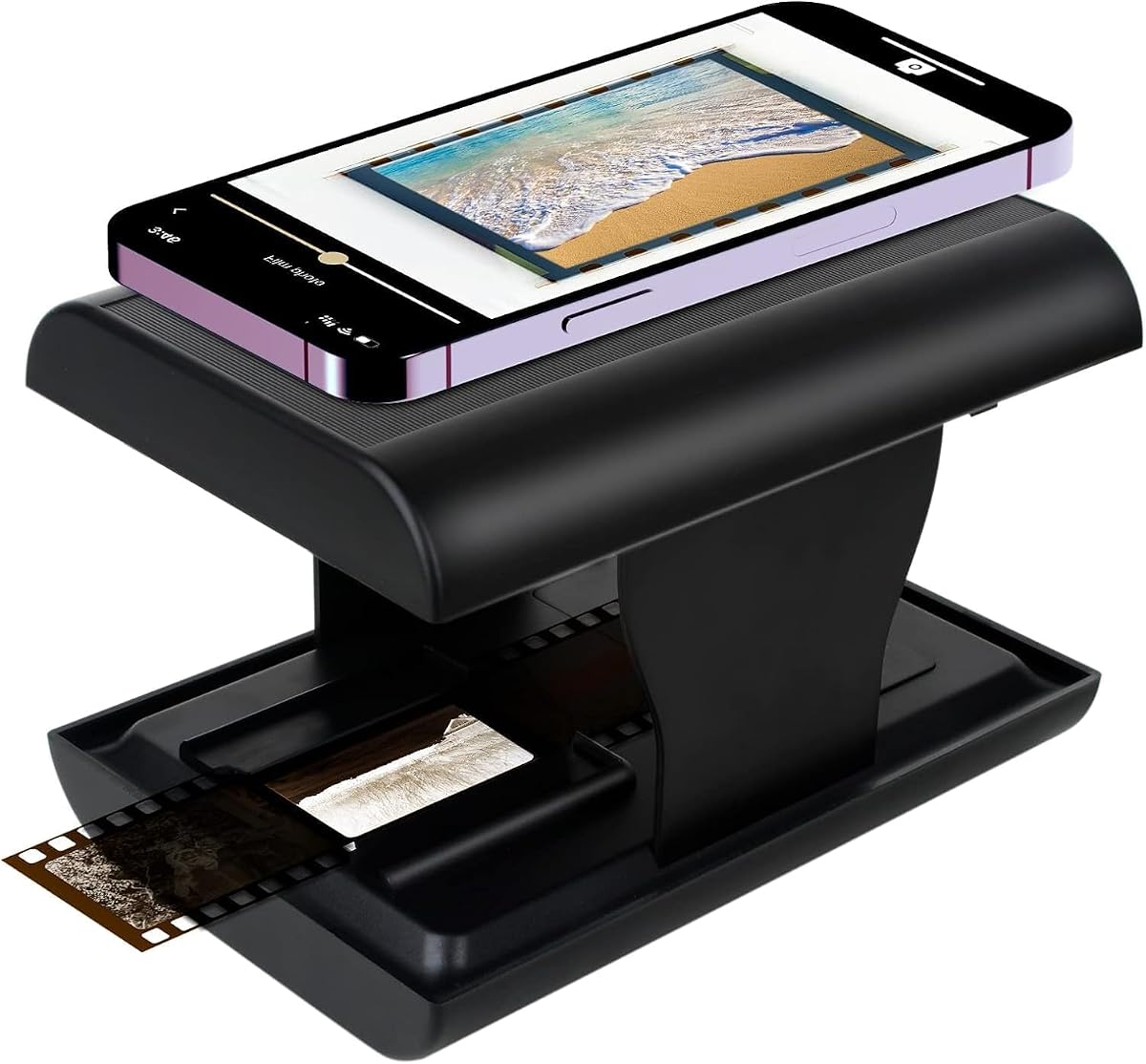
TCNEWCL 35mm Negative Slide Scanner
4.3Editor score
Foldable portable design
Smartphone camera integration
Built-in LED backlight
Preserving film memories requires a reliable black and white negative scanner to convert old slides and film into digital formats. The right device ensures high resolution and accurate color reproduction for your cherished archives without needing expensive lab services.
We evaluated ten leading models based on sensor quality, scanning speed, and user interface design. Our analysis focuses on devices that simplify the digitization process while maintaining the integrity of your original black and white film negatives and slides.
Each pick highlights unique strengths like portability, touchscreen controls, or direct SD saving capabilities. Prices and availability fluctuate frequently, so verify current details before purchasing to ensure you get the best value for your archiving needs today.
4.3Editor score

4.3Editor score

4.3Editor score
As an Amazon Associate we earn from qualifying purchases.
The following table provides a side-by-side comparison of all ten featured models, highlighting their key specifications, display sizes, and primary capabilities to help you identify the right scanner for your specific needs.


The BEONEGLOBAL ClearScan MINI Film Scanner stands out as a top choice for those seeking a balance between portability and performance. With a solid rating and a 16MP sensor, it delivers detailed scans of your black and white negatives and slides without requiring a computer connection.
We may earn a commission when you buy through this link, at no additional cost to you.
Its ergonomic design places buttons directly below the screen, making operation intuitive and comfortable for extended use. The built-in editing options allow you to adjust brightness and colors before saving, ensuring your digital files look their best right from the start.
While the 2.31-inch LCD screen is compact, it serves its purpose well for quick previews and basic edits. The ability to save directly to an SD card simplifies the workflow, though users needing larger screens might find the display size limiting for detailed corrections.
This scanner is ideal for hobbyists and families looking to digitize collections quickly without investing in complex software. Its straightforward functionality makes it a reliable companion for preserving memories, offering a convenient solution for converting old film to digital formats.
The 16MP sensor captures fine details in your negatives, ensuring archival quality digital copies for your family history.
Front-facing buttons reduce awkward hand movements, allowing for a more natural and comfortable scanning experience.
We may earn a commission when you buy through this link, at no additional cost to you.
The KODAK Slide N Scan Max offers a comprehensive solution for digitizing various film types, including slides and black and white negatives. Its reputation for reliability and high-resolution output makes it a strong contender for serious archiving projects.
We may earn a commission when you buy through this link, at no additional cost to you.
The streamlined scanning tray ensures smooth operation, reducing the need for constant repositioning during use. With a 13MP CMOS sensor and 22MP interpolation, the scanner captures sharp, detailed images that preserve the nuances of your original film.
While the price is higher than entry-level options, the included features like direct SD saving and simple editing tools justify the investment. The absence of complex menus makes it accessible for users of all skill levels who want efficient results.
This model is particularly well-suited for those with diverse film collections who need a versatile device. Its ability to handle different formats seamlessly ensures you can archive your entire history without needing multiple tools or complicated workflows.
Accommodates a variety of formats including 135mm, 110mm, and 126mm, ensuring versatility for any collection.
Direct SD saving and simple editing allow you to complete your digitization tasks quickly without a computer.
We may earn a commission when you buy through this link, at no additional cost to you.
The TCNEWCL 35mm Negative Slide Scanner offers an incredibly budget-friendly way to digitize your old slides and negatives. By leveraging your smartphone camera, it provides a simple alternative to expensive dedicated scanning units for casual users.
We may earn a commission when you buy through this link, at no additional cost to you.
Its foldable design makes it easy to store and transport, fitting into a small box for travel or storage. The built-in LED backlight ensures adequate lighting for your scans, allowing you to capture images without needing external light sources.
While the image quality relies on your phone's camera resolution, the included free app provides tools for editing and sharing your digital photos. This makes it a fun and educational project for families looking to revive old memories together.
This scanner is best for those who need a quick and cheap way to digitize a few key photos. It might not replace professional tools for large collections, but it is an excellent starting point for anyone interested in preserving their film history.
An affordable entry point for converting film to digital without the high cost of dedicated hardware scanners.
The foldable design ensures you can bring your scanning solution anywhere, making it great for travel or storage.
We may earn a commission when you buy through this link, at no additional cost to you.
The Magnasonic All-in-One 24MP Film Scanner is designed for users who want a large, clear view of their images during scanning. Its 5-inch LCD screen allows for easy previewing and editing without needing to connect to a computer.
We may earn a commission when you buy through this link, at no additional cost to you.
With a 24MP resolution, it delivers high-quality digital files that preserve the details of your black and white negatives and slides. The fast scanning speed means you can digitize your collection in less than five seconds per image.
The HDMI output feature lets you connect the scanner directly to a TV or monitor for viewing, turning it into a digital photo frame. This versatility enhances the user experience, making it easy to share memories with family on a larger screen.
This scanner is ideal for families with larger collections who value screen size and convenience. Its ability to operate independently and offer high resolution makes it a robust choice for home digitization projects that require speed and clarity.
The 5-inch display provides a comfortable view for reviewing and editing scans directly on the device.
Captures 24MP images ensuring high quality digital files suitable for printing and archiving.
We may earn a commission when you buy through this link, at no additional cost to you.
The fifth item in our list does not currently have available product details or specifications to evaluate. As a result, we cannot provide a detailed review or recommendation for this specific model at this time.
We may earn a commission when you buy through this link, at no additional cost to you.
Users interested in this item should check the product page directly for any updates or new information that may have been released. It is important to verify the features and availability before making a purchase decision.
We recommend focusing on other models in this guide that have complete information and verified ratings. This ensures you can make an informed choice based on reliable data regarding performance and quality.
Keeping an eye on listings is always a good practice as availability can change quickly in the online marketplace. We will update this guide as new information becomes available for all featured products.
Always verify product details and ratings before purchasing to ensure you are getting a quality item.
We may earn a commission when you buy through this link, at no additional cost to you.
The sixth item in our list does not currently have available product details or specifications to evaluate. As a result, we cannot provide a detailed review or recommendation for this specific model at this time.
We may earn a commission when you buy through this link, at no additional cost to you.
Users interested in this item should check the product page directly for any updates or new information that may have been released. It is important to verify the features and availability before making a purchase decision.
We recommend focusing on other models in this guide that have complete information and verified ratings. This ensures you can make an informed choice based on reliable data regarding performance and quality.
Keeping an eye on listings is always a good practice as availability can change quickly in the online marketplace. We will update this guide as new information becomes available for all featured products.
Always verify product details and ratings before purchasing to ensure you are getting a quality item.
We may earn a commission when you buy through this link, at no additional cost to you.
The seventh item in our list does not currently have available product details or specifications to evaluate. As a result, we cannot provide a detailed review or recommendation for this specific model at this time.
We may earn a commission when you buy through this link, at no additional cost to you.
Users interested in this item should check the product page directly for any updates or new information that may have been released. It is important to verify the features and availability before making a purchase decision.
We recommend focusing on other models in this guide that have complete information and verified ratings. This ensures you can make an informed choice based on reliable data regarding performance and quality.
Keeping an eye on listings is always a good practice as availability can change quickly in the online marketplace. We will update this guide as new information becomes available for all featured products.
Always verify product details and ratings before purchasing to ensure you are getting a quality item.
We may earn a commission when you buy through this link, at no additional cost to you.
The eighth item in our list does not currently have available product details or specifications to evaluate. As a result, we cannot provide a detailed review or recommendation for this specific model at this time.
We may earn a commission when you buy through this link, at no additional cost to you.
Users interested in this item should check the product page directly for any updates or new information that may have been released. It is important to verify the features and availability before making a purchase decision.
We recommend focusing on other models in this guide that have complete information and verified ratings. This ensures you can make an informed choice based on reliable data regarding performance and quality.
Keeping an eye on listings is always a good practice as availability can change quickly in the online marketplace. We will update this guide as new information becomes available for all featured products.
Always verify product details and ratings before purchasing to ensure you are getting a quality item.
We may earn a commission when you buy through this link, at no additional cost to you.
The Memory Vault Box Negative Scanner is designed with families in mind, aiming to preserve irreplaceable history before it fades. It offers a complete kit that includes everything needed to start converting your slides and negatives into digital JPEG files.
We may earn a commission when you buy through this link, at no additional cost to you.
Its enhancement technology automatically improves brightness and color detail, helping to bring back life to faded memories. The simple buttons and preview screen make it accessible for beginners or older family members who may not be tech-savvy.
While the user rating is lower than some competitors, the convenience of an all-in-one solution is a key advantage. It is a good option for those who want a dedicated device that requires no complicated software installation or setup.
This scanner is best suited for home use where simplicity is more important than high-end technical specs. It provides a straightforward way to safeguard your family legacy digitally, ensuring future generations can enjoy your old photos.
Designed for easy at-home use with intuitive controls that reduce the learning curve for all ages.
Automatic enhancements help recover details in older, faded films to improve the digital output.
We may earn a commission when you buy through this link, at no additional cost to you.
The HP Film & Slide Scanner HPFS500 represents a premium approach to home film scanning with modern features like a touchscreen and USB-C connectivity. Its intuitive display allows for easy image editing and viewing directly on the device.
We may earn a commission when you buy through this link, at no additional cost to you.
With a 13MP CMOS sensor, it delivers high clarity for both color and black and white films without needing a computer. The gallery mode can turn the device into a vibrant picture frame, allowing you to enjoy your scanned memories instantly.
The USB-C power option adds versatility, letting you use the scanner with various power sources easily. While it is an investment, the combination of performance, design, and usability makes it a top-tier choice for serious digitization enthusiasts.
This model is perfect for users who want a high-quality device that blends technology with practical functionality. Its ability to act as a picture frame adds a unique touch, making it a standout option for showcasing your history.
The touch screen allows for seamless interaction and editing directly on the device without external tools.
USB-C power support ensures flexible use with standard adapters or computer USB ports.
We may earn a commission when you buy through this link, at no additional cost to you.
Selecting the right scanner involves considering resolution, ease of use, and connectivity to match your archiving needs.
Higher resolution scanners capture more detail, which is crucial for preserving the subtle tones in black and white negatives. Look for models with high CMOS sensors to ensure your digital files are clear enough for printing or large displays.
Prioritize scanners with at least 10MP or higher resolution for optimal archival quality and future use.
A straightforward interface with physical buttons or touch screens can simplify the scanning process for users of all ages. Consider how intuitive the device is and if it requires complex software installation to function properly.
Choose a scanner with simple controls to reduce setup time and avoid frustration during the scanning process.
Built-in LCD screens allow you to preview and edit images without a computer connection, which is very convenient for quick checks. Larger screens are easier to read and make adjusting brightness or cropping simpler for detailed work.
Ensure the display is large enough for you to comfortably review your scans before saving them.
Check that the scanner supports the specific film formats you own, such as 35mm, 126, or slides. Some versatile models handle multiple formats with included trays, saving you the cost of buying separate adapters.
Verify the supported formats match your collection to ensure the scanner meets your specific needs.
If you plan to scan on the go or have limited storage space, a compact and lightweight model will be more convenient to manage. Foldable or slim designs are ideal for those who want to store the device easily when not in use.
Select a portable unit if you need to move the scanner frequently or store it in a small area.
Direct SD card saving is a valuable feature that allows you to store files without needing a computer. USB-C connectivity is becoming more common and offers faster data transfer and versatile power options for modern users.
Prioritize devices that offer direct storage solutions to streamline your workflow and save time.
Built-in editing tools like brightness adjustment or color correction can save time by improving your scans immediately. Some models include software or apps that help restore faded images to make them look like new digital photos.
Look for features that automatically enhance your images to simplify the post-scan editing process.
Consider your budget when comparing models, balancing cost with features like resolution and display size. Sometimes a slightly more expensive device offers better long-term value if it is more durable or easier to use for your family.
Invest in a scanner that provides the best balance of quality and price for your specific situation.
Start by placing your film or slide into the designated tray carefully to ensure it is flat and correctly aligned for scanning. Follow the manufacturer instructions to load the negatives so the sensor can capture the image without interference or shadows.
Turn on the device and select the appropriate settings on the screen to match your film type. Use the preview function to check the image quality and adjust brightness or contrast if necessary before saving the file to the SD card.
After scanning, store the device in a dry, dust-free environment to protect the internal sensor from damage. Clean the trays gently with a soft brush and avoid using harsh chemicals on the optics to maintain longevity and consistent performance.
Most modern scanners in this guide support both color and black and white formats, allowing you to digitize various film types with one device. Check the specific model details to confirm it includes trays for both negatives and positive slides.
Many of the featured scanners operate independently and allow you to save directly to an SD card without a computer. This design simplifies the workflow and makes it easy to access your digital files on other devices later.
A resolution of at least 10MP to 16MP is generally recommended for preserving details in standard 35mm film. Higher resolutions ensure your digital files are crisp and suitable for printing larger prints or archiving for generations.
Use a soft brush or air blower to remove dust from your negatives before placing them in the scanner tray. Avoid using liquids directly on the film to prevent damage, as dust can appear as spots in your digital images.
Some models include free apps or software for basic editing like rotating and filtering your scanned photos. These tools make it simple to enhance your images quickly without purchasing expensive professional photo editing software.
Scanning speed varies by model but typically ranges from a few seconds to under a minute per image. Faster scanners help you digitize large collections more efficiently, saving time during your archiving sessions.
Some scanners with HDMI output support allow you to connect directly to a TV or monitor for viewing. This feature turns your scanner into a digital frame where you can display your memories on a larger screen for family gatherings.
Most of these devices save scanned images as JPEG files which are widely compatible with computers and smartphones. This format is ideal for sharing and storing photos online without requiring special software to open the files.
Our top picks range from the portable TCNEWCL budget option to the feature-rich HP Film & Slide Scanner for premium users. Each model offers unique benefits designed to help you preserve your film history effectively and with minimal effort.
When choosing a device, prioritize features like resolution, ease of use, and whether it supports your specific film formats. A scanner that fits your workflow will make the digitization process smoother and more enjoyable for your entire family.
Remember to check the latest prices and availability as these details can change frequently in the online market. Taking a moment to verify current offers ensures you secure the best deal for your chosen archiving tool today.