
Ostrich Charger Compatible with Dell Laptop Computer 65W 45W Round Tip Power Adapter
4.5Editor score
65W max output
Round tip compatible
Lifetime warranty offer
Explore the top battery backup solutions for Dell laptops in October 2026. This guide compares portable chargers, UPS units, and power adapters to keep your
Keeping your Dell laptop running during power outages or while traveling requires a reliable battery backup solution. Whether you need a portable power bank or a stationary UPS, finding the right match ensures uninterrupted productivity and data safety.
We evaluated ten top-rated products based on compatibility, charging speed, capacity, and build quality. Our selection includes universal chargers, high-capacity power banks, and surge-protected UPS systems designed to work seamlessly with various Dell models.
Each pick highlights specific strengths like USB-C PD support, high wattage output, or extensive outlet coverage. Please note that availability and pricing fluctuate frequently, so verify current details before making your final purchase decision.
4.5Editor score

4.3Editor score

4.4Editor score
This side-by-side comparison highlights the key specifications and features of the ten selected battery backup options for Dell laptops, helping you identify the best fit for your needs.




The CyberPower EC850LCD Ecologic UPS stands out as a robust solution for stationary Dell laptop setups. With a strong rating, it offers reliable power backup and surge protection for multiple devices simultaneously.
We may earn a commission when you buy through this link, at no additional cost to you.
Its multifunction LCD panel provides immediate, detailed information on battery and power conditions, allowing you to monitor status at a glance. The ECO mode automatically turns off power to peripherals when the computer is off or in sleep mode, reducing energy costs.
While it is larger than portable options, its twelve NEMA outlets ensure you can protect your entire workstation. The three-year warranty including the battery adds significant value and peace of mind for long-term use.
This UPS is ideal for home offices or workstations where stability is critical. It effectively bridges power gaps and protects sensitive electronics, making it a top recommendation for Dell users needing comprehensive backup.
It features six battery backup and surge protected outlets alongside six surge protected outlets to shield your Dell laptop and peripherals from voltage spikes.
The ECO controlled outlets help lower energy costs by cutting power to unused devices like monitors or speakers when the main computer is inactive.
We may earn a commission when you buy through this link, at no additional cost to you.
The Ostrich Charger offers an excellent budget-friendly solution for Dell laptops needing a reliable power adapter. It supports both 65W and 45W requirements with a standard round tip connector widely used across Dell Inspiron, XPS, and Vostro series.
We may earn a commission when you buy through this link, at no additional cost to you.
This product has been listed by a leading American Consumer Product Testing Laboratory for meeting electrical safety standards in the US and Canada. It includes numerous safety mechanisms to prevent short circuits, overvoltage, and overheating, ensuring your device remains safe.
Despite its low cost, the charger includes a lifetime exchange policy and a 30-day return window. The package also comes with a converter cable for different connector sizes, adding versatility for various laptop models in your collection.
For users seeking a cost-effective replacement without compromising safety, this adapter is a strong contender. Its high rating reflects customer satisfaction with its reliability and value, making it a great backup option for Dell owners.
It works with all 65W and 45W Dell laptops with round power connectors and includes a cable to adapt to 7.4mm x 5.0mm connectors if needed.
The product meets strict electrical safety and design standards verified by an independent testing laboratory, reducing risks associated with cheaper chargers.
We may earn a commission when you buy through this link, at no additional cost to you.
The UGREEN Power Bank delivers premium performance with 145W output capacity capable of powering demanding laptops like the Dell XPS. Its 25000mAh capacity can fully recharge laptops up to 1.3 times, ensuring extended usage away from wall outlets.
We may earn a commission when you buy through this link, at no additional cost to you.
Featuring a digital display, you can always monitor the remaining battery life at a glance. The bi-directional technology allows for simultaneous fast charging of the power bank and your devices, which is crucial for professionals on the go.
While it is an investment compared to smaller banks, the ability to power high-demand devices makes it worth the cost. It is compact enough to fit in bags yet robust enough to handle intensive workloads without frequent recharging breaks.
This power bank is perfect for travelers and remote workers who need dependable power for their Dell laptops. It combines speed, capacity, and smart features to provide a seamless charging experience anywhere.
A single USB-C1 port provides up to 140W, allowing fast charges like taking a 16 inch MacBook Pro from 0 to 56 percent in just 30 minutes.
Using a 65W PD charger, the power bank itself recharges in just two hours, ensuring minimal downtime when you need it most.
We may earn a commission when you buy through this link, at no additional cost to you.
The Omni 20C+ Professional is a versatile power hub designed to keep all your devices charged including laptops. With two high-powered USB-C ports and a 71Wh capacity, it ensures safe and fast charging for smart devices like Dell laptops.
We may earn a commission when you buy through this link, at no additional cost to you.
Its USB Hub Mode is a standout feature, allowing you to transfer files and connect peripherals directly through the power bank. This reduces the need for extra dongles and streamlines your workspace when traveling or working remotely.
Wireless charging and QC 3.0 USB-A ports add further convenience for smartphones and other accessories. The pass-through charging function enables you to charge the bank and devices simultaneously, enhancing usability during long sessions.
Ideal for users who want a unified charging solution for multiple gadgets, this power bank balances power and functionality well. While the wall charger is not included, the included USB-C cable and comprehensive features make it a valuable addition.
Connect the right USB-C port to your laptop and use the USB-A ports to connect external devices for easy file transfer and peripheral use.
The bank uses overcharge protection and high efficiency to charge laptops and devices quickly without compromising safety or battery health.
We may earn a commission when you buy through this link, at no additional cost to you.
This genuine Original Dell AC Adapter is designed for users who prefer official accessories for their laptops. It supports USB Type-C connectivity and offers multiple power outputs ranging from 15W to 65W to accommodate different Dell models.
We may earn a commission when you buy through this link, at no additional cost to you.
The adapter includes a power cord and is compatible with various Dell Latitude and XPS models such as the XPS 13 9350 and Latitude 7340. Using a genuine adapter ensures optimal performance and reduces risks of electrical issues.
While it may be priced higher than generic alternatives, the build quality and reliability are unmatched for specific OEM requirements. The USB-C tip allows for faster data transfer and charging speeds on modern laptops.
For owners of specific Dell Latitude or XPS series, this adapter is a safe and effective replacement. It ensures that your laptop receives the exact power specifications intended by the manufacturer for long-term health.
This adapter is compatible with factory models like LA65NM190 and DP/N codes such as 0WMDHR ensuring it fits your Dell laptop correctly.
It adjusts output automatically between 65W 45W 27W and 15W depending on the connected device to optimize charging efficiency.
We may earn a commission when you buy through this link, at no additional cost to you.
This Dell External USB Slim DVD RW Drive provides a convenient way to play or burn discs on notebooks that lack internal drives. It is powered directly by the USB port so no separate power cord or batteries are required.
We may earn a commission when you buy through this link, at no additional cost to you.
The drive comes with a pre-loaded CyberLink Media Suite that simplifies playing and burning DVDs or CDs and installing disc-based programs. Its low profile design fits easily in bags making it great for home or on-the-go use.
Despite being an older technology, optical drives remain necessary for installing legacy software or playing physical media. The premium build ensures exceptional performance while blending seamlessly with contemporary notebooks and workspaces.
Ideal for professionals who still need optical capabilities, this drive offers a plug-and-play solution. Its simplicity and compatibility make it a useful accessory for backup and data access tasks.
The drive draws power from your Ultrabook or notebook USB port allowing you to carry it anywhere without hunting for extra adapters.
The included CyberLink Media Suite enables easy media playback and burning without needing to download additional software separately.
We may earn a commission when you buy through this link, at no additional cost to you.
This 65W AC Charger is designed specifically for Dell Inspiron models across the 3000 5000 and 7000 series. It offers a versatile plug that fits both 4.5×3.0mm and 7.4×5.0mm sockets ensuring broad compatibility.
We may earn a commission when you buy through this link, at no additional cost to you.
With an 8.8ft cord length, you have extra reach for power outlets which is useful for setups where the port is far from the wall. The adapter has CE and FCC safety certificates providing peace of mind regarding electrical safety.
It serves as an effective replacement for older chargers with lost or damaged units. The consistent performance ensures your Inspiron laptop stays powered efficiently without compromising on charging speeds or stability.
For Dell Inspiron owners looking for a reliable and affordable replacement, this charger is an excellent choice. Its compatibility and safety features make it a trustworthy option for daily use.
The 8.8 foot cord provides extended reach for power outlets making it easier to position your laptop comfortably in different settings.
This charger works with a wide range of Inspiron models and plug sizes ensuring it fits your specific laptop configuration.
We may earn a commission when you buy through this link, at no additional cost to you.
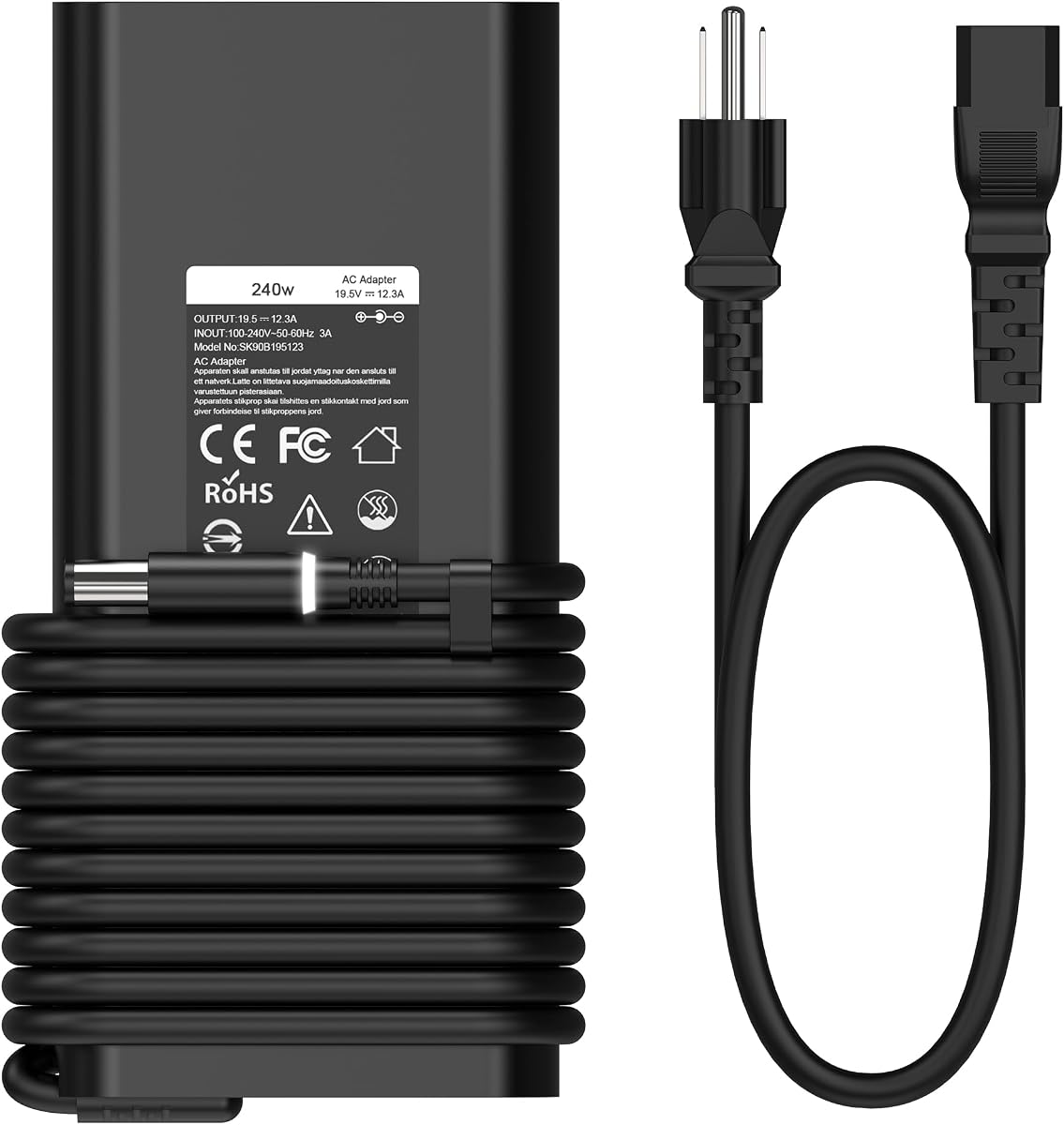
The 2025 New Slim 240W Laptop Charger is engineered for high-performance Dell Alienware and Precision laptops that demand more power. It delivers 240W output compatible with 180W devices ensuring stable power for intensive tasks.
We may earn a commission when you buy through this link, at no additional cost to you.
It supports a wide range of Alienware series including M15 M17 and G3 G5 G7 gaming models. This ensures that your high-end laptop runs at full potential without thermal throttling due to insufficient power supply.
Although specialized, it offers a budget-friendly alternative to official OEM chargers. The seller offers a 12-month warranty contactable directly through their store providing reliable support if issues arise.
For owners of powerful Alienware or Precision systems, this charger provides the necessary wattage for sustained performance. Its compatibility and high power rating make it a practical choice for gaming and professional workloads.
With 240W output this charger supports demanding applications like gaming and video editing without power constraints on high-end laptops.
It fits Alienware and Precision models like M15 M17 and G-series ensuring your device receives adequate power for full performance.
We may earn a commission when you buy through this link, at no additional cost to you.
This 330W charger is designed for top-tier Alienware laptops that require maximum power for smooth gaming and rendering. It delivers stable full-rated power to prevent CPU and GPU throttling during intensive sessions.
We may earn a commission when you buy through this link, at no additional cost to you.
The charger is safe backward compatible with devices designed for 180W or 240W input. The extra power headroom keeps the adapter running cooler and avoids overheating even during long hours of use.
Its robust build ensures that your laptop performs without frame drops or stuttering. This is crucial for users who rely on their machines for competitive gaming or heavy creative workloads.
If you own a high-end Alienware laptop this charger offers the power stability you need. The thermal protection and high ratings make it a dependable upgrade or replacement for aging power supplies.
By delivering stable power this charger eliminates throttling stuttering and lag ensuring smooth gaming and video editing performance.
The adapter features safety measures to prevent overheating and avoids performance throttling during long-hour intensive usage.
We may earn a commission when you buy through this link, at no additional cost to you.
The KFD USB C to DC Tip Adapter Kit is a versatile accessory that converts PD power from USB-C sources to standard laptop DC jacks. It includes 15 different connector sizes to cover most brands and models.
We may earn a commission when you buy through this link, at no additional cost to you.
Built with a smart charging chip this cable adjusts current automatically for safe and stable charging up to 100W. It is ideal for travelers who want to carry one cable that can power multiple devices.
This kit allows you to use external battery sources like power stations with 20V PD output to charge various laptops. It simplifies your travel setup by reducing the need for multiple individual power bricks.
For users with diverse devices or those seeking a compact backup solution this adapter kit is highly practical. It provides flexibility and ensures you can charge your Dell or other laptops with universal power sources.
The kit includes 15 male jack plugs such as 4.5mm x 3.0mm for Dell making it versatile across many brands.
An embedded E-mark chip adjusts current automatically ensuring safe charging up to 100W without overheating.
We may earn a commission when you buy through this link, at no additional cost to you.
Choosing the right battery backup depends on your specific usage scenarios. Here are key factors to consider before making a decision.
Ensure the backup solution matches your laptop's power requirements and port type. Some chargers support USB-C while others require specific round tips like 4.5mm or 7.4mm. Always check your Dell laptop's model number to verify compatible wattage and connector sizes.
Checking model compatibility ensures your device receives the correct power and prevents potential damage from mismatched adapters.
Higher wattage is essential for gaming or performance laptops like Alienware or Precision. Standard ultrabooks may only need 65W but powerful models often require 180W to 330W to operate efficiently without throttling.
Choose a backup with sufficient wattage to meet your laptop's peak power demands to maintain full performance levels.
Portable power banks vary in capacity typically measured in mAh. Higher capacity means longer usage times but adds weight. For travel, a balance between 20000mAh and 25000mAh offers significant runtime without being too bulky.
Select a capacity that aligns with how long you need to work unplugged and how much you are willing to carry.
Fast charging technologies like USB-C PD and Quick Charge significantly reduce downtime. Look for power banks that support bi-directional charging to recharge the device quickly using a high wattage adapter.
Prioritize models with fast charge support to minimize waiting times when you need to get back to work.
Safety mechanisms such as overcharge protection short circuit prevention and thermal regulation are critical. Products with CE or FCC certifications meet recognized safety standards reducing risks of electrical hazards or damage to your laptop.
Always verify that the backup solution includes safety protections to ensure safe charging and use.
Build quality affects the longevity of the battery backup. Sturdy casings and quality internal components resist wear and tear especially for frequent travelers. Premium units often come with better warranties indicating higher confidence in build.
Invest in a well-built product with a good warranty to ensure long-term reliability and support.
Consider extras like multiple ports USB hub modes or LCD displays. Some UPS units offer ECO modes to save energy when devices are idle. These features add convenience and efficiency to your power backup strategy.
Look for additional features that enhance usability such as multiple ports or displays for better monitoring.
Prices range from budget-friendly chargers to premium power banks and UPS systems. Determine your priority between cost and performance. Sometimes paying more for a reputable brand or higher capacity offers better long-term value.
Balance your budget with your needs to find a solution that offers the best value for your specific situation.
When using a portable power bank connect your Dell laptop via the appropriate USB-C or DC cable. Ensure the power bank has enough charge before disconnecting from wall outlets. Avoid exposing the device to extreme temperatures which can reduce battery life.
For UPS units place them near your workstation in a dry and ventilated area. Plug the UPS into a wall outlet and connect your laptop to the backup outlets. Test the UPS periodically to ensure it functions correctly during outages.
Maintain your battery backups by fully charging them every three months if not in use. Keep contacts clean and avoid dropping or exposing to moisture. Regular care extends the lifespan and ensures reliability when you need it most.
Not all power banks can charge Dell laptops. You need one with sufficient wattage usually at least 65W and compatible connectors. USB-C PD power banks work with newer models while older ones may require specific DC tips.
Battery life depends on capacity and laptop usage. A 20000mAh power bank might last 2 to 4 hours on a typical Dell laptop. Higher capacity units extend this time significantly for longer work sessions.
Third-party chargers can be safe if they meet safety certifications and correct wattage. Look for models with overvoltage and short circuit protection. Always verify compatibility to avoid damaging your laptop.
A UPS provides backup power during outages and surge protection for stationary setups. A portable charger is designed for travel and mobile power. UPS units offer more outlets while portable chargers are compact and lightweight.
Check your laptop's power adapter label for output watts. Most ultrabooks need 65W but gaming models like Alienware require 180W or more. Ensure your backup matches or exceeds this rating for optimal performance.
Older Dell laptops may not support USB-C charging. You will need a USB-C power bank with a DC adapter kit or a traditional DC power bank. Check your laptop's charging port specifications to confirm support.
The top picks offer a range of solutions from portable power banks to robust UPS systems. Each option addresses specific needs ensuring you can keep your Dell laptop powered in any situation.
Prioritize compatibility and power output when selecting a backup solution. A good match ensures reliability and extends the life of both your device and the backup unit.
Prices and availability may change so check the latest details before buying. With the right battery backup your Dell laptop stays productive no matter where you are or what happens to the grid.