This guide compares the top barcode scanners for iPad including wireless Bluetooth models and handheld readers for retail inventory and mobile scanning needs.
As an Amazon Associate we earn from qualifying purchases. We may earn a commission when you buy through links on this page, at no additional cost to you. Read our affiliate disclosure.As an Amazon Associate we earn from qualifying purchases.Purchases through our links may earn us a commission, at no extra cost to you. Read our affiliate disclosure.
Finding the right barcode scanner for iPad can transform how you manage inventory or track assets on the go. A good model offers reliable Bluetooth connectivity and fast scanning speeds to keep your workflow smooth.
We evaluated ten real products based on compatibility, battery life, and scanning technology. Each option supports iPad devices and covers various needs from small shops to large warehouses.
Every pick below highlights key specs and real-world performance notes. Prices and availability change frequently so check current listings before making your final decision.
Top 3 Picks for Best Barcode Scanner for iPad
Best Budget
Bluetooth 1D&2D Barcode Scanner, 3-in-1 Bluetooth & USB Wired & 2.4G Wireless QR Barcode Reader, PDF417 Data Matrix Handheld Bar Code Scanner Work with Windows, Android, iOS (TM-10B)
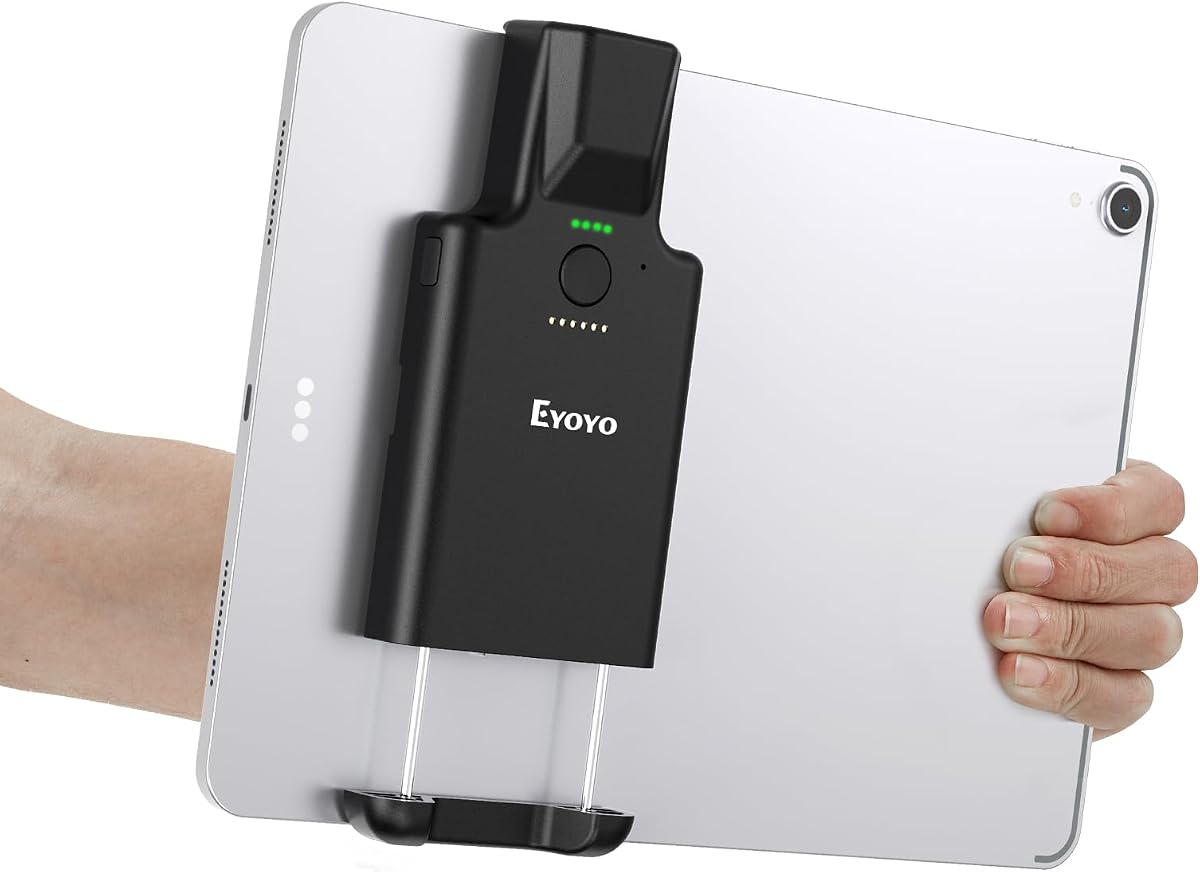
Eyoyo 1D 2D Portable Bluetooth Barcode Scanner Compatible with iPad Tablet
2D CMOS imaging tech
Retractable clip included
30 hours scan time
LED battery indicator
This Eyoyo scanner is built for iPad users who need a secure grip while scanning items. It holds a 4.9 out of 5 rating and uses advanced 2D CMOS imaging to read codes quickly.
Pros
Clip works for most tablets
Long 3000mAh battery life
Scans screens and paper
LED indicators show level
Cons
No 2.4G mode
Clip range is fixed
We may earn a commission when you buy through this link, at no additional cost to you.
The standout feature is the vertical retractable clip that fits most iPad sizes. You can scan with one hand while the other holds the device steady. It reads damaged, curved, and digital codes reliably.
Battery life is excellent at 30 hours of continuous use. LED indicators show remaining power at 25 percent intervals. The ergonomic buttons allow comfortable left or right handed operation.
If you work in retail or libraries with iPad devices this scanner is the top pick. It balances price, performance, and convenience better than any other model on this list.
Secure Tablet Grip Design
The clip holds iPads from 9.7 to 11 inches so you can scan hands free while the tablet is mounted.
Screen and Paper Scanning
It uses 2D imaging so you can scan barcodes shown on mobile screens as well as printed paper labels.
This scanner offers incredible value for money while supporting both 1D and 2D barcodes. It connects via Bluetooth 2.4G or USB so you can switch modes as needed for your iPad or PC.
Pros
Affordable price point
Scans 1D and 2D codes
Very long wireless range
Fast scan speed
Cons
Shorter Bluetooth range
Bulkier than mini scanners
We may earn a commission when you buy through this link, at no additional cost to you.
The 2.4G wireless range reaches up to 70 meters which is rare at this price. It scans 350 times per second and holds 130000 codes in offline storage if you lose connection.
Battery life is solid at 9 hours of continuous scanning per charge. It is not the smallest device but the performance and range make it a great budget pick for larger warehouses.
Choose this if you need long range wireless scanning without paying premium prices. It works well with iOS and Android devices and covers all common barcode types.
Extended Wireless Range
The 2.4G mode lets you scan items from up to 70 meters away so you can move freely around a large store.
Offline Storage Capability
If you move out of range you can store up to 130000 barcodes locally and upload them later when you return.
Inateck makes high quality peripherals and this scanner delivers premium build quality with reliable Bluetooth performance. It features a 115ft connection range and a 2600mAh battery that lasts 180 days on standby.
Pros
115ft Bluetooth range
180 days standby battery
Rugged TPU protection
Quick setup connection
Cons
Only 1D codes
Higher price point
We may earn a commission when you buy through this link, at no additional cost to you.
The TPU case adds extra drop protection for tough jobs. You can edit prefixes and suffixes to match your software needs and it supports multiple keyboard languages for international use.
While it only scans 1D barcodes it is designed for reliability and battery endurance. The connection is stable and setup takes only seconds making it ideal for long shifts.
Buy this if you need a durable scanner that stays connected over long distances. It is perfect for warehouses or field work where dropping a device is a real risk.
Long Standby Battery
The battery stays ready for 180 days on standby so you do not need to recharge it often if usage is light.
Customization Options
You can add up to 32 digits to each scan as a prefix or suffix to fit your specific data entry requirements.
NETUM scanners are known for strong compatibility across many operating systems. This model supports 2.4G Bluetooth and wired modes and it scans damaged barcodes thanks to its CCD sensor.
Pros
Triple mode connectivity
100000 offline storage
CCD sensor scans screens
Storage mode for travel
Cons
Requires setting barcodes
Not compatible with Square
We may earn a commission when you buy through this link, at no additional cost to you.
You can store up to 100000 codes in offline mode which is useful when working outside of wireless range. The battery lasts for 200000 scans so you can use it all month on one charge.
The device allows customization of prefixes and keyboard combinations but you need to scan setup barcodes from the manual first. It is not compatible with Square POS systems.
This is a great option if you need a reliable scanner that can store data when offline. It works well for libraries and warehouses where connectivity might be inconsistent.
Offline Storage Mode
When out of range the scanner stores scans locally and uploads them when you reconnect to your device.
CCD Sensor Benefits
The CCD sensor can read codes from paper and from computer screens so you do not need a separate screen scanner.
At only 35 grams this Eyoyo scanner is the lightest option available. It is designed for staff who carry the scanner all day in a pocket or clip to a shirt.
Pros
Lightest on the list
Fits in a pocket
Long Bluetooth range
Silent vibration feedback
Cons
1D codes only
Shorter active battery
We may earn a commission when you buy through this link, at no additional cost to you.
It supports Bluetooth 2.4G and wired modes and scans damaged or colorful barcodes well. The vibration mode is great for quiet environments like libraries where beeps are disruptive.
Battery life is 8 hours on a full charge and it lasts up to 10 days with auto off. The Bluetooth range reaches 50 meters without barriers so you can move around freely.
Choose this if portability is your top priority and you only need to scan 1D codes. It is ideal for small retail stores or mobile inventory checks.
Pocket Sized Design
The scanner weighs 35 grams and fits in any pocket so staff can carry it comfortably during long shifts.
Quiet Vibration Mode
You can disable the buzzer and use vibration so you know a scan worked without making noise around others.
This desktop scanner sits on a counter and reads codes without you lifting a handheld device. It has an omnidirectional scan window that reads 1D and 2D codes from any angle.
Pros
Handsfree omnidirectional scan
Auto sensing activation
Non-slip stable base
Durable dust protection
Cons
Desk mounted only
Needs power via USB
We may earn a commission when you buy through this link, at no additional cost to you.
Auto sensing triggers a scan as soon as an item moves past the window which speeds up checkout lines. The base is non slip and anti shock to withstand drops up to 4.9 feet.
It is IP54 rated for dust and water resistance and it plugs directly into a PC via USB. No drivers or apps are needed and it works on Windows and macOS systems.
This is the best pick for busy checkout counters where handsfree scanning saves time. It is not portable but it improves speed for high volume scanning stations.
Auto Sensing Speed
The scanner wakes from sleep when it detects movement so you can scan items continuously without pressing a button.
Omnidirectional Window
The scan window reads codes from any direction so you do not need to align the barcode perfectly before scanning.
NetumScan Bluetooth Barcode Scanner with Charging Dock
Integrated charging dock
1200mAh battery life
Silent vibration mode
Pocket-sized design
This scanner comes with a base that acts as both a charging dock and data receiver. It supports Bluetooth 2.4G and wired modes and scans 1D and 2D codes for iOS devices.
Pros
Charging dock included
Compact and light
Scans 1D and 2D
Optimized for iPhone iPad
Cons
Lower battery capacity
Average customer rating
We may earn a commission when you buy through this link, at no additional cost to you.
The dock keeps the scanner charged and ready while not in use. It is pocket sized and ergonomic so staff can carry it easily during inventory rounds in a store or library.
The battery is 1200mAh which is smaller than other models but charges quickly in four hours. You can switch to vibration mode to scan quietly in sensitive environments.
This is a good choice if you want a tidy docked setup for iPad inventory apps. It is simple to use and designed to integrate smoothly with iPhone and iPad devices.
Docked Charging Base
The base keeps the scanner charged and plugged in so it is always ready for the next shift without cable clutter.
Silent Operation
Switching to vibration mode lets you scan in quiet areas like libraries without disturbing patrons or staff members.
NetumScan Bluetooth Barcode Scanner with Charging Doc
Dual-button control
1200mAh battery capacity
2m drop protection
Advanced wireless chip
This model also includes a charging dock but adds a dual button control to prevent accidental power offs. It is designed to survive 2 meter drops so it is tough enough for warehouse floors.
Pros
Dual button power control
2 meter drop proof
Dock base included
Quiet vibration feedback
Cons
2D CMOS only model
No 2.4G in dock
We may earn a commission when you buy through this link, at no additional cost to you.
The advanced wireless chip ensures stable Bluetooth pairing with iOS devices. It reads 1D and 2D codes and lets you switch between buzzer and vibration for silent scanning.
The 1200mAh battery lasts through long shifts and charges fully in four hours. The dock keeps the device safe and ready while you work on inventory or receiving.
Pick this if you need a rugged scanner that won't shut down when you press a button by accident. It is built for high impact environments and works well with iPads.
Dual Button Safety
A dedicated side button handles power so you do not accidentally turn the device off while scanning items quickly.
Drop Protection
The scanner is built to survive falls up to 2 meters onto concrete so it is reliable in busy warehouses.
Bluetooth Wireless Handheld Barcode Scanner with Base
50000 offline storage
110g lightweight body
3 in 1 modes
Auto connect feature
This scanner offers multiple connection modes and offline storage for 50000 codes. It weighs 110 grams and connects via Bluetooth 2.4G or USB so you can switch as needed for iPad or PC.
Pros
50000 offline storage
Lightweight ergonomic shape
Auto connect after reconnect
USB wired option
Cons
Lower review rating
Manual switch required
We may earn a commission when you buy through this link, at no additional cost to you.
It reads 1D and 2D codes including QR and Data Matrix. There is a manual switch on the side you must set to ON before scanning but once connected it auto reconnects when you turn it on.
The design is ergonomic and easy on the hand during long sessions. It stores scans when out of range and uploads them later which helps in areas with weak Wi-Fi.
Choose this if you need offline storage and multiple connection options. It is less polished than top picks but offers solid performance at a reasonable price for small businesses.
Offline Data Storage
Store up to 50000 codes in memory and sync them later when you reconnect to your computer or iPad device.
Auto Connect Feature
After you enable wireless again the scanner reconnects automatically so you do not need to pair it every time.
This scanner uses an 800×600 CMOS sensor for high accuracy and it comes with an IP54 rating for dust and water resistance. It has a built-in light to help scan in dark areas.
Pros
High resolution CMOS sensor
IP54 dust waterproof rating
Built-in auxiliary light
Strong drop protection
Cons
Average connectivity stability
No 2.4G wireless dock
We may earn a commission when you buy through this link, at no additional cost to you.
The 2000mAh battery provides long usage and it stores 50000 codes in offline mode. It supports Bluetooth and wired connections and works on Windows Mac and iOS devices.
It is durable enough to survive 1.5 meter drops and you can choose between manual auto sensing and continuous scan modes. The auxiliary light is a nice touch for dim environments.
Pick this if you want a rugged scanner with a built-in light for low light scanning. It offers solid features at a competitive price and works well for libraries or retail.
High Resolution Scanning
The 800×600 CMOS sensor reads codes with high accuracy so you can scan damaged or low contrast barcodes easily.
Auxiliary Light
A built-in light helps you read codes in dark corners or poorly lit warehouse shelves without needing extra tools.
We may earn a commission when you buy through this link, at no additional cost to you.
Buying Guide – How to Choose the Best Barcode Scanner for iPad
Use this section to understand the key factors that affect scanner performance and compatibility with your iPad workflow.
Connectivity Options
Bluetooth is the primary choice for iPads because it connects wirelessly without extra hardware. Some models also support 2.4G wireless or USB wired modes which can be useful if Bluetooth signal is unstable.
Look for scanners that explicitly support iOS or iPad so you avoid pairing issues. Check if the scanner can switch between modes easily to match your environment.
Barcode Type Support
1D scanners read standard linear codes like UPC and EAN which are common in retail. 2D scanners can read QR codes and PDF417 which are often used for digital coupons or shipping labels.
If your business uses both types choose a 1D and 2D combo model. Most modern scanners support both but confirm the specific codes they read before buying.
Battery Life
Battery capacity determines how long you can work between charges. Scanners with 2000mAh or more can often last 8 to 30 hours of continuous scanning depending on usage.
Look for models with standby modes to extend battery life. A long battery reduces downtime and ensures you can finish inventory tasks without recharging.
Durability and Build
If you work in warehouses or outdoors look for scanners with drop protection and water resistance ratings like IP54. Rubberized cases and internal shockproofing help survive daily drops.
Durability matters most for high volume use. A sturdy scanner reduces repair costs and keeps your operations running smoothly when equipment takes a beating.
Ergonomics
Comfort is important if you scan for many hours a day. Look for lightweight designs that fit your hand and have buttons you can press without strain.
Some models include clips or docks so you can hold your iPad and scan at the same time. This feature can reduce fatigue and improve workflow speed.
Offline Storage
Offline storage lets you save scans when your device is out of wireless range. This is useful for large warehouses or outdoor jobs where Bluetooth or Wi-Fi may drop.
Check how many barcodes the scanner can store and how to upload them later. A higher storage capacity means you can work longer without reconnecting.
Software and System Compatibility
Ensure the scanner works with your inventory or POS software. Some scanners require specific apps or settings while others plug in and work as a keyboard input.
Also confirm compatibility with your POS system. Some scanners are not compatible with systems like Square or Shopify so check the details before purchasing.
Price and Value
Prices range from budget friendly to premium depending on features. Higher priced models often have better build quality and longer battery life.
Decide what features you actually need before comparing prices. A cheaper model may save money upfront but cost more in repairs or replacement time.
How to Use and Care for Your Barcode Scanner for iPad
Start by pairing the scanner with your iPad using Bluetooth. Follow the manufacturer steps in the manual to enter pairing mode and select the scanner from your device list.
Keep the scanner lens clean from dust and smudges to maintain accuracy. Use a soft dry cloth to wipe the lens window and avoid harsh chemicals that could damage it.
Charge the device fully before first use and let it discharge slightly to calibrate the battery. Avoid leaving it plugged in for days without use to preserve battery health.
Frequently Asked Questions
Do all barcode scanners work with iPad?
Not all barcode scanners are compatible with iPad. You must choose a model that supports Bluetooth iOS or iPad specifically. Some only work with Windows or Android devices so check the compatibility list carefully before purchasing.
Can I scan QR codes with these scanners?
Many scanners on this list support 2D QR codes in addition to 1D barcodes. If you need to scan QR codes for coupons or digital labels choose a 2D capable model. Confirm this before buying because 1D only scanners cannot read QR codes.
How long does the battery last?
Battery life depends on usage and model. Most scanners with 2000mAh to 3000mAh batteries last 8 to 30 hours on a full charge. Some have standby modes that extend life to several days when not actively scanning.
Do I need to install software on my iPad?
Most barcode scanners plug and play without extra software on iPad. They act like a keyboard and input scan data directly into any app. Some may need specific apps for offline storage so check the product page for details.
What is the typical range of a Bluetooth scanner?
Bluetooth scanners typically range 50 to 100 feet. Some models using 2.4G wireless can reach 70 to 100 meters. If you need longer range choose a model with a high range spec for better freedom of movement.
Can I use a scanner in wet or dusty environments?
Some scanners have IP54 or higher ratings meaning they resist dust and water. Look for this rating if you work outdoors or in warehouses with dust. Not all models are water resistant so check the specs.
What if the scanner stops working after pairing?
If pairing fails try resetting the scanner to factory defaults and re-pairing. Ensure your iPad Bluetooth is on and close other apps. Sometimes updating the scanner firmware or rebooting the iPad helps resolve connection issues.
Can I use a scanner with both iPad and PC?
Many scanners support multiple modes so you can switch between iPad Bluetooth and PC USB or 2.4G. You may need to switch modes using a barcode from the manual. Check if the model supports this flexibility before buying.
Final Thoughts on Choosing the Best Barcode Scanner for iPad
The Eyoyo scanner with a clip is our top pick for overall iPad integration and battery life. It offers the best balance of features for mobile inventory and retail work.
Consider your primary use case when choosing. For long range use look at models with 2.4G wireless. For durability choose scanners with IP ratings and drop protection.
Prices and availability change so always check current listings before buying. Verify the specs match your needs to ensure the scanner supports your workflow smoothly.
Discover the top cordless spin mop for quick cleaning with detailed comparisons of battery life, spray features, and performance on hard floors for home…