
JADENS Portable US Letter Thermal Printer with Bluetooth, Inkless Printing
4.6Editor score
Inkless thermal technology
Bluetooth connectivity
Compact lightweight design
Battery powered portable printers have revolutionized how we handle document needs on the go. Whether you are a traveler needing boarding passes or a professional requiring instant contracts these devices offer freedom from traditional office setups.
We evaluated ten real models based on connectivity print quality battery life and ease of use. Our comparison covers inkjet thermal and photo options to ensure you find the right tool for your specific mobility requirements today.
Each pick highlights unique strengths and limitations so you can decide quickly. Remember that availability and prices change frequently so check current listings before making your final purchase decision for your next journey.
4.6Editor score

4.4Editor score
4.5Editor score
As an Amazon Associate we earn from qualifying purchases.
The following table provides a side-by-side overview of key specifications for each model to help you compare features and capabilities quickly.



The HP OfficeJet 200 stands out as a top contender for those needing reliable mobile printing without network dependency. Its robust build and included battery make it ideal for frequent travelers who need consistent performance.
We may earn a commission when you buy through this link, at no additional cost to you.
This model supports a wide range of paper sizes from letters to envelopes which adds significant utility for business documents. The HP Auto Wireless Connect feature ensures quick setup even without a router saving valuable time on the go.
While it uses ink cartridges which may add to ongoing costs the high page yield helps offset this concern over time. The fast charge feature allows you to power up quickly when opportunities arise during busy schedules.
If you need a printer that handles various document types and offers true mobility without sacrificing quality this is a strong choice for professionals and students alike who value versatility in their toolkit.
The ability to print without a network connection ensures you can work from cafes vehicles or remote locations seamlessly.
Original HP 62 series cartridges deliver the highest in-class page yields reducing supply replacement frequency.
We may earn a commission when you buy through this link, at no additional cost to you.
The Canon PIXMA TR160 offers vibrant color printing in a form factor that fits easily into backpacks for students and creatives. Its lightweight design makes carrying it around campus or during events hassle-free for daily needs.
We may earn a commission when you buy through this link, at no additional cost to you.
With a 5-Color Hybrid Ink System it produces sharp text and vivid photos that stand out compared to standard monochrome options. The OLED display helps you monitor ink levels so you never run out unexpectedly during important projects.
It lacks scanning capabilities which might be a drawback if you need to digitize documents on the fly. However for pure printing tasks it delivers excellent quality with wireless direct mode ensuring connection even without routers.
Choose this model if color accuracy and portability are your top priorities and you do not require scanning functions in your mobile workflow for creative or academic use cases today.
Rich color thanks to a 5-Color Hybrid Ink System showcases vibrant details and sharp black text.
Easily check ink levels and printer status with the built-in Monochrome OLED display screen.
We may earn a commission when you buy through this link, at no additional cost to you.
The HP OfficeJet 250 adds scanning and copying capabilities to its printing functions making it a comprehensive solution for mobile offices. This all-in-one design ensures you can handle diverse document tasks without carrying multiple devices.
We may earn a commission when you buy through this link, at no additional cost to you.
Its included battery and fast charge feature mean you can keep working even when power outlets are scarce during long trips. The HP app allows straightforward printing and scanning from smartphones reducing the need for laptop connections constantly.
Because it offers more functionality it may be slightly bulkier than single-function printers. However the convenience of scanning documents on the spot often outweighs the minor size increase for business users on the move.
If you need a complete document solution that prints scans and copies while remaining portable this model provides the versatility required for professional environments away from traditional desk setups today.
Print scan and copy on the go without having to connect to a network.
Charge within 90 minutes while the printer is turned off with HP Fast Charge technology.
We may earn a commission when you buy through this link, at no additional cost to you.
The Epson Workforce WF-110 delivers color printing in a compact form that fits well in travel kits for creative professionals. Its wireless capabilities ensure you can connect from various devices without complex network configurations.
We may earn a commission when you buy through this link, at no additional cost to you.
Flexible battery charging options including USB and AC adapter give you versatility in how you power up during long days away from home. The optional external accessory battery allows for even greater print volume if your workload demands it.
You must use Genuine Epson Cartridges to avoid potential damage which adds a layer of cost awareness to ongoing use. However the reliable performance and portable design make it a solid choice for those needing color mobility.
Consider this model if you value color output and flexible power options in a small package that can fit into tight spaces like car trunks or small offices easily.
Choose from a variety of charging options including via USB and AC adapter or print on AC power.
External accessory battery available for even greater print volume when needed.
We may earn a commission when you buy through this link, at no additional cost to you.
The Gloryang Inkless Printer eliminates the mess and cost of ink by using thermal technology for clear black and white documents. Its built-in paper bin saves space and keeps your workspace tidy whether you are on the go or in a car.
We may earn a commission when you buy through this link, at no additional cost to you.
Weighing just 1.75 pounds and measuring 1.7 inches thick this printer is incredibly lightweight and compact for backpacks. The included carrying case and three rolls of paper make it a ready-to-use kit for immediate travel needs.
It only works with specific thermal paper so you must plan your supply needs carefully when traveling. For text documents this limitation is minor but it limits color capabilities compared to inkjet alternatives available today.
Ideal for students and professionals needing quick contracts or notes this model offers a clean and cost-effective printing solution that fits easily into any travel bag without extra clutter.
Advanced thermal technology requiring no ink toner or ribbons for cost-effective and easy use.
Built-in paper bin saves space and keeps your workspace tidy during travel or work.
We may earn a commission when you buy through this link, at no additional cost to you.
The A285M small wireless printer supports five different thermal paper widths offering flexibility for receipts or full letters. Its dual connectivity options with Bluetooth for phones and USB for laptops make it versatile for different devices in use.
We may earn a commission when you buy through this link, at no additional cost to you.
Weighing only 1.5 pounds it fits easily into backpacks or briefcases for business travel or fieldwork. The thermal technology ensures no clogging or cleaning issues which simplifies maintenance compared to inkjet models requiring care.
You will need to download drivers for computer connections which adds a step to setup but ensures stable printing once configured. For on-the-go tasks like invoices or boarding passes this device offers solid reliability.
This model suits workers who need a compact solution for various document sizes and want to avoid ink costs in daily operations.
Supports five sizes of thermal paper to meet most of your needs from receipts to letters.
Compatible with phones via Bluetooth and laptops via USB-C for flexible device connections.
We may earn a commission when you buy through this link, at no additional cost to you.
The D90E portable printer combines inkless thermal technology with a practical design that includes a travel case for protection. It supports standard 8.5 by 11 thermal paper making it suitable for common documents like contracts and worksheets.
We may earn a commission when you buy through this link, at no additional cost to you.
Connectivity is simple via Bluetooth for mobile devices or USB for computers ensuring you can print from nearly any source. The package includes essentials like USB cable and paper so you can start printing immediately upon unboxing.
While it cannot handle regular copy paper its cost-effective thermal approach avoids ink costs for daily needs. The lightweight build fits easily into backpacks making it ideal for students or professionals who move frequently.
If you need a reliable portable printer for black and white documents without the hassle of ink cartridges this model offers a straightforward and efficient solution for everyday tasks.
Supports 8.5 by 11 US Letter thermal paper to meet all your various printing requirements.
Package includes printer cable paper and travel case making it a perfect gift.
We may earn a commission when you buy through this link, at no additional cost to you.
The JADENS Portable Printer is an ideal budget option for those seeking a lightweight solution for everyday documents. Its direct thermal technology ensures you can print without ink toner or ribbons keeping costs low for frequent use.
We may earn a commission when you buy through this link, at no additional cost to you.
With a 203 DPI resolution it produces sharp text and clear images suitable for forms or learning materials. The built-in 1800mAh battery provides up to 3 hours of continuous printing so you can work without being tethered to power.
Private local printing ensures your files stay on your device rather than being uploaded to the cloud for enhanced security. This feature is particularly valuable for sensitive documents in professional or educational settings today.
This model balances cost and performance effectively making it a strong recommendation for students or small office users who prioritize affordability and simplicity in their mobile printing needs.
Print directly from your connected device without uploading files to the cloud to keep documents private.
Built-in 1800mAh rechargeable battery provides up to 3 hours of continuous printing per charge.
We may earn a commission when you buy through this link, at no additional cost to you.
The N80 Bluetooth Thermal Printer is designed for portability with a weight of just 1.5 pounds making it easy to carry anywhere. It supports high-definition printing with 203 DPI resolution to provide clear results for text and images.
We may earn a commission when you buy through this link, at no additional cost to you.
With a built-in 1500mAh battery it can print 160 sheets on a single charge which is sufficient for most daily tasks. It supports roll paper and tattoo transfer paper allowing for versatile uses beyond standard documents.
Connection to laptops requires USB and driver installation but mobile users benefit from straightforward Bluetooth pairing. This device is perfect for business travel small offices or even creative uses like tattoo transfers.
Choose this model if you need a reliable and affordable thermal printer for quick text output while traveling or working away from your main office.
Adopts high-definition printing technology with 203 DPI resolution to provide clear printing results.
Compatible with roll paper folded paper and tattoo transfer paper for diverse applications.
We may earn a commission when you buy through this link, at no additional cost to you.
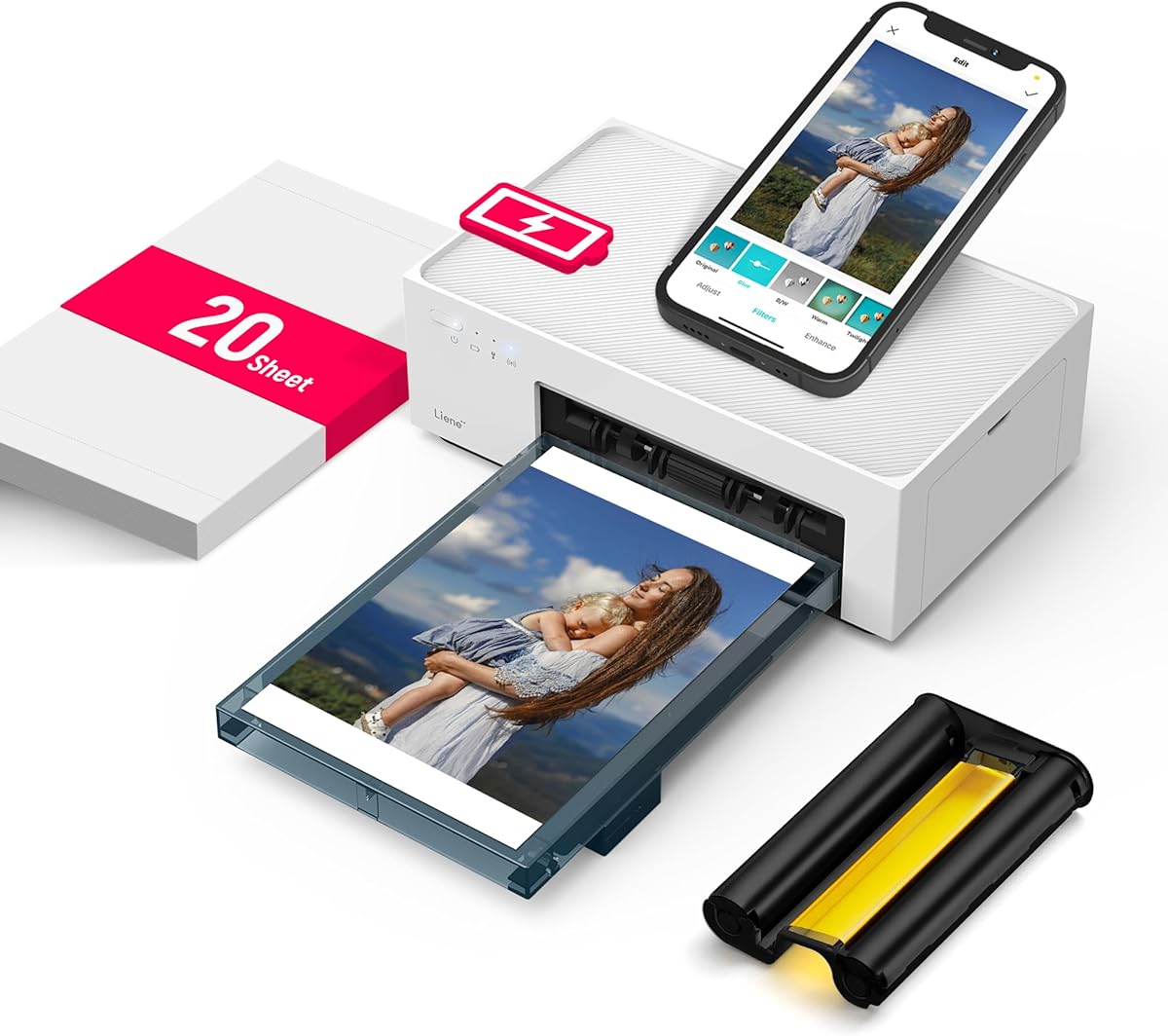
The Liene White M200 specializes in professional quality photo printing using dye sublimation technology for vibrant and long-lasting images. Its built-in battery allows for 40 prints per charge making it perfect for capturing memories while traveling.
We may earn a commission when you buy through this link, at no additional cost to you.
The unique magnetic design on the top lets you place the photo cassette on it saving space after printing. Liene App offers endless fun with filters and borders adding creative control to your photo sessions on the go.
Unlike standard inkjet printers the photos are protected from water scratches and fading thanks to the final protective layer. This durability ensures your precious memories remain vivid for years after printing outside.
This model is the top choice for photography enthusiasts who need a reliable portable solution for high-quality photo prints without relying on home power sources.
With dye sublimation printing which 3 primary colors deeply penetrate the paper layer by layer for vibrant images.
The last layer covered on the photo makes it better to protect photos from water scratches and fading.
We may earn a commission when you buy through this link, at no additional cost to you.
Choosing the right portable printer depends on your specific needs and environment.
Thermal printers offer speed and low cost without ink but are limited to black and white. Inkjet printers provide color and larger paper sizes but require regular maintenance and consumables.
Consider whether color is essential for your work before deciding between inkjet and thermal options.
Most portable models support letter size but some only handle photo or receipt paper. Ensure the printer supports the standard paper types you need for your documents.
Check the specifications carefully to confirm support for 8.5 by 11 inches if needed.
Battery capacity determines how many pages you can print on a single charge. Look for models that offer sufficient prints for your daily travel needs.
Fast charging features can also be helpful if you have quick access to power outlets.
Bluetooth and Wi-Fi Direct ensure you can connect without a router. USB connections are useful for laptop users who prefer wired reliability.
Verify that the printer supports your preferred mobile or desktop devices before buying.
A lightweight design is crucial for carrying the printer in a backpack or briefcase. Some models include carrying cases for added protection during travel.
Weigh the unit against your need for functionality to ensure it fits your lifestyle.
Inkjet models require cartridges which add to long-term costs. Thermal printers avoid ink but use specific paper rolls that must be ordered separately.
Calculate ongoing costs to ensure the printer fits your budget over time.
Page yield and printing speed vary across models. High-volume users should look for higher capacity options to avoid frequent refills.
Check reviews for real-world speed tests to manage your expectations.
A dedicated mobile app simplifies printing from phones and tablets. Some apps include editing tools that enhance the user experience.
Test the app compatibility with your operating system to avoid installation issues.
Always use the recommended paper or ink to prevent jams and ensure print quality. Incorrect supplies can damage the internal mechanism and void the warranty.
Keep the device dry and away from direct sunlight to maintain battery health. Store it in its protective case when not in use to avoid scratches or dents.
Charge the battery fully before your first use to maximize its lifespan. Regularly update firmware through the app to ensure optimal performance and security.
No many portable models use thermal technology which only prints black and white. Inkjet models support color but may be bulkier and require more maintenance for consistent results.
Most use Bluetooth or a dedicated app to pair wirelessly. Install the app and enable Bluetooth on your phone then follow the on-screen pairing instructions to start printing immediately.
Thermal printers eliminate ink costs but require specific paper. If you print mostly text documents thermal can be more cost-effective over time than inkjet options.
Yes many models support Wi-Fi Direct or USB connections that do not require internet. Check the specs to confirm local printing capabilities before purchasing.
Most models offer 40 to 360 prints per charge depending on the size and type. Look for fast charging features to minimize downtime during long trips.
Thermal printers do not accept regular copy paper and need special thermal rolls. Inkjet models accept standard paper but are less common in ultra-compact portable designs.
We reviewed ten standout models ranging from all-in-one inkjets to compact thermal printers. Each offers unique benefits for travelers professionals and students needing mobility.
Prioritize connectivity battery life and paper support to match your daily tasks. Choosing the right technology now saves time and money in the long run.
Always check current listings for the best deals before purchasing as prices and availability fluctuate frequently online.