
CyberPower CP1000PFCLCD
4.2Editor score
1000VA/600W Output Capacity
PFC Sinewave Technology
Color LCD Display Panel
This guide compares the top battery backup for workstation PC units for reliability, surge protection, and runtime to keep your critical hardware safe during
Modern workstations require stable power to prevent data loss and hardware damage. A quality battery backup provides uninterrupted power during outages and protects against surges that can fry sensitive components over time.
We evaluated ten leading models based on output capacity, waveform quality, outlet counts, and software features. Each unit was analyzed for compatibility with active PFC power supplies common in professional desktop builds.
Each pick below highlights specific strengths like sine wave output or long warranties. Remember that prices fluctuate frequently so check current listings before purchasing to ensure you get the best deal available now.
4.2Editor score

4.5Editor score

4.4Editor score
The following table provides a side-by-side comparison of key specifications for all ten models featured in this guide to help you quickly identify the right capacity and features for your setup.




The CyberPower CP1500PFCLCD stands out as the most reliable option for demanding workstation setups. With a 4.5 star rating it combines robust power capacity with essential protection features needed for professional environments.
We may earn a commission when you buy through this link, at no additional cost to you.
Its 1500VA capacity delivers ample headroom for high-end workstations while the PFC Sinewave output ensures compatibility with active power factor correction supplies found in modern PCs. The AVR technology maintains stable voltage without unnecessary battery drain.
While the unit is heavier than entry-level models it is designed for desktop placement rather than portability. The extra weight reflects the quality components inside that ensure long term reliability during critical power events.
This model is ideal for users who need maximum uptime and equipment protection. The comprehensive warranty and connected equipment guarantee provide peace of mind for those investing in expensive hardware.
The pure sine wave output ensures stable power delivery to modern power supplies that require clean waveforms for optimal operation.
The tilting color LCD provides instant visibility of load levels and battery health for proactive system management.
We may earn a commission when you buy through this link, at no additional cost to you.
The GOLDENMATE 2000VA/1600W introduces advanced lithium technology to the workstation backup category. Its 4.4 rating reflects strong performance in delivering clean power for extended periods during outages.
We may earn a commission when you buy through this link, at no additional cost to you.
Unlike traditional lead-acid units this model features a Lithium Iron Phosphate battery with over 3000 charge cycles. This significantly reduces long term ownership costs and eliminates frequent replacements required by conventional batteries.
The higher capacity is offset by a slightly larger footprint due to the integrated transformer needed for the 51.2V battery system. Users should verify their outlet voltage falls within the supported 90 to 140V range before setup.
This unit is perfect for users seeking long-term reliability and reduced maintenance. The industrial certifications and safety features ensure safe operation in professional office environments.
The LiFePO4 chemistry provides over ten years of service life reducing the need for recurring battery replacements.
Pure sine wave output prevents harmonic distortion that can damage sensitive electronics or reduce efficiency.
We may earn a commission when you buy through this link, at no additional cost to you.
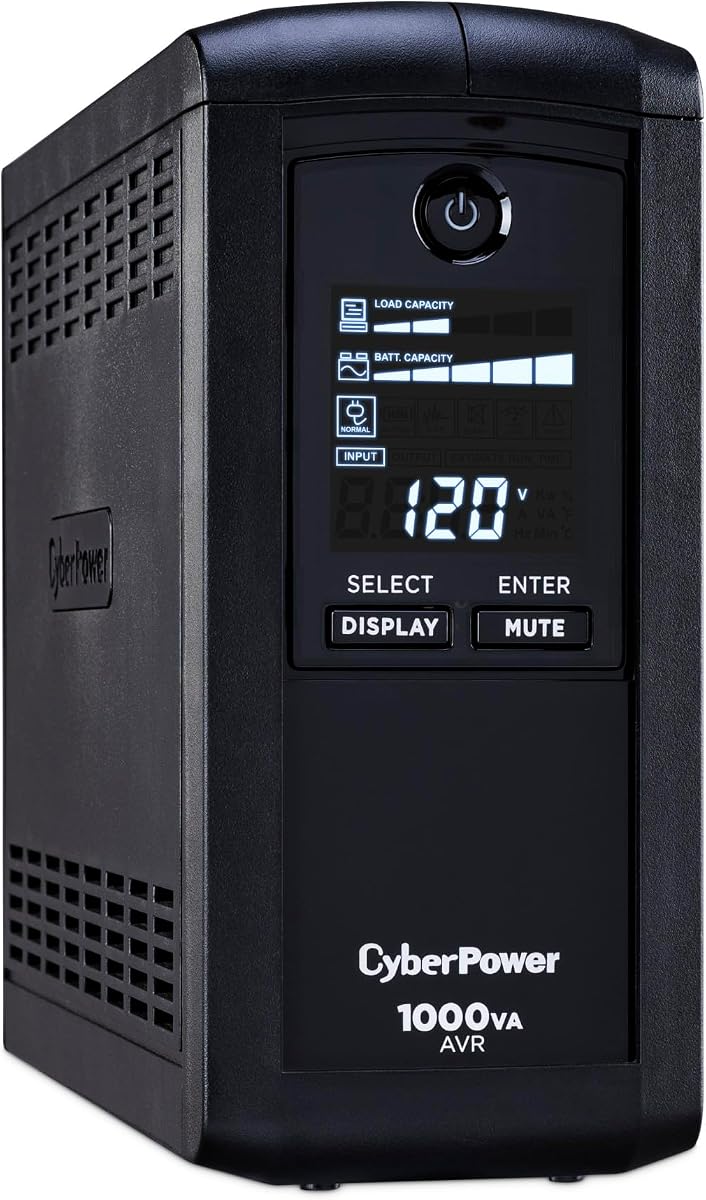
The CyberPower CP1000PFCLCD delivers essential sine wave protection at a lower price point. It rates 4.2 stars for offering key professional features without the high cost of larger capacity models.
We may earn a commission when you buy through this link, at no additional cost to you.
With 600W output it supports standard workstation loads while the PFC sine wave capability ensures compatibility with active PFC power supplies. The color LCD provides immediate status updates on battery capacity and connected load.
It trades some runtime capacity for affordability making it a smart choice for users with moderate power needs. The ten outlets offer good flexibility for connecting monitors and networking gear.
Buyers looking for clean power output on a budget will find this model ideal. It balances cost and performance effectively for entry-level professional setups.
PFC Sinewave output ensures sensitive components receive clean power similar to standard wall outlets.
The color display keeps users informed about remaining battery time and system health instantly.
We may earn a commission when you buy through this link, at no additional cost to you.
The CP1500AVRLCD3 offers substantial capacity for workstations that do not strictly require pure sine wave. Its 4.5 rating highlights the strong value provided by its extensive outlet configuration and AVR tech.
We may earn a commission when you buy through this link, at no additional cost to you.
Featuring 900W output it handles moderate workstation loads well. The twelve outlets provide ample space for connecting multiple monitors and peripherals without daisy chaining adapters that introduce points of failure.
While it uses simulated sine wave it remains a solid choice for standard power supplies. The Intelligent LCD panel keeps you informed of power status and estimated runtime during outages.
This unit suits users who prioritize outlet count and capacity over pure sine wave requirements. It delivers reliable protection for general office workstations effectively.
Twelve outlets allow for complete workstation setup including monitors and networking equipment.
AVR adjusts voltage levels to keep power stable without switching to battery reserve.
We may earn a commission when you buy through this link, at no additional cost to you.
The EC850LCD introduces energy saving features through its ECO Mode outlets. It receives a 4.4 rating for balancing basic protection with smart power management for peripheral devices.
We may earn a commission when you buy through this link, at no additional cost to you.
Its 850VA capacity supports essential workstation loads while the ECO controlled outlets cut power to peripherals when the PC is off or sleeping. This helps lower energy costs and extends battery life.
The 510W output may be limiting for high-power workstations with multiple GPUs. Users with simpler setups will appreciate the intelligent power distribution and automatic voltage regulation features.
Choose this for smaller offices or eco-conscious users who want to reduce idle power consumption. The surge protection ensures hardware remains safe during storms.
ECO Mode outlets automatically shut off power to accessories when the main PC is off.
All outlets receive surge protection to guard against spikes from the electrical grid.
We may earn a commission when you buy through this link, at no additional cost to you.
The AVRG900LCD earns a 4.6 rating for its solid performance and unique data line protection. It provides standard backup functionality for workstations that need to protect modem or fax lines too.
We may earn a commission when you buy through this link, at no additional cost to you.
With 900VA capacity it supports basic workstation loads effectively. The data line protection prevents surges on telephone lines from damaging connected networking gear or modems.
Its 480W output is adequate for standard office PCs but may struggle with high-end gaming or rendering machines. The AVR ensures power stability without unnecessary battery switching.
Ideal for office setups with legacy telephony gear or modem connections. It delivers reliable protection with minimal maintenance requirements.
Safeguards connected phone or fax lines from voltage spikes during storms.
AVR corrects minor fluctuations to protect sensitive electronics.
We may earn a commission when you buy through this link, at no additional cost to you.
The CP1000AVRLCD is a dependable mid-range UPS rated 4.5 stars for its practical feature set. It suits standard workstations that need reliable backup without advanced pure sine wave needs.
We may earn a commission when you buy through this link, at no additional cost to you.
Featuring 600W output it supports typical office loads easily. The Intelligent LCD panel displays load capacity and estimated runtime to help users gauge remaining power quickly during outages.
With nine outlets it covers essential devices but offers less flexibility than 12-outlet models. The AVR helps maintain stable power to avoid unnecessary battery use during fluctuations.
This unit is recommended for users prioritizing reliability and straightforward operation. It delivers consistent performance for daily workstation protection.
The LCD panel shows estimated runtime so users know how much time is left.
Automatic voltage regulation corrects fluctuations without using battery power.
We may earn a commission when you buy through this link, at no additional cost to you.
The ST900U prioritizes space efficiency with a slim profile design. It earns a 4.5 rating for its high outlet count and Greenpower efficiency that reduces idle power consumption.
We may earn a commission when you buy through this link, at no additional cost to you.
With 900VA capacity it supports basic workstation needs but is best suited for light loads. The slim build helps save desk space compared to bulkier tower units.
It uses standard standby technology which is simpler than line-interactive units. This makes it a good choice for home office setups where space is at a premium.
Buyers with limited desk space will appreciate its compact footprint. It provides essential surge protection and backup power for standard office PCs.
Slim profile design leaves more desk space available for workspace.
Greenpower technology reduces power consumption during normal operation.
We may earn a commission when you buy through this link, at no additional cost to you.
The CP850AVRLCD serves as an entry-level solution for basic protection. It receives a 4.5 rating for delivering standard AVR and LCD features at a competitive price point.
We may earn a commission when you buy through this link, at no additional cost to you.
Its 510W output is best for basic office PCs without heavy graphics cards. The Intelligent LCD shows battery capacity and load status for informed monitoring during events.
While it lacks the capacity of higher models it fulfills the role of essential surge protection and brief backup. The AVR ensures power stability for daily office work.
Ideal for users on a tight budget who still require voltage regulation. It offers reliable protection for simple workstation configurations.
Provides essential protection features at an accessible price point for basic needs.
AVR corrects power fluctuations to prevent equipment stress.
We may earn a commission when you buy through this link, at no additional cost to you.
The BRG1500AVRLCD2 is a top contender for reliability with its 5-year warranty and 4.7 rating. It offers substantial capacity and support for remote management cards in enterprise settings.
We may earn a commission when you buy through this link, at no additional cost to you.
With 900W output it supports demanding workstation loads well. The 5-year warranty on the battery signals strong manufacturer confidence in its durability over time.
Management features require an optional card but provide significant value for network monitoring. The twelve outlets ensure ample connection options for all workstation devices.
This model is recommended for businesses needing extended warranty coverage and remote monitoring. It provides robust protection for critical office hardware.
A five-year battery warranty ensures long term coverage for business investments.
Optional cards allow IT admins to monitor power status over a network.
We may earn a commission when you buy through this link, at no additional cost to you.
Selecting the right UPS involves balancing capacity, waveform, and features. This section breaks down the key factors to help you make an informed decision for your workstation needs.
The total wattage you need depends on your hardware components. Check your power supply wattage and add a safety margin to ensure the UPS can handle your workstation under full load without overloading.
Always choose a model where the wattage rating exceeds your PC maximum power draw for safe operation during outages.
Modern workstations often use Active PFC power supplies which require Pure Sine Wave output to operate correctly. Simulated Sine Wave may cause instability or failure in these systems during outages.
Verify your PSU type and select Pure Sine Wave if you have Active PFC hardware to avoid compatibility issues.
Lead-acid batteries are standard but have shorter lifespans requiring replacements every few years. Lithium Iron Phosphate options last longer and reduce total cost of ownership over time.
Consider Lithium models if you prefer lower maintenance and longer service life for your investment.
A typical workstation setup includes multiple monitors, speakers, and networking gear. Ensure the UPS has enough protected outlets to connect everything without using risky daisy-chaining adapters.
Select units with at least ten outlets to cover your essential devices comfortably.
AVR stabilizes voltage fluctuations without switching to battery mode. This is essential in areas with unstable power to extend battery life by saving charge for actual outages.
Look for models with AVR to protect your hardware from brownouts and surges daily.
A clear LCD panel provides real-time status on load, battery health, and runtime. This visibility helps you manage power consumption and know exactly how long you have left.
Choose models with visual displays to avoid guessing when the power fails.
Standard warranties range from three to five years covering the battery. Check for connected equipment guarantees that cover damages to your PC if the UPS fails.
Prioritize units with longer warranty periods to ensure long-term protection for your expensive hardware.
USB or Ethernet ports enable automatic PC shutdown via software. This prevents data corruption during long outages when you cannot reach the machine to shut it down manually.
Ensure the UPS includes compatible software to manage and automate shutdowns on your system.
Plug your critical devices directly into the battery backup outlets. Avoid plugging power strips or surge protectors into the UPS unless it specifically supports pass-through to prevent overloading the unit.
Periodically test the UPS by unplugging it from the wall. Run the system on battery power to verify it holds a charge and supports your load without shutting down unexpectedly.
Keep the unit in a cool, dry area away from direct sunlight. Heat can shorten battery life so ensure there is adequate airflow around the unit for optimal performance.
Pure Sine Wave delivers clean electricity similar to what comes from the wall outlet. It is required for Active PFC power supplies found in modern workstations. Simulated Sine Wave is a simpler, less expensive output that may cause issues with sensitive equipment.
Runtime depends on the load connected. A unit with 600W output may last 30 to 50 minutes at half load. Higher wattage components like graphics cards will drain the battery faster significantly reducing available time.
Yes lead acid batteries degrade over time typically lasting two to three years. Lithium batteries last longer but may eventually need replacement. Check the manufacturer guidelines for recommended intervals.
No printer motors draw huge surge currents that can overload the UPS. It is best to plug printers directly into a wall outlet or surge protector instead to protect the backup system.
AVR corrects minor fluctuations in voltage without using battery power. It keeps the power stable during brownouts or surges extending battery life by saving the charge for actual outages.
Yes a UPS switches to battery power instantly when AC power fails. This seamless transition prevents data loss and hardware shutdown allowing you to save work or shut down gracefully.
We reviewed ten top models ranging from budget-friendly options to premium lithium units. The CyberPower CP1500PFCLCD stands out for its balanced performance and compatibility with Active PFC supplies.
Prioritize Pure Sine Wave output if your PC uses Active PFC power supplies. Ensure the wattage capacity exceeds your total system draw to avoid overloading the unit during usage.
Prices and availability change often so verify current listings before buying. Investing in the right UPS protects your expensive workstation hardware and data from unexpected outages.