
CyberPower AVRG900LCD Intelligent LCD UPS
4.6Editor score
900VA 480W simulated sine wave
12 outlets with data line protection
Automatic voltage regulation included
This guide compares the best battery backup for gaming laptop solutions including UPS units and inverters to ensure uninterrupted power during critical gaming
Gaming laptops require stable power to prevent data loss and hardware damage during outages. A reliable battery backup ensures your sessions continue smoothly without unexpected shutdowns or corruption risks.
We evaluated ten top-rated UPS units and inverters based on output wattage, outlet count, and surge protection features. Each product was assessed for compatibility with modern gaming power supplies and portability needs.
Each pick highlights key strengths and ideal use cases for different setups. Prices and availability may vary, so check current listings before making your final decision for your specific gaming environment.
4.6Editor score

4.5Editor score

4.7Editor score
The following table compares all ten selected battery backup solutions side by side. Review key specifications like wattage, outlet count, and warranty terms to find the right fit for your gaming laptop setup.




The CyberPower CP1500PFCLCD stands out as the top pick for gaming laptops needing reliable power. It offers a strong 1500VA capacity with pure sine wave output that matches modern power supplies perfectly.
We may earn a commission when you buy through this link, at no additional cost to you.
Its twelve outlets provide ample space for your laptop, monitor, router, and speakers. The color LCD panel shows real-time battery status and power conditions to keep you informed during outages.
While the unit is larger and heavier than compact alternatives, this size supports the robust internal components. The AVR system protects against voltage fluctuations without draining battery life unnecessarily.
This model is ideal for gamers who want maximum protection and connectivity. It ensures your equipment stays safe during storms or grid issues without interruption.
Active PFC power supplies in gaming laptops work best with pure sine wave output to avoid shutdowns.
The color screen gives immediate alerts on battery levels and potential power issues before they affect equipment.
We may earn a commission when you buy through this link, at no additional cost to you.
The CyberPower EC850LCD balances power protection with energy efficiency for home setups. It features ECO outlets that shut down connected peripherals when your main device enters sleep mode to reduce consumption.
We may earn a commission when you buy through this link, at no additional cost to you.
With twelve outlets and an LCD display, you get visibility and flexibility. The automatic voltage regulation handles minor power fluctuations without switching to battery power too often.
The ECO mode is great for saving electricity but needs proper configuration. If your peripherals draw too much power independently, the savings might be limited in some scenarios.
Choose this unit if you want to cut energy costs while protecting your gaming gear. It is a smart pick for users mindful of power usage.
ECO outlets detect when your computer is off or sleeping and cut power to peripherals automatically to save energy.
The multifunction LCD shows detailed battery and power condition information instantly for easy monitoring.
We may earn a commission when you buy through this link, at no additional cost to you.
The CyberPower CP1500AVRLCD3 delivers strong power and versatile charging options for gaming environments. It provides twelve outlets plus USB ports for quick charging of phones and tablets alongside your laptop.
We may earn a commission when you buy through this link, at no additional cost to you.
The color LCD panel keeps you informed on battery status and power quality. Its automatic voltage regulation protects against minor fluctuations without switching to battery too often.
Simulated sine wave output works for most devices but might not support Active PFC power supplies. Check your laptop manual to ensure compatibility before purchase.
This unit suits gamers who need extra ports and charging options. It keeps your ecosystem powered and mobile devices charged during extended use.
Built-in USB-A and USB-C ports allow quick charging of mobile devices while gaming or working.
The color screen provides immediate alerts on battery levels and power conditions to prevent equipment downtime.
We may earn a commission when you buy through this link, at no additional cost to you.
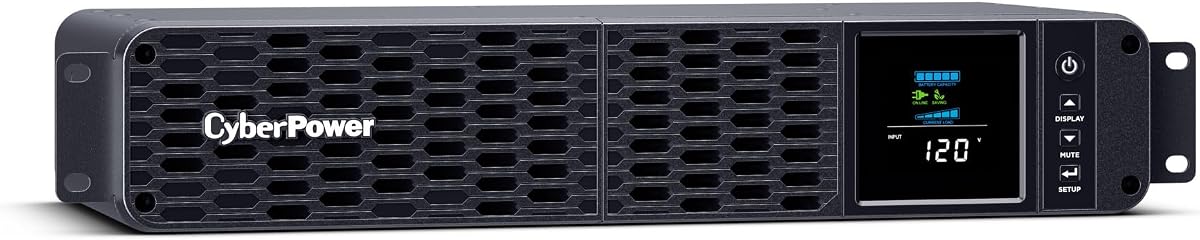
The CyberPower AVRG900LCD offers reliable protection at an accessible price for budget gamers. It provides nine hundred watt capacity with twelve outlets to cover essential devices during outages.
We may earn a commission when you buy through this link, at no additional cost to you.
Data line protection safeguards your network equipment from surges traveling through telephone lines. The LCD panel keeps you updated on battery and power conditions instantly.
The lower wattage may not support high-end gaming rigs with multiple power-hungry components. It is best for laptops with moderate power demands or single-monitor setups.
This unit is perfect for casual gamers seeking basic protection. It balances cost and functionality for entry-level gaming environments.
Prevents power surges traveling through telephone lines from damaging your connected network devices.
The intelligent LCD displays immediate and detailed information on battery and power conditions.
We may earn a commission when you buy through this link, at no additional cost to you.
The CyberPower CP1500AVRT focuses on automatic voltage regulation to extend battery life and protect devices. It delivers strong output and ten outlets for essential gaming gear during outages.
We may earn a commission when you buy through this link, at no additional cost to you.
LED status lights provide quick visual checks on power and wiring faults without needing the screen. This simplifies monitoring during intense gaming sessions.
It lacks USB ports and has fewer outlets than similar models. If you need to charge devices directly from the UPS, this may not fit your workflow.
Choose this unit for reliable AVR protection without extra features. It suits users prioritizing battery longevity and simplicity.
AVR corrects minor power fluctuations without switching to battery power which helps extend battery life.
Power-on and wiring fault indicators offer quick visual status checks for your connected devices.
We may earn a commission when you buy through this link, at no additional cost to you.
The APC Back-UPS Series includes two separate units for flexible power distribution across your gaming setup. One unit handles high-priority gear while the other covers secondary devices.
We may earn a commission when you buy through this link, at no additional cost to you.
Combined outlets give ten total connections with USB-C and USB-A ports for charging. This flexibility supports diverse equipment without a single central hub.
Managing two units adds complexity and cable clutter. You need to place each strategically for optimal outlet usage.
Select this set if you need distributed protection across multiple rooms. It suits multi-device gamers wanting redundancy and portability.
Two units allow you to distribute power to devices across different areas without relying on one central battery.
Replaceable batteries ensure long-term use and allow you to swap in new units when needed.
We may earn a commission when you buy through this link, at no additional cost to you.
The CyberPower CP1500PFCRM2U is designed for rack installations or organized home server spaces. It offers strong PFC Sinewave output for gaming laptops with Active PFC power supplies.
We may earn a commission when you buy through this link, at no additional cost to you.
Eight outlets provide solid connectivity for essential gear while the color LCD keeps you updated on power conditions. Its shallow depth fits compact racks or shelves.
It has fewer outlets than some desktop models and requires a rack or shelf. If you need maximum outlets without rack space, consider alternative models.
Choose this unit for neat and organized setups. It suits gamers with dedicated server or equipment rooms.
Short-depth design fits comfortably in short-depth rack installations where space is at a premium.
The color panel displays immediate information on battery and power conditions to prevent equipment downtime.
We may earn a commission when you buy through this link, at no additional cost to you.
The 3500W Power Inverter converts DC power to AC for gaming laptops on the go. It provides strong output and pure sine wave technology suitable for modern devices.
We may earn a commission when you buy through this link, at no additional cost to you.
Its portable design with dual fans makes it ideal for outdoor use or emergency situations. The LED display shows power status and protection alerts.
This inverter requires a separate DC battery source to work. It is not a standalone UPS and needs proper battery connection setup.
Pick this for mobile gaming or camping. It suits users needing high power in remote locations with DC sources.
Real pure sine wave inverter ensures stable and efficient power conversion for sensitive electronics.
Thermal overload and voltage protection features keep your devices safe from electrical issues.
We may earn a commission when you buy through this link, at no additional cost to you.
The CyberPower BRG1500AVRLCD2 offers a five-year warranty for long-term peace of mind. It provides twelve outlets with USB ports to keep your gaming setup fully powered and connected.
We may earn a commission when you buy through this link, at no additional cost to you.
The color LCD panel gives clear feedback on battery and power conditions. Automatic voltage regulation protects devices without unnecessary battery switching.
While the simulated sine wave works for most devices, high-end Active PFC supplies may prefer pure wave. The warranty offsets this trade-off for many users.
Choose this for extended protection and connectivity. It suits gamers who prioritize long-term reliability and support.
A comprehensive five-year warranty includes the battery and connected equipment guarantee for long-term security.
USB-A and USB-C ports allow quick charging of mobile phones and tablets during gaming.
We may earn a commission when you buy through this link, at no additional cost to you.
The 3500W Smart Inverter delivers strong power for gaming laptops outdoors or during emergencies. Its compact design and smart screen offer easy monitoring in various conditions.
We may earn a commission when you buy through this link, at no additional cost to you.
Pure sine wave output ensures safe power for sensitive electronics. Dual fans provide efficient cooling during continuous use to prolong service life.
Like other inverters, it requires an external DC battery to function. It is not a standalone UPS solution for home power outages.
Select this for portable power in remote areas. It suits gamers or travelers needing reliable AC power from DC sources.
Save space with a compact design that fits easily in a toolbox or armrest box for transport.
Digital LED display shows power status and protection alerts for quick monitoring.
We may earn a commission when you buy through this link, at no additional cost to you.
Selecting the right battery backup involves evaluating power capacity, output type, and connectivity needs. This section breaks down key factors to help you make an informed decision.
VA and wattage determine how much power your UPS can deliver. Gaming laptops often require high-wattage adapters so choose a unit with enough headroom for your laptop monitor and peripherals.
Look for a UPS with at least 900W output for standard gaming laptops and higher for dual-monitor setups.
Active PFC power supplies need pure sine wave output to avoid shutdowns. Simulated sine wave works for most devices but may cause issues with high-end power supplies.
Check your laptop manual to confirm if pure sine wave is required for your power adapter.
More outlets provide flexibility for multiple devices. Ensure the UPS has enough surge-protected outlets for your laptop monitor router and speakers without overcrowding.
USB ports are a bonus for charging phones or tablets directly from the battery backup.
AVR corrects minor power fluctuations without using battery power which extends battery life. This feature is essential in areas with unstable grid power.
Choose a model with AVR to reduce unnecessary battery discharge during minor power dips.
Color LCD panels offer detailed information on battery levels and power conditions. This helps you monitor status during gaming without needing extra apps.
Prioritize models with clear displays for better visibility during outages.
A longer warranty and connected equipment guarantee protect your investment. Some units offer five-year warranties including the battery for extended security.
Check the coverage amount to ensure it aligns with your equipment value.
If you need to move your setup frequently consider portable inverters or compact UPS units. Larger units provide more power but take up more space.
Balance power needs with available desk or storage space.
Surges can travel through telephone or Ethernet lines. Data line protection safeguards your network equipment from damage during storms.
Prioritize this feature if you rely on wired internet connections.
Plug your gaming laptop and essential peripherals into battery-protected outlets on the UPS. Ensure the unit is properly grounded and connected to a wall outlet for charging.
Perform regular self-tests using the LCD panel to check battery health. Replace the battery every three to five years or when the unit indicates low capacity.
Keep the UPS in a well-ventilated area away from direct sunlight. Avoid overloading outlets beyond the total wattage rating to prevent overheating or damage.
Yes battery backup units like UPS provide seamless power during outages for gaming laptops. They allow you to save work or finish sessions without sudden shutdowns or data loss.
Runtime depends on your laptop wattage and battery capacity. Most units offer five to twenty minutes which is enough to save work and shut down properly.
Pure sine wave matches utility power and works with Active PFC supplies. Simulated sine wave is cheaper and works for most devices but may cause issues with high-end power adapters.
Inverters work well if you have an external DC battery source. However they lack the seamless switching of a UPS so there may be a brief interruption during startup.
Yes especially if you play online games or work on important projects. A UPS protects against data loss and hardware damage from sudden power cuts.
Check your laptop manual or power adapter specifications. Active PFC is common in modern gaming laptops but may require pure sine wave output for full compatibility.
Use battery-backed outlets for your laptop and monitor. Other outlets like speakers may only need surge protection to reduce cost.
Replace every three to five years or when the unit indicates low capacity. Regular self-tests help monitor health and schedule replacements proactively.
The top picks offer reliable protection for various setups from budget-friendly models to premium units with extended warranties. Each delivers essential features like AVR and surge protection for your equipment.
Prioritize pure sine wave output and sufficient wattage for your gaming rig. Ensure the UPS has enough outlets for your laptop monitor and network gear.
Prices and availability may change over time so verify current listings before buying. Choose the model that best fits your specific power needs and budget.