
CyberPower ST425
4.4Editor score
Simulated sine wave output
Eight outlets total
High efficiency design
This guide compares ten top battery backup units for small offices, evaluating features, reliability, and surge protection to help you choose the right UPS.
A reliable battery backup for small office environments ensures continuous operations during power outages. It protects sensitive electronics from surges and provides time to save work safely.
We analyzed ten highly rated models based on capacity, outlet types, and management software. Our comparison highlights performance, build quality, and value for money across different needs.
Each pick shows key specifications and real-world benefits. Prices and availability may change, so verify current details before purchasing the best unit for your setup.
4.4Editor score

4.5Editor score
4.9Editor score
This table provides a side-by-side comparison of all ten models to help you identify the best fit for your specific office requirements.


The CyberPower CP1500PFCLCD stands out as a robust solution for small offices needing reliable power protection. With a rating of 4.5 stars, users praise its PFC Sinewave technology that ensures compatibility with modern power supplies.
We may earn a commission when you buy through this link, at no additional cost to you.
Its standout feature is the color LCD panel, which provides immediate, detailed information on battery and power conditions. This helps users detect potential issues before they affect critical equipment. The 12 outlets allow for extensive device connectivity.
While the unit is slightly larger and pricier than basic models, the investment is justified by the superior output waveform and comprehensive monitoring capabilities. It offers peace of mind for essential office equipment.
This UPS is ideal for offices with active PFC power supplies and multiple network devices. It is the top recommendation for those prioritizing performance and detailed status monitoring.
Provides clean power that protects sensitive electronics from damage during battery operation.
Displays detailed battery status and power conditions for proactive maintenance.
We may earn a commission when you buy through this link, at no additional cost to you.
The CyberPower CP1500AVRLCD3 is another strong contender with a similar rating. It uses simulated sine wave technology which is suitable for most standard office equipment. The Intelligent LCD panel offers clear status updates on battery and power.
We may earn a commission when you buy through this link, at no additional cost to you.
Automatic Voltage Regulation is a key strength, correcting minor power fluctuations without switching to battery power. This extends battery life and reduces wear during unstable grid conditions. The 12 outlets offer great versatility for desktops and routers.
Although it uses simulated sine wave rather than pure, it remains effective for non-sensitive electronics. The higher cost is balanced by the AVR feature and extensive outlet count for various devices.
This model is best for offices needing frequent voltage correction. It is a great choice for those who want a balance of performance and cost for standard workstations.
Protects against brownouts and overvoltages without consuming battery power.
Provides clear indicators for battery life and power status alerts.
We may earn a commission when you buy through this link, at no additional cost to you.
The CyberPower EC850LCD introduces a unique feature set focused on energy efficiency. It uses ECO Mode to automatically cut power to peripherals when the computer is off. This feature saves energy and lowers operational costs effectively.
We may earn a commission when you buy through this link, at no additional cost to you.
Its 12 outlets include three ECO controlled ones, offering smart control for monitors and speakers. The LCD panel displays battery conditions clearly. It is a solid choice for offices aiming to reduce energy waste.
The lower capacity limits heavy load support but fits typical office setups. The ECO feature is the trade-off that many users accept for long-term cost savings and sustainability goals.
This UPS is perfect for cost-conscious offices wanting energy savings. It is recommended for setups with standard desktops and peripherals that can benefit from smart power management.
Automatically turns off power to peripherals when the computer is idle.
Lowers energy costs by reducing unnecessary power consumption.
We may earn a commission when you buy through this link, at no additional cost to you.
The CyberPower ST900U is a slim profile unit designed for home office and entertainment use. It provides 900VA capacity and is rated 4.5 stars for its efficiency. The GreenPower UPS design reduces power consumption significantly.
We may earn a commission when you buy through this link, at no additional cost to you.
Its slim design saves space on desks while offering 12 outlets. It includes widely spaced outlets for larger plugs. This makes it suitable for offices with multiple devices needing backup power.
The efficiency design reduces heat and electricity costs. While wattage is lower than premium models, it fits smaller office needs well. The warranty ensures reliability for daily operations.
This unit is best for compact offices with gaming consoles or routers. It is recommended for users seeking a small footprint without sacrificing outlet count.
Space-saving design ideal for crowded desks and small rooms.
Reduces power consumption with a compact charger and inverter.
We may earn a commission when you buy through this link, at no additional cost to you.
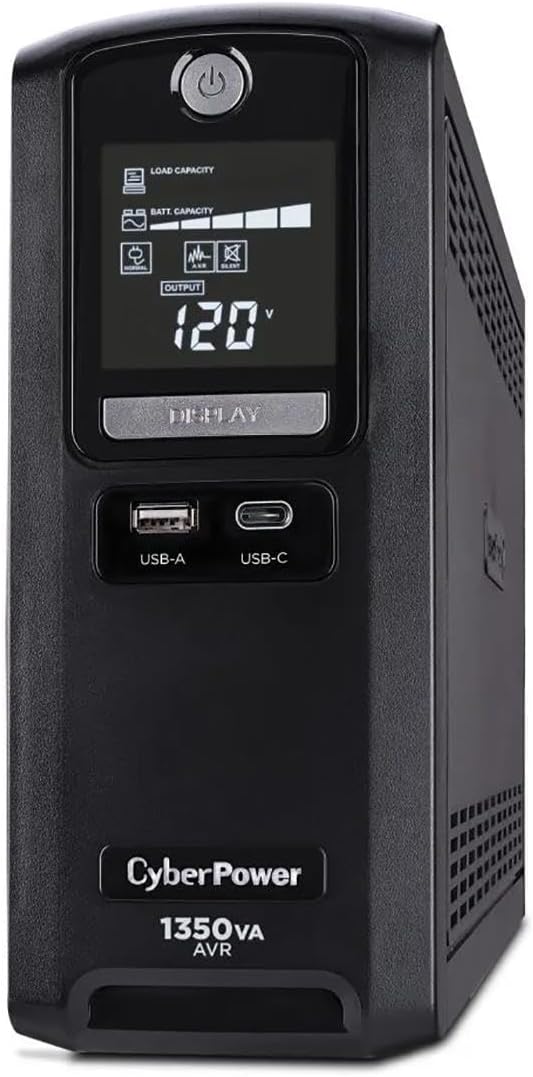
The CyberPower CST135UC has an impressive 4.9 rating and offers extensive protection. It includes network and coax protection, guarding against surges on phone and cable lines. This is critical for offices with modems or routers.
We may earn a commission when you buy through this link, at no additional cost to you.
It offers 1350VA capacity with 10 outlets. USB charge ports keep phones powered during outages. The Energy Star certification ensures it runs efficiently. The runtime at half load is ten minutes.
The data protection sets it apart from standard surge protectors. While it uses simulated sine wave, its broad coverage justifies the cost. It is a complete solution for internet-dependent offices.
This model is ideal for offices with high reliance on network connectivity. It is recommended for users wanting to protect both power and data lines effectively.
Prevents damage from surges traveling through phone or cable lines.
Provides up to ten minutes of power at half load.
We may earn a commission when you buy through this link, at no additional cost to you.
The CyberPower AVRG900LCD is rated 4.6 stars and focuses on stability. It includes Automatic Voltage Regulation to correct fluctuations without using battery. This extends battery life during brownouts effectively.
We may earn a commission when you buy through this link, at no additional cost to you.
Its data line protection prevents surges from damaging phones or modems. The Intelligent LCD shows clear status. The 12 outlets accommodate multiple devices. It is a strong option for older office equipment.
The wattage is moderate, limiting heavy loads. However, the AVR and data protection offer good value for the price. It balances basic backup with added safety for connected lines.
This unit is best for offices needing voltage stability. It is recommended for users who want affordable protection against power line disturbances.
Corrects minor power fluctuations without switching to battery power.
Prevents damage to electronics from surges on telephone lines.
We may earn a commission when you buy through this link, at no additional cost to you.
The Eaton Tripp Lite BC450 is a compact unit rated 4.2 stars. It provides basic backup for routers and PCs with 450VA capacity. It is an affordable option for small setups needing essential protection.
We may earn a commission when you buy through this link, at no additional cost to you.
It features 8 outlets with wide spacing for bulky plugs. Wall mount tabs allow for space-saving installation. The LED light indicates status clearly. It is simple and user-friendly.
The capacity limits it to low-wattage devices. The low battery alarm ensures safety. It is a budget-friendly choice for those needing to protect a single station or router.
This UPS is best for minimal office needs. It is recommended for users who want basic protection at the lowest cost point.
Small size suitable for desktop or wall mounting easily.
Provides basic surge and backup protection at a low price.
We may earn a commission when you buy through this link, at no additional cost to you.
The Eaton Tripp Lite BC350R is a tiny unit rated 4.5 stars. It provides 350VA backup for very light loads. It is designed for wall mounting with a VESA pattern. This saves space completely.
We may earn a commission when you buy through this link, at no additional cost to you.
Its simple setup allows for plug-and-play use. The battery is easily replaceable. It is ideal for small office kiosks or POS equipment where space is tight. It offers reliable basic backup.
The capacity limits it to very low power devices. However, the easy mounting and low cost make it a strong budget option. It fits well in tight spots.
This unit is best for minimal space setups. It is recommended for users needing a discreet backup for essential low-wattage devices.
Keyhole slots enable easy wall mounting to save desk space.
Provides affordable basic backup protection for small setups.
We may earn a commission when you buy through this link, at no additional cost to you.
The APC BE600M1 is rated 4.5 stars and is focused on connectivity. It keeps computers and routers running during outages to maintain internet access. Its 5 outlets are well spaced for plugs.
We may earn a commission when you buy through this link, at no additional cost to you.
The USB charger keeps phones charged even without power. Battery replacement is simple and easy. The 23-minute runtime at 100W load is useful. It is a trusted choice for home office.
It has fewer outlets than others but offers essential backup. The phone charging feature is a nice touch. It is reliable for basic office needs and network maintenance.
This model is best for internet-dependent setups. It is recommended for users who need to keep routers running and phones charged.
Keeps mobile devices charged even when the power goes out.
Internal battery can be swapped in minutes to keep costs low.
We may earn a commission when you buy through this link, at no additional cost to you.
The CyberPower ST425 is rated 4.4 stars and is the most affordable pick. It provides 425VA capacity for entry-level protection. The GreenPower design reduces power consumption. It is a budget-friendly choice for small offices.
We may earn a commission when you buy through this link, at no additional cost to you.
It offers 8 outlets with LED status lights. The outlets are transformer-spaced for larger plugs. It is suitable for basic backup of computers and broadband routers. It saves money while offering essential safety.
The capacity limits it to low loads. It lacks advanced LCD features but meets basic needs. It is a solid option for those on a tight budget.
This unit is best for cost-conscious users. It is recommended for minimal office setups needing basic surge and battery protection.
Provides essential backup at the lowest price point available.
Reduces power consumption with an ultra-efficient design.
We may earn a commission when you buy through this link, at no additional cost to you.
Selecting the right UPS requires understanding your power needs and budget. This guide outlines key factors to help you make an informed decision.
VA measures apparent power while wattage measures real power. Ensure the unit supports your total device load. Calculate wattage of all devices to choose the correct capacity.
Choose a unit that handles your total load without overloading the system.
Pure sine wave is best for modern electronics and sensitive servers. Simulated sine wave works for standard desktops and routers. Check device requirements to avoid compatibility issues.
Pure sine wave is recommended for sensitive equipment.
Ensure the unit has enough outlets for all devices. Look for spaced outlets for large adapters. This prevents the need for extension cords.
Choose a unit with enough outlets to cover all devices.
AVR corrects voltage fluctuations without using battery power. It extends battery life and protects against brownouts. This feature is useful in areas with unstable power grids.
AVR provides extra protection against voltage issues.
Check warranty length and battery replacement costs. A longer warranty indicates better quality. Ensure the battery is easy to replace to maintain unit life.
Look for a comprehensive warranty and easy battery replacement.
Protects network and phone lines from surges. This is crucial for routers and modems. Ensure the unit has coax protection if needed.
Data protection prevents damage to network equipment.
Software allows remote monitoring of battery status. Some models include USB ports for communication. This helps manage shutdowns during outages.
Software enhances monitoring and control capabilities.
Consider physical dimensions for your desk or rack. Some units support wall mounting. Ensure the unit fits in your intended location.
Ensure the unit fits your available space.
Plug the UPS into a grounded wall outlet and connect your devices. Press the power button to start. Ensure all plugs are secure for proper operation.
Keep the unit in a cool dry place to extend battery life. Avoid blocking ventilation holes to prevent overheating during operation.
Test the battery annually by unplugging it and checking functionality. Replace the battery if the alarm indicates low charge.
Most small offices need one UPS for essential devices. For larger setups, multiple units can be used for different zones. Always calculate total wattage to determine the correct size.
Pure sine wave provides clean power for sensitive electronics. Simulated sine wave is cheaper but may not suit all devices. Check your device manual for specific waveform requirements.
Many models have user-replaceable batteries. Follow the manufacturer instructions for safe removal. Ensure you use the correct replacement part for compatibility.
Battery life varies by load. A full load may last only minutes. A half load can last ten minutes or more. Check runtime charts for estimates.
Network protection prevents damage to modems and routers from surges. If you have a modem, this feature is valuable. It adds a layer of safety beyond power.
Most units come with a three-year warranty. Some include equipment protection plans. Check terms for coverage on batteries and connected devices.
The CyberPower CP1500PFCLCD stands out as a top choice for performance and features. It offers pure sine wave and extensive outlets.
Prioritize capacity and surge protection for your equipment. Ensure the unit meets your specific outlet and protection needs.
Prices and availability change frequently. Check current offers before finalizing your purchase to secure the best deal.