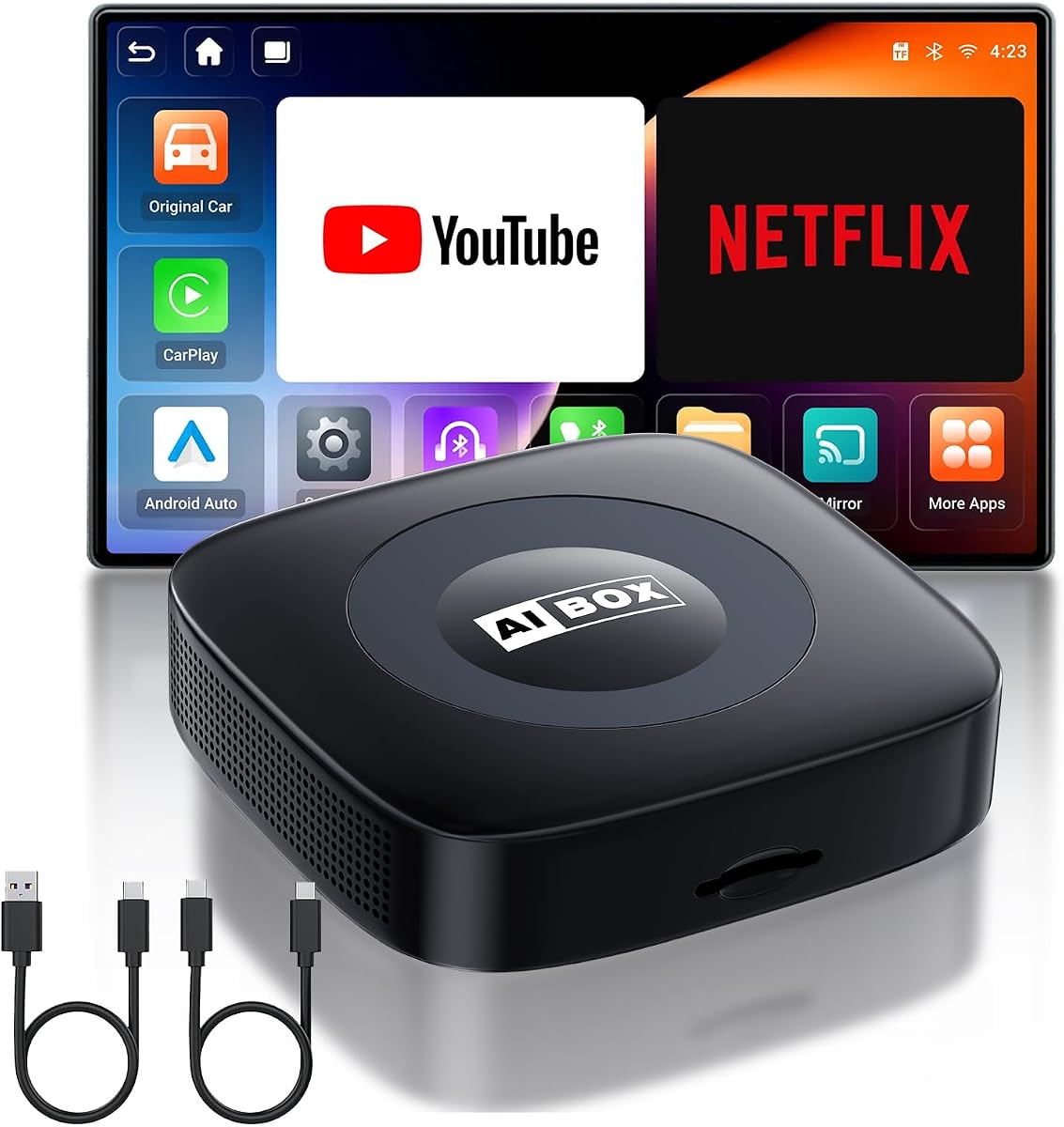
AI Box Carplay 2026 Upgraded
5.0Editor score
Quad-Core Processor
WiFi 6 Support
Compact Design
This guide compares the top 10 Carplay Box with Google Play adapters, reviewing features, performance, and compatibility for modern wired cars.
Transform your factory wired infotainment system into a smart hub with a Carplay Box with Google Play. These devices unlock full Android functionality, allowing you to stream apps like YouTube and Netflix directly on your car screen. They are essential for drivers who want more than just navigation and music from their vehicle.
We compared ten top-rated adapters based on streaming capabilities, connection stability, and user interface. Our analysis focuses on models that support Google Play access and wireless CarPlay conversion. Each product was evaluated for ease of setup, video quality, and overall performance in real-world driving scenarios.
Each pick highlights key specs, pros, and cons to help you choose the right fit. Prices and availability change frequently, so verify current details before purchasing. This guide ensures you find a reliable Carplay Box with Google Play that meets your specific needs and budget requirements.
5.0Editor score

4.7Editor score

5.0Editor score
This table provides a side-by-side comparison of the top ten Carplay Box with Google Play adapters. It highlights key specifications and unique features for each model to help you make an informed decision.


This AI Box Wireless CarPlay Adapter stands out as a top choice for transforming your wired CarPlay system. With a 4.7 rating, it offers a full Android system and Google Play Store access right out of the box.
We may earn a commission when you buy through this link, at no additional cost to you.
The key strength is its ability to turn your car screen into a smart tablet. You can download favorite apps like YouTube and TikTok directly onto the device. Screen mirroring lets you share phone content instantly without extra apps.
One trade-off is that video playback is restricted when the car is parked to comply with safety laws. Also, streaming relies on a mobile hotspot connection. These are acceptable limitations for the flexibility it provides.
Drivers who want full Android freedom will love this box. It is easy to set up and works seamlessly with most factory wired CarPlay vehicles. For a versatile entertainment hub, this is a top pick.
Access Google Play Store and install any Android app directly on your car screen for unlimited customization.
Share photos, videos, and apps from your phone to the car display with a simple one-tap connection.
We may earn a commission when you buy through this link, at no additional cost to you.
The AI Box Carplay 2026 Upgraded is an excellent budget option with a perfect 5.0 rating. It combines wireless CarPlay and Android Auto in a single compact device for seamless switching.
We may earn a commission when you buy through this link, at no additional cost to you.
Its standout feature is the upgraded Android 13 OS with a powerful quad-core processor. This ensures smooth performance and fast connections via WiFi 6 and Bluetooth 5.3. It supports over 1,200 car models.
The lower memory compared to premium boxes might limit heavy multitasking. Without a built-in SIM card, you rely on phone hotspots for internet. Still, the value and 3-year warranty make it a great buy.
Ideal for budget-conscious drivers needing reliable wireless connectivity and basic app streaming. It simplifies your dash while offering modern features. Choose this for high performance at a lower price.
Get wireless CarPlay and Android Android capabilities along with basic app support at an entry-level price point.
Enjoy Android 13 with a quad-core processor for smooth app launches and stable connections on daily drives.
We may earn a commission when you buy through this link, at no additional cost to you.
This adapter delivers premium features with a 5.0 rating. It runs on Android 13 with an 8-core Qualcomm platform for high-end performance and multitasking capabilities.
We may earn a commission when you buy through this link, at no additional cost to you.
The ScenePilot AI ecosystem adds smart driving insights, voice assistance, and privacy locks. A built-in 4G LTE trial card ensures you stay connected without relying on phone hotspots. This is a full smart car hub.
The higher price reflects these advanced features. You must activate the SIM card for LTE to work. While it is an investment, the independence and privacy tools justify the cost for tech-focused users.
Best for drivers wanting the ultimate smart car experience. It transforms your infotainment into a connected hub with AI tools. If you want top-tier features, this is the one to get.
Stay online with built-in 4G LTE without needing your phone hotspot for navigation or streaming apps.
Access ScenePilot AI features like voice assistance, trip logging, and privacy locks for a smarter drive.
We may earn a commission when you buy through this link, at no additional cost to you.
This 3-in-1 adapter has a 4.5 rating for stable wireless performance. It transforms wired CarPlay or Android Auto into a seamless wireless experience with fast auto-connect capabilities.
We may earn a commission when you buy through this link, at no additional cost to you.
The aluminum alloy build ensures superior heat dissipation for durability. Pre-loaded apps like Netflix and YouTube offer instant entertainment. Dual-band WiFi supports navigation and streaming simultaneously without lag.
It does not mention full Play Store access like other models. Also, it excludes BMW and Tesla vehicles. These exclusions limit its scope but do not hinder its core streaming performance.
Choose this for durability and reliable streaming. It is perfect for long trips where consistent performance matters. If you need a sturdy box for entertainment, this is a solid pick.
Premium aluminum build and dual-band WiFi ensure reliable performance across extreme temperatures.
Pre-loaded video apps mean you can start streaming right away without downloading extra software.
We may earn a commission when you buy through this link, at no additional cost to you.
This adapter integrates Gemini AI for hands-free assistance with a 3.7 rating. It turns your car screen into a customizable hub with 4GB RAM and 32GB storage for apps.
We may earn a commission when you buy through this link, at no additional cost to you.
The Gemini AI can plan routes, answer questions, and control smart home devices. HDMI output lets you connect external displays for passengers. Dual-band WiFi separates CarPlay and streaming channels.
The lower rating might suggest connectivity setup complexities. It relies on phone hotspots for online features. Still, the AI features and HDMI output are unique additions for families.
Best for drivers wanting voice assistance and rear passenger entertainment. The AI co-pilot adds real value on long trips. If you need HDMI, this is worth considering despite the mixed reviews.
Use Gemini AI for hands-free route planning and smart home control while driving safely.
Connect rear headrest screens via HDMI to keep backseat passengers entertained independently.
We may earn a commission when you buy through this link, at no additional cost to you.
This 5-in-1 adapter has a 4.4 rating for versatile dual-system support. It converts wired CarPlay or Android Auto to wireless effortlessly with auto-connect after initial setup.
We may earn a commission when you buy through this link, at no additional cost to you.
Built-in apps like Netflix and YouTube provide instant entertainment. The TF card slot supports offline playback for areas with poor signals. Wide compatibility covers over 800 car models post-2016.
Streaming and CarPlay cannot run simultaneously on this model. It also lacks HDMI output. However, the dual system flexibility and offline options are strong points for varied needs.
Ideal for households using both iPhone and Android. The offline playback ensures entertainment everywhere. If you need both OS options, this is a practical choice.
Seamlessly switch between CarPlay and Android Auto to support different phone types in one car.
Use the TF card slot to play downloaded movies without needing a WiFi connection.
We may earn a commission when you buy through this link, at no additional cost to you.
The CarlinKit box boasts a 4.3 rating with high-end specs. It uses the latest Android 13 OS with an 8-core processor for fast multitasking and app performance.
We may earn a commission when you buy through this link, at no additional cost to you.
It supports SIM card insertion for direct 4G internet. Built-in apps and Google Play access let you download any needed software. Storage is ample at 4G RAM and 64G ROM.
Using the SIM card requires setup steps and a data plan. The process is more involved than plug-and-play models. Still, the independence from hotspots is a major benefit.
Best for those wanting standalone connectivity and power. It offers a robust Android experience. If you prefer not to use phone hotspots, this model is designed for you.
Powerful 8-core processor handles multiple apps and streaming without lag or freezing.
Use a SIM card for direct 4G internet so your phone remains free for calls.
We may earn a commission when you buy through this link, at no additional cost to you.
This 2026 upgraded Magic Box holds a perfect 5.0 rating. It combines wireless CarPlay, Android Auto, and video playback in one compact unit with 5G WiFi for fast streaming.
We may earn a commission when you buy through this link, at no additional cost to you.
HDMI connection allows video output to projectors or external screens. Ideal for camping or outdoor use. Bluetooth 5.0 ensures quick pairing. It supports Netflix and YouTube apps directly.
App downloading is limited to pre-installed options. You still need a hotspot for online content. Despite this, the HDMI versatility and speed make it a strong contender for tech lovers.
Best for those needing HDMI versatility or outdoor video options. The compact design fits neatly. If you want a 2026-ready box with HDMI, choose this one.
Use the HDMI port to connect projectors for movie nights in camping or outdoor settings.
Enjoy 5G WiFi speeds for smooth streaming on 2026 upgraded hardware.
We may earn a commission when you buy through this link, at no additional cost to you.
This LAMTTO adapter has a 4.0 rating and features Gemini AI Co-Pilot. It offers wireless CarPlay, Android Auto, and media apps like Netflix and YouTube in one box.
We may earn a commission when you buy through this link, at no additional cost to you.
Gemini AI helps with routes and entertainment. USB playback works offline for areas without signal. HD media output connects to rear displays so kids can watch separately.
Hotspot dependency means your phone uses data for internet. It also requires newer Android versions. Still, the AI and offline features provide good versatility for family trips.
Great for parents needing rear screen solutions. The AI makes navigation easier. If you have an Android phone, this works well for entertainment on long drives.
Use voice commands to access AI features and keep eyes on the road for safety.
Connect rear displays to let passengers watch independently while the driver navigates.
We may earn a commission when you buy through this link, at no additional cost to you.
This 6-in-1 box has a 3.8 rating and focuses on simple plug-and-play streaming. It supports wireless CarPlay and Android Auto with built-in Netflix and YouTube apps.
We may earn a commission when you buy through this link, at no additional cost to you.
TF card playback allows offline use. It works with over 800 car models after 2016. Easy setup takes just 10-15 seconds. You can switch between systems easily.
It does not allow downloading new apps beyond what is built-in. BMW and Tesla are not supported. For basic streaming needs, it is straightforward and functional.
Best for simple users who do not need custom apps. It works right out of the box. If you just want built-in entertainment, this is a simple choice.
Plug in the device and connect in seconds for immediate wireless CarPlay and streaming.
Use a TF card to play downloaded content when you have no WiFi signal.
We may earn a commission when you buy through this link, at no additional cost to you.
Selecting the right Carplay Box with Google Play requires evaluating several key factors to ensure compatibility and performance.
Check which Android OS the box runs. Newer versions like Android 13 offer better app compatibility and smoother interfaces.
Choose a box with the latest OS for future-proofing your device.
Some boxes need a phone hotspot, while others have SIM slots for 4G LTE. If you drive in weak signal areas, built-in LTE is better.
Determine if you prefer phone tethering or independent internet for your car box.
Ensure the box has Google Play Store access if you need custom apps. Some models only have pre-installed apps like Netflix or YouTube.
Look for full Play Store support if you want to install any Android app.
Confirm the adapter supports your car's factory wired CarPlay system. Not all work with BMW or Tesla models due to different protocols.
Verify vehicle compatibility before purchasing to avoid return issues.
Higher RAM and storage allow more apps and smoother multitasking. 4GB RAM or more is ideal for heavy use.
Pick a box with ample memory to prevent lag when switching apps.
If you want to connect rear screens, look for HDMI ports. Not all boxes support video output beyond the main car screen.
Choose HDMI output if family entertainment is a priority for you.
Many boxes lock video playback when driving. Ensure the device follows local laws to avoid distractions while on the road.
Prioritize models with parking-only restrictions for safe legal use.
A longer warranty like 12 or 24 months protects your investment. Check customer support availability for setup help.
Look for boxes with strong warranty terms and responsive support teams.
Begin by plugging the adapter into your car's USB port. If the box supports it, insert a SIM card for internet. Then pair via Bluetooth with your phone.
Connect the box to your mobile hotspot or enable 4G if supported. Open streaming apps or Android apps directly on the car screen to enjoy content.
Keep the device updated via OTA updates. Avoid leaving it in extreme heat or direct sunlight for long periods to maintain battery life.
No, most boxes come with pre-installed apps like YouTube and Netflix. If the box has Google Play access, you can download other apps directly during setup.
No, for safety reasons, video apps like Netflix only work when the car is parked. The system detects motion and disables video playback while driving.
Yes, you connect to your phone's hotspot. Some boxes have built-in SIM slots so you do not need to tether your phone for internet.
Not all. Most work with factory wired CarPlay systems. Many exclude BMW and Tesla, so check specific compatibility before purchasing your device.
If the box has Google Play Store, yes. If not, you are limited to pre-installed apps like YouTube and Netflix on most standard models.
Most boxes support Over-the-Air updates. Connect to WiFi and check settings for updates. The device will install the latest firmware automatically.
We highlighted the top choices including the AI Box Wireless CarPlay Adapter for overall value and the Wireless Android Auto Carplay Adapter for premium features.
Prioritize connectivity options and app needs when selecting. If you need HDMI or LTE, choose premium models. For budget needs, the 2026 Upgraded options work well.
Always check current prices and availability on Amazon. Features and deals change often so verify specs before finalizing your purchase decision.