
HP Chromebook 14 Laptop
4.4Editor score
Long 13 hour battery life
Dual array digital microphones
Lightweight portable design
Finding a cheap laptop for recording music requires balancing power with affordability. You need enough RAM and processing speed to handle audio tracks without annoying latency issues or frustrating crashes during creative sessions.
We compared ten budget-friendly models based on their processors, memory capacity, storage options, and connectivity. Our analysis focuses on which devices offer the best stability for digital audio workstations under a strict price limit.
Each pick shows key specs and real-world strengths for audio tasks. Prices fluctuate often so verify current deals before buying. This guide ensures you spend wisely on hardware that supports your musical growth without breaking the bank.
4.4Editor score
4.3Editor score

5.0Editor score
As an Amazon Associate we earn from qualifying purchases.
This side by side comparison highlights the core specifications of all ten budget laptops. We focus on processor speed, memory size, storage type, and port availability to help you quickly identify the model best suited for your recording needs.


This laptop stands out as a top budget choice with 12GB RAM and a responsive SSD. It handles basic recording tasks and file management smoothly without lagging during simple sessions.
We may earn a commission when you buy through this link, at no additional cost to you.
The FHD IPS display offers clear visuals for tracking waveforms or editing notes. Connectivity includes USB-C and HDMI so you can attach external audio interfaces or monitors easily.
Storage is limited at 128GB but the M.2 slot supports upgrades. This means you can add space for audio files later. The lightweight chassis makes it portable for sessions on the go.
It is ideal for beginners or students needing an affordable entry point. While not a powerhouse for complex multi-track projects it delivers reliable performance for learning the basics of music production.
The 12GB RAM allows you to run your DAW and a browser simultaneously without slowdowns. This ensures your recording software stays responsive even when other apps are open.
With USB 3.2 and Type-C ports you can connect external hard drives or audio interfaces directly. This flexibility is essential for transferring large project files quickly.
We may earn a commission when you buy through this link, at no additional cost to you.
The HP Chromebook 14 is designed for lightweight tasks with a focus on battery longevity and portability. It features dual microphones which can be useful for capturing simple vocal ideas on the fly.
We may earn a commission when you buy through this link, at no additional cost to you.
With Intel Celeron processing it handles music playback and basic web tools well. The 13.5 hour battery ensures you can work through a long day without hunting for an outlet.
However the 4GB RAM and Chrome OS limit its use for professional recording software. It is best suited for listening to reference tracks or organizing your music library rather than active recording.
For casual users or students this laptop offers great value. Its small footprint and light weight make it easy to carry anywhere while still providing a reliable screen for media consumption.
Enjoy up to thirteen hours of battery life on a single charge. The laptop weighs only 3.24 lbs making it easy to slip into a backpack for daily transport.
Dual array digital microphones help capture clear audio for notes or quick demos. This is a rare feature at this price point and adds versatility to the device.
We may earn a commission when you buy through this link, at no additional cost to you.
This model emphasizes performance per dollar with 12GB RAM out of the box. It runs smoothly for standard productivity and light audio tasks thanks to the responsive SSD and capable processor.
We may earn a commission when you buy through this link, at no additional cost to you.
The 15.6 inch FHD IPS screen delivers vibrant colors which helps when visualizing audio waveforms. A privacy slider is built into the webcam for added security during recording sessions.
It includes a mix of USB 3.2 and Type-C ports allowing for flexible peripheral connections. The anti-glare coating reduces eye strain during long editing sessions in bright environments.
Ideal for students who need a reliable machine for both school and music basics. The ability to upgrade storage later makes it a smart long-term investment for growing needs.
The FHD IPS display offers wide viewing angles and sharp details. This is essential for reading small DAW controls or tracking notes without eye fatigue.
Connect external monitors or drives using USB-C or HDMI. The range of ports ensures you can build a functional workspace without needing extra adapters.
We may earn a commission when you buy through this link, at no additional cost to you.
The BLUEING 2026 laptop balances portability with a clear FHD display. It supports USB-C charging which simplifies your setup by reducing the number of cables needed during sessions.
We may earn a commission when you buy through this link, at no additional cost to you.
With 8GB RAM it handles basic multitasking adequately. The Bluetooth 5.2 connectivity ensures stable wireless connections for headphones or speakers while working away from the desk.
A privacy slider protects your camera when not in use. The 16:9 widescreen ratio provides ample space for organizing project files or viewing reference materials comfortably.
This unit is a solid pick for users who prioritize mobility. It is easy to carry and offers enough power for learning music software without the bulk of heavier machines.
The 1080p FHD IPS display offers a 100% sRGB color gamut. Vivid visuals make it easy to see details in your editing software or browsing the web.
Lithium-polymer battery provides extended runtime for daily tasks. USB-C charging means you can use a single cable for power and data transfer.
We may earn a commission when you buy through this link, at no additional cost to you.
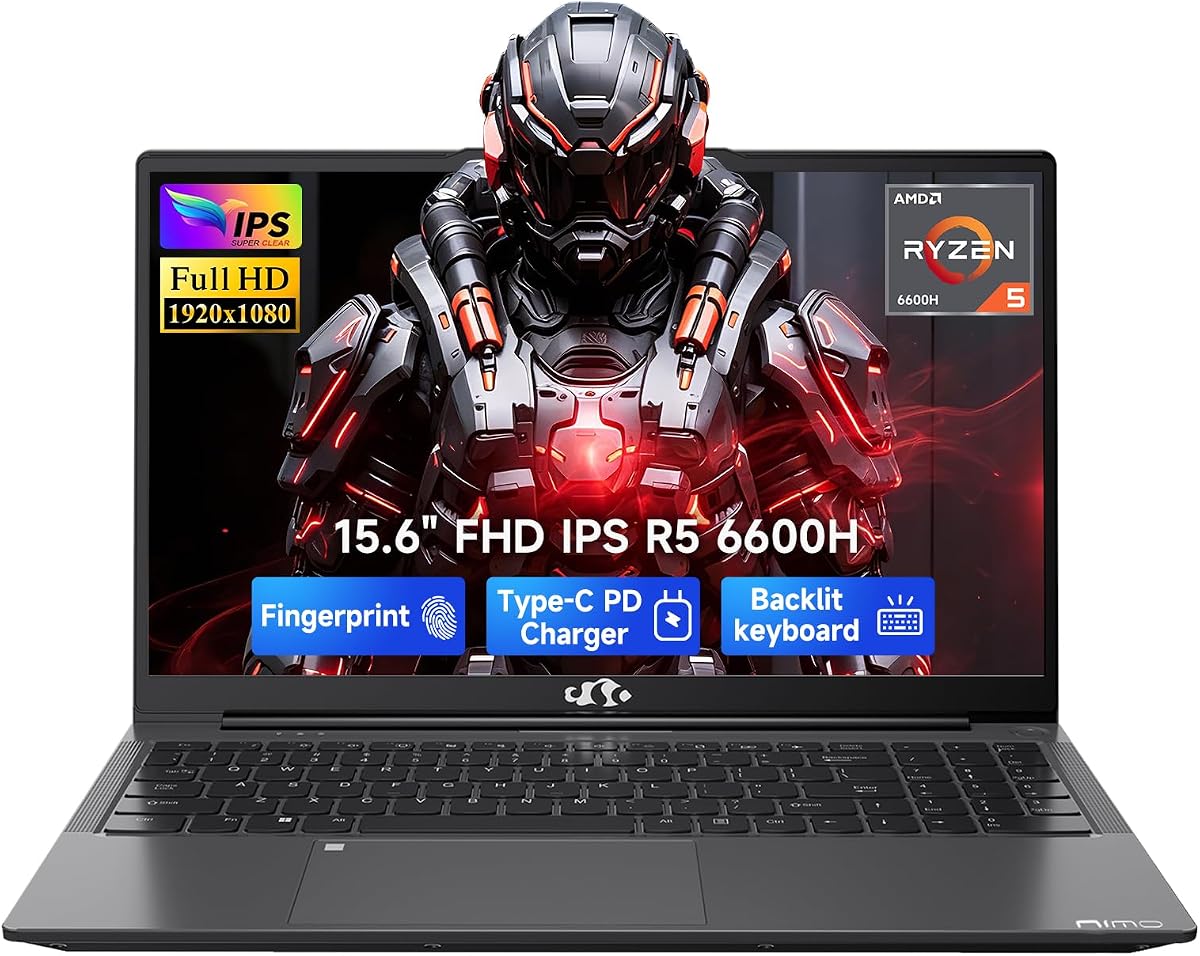
This NIMO laptop leads the list with a powerful AMD Ryzen 5 processor and 16GB of DDR5 memory. It provides the headroom needed for more complex multi-track recording sessions.
We may earn a commission when you buy through this link, at no additional cost to you.
The 512GB SSD ensures quick loading of samples and projects. Multiple USB ports let you connect interfaces and drives without constant unplugging which keeps workflow smooth.
A backlit keyboard helps with late night sessions. The fingerprint reader adds security for your personal music files and user data on the device.
It is the best choice for serious hobbyists needing real processing power. The combination of speed and memory makes it a reliable partner for growing your music career.
The Ryzen 5 6600H features 6 cores and 12 threads. This architecture handles audio plugins and multitasking efficiently without lag or latency issues.
16GB RAM supports running heavy software while other apps stay open. The 512GB SSD offers ample space for storing libraries and project files.
We may earn a commission when you buy through this link, at no additional cost to you.
This model improves on storage with a 256GB SSD which is better for saving audio files than the base 128GB options. It keeps startup times fast and file access snappy for daily work.
We may earn a commission when you buy through this link, at no additional cost to you.
The 12GB RAM supports smooth multitasking allowing you to run recording software and other tools simultaneously. The FHD IPS display delivers vivid colors for accurate visual feedback.
Bluetooth 5.0 ensures stable wireless connections for peripherals. The full-size ergonomic keyboard enhances comfort during long writing or editing sessions at a desk.
It is a practical step up for users needing more room. The balance of memory and storage makes it a good middle ground for those ready to expand beyond basic tasks.
With 256GB SSD you can store more projects locally without external drives. This reduces clutter and keeps your workflow organized during active recording periods.
The 100% sRGB color gamut ensures vibrant visuals. This is beneficial when color coding tracks or reviewing media within your production software.
We may earn a commission when you buy through this link, at no additional cost to you.
This laptop is designed for quiet operation making it suitable for shared spaces or home studios. The 12GB RAM and 256GB SSD provide a solid baseline for handling audio tasks.
We may earn a commission when you buy through this link, at no additional cost to you.
It features a built-in webcam cover for privacy during video calls or online lessons. The lightweight design at 3.5 lbs makes it easy to move between rooms as needed.
Connectivity includes dual Type-C ports which simplify connection to modern devices. The FHD IPS display offers wide viewing angles so you can see your screen from different positions.
It is a reliable option for those prioritizing silence. The balanced specs ensure smooth daily use without unnecessary noise or distraction during creative work.
Quiet operation ensures your microphone captures clean audio without fan noise interference. The webcam cover adds a layer of security when you step away.
Weighing only 3.5 lbs it is easy to carry around. This makes it ideal for taking to a coffee shop or a friend's studio for collaboration.
We may earn a commission when you buy through this link, at no additional cost to you.
This BLUEING model focuses on visual clarity with a 1080p FHD IPS display. The 256GB SSD provides enough space for storing media files and system software efficiently.
We may earn a commission when you buy through this link, at no additional cost to you.
It supports fast downloads and streaming with strong WiFi connectivity. The full-size keyboard helps with quick shortcuts and typing notes during your sessions.
The privacy slider is a useful feature for security. A 100% sRGB color gamut ensures that colors appear vivid on screen for accurate visual work.
It is a good fit for media consumption and light editing. The screen quality stands out as a highlight for users who value a clear view of their work.
Enjoy a vibrant visual experience with crisp 1080p resolution. The wide screen-to-body ratio offers more space to see multiple windows at once.
Powerful wireless connectivity supports fast file transfers. USB-C and USB 3.2 ports allow for easy connection to external drives or monitors.
We may earn a commission when you buy through this link, at no additional cost to you.
The Amzboy laptop is fanless ensuring absolutely silent operation during recording. This is crucial for avoiding noise interference when capturing audio in quiet environments.
We may earn a commission when you buy through this link, at no additional cost to you.
Weighing just 3.3 lbs it is incredibly portable for daily travel. The Type-C PD fast charging keeps you moving without waiting hours for a full battery.
Storage can be expanded up to 1TB via TF card slot. This flexibility allows you to archive old projects without buying expensive internal upgrades.
It is perfect for those needing a silent listening device. While not powerful for heavy production its fanless design makes it a unique tool for audio monitoring.
The fanless design prevents internal dust and noise. This is a major benefit for recording vocals or instruments without adding background noise to your tracks.
Expandable storage up to 1TB gives you plenty of room for backups. The hassle-free slot allows easy upgrades without needing technical tools.
We may earn a commission when you buy through this link, at no additional cost to you.
This laptop offers dependable processing for daily workloads without pretending to be a heavy workstation. It handles basic recording needs and file management reliably with Windows 11 preloaded.
We may earn a commission when you buy through this link, at no additional cost to you.
The 128GB SSD ensures quick startups while the TF slot supports expansion to 512GB. This lets you adapt the device as your music library grows over time.
Three USB 3.0 ports cover all your peripheral needs without adapters. The lightweight footprint keeps the machine easy to carry between different workspaces.
It is a great entry level choice for casual creators. The secure design and reliable performance make it a safe and steady tool for getting started in music.
Comet Lake processing provides smooth everyday responsiveness. It handles online classes and office productivity alongside light music work seamlessly.
The integrated Kensington lock slot lets you tether the laptop to a desk. This safeguards your device in shared spaces like libraries or schools.
We may earn a commission when you buy through this link, at no additional cost to you.
Selecting the right budget laptop for music recording involves balancing specific hardware requirements with your financial limits.
RAM is critical for handling multiple tracks in your Digital Audio Workstation. Aim for at least 8GB but 12GB or 16GB is preferred to prevent lag during complex sessions.
Higher RAM ensures smooth performance when running your DAW alongside web browsers and reference tools without interruption.
The CPU determines how well your laptop can handle audio plugins and effects. Look for processors with higher core counts to support real-time processing of your tracks.
A faster processor reduces latency and allows for more detailed mixing and mastering within your project environment.
Solid State Drives are essential for quick file access and fast loading of audio libraries. Avoid slower mechanical hard drives which can cause stuttering during playback.
An SSD with sufficient space or expansion capabilities ensures you can store all your samples and projects efficiently.
Your laptop needs enough ports to connect external audio interfaces or monitors directly. USB-C and USB 3.0 are standard and necessary for professional peripherals.
Verify the available ports match your hardware to avoid needing expensive adapters that can introduce signal issues.
Long battery life is useful if you move between locations for recording or editing. Aim for laptops that offer 8 hours or more to stay productive without hunting for outlets.
Extended runtime ensures your creative flow is not interrupted by low power warnings during important sessions.
A clear display helps you read small waveforms and DAW controls accurately. FHD resolution and good color accuracy make visual editing tasks easier on the eyes.
Prioritize screens with wide viewing angles if you work in different lighting or positions during the day.
Lightweight laptops make it easier to transport your gear for on-the-go recording. A chassis under 4 lbs is ideal for daily commuting or studio hopping.
Reducing weight helps prevent fatigue when carrying your laptop and other gear between locations regularly.
Ensure the operating system supports your preferred music software and plugins. Windows and macOS have different compatibility requirements for professional audio tools.
Check that your chosen OS is fully updated to avoid conflicts with audio drivers and system resources.
Keep your laptop on a hard surface during recording to prevent overheating. Soft surfaces like beds can block air vents causing fans to spin louder which interferes with audio.
Use a wired internet connection or close background downloads to stabilize your performance. Network fluctuations can sometimes impact cloud-based audio tools or sync processes.
Regularly update your audio drivers and operating system to ensure compatibility. This helps maintain smooth connections with external interfaces and software plugins.
Chromebooks are generally limited for professional recording software but can handle simple tasks like file management or basic web audio tools. You may find limited support for local plugins due to the operating system constraints.
Eight gigabytes is the bare minimum for entry-level projects but 12GB or more is recommended for smooth performance. You might experience slowdowns if you use multiple large plugins at once.
While some laptops have built-in jacks an external interface provides better audio quality and more inputs. It allows you to connect instruments directly with lower latency.
An M.2 NVMe SSD offers the fastest read and write speeds which are crucial for loading samples quickly. Look for models that support upgrades to expand your storage later.
Lower your buffer size in your audio settings and close unnecessary background apps to free up system resources. Keeping drivers updated also helps minimize processing delays.
USB-C ports are highly useful for modern peripherals like external drives or high-speed audio interfaces. They often allow for faster data transfer and simpler charging options.
A minimum one-year manufacturer warranty is standard but longer terms offer better peace of mind. Check if the plan includes coverage for accidental damage or hardware defects.
These ten options provide a strong starting point for music production on a budget. From the powerful NIMO model to the lightweight HP Chromebook there is a fit for various skill levels and needs.
Prioritize RAM and SSD speed to ensure your recording software runs smoothly without interruption. Investing a little more in memory can save you from frustrating lag during creative sessions.
Always verify current availability and deals before making a purchase. Prices change frequently so keeping an eye on sales ensures you get the most value for your investment.