
VEIKK VK1200 V2
4.3Editor score
Full-laminated anti-glare glass
Eight thousand pressure levels
USB-C single cable setup
Finding an affordable pen display can transform your creative workflow without breaking the bank. These devices let you draw directly on a screen, offering a natural experience that traditional tablets cannot match for beginners and professionals alike.
We have analyzed ten highly rated options based on screen quality, pressure sensitivity, and software compatibility. Each entry offers distinct advantages for different users, ensuring you can find the right tool for your specific artistic needs.
Every pick highlights key strengths and potential drawbacks so you can make an informed decision. Please note that product availability and pricing may change over time, so check current listings before finalizing your purchase.
4.3Editor score

4.4Editor score

4.5Editor score
As an Amazon Associate we earn from qualifying purchases.
The following table provides a side-by-side comparison of all ten models to help you quickly identify which device aligns best with your technical requirements and creative goals.




The XP-PEN Artist12 stands out as a top choice for artists seeking high-quality visuals without a premium price tag. With a 4.4-star rating, it delivers vivid images and extreme detail suitable for various creative tasks.
We may earn a commission when you buy through this link, at no additional cost to you.
Its 11.6-inch HD IPS display offers a 72 percent NTSC color gamut, ensuring your artwork appears lifelike. The battery-free stylus features a digital eraser and a comfortable grip, while customizable shortcut keys enhance workflow efficiency.
Although it requires a computer connection and might need an extra converter for some laptops, the included anti-reflective protector saves setup time. These minor limitations are acceptable given the robust performance and broad software compatibility.
Ideal for digital drawing and remote education, this tablet bridges the gap between affordability and professional features. We recommend it for anyone wanting a reliable entry into pen displays with strong manufacturer support.
The display presents vibrant colors and extreme detail, making it perfect for animation and photo editing tasks.
The passive pen requires no charging, ensuring uninterrupted creativity during long drawing sessions.
We may earn a commission when you buy through this link, at no additional cost to you.
VEIKK VK1200 V2 offers exceptional value for those on a tight budget while maintaining professional-grade features. Its full-laminated technology minimizes parallax, ensuring cursor accuracy for precise digital art creation.
We may earn a commission when you buy through this link, at no additional cost to you.
The device includes two battery-free pens with tilt recognition and a high pressure sensitivity level. A single USB-C cable simplifies connectivity, while six programmable keys help streamline your drawing process efficiently.
While it is not standalone and requires a PC, the anti-glare glass provides a natural paper-like feel. These trade-offs are minor compared to the cost savings and ergonomic design benefits provided by this model.
Perfect for students and beginners, this tablet delivers a highly ergonomic work platform without expensive price. We suggest it for anyone prioritizing affordability and ease of use in their creative toolkit.
Seamless integration of glass and screen minimizes parallax for precise cursor positioning during drawing.
Compact and stylish all-metal body makes it easy to carry on the go for creative work.
We may earn a commission when you buy through this link, at no additional cost to you.
The HUION Kamvas 13 (Gen 3) elevates the category with advanced features like dual dials and factory calibration. Its 4.5-star rating reflects strong performance in color accuracy and pressure sensitivity for detailed work.
We may earn a commission when you buy through this link, at no additional cost to you.
With 16384 pressure levels and an anti-sparkle canvas glass, it offers a fluid natural drawing experience. The dual dials and shortcut keys optimize workflow, allowing you to control brushes and scroll without software menus.
While it requires a computer and is pricier than other options, the enhanced color accuracy justifies the cost for professionals. These considerations are acceptable for users who demand precise visual representation in their projects.
Ideal for designers and illustrators, this model provides a streamlined creative workflow with stunning visuals. We recommend it for those seeking top-tier performance and reliability in a pen display.
The 16384 pressure levels and tilt support ensure fluid and natural strokes for detailed art.
Dual dial buttons and shortcut keys let you manage creative tasks efficiently without interrupting focus.
We may earn a commission when you buy through this link, at no additional cost to you.
GAOMON PD1161 is a versatile option for beginners and professionals alike, offering a full HD IPS screen with vivid color performance. The 4.3-star rating indicates reliable performance for sketching and design work.
We may earn a commission when you buy through this link, at no additional cost to you.
Its 11.6-inch display supports 16.7 million colors, ensuring smooth gradation for lifelike drawings. Eight customizable shortcut keys on the side improve workflow, while the battery-free stylus eliminates charging hassles.
Though it needs a separate power adapter and HDMI connection, these are minor drawbacks for the price. The matte film reduces glare effectively, providing a comfortable viewing experience during long creative sessions.
Best for general digital art and education, this tablet is a solid choice for those needing reliable tools. We suggest it for anyone looking for a balance between cost and functionality in a pen display.
The 16.7 million display colors enable lifelike artwork with smooth color transitions on screen.
Eight programmable keys and two pen buttons let you tailor shortcuts to your specific needs.
We may earn a commission when you buy through this link, at no additional cost to you.
The Artisul D16 offers a significantly larger 15.6-inch create area, perfect for detailed illustration and animation tasks. Its perfect rating suggests high customer satisfaction with the refurbished unit and overall performance.
We may earn a commission when you buy through this link, at no additional cost to you.
Equipped with a full-laminated screen and 76 percent Adobe RGB color gamut, it delivers clear details and accurate colors. The quick dial allows intuitive control over brush sizes, while the adjustable stand supports ergonomic postures.
As a refurbished unit, availability may vary, but it provides a cost-effective solution for those needing more space. These factors are acceptable for users who prioritize screen real estate and ergonomic features in their setup.
Ideal for graphic design and animation, this model is a strong contender for those seeking a larger workspace. We recommend it for professionals who need extra room to maneuver their creative projects.
The 15.6-inch area offers ample space for intricate illustrations and detailed animation work.
Programmer quick dial helps you adjust brush sizes and scroll pages without navigating menus.
We may earn a commission when you buy through this link, at no additional cost to you.
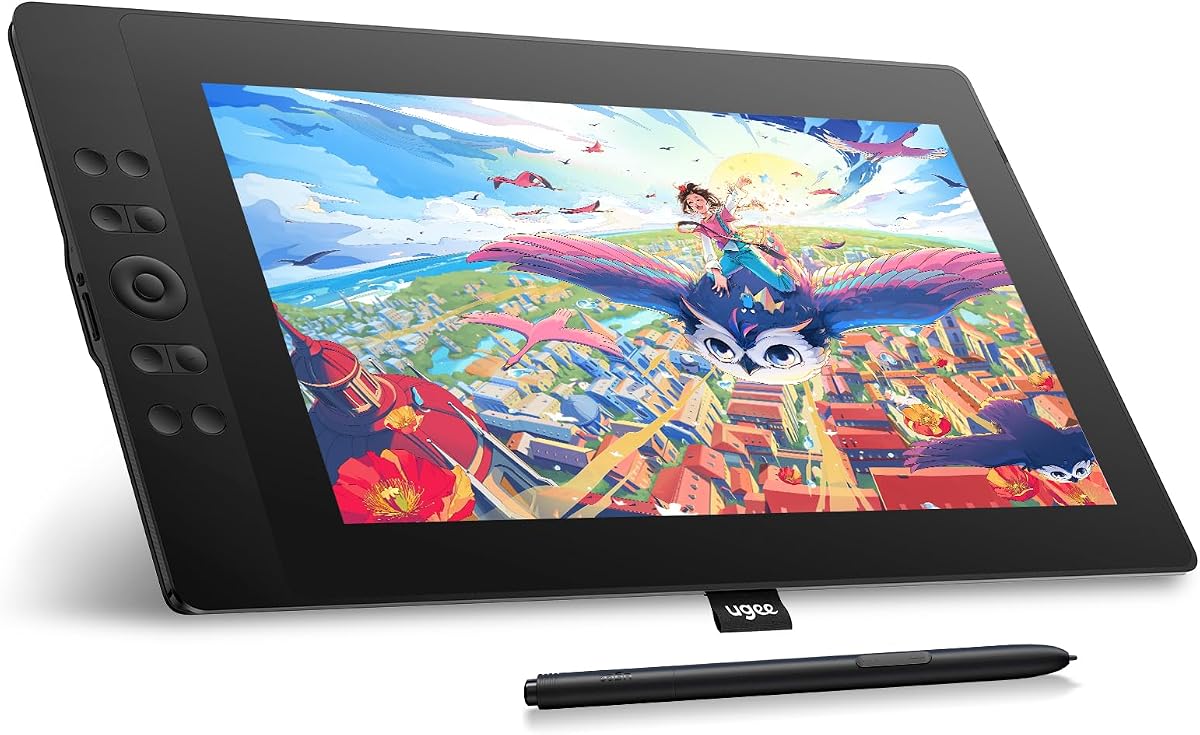
UGEE UE16 stands out with its 143 percent sRGB color gamut, delivering exceptional color accuracy for designers and artists. A 4.5-star rating highlights its capability to reproduce 16.7 million colors with remarkable fidelity.
We may earn a commission when you buy through this link, at no additional cost to you.
The tablet features 16K pressure sensitivity and multiple color spaces like Adobe RGB and DCI-P3 for versatile work. Its pencil-like grip and customizable hotkeys provide a tactile, feedback that enhances the drawing experience.
Although it requires a PC and you must verify cable packing, the color performance justifies these minor checks. These limitations are acceptable for users who prioritize accurate color representation in their creative output.
Best for professional design and digital painting, this model offers precision and finesse. We suggest it for anyone needing vivid and accurate color portrayal in their artwork.
With 143 percent sRGB coverage, the UE16 ensures accurate and vivid color reproduction.
The 16K pressure level ensures that every stroke translates effortlessly and precisely onto the screen.
We may earn a commission when you buy through this link, at no additional cost to you.
VEIKK VK1200 provides a reliable entry point for beginners and students looking to start digital art. With a 4.2-star rating, it offers essential features like tilt function and pressure sensitivity for effective drawing.
We may earn a commission when you buy through this link, at no additional cost to you.
The tablet includes two battery-free pens and an artist glove, ensuring you have everything needed to start. Six shortcut keys allow quick access to essential tools like undo or brush selection, simplifying your workflow.
While it requires a computer and offers a basic feature set, the included accessories add significant value. These trade-offs are acceptable for beginners who want an affordable kit to get started in digital art.
Ideal for students and entry-level artists, this model is a practical choice for learning digital sketching. We recommend it for those starting their creative journey with budget-friendly tools.
The package includes two pens, an artist glove, and twenty-eight pen nibs for extended use.
Tilt support allows you to adjust the pen angle for natural and varied drawing styles.
We may earn a commission when you buy through this link, at no additional cost to you.
RubensTab T11 Pro offers a unique standalone experience for users who want to create on the go without a PC. Its 4.4-star rating reflects satisfaction with its portability and ease of use for notes and art.
We may earn a commission when you buy through this link, at no additional cost to you.
Equipped with a 10.1-inch Full HD screen and a 5800mAh battery, it supports continuous creative sessions. The high-sensitivity pen and multi-touch features allow intuitive zooming and fluid strokes for sketching and editing.
While battery life is limited to about five hours and it lacks PC integration, it provides true portability. These factors are acceptable for travelers or students needing a compact solution for daily creative tasks.
Best for on-the-go artists and students, this model is perfect for quick sketches and notes. We suggest it for anyone valuing independence and mobility in their digital art setup.
No need for a computer allows you to create anywhere, anytime with this self-contained device.
Up to five hours of continuous use supports long creative sessions without needing immediate power.
We may earn a commission when you buy through this link, at no additional cost to you.
VEIKK VK1200V2 features an upgraded 16384 pressure sensitivity, doubling the standard to offer more control over strokes. Its 4.2-star rating indicates reliable performance for creating delicate lines with a high reading rate.
We may earn a commission when you buy through this link, at no additional cost to you.
The device uses a full-laminated IPS HD screen to minimize parallax and ensure precise cursor positioning. Six customizable hotkeys help streamline tasks, while the lightweight design makes it easy to carry for daily use.
While it requires a PC and driver updates, the enhanced pressure levels provide a competitive edge. These factors are acceptable for users who need high precision and portability in their drawing setup.
Ideal for artists needing finer control, this model is a great choice for detailed work. We recommend it for those who want an upgrade in pressure sensitivity without increasing the budget significantly.
Sixteen thousand three hundred eighty-four pressure levels allow for natural and delicate lines.
This design effectively reduces parallax for precise cursor positioning and a comfortable experience.
We may earn a commission when you buy through this link, at no additional cost to you.
XPPen Artist 12 Pro Lite offers a fully laminated display that eliminates parallax for a distraction-free drawing experience. With a 4.4-star rating, it provides smooth strokes and high sensitivity for varied creation needs.
We may earn a commission when you buy through this link, at no additional cost to you.
The red dial and eight shortcut keys offer convenient control options, while the 3-in-1 cable design means no extra adapters. Tilt support allows for natural shading without frequent software adjustments, enhancing comfort.
Although it requires a PC and the stylus is basic, the convenience of the cable setup is a plus. These trade-offs are acceptable for artists who value ease of connection and workflow customization.
Best for illustrators needing precision and convenience, this model simplifies setup. We suggest it for those looking for a reliable tool with easy connectivity for daily tasks.
The programmable Red Dial provides comfortable hand control for adjusting settings smoothly.
The 3-in-1 cable design means you do not need any adapter to connect to your computer.
We may earn a commission when you buy through this link, at no additional cost to you.
Selecting the right pen display involves understanding key factors like screen quality, pressure sensitivity, and connectivity options to ensure it fits your creative needs and budget.
Screen size determines how much space you have for detailed work. A larger display allows for more complex projects, while smaller screens are easier to transport. Ensure the resolution is at least Full HD for sharp lines and text clarity.
Choose a size that fits your workspace and portability needs without sacrificing clarity.
Pressure sensitivity determines how well the tablet captures the force of your strokes. Higher levels like 8192 or 16384 provide finer control over line thickness. This feature is crucial for natural shading and varied brush effects.
Look for higher levels if you need detailed control over your artistic output.
Tilt support allows you to adjust the pen angle to vary line width and shading naturally. This mimics traditional tools like pencils or brushes. It is particularly useful for shading techniques and dynamic strokes.
Ensure the pen supports tilt if you want more natural and expressive drawing capabilities.
Color accuracy ensures your digital art looks the same on screen and when printed. Look for high sRGB or Adobe RGB percentages for vivid, lifelike colors. This factor is key for professional designers and illustrators.
Prioritize higher color gamut coverage if color fidelity is critical to your work.
Most tablets require a computer connection via HDMI and USB or USB-C. USB-C single cable options simplify setup. Standalone tablets exist but may have limited features. Check your computer ports to avoid needing extra adapters.
Verify that your device supports the necessary ports for seamless connectivity.
Ensure the tablet supports your operating system and preferred software like Photoshop or Clip Studio. Drivers are crucial for full functionality. Linux and Mac users should check specific compatibility before purchasing.
Confirm compatibility with your existing software to avoid workflow disruptions.
Most pen displays require constant power from a computer or adapter. Standalone models have built-in batteries with limited hours. Consider how long you need to work away from a power source.
Check battery specifications if you plan to use the device on the go.
Build quality affects durability and comfort. Look for models with anti-glare glass and stable stands. A good warranty and customer support can save time and money if issues arise.
Prioritize durable materials and reliable support for long-term use.
To start using your pen display, connect it to your computer using the provided cables. Install the necessary drivers from the manufacturer website to ensure all functions like pressure sensitivity and shortcut keys work correctly.
Adjust your pen pressure and tilt settings in the software to match your drawing style. Many programs allow you to map the shortcut keys for efficient access to tools like erasers or undo functions.
Keep the screen clean with a soft cloth to avoid scratches and maintain visibility. Avoid exposing the device to direct sunlight or extreme temperatures to prolong its lifespan and performance.
Most models require a computer connection, but some support Android via USB-C. Check device compatibility before purchasing to ensure it works with your mobile device.
Most featured in this guide use battery-free styluses that do not require charging. They rely on electromagnetic resonance for power, ensuring uninterrupted creativity.
Yes, these tablets are excellent for note-taking, especially for remote work or education. They allow you to write directly on the screen with natural pressure sensitivity.
Some models include basic software or licenses for apps like ArtRage. However, most rely on third-party software like Photoshop or Krita for advanced work.
Full-laminated screens minimize parallax effectively. Ensure drivers are up to date and calibrate the pen settings in your system preferences if issues persist.
Most require a computer connection to function. Only standalone models like the RubensTab T11 Pro allow standalone use without a PC.
We have explored ten affordable options ranging from budget-friendly to premium features. Each tablet offers unique advantages like high pressure sensitivity or larger screens to suit different artistic needs.
Prioritize features that matter most to you, such as color accuracy or connectivity options. A device with the right tools will enhance your workflow without costing a fortune.
Remember that product availability and specifications may change over time. Always check current listings and reviews before making your final decision to ensure the best value.