This guide compares the best captioned telephone models for hearing impaired users, featuring real-time captions, amplified sound, and senior-friendly designs.
As an Amazon Associate we earn from qualifying purchases. We may earn a commission when you buy through links on this page, at no additional cost to you. Read our affiliate disclosure.As an Amazon Associate we earn from qualifying purchases.Purchases through our links may earn us a commission, at no extra cost to you. Read our affiliate disclosure.
Captioned telephones provide a vital connection for those with hearing loss by displaying real-time text of phone conversations. These devices transform audio calls into visual text, ensuring no word is missed during important chats with family or friends.
We evaluated ten top models based on caption accuracy, sound amplification, ease of use, and accessibility features for seniors. Our comparison highlights devices with large screens, high-volume speakers, and intuitive interfaces designed for varying levels of hearing and vision impairment.
Each product pick details specific strengths like voicemail captions, photo dialing, or voice activation to match individual needs. Prices and availability fluctuate frequently, so always verify current listings before making a final purchase decision for your home or care facility.
Top 3 Picks for Best Captioned Telephone
Best Budget
Corded Landline Phones for Seniors – Dementia/Alzheimers Phone for Seniors, 9 Big Picture Buttons & One-Click Dialing – 110dB Loud Ringer, Hands-Free – for Visual Hearing & Memory Impairments
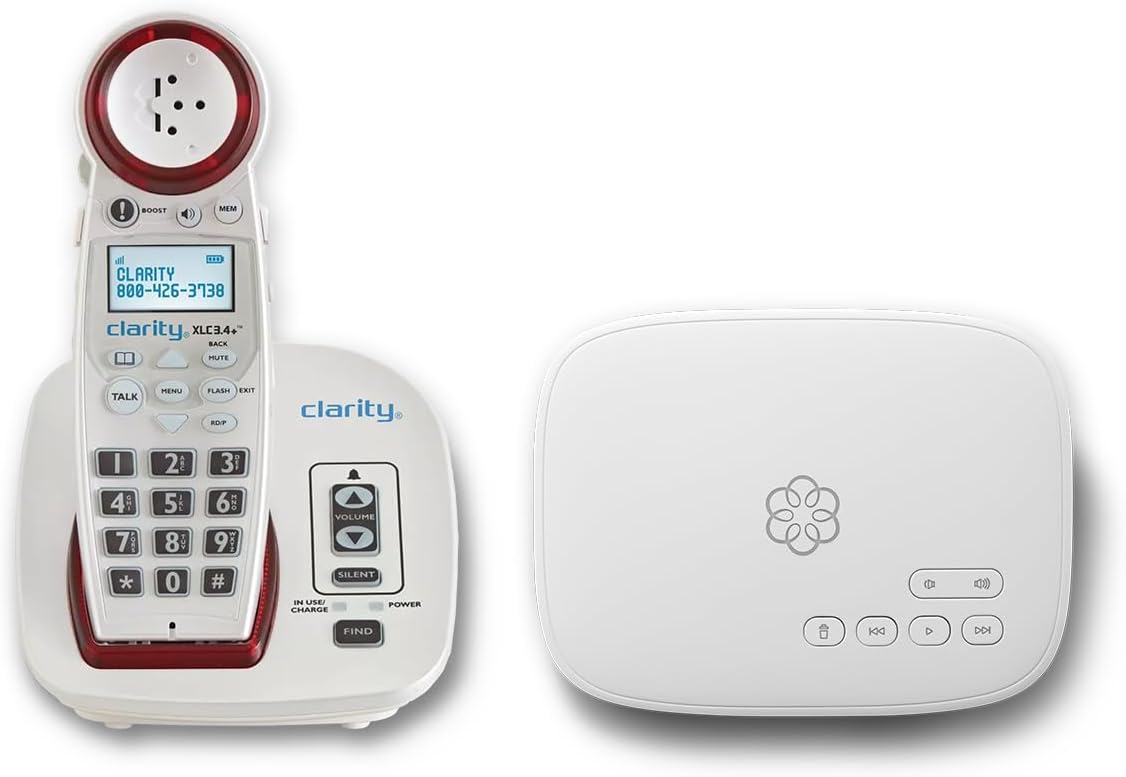
Ooma Telo with Clarity XLC3.4+ Amplified Cordless Phone Service Bundle with 24/7 Concierge Plan. Personal Setup Assistance, Address-Based 911 and Text alerts, Call Blocking. Subscription Required
This side-by-side comparison highlights the unique capabilities of each ranked device to help you find the perfect fit for your hearing and accessibility requirements.
ProductsSpecificationsEditor scorePrice
1
Editor's Choice
Hamilton CapTel 2400iSPNBT Large Touch Screen Captioned Telephone
FLYINGVOICE FIP12WP Home VoIP Phone (Not a Regular Analog Phone), Customizable Image Keys for Seniors with Dementia, Large Button IP Phone, 110dB Amplified Sound, One-Touch Help Key
Ooma Telo with Clarity XLC3.4+ Amplified Cordless Phone Service Bundle with 24/7 Concierge Plan. Personal Setup Assistance, Address-Based 911 and Text alerts, Call Blocking. Subscription Required
Corded Landline Phone for Seniors, Dementia/Alzheimers Phone for Seniors -Amplified Senior Phone -9 Picture Memory One-Touch Dial Telephone, Hands-Free Calling, Home House Phones for Senior
This captioned telephone leads our list by offering real-time text captions directly on an easy-to-read touchscreen. With a solid 4.3 star rating, it ensures users never miss words during calls through its robust captioning system that works for both incoming and outgoing conversations.
Pros
Clear large screen text display
Easy to use touch controls
No cost captioning service
Hearing aid compatible audio
Visual voicemail text review
Cons
Requires high-speed internet connection
Registration required for service
We may earn a commission when you buy through this link, at no additional cost to you.
The device excels with amplified sound up to 40dB and customizable caption sizes to fit personal comfort levels. It features a built-in answering machine that displays voicemail captions, allowing seniors to review messages at their own pace without relying solely on auditory cues.
While the unit needs a high-speed internet connection and FCC registration, the benefits of accurate captions outweigh these setup requirements for most users. The system operates 24/7 nationwide ensuring reliable support regardless of the time of day when calls are placed.
Anyone needing to bridge the gap between hearing and understanding phone conversations will find this Hamilton model invaluable. It turns everyday calls into confident interactions making it the top recommendation for those seeking clarity and connection in their daily communication routines.
Instant Visual Clarity
The large touchscreen displays every word spoken during calls in real time reducing the stress of trying to hear clearly.
Accessible Voicemail
Voicemails are transcribed to text on the screen so users can read and respond without confusion or delay.
This corded landline phone is ideal for those prioritizing simplicity and loud audio over text captions. It features customizable photo speed dial buttons that allow seniors to call family by simply pressing a picture of their loved one instead of numbers.
Pros
Simple photo speed dial keys
Extremely loud visual and audio alerts
Reliable landline power source
Hands-free speakerphone mode
Easy four-step setup
Cons
No captioning functionality included
Requires RJ11 phone line
We may earn a commission when you buy through this link, at no additional cost to you.
The device boasts a massive 110dB ringer and flashing visual indicator so calls are never missed even in noisy environments. It runs entirely on the phone line power meaning no batteries or WiFi are needed which ensures reliability during power outages.
While it lacks built-in captioning, the volume and interface design make it accessible for hearing impaired users who struggle with traditional dialing. The programmable SOS button adds an extra layer of safety for emergency situations though it must be set up manually.
Best for seniors with memory or visual impairments this phone keeps communication effortless. It serves as a reliable budget option for those who need clear sound and easy access to contacts without complex internet dependencies.
Effortless Picture Dialing
Large picture buttons let users call family members instantly without needing to remember or look up phone numbers.
Visual and Auditory Alerts
A loud 110dB ringer and flashing light ensure incoming calls are noticed immediately by everyone in the home.
This bundle combines an amplified cordless phone with a full home calling service to create a seamless communication hub for seniors. The 4.5 star rating reflects the comprehensive nature of the setup which includes concierge plans and personal assistance for installation.
Pros
Integrated voice and phone service
Visual and adjustable ringer alerts
Talking keypad for navigation
Hearing aid compatible device
Robust robocall blocking
Cons
Requires monthly subscription fee
Setup assistance may take time
We may earn a commission when you buy through this link, at no additional cost to you.
Key features include a talking keypad and visual ringer that accommodate varying degrees of hearing loss. The device allows full control over speaker volume and ringer settings while offering robust call blocking to keep the line safe from unwanted contacts.
The main trade-off involves the ongoing subscription cost required to maintain the service and features. However the convenience of unlimited domestic calling and precise 911 location tracking provides significant peace of mind for families managing senior care needs.
Ideal for those wanting an all-in-one solution this premium option ensures connectivity and safety. It is best suited for households ready to invest in a long-term telephone service that prioritizes accessibility and clear communication.
Complete Communication Bundle
This system includes both the hardware and the telephone service ensuring a cohesive experience for daily use.
Safety and Clarity
Visual ringers and address-based 911 alerts ensure calls are heard and emergency help is routed accurately.
The VTech SN5147 offers a reliable hybrid system combining a corded base for power outages with a cordless handset for mobility. It supports seniors with hearing loss through amplified sound and large buttons that make dialing easier for those with limited vision.
Pros
Mobility with cordless handset
Large backlit display
One-touch volume boost
Photo speed dial keys
Block robocalls feature
Cons
Caption text not available
Answering machine limited to minutes
We may earn a commission when you buy through this link, at no additional cost to you.
It includes a loud 90dB ringer with flashing alerts to ensure calls are never missed even if the room is noisy. The photo dial feature allows users to store numbers of loved ones in visual slots so they can call with just one touch.
While it lacks text captioning the phone focuses on audio clarity and call management. The smart call blocker helps prevent interruptions from unwanted calls while the answering machine records messages for later review by family members.
This model is perfect for seniors who want flexibility between staying home and moving around. Its combination of amplified audio visual cues and easy dialing makes it a strong contender for those needing a versatile and accessible landline phone.
Hybrid Convenience
Work during power outages with the corded base while enjoying the freedom of the cordless handset daily.
Visual Accessibility
Oversized buttons and extra-large displays help users with low vision dial numbers and check caller ID easily.
This phone stands out by allowing users to answer dial and hang up using only their voice. It is designed for those with mobility or vision difficulties who cannot easily reach or press buttons on a traditional telephone device.
Pros
No button pressing required
Ideal for limited mobility
Simple voice commands
Quality audio clarity
Always ready listening mode
Cons
No specific caption text features
Dependent on voice recognition
We may earn a commission when you buy through this link, at no additional cost to you.
The active listening feature keeps the device ready to receive commands at any time. This hands-free approach reduces physical effort and makes communication accessible for individuals with arthritis or hand tremors who struggle with standard phone interfaces.
While it does not offer text captions the voice activation provides a different form of accessibility that may suit some users better. The quality is rated well by users who appreciate the simplicity of voice commands over complex navigation menus.
Anyone with mobility constraints will find this phone incredibly useful for daily communication. It removes the physical barrier of buttons and allows for seamless conversation initiation making it a unique option for those needing voice-based control.
Hands-Free Convenience
Control the phone entirely with voice commands so no physical buttons need to be pressed during calls.
Continuous Readiness
The device is always listening for commands ensuring users can call or answer at any time without delay.
This big button phone is tailored for seniors with dementia or hearing impairments through its large tactile buttons and picture assist options. It offers up to 40dB of amplified volume so users can hear conversations clearly without straining to listen.
Pros
Adjustable loud volume levels
Clear picture dial options
Memory stays after unplug
Wall or desktop mountable
Nonskid base stability
Cons
No caption display on screen
Basic landline functionality
We may earn a commission when you buy through this link, at no additional cost to you.
The replaceable picture buttons allow families to store numbers visually making it easier to remember who to call. The memory protection ensures numbers stay safe even if the phone line is unplugged which is crucial for those with cognitive challenges.
While it lacks a digital display for text captions the focus is on physical ease of use and reliable sound. It can be mounted on a wall or placed on a desktop ensuring it stays secure and accessible in any room of the house.
Ideal for those needing a simple yet effective communication tool this phone keeps family bonds strong. The combination of visual cues amplified sound and sturdy design makes it a reliable choice for seniors with varying physical limitations.
Visual Memory Aids
Picture buttons help seniors dial loved ones without needing to memorize or type in phone numbers.
Sturdy Installation Options
The phone can be mounted on a wall or sits stably on a table with nonskid pieces to prevent slipping.
This VoIP phone stands out for its customizable image keys that help seniors with dementia remember who to call by showing photos. It features a dedicated help key and offers massive 110dB amplified sound ensuring calls are heard clearly even in busy environments.
Pros
Custom image memory keys
Very loud amplified speakerphone
Dedicated help button
Visual red light alerts
Wall mountable design
Cons
Not compatible with POTS
Requires SIP or PBX service
We may earn a commission when you buy through this link, at no additional cost to you.
The device provides visual cues through a bright red light alert so users know when a call is coming in or a message is waiting. It is designed for safety and clarity making it suitable for nursing homes or personal use where monitoring is important.
It requires an active VoIP service or PBX system to work which is a key difference from standard analog phones. Users should confirm their internet telephony setup before purchasing to ensure compatibility with this advanced communication device.
Best for those needing modern internet-based calling with senior friendly features this phone bridges technology and accessibility. Its safety features and image keys make it a top choice for facilities caring for individuals with memory or hearing impairments.
Image Based Memory
Customizable image keys allow users to dial contacts by looking at a photo rather than remembering names or numbers.
Enhanced Volume
Speakerphone volume exceeds one hundred ten decibels to ensure audio is clear for those with significant hearing loss.
The Serene Innovations phone focuses on delivering high definition audio to make conversations as clear as possible. It is designed for performance with amplified sound levels that help users hear words clearly without distortion or static interference.
Pros
Clear high definition sound
Simple amplified dialing
Standard landline connection
Comfortable listening experience
Reliable performance
Cons
No visual text captions
Higher price point
We may earn a commission when you buy through this link, at no additional cost to you.
While specific features vary this model is known for its reliable audio quality and straightforward operation. It uses standard landline compatibility to ensure it works easily with existing home phone setups without requiring extra adapters or services.
Some users find the price higher compared to basic models but the audio clarity often justifies the cost for those with hearing needs. It serves well as a dedicated listening device for individuals who need superior sound output over visual text features.
Best for seniors prioritizing audio clarity this phone provides a comfortable listening experience. It simplifies calls by improving sound quality which helps those with mild to moderate hearing loss feel more confident during conversations.
Superior Sound Clarity
High definition audio ensures that voices are heard clearly without static or distortion during calls.
Simple Setup
Compatible with standard landlines so users can plug it in and start talking without complex configuration.
This voice dialer phone allows users to make and end calls using voice commands which helps those with limited dexterity. It includes features like talking caller ID and a visual LED ring to alert users when calls are coming in.
Pros
Voice dial and answer
Visual LED ring alerts
Talking caller ID
Redial and pause features
Hands-free volume control
Cons
Mixed user ratings
Older interface design
We may earn a commission when you buy through this link, at no additional cost to you.
The phone offers up to 40dB of earbud volume and hands-free controls so users can adjust settings to their comfort. It supports programmable memories for numbers which can be useful for quick access to frequent contacts.
While the feature set is robust some users report mixed experiences with the interface or voice recognition. However for those who need hands-free options and visual alerts this model provides a range of accessibility tools for daily use.
Best for individuals needing voice command capabilities this phone simplifies dialing. It combines audio and visual aids to help users manage calls effectively though testing the interface is recommended to ensure satisfaction with voice commands.
Voice Control
Use voice commands to dial answer or end calls making it easier for those with limited hand movement.
Visual and Audio Alerts
A visual LED ring and talking caller ID ensure you know exactly who is calling and when.
This landline phone is built for simplicity with nine picture memory keys that let seniors call family by touching a photo. It features a loud ringer and hands-free mode to ensure calls are accessible and clear for those with limited mobility.
Pros
Simple one-touch dialing
Extremely loud ringer
Hands-free mode support
No external power needed
Quick number programming
Cons
No internet features
Basic landline only
We may earn a commission when you buy through this link, at no additional cost to you.
Programming numbers takes just four steps which reduces the time and effort needed to set up contact lists. The phone runs on the phone line so there are no batteries to replace ensuring it stays reliable without extra maintenance.
While it does not include internet based features the focus is on dependable and accessible communication. The large picture buttons and clear audio make it a great choice for those needing straightforward tools to stay in touch.
Ideal for those with memory loss or vision challenges this phone keeps family bonds strong. Its design prioritizes ease of use and clear sound making it a comforting tool for seniors to connect with loved ones daily.
One-Touch Dialing
Nine picture keys let users call family and friends instantly by pressing a photo instead of typing numbers.
Reliable Power
Uses phone line power without batteries so the device stays ready for calls without extra maintenance or charging.
We may earn a commission when you buy through this link, at no additional cost to you.
Buying Guide – How to Choose the Best Captioned Telephone
Choosing the right telephone involves evaluating your specific hearing vision and memory needs along with home setup requirements.
Captioning Technology
Captioned telephones display text of spoken words during calls helping those with hearing loss understand conversations fully. Look for devices that offer real-time captioning via internet connections for both incoming and outgoing calls to ensure no words are missed.
Ensure the model supports your internet connection type and offers enough screen space to read captions comfortably.
Audio Amplification
Even with captions hearing impaired users often need louder audio to hear tones or confirm speech. Check for volume settings that support at least 40 to 50 decibels of amplification and hearing aid compatibility for clearer sound.
Higher decibel ranges like 110dB in ringers can also alert you to incoming calls in busy or noisy rooms.
Visual and Audio Alerts
Visual indicators such as flashing lights and loud ringers ensure users never miss a call even if they are not in the room. These features are critical for those with mild to moderate hearing loss who might not hear standard chimes.
Look for adjustable ringer volumes and bright LED indicators that sync with incoming calls for maximum awareness.
Memory and Dialing Ease
Large buttons and picture dialing options simplify the process of contacting loved ones without remembering numbers. This is particularly useful for seniors with dementia or memory loss who benefit from visual cues on the phone interface.
Ensure the phone allows easy programming of speed dial contacts and keeps these memories safe even after power interruptions.
Connection and Power
Determine if the device works with a standard analog line or requires VoIP internet services. Traditional analog phones offer reliability during power outages while VoIP models offer more advanced features like video or text messaging.
Always check if the phone needs an electrical outlet or runs solely on the phone line power to avoid unnecessary complexity.
Service Requirements
Captioned telephones often rely on specific services or registration to function correctly so verify eligibility and subscription needs. Some services require FCC certification or residency restrictions that could affect your ability to use them.
Confirm if the device includes a free subscription or if ongoing fees apply to access captioning and support features.
Safety and Support
Emergency features like SOS buttons and address-based 911 tracking provide peace of mind for families caring for seniors. Hands-free options and dedicated help keys make it easier to reach assistance quickly if needed.
Look for devices with customer support and setup assistance to ensure the phone is configured correctly for daily use.
Durability and Build
Phones that are wall mountable or have nonskid bases reduce the risk of drops or damage over time. Choose models with sturdy construction that withstands regular use in nursing homes or busy household environments.
A solid build quality ensures the phone remains functional and safe for years of reliable communication.
How to Use and Care for Your Captioned Telephone
Start by placing the telephone on a stable flat surface near your regular seating area for comfort. Plug the device into a working phone line and electrical outlet if required following the setup guide provided with the unit.
Program your speed dial contacts by entering numbers and assigning names or photos to specific buttons. Test the voice or captioning features by making a trial call to ensure everything sounds and displays correctly before regular use.
Keep the screen and buttons clean with a soft dry cloth to avoid damage from moisture or dirt. Regularly check the volume settings and update contact lists as needed to ensure the phone remains functional and useful over time.
Frequently Asked Questions
Do captioned telephones work without internet?
Most captioned telephones require a high-speed internet connection to display real-time text captions during calls. However basic landline phones without captions do not need internet and work solely on phone line power. Always check the product specs for connection requirements before purchase.
Can seniors with dementia use these phones easily?
Yes many models feature photo dial buttons and simple interfaces that help seniors with memory loss dial contacts easily. Visual cues and one-touch options reduce the need to remember numbers making calls more accessible and stress-free.
Are captioned telephone services free to use?
Many captioning services are funded by the government and do not require subscription fees for basic use. However some advanced bundles like Ooma may involve monthly service charges for unlimited calls and extra features like call blocking.
What volume level is best for severe hearing loss?
For severe hearing loss look for phones with amplification up to 50dB on the handset and 110dB on the ringer. These levels ensure that users can hear conversations and incoming alerts clearly even in noisy environments.
How do I program speed dial on these phones?
Programming usually involves entering the number pressing a speed dial button and saving the contact. For photo dial models place a picture card into the designated slot and press the button to link the number to that image.
Can I use a captioned phone during a power outage?
Traditional corded phones that rely only on phone line power will work during outages. However captioned phones that need internet or Wi-Fi may not function until power is restored unless you have backup solutions like a UPS.
Final Thoughts on Choosing the Best Captioned Telephone
The Hamilton CapTel 2400iSPNBT leads as the best overall choice for real-time captioning and user-friendly design. For budget needs the Corded Landline Phones for Seniors offer simple photo dialing and high volume without complex setup.
Prioritize features like visual alerts and picture dialing to match your specific hearing and cognitive needs. A device with hands-free options and loud ringers ensures reliable communication in any environment.
Remember to check current availability and prices as listings change frequently. Verify service requirements and setup needs to ensure the chosen model fits your home connection and daily lifestyle.