
Anker Prime Charging Station, 200W 6-Port GaN Desktop Charger
4.6Editor score
Ultra-powerful 200W output capacity
Each USB-C supports up to 100W
Compact design suitable for desk use
This guide compares the top charging stations for multiple devices to help you find the best organizer for your home office and tech setup in October 2026.
In today's digital world, we rely on numerous gadgets daily. A good charging station keeps everything powered and organized without cluttering your desk.
We evaluated ten leading models based on port count, charging speed, build quality, and safety features. This list covers various needs from budget to premium.
Each pick highlights key strengths and ideal use cases. Please note that product availability and pricing can change frequently on major retail platforms.
4.6Editor score

4.5Editor score

4.3Editor score
The following comparison table provides a side-by-side look at the specifications and key features of all ten selected charging stations.




The Zobirez 420W 10-Port Charging Station stands out as a powerful solution for homes and offices. With a rating of 4.5 stars from thousands of users, it delivers reliable performance across a wide range of gadgets. Its standout quality lies in the ability to charge ten devices simultaneously without sacrificing speed or safety.
We may earn a commission when you buy through this link, at no additional cost to you.
This unit features a total output of up to 420 watts, distributed across five USB-C and five USB-A ports. The dual 65W GaN ports allow laptops like MacBook series to charge efficiently. The five 30W and three 45W ports handle smartphones, tablets, and accessories with ease. The design includes eight short mixed cables to reduce clutter immediately.
While the unit is robust, its size means it requires dedicated space. The fixed slots are durable but do not allow for rearrangement like removable dividers. However, the trade-off is worth it for the stability and longevity provided by the one-piece flame-retardant ABS construction.
Anyone managing a tech-heavy household or shared workspace will find this station indispensable. It eliminates the need for multiple wall adapters and keeps cords tidy. We recommend it for those seeking a high-capacity, set-and-forget solution that prioritizes safety and organization.
The 420W total output ensures that even when all ports are in use, devices receive adequate power to charge quickly without throttling speeds significantly.
Built-in protections guard against over-current, over-voltage, and overheating, ensuring your expensive electronics remain safe during extended charging sessions.
We may earn a commission when you buy through this link, at no additional cost to you.
The Zobirez 750W 10-Port Charging Charger pushes the limits of what a desktop hub can offer. Rated at 4.6 stars, it is built for power users who need to charge multiple high-demand devices simultaneously. Its standout feature is the ability to deliver 120W per USB-C port, enabling fast charging for modern laptops.
We may earn a commission when you buy through this link, at no additional cost to you.
This station combines five 120W USB-C ports with five 30W USB-A ports. This configuration ensures that even when fully loaded, high-power devices like MacBook Pros or gaming consoles get the watts they need. The sturdy one-piece design includes wide bays that accommodate tablets with protective cases without slipping.
The size and price reflect its capacity, making it less ideal for small nightstands. Users might find the sheer bulk overpowering for simple phone charging needs. However, for a central charging hub in an office or family room, the performance justifies the footprint and cost.
We recommend this model for households with diverse tech needs including high-wattage laptops and multiple tablets. It provides a future-proof solution that will not bottleneck as device power requirements increase. It is the ultimate choice for those who prioritize raw power over portability.
With 750W total output and 120W per USB-C port, this station handles the most demanding laptops and peripherals without compromising charge speeds.
The mix of high-power USB-C and reliable USB-A ports ensures compatibility with both new laptops and legacy devices like keyboards and mice.
We may earn a commission when you buy through this link, at no additional cost to you.
Anker continues to set the standard for quality with the Prime Charging Station. Boasting a 4.6-star rating, this 200W unit offers premium features like active temperature monitoring. It is designed for users who value reliability and compact efficiency over sheer port count.
We may earn a commission when you buy through this link, at no additional cost to you.
Each of the three USB-C ports can deliver up to 100W when used individually, making it capable of charging two 14-inch MacBook Pros simultaneously. The GaN technology ensures the unit stays cooler and smaller than traditional silicon chargers. It includes a five-foot power cord to reach outlets behind desks easily.
The main trade-off is the lower port count compared to 10-port models. If you need to charge ten devices at once, this might not be enough. However, for most professionals with a few laptops and phones, the six ports are sufficient and the build quality is superior.
We suggest this for those who want a clean, professional setup without sacrificing performance. It is an excellent choice for office desks or home workspaces where space is at a premium. The warranty and safety features provide peace of mind for expensive equipment.
Proprietary safety systems continuously monitor temperature to prevent overheating, ensuring safe operation even during intense multi-device charging sessions.
The compact form factor keeps your desk tidy, taking up minimal space while still delivering high-power output for your essential work devices.
We may earn a commission when you buy through this link, at no additional cost to you.
For budget-conscious shoppers, this six-port charging station offers exceptional value. With a 4.3-star rating, it proves that you do not need to spend a fortune to organize your electronics. It is designed primarily for mobile devices rather than high-wattage laptops.
We may earn a commission when you buy through this link, at no additional cost to you.
The unit delivers 100W total across three USB-C and three USB-A ports. Each USB-C port supports up to 20W, which is sufficient for most smartphones and small tablets. The compact dimensions and light weight make it easy to pack in a bag for travel or temporary desk setups.
While it lacks the power for laptops, it excels at keeping phones, earbuds, and kindles running. The included extension cord helps manage reach issues. Users looking for a desktop hub for high-power laptops should look elsewhere, but for general mobile needs, this is a solid entry-level option.
We recommend this for students or travelers who need to charge phones and small accessories cheaply. It is a great secondary charger for a bedside table or office cubicle. The build quality is decent, and the port count allows the whole family to power up quickly.
Its small size and included power cord make it perfect for hotel rooms or offices where outlet access is limited or inconveniently located.
Intelligent circuitry adjusts power delivery to match device needs, preventing overcharging and extending battery health for your portable electronics.
We may earn a commission when you buy through this link, at no additional cost to you.
Apple users looking for a seamless wireless experience will love the MagGo 3-in-1 station. Rated 4.6 stars, it supports Qi2 standards for true 15W charging on iPhones. It simplifies the bedside routine by combining phone, watch, and earbud charging into one tidy dock.
We may earn a commission when you buy through this link, at no additional cost to you.
The unit features a dedicated spot for the Apple Watch that charges fully in just over an hour. You can adjust the phone angle up to 45 degrees for StandBy mode, turning your phone into a clock or media display. The design is sleek and fits easily on nightstands.
The reliance on wireless charging means speeds are slower than plugging in a cable. It also restricts you to devices compatible with MagSafe or Qi. If you use Android devices or need to charge laptops, this will not work. However, for Apple fans, it is convenient.
We recommend this specifically for iPhone owners who value convenience and aesthetics. It is perfect for a nightstand where you want to see notifications or use StandBy mode. The official certifications ensure safe, reliable charging for your Apple ecosystem devices.
Leveraging Qi2 technology, this dock provides consistent 15W charging for iPhones, ensuring faster wireless charging than older Qi standards.
Adjustable viewing angles let you set your iPhone to StandBy mode, transforming it into a bedside clock or smart home controller effortlessly.
We may earn a commission when you buy through this link, at no additional cost to you.
This 9-in-1 unit bridges the gap between a traditional power strip and a modern charging hub. With a 4.7-star rating, it is highly trusted for its safety features. It offers three AC outlets alongside USB ports, making it versatile for older devices without USB-C support.
We may earn a commission when you buy through this link, at no additional cost to you.
Two USB-C ports deliver up to 100W individually, allowing laptops to charge at full speed. The 300J surge protection adds a layer of security for expensive gear. The weight ensures it stays put on the desk, preventing accidental slips or tugs on the plugs.
The lack of included device cables means you must supply your own for USB connections. Also, it is heavier and bulkier than slim chargers. However, the surge protection and AC outlets make it a robust choice for protecting multiple electronics in one place effectively.
We suggest this for home offices where you need both laptop power and surge protection. It replaces multiple strips and chargers with one stable unit. If you prioritize safety and versatility over slimness, this model provides excellent coverage for your tech setup.
The 300J surge rating safeguards your electronics against power spikes, keeping your desktop safe from potential electrical damage or surges.
Three AC outlets allow you to plug in other peripherals like monitors or speakers without needing a separate power strip nearby.
We may earn a commission when you buy through this link, at no additional cost to you.
The MSTJRY station is a straightforward solution for families needing a simple charging hub. With a 4.3-star rating, it offers basic but effective functionality. The included seven cables make it a convenient all-in-one kit right out of the box for most users.
We may earn a commission when you buy through this link, at no additional cost to you.
It features five USB-A ports that detect devices to optimize charging current up to 2.0A. The removable dividers allow you to adjust the spacing for larger tablets or smaller phones. A power switch gives a visual cue so you know when the unit is active.
Speeds are limited by older USB 2.0 standards, so it will not charge as fast as USB-C stations. It is best for older devices or overnight charging. The plastic build is functional but less durable than metal or heavy-duty ABS options found in premium models.
We recommend this for parents managing kids' devices or for light use on a nightstand. It keeps cords organized and provides enough speed for overnight charging. If you need to fast charge laptops, this is not the right tool, but it works well for phones.
Seven short cables for iPhone and Android devices eliminate the need to buy extra cords, making setup instant for most household electronics.
Removable plastic dividers let you customize slot sizes, allowing bulky tablets to fit without removing protective cases easily.
We may earn a commission when you buy through this link, at no additional cost to you.
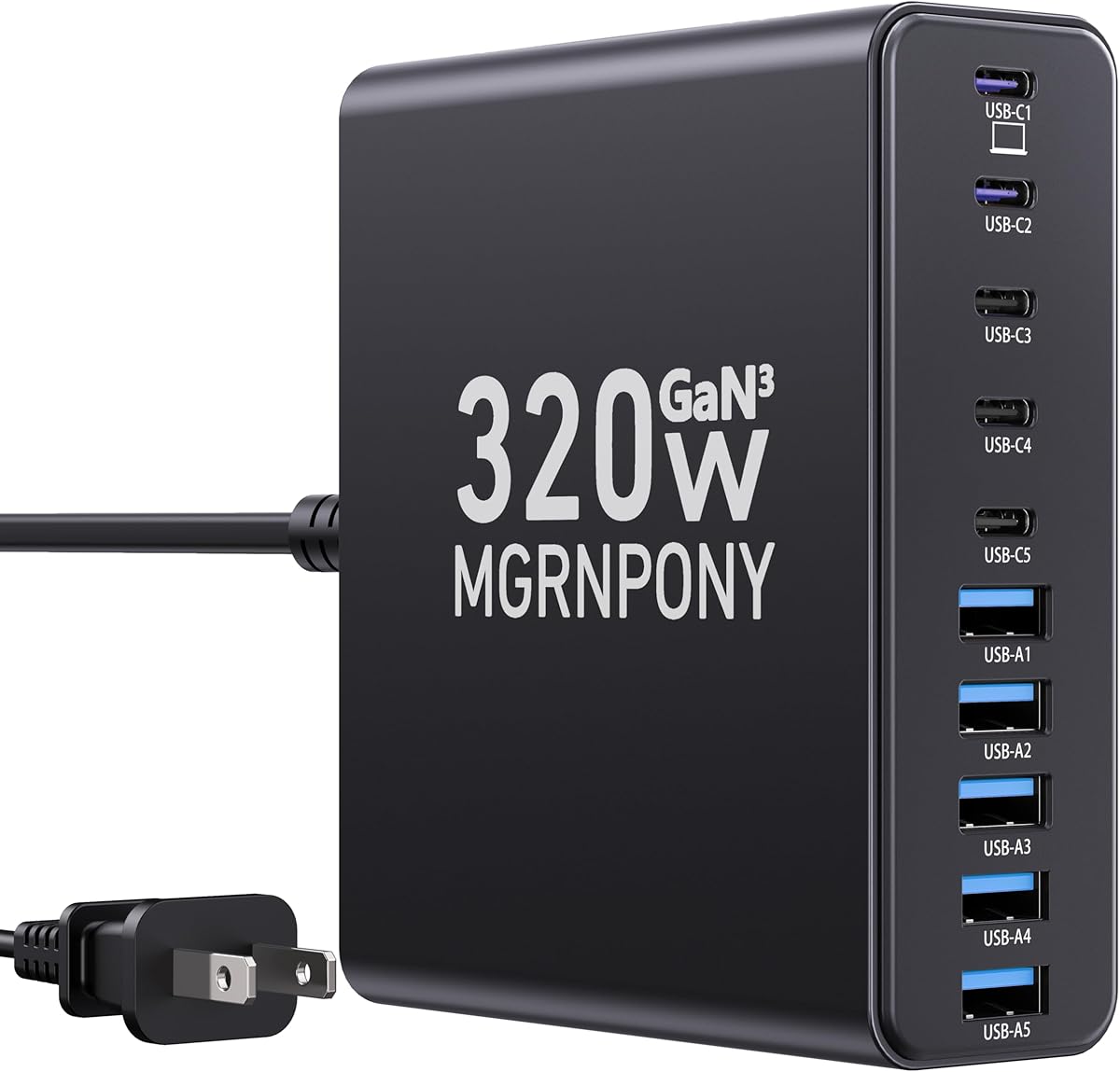
This MGRNPONY model balances power and portability with 320W output. Rated 4.5 stars, it offers enough capacity for a laptop and multiple phones. It is a strong middle-ground option for those who do not need the massive 750W capacity but want more than basic charging.
We may earn a commission when you buy through this link, at no additional cost to you.
The five USB-C ports allow for fast charging on modern devices including laptops. GaN III technology ensures the unit stays cool and safe, with millions of safety checks per day. It is designed to be used horizontally or vertically to suit your desk layout.
While compact, it still has a substantial footprint. The included cords are short, which might limit reach. However, the safety features and power distribution are well-implemented. It is a reliable choice for home offices or shared rooms where stability is key.
We recommend this for users who need laptop charging speed but want a portable option. It is a great all-rounder for mixed device setups. If you want to save space and keep things organized, this station provides efficient performance without excessive bulk.
GaN III technology monitors temperature millions of times daily, ensuring your device is safe from overheating during long charging periods.
Use the station horizontally for stability or vertically to save desk space, adapting to your specific setup needs effortlessly.
We may earn a commission when you buy through this link, at no additional cost to you.
This retractable charger solves the classic cable mess with a clever design. Rated 4.4 stars, it integrates eight cords into a single dock. It is ideal for desks where loose wires are annoying and you want a clean look without sacrificing speed or convenience.
We may earn a commission when you buy through this link, at no additional cost to you.
The four retractable cords can extend up to 80cm, providing flexibility for placement. It supports 105W total output and uses GaN for efficient charging of laptops and phones. The dock fits multiple devices securely, acting as a stand while they charge.
Retractable mechanisms can be less durable than fixed ports over years of use. If a cable breaks, it affects the whole unit. However, for the convenience and desk cleanliness, many find the trade-off acceptable. It is a great visual upgrade for workspaces.
We recommend this for anyone tired of tangled wires who wants a modern look. It suits offices and bedrooms where neatness is a priority. If you value cable organization highly, this model offers a stylish and functional solution for your daily charging routine.
Retractable cords eliminate tangles, allowing you to plug in devices quickly without sorting through piles of wires on your desk surface.
With 80cm extended length, you can position devices anywhere on the desk without being tied down to a tight outlet spot.
We may earn a commission when you buy through this link, at no additional cost to you.
The Lcssio 300W station is a dependable option for mixed charging needs. Rated 4.5 stars, it offers a solid build with dual 65W ports for laptops. It is a strong contender for families needing to charge phones and tablets alongside work machines.
We may earn a commission when you buy through this link, at no additional cost to you.
Five USB-C ports provide versatility for modern devices. The unit is built as one piece without removable dividers, increasing durability. Rubber pads keep it steady on surfaces, preventing scratches and slips. It includes cables for immediate use.
The fixed slots are less flexible than removable dividers but provide more stability for devices. It might not hold every case size perfectly. However, the power distribution is balanced, and the anti-slip features add practical value for daily use on desks.
We recommend this for households looking for a balance of price and performance. It handles daily charging needs well for most standard devices. If you want a durable, stable unit without too many frills, this is a reliable choice for your electronics.
The one-piece housing removes weak points from removable parts, ensuring a longer lifespan for your charging setup and daily use.
Four anti-slip rubber pads prevent the station from moving, keeping your desk tidy and protecting furniture from scratches during use.
We may earn a commission when you buy through this link, at no additional cost to you.
Selecting the right charging station involves considering your specific device mix and power needs to ensure efficiency and safety.
Total output wattage determines how much power the station can distribute across all ports combined. A station with 300W or more can handle laptops alongside phones, whereas lower wattage models are better suited for mobile devices only.
Look for a total wattage that matches the sum of your devices' maximum charging requirements to avoid slow charging or throttling.
Modern devices rely heavily on USB-C, so prioritize stations with at least a few USB-C ports. However, retaining USB-A ports is useful for older accessories like earbuds or keyboards.
Ensure the number of ports matches the typical number of devices you need to charge simultaneously without needing extra adapters.
Safety mechanisms like over-voltage, over-current, and overheat protection are essential for protecting expensive electronics. Look for GaN technology which often includes advanced thermal management.
Choose a brand that emphasizes safety certifications and protection features to ensure long-term reliability for your gadgets.
A sturdy one-piece construction is generally more durable than models with removable dividers that can break easily. Consider non-slip pads to protect your desk surface.
Select a design that fits your space, whether it is a compact travel unit or a larger desktop organizer.
Stations that include short mixed cables simplify setup and reduce clutter immediately. This saves you from buying separate cables for different devices.
Check if the included cables are short enough to keep the desk tidy but long enough to reach your devices comfortably.
Ensure the station supports the power delivery protocols required by your specific devices, especially for laptops and fast-charging phones.
Review product descriptions for compatibility lists to confirm support for brands like Apple, Samsung, or other specific electronics you own.
Measure your desk space before purchasing. Larger stations offer more ports but might overwhelm small nightstands or cubicle desks.
Consider vertical options or compact designs if space is limited in your workspace or home environment.
Higher-end models offer faster charging and better build quality but come at a higher cost. Budget models often lack high-wattage ports.
Weigh the cost against your needs; if you only charge phones, a budget model may suffice, but power users should invest in premium options.
To begin, place the station on a flat, stable surface away from heat sources. Plug the power cord firmly into the station and the wall outlet to ensure a steady connection.
Connect your devices using the included cables or your own. If using removable dividers, press them gently to secure the devices in place for stability.
Clean the unit periodically with a dry cloth to remove dust. Avoid wet cleaning and keep the vents clear to maintain proper airflow and prevent overheating.
Yes, many modern stations support simultaneous charging for laptops and phones. Ensure the station provides enough total wattage to support both devices without significant speed reduction.
Most reputable models include safety features that prevent overcharging and overheating. This makes them generally safe for overnight charging, but always check manufacturer guidelines.
Many models come with a bundle of short cables for immediate use. However, if your devices need longer cords, you may need to purchase additional cables separately.
GaN technology allows chargers to be smaller and more efficient with better heat management. It often leads to faster charging speeds and a more compact design.
Check the slot dimensions in the product specifications. Some models feature wider or taller slots specifically designed to hold tablets with protective cases intact.
Smaller stations are portable, but some larger desktop models are bulky. Always check the dimensions and weight if you plan to pack the station in luggage.
USB-C ports are essential for modern fast charging and laptops. USB-A ports are still useful for older accessories, so a mix of both offers the best compatibility.
Many brands include a warranty, often up to 24 months. Check the specific product details to confirm the warranty period and what it covers for your purchase.
We have explored ten top options ranging from budget-friendly models to premium high-wattage stations. Each offers unique benefits depending on your specific device needs and desk space.
When choosing, prioritize total wattage and port types to ensure your most power-hungry devices get the charging speed they need. Safety features should also be a key consideration.
Please remember that product availability and pricing fluctuate. Always check the current details on the retailer's site before making your final purchase decision.