
FlyFrost 8K Video Camera
4.3Editor score
8K resolution at 15fps for future proofing
88MP photos for high detail stills
IR night vision for dark environment recording
Discover the top cameras for social media content creators in October 2026. This guide compares image quality, stabilization, and portability for TikTok and
Creating engaging social media content requires reliable tools that capture high-quality video and photos effortlessly. The right camera ensures your posts stand out on platforms like Instagram and YouTube with crisp visuals and smooth motion.
We evaluated ten top-rated cameras based on resolution, stabilization, portability, and ease of use for creators. Each product was selected for its ability to deliver professional results without overwhelming complexity for beginners.
This guide highlights key features, pros, and cons for every pick to help you choose wisely. Prices and availability may change, so check current listings before making your final decision today.
4.3Editor score

4.5Editor score

4.4Editor score
Compare all ten cameras side by side to find the perfect fit for your workflow. Each entry lists key specifications to highlight differences in resolution, zoom, and connectivity features.




This 4K vlogging camera is designed specifically for beginners and first-time content creators who need a reliable tool without complexity. It shoots stunning 4K video and captures 75MP photos to ensure your social media posts look sharp and professional on any platform.
We may earn a commission when you buy through this link, at no additional cost to you.
The standout feature is the unique 330-degree rotating lens which allows you to film yourself confidently while traveling or creating daily content. The built-in WiFi enables quick wireless transfers to your smartphone for immediate editing and sharing on platforms like Instagram.
While it is compact and comes with a mini tripod and 16GB card to start you off, the digital zoom can lack the detail of optical systems. However, for casual travel vlogs and YouTube intros, the stabilization and ease of use are highly acceptable for the price point.
If you are looking for a simple all-in-one kit to start your social media journey today, this camera delivers clear and stable footage with minimal setup required for immediate content creation success.
The rotating lens makes framing yourself easy without needing a second person or complicated tripods for every shot you take.
WiFi connectivity streamlines the process from recording to posting by allowing instant transfers to your mobile device for editing.
We may earn a commission when you buy through this link, at no additional cost to you.
The DJI Osmo Pocket 3 is a powerhouse for serious creators who need cinematic results in a pocket-sized device. With a 1-inch CMOS sensor it records 4K video at 120fps allowing for breathtaking clarity in both day and night scenes.
We may earn a commission when you buy through this link, at no additional cost to you.
Its advanced 3-axis mechanical stabilization ensures your footage remains smooth even while hiking or running. The 2-inch rotating touchscreen makes framing shots effortless and the ActiveTrack 6.0 keeps you centered in the frame automatically during movement.
Although the price is higher than typical vlogging cameras the upgrade in sensor size and stabilization is significant for professional output. The included mic transmitter and battery handle also simplify your workflow for longer shoots and better sound quality.
This creator combo is the top choice for influencers who prioritize image fidelity and ease of use without sacrificing portability for their daily content production schedule.
The larger sensor captures more light making sunsets and indoor shots look vibrant without excessive noise or grain.
ActiveTrack locks onto you as you move so you never have to adjust the camera manually while performing.
We may earn a commission when you buy through this link, at no additional cost to you.
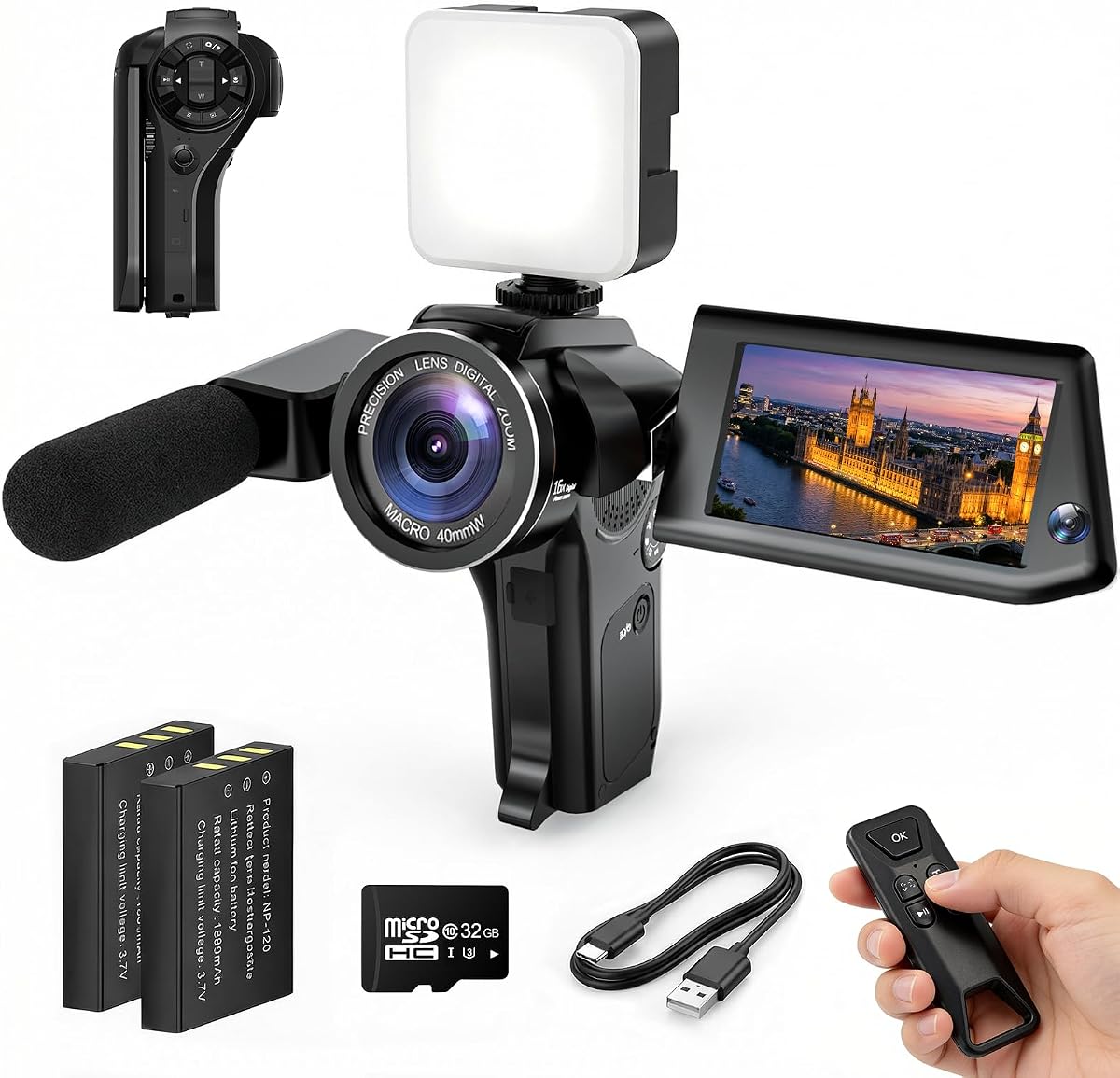
This FlyFrost camera is designed for users who want maximum resolution for their content. It captures video up to 8K and photos up to 88MP providing sharp and stable recording suitable for high detail editing needs.
We may earn a commission when you buy through this link, at no additional cost to you.
The IR night vision feature allows you to capture scenes in dark environments that other cameras might miss. With a 3-inch touch screen and 18X digital zoom you have precise control over framing distant subjects or fine details.
While the 8K recording runs at 15fps which is lower than 4K standards the sheer detail makes it useful for cropping and stabilization in post. The included external microphone reduces wind noise and the stabilizer helps keep shots smooth.
Choose this camera if you need high resolution versatility and night capabilities for travel vlogs or outdoor content without investing in expensive professional cinema gear.
Infrared sensors allow you to shoot black and white footage in the dark when natural light is insufficient.
Connect via USB to use the camera as a high quality webcam for streaming or video calls directly.
We may earn a commission when you buy through this link, at no additional cost to you.
This camera focuses on delivering high quality stills and videos with a large 3.5-inch flip screen for easy self-framing. The 96MP sensor and HDR imaging support vibrant colors and detailed texture in your social media photos.
We may earn a commission when you buy through this link, at no additional cost to you.
WiFi transfer lets you sync content to your phone quickly using the Viipulse app. The 20X digital zoom controlled by ergonomic rockers allows smooth transitions during recording without losing grip on the camera body.
The dual battery setup ensures you never miss a shot during long events. While the stabilization is digital rather than mechanical the anti-shake feature helps maintain clarity for casual videos and portraits.
Ideal for photographers who also vlog this device offers a great balance of photo power and video features at an accessible price for beginners.
High Dynamic Range combines multiple exposures to retain detail in both bright skies and dark shadows.
Access 60 filters including vintage and black and white to instantly change the mood of your photos.
We may earn a commission when you buy through this link, at no additional cost to you.
The Mini Camcorder is built for travelers who want to capture moments without carrying heavy gear. Measuring just 5.35 inches it fits easily in a pocket or bag for spontaneous recording during your daily life or trips.
We may earn a commission when you buy through this link, at no additional cost to you.
With one-button recording you start shooting instantly without downloads or QR codes. The 7-hour battery life means you can record all day without needing a recharge which is perfect for travel itineraries.
The rotating lens allows for self-recording though manual adjustment is required. While it does not offer professional image quality its charm lies in its simplicity and fun factor for capturing everyday memories.
If your priority is convenience and price over cinematic visuals this camera provides a reliable way to document your day effortlessly.
Everything you need is included so you can begin filming immediately upon opening the package.
Its tiny form factor ensures you always have a camera on you without weighing down your luggage.
We may earn a commission when you buy through this link, at no additional cost to you.
Similar to the first pick this camera offers a reliable entry point for content creators. The 330-degree lens helps you frame shots naturally while the built-in WiFi allows for quick transfer to mobile devices.
We may earn a commission when you buy through this link, at no additional cost to you.
It is designed for daily use such as hiking or vacation vlogging. The fast autofocus and wide-angle lens ensure stable footage even when you are moving quickly through crowded environments.
The kit includes a tripod and card so you can start immediately. While it is not the most advanced device it provides consistent quality for beginner friendly content.
Choose this if you want a straightforward vlogging tool that balances image quality with portability for your daily activities.
Lightweight design ensures you can carry it everywhere without it becoming a burden.
Easy settings allow you to focus on your content rather than technical camera configurations.
We may earn a commission when you buy through this link, at no additional cost to you.
This camera offers a unique Picture-in-Picture feature that lets you record your reaction alongside the main event. It is perfect for family gatherings where you want to capture both the moment and your face at the same time.
We may earn a commission when you buy through this link, at no additional cost to you.
The dual-view recording makes tutorials and reviews more engaging by showing the product and your hands simultaneously. This feature helps keep the audience connected to the creator rather than just the subject.
The WiFi flip screen allows easy framing and quick sharing of memories. While it is excellent for personal stories the technical specs support high quality output for professional YouTube content.
If you create reaction videos or family content this camera provides a unique tool to enhance storytelling and audience engagement.
See the scene and your face in the same frame to create more intimate and engaging videos.
From birthdays to tutorials the dual view adapts to different content styles easily.
We may earn a commission when you buy through this link, at no additional cost to you.
This kit transforms your smartphone into a professional vlogging setup with essential accessories. The wireless microphone ensures clear audio which is crucial for quality content. The RGB light adds flexibility for indoor shooting.
We may earn a commission when you buy through this link, at no additional cost to you.
The flexible tripod allows creative angles by wrapping around objects. With multiple lighting modes you can adjust the mood to match your video style. The sturdy camera tripod provides stability for ground level shots.
While it relies on your phone for recording it elevates the quality significantly with better light and sound. It is ideal for creators who already have a good phone camera but need audio support.
Invest in this kit if you want to upgrade your existing smartphone setup without buying a dedicated camera unit.
Wireless mics reduce wind noise and ensure your voice is heard clearly over background sounds.
RGB lights add color and brightness to make your videos look polished and professional.
We may earn a commission when you buy through this link, at no additional cost to you.
This kit adds intelligent tracking and audio to your phone setup. The face tracking tripod follows your movement so you stay in the frame without manual adjustment. This is great for active vlogging or livestreaming.
We may earn a commission when you buy through this link, at no additional cost to you.
Dual wireless microphones ensure clear sound picking up to the video. The gesture control lets you start or pause tracking with hand signals which simplifies solo recording further.
The LED lights provide necessary illumination for indoor shots. While it does not replace a dedicated camera it enhances the performance of your smartphone for social media videos.
Choose this for effortless livestreams or tutorials where keeping the camera on you without a tripod operator is essential.
Use simple hand signals to manage recording modes without touching your phone during a session.
Noise reduction chips ensure your voice is crisp even in busy environments.
We may earn a commission when you buy through this link, at no additional cost to you.
This webcam is designed for streaming and meetings where convenience is key. The auto light balance boosts brightness to reduce shadows on your face. It connects via USB for a reliable plug and play experience.
We may earn a commission when you buy through this link, at no additional cost to you.
The integrated privacy cover allows you to shut the camera when not in use. The built-in mic ensures clear audio for calls without extra equipment. It is a robust option for desktop setups.
While it lacks the mobility of a handheld camera it excels for stationary content like tutorials or Zoom calls. The focus on reliability makes it a solid choice for home creators.
If you need a stable high quality webcam for streaming this device provides clear video and sound with minimal setup.
Slide the cover to instantly block the lens when you want privacy during breaks.
RightLight technology adjusts exposure so you look best even in dimly lit rooms.
We may earn a commission when you buy through this link, at no additional cost to you.
Choosing the right camera depends on your specific needs. This guide covers key factors to help you find the perfect fit.
Higher resolutions like 4K or 8K ensure your content looks sharp on modern displays. Look for large sensors for better low light performance and color depth to avoid grainy videos.
Prioritize 4K or higher for future proofing and clear visuals.
Shaky footage can ruin a vlog. Optical or mechanical stabilization provides smoother motion than digital alternatives. This is essential for walking shots or active travel content.
Always check for 3-axis stabilization if you plan to move while filming.
If you travel often a pocket-sized camera is convenient. Larger cameras offer more features but can be cumbersome. Balance weight with performance based on your daily workflow.
Choose a compact model for spontaneous travel or daily recording.
A flip or rotating screen helps you frame yourself while vlogging. Touchscreens simplify menu navigation and focus. These features are critical for solo creators.
Ensure the camera has a screen that turns toward you.
WiFi or Bluetooth transfer allows you to send files to your phone for editing. Quick sharing is vital for social media. Look for dedicated apps to streamline this process.
Select cameras with strong wireless transfer capabilities.
Good audio is as important as video. Built-in mics vary in quality. Many creators prefer external mic inputs or wireless options for clear voice recording in noisy environments.
Check for external mic support if sound clarity is a priority.
Long recording sessions require durable power. Check how many minutes or hours a single charge lasts. Extra batteries are often included with value kits.
Aim for at least two hours of continuous recording per charge.
Consider the total cost including tripods and cards. Some cameras come as kits while others need separate purchases. A complete set saves time and money for beginners.
Evaluate if accessories are included in the price you pay.
Start by charging the battery fully and inserting a memory card before your first shoot. Configure your screen brightness and audio levels to match your typical environment settings.
Clean the lens regularly with a microfiber cloth to remove dust and fingerprints. Avoid touching the glass surface directly with your fingers to prevent smudges in your videos.
Store the camera in a dry bag or case when not in use. Keep it away from moisture or extreme heat to maintain the longevity of the internal components and battery.
For most platforms like Instagram and YouTube 1080p is acceptable but 4K offers more detail and cropping flexibility. Higher resolution ensures your videos look sharp on mobile devices.
A camera with built-in stabilization is often sufficient. If your camera lacks it a small gimbal or tripod can provide the smooth shots needed for professional looking results.
Beginners benefit from auto modes and touch screens. Cameras with flip screens and easy WiFi sharing reduce the technical setup needed to start posting immediately.
Audio is critical for engagement. Viewers may forgive imperfect video but poor sound will cause them to leave. Consider a wireless mic for clear voice recordings.
Yes modern phones have excellent sensors. However dedicated cameras offer better zoom and manual control. Use a kit if you prefer using your phone for recording.
Portability and quick sharing are key. Look for compact cameras with WiFi and simple controls to capture short clips and upload them rapidly to your account.
We highlighted ten diverse options ranging from budget pocket cameras to premium gimbal combos. Each pick offers unique strengths for creators focused on visual storytelling and quality.
Prioritize stabilization and audio capabilities to ensure your content engages viewers. Consider your budget and specific content style when selecting a device.
Remember to check current prices and availability as deals change frequently. Pick the camera that matches your needs to start creating high impact content today.