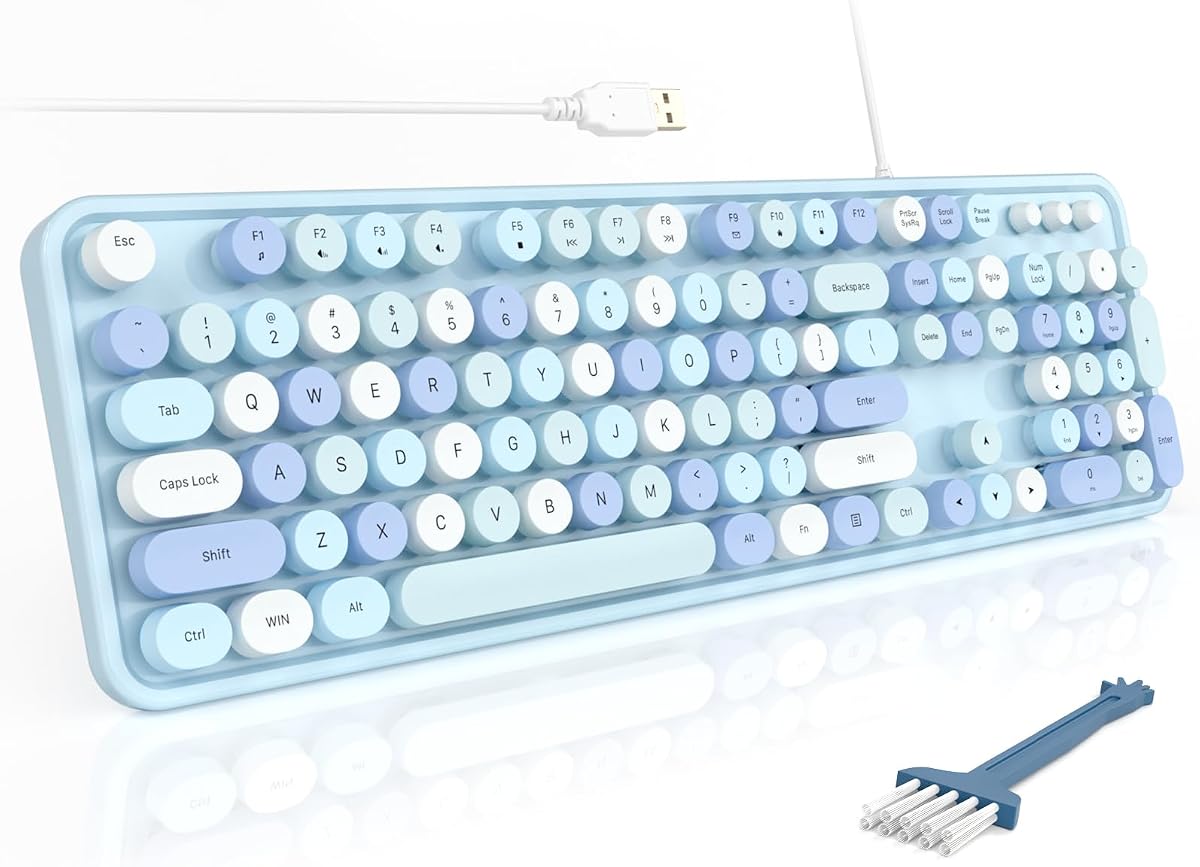
MOFII Computer Keyboards Wired
4.6Editor score
Retro typewriter design
Plug and play USB
Foldable stand included
Explore our expert guide on the top colorful keyboards available in October 2026, comparing features and designs to help you find the perfect vibrant typing
Colorful keyboards transform dull workspaces into vibrant creative hubs. Whether you seek retro typewriter styles or modern RGB lighting, these devices combine aesthetic appeal with practical functionality for daily tasks.
We evaluated ten top-rated models based on build quality, connectivity, and design. Our team analyzed user feedback and technical specifications to identify the most reliable options for home and office environments.
Each review highlights unique strengths and potential limitations to help you decide. Prices and availability fluctuate frequently, so verify current details before purchasing to ensure you get the best value today.
4.6Editor score

4.7Editor score

4.4Editor score
This side-by-side comparison highlights key specifications across all ten models to help you quickly identify which colorful keyboard best suits your specific typing needs and aesthetic preferences.


This wireless keyboard and mouse combo stands out with its MilkTea color scheme and full-sized layout. It holds a solid 4.4 star rating from users who appreciate its aesthetic appeal and functionality.
We may earn a commission when you buy through this link, at no additional cost to you.
The 2.4GHz wireless connection ensures a tidy desk with a 35-foot range. Detachable keycaps allow for easy cleaning, and the floating button design mimics classic typewriters for a quiet typing experience.
While it offers excellent battery life through auto-sleep modes, you must replace batteries manually. Some Type-C devices require adapters, which might inconvenience users without extra dongles.
Ideal for professionals wanting style and performance, this set brings vibrancy to any office. It balances nostalgia with modern wireless convenience for daily productivity tasks.
The round keycaps and floating design reduce finger fatigue during long sessions while providing a satisfying tactile feel.
Works seamlessly across Windows and Mac systems, making it a flexible choice for multi-device households.
We may earn a commission when you buy through this link, at no additional cost to you.
This wired model delivers reliability without battery concerns, earning a high 4.6 star rating. Its blue colorful design adds a splash of vibrancy to any workspace instantly.
We may earn a commission when you buy through this link, at no additional cost to you.
Users appreciate the ergonomic foldable stand and spacious number pad. The included dust brush simplifies maintenance, ensuring the typewriter-style keys remain clean over time.
While the cable limits distance from the computer, it eliminates signal dropouts. Some users prefer wireless freedom, but this model prioritizes consistent performance and simplicity.
Best suited for fixed desks and office setups, it combines functionality with style. The sturdy build and comprehensive warranty support long-term daily use.
Wired connectivity ensures uninterrupted typing without the hassle of charging or swapping batteries regularly.
Twelve multimedia shortcuts and indicator lights streamline workflow for efficient media control and task management.
We may earn a commission when you buy through this link, at no additional cost to you.
Offering a budget-friendly entry into wireless typing, this combo boasts a 30-meter range. Users rate it 4.4 stars for its reliable connection and long-lasting battery efficiency.
We may earn a commission when you buy through this link, at no additional cost to you.
The retro concave keycaps provide comfort without causing hand fatigue. Shared receiver technology keeps clutter minimal, allowing simultaneous use of keyboard and mouse efficiently.
While batteries are not included, the device can last up to 36 months on power saving. This makes it a hassle-free option for general office tasks without constant maintenance.
Perfect for students or home offices seeking value, it balances cost with performance. It remains a practical choice for those prioritizing range and battery longevity.
Sleep mode activation after inactivity extends battery life significantly for years of uninterrupted service.
Retro round keycaps align naturally with fingers, reducing strain during extended typing sessions.
We may earn a commission when you buy through this link, at no additional cost to you.
This purple rainbow set brightens any workspace with durable, fade-resistant materials. It holds a 4.2 star rating, appreciated for its vintage aesthetic and comfortable tactile feedback.
We may earn a commission when you buy through this link, at no additional cost to you.
Typing feels satisfying due to the clicky retro keycaps. Independent power switches allow users to manage battery usage for the keyboard and mouse separately.
While the connection is stable, some devices need adapters for wireless functionality. It is a strong option for dorm rooms or personal desks needing style.
Ideal for those seeking visual pop, it merges nostalgia with utility. The robust build quality ensures long-term durability against daily wear and tear.
Special coating maintains vibrant colors over time, preventing the faded look common in budget models.
2.4GHz wireless tech ensures fast input response for smooth operation across various systems.
We may earn a commission when you buy through this link, at no additional cost to you.
The green variant offers a distinct look compared to standard whites. Rated 4.2 stars, it features a foldable holder and reliable wireless performance for everyday tasks.
We may earn a commission when you buy through this link, at no additional cost to you.
Ergonomic design helps prevent wrist strain during prolonged typing. Battery life extends up to 18 months, reducing replacement frequency for both devices.
While the green color is distinct, it may not blend with every desk theme. The wireless range is solid but standard for this price segment.
Best for users needing a full keyboard with vibrant flair, it serves well in offices. It combines practical features with a unique visual appeal effectively.
The folding holder maintains an optimal typing angle to improve posture and reduce wrist stress.
Removable keycaps allow users to wash and clean dust easily without disassembling the whole unit.
We may earn a commission when you buy through this link, at no additional cost to you.
This model stands out with a three-year warranty and silent mouse operation. It holds a 4.3 star rating, favored for its durability and splash-resistant features.
We may earn a commission when you buy through this link, at no additional cost to you.
Laser-engraved keycaps ensure characters never fade. The shared receiver keeps desktop clutter low, while noise reduction algorithms prevent interference in shared spaces.
Hotkeys may lack full compatibility with Mac systems. However, the build quality and silent features make it suitable for quiet office environments.
Ideal for shared workspaces, it minimizes noise and maximizes protection. The extensive support adds peace of mind for long-term ownership.
Silent micro-motion technology ensures minimal noise, preventing distractions for colleagues or family members.
Splash resistance and high-definition injection molding protect against spills and wear over years.
We may earn a commission when you buy through this link, at no additional cost to you.
Atelus delivers a high-rated wired keyboard with a distinct purple hue. Users praise its crisp sound and detachable keycaps for easy maintenance in a clean setup.
We may earn a commission when you buy through this link, at no additional cost to you.
The foldable stands provide comfort without complex adjustments. Its reliable USB connection ensures consistent performance without wireless latency issues.
Without wireless features, it limits mobility compared to other models. However, the simplicity appeals to those who prefer plug-and-play solutions.
Best for home offices needing style and simplicity, it performs well for daily tasks. The aesthetic stands out while maintaining functional reliability.
Detachable design lets users remove keycaps for thorough cleaning without damaging internal components.
Adjustable stands help maintain a comfortable typing angle to reduce wrist strain during work.
We may earn a commission when you buy through this link, at no additional cost to you.
This mechanical keyboard offers unique visuals with a multimedia display screen. Rated 4.7 stars, it attracts gamers and enthusiasts looking for high customization and vibrant aesthetics.
We may earn a commission when you buy through this link, at no additional cost to you.
Hot-swappable sockets allow switch changes without soldering. The RGB lighting and display let users personalize every detail for a unique desktop setup.
Customization requires software that is less robust on Mac. Despite this, the build quality and visual appeal remain top-tier for mechanical keyboard users.
Best for tech-savvy users, it combines style with advanced features. It elevates any desk setup with its interactive display and sound quality.
The top-right screen displays system info and custom images, adding dynamic visual feedback to typing.
Hot-swap capability lets users try different switches to match their preferred typing sound and feel.
We may earn a commission when you buy through this link, at no additional cost to you.
This variant features a sleek black design with a unique mirror finish panel. It earns a 4.3 star rating for its elegant look and reliable wireless connectivity.
We may earn a commission when you buy through this link, at no additional cost to you.
The coating resists fading for long-lasting beauty. A shared receiver keeps connections stable while minimizing dongles for a tidy workspace.
Some Mac shortcuts may not function as expected. However, the visual appeal and build quality make it a strong choice for professional environments.
Ideal for users seeking a polished look, it balances elegance with performance. It is a thoughtful gift for style-conscious professionals and students.
The mirror-finish panel reflects light subtly, adding a sophisticated touch to the standard desk layout.
Updated chipset ensures fast response times for smooth typing and cursor control across tasks.
We may earn a commission when you buy through this link, at no additional cost to you.
This gaming keyboard features bright rainbow LED backlighting. Rated 4.4 stars, it is built for durability with double-shot injection caps that resist fading.
We may earn a commission when you buy through this link, at no additional cost to you.
Water-resistant design protects against spills during late sessions. Adjustable feet allow users to set a comfortable typing angle for different tasks.
While it lacks wireless capability, the wired connection ensures zero lag. It is a practical option for gamers who prioritize stability and lighting.
Best for gaming setups, it delivers solid performance and vibrant light. It stands out as a reliable and affordable entry into gaming peripherals.
Double-shot keycaps ensure characters remain visible even as LED brightness changes over time.
Internal water-resistant film redirects liquids away from critical circuits to prevent hardware damage.
We may earn a commission when you buy through this link, at no additional cost to you.
Selecting the right colorful keyboard involves balancing aesthetics with performance features to match your specific workflow and environment.
Decide between wired and wireless based on your need for mobility versus stability. Wireless offers a tidy desk but requires batteries or charging, while wired ensures constant power.
Wireless is better for clean setups, but wired suits gaming or fixed workstations where reliability is paramount.
Look for double-shot or ABS keycaps to ensure color longevity. High-quality materials resist fading and maintain vibrancy over years of daily typing.
Premium coatings offer better durability for colorful designs compared to standard printing methods.
Choose between full-size, tenkeyless, or compact layouts based on desk space. Full-size includes a number pad essential for data entry, while compact saves room.
Full-size is preferred for productivity, while smaller sizes suit gamers or limited desk areas.
Consider mechanical or membrane switches for tactile feedback. Mechanical switches offer durability and customization, while membrane keys are quieter and more budget-friendly.
Mechanical switches provide better longevity for heavy typists.
Verify compatibility with your operating system like Windows or macOS. Some models may have limited shortcut support on non-Windows platforms.
Check for adapter needs if using USB-C devices to ensure smooth functionality.
For wireless models, check battery duration and power-saving features. Long battery life reduces interruptions, while auto-sleep modes extend usage between changes.
Prioritize models with energy-saving switches to maximize efficiency.
Look for warranties to protect your investment. Brands offering multi-year support provide peace of mind against manufacturing defects.
Strong customer service ensures quick resolutions for any technical issues.
Balance cost with features to get the best value. Higher prices often bring better build quality, but budget options can still deliver great style.
Set a budget range that fits your financial constraints without compromising essentials.
Connect your keyboard securely to ensure stable performance. For wireless models, check battery levels periodically to avoid unexpected shutdowns during work.
Clean your keyboard regularly using compressed air or a brush. Remove keycaps to reach dust underneath, maintaining the vibrant color and functionality.
Store your keyboard in a dry place to prevent moisture damage. Avoid placing liquids near the device to protect internal electronics and ensure longevity.
Yes, many models use fade-resistant coatings to maintain their vibrant colors over time. High-quality ABS or double-shot keycaps prevent peeling and cracking even with heavy use.
Most colorful keyboards are compatible with Mac, but some shortcut keys may require configuration. Always check the product details for specific OS support before purchasing.
Battery life varies by usage, typically ranging from 6 to 36 months on auto-sleep settings. Replacing batteries promptly ensures consistent performance without interruptions.
Yes, many models feature detachable keycaps that can be removed for cleaning. Soaking them gently helps remove dust and debris accumulated between switches.
Noise levels depend on switch type, with membrane and retro round caps often quieter than loud mechanical switches. Some models include noise reduction features for office environments.
Warranties range from 12 months to three years depending on the brand. Always review the manufacturer's policy for coverage details and customer service contact info.
Our top picks include the KNOWSQT set for premium style and the Womier SK80 for advanced features. Each model offers unique benefits for diverse user needs.
Prioritize connectivity and keycap durability when selecting your keyboard. Balancing aesthetic preferences with functional requirements ensures satisfaction.
Remember to check current prices and availability before buying. Models may vary in stock, so act quickly to secure the best value for your setup.