
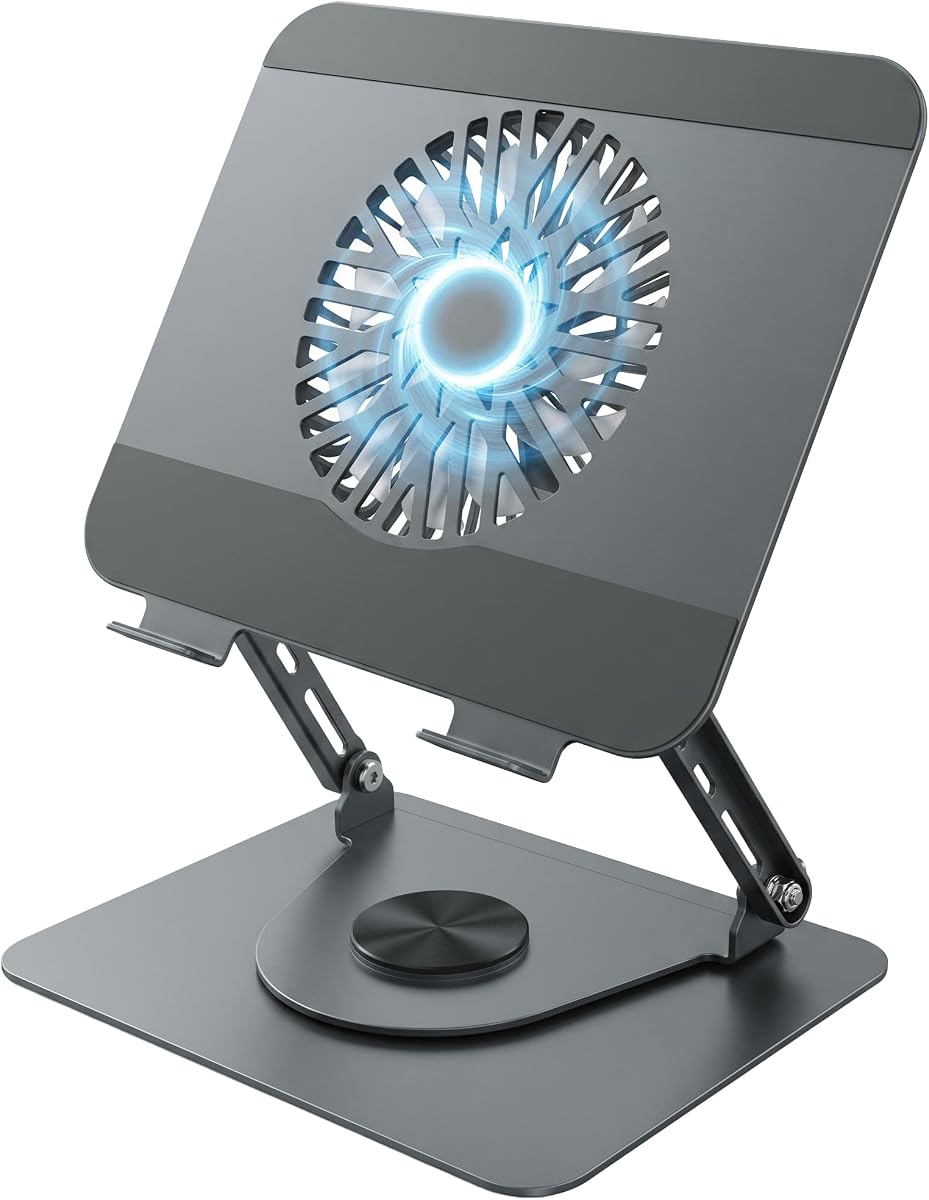
YAODHAOD Multi-Purpose Desk Fan Stand Mount
5.0Editor score
Full 360 rotation
Heavy-duty metal frame
Universal fan compatibility
Keeping your devices cool is essential for performance and longevity. A computer fan stand provides targeted airflow to prevent overheating during intense gaming or work sessions. Choosing the right model ensures stability and effective heat dissipation.
We compared ten top-rated stands based on cooling power, build quality, and adjustability. Our analysis covers laptop coolers, PC fan mounts, and ergonomic risers with active cooling fans. Each product was evaluated for versatility and ease of use.
Every pick highlights key strengths and potential trade-offs for different user needs. Prices and availability change frequently, so verify current deals before purchasing. This guide helps you find the perfect cooling solution for your setup.
5.0Editor score

4.4Editor score

4.0Editor score
As an Amazon Associate we earn from qualifying purchases.
This table compares all ten selected models side by side. You will see key specifications like fan count, material, and adjustability to help you decide quickly.


The Kootek Laptop Cooling Pad offers robust cooling with five quiet fans. It supports laptops from 12 to 17 inches comfortably. Users praise its ability to reduce heat during gaming or heavy workloads.
We may earn a commission when you buy through this link, at no additional cost to you.
Its dual USB hub adds convenient connectivity for peripherals. The 6 adjustable height settings allow for ergonomic positioning. LED lights indicate fan status clearly. This model balances performance and affordability well.
While effective, the unit is a bit bulky for travel. Maximum fan speed can produce audible noise. However, these trade-offs are minor compared to the cooling benefits provided during intense sessions.
Ideal for home office or gaming setups where portability isn't critical. It provides excellent value for those needing reliable thermal management. Recommended for desktop users seeking enhanced laptop performance.
Five fans ensure even heat distribution across your device base. This prevents hot spots effectively.
Dual USB ports let you connect mice or drives easily. It expands laptop functionality.
We may earn a commission when you buy through this link, at no additional cost to you.
YICOSUN combines cooling with premium aesthetics using RGB lighting. The aluminum alloy body offers durability and a sleek look. It supports MacBooks and other brands well. Ideal for modern workspaces.
We may earn a commission when you buy through this link, at no additional cost to you.
Its foldable design makes it easy to carry on trips. The adjustable height helps maintain good posture. RGB fans add a vibrant touch. Quality construction justifies the price point for style-conscious users.
Fans are quieter but less aggressive than larger models. Some may find the cost higher than plastic alternatives. However, the build quality and design make it a standout choice for professionals.
Recommended for users who value design and portability. It suits travelers and office workers needing both style and function. A great premium option for MacBook users specifically.
RGB lighting enhances your desk look. It looks modern and professional.
Folds flat for easy packing. It fits in laptop bags easily.
We may earn a commission when you buy through this link, at no additional cost to you.
This stand features an active cooling fan to prevent overheating. It works well with MacBooks and other laptops. The adjustable load capacity supports heavier devices. Users like the added phone mount feature.
We may earn a commission when you buy through this link, at no additional cost to you.
Its portable and durable design is good for mobile users. Open-frame construction maximizes airflow effectively. You can adjust load capacity with included tools. It balances utility with simplicity in design.
Adjustment requires screws which may take time initially. The look is functional but not flashy. Still, it delivers reliable cooling for daily use. A practical pick for budget-conscious buyers.
Great for students or travelers needing basic cooling. The phone mount adds versatility for multitasking. Choose this if you need a simple riser with active airflow.
Built-in fan actively moves air. It reduces heat buildup effectively.
Screw tool allows customization. You can support heavier laptops safely.
We may earn a commission when you buy through this link, at no additional cost to you.
This pad is designed for family use with quiet fans. It offers a 5-level height adjustment for comfort. The included phone holder is a nice bonus. USB ports help expand connections easily.
We may earn a commission when you buy through this link, at no additional cost to you.
Its ergonomic design reduces strain during long sessions. The wheel switch makes adjusting speed simple. ABS materials are durable for daily use. It fits laptops up to 17 inches well.
Maximum noise is low but not silent. Build is not premium heavy-duty. However, it suits general work and kids' homework perfectly. A cost-effective solution for households.
Perfect for shared desks or home office use. The phone holder helps multitask during work. Select this if you need a versatile cooling pad for everyone.
Wheel switch simplifies speed adjustments. It is intuitive for all ages.
Holds phone while you use laptop. Great for watching videos.
We may earn a commission when you buy through this link, at no additional cost to you.
This stand fits 120mm and 140mm PC fans perfectly. It offers full vertical rotation for flexible airflow. Solid metal construction ensures stability on desks. Users praise its value for money.
We may earn a commission when you buy through this link, at no additional cost to you.
Thumb screws allow quick assembly without tools. The frame eliminates vibration effectively. It works well for routers or laptops. Highly rated for its practical design and durability.
Limited to PC fans so no built-in USB hubs. It focuses solely on cooling airflow. This focus keeps costs low. A smart pick for dedicated cooling needs.
Ideal for DIY cooling or electronics ventilation. Best for those who already own PC fans. Choose this for a reliable and affordable cooling mount.
360 rotation lets you aim air anywhere. It helps target heat sources.
Solid metal frame reduces shaking. It handles high RPM fans well.
We may earn a commission when you buy through this link, at no additional cost to you.
A heavy-duty stand made of solid steel for PC fans. The weighted base provides excellent stability. It supports 120mm and 140mm sizes. Great for DIY cooling projects or desktop ventilation.
We may earn a commission when you buy through this link, at no additional cost to you.
360 rotation allows precise airflow targeting. Tool-free thumb screws make setup quick. Ideal for cooling PCs or 3D printers. Users like its reliability and strength.
Edges are sharp so gloves are recommended. Fan must be purchased separately. These are minor issues for such a sturdy unit. A strong contender for industrial or home use.
Best for permanent desktop cooling setups. Choose this if you need a robust mount. It delivers value for serious cooling tasks.
Adjust fan angle precisely. It targets heat spots directly.
Solid steel holds up over time. It resists bending.
We may earn a commission when you buy through this link, at no additional cost to you.
This stand uses aluminum for a rust-proof design. It is lightweight and fits 120mm fans. The 360 rotation adds versatility to airflow. A good pick for lighter cooling needs.
We may earn a commission when you buy through this link, at no additional cost to you.
Upgraded version ensures stability even at high speeds. Thumb screws make it tool-free. It avoids rust issues effectively. Slightly less stable than steel but still reliable.
Only fits 120mm fans limiting size options. Steel stands offer more weight for stability. But aluminum is great for portability. A solid choice for specific setups.
Ideal for users needing lightweight cooling mounts. Best for office environments. Choose this if you prefer aluminum durability.
Aluminum prevents rust over time. It stays clean for years.
Aluminum makes it light. Easy to move around.
We may earn a commission when you buy through this link, at no additional cost to you.
A standard black metal stand for PC fans. Fits both 120mm and 140mm sizes. Heavy-duty metal keeps it steady. It is a straightforward and reliable cooling mount.
We may earn a commission when you buy through this link, at no additional cost to you.
360 rotation allows flexible positioning. Tool-free installation makes setup easy. No extra features keep costs down. Good for basic desktop ventilation needs.
Design is basic without extra bonuses. Some may want more adjustability. But it gets the job done efficiently. A practical choice for standard fans.
Best for simple cooling tasks. Choose this if you need a basic mount. It offers value for standard PC fans.
Supports both fan sizes. It is very versatile.
Tool-free installation saves time. It is quick to assemble.
We may earn a commission when you buy through this link, at no additional cost to you.
This stand features a rotating base for easy sharing. An integrated fan helps keep laptops cool. Adjustable height promotes better posture. Non-slip pads protect devices from sliding.
We may earn a commission when you buy through this link, at no additional cost to you.
Swivel base allows effortless screen sharing. Height settings help find the perfect view. Elevated platform organizes desk space well. Ideal for collaborative work environments.
Fan is quiet and not high power. Price is a bit premium. But ergonomics and rotation are unique. A great pick for office ergonomics.
Best for meetings or teamwork settings. Choose this if you rotate your screen often. It combines cooling with desk organization.
Swivel base aids presentations. It allows easy screen sharing.
Elevated platform creates storage space. It keeps desk tidy.
We may earn a commission when you buy through this link, at no additional cost to you.
This stand supports fans from 120mm to 180mm. Premium aluminum ensures durability and style. It has a wide angle adjustment. A top choice for custom cooling builds.
We may earn a commission when you buy through this link, at no additional cost to you.
Precision pivot hinges allow flexible mounting. Anti-slip pads keep it stable. CNC machining gives a refined finish. It is elegant and functional for enthusiasts.
Higher price may deter budget buyers. Adjustment is complex with many screws. But build quality is superior. Best for those needing specific fan sizes.
Ideal for custom PC projects. Choose this if you need 180mm fans. It offers premium features and versatility.
Fits up to 180mm fans. It handles various sizes.
Precision CNC gives smooth finish. It looks and feels high-end.
We may earn a commission when you buy through this link, at no additional cost to you.
Selecting the right computer fan stand requires careful consideration of your specific needs and setup. This guide explores key factors to help you make an informed choice.
Laptop coolers often have multiple fans to spread air evenly. PC stands usually hold one large fan. More fans can mean better coverage but also more noise. Evaluate your heat needs carefully.
Prioritize fans that balance quiet operation with airflow. Too many fans may be overkill.
Ensure the stand supports your device size. Laptop stands often cover 12 to 17 inches. PC mounts vary between 120mm and 180mm. Check dimensions before buying.
Verify the range matches your device to avoid issues.
Metal stands like aluminum or steel offer better stability. Plastic is lighter but less durable. Premium options often use CNC-machined aluminum. Stability prevents wobbling during typing.
Metal builds last longer and reduce vibration.
Height and angle settings improve ergonomics. 360 rotation helps direct airflow. Look for models with easy-to-use adjustment knobs. Flexibility enhances comfort and cooling.
Adjustable options adapt to your workspace needs.
Foldable designs are essential for travelers. Lightweight materials like aluminum help. Rigid stands may be heavy. Consider where you will use the stand.
Choose foldable models for frequent movement.
Extra USB hubs can be useful for peripherals. Some stands offer power for fans only. Check if you need data ports. It adds convenience to your desk.
USB hubs save desk space and ports.
Quiet fans are vital for work or study. High RPM fans may be loud. Read reviews for noise feedback. Balance cooling power with silence.
Opt for quiet fans in shared spaces.
Prices vary based on materials and features. Budget options work well for basic needs. Premium stands offer durability and style. Decide how much you want to invest.
Set a budget to narrow choices quickly.
Place the stand on a flat, stable surface. Ensure vents on your laptop or fan are not blocked. Proper placement maximizes cooling efficiency and prevents airflow restriction.
Adjust the height to match your eye level. This improves posture and reduces neck strain. Secure your device with anti-slip pads to avoid sliding during typing.
Clean dust from fans regularly using compressed air. Keep the surface dust-free for better performance. Avoid liquids near electronics. Check screws and joints occasionally for tightness.
Yes, most laptop cooling stands are compatible with MacBooks. Check the weight and size limits to ensure a secure fit. Many models include anti-slip pads to hold MacBooks safely. Always verify dimensions before purchasing.
Many stands use USB power from your laptop. This makes them convenient without extra plugs. Some PC stands may need AC adapters. Always check power requirements in the product details.
Yes, you can use a PC fan stand for laptops. Aim airflow underneath the device for cooling. Ensure the fan size matches the stand. It is a flexible solution for custom setups.
Choose models rated for low decibels. Avoid running fans at max speed constantly. Ensure vents are not blocked by dust. Noise dampening pads can also help.
Yes, stands are generally safe for laptops. Ensure they have non-slip pads. Avoid placing wet items near electronics. Proper setup prevents slips and damage effectively.
Most stands support laptops between 12 to 17 inches. Some models support smaller 10-inch devices. Check specs for exact dimensions. Verify weight limits before purchase.
Yes, many stands are foldable for easy travel. Look for lightweight designs that pack flat. Foldable options save space in bags. Verify weight before buying.
Our top picks include the YICOSUN Adjustable Stand for premium quality and the YAODHAOD Mount for budget value. Each offers unique benefits depending on your needs. Choose based on portability or cooling power.
Prioritize ergonomic height and airflow direction for best results. Stability and material quality affect long-term performance. Consider noise levels for your workspace environment.
Always check current prices and deals before buying. Offers change frequently on major platforms. Find the perfect solution to keep your devices running cool.