
NZXT H5 Flow
4.6Editor score
Compact ATX design
Excellent GPU cooling
Pre-installed quiet fans
This guide compares the top cooling computer case options for performance and airflow to help you choose the best chassis for your next PC build.
A cooling computer case is essential for keeping your system running smoothly under load. High airflow designs prevent overheating and extend the life of expensive components like your graphics card and processor.
We compared ten leading models based on fan count, radiator support, and build quality. Each pick offers unique features tailored to different budgets and cooling needs for modern gaming or workstations.
Every review highlights strengths and weaknesses to guide your decision. Prices and availability change frequently so check current listings before purchasing your new computer chassis today.
4.6Editor score

4.8Editor score

4.7Editor score
This side-by-side comparison highlights key specifications across all ten models to help you quickly identify the best fit for your specific hardware and cooling requirements.




The Lian Li V100 stands out as a top choice for builders seeking performance and style. Its 4.8 rating reflects excellent value and cooling efficiency for most modern systems.
We may earn a commission when you buy through this link, at no additional cost to you.
It comes with four PWM-controlled ARGB fans that ensure strong airflow from the start. The integrated 26-LED strip adds vibrant lighting without needing extra hubs.
While the fan noise can be noticeable at full speed the performance justifies the trade-off for enthusiasts. You may need to tune fan curves for quieter daily use.
Anyone building a mid-range to high-end PC will appreciate its flexible design. It supports latest motherboard tech and offers easy access for maintenance and upgrades.
The layout optimizes path for cool air intake and hot air exhaust effectively.
Compatibility with reverse connector boards simplifies cabling for a cleaner look.
We may earn a commission when you buy through this link, at no additional cost to you.
The CORSAIR 4000D RS introduces a unique modular FRAME system for ultimate flexibility. It earns its top rating through robust cooling and innovative mounting features.
We may earn a commission when you buy through this link, at no additional cost to you.
Its InfiniRail system allows precise fan placement up to 200mm on the front. This ensures targeted airflow exactly where your components need it most.
The modularity means higher initial cost but future-proofs your build against new standards. It may require extra effort to swap parts compared to standard cases.
This case is ideal for builders who want to tweak and upgrade over time. Its support for reverse boards and high airflow makes it a smart long-term choice.
You can swap trays and panels to adapt the case as your needs evolve.
The rail system lets you mount fans at optimal angles for efficiency.
We may earn a commission when you buy through this link, at no additional cost to you.
The NZXT H5 Flow delivers outstanding cooling for its small size and price. It focuses on airflow efficiency to keep components cool during demanding tasks.
We may earn a commission when you buy through this link, at no additional cost to you.
Perforations on the PSU shroud enable direct intake for two extra 120mm fans. This boosts cooling power for GPUs even in a compact chassis design.
It lacks advanced RGB features which might disappoint those seeking flashy lighting. The small size may also limit compatibility with oversized radiators or GPUs.
Gamers with limited desk space will find this case perfect for solid cooling. It offers the best value for those prioritizing thermal performance over aesthetics.
Despite its small size it delivers airflow that rivals larger cases.
Perforated shrouds and mesh panels optimize air intake significantly.
We may earn a commission when you buy through this link, at no additional cost to you.
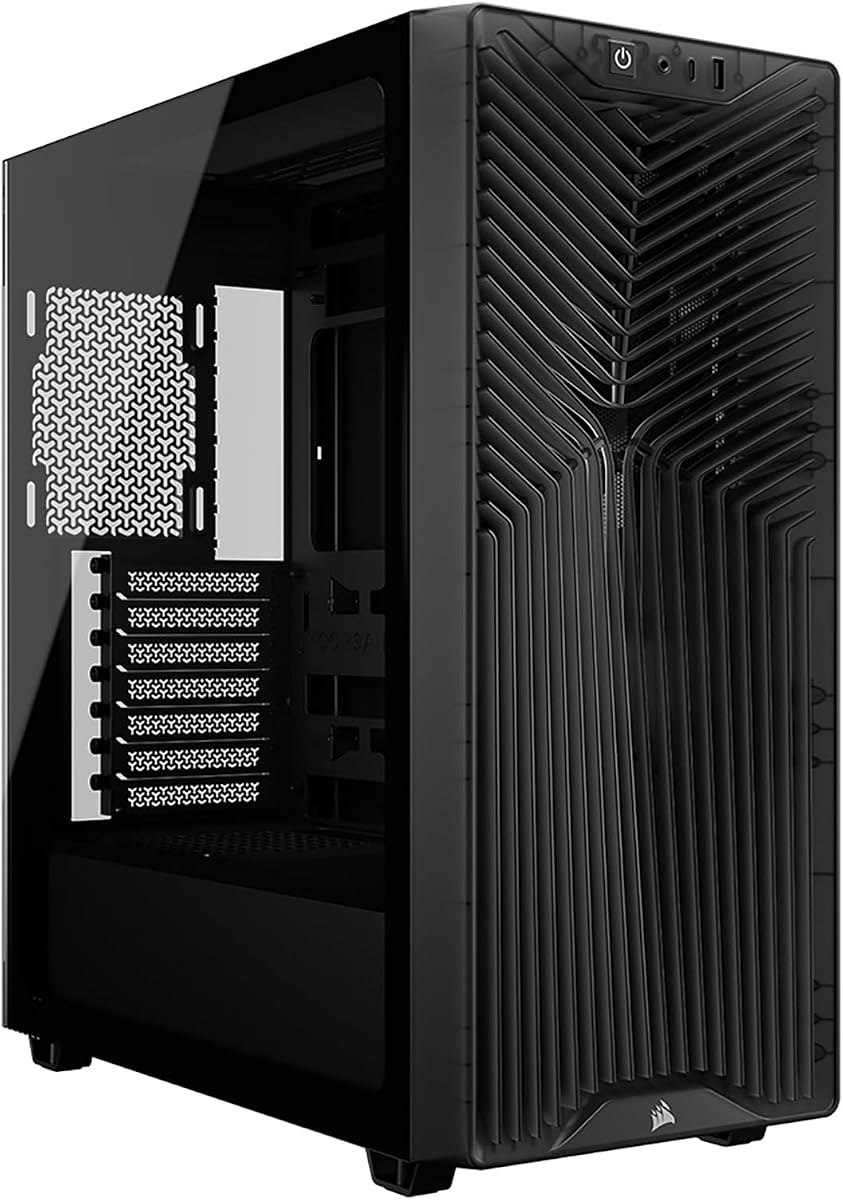
The CORSAIR 3200D RS is designed with modern reverse connector motherboards in mind. It simplifies builds while maintaining strong cooling for high-end components.
We may earn a commission when you buy through this link, at no additional cost to you.
It supports up to nine 120mm fans allowing for extensive custom cooling loops. The included RS120 ARGB fans provide decent cooling with easy control.
The smoke tint gives a sleek look but might hide internal components too much. Users wanting clear visibility might prefer the standard white or black versions.
This case suits builders planning to use latest motherboard standards for neat cables. Its anti-sag arm and cable hide features make assembly straightforward and clean.
Reverse support reduces cable clutter significantly for a cleaner look.
The built-in stabilizer protects heavy GPUs from sagging over time.
We may earn a commission when you buy through this link, at no additional cost to you.
The MONTECH XR Panoramic transforms your rig into a stunning showcase with glass panels. It balances bold visuals with solid cooling features for gaming setups.
We may earn a commission when you buy through this link, at no additional cost to you.
Reverse-blade fans on the side present illuminated faces for a cleaner look. Magnetic filters make it easy to clean without tools for routine upkeep.
Glass surfaces can collect dust and show fingerprints more than mesh. The panoramic design also increases cost compared to standard front-panel cases.
Anyone wanting a high-visibility build will love this case's immersive design. It fits large GPUs well and offers ample fan space for cooling upgrades.
Panoramic glass provides an unobstructed view of your hardware inside.
Magnetic dust filters allow for quick and easy cleaning cycles.
We may earn a commission when you buy through this link, at no additional cost to you.
The CORSAIR AIR 5400 RS uses isolated chambers to manage heat zones. This design ensures powerful CPUs do not overheat other components in the case.
We may earn a commission when you buy through this link, at no additional cost to you.
Airflow ducts accelerate air into narrow channels for better velocity and cooling. The panoramic glass offers a stunning look while maintaining airflow efficiency.
The large footprint may not fit on every desk or in tight cases. Its price reflects the premium features but may be steep for budget builds.
This case is perfect for enthusiasts with high-end hardware needing maximum isolation. Its design supports top-tier cooling and looks impressive as a centerpiece.
Separate chambers prevent CPU heat from affecting GPU performance.
Ducts increase fan efficiency without raising noise levels.
We may earn a commission when you buy through this link, at no additional cost to you.
The CORSAIR AIR 5400 LX adds enhanced RGB lighting to the triple-chamber design. It delivers exceptional cooling performance with a focus on visual impact.
We may earn a commission when you buy through this link, at no additional cost to you.
Isolated CPU and GPU chambers keep temperatures low for sustained performance. The panoramic glass and RGB make it a showpiece for any gaming room.
It is one of the most expensive cases available on the market today. The unique design may also limit options for specific custom water cooling parts.
This model suits builders seeking ultimate cooling and a premium aesthetic. Its advanced features justify the price for those who want the best.
LX RGB offers deeper color control for a customized lighting setup.
Chambers isolate heat to keep all components running cool.
We may earn a commission when you buy through this link, at no additional cost to you.
The Antec Flux Pro offers a full-tower chassis with six fans ready out of the box. It supports large motherboards and provides exceptional cooling capacity.
We may earn a commission when you buy through this link, at no additional cost to you.
Multi-directional vents and a unique iShift PSU mount optimize airflow paths. The dual temperature display allows monitoring CPU and GPU temps directly on case.
Its large size is a challenge for smaller desks or standard PC tables. The weight also makes moving it around difficult once built and filled.
This case is ideal for enthusiasts needing space for multiple GPUs or radiators. Its included fans and unique features make it a strong value for pros.
Six included PWM fans ensure strong airflow across the system.
Built-in dual temp display provides instant feedback on heat.
We may earn a commission when you buy through this link, at no additional cost to you.
The MSI MAG Forge 321R focuses on lighting control and ventilation performance. It offers flexible mounting for many fans to suit different cooling needs.
We may earn a commission when you buy through this link, at no additional cost to you.
Its built-in LED control board and Mystic Light Sync allow easy customization. Magnetic filters on top make cleaning quick and tool-free for users.
Build materials are standard and may feel less premium than steel heavy cases. The design emphasizes airflow over noise dampening or aesthetic richness.
This case suits users who prioritize lighting and cooling efficiency over sound. It provides a solid base for a colorful and cool gaming setup.
Extensive RGB control ensures your system matches your desk style.
Mounting options support up to eleven fans for custom setups.
We may earn a commission when you buy through this link, at no additional cost to you.
The Cooler Master HAF II delivers massive airflow through oversized front fans. It is built to push air efficiently through the system for maximum cooling.
We may earn a commission when you buy through this link, at no additional cost to you.
Split cable management creates space for rear exhaust and maintains airflow. The MasterRail supports various radiator and fan sizes for versatile liquid cooling.
Its high price and large dimensions may limit its use to dedicated spaces. The dual GPU support adds bulk but ensures stability for multiple cards.
This case is perfect for those who need raw cooling power for high load. Its design minimizes resistance to keep temperatures low even under heavy stress.
Huge 220mm fans provide unmatched airflow for demanding tasks.
Split cable space leaves room for larger exhaust fans.
We may earn a commission when you buy through this link, at no additional cost to you.
Selecting the right cooling computer case involves evaluating airflow design fan support size and features to match your hardware needs and aesthetic preferences.
Airflow design determines how efficiently cool air enters and hot air exits the case. Look for cases with mesh panels perforated fronts and optimized paths for components.
Prioritize open designs over solid panels to ensure better thermal performance.
The number of fans a case supports directly impacts cooling potential for CPUs and GPUs. Check the maximum supported fan size and positions before buying.
Ensure the case can handle enough fans to meet your thermal demands.
Radiator support is essential if you plan to use liquid cooling for your system. Verify dimensions for front top and rear mounting to match your radiator size.
Choose a case with support large enough for your planned liquid cooling setup.
Compatibility ensures the case fits your motherboard form factor and connectors properly. Check support for ATX Micro-ATX Mini-ITX and reverse connector layouts.
Confirm that all ports and connectors align with your motherboard before buying.
Good cable management keeps wires organized and improves internal airflow efficiency. Look for channels hooks and tie points to hide power and data cables.
A clean interior reduces airflow blockage and maintains a professional build.
Dust filters prevent debris from entering and clogging fans or radiators over time. Magnetic or removable filters simplify cleaning and extend hardware lifespan.
Always prioritize cases with easy-to-clean dust protection on vents.
Aesthetics include glass panels RGB lighting and design elements like wood accents. Choose what fits your space while ensuring cooling performance is not compromised.
Balance looks with function to ensure cooling needs remain a priority.
Budget constraints affect features like included fans build quality and customization options. Determine how much to spend based on required cooling and features.
Select a case offering the best balance of cost and performance.
Install the case on a stable surface with enough space for airflow intake. Ensure vents are not blocked by walls or other objects.
Clean dust filters weekly or monthly to maintain proper airflow efficiency. Use compressed air or a soft brush to remove debris.
Monitor component temperatures regularly and adjust fan speeds if needed. Good maintenance keeps the system cool and extends hardware life.
An effective cooling computer case features mesh panels perforated fronts and multiple fan mounting points. Good airflow design allows cool air to reach components while hot air is exhausted efficiently.
Most cases include pre-installed fans but adding more can improve cooling. Check the maximum fan count and size supported before purchasing extra fans.
Reverse connector support simplifies cable routing by connecting motherboard power cables directly. This reduces clutter and improves airflow inside the case.
Most cases support 240mm to 360mm radiators on the front or top. Always check the exact dimensions for your specific case before buying liquid cooling.
Glass panels offer clear visibility of components but restrict airflow slightly. Metal mesh panels provide better cooling but hide internal parts from view.
Remove magnetic or slide-out dust filters and clean them with water or compressed air. Use compressed air to remove dust from fans and radiators inside.
This guide highlighted ten top cooling computer case options ranging from budget to premium choices. Each offers unique strengths like modularity airflow and aesthetic appeal.
Focus on airflow fan support and motherboard compatibility when making your final decision. These factors ensure your components stay cool during demanding use.
Prices and availability change frequently so check current listings before purchasing. Review each model to find the best fit for your build.