
MAYFLASH F300 Arcade Fight Stick
4.5Editor score
Sanwa compatible parts
Multi-platform support
Turbo functions
This guide compares the top 10 arcade fight sticks for Switch 2, evaluating compatibility, build quality, and features to help you choose the perfect controller
Finding the right arcade fight stick for Switch 2 is crucial for competitive gaming. A quality stick ensures precise inputs, durability during intense sessions, and seamless connectivity across platforms to maximize your playing experience.
We analyzed ten top models based on compatibility, build quality, and customization options. Our comparison covers wireless features, button layouts, and software support to highlight the best options for both casual and serious fighting game enthusiasts.
Each pick below showcases key strengths and potential trade-offs to guide your decision. Keep in mind that availability and pricing may shift over time, so always verify current details before making your final purchase decision today.
4.5Editor score
4.7Editor score

4.6Editor score
The following table provides a side-by-side overview of all ten models, highlighting their key specifications and unique selling points to help you quickly identify which stick matches your specific gaming requirements and budget constraints effectively.




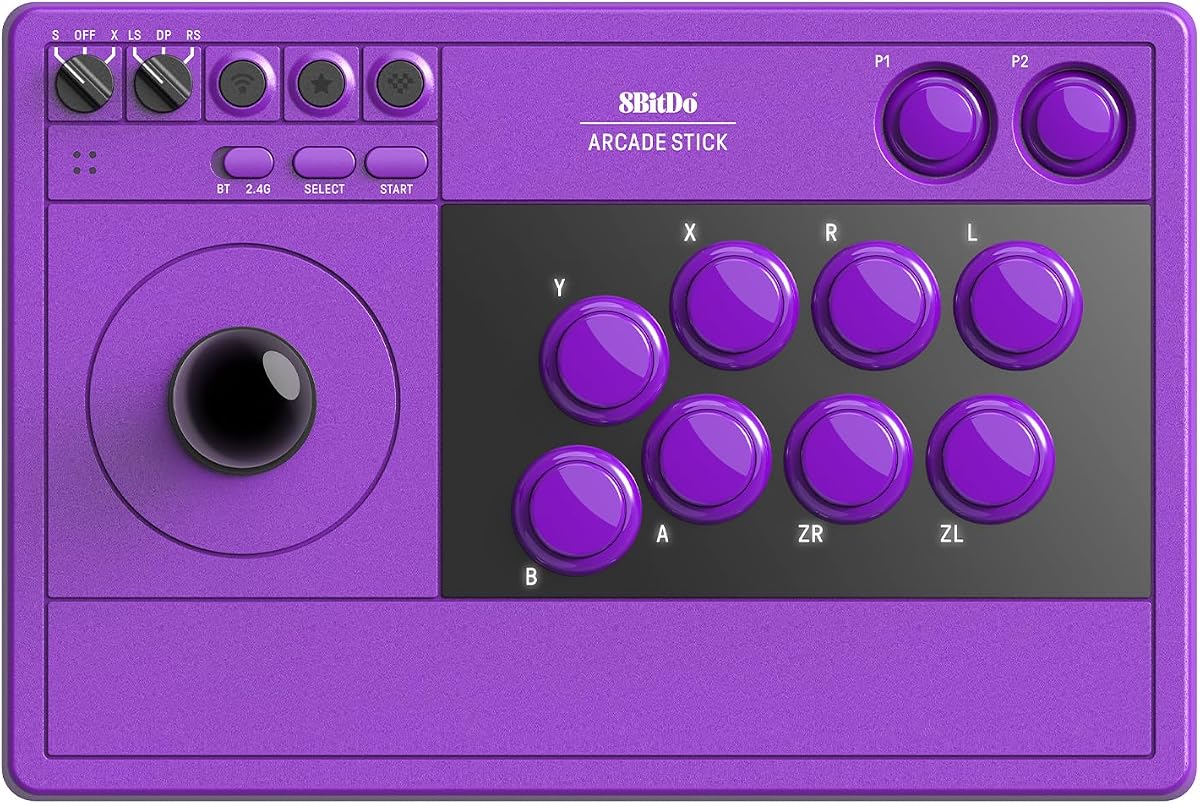
The 8BitDo Arcade Stick for Switch 2 stands out as a top choice for fighters seeking reliability and style. With a 4.7 rating, it delivers responsive controls and a sleek design that appeals to both casual and competitive players.
We may earn a commission when you buy through this link, at no additional cost to you.
Its standout feature is the dynamic button layout, which automatically updates based on your current mode. This ensures you never get confused during switches between Switch and PC. The tempered glass faceplate adds a durable, premium feel to the hardware.
While the price is higher than budget options, the build quality justifies the cost. The hidden compartment for the receiver is a thoughtful touch that keeps your setup tidy. Some may prefer more color variety, but performance remains top tier.
This stick is perfect for players who want a polished, high-performance experience on Switch 2 and PC. If you value design and software features, this model is highly recommended for your fighting game arsenal.
This feature instantly changes visual button labels when switching modes, reducing confusion and speeding up setup times during gaming sessions.
Users can map buttons and create macros easily, allowing for deep customization tailored to specific game mechanics and personal play styles.
We may earn a commission when you buy through this link, at no additional cost to you.
The MAYFLASH F300 is an excellent entry point for anyone wanting a quality fight stick without breaking the bank. Its 4.5 rating reflects solid performance across many platforms, making it a versatile choice for diverse gaming setups.
We may earn a commission when you buy through this link, at no additional cost to you.
Key strengths include its broad compatibility with Switch, PC, and Xbox. The ability to use Sanwa parts means you can upgrade it easily. Turbo functions add value for classic arcade games, ensuring you get more than just basic inputs.
The main trade-off is the lack of wireless features and premium build materials. However, for the price, it offers exceptional value. If you plan to use it mostly at a desk, the wired connection is rarely a significant hindrance.
This model is ideal for beginners or those on a strict budget. It provides a reliable foundation for learning the ropes of arcade fighting games while allowing room for future custom upgrades.
Since it supports standard Sanwa components, users can swap buttons and joysticks to suit their tactile preferences and improve longevity over time.
It works with everything from retro consoles to modern PCs, making it a universal stick that grows with your gaming collection and preferences.
We may earn a commission when you buy through this link, at no additional cost to you.
The MAYFLASH F700 Elite represents the pinnacle of fighting stick quality in this roundup. With a 4.6 rating, it delivers top-tier response times and durability, making it a favorite among serious competitive players.
We may earn a commission when you buy through this link, at no additional cost to you.
Its biggest selling point is the inclusion of premium Sanwa components out of the box. You get 8 responsive buttons and a precision joystick without needing to mod. The anti-slip mat ensures the stick stays planted during intense combos.
However, it is strictly designed for fighting games, which might limit its appeal for casual gamers. The price is also higher than standard sticks. But for enthusiasts, the performance reliability justifies the investment in this specialized tool.
If you want a no-compromise stick for Street Fighter or Tekken, this is the one to choose. It combines professional-grade hardware with solid connectivity to ensure you always perform at your best.
Pre-installed Sanwa parts provide industry-leading responsiveness and durability, reducing latency and wear during high-intensity gameplay sessions.
The full-size anti-slip rubber mat keeps the stick firmly in place, preventing unwanted movement during aggressive inputs and rapid combos.
We may earn a commission when you buy through this link, at no additional cost to you.
This classic 8BitDo stick is a reliable choice for those who value flexibility. With a 4.6 rating, it balances wireless convenience and wired stability, making it suitable for various gaming environments and setups.
We may earn a commission when you buy through this link, at no additional cost to you.
It stands out due to its strong modding potential. The universal mounting plate means you can easily upgrade the internals if desired. Dynamic button layout ensures clarity across different modes without manual configuration steps.
While it supports many platforms, it is not as broad as the MAYFLASH F300. Some users might find firmware updates needed for optimal performance. But overall, it delivers a balanced experience that meets most casual needs.
This stick is perfect for players who want a mix of modern convenience and classic feel. If you like tweaking your gear, the modding support makes it a great long-term investment.
The universal mounting plate allows users to install a wide range of arcade parts, making it easy to customize the stick to their specific preferences.
Software tools allow deep customization of macros and mappings, giving players full control over how their stick behaves across different game modes.
We may earn a commission when you buy through this link, at no additional cost to you.
The 8BitDo Retro Wireless is designed for players who need long battery life. With a 4.5 rating, it offers up to 40 hours of use, making it perfect for marathon sessions without needing frequent recharges.
We may earn a commission when you buy through this link, at no additional cost to you.
Its dedicated macro buttons are a huge plus for complex games. You can assign combos to single presses easily. The ability to swap buttons lets you tailor the physical feel to your preferences quickly.
Charging time is a consideration if you plan to use it nonstop. It also comes with a higher price tag compared to basic options. However, the convenience of wireless play with long endurance is a major plus.
This model is ideal for those who prefer wireless setups and need endurance. If you often play long matches, the battery performance ensures you never get disconnected mid-game.
The large battery capacity allows for up to 40 hours of wireless play, minimizing downtime and ensuring uninterrupted gaming sessions for hours.
Two extra buttons allow quick access to complex combos or macros, streamlining gameplay and reducing the need for complex button combinations.
We may earn a commission when you buy through this link, at no additional cost to you.
The Saitake Wireless Arcade stands out with its built-in display screen. This unique feature allows you to adjust settings like volume and brightness easily. With a 4.6 rating, it offers a versatile package for many types of gamers.
We may earn a commission when you buy through this link, at no additional cost to you.
Its support for mobile and PC devices is impressive. The macro function records keystrokes for complex inputs, which is great for RPGs too. The audio jack lets you connect headphones directly, reducing cable clutter.
However, the display might consume more battery power than simple sticks. Setting up all features could feel overwhelming for some users. Despite this, it offers unique utility that few competitors can match.
This stick is best for those who love tech features. If you want a controller that offers more than just buttons, this model provides a rich, customizable experience.
The built-in screen simplifies settings adjustments like volume and language, offering a user interface directly on the device itself.
Users can record up to 18 keystrokes, allowing for precise macro creation that can be triggered with single button presses.
We may earn a commission when you buy through this link, at no additional cost to you.
The MAYFLASH F700 is tailored for console gamers seeking a professional feel. With a 4.5 rating, it works seamlessly with PlayStation and Switch systems, ensuring stable performance during competitive matches.
We may earn a commission when you buy through this link, at no additional cost to you.
It is optimized for fighting titles, which means every feature is tuned for precision. The headset support allows clear chat during tournaments. Turbo functions add extra utility for arcade classics and rhythm games.
One limitation is its focus on fighting games only. It does not support general gameplay modes well. Xbox users should look at other models. But for PS5 and Switch fans, it is a solid specialist tool.
This model is best for console enthusiasts who want a no-nonsense fighting stick. If you primarily play competitive titles, this will provide the stability and features you need.
Designed specifically for fighting games on modern consoles, it ensures low latency and high reliability during critical online matches.
Direct headset connectivity allows clear audio and chat without extra adapters, keeping your setup clean and functional during long matches.
We may earn a commission when you buy through this link, at no additional cost to you.
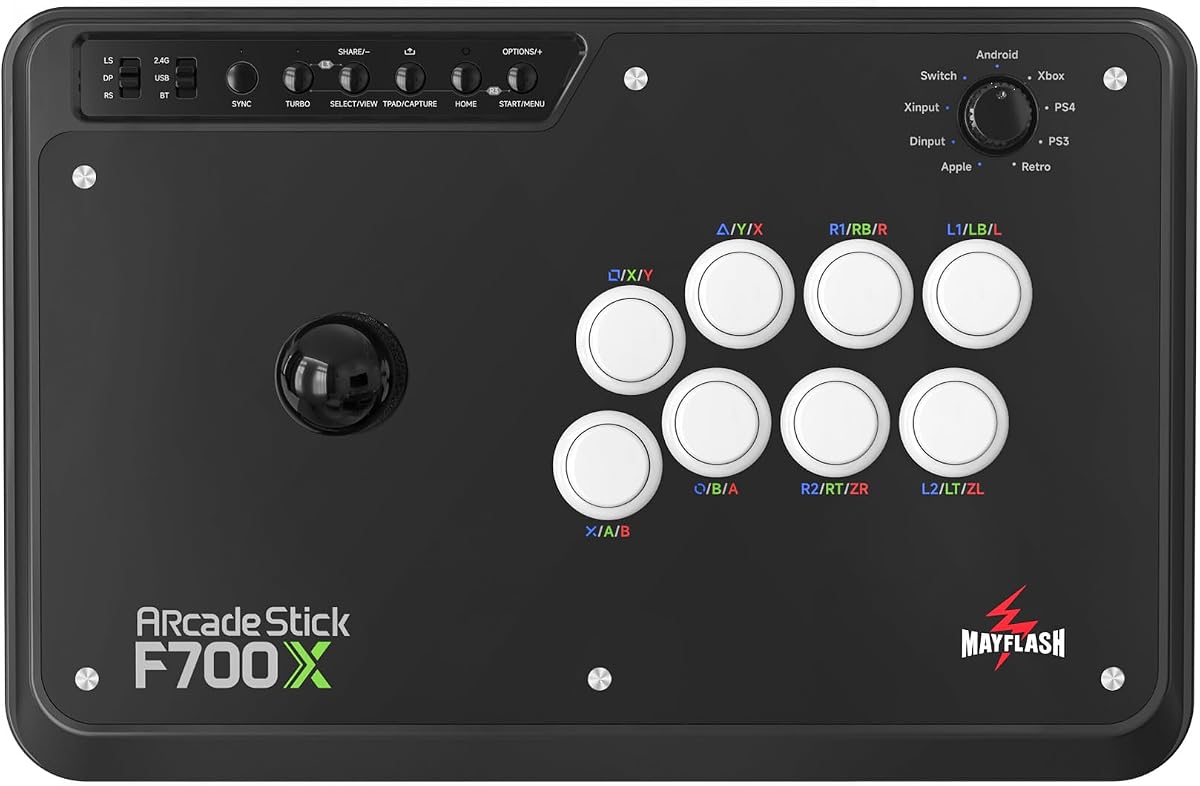
The MAYFLASH F700X is the go-to for Xbox Series owners. With a 4.2 rating, it provides solid compatibility and responsive inputs tailored for fighting titles on the Xbox ecosystem.
We may earn a commission when you buy through this link, at no additional cost to you.
It supports wireless play and wired connections flexibly. Turbo functions and Sanwa compatibility allow deep customization. However, it does not work with PS5, so choose based on your main console platform carefully.
While the rating is slightly lower, it still performs well for its niche. Users who need Xbox compatibility specifically will find it valuable. Just note it is not as broad as other general sticks.
This stick is ideal for Xbox players who want a dedicated fighting setup. If you play primarily on Xbox, this model offers the right features and compatibility.
Built to work seamlessly with Xbox Series consoles, ensuring drivers and protocols are optimized for native controller recognition.
Support for Sanwa parts allows players to swap out buttons for a personalized feel, maintaining high performance across different play styles.
We may earn a commission when you buy through this link, at no additional cost to you.
The POWER A Fusion is an official option for Switch owners. With a 4.1 rating, it offers reliability and support from a trusted brand. Its custom face card feature lets you personalize the look easily.
We may earn a commission when you buy through this link, at no additional cost to you.
It features a solid metal base for stability during play. The battery life allows for extended sessions without constant replugging. While it is Switch only, the official license ensures compatibility with system menus.
Its rating is lower compared to more advanced sticks, but it remains a budget-friendly option. The limited compatibility might be a downside for multi-system players. But for dedicated Switch users, it works well.
This model is best for casual Switch players who value official branding. If you want a reliable, branded controller with customization, this is a solid choice.
As an officially licensed product, it guarantees full compatibility with Nintendo systems and adheres to quality standards set by the manufacturer.
The download template allows users to print their own face cards, adding a personal touch to the standard design and feel.
We may earn a commission when you buy through this link, at no additional cost to you.
The 8BitDo Arcade Stick V3 is a newer release with modern features. With a high capacity battery and dynamic button layout, it focuses on user experience and convenience. It is designed for competitive play on Switch and PC.
We may earn a commission when you buy through this link, at no additional cost to you.
Its tempered glass faceplate provides a sleek and durable finish. The layout refreshes automatically when modes change, which keeps combos smooth. Firmware updates ensure long-term compatibility with new games.
As a newer model, user data is limited compared to older versions. The price may reflect its newer technology. However, for those seeking a modern, reliable design, it is a strong contender.
This stick is ideal for users who want the latest tech. If you prefer updated features and a modern aesthetic, this model fits the bill.
The tempered glass finish offers a premium look and smooth feel, while providing a scratch-resistant surface for daily use.
The 1000mAh battery ensures long playtime on wireless modes, reducing interruptions and maintaining performance throughout extended sessions.
We may earn a commission when you buy through this link, at no additional cost to you.
Choosing the right stick depends on your specific needs. Here are key factors to consider before making a purchase.
Ensure the stick supports Switch 2 as well as any other consoles you own. Some sticks work with PC and PS5, while others are limited to specific ecosystems.
Always check the product details to confirm it works with your devices before buying.
Wired connections often offer lower latency, which is crucial for competitive play. However, wireless options provide convenience for couch gaming.
Look for models offering both options to switch based on your current setup.
Many fighters want to swap parts for a personal feel. Check if the stick uses standard parts like Sanwa or JLF for easy upgrades.
A moddable stick can extend its lifespan as your preferences change.
Software support allows you to map buttons and create macros easily. This can save time during setup and improve gameplay efficiency.
Models with dedicated macro buttons offer even faster access to complex combos.
Sturdy materials like metal bases and tempered glass faceplates enhance durability. Plastic models may be cheaper but less resilient over time.
Consider how much you will use the stick daily to decide on durability needs.
For wireless models, long battery life is essential to avoid frequent charging. Look for sticks offering 30+ hours of playtime per charge.
Charging times and battery capacity should also be considered for convenience.
Sticks range from budget-friendly to premium prices. Determine what features you actually need to avoid overspending on unnecessary extras.
Balancing cost with performance ensures you get the best value for your budget.
Some sticks offer dynamic layouts that change based on the mode. This helps prevent confusion when switching between systems.
Ensure the button count and arrangement match the games you plan to play.
Always connect the stick securely via USB or Bluetooth before playing. If using a 2.4G receiver, store it in the provided hidden compartment to prevent loss.
Regularly update firmware using the provided software to ensure compatibility with Switch 2 games. This prevents connection drops and improves performance.
Clean the faceplate with a soft cloth and avoid using harsh chemicals. Store the stick in a dry place to prevent dust from affecting internal components.
Many models listed in this guide explicitly support Switch 2. Always check the product specifications to confirm compatibility before purchase to ensure it works seamlessly with the new console.
Yes, most sticks can be used for any game that accepts standard controller inputs. However, some specialized sticks focus on fighting modes and might not support all features for RPGs.
Many modern sticks use standard sizes that snap in easily. You may need small tools to release clips. Always refer to the manufacturer's guide for specific installation steps.
XINPUT is a standard for newer PCs, while DINPUT is for older systems. Ensure your stick supports the correct mode for your PC to avoid configuration issues.
Restart the Bluetooth settings on your device and the stick. Ensure you are within range and that batteries are charged. Updating firmware can also resolve persistent connection drops.
Basic sticks come with standard parts. If you want a specific feel or color, you might need to buy extra buttons or joysticks separately depending on the brand.
This guide highlighted ten top picks ranging from budget-friendly to premium models. Whether you want the 8BitDo Elite or the MAYFLASH F300, there is an option for every player.
Prioritize what matters most to you, be it battery life, modding, or specific platform support. Focus on the features that enhance your daily gaming experience.
Always verify current availability and pricing before buying. These models offer great value, so finding the right deal will ensure satisfaction with your purchase.