
Logitech MX Keys Mini Minimalist Wireless Illuminated Keyboard
4.4Editor score
Smart illumination adjusts to lighting conditions
Perfect stroke typing with voice to text
Multi-device pairing across different operating systems
This guide compares the top compact editing keyboards for creators, featuring portable layouts, customizable shortcuts, and ergonomic designs to streamline
Finding the right compact editing keyboard can transform your creative workflow by saving desk space and offering tailored shortcuts. Whether you edit video, design graphics, or write code, a streamlined input device helps you focus on your craft without clutter.
We analyzed ten top-rated models based on portability, key layout, connectivity options, and specialized features like dials or programmable keys. Our evaluation prioritizes tools that enhance efficiency for professionals working in tight spaces or on the go.
Each pick highlights unique strengths, from budget-friendly options to premium editorial consoles. Keep in mind that availability and pricing can shift, so check current listings before making your final decision to ensure you get the best deal available.
4.4Editor score

4.7Editor score

4.4Editor score
This side-by-side comparison highlights the key specifications and unique features of each compact editing keyboard to help you identify the model that best fits your specific creative needs and workspace constraints.



The Blackmagic Design Davinci Resolve Speed Editor stands out as the premier choice for video editors seeking a compact solution. With a high rating of 4.7 stars, it combines a portable design with dedicated keys that mirror professional editing functions directly.
We may earn a commission when you buy through this link, at no additional cost to you.
Its standout feature is the built-in search dial which allows for rapid navigation through timelines without reaching for a mouse. The keyboard shortcuts are meticulously mapped to edit functions, significantly speeding up the post-production process for users familiar with the software.
While the investment is higher than general keyboards, the productivity gains justify the cost for professionals. The bundle includes the DaVinci Resolve 17 Studio activation, adding substantial value and ensuring you have the tools needed for advanced color grading and effects.
This keyboard is ideal for video editors who need a dedicated, portable input device that integrates seamlessly with their workflow. If you prioritize speed and precision in your editing tasks, this model offers unmatched functionality in a small package.
Designed specifically for DaVinci Resolve, this keyboard ensures every key serves a purpose in the editing timeline.
Despite its compact size, it delivers full desktop functionality with wireless connectivity options for versatile setups.
We may earn a commission when you buy through this link, at no additional cost to you.
The Logitech MX Keys Mini offers a premium compact editing experience with its minimalist design and smart features. Rated 4.4 stars, it provides a high-quality typing feel with keys shaped for your fingertips to reduce fatigue during long sessions.
We may earn a commission when you buy through this link, at no additional cost to you.
Smart illumination is a key benefit, lighting up keys automatically when your hands approach and adjusting to ambient light conditions. This feature ensures visibility in any environment without draining the battery unnecessarily, making it perfect for varied workspaces.
Although it lacks a number pad, the layout is optimized for precision tasks common in editing. The ability to pair with up to three devices via Bluetooth Low Energy allows seamless switching between your computer, tablet, or phone effortlessly.
This keyboard suits professionals who value design and efficiency in a portable package. The USB-C rechargeable battery lasts up to ten days on a full charge, ensuring you stay productive without frequent interruptions for power.
Spherically dished keys match the shape of your fingertips for a comfortable and accurate typing experience.
Made with certified post-consumer recycled plastic, reflecting a commitment to sustainable manufacturing practices.
We may earn a commission when you buy through this link, at no additional cost to you.
The Macally Compact Wireless Keyboard is an excellent entry-level option for those needing a reliable compact editing tool. With a 4.4 rating, it delivers straightforward functionality without unnecessary complexity, making it ideal for everyday typing and editing tasks.
We may earn a commission when you buy through this link, at no additional cost to you.
Its 2.4G wireless USB dongle provides a stable connection without the need for Bluetooth pairing, ensuring quick setup on almost any PC or Chromebook. The slim design saves desk space while maintaining enough keys for efficient navigation and text input.
While it does not offer advanced macro keys, the 78-key layout includes convenient shortcut keys to help manage computer tasks effectively. The included batteries and on/off switch ensure you can use it immediately without worrying about immediate power requirements.
This keyboard is perfect for users on a budget who need a portable device for travel or small workspaces. Its simplicity and reliability make it a solid choice for students or casual editors who prioritize functionality over premium features.
The wireless USB dongle ensures a stable connection without draining battery life or requiring complex setup steps.
Without a number pad, it keeps your mouse closer for better ergonomics and saves valuable desk real estate.
We may earn a commission when you buy through this link, at no additional cost to you.
The ProtoArc XK04 Foldable Compact Keyboard offers a unique solution for mobile editing tasks with its pocket-sized design. Rated 4.5 stars, it is engineered for portability, folding into a small form that fits easily into a bag or briefcase.
We may earn a commission when you buy through this link, at no additional cost to you.
Its Bluetooth 5.1 connectivity allows you to connect to three devices simultaneously, switching between them without re-pairing. This feature is particularly useful for editors who work across multiple screens or devices without a physical keyboard nearby.
The integrated PU leather cover protects the keys during transport while adding a premium look to the device. With auto-sleep standby up to 150 days, you can trust it to be ready whenever your work moves to a new location.
This keyboard is best for editors who prioritize portability and need a dedicated typing tool for phones and tablets. While key travel is limited due to size, the convenience and lightweight build make it a top choice for travel work.
Optimized specifically for iPhones and Android tablets, making it a perfect companion for mobile content creation.
The included leather cover shields the keyboard from scratches, allowing you to carry it confidently without extra cases.
We may earn a commission when you buy through this link, at no additional cost to you.
The Microsoft Designer Compact Keyboard brings a modern aesthetic to your workspace with its sleek matte black finish. Rated 4.3 stars, it is designed to save desktop space while allowing for a comfortable mouse position close to the typing area.
We may earn a commission when you buy through this link, at no additional cost to you.
The expressive input key provides quick access to emojis and symbols, which can be a helpful tool for creators communicating ideas or annotating projects. The optimized key spacing and travel ensure that typing remains fast and fluid despite the compact layout.
Connecting up to three devices via Bluetooth allows for seamless switching between your PC and Mac without interruption. This versatility makes it a strong candidate for users who need a clean, minimalist device that still performs well for daily tasks.
This keyboard is suitable for designers and writers who value aesthetics and space efficiency. While it lacks advanced editing macros, its reliable connection and stylish look make it a pleasant addition to any compact workstation setup.
The compact design ensures your mouse can sit closer to your body, reducing strain during long editing sessions.
The expressive key offers a shortcut to special characters, streamlining input for creative documentation and communication.
We may earn a commission when you buy through this link, at no additional cost to you.
The Logitech Pebble Keys 2 K380s is a versatile compact editing keyboard known for its slim design and smart features. Rated 4.3 stars, it allows you to hop across three devices effortlessly, making it ideal for those who switch between platforms often.
We may earn a commission when you buy through this link, at no additional cost to you.
Its quiet scooped round keys provide a laptop-like typing experience that feels familiar and comfortable. The 3-year battery life with auto-sleep power-saving mode means you can rely on it for extended periods without worrying about power changes.
The ability to personalize Fn keys through the Logi Options plus app adds a layer of customization for specific workflows. This feature helps streamline repetitive tasks, enhancing productivity even without specialized macro keys.
This keyboard is perfect for everyday editing on the go due to its durability and battery efficiency. The use of recycled plastic also appeals to eco-conscious users looking for sustainable technology choices without sacrificing quality.
Bluetooth technology lets you switch between devices with a single click, keeping your workflow uninterrupted and fast.
The quiet keys ensure you can work in shared spaces without disturbing others while maintaining a pleasant typing feel.
We may earn a commission when you buy through this link, at no additional cost to you.
The XPPen Mini Keydial ACK05 is a specialized tool designed to boost productivity for creative editors. Rated 4.3 stars, it offers ten customizable keys and a rotary dial that can be programmed to control zooming or brush sizes in your software.
We may earn a commission when you buy through this link, at no additional cost to you.
Wireless connectivity allows for a clean workspace without cables, and the large 1000 mAh battery ensures up to 300 hours of continuous use. The dial provides tactile feedback, making navigation adjustments intuitive without needing to look away from your screen.
Anti-ghosting technology ensures that you can press multiple keys simultaneously without lag, which is essential for complex shortcuts. However, full customization requires downloading the driver, which adds a small setup step before you can optimize its use.
This keyboard is highly recommended for graphic designers and digital artists who rely heavily on shortcuts. Its ability to handle different software applications makes it a powerful addition to any digital content creation setup.
The dial provides precise control for zooming and brush adjustments, enhancing the flow of creative editing tasks.
You can create four sets of shortcuts for different applications, switching between them with a single key press.
We may earn a commission when you buy through this link, at no additional cost to you.
The Logitech K250 offers a unique balance of compactness and functionality by including a number pad in its design. Rated 4.2 stars, it is designed for those who need numerical input without taking up the space of a full-sized keyboard.
We may earn a commission when you buy through this link, at no additional cost to you.
Its deep-profile keys and adjustable tilt-leg design make typing feel great even during extended sessions. The spill-resistant construction adds durability, giving you peace of mind when working in environments where drinks might be nearby.
Wireless connection via Bluetooth eliminates the need for dongles, allowing for a cleaner desk setup. The 12 months battery life ensures you can rely on it for daily use without frequent interruptions to replace batteries.
This keyboard is a strong choice for editors who frequently use numerical codes or data entry tasks. Its combination of convenience, durability, and comfort makes it a practical option for home or office setups.
The space-saving layout includes a number pad, providing essential numeric access in a smaller footprint.
Spill-resistant design and durable keys ensure long-lasting performance even under heavy daily use conditions.
We may earn a commission when you buy through this link, at no additional cost to you.
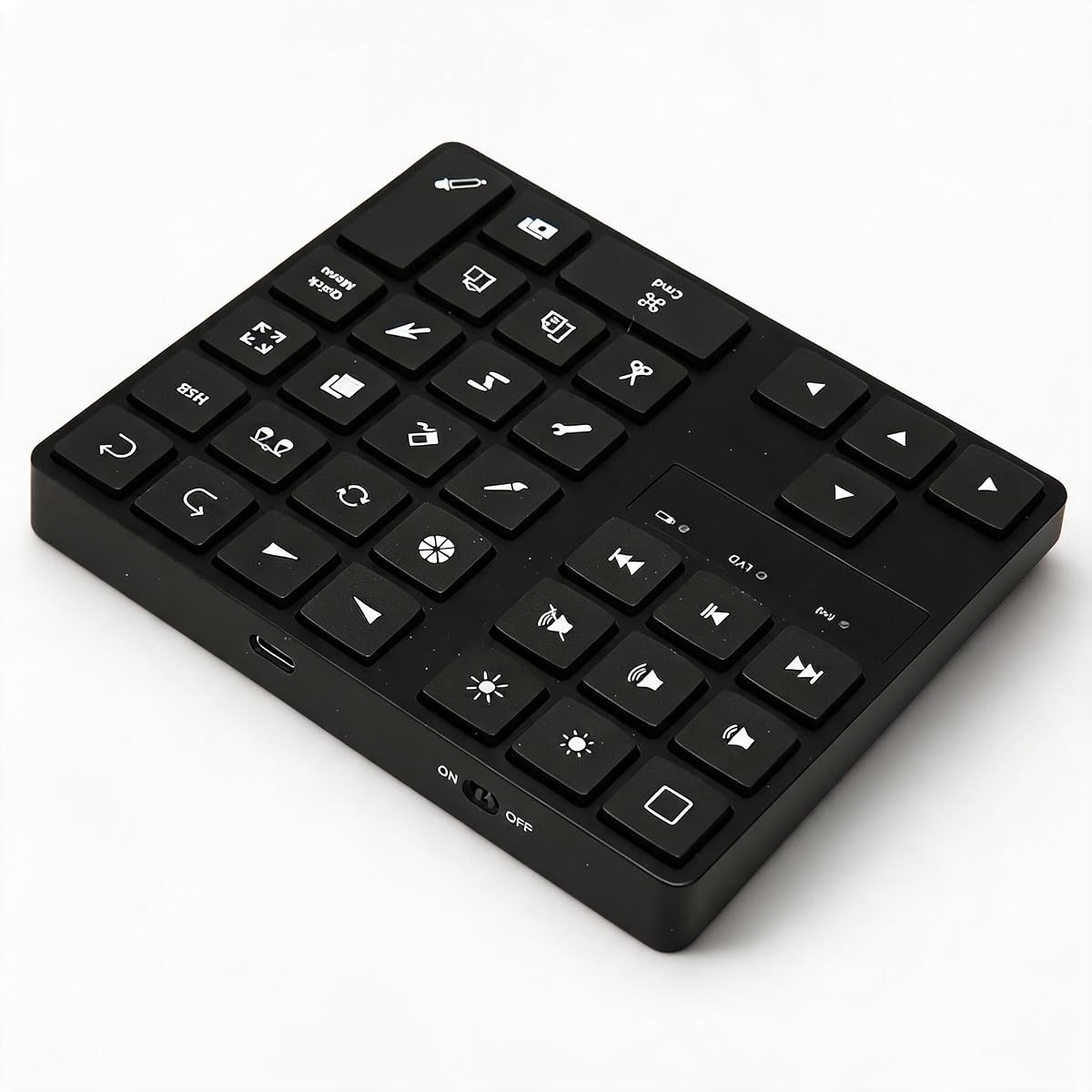
The One-Handed Ergonomic Keyboard provides a unique solution for artists and creators focused on comfort and efficiency. Rated 4.0 stars, its ergonomic layout naturally positions your hand to reduce muscle fatigue during long drawing or design sessions.
We may earn a commission when you buy through this link, at no additional cost to you.
With 35 fully programmable macro shortcut keys, you can assign your most-used commands to the keyboard for faster workflow. This eliminates repetitive mouse clicks and helps you focus on the creative aspects of your work without constant tool switching.
The USB-C wired connection ensures instant performance with zero lag, which is critical for real-time editing tasks. While it uses one hand, this allows your other hand to remain on the mouse or tablet, optimizing your input strategy.
This keyboard is ideal for artists who experience wrist strain with traditional layouts. Its portable design and reliable performance make it a valuable tool for anyone looking to improve their physical comfort while creating content.
The angled sculpted key well promotes a neutral wrist posture, preventing cramping during intensive work periods.
Assigning shortcuts to keys streamlines repetitive actions, significantly speeding up your overall editing workflow.
We may earn a commission when you buy through this link, at no additional cost to you.
The Cherry Stream Wired Keyboard is a robust option for those seeking reliability and quiet operation. Rated 4.3 stars, its compact TKL design places the mouse closer to the keyboard, promoting a more ergonomic and natural position.
We may earn a commission when you buy through this link, at no additional cost to you.
Cherry SX scissor technology ensures a precise pressure point that makes typing feel smooth and responsive. This technology is perfect for frequent typists who need consistent performance without noise disturbances in shared environments.
The integrated metal plate adds stability, preventing the keyboard from slipping even during vigorous typing sessions. The abrasion-resistant lettering ensures that key labels remain legible over time, maintaining usability for years.
This keyboard is suitable for editors who prioritize quiet typing and build quality. Its wired connection guarantees zero latency, making it a dependable choice for critical work where connection stability is paramount.
The scissor mechanism provides precise pressure points for a comfortable and consistent typing experience every time.
Rubberized feet and a metal plate keep the keyboard steady on any surface during heavy use.
We may earn a commission when you buy through this link, at no additional cost to you.
Choosing the right compact editing keyboard involves balancing portability with essential features like customization and ergonomics to match your specific workflow needs.
Look for keyboards that offer customizable keys or macro support if you rely on shortcuts. Models like the XPPen Mini Keydial allow you to program specific functions for editing software, significantly reducing time spent navigating menus.
Prioritize layouts that include essential modifiers like F-keys and arrow keys, even if the main alphanumeric area is reduced to save space.
Decide between wireless Bluetooth and wired USB connections based on your need for mobility versus stability. Bluetooth offers cleaner setups, while wired connections ensure zero latency for high-performance editing tasks.
Check compatibility with your operating system to ensure seamless pairing and reliable performance across devices.
Consider how much space you need to save. Foldable or ultra-slim designs like the ProtoArc XK04 are great for travel, while compact desktop models fit neatly on a stationary desk.
Ensure the keyboard is light enough to transport if you plan to use it outside the office regularly.
Review battery specifications for wireless models to ensure they meet your usage habits. Some offer rechargeable batteries via USB-C, while others use standard replaceable cells for longer continuous runtime.
Auto-sleep features help extend battery life, making the device ready whenever you need to work.
Choose keyboards with comfortable key profiles and adjustable angles to reduce strain during long editing sessions. One-handed ergonomic designs can also help alleviate wrist stress for artists and designers.
Features like spill resistance and durable construction add longevity to the device in professional environments.
Check if the keyboard has specific software integration with your editing tools. Professional editors might benefit from dedicated dials or keys that control specific functions in applications like DaVinci Resolve.
Compatibility with driver software for customization can unlock advanced features that standard keyboards lack.
Invest in models with sturdy construction like metal plates or high-quality plastics to withstand daily use. Look for warranties that protect your investment against defects and wear.
Key durability indicators include abrasion-resistant lettering and robust hinge mechanisms in foldable devices.
Extra features like backlit keys, multi-device pairing, and included cases can add value to your purchase. These convenience factors improve usability in low-light conditions and multi-device workflows.
Consider if specialized input methods like touchbars or dials are necessary for your specific creative applications.
To set up your wireless compact editing keyboard, ensure Bluetooth is enabled on your device and press the pairing button until the light indicator flashes. Follow the prompts on your screen to complete the connection securely.
Keep the keys clean by wiping them gently with a dry, soft cloth. For deeper cleaning, you can use compressed air to remove dust from between the keycaps without damaging internal components.
Store your keyboard in a protective case when traveling to prevent scratches and accidental presses. If it is foldable, ensure the locking mechanism engages fully before placing it in a bag.
Yes, many modern compact keyboards allow you to connect to up to three devices simultaneously via Bluetooth. You can switch between them using dedicated keys, making it easy to work across different computers without disconnecting.
While most keyboards work out of the box, customizing macros or specific editing shortcuts usually requires installing the manufacturer's driver software. This ensures you can tailor the keys to your exact workflow needs.
Most compact editing keyboards listed are compatible with macOS, offering seamless Bluetooth connection. However, always check the product details for specific macOS version requirements to ensure full functionality.
Battery life varies by model, ranging from months to years depending on usage and features like backlighting. Rechargeable models typically last up to 10 days on a full charge if used daily.
Not always. While a number pad helps with data entry or precise coordinates, many editors prefer compact layouts to keep the mouse closer for ergonomics. Choose based on your specific workflow demands.
Many rechargeable compact keyboards support use while charging via USB-C. This ensures you can continue working without interruption if the battery runs low during a session.
Yes, specialized models like the Blackmagic Speed Editor are designed specifically for video editing. General compact keyboards can also work well if they offer shortcut customization for your preferred software.
Scissor switches are common in compact designs due to their low profile and quiet operation. They offer precise feedback and are comfortable for typing long text or script content.
Our top picks highlight diverse options from the specialized Blackmagic Speed Editor for professionals to the affordable Macally Wireless Keyboard for budget-conscious users. Each model offers unique benefits tailored to specific editing needs and workspace sizes.
When selecting your device, consider factors like customization, ergonomics, and battery life to ensure a seamless workflow. Balancing portability with the essential features you need is key to finding the perfect fit.
We encourage you to check the current listings for the latest deals and availability before making your purchase. Prices and stock can vary, so staying updated ensures you get the best value for your chosen keyboard.