
Logitech G F310 Wired Gamepad Controller Console – Blue/Black
4.4Editor score
Broad Game Support
10 Programmable Buttons
Six-Foot Cord
This guide compares the best controllers for retro console gaming across wired and wireless options to help you relive classic gaming experiences today.
Retro gaming has seen a massive resurgence in recent years as players seek nostalgic experiences from the past. Finding the right controller is essential to enjoying these classic titles on modern hardware. A good controller offers responsive inputs and ergonomic comfort for long sessions.
We evaluated ten top-rated controllers based on compatibility build quality and features like wireless connectivity and Hall Effect sticks. Each product was selected for its ability to handle emulators and original hardware equally well. This list covers various budgets and platform needs.
Each pick highlights specific strengths such as budget friendliness premium features or broad system support. We included detailed reviews and comparison tables to help you decide quickly. Keep in mind that prices and availability can change frequently online.
4.4Editor score

4.6Editor score

4.3Editor score
This comparison table provides a side-by-side overview of all ten controllers to help you evaluate their key specifications and compatibility at a glance.


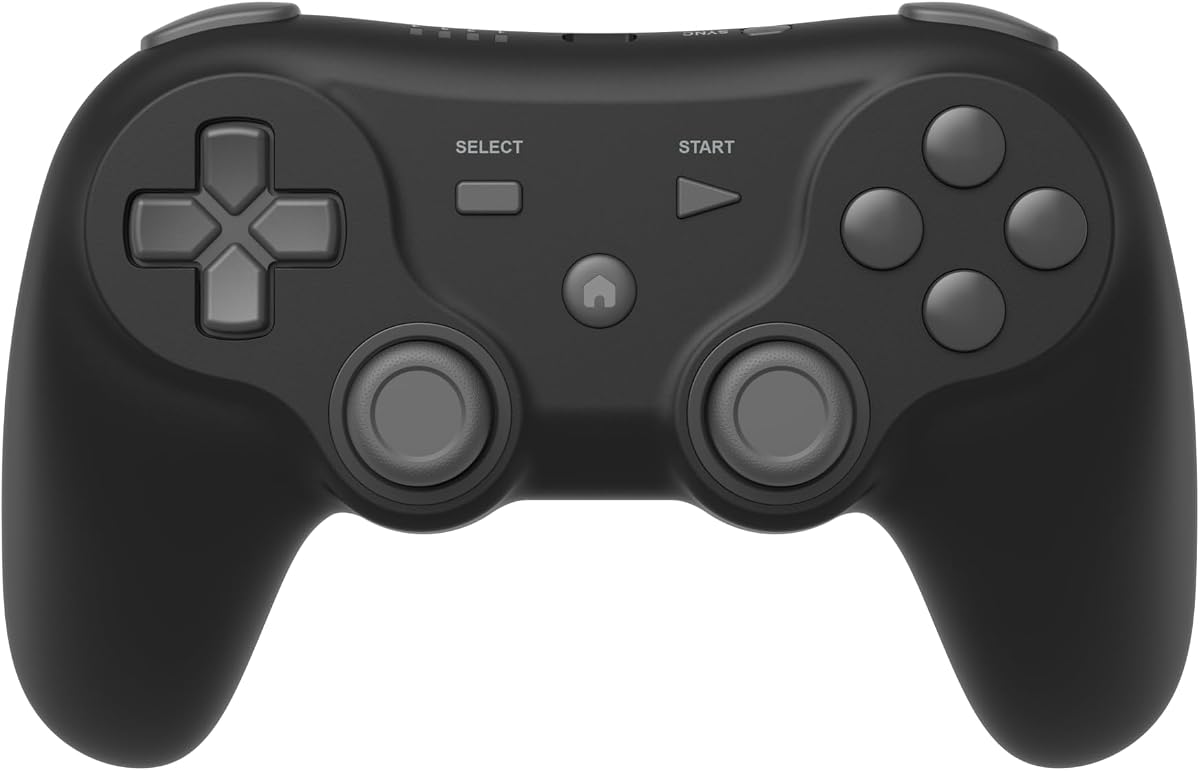


The 8Bitdo SN30 Pro stands out as the top choice for retro gaming enthusiasts seeking a premium wireless experience. With a rating of 4.6 stars it delivers exceptional performance across multiple platforms including Switch and PC. Its Hall Effect joysticks ensure durability and precision that rivals modern controllers.
We may earn a commission when you buy through this link, at no additional cost to you.
This controller features a robust build with clickable joysticks motion controls and a rechargeable battery offering up to 18 hours of play. The full button set includes dedicated home and screen shot buttons making it versatile for emulation and modern indie games alike. Connectivity options include Bluetooth and USB for flexibility.
While the price is higher than budget options the feature set justifies the investment for serious gamers. The size may be slightly larger than classic controllers but it remains portable. The need for firmware updates via software might be a minor hurdle for less tech savvy users.
If you want a reliable versatile controller that bridges the gap between nostalgia and modern features this is the ideal pick. It suits those who play on multiple devices and value precision over cost. We highly recommend it for anyone building a serious retro gaming setup.
Hall Effect joysticks use magnetic sensors to eliminate drift and extend the lifespan of the controller significantly.
Bluetooth and wired options allow seamless switching between PC mobile and console devices without hassle.
We may earn a commission when you buy through this link, at no additional cost to you.
The Logitech G F310 is an excellent budget option for PC retro gaming with a 4.4 star rating. It offers a familiar Xbox 360 layout that requires no learning curve for most users. The broad game support ensures it works with both old standbys and modern titles.
We may earn a commission when you buy through this link, at no additional cost to you.
Its unique floating D-pad sits on four switches for responsive directional changes. The six-foot cord gives you enough slack to lean back comfortably during long sessions. Software allows you to map keys for games that lack native controller support making it versatile for emulators.
The downside is that it is wired which limits mobility compared to wireless options. The build is functional but not premium which is expected at this price point. It may lack the precision of more expensive controllers for competitive play but it is great for casual use.
This controller is perfect for students or casual gamers who want a reliable plug-and-play solution. It is especially good for desktop setups where cables are not an issue. We recommend it for anyone needing an affordable way to play retro games on PC.
The design mirrors the Xbox 360 controller so users can switch in without relearning controls.
Custom software lets you assign keyboard and mouse commands to gamepad buttons for wider compatibility.
We may earn a commission when you buy through this link, at no additional cost to you.
The GameSir Tegenaria Lite brings premium features to retro gaming with a 4.3 star rating. Its 1000Hz polling rate ensures instant response times which is rare at this price point. The 90s design aesthetic fits perfectly with retro console themes.
We may earn a commission when you buy through this link, at no additional cost to you.
Hall Effect sticks provide precise control without drift and the dual rumble motors add immersion. Mappable back buttons let you customize inputs for faster in-game execution. The ergonomic design ensures comfort during extended gameplay sessions.
The wired connection ensures stability but limits portability compared to wireless options. Some users might find the 90s design a bit bulky for smaller hands. The latency is excellent for fighting games but casual players might not notice the difference.
If you prioritize performance and response time this controller is a strong contender. It is ideal for PC and Switch users who want modern tech in a retro shell. We suggest it for competitive players who demand precision and low lag.
The 1000Hz polling rate registers inputs faster than standard controllers giving you a split second advantage.
Hall Effect technology eliminates wear on internal contacts ensuring the stick works perfectly for years.
We may earn a commission when you buy through this link, at no additional cost to you.
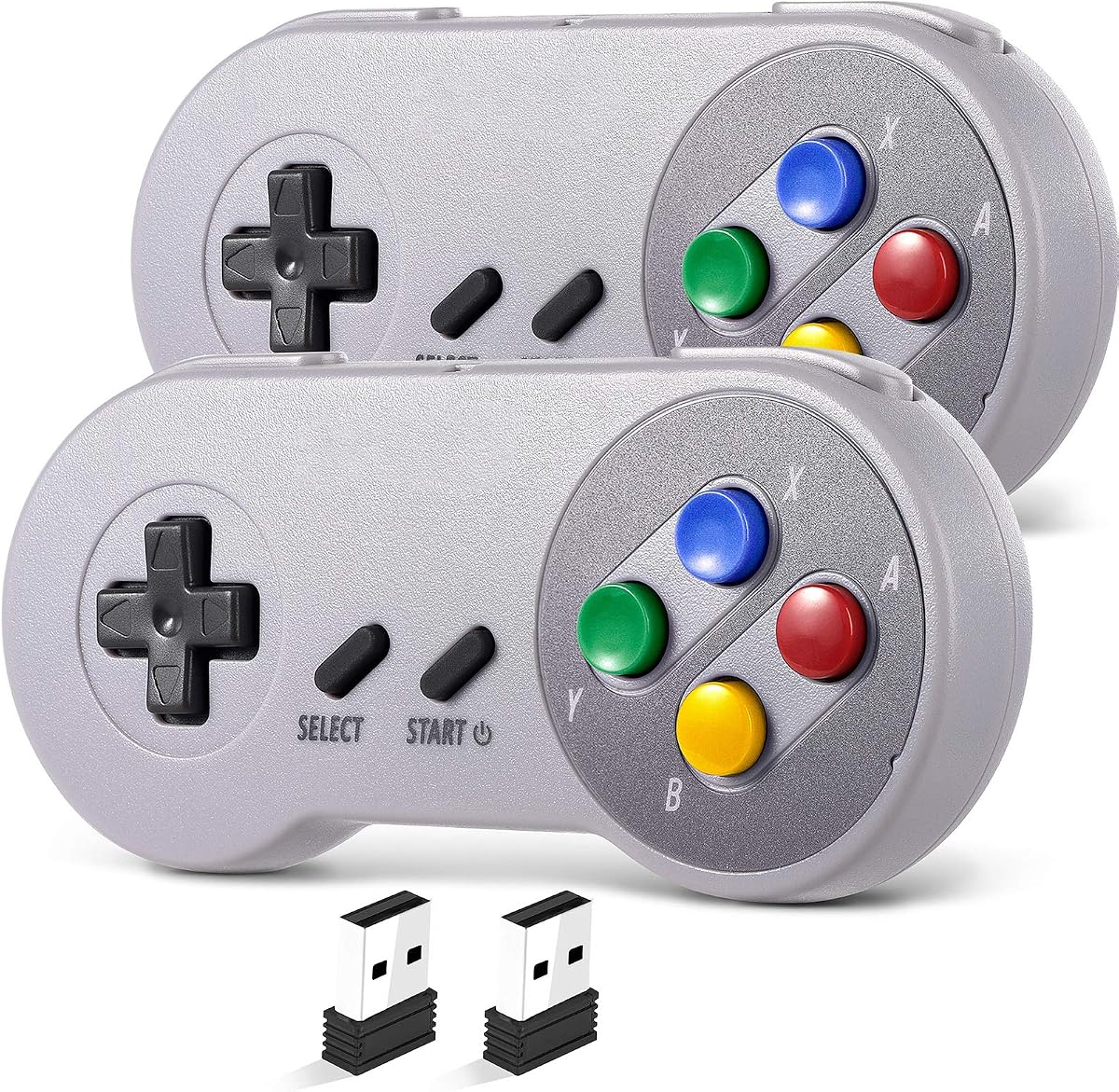
This 2 Pack offers a convenient multiplayer solution for SNES style gaming on PC and Mac. It holds a 4.2 star rating and provides wireless freedom with zero lag performance. The multi-color keys add a fun retro visual appeal to the setup.
We may earn a commission when you buy through this link, at no additional cost to you.
The 2.4GHz wireless connection ensures stability over a 10m range. Plug and play USB receivers make setup easy without drivers. Built-in rechargeable batteries allow for about 10 hours of runtime per charge.
Compatibility is limited as it does not work with Switch or Android TV boxes. Users on these platforms will need a different model. The build quality is decent but not as robust as premium options.
It is a great choice for friends wanting to play co-op games on a PC emulator. The value of getting two controllers at once is hard to beat. We recommend it for budget-conscious gamers with Windows or Mac systems.
Getting two controllers in one package saves money and ensures everyone can play immediately.
The USB receivers make the controllers immediately recognized by Windows and macOS without extra steps.
We may earn a commission when you buy through this link, at no additional cost to you.
The happymaxplus Retro Classic controller is designed specifically for AV 620 HD 621 and HD 821 consoles. With a high 4.8 star rating it offers reliable plug-and-play functionality for these specific devices. The 9 Pin port design ensures compatibility right out of the box.
We may earn a commission when you buy through this link, at no additional cost to you.
These controllers feature continuous fire buttons which give you an edge in rapid fire games. The 4-button layout mimics classic designs perfectly. Two packs allow for shared gaming sessions with friends or family.
The main limitation is narrow compatibility outside of these specific retro consoles. If you plan to use it on PC or Switch it will not work. The build is sturdy but basic reflecting its purpose as a specialized accessory.
This is the best choice for owners of these specific mini consoles needing extra controllers. It offers a simple and affordable way to share the experience. We recommend it only if your console matches the listed models.
The 9 Pin connector matches the exact port on AV 620 and similar retro consoles.
Continuous fire features help you maintain momentum in shooter and action games.
We may earn a commission when you buy through this link, at no additional cost to you.
The Retro-Bit Legacy 16 captures the golden era of gaming with a 4.3 star rating. It combines classic 16-bit design with modern features like dedicated Home and Screenshot buttons. The ergonomic design ensures comfort even during long retro gaming sessions.
We may earn a commission when you buy through this link, at no additional cost to you.
A generous 10 ft cable provides flexibility in setup. It works across multiple platforms including Switch PC and Raspberry Pi. The responsive D-pad and buttons deliver precision for fighting games and arcade classics.
While the cable length is great it can get in the way for wireless fans. The build is durable but the buttons are straightforward without advanced features. It might lack the extra triggers found on modern controllers.
This controller is perfect for those who value authenticity and comfort. It bridges the gap between retro looks and modern connectivity. We recommend it for users who want a classic feel on modern systems.
The design and layout mimic classic 16-bit controllers for a true nostalgic feel.
Despite the retro look it includes USB connectivity to work with current consoles and PCs.
We may earn a commission when you buy through this link, at no additional cost to you.
The 8Bitdo 64 is designed specifically for Analogue 3D and Switch systems with a 4.6 star rating. It offers a unique form factor that resembles the original N64 controller but adds modern reliability. The wireless option ensures a clutter-free setup.
We may earn a commission when you buy through this link, at no additional cost to you.
It supports vibration on compatible consoles and includes a turbo function for rapid inputs. D-input and S-input modes make it versatile across different emulation needs. The build quality is solid and comfortable for smaller hands.
This controller is expensive compared to generic options because of its specific niche. If you do not use Analogue 3D it may not be the best value. The cable for wired mode can be cumbersome if you prefer full wireless.
It is the ideal choice for collectors of Analogue consoles needing an authentic controller. The features justify the cost for users invested in these specific platforms. We recommend it for dedicated retro hardware enthusiasts.
The controller is optimized for Analogue 3D ensuring perfect functionality without extra config.
Bluetooth connectivity allows you to play without cables while maintaining precise inputs.
We may earn a commission when you buy through this link, at no additional cost to you.
The Retro Fighters Defender Pro offers broad support for PS1 PS2 and PS3 with a 3.8 star rating. It features pressure-sensitive buttons for more precise control in older titles. Hall Effect sticks ensure high precision and a long lifespan without drift.
We may earn a commission when you buy through this link, at no additional cost to you.
Dual wireless modes let you switch between 2.4GHz and Bluetooth for flexibility. Customizable trigger stops allow you to toggle between analog and digital settings. This level of detail is rare for retro-compatible controllers.
The rating suggests mixed user experiences which might indicate setup complexity. The software for customization may be challenging for some users. It is also pricier than standard retro controllers on the market.
This is a strong pick for users wanting advanced features on older PlayStation consoles. If you are comfortable with software it offers great customization. We recommend it for tinkerers who need pressure sensitivity.
Pressure-sensitive buttons allow you to control speed and power in compatible games.
Switching between 2.4GHz and Bluetooth offers the best of both worlds for connectivity.
We may earn a commission when you buy through this link, at no additional cost to you.
The ZAMPAM 2 Pack offers excellent value for PC gaming with a 4.0 star rating. It supports Windows Mac and Linux systems seamlessly with 2.4GHz wireless. The long battery life of around 100 hours reduces charging frequency.
We may earn a commission when you buy through this link, at no additional cost to you.
Customizable turbo buttons allow you to automate rapid inputs for various games. The wireless range reaches up to 10 meters providing flexibility in room setup. It is a great budget-friendly option for emulators.
The controllers are not compatible with Super Nintendo or Mini NES consoles which limits retro use. Software configuration is required for key mapping which might deter some users. The build is lightweight but functional.
If you are a PC gamer wanting a cheap dual pack this is ideal. It is great for LAN parties or multiplayer emulation sessions. We recommend it for users primarily using PC or Linux systems.
A single charge provides up to 100 hours of play so you rarely need to recharge.
Customizable turbo buttons let you map rapid presses to any key for faster gameplay.
We may earn a commission when you buy through this link, at no additional cost to you.
The Hyperkin Trooper 2 is a premium USB controller ideal for emulation on PC and Mac with a 4.2 star rating. Its ergonomic design with chamfered corners provides comfort for long gaming sessions. The build uses high-quality materials ensuring durability.
We may earn a commission when you buy through this link, at no additional cost to you.
A 10-foot USB cable allows you to play from a distance comfortably. The joystick moves quietly and the buttons are responsive for precise inputs. Six mappable buttons help you play various consoles and navigate menus easily.
It is a wired controller which limits mobility compared to wireless options. The basic feature set might not appeal to those seeking advanced modern options. The retro look is stylish but might not suit every desk setup.
This is a solid choice for users who prioritize comfort and build quality. It suits those who prefer classic ergonomic designs over modern shapes. We recommend it for PC users who value a long cable and sturdy construction.
The chamfered corners and soft rubber grips reduce hand fatigue during long use.
Solid base and quality cord ensure this controller lasts longer than cheaper plastic options.
We may earn a commission when you buy through this link, at no additional cost to you.
Choosing the right controller for retro gaming involves weighing compatibility ergonomics and features against your specific needs and budget.
The most critical factor is ensuring the controller works with your console or PC emulator. Check if it supports Switch PC Mac or specific retro hardware like the AV 620. Some controllers are universal while others are designed for specific ecosystems.
Always verify the product description lists your exact platform before purchasing to avoid return hassle.
Wired controllers often provide lower latency and never need batteries which is great for competitive retro fighting games. Wireless options offer convenience and a clutter-free setup but may require charging or batteries periodically.
Choose wired for speed and reliability or wireless if you value comfort and a clean desk environment.
Look for controllers with Hall Effect sticks if you want to prevent drift and ensure long-term accuracy. High-quality materials like reinforced plastics and soft rubber grips contribute to a longer lifespan and better comfort.
Investing in durable build materials saves money by reducing the need for frequent replacements over time.
Retro gaming often requires frequent directional inputs so a responsive D-pad is essential. Ergonomic shapes and button spacing should match your hand size to prevent fatigue during extended sessions.
Prioritize a layout that feels natural to you rather than a standard design that might cause discomfort.
Some retro titles benefit from turbo functions for rapid fire attacks without holding buttons repeatedly. Rumble motors add immersion which can enhance the experience for games that were not designed for vibration.
Consider these features as optional bonuses that improve gameplay depending on the types of games you play.
Controllers range from very affordable budget packs to premium wireless options with advanced tech. Determine your spending limit but remember that a slightly higher price often brings better reliability and features.
Look for deals or multi-packs if you plan to play with friends to maximize value without sacrificing quality.
Some controllers offer both Bluetooth and USB-C options allowing you to switch between wireless and wired modes. This flexibility is useful for users who play on multiple devices like a PC and a portable console.
Having multiple connection methods ensures you can always use the controller even if one connection type fails.
Advanced users may want software to remap buttons or update firmware to fix bugs and improve performance. Good software support means the controller can adapt to new games and platforms as they are released.
Check reviews to ensure the software is user-friendly and actively maintained by the manufacturer.
Start by connecting your controller to your device via USB or Bluetooth and ensuring drivers are installed if necessary. For wireless models charge the battery fully before first use to ensure maximum performance during initial setup sessions.
Test all buttons and sticks in the device settings menu to confirm each input is recognized correctly. This helps identify any defects early and allows you to map custom buttons to your preferred functions.
Store your controller in a cool dry place away from direct sunlight to prevent plastic degradation. Clean the buttons and sticks gently with a soft cloth to remove dust and oils that might affect performance.
Most of these controllers support modern platforms like PC Switch and Android but you should check the compatibility list before buying. Some are designed specifically for retro consoles like AV 620 and will not work on PlayStation or Xbox. Always verify the supported systems.
Yes many of the models listed are optimized for PC emulators on Windows Mac and Linux. They often include plug and play functionality that makes them recognized immediately by software like RetroPie. Check the specs for emulator support.
Battery life varies by model but you can expect around 10 to 18 hours of continuous use on most units. Some budget wireless models offer up to 100 hours on a single charge which is ideal for long sessions. Always keep the cable handy for charging.
Yes Hall Effect sticks use magnetic sensors that eliminate wear and prevent stick drift over time. This technology significantly extends the lifespan of the controller compared to traditional potentiometer sticks. It is a great upgrade for longevity.
Many options come in 2 packs which allow for local multiplayer gaming immediately. Wireless connections often support multiple controllers connecting to the same device simultaneously without interference. Just ensure your console supports the number of players.
Most controllers work plug and play without software but mapping features may require specific driver installs. For PC gaming you might need third party apps to configure advanced functions like turbo or vibration. Always check the manual.
Most retro style controllers are lightweight and compact for easy handling during long sessions. They usually fit comfortably in the hands but some models are bulkier to accommodate extra buttons or batteries. Consider your hand size before purchasing.
Many premium and mid-range models include dual vibration motors for immersive gameplay feedback. Check the specifications as basic models might omit this feature to keep costs down. Support varies by platform and game.
We reviewed ten top controllers ranging from budget wireless packs to premium wireless options with Hall Effect sticks. Each offers a unique balance of features and price to suit different retro gaming needs and platforms.
Prioritize compatibility and connection type to match your specific device and play style. If you value precision look for Hall Effect sticks and if you value cost consider the 2-pack options for multiplayer.
Prices and availability change frequently so check the current listings before buying to ensure you get the best deal today. We hope this guide helps you find the perfect controller to relive your favorite gaming memories.