
BNC to HDMI Converter
4.7Editor score
Supports 1080P output
Includes audio input port
ABS anti impact housing
This guide compares the top 10 coax to HDMI converters for connecting legacy RF devices to modern displays with clear video quality and reliable signal
Connecting older RF devices to modern screens requires reliable converters. This guide explores the top coax to HDMI adapters available in November 2026 for seamless integration.
We evaluated performance, compatibility, and build quality across ten leading models. Our analysis focuses on signal stability and ease of setup for various legacy sources.
Each pick highlights key features and real-world use cases. Prices and availability change frequently, so verify current details before purchasing your ideal adapter.
4.7Editor score

5.0Editor score

4.4Editor score
The following table offers a side by side look at the specifications and key attributes of each selected adapter for easy comparison.


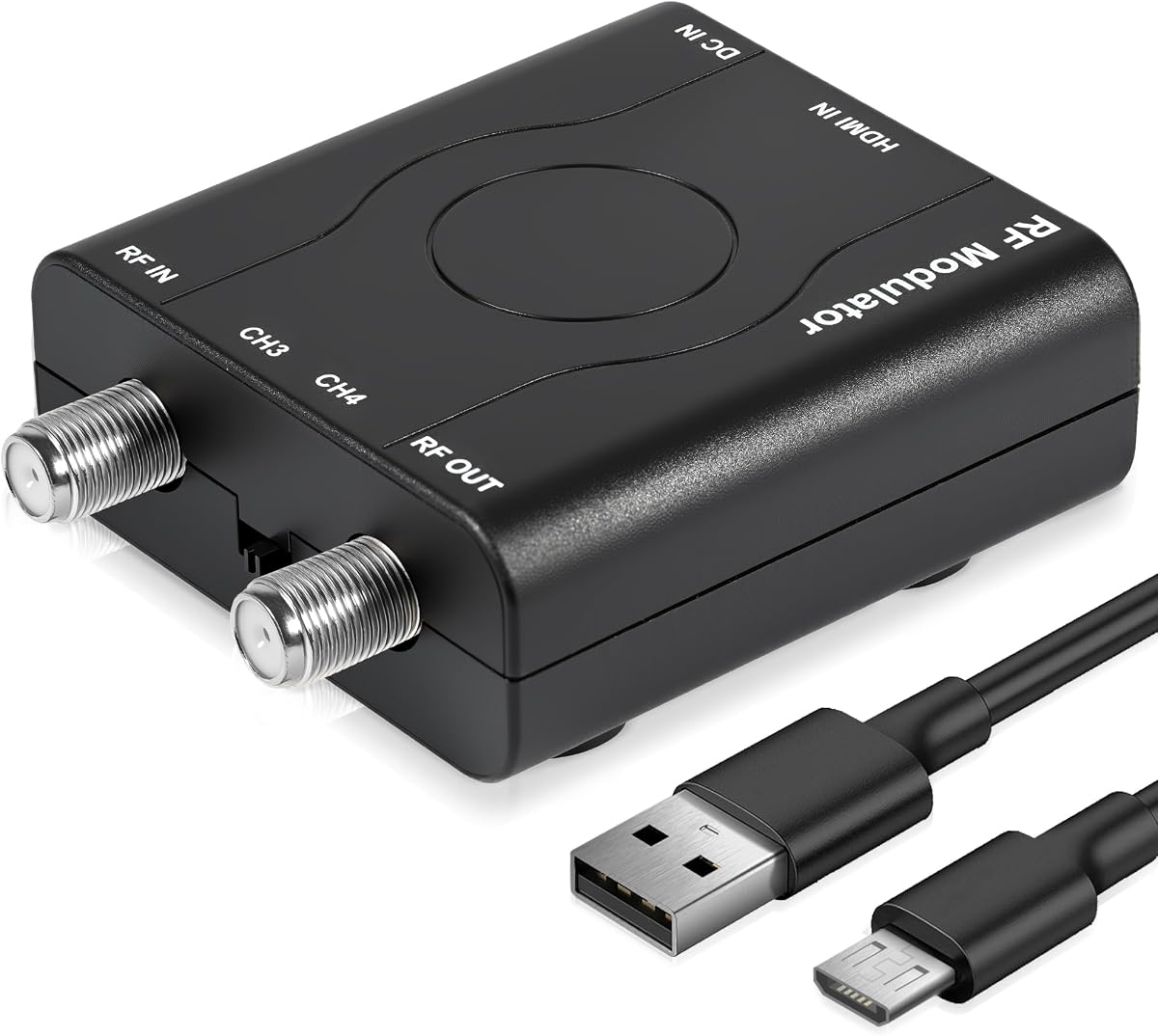


This adapter is designed to send modern HDMI signals to older TVs with RF inputs. It holds a solid 4.3 rating and is known for reliable performance with game consoles.
We may earn a commission when you buy through this link, at no additional cost to you.
It includes a 1.2 meter HDMI cable and supports resolutions up to 1080P input. The built-in PLL control ensures stable VHF frequency output on channels 3 or 4.
While it is excellent for sending signals out, it cannot convert coax input to HDMI. Users must ensure their display has an RF antenna input to use this correctly.
It is ideal for gamers who want to play Switch or PS5 on legacy TVs. The setup requires no drivers and connects directly via the included HDMI cable.
The included cable and plug play design mean you can start playing games immediately without hunting for extra adapters.
PLL control technology ensures the signal stays locked to the correct channel for consistent viewing without interference.
We may earn a commission when you buy through this link, at no additional cost to you.
This unit is built to take old analog signals from VCRs and retro consoles and convert them to HDMI for modern screens. It has a mixed 3.4 rating due to specific signal requirements.
We may earn a commission when you buy through this link, at no additional cost to you.
It supports CH3 and CH4 analog inputs and includes a remote for channel selection. The device works with Atari 2600 systems and VHS players effectively when tuned correctly.
Some users find the setup requires careful channel tuning to avoid static. Ensure your source signal is strong enough for the demodulator to process cleanly.
If you are trying to play old cartridges or watch VHS tapes on a smart TV, this converter bridges the gap efficiently without needing complex capture cards.
The included remote allows you to switch channels and settings without constantly adjusting the box manually.
Compatibility lists include many classic systems making it a versatile choice for collectors with various legacy gear.
We may earn a commission when you buy through this link, at no additional cost to you.
This adapter is specifically designed for security cameras with BNC connectors rather than standard TV coax. It holds an impressive 4.7 rating for its ability to output sharp 1080P video.
We may earn a commission when you buy through this link, at no additional cost to you.
It automatically detects whether the signal is PAL or NTSC and adjusts accordingly. The ABS casing provides strong protection against impacts and physical damage over time.
Be aware this works with BNC ports not standard F type antenna inputs. You will need your own HDMI cable to connect it to the display.
It is the best budget choice for security users who want to view camera feeds on a TV without expensive DVR equipment.
The unit identifies the incoming video standard automatically saving you from manually switching settings for different regions.
The ABS housing is rugged enough to withstand daily use in monitoring setups where the device might be moved often.
We may earn a commission when you buy through this link, at no additional cost to you.
This modulator is built to send HDMI signals over existing coax cabling systems. It features a strong 4.3 rating and is designed for reliable operation in home or office environments.
We may earn a commission when you buy through this link, at no additional cost to you.
It supports HDCP 1.4 which is important for streaming content that requires encryption. The PLL control ensures the frequency stays locked so the TV can find the signal easily.
Since it is compact it can be hidden easily behind a desk or TV. Note that you need your own HDMI cable as the box does not include one.
It is a solid choice for businesses or homes that need to distribute video signals through walls using old coax wiring.
Support for 1080P input means you can send high definition video to older displays via the RF converter.
The plug and play nature means you do not need to install drivers or configure software on your computer.
We may earn a commission when you buy through this link, at no additional cost to you.
This unit stands out with a perfect rating and a complete kit that includes everything you need to start. It is designed to connect modern HDMI devices to older TVs with coax inputs.
We may earn a commission when you buy through this link, at no additional cost to you.
It provides stable video distribution performance making it suitable for hotels or classrooms where reliability matters. The setup is simple with a step by step guide included in the box.
You get a 4ft HDMI cable and power adapter with the modulator. This makes it ready to use straight out of the package without extra purchases.
It is our top recommendation for anyone needing a dependable converter that supports most streaming media players and game consoles easily.
Having the HDMI cable included ensures you do not have to buy additional accessories before using the device.
The stable output performance ensures that your older TV receives a clear signal without constant flickering or static.
We may earn a commission when you buy through this link, at no additional cost to you.
This adapter is built to take HDMI audio video input and turn it into analog RF signals. It holds a perfect 5.0 rating for its straightforward and effective design.
We may earn a commission when you buy through this link, at no additional cost to you.
It features a molded ABS shell that is tough and reliable for continuous daily operation. The unit supports fixed frequencies on channels 3 and 4 for easy tuning.
It is small enough to sit behind a TV without taking up much space. You will need to supply your own HDMI cable to connect it to the source.
It is ideal for simple setups where you just need to get a signal from a laptop or game box to an old TV.
The device outputs on specific channels so your TV can find the signal without complex scanning processes.
The molded ABS shell ensures the unit can withstand heat and physical bumps during daily use.
We may earn a commission when you buy through this link, at no additional cost to you.
This modulator is built to work with a wide range of devices including personal computers and laptops. It has a strong 4.5 rating for its ability to connect to older RF television systems.
We may earn a commission when you buy through this link, at no additional cost to you.
It comes with a USB power cable and user manual for easy setup. The durable ABS construction ensures that it can handle daily use without overheating or failing.
You can plug this into your laptop to display content on an old monitor. Just ensure you have an HDMI cable ready to connect the source to the box.
It is a great choice for office environments where legacy displays need to show modern content from current hardware.
The included USB power cable makes it easy to power the device using your laptop or computer port.
Compatibility extends to various devices ensuring you can connect cameras laptops and consoles without issues.
We may earn a commission when you buy through this link, at no additional cost to you.
This unit stands out because it can convert HDMI to both RF coax and RCA signals at the same time. It has a 4.2 rating and is designed for advanced distribution setups.
We may earn a commission when you buy through this link, at no additional cost to you.
The dual output allows you to watch on one TV while recording with another capture card. It also has an antenna input to pass through existing signals without interruption.
It includes a channel switch that prevents interference with other devices like VCRs. This makes it useful for sharing content across multiple TVs in different rooms.
It is perfect for users who need to connect a capture card and a TV simultaneously using one source signal.
Outputting to both RCA and RF gives you more flexibility on how you connect your display devices.
The RF coax signal allows you to transmit video over longer distances to other TVs in the house.
We may earn a commission when you buy through this link, at no additional cost to you.
This is a high end adapter designed specifically for security cameras using modern analog formats. It holds a 4.4 rating and supports inputs up to 8MP for sharp monitoring.
We may earn a commission when you buy through this link, at no additional cost to you.
The metal housing is designed to dissipate heat efficiently during 24/7 operation. It also has a loop out port so you can still record to a DVR while viewing on a TV.
It automatically detects the camera format so you do not need to change settings manually. This is vital for mixed systems with different camera brands.
If you are running a security setup and want to view feeds on a big screen without buying new cameras this is the premium choice.
Supporting up to 8MP ensures you get clear detail even from modern high megapixel security cameras.
The metal housing keeps the unit cool during long hours of continuous operation in surveillance setups.
We may earn a commission when you buy through this link, at no additional cost to you.
This adapter is built with a professional grade design for stable and consistent performance. It has a perfect 5.0 rating and is ready to use straight out of the box.
We may earn a commission when you buy through this link, at no additional cost to you.
It supports 1080P input and includes a PLL control for stable VHF output. The device works with many laptops PCs and game consoles easily.
You will need to connect your own HDMI cable to get started. However the quality of the conversion is high enough for daily home use.
It is an excellent option for users who want a reliable converter that is built to last for years.
The PLL control ensures the signal remains locked and stable on your TV channel without interference.
No software or complex steps are needed to get the unit running for immediate video playback.
We may earn a commission when you buy through this link, at no additional cost to you.
Choosing the right adapter depends on your source device and display type. Here are the key factors to consider before buying.
Ensure the adapter matches your cable connector. BNC units work for security cameras while F type units work for standard TV antennas.
Always check if the box includes an HDMI cable to avoid extra costs after purchase.
Most adapters support 1080P input but the output is analog which limits resolution. Check if your display handles analog signals well.
Higher input support ensures you do not lose quality from modern source devices like laptops or consoles.
Some devices draw power via USB while others need a wall adapter. Choose based on your power outlet availability.
A stable power supply is vital for preventing video flickering during playback.
If you plan to stream protected content check for HDCP support. Without it some streaming apps may not work.
This is critical for connecting streaming sticks to older TVs via conversion.
Metal housings dissipate heat better than plastic. For 24/7 use choose models with metal or durable ABS construction.
Quality builds prevent overheating during long viewing sessions.
Look for features like loop outs or remote controls. These can add value for specific setups like surveillance or multi room viewing.
Advanced features help you maximize the utility of the adapter in complex setups.
Plug and play units require no drivers. Check reviews to ensure the device works straight out of the box.
Simple setup saves time and technical frustration during installation.
Most units use fixed channels 3 or 4. Ensure your TV has a reliable tuner for these channels to avoid static.
Channel switches can help if your area has interference on specific frequencies.
Connect the HDMI cable from your source device to the input port on the adapter. Then connect the coax cable from the adapter to your TV or distribution system.
Plug in the power adapter to ensure stable operation. Without power the unit will not convert the signal correctly.
Clean the device with a dry cloth to prevent dust buildup. Keep it in a ventilated area to avoid overheating during use.
You must use a BNC to HDMI converter for security cameras. Standard coax adapters are for TV signals while security cameras use BNC connectors.
Most adapters support up to 1080P input. The output is analog so true 4K quality is not supported. Check specs for 1080P input support.
No drivers are required for these devices. They are plug and play units that work immediately after connecting to the source and power.
HDMI to RF sends digital signals to old TVs. RF to HDMI does the reverse for converting antenna inputs to HDMI. Ensure you get the correct direction.
Yes if your smart TV has a coax input. Use the RF output to display modern devices on legacy screens that lack HDMI ports.
Check that you are tuned to channel 3 or 4. Ensure the power adapter is connected. If the issue persists try a different HDMI cable.
We reviewed ten top adapters covering needs from gaming to security. The RF Modulator stands out as the best overall choice for most users.
Prioritize build quality and input compatibility when picking a model. A sturdy unit with correct connectors will serve you longer.
Check current prices and availability before buying to ensure the best deal. Verify that all necessary cables are included.