
CORSAIR Vengeance SODIMM 16GB
4.8Editor score
5600MHz up to speed
Single stick 16GB option
Easy installation process
This comprehensive guide compares the top DDR5 Laptop RAM modules available in October 2026, evaluating speed capacity compatibility and reliability to help
Selecting the right DDR5 Laptop RAM is crucial for modern computing needs. Whether you are gaming, editing video, or running complex simulations, having fast and reliable memory ensures your system runs smoothly without bottlenecks.
We compared ten top-rated DDR5 Laptop RAM modules based on speed, capacity, voltage efficiency, and compatibility with Intel and AMD processors. Our analysis focuses on real-world performance benefits and long-term reliability for laptop upgrades.
Each pick highlights key specifications and user feedback to guide your decision. Please note that pricing fluctuates frequently, so always check current offers before purchasing to ensure you get the best value for your investment today.
4.8Editor score

4.8Editor score

4.5Editor score
The following table provides a side-by-side comparison of all ten DDR5 Laptop RAM modules featured in this guide. Review the key specifications and links to find the exact match for your laptop model.



The Crucial 32GB DDR5 RAM Kit stands out as the top choice for users seeking a balance of performance and reliability. With a stellar 4.8 rating, it delivers robust multitasking capabilities essential for modern laptops.
We may earn a commission when you buy through this link, at no additional cost to you.
This kit operates at 5600MHz, offering significant speed improvements over previous generations. It supports both Intel XMP 3.0 and AMD EXPO, making it versatile for various processor architectures without complex BIOS tweaks.
While the price point is higher than some budget options, the quality of Micron memory chips justifies the cost. Users benefit from rigorous testing at component and module levels, ensuring long-term stability.
Ideal for professionals and gamers needing smooth performance, this kit is the best overall DDR5 Laptop RAM. Check current pricing before purchase to secure the best deal for your upgrade.
The 32GB capacity allows for seamless multitasking across heavy applications without slowing down system responsiveness.
Works best with 12th Gen Intel Core and AMD Ryzen 7000 Series processors for maximum efficiency.
We may earn a commission when you buy through this link, at no additional cost to you.
For budget-conscious buyers, the CORSAIR Vengeance SODIMM 16GB offers exceptional value. It delivers high performance with its 5600MHz capability, making it a strong contender for laptop upgrades.
We may earn a commission when you buy through this link, at no additional cost to you.
This module features Intel XMP 3.0 support, enabling automatic speed boosts on compatible systems. The simple installation process means you can upgrade your laptop with just a screwdriver.
Users note that maximum speed depends on system components and BIOS settings. However, it automatically sets to optimal speeds on most platforms, reducing manual configuration headaches.
This is the best budget DDR5 Laptop RAM for those needing a quick capacity boost. Verify compatibility with your motherboard before ordering to ensure full performance potential.
Tackle demanding tasks and games with faster frequencies and lower power consumption.
Industry-standard SODIMM form factor fits a wide range of Intel and AMD laptops.
We may earn a commission when you buy through this link, at no additional cost to you.
Samsung brings premium quality to laptop memory with this 32GB DDR5 kit. Known for manufacturing reliable memory chips, Samsung ensures stable performance for demanding workloads.
We may earn a commission when you buy through this link, at no additional cost to you.
Operating at 5600MHz, this kit offers significant speed improvements. The dual 16GB modules work together to expand system resources, reducing bottlenecks and increasing overall workload capacity.
While it carries a higher price tag, the durability and performance consistency justify the cost. It adheres strictly to JEDEC standards, minimizing compatibility issues with various laptop models.
Ideal for power users needing top-tier reliability, this is the best premium DDR5 Laptop RAM. Confirm your laptop supports 32GB total capacity before proceeding with the purchase.
Improves performance and increases workload capacity for professional applications.
Designed specifically for select Laptop, Notebook, and All in One computers.
We may earn a commission when you buy through this link, at no additional cost to you.
TEAMGROUP offers a competitive option with the Elite SODIMM DDR5 kit. It delivers 5600MHz frequency for fast performance, appealing to users seeking speed without breaking the bank.
We may earn a commission when you buy through this link, at no additional cost to you.
The on-die ECC support enhances system stability, which is crucial for critical tasks. With a working voltage of 1.1V, it conserves energy effectively, extending battery life during portable use.
A lifetime warranty adds significant value, though users should verify details on the official website. The capacity supports powerful multitasking, ensuring smooth operations across multiple applications.
This kit is a strong contender for DDR5 Laptop RAM upgrades. It balances performance with reliability, making it suitable for daily computing and professional workflows.
New structural composition improves performance significantly with higher frequency.
Refer to the latest version on the official website for full warranty terms.
We may earn a commission when you buy through this link, at no additional cost to you.
GIGASTONE focuses on high-performance notebook upgrades with this 32GB kit. It operates at 5600MHz, delivering the speed needed for modern computing demands without sacrificing efficiency.
We may earn a commission when you buy through this link, at no additional cost to you.
A key feature is the included Power Management Integrated Circuit (PMIC). This provides better power efficiency, crucial for maintaining battery life during intensive tasks on laptops.
Compatible exclusively with DDR5 laptops, it ensures a clean upgrade path. The non-ECC nature simplifies compatibility for general consumer use while maintaining stable operation.
This kit is ideal for users seeking a direct laptop performance boost. Verify your system supports DDR5 before purchasing to ensure the 5600MHz speed is utilized fully.
Compatible with only DDR5 laptops and notebooks for maximum performance.
Includes power management integrated circuit for enhanced power efficiency.
We may earn a commission when you buy through this link, at no additional cost to you.
G.SKILL delivers speed with its Ripjaws DDR5 SO-DIMM Series. The kit features low CL40 latency, which can improve responsiveness in tasks that require quick data access.
We may earn a commission when you buy through this link, at no additional cost to you.
It includes both JEDEC default profiles and Intel XMP 3.0 overclock profiles. This flexibility allows users to choose between stability and maximum performance based on their needs.
Users must avoid mixing memory kits to prevent system instability. Always refer to the QVL or RAM Configurator tool on the G.SKILL website for validated hardware details.
This is a solid choice for performance enthusiasts needing DDR5 Laptop RAM. Confirm your motherboard supports the specific speed to maximize the benefits of the CL40 latency.
Maximum speed depends on system components and may require BIOS adjustments.
Memory kits are designed to run together; mixing results in stability issues.
We may earn a commission when you buy through this link, at no additional cost to you.
CORSAIR Vengeance 32GB kit brings reliable performance to laptops. It supports up to 5600MHz, delivering faster load times and better multitasking capabilities for demanding workloads.
We may earn a commission when you buy through this link, at no additional cost to you.
Compatible with nearly any Intel and AMD system, it offers broad usability. The SODIMM form factor fits most popular gaming and performance laptops without modification.
While manual BIOS adjustments may be needed for peak speed, it often auto-detects maximum performance. This simplifies the upgrade process for most end-users without technical expertise.
Ideal for those needing a robust memory upgrade, this is a reliable DDR5 Laptop RAM option. Check your system requirements to ensure compatibility before purchasing.
Deliver faster frequencies and greater capacities to tackle demanding tasks.
Simple installation process requires just a screwdriver for most laptops.
We may earn a commission when you buy through this link, at no additional cost to you.
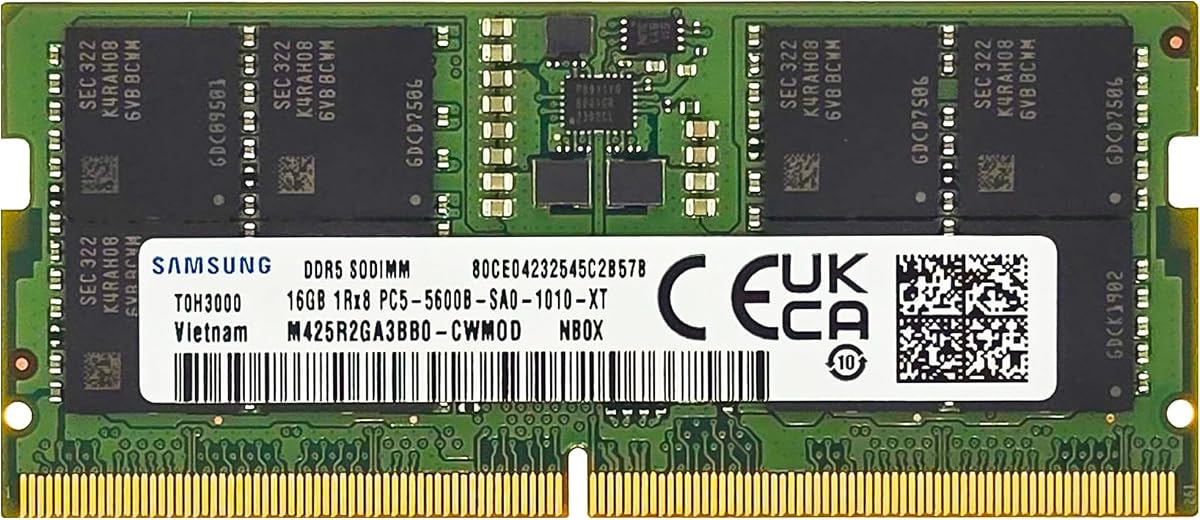
Samsung provides a single 16GB DDR5 module for efficient upgrades. Operating at 5600MHz, it offers the speed necessary to handle modern applications without performance drops.
We may earn a commission when you buy through this link, at no additional cost to you.
The single rank configuration ensures compatibility with systems having specific slot limits. It expands available memory resources, directly improving performance and reducing processing bottlenecks.
Built to JEDEC standards, this module prioritizes stability over aggressive overclocking. This makes it suitable for users needing reliable daily performance without complex tuning.
Consider this for laptops needing a single module addition. Verify your slot configuration supports 1Rx8 to ensure seamless integration with your existing system.
Part Number M425R2GA3BB0-CWM ensures genuine Samsung quality and performance.
Increases workload capacity and reduces system bottlenecks efficiently.
We may earn a commission when you buy through this link, at no additional cost to you.
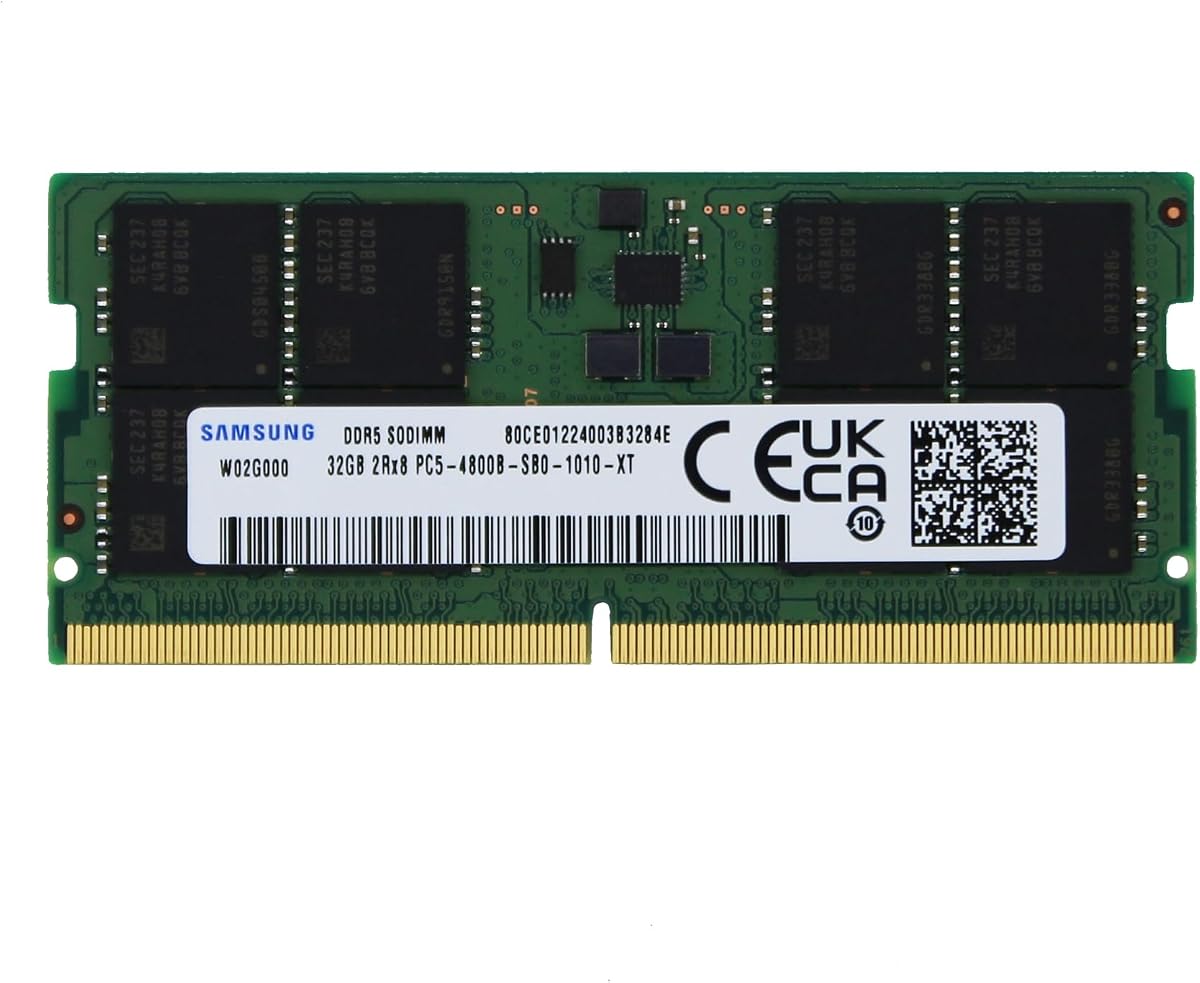
This Samsung module prioritizes capacity with a single 32GB stick. Although it runs at 4800MHz, its dual rank configuration offers excellent stability for data-intensive tasks.
We may earn a commission when you buy through this link, at no additional cost to you.
With a CL40 latency, it maintains responsive performance despite the lower frequency. The single module design simplifies installation for laptops with only one available slot.
It expands available memory resources effectively, reducing bottlenecks for multitasking. The non-ECC nature ensures it fits standard laptop requirements without specialized hardware.
Best for systems requiring maximum capacity in a single slot. Verify your system supports 32GB single modules before purchase to ensure full functionality.
Part Number M425R4GA3BB0-CQK identifies this genuine Samsung memory module.
Ensure compatibility with select Laptop, Notebook, and All in One computers.
We may earn a commission when you buy through this link, at no additional cost to you.
This Samsung kit offers a 16GB solution using two 8GB modules. The dual module setup enables dual-channel performance, significantly boosting data transfer rates over single sticks.
We may earn a commission when you buy through this link, at no additional cost to you.
Operating at 5600MHz, it ensures high-speed connectivity for modern processors. The 1Rx16 configuration is optimized for compatibility with specific laptop motherboard architectures.
Ideal for systems requiring dual slots, it balances capacity and speed efficiently. The genuine Samsung quality ensures durability and consistent performance over time.
Choose this for laptops needing dual slot upgrades. Confirm your system supports 1Rx16 to maximize the efficiency of this 5600MHz memory kit.
Provides high speed up to 5600MHz with dual channel benefits.
Ensure compatibility with select DDR5 Laptop, Notebook, and AIO systems.
We may earn a commission when you buy through this link, at no additional cost to you.
Selecting the right DDR5 Laptop RAM involves understanding several technical factors. This guide breaks down the essential elements to ensure compatibility and performance.
DDR5 RAM comes in various speeds, typically ranging from 4800MHz to 5600MHz or higher. Higher frequency means faster data transfer rates, which directly impacts system responsiveness and application loading times.
Always check your laptop's maximum supported speed before purchasing to avoid unnecessary costs or compatibility issues.
Capacity determines how much data can be processed simultaneously. For general use, 16GB is sufficient, while 32GB is recommended for video editing or heavy multitasking.
Ensure your laptop can support the total capacity you plan to install by checking the motherboard specifications.
DDR5 modules typically operate at 1.1V, which is more energy-efficient than previous generations. Lower voltage helps preserve battery life in portable devices.
Look for modules that explicitly state low voltage operation to maintain optimal battery performance during mobile use.
CAS Latency indicates how quickly the memory responds to a request from the CPU. Lower numbers generally mean faster response times, though frequency plays a larger role in overall throughput.
Focus on finding a balance between high frequency and low latency for the best real-world performance.
Single Rank (1Rx8) and Dual Rank (2Rx8) affect how memory is organized. Dual rank can offer better throughput in some scenarios but may have compatibility limits on certain boards.
Verify your system supports the rank configuration you intend to buy to prevent instability.
Choosing established brands like Crucial, Samsung, or Corsair ensures better quality control and warranty support. These companies often provide rigorous testing for stability.
Always check warranty terms to ensure peace of mind for your investment.
DDR5 is not backward compatible with DDR4. Ensure your laptop supports DDR5 memory specifically before attempting to upgrade.
Consult your laptop's user manual or manufacturer website for confirmed memory type support.
Error Correction Code (ECC) helps prevent data corruption. While not standard in consumer laptops, some DDR5 kits include on-die ECC for added stability.
Consider ECC support if you work with critical data that requires high reliability.
Before installing new RAM, power down your laptop completely and disconnect the power adapter. This prevents electrical damage to the system components during the upgrade process.
Ground yourself by touching a metal part of the laptop chassis or using an anti-static wrist strap. Static electricity can damage sensitive memory modules and motherboard components.
After installation, enter the BIOS to ensure the system recognizes the new capacity. If speeds are not optimal, update your BIOS to the latest version provided by the manufacturer.
It is generally recommended not to mix different RAM kits. Even if specifications match, slight manufacturing differences can cause instability. Always use matched kits for best reliability.
DDR5 offers higher speeds and greater capacity per module compared to DDR4. It also introduces new power management features like PMIC, improving energy efficiency for modern laptops.
Check your laptop's user manual or manufacturer website for memory specifications. If your laptop has 12th Gen Intel or AMD Ryzen 7000 processors, it likely supports DDR5.
Most manufacturers allow user-upgradable memory without voiding the main warranty. However, opening the case might affect specific terms, so check your warranty policy before starting.
Incompatible RAM may prevent the system from booting or running in reduced speeds. Always ensure the memory type matches your motherboard's supported standards exactly.
Enable XMP or EXPO profiles in BIOS if available. Keep your BIOS updated and ensure you install RAM in matching slots to enable dual-channel mode.
Choosing the right DDR5 Laptop RAM is a critical step in optimizing your system. The top picks from Crucial, Corsair, and Samsung offer reliable performance for various needs.
Prioritize compatibility and capacity to ensure smooth operation. Investing in quality memory now can extend the lifespan and performance of your laptop significantly.
Remember to check current prices before purchasing as market rates fluctuate. Ensure your system supports the selected speed and capacity for a hassle-free upgrade.