
OMTech K40+ 45W Desktop CO2 Laser Engraver & Cutter
4.4Editor score
45W laser power
Compact 12×8 workspace
LightBurn compatibility
This guide compares the best CO2 laser cutters for precision cutting and engraving across budgets and business needs.
CO2 laser cutters offer incredible precision for cutting and engraving non-metallic materials. They are essential for makers, designers, and small businesses seeking professional results.
We evaluated ten top models based on power, speed, work area, safety features, and software compatibility. Our goal is to help you find the right machine for your projects.
Each review highlights key strengths and trade-offs to guide your decision. Prices and availability can change, so verify details before purchasing to ensure the best value.
4.4Editor score

4.5Editor score

4.8Editor score
The following table provides a side-by-side comparison of all ten models. It highlights key specifications to help you quickly identify the best fit for your workflow and budget.



The xTool P3 is a flagship CO2 laser cutter offering powerful 80W performance. It achieves speeds up to 1200mm/s and includes intelligent automation features like LiDAR and dual cameras.
We may earn a commission when you buy through this link, at no additional cost to you.
Its Automated Creation System simplifies setup with LiDAR autofocus and AutoLift Base. The massive 36×18 workspace handles large projects. AI nesting and batch fill improve efficiency for production.
While accessories like the conveyor feeder cost extra, the core machine is robust. Class 1 safety ensures safe operation. The price is high but justified for professional workflows.
This model is best for serious makers and businesses needing speed and automation. It excels where precision and throughput are critical. We recommend it for professional use cases.
ACS integrates LiDAR and cameras for precise autofocus and positioning without manual input.
A massive 36×18 inch area accommodates big sheets and complex layouts efficiently.
We may earn a commission when you buy through this link, at no additional cost to you.
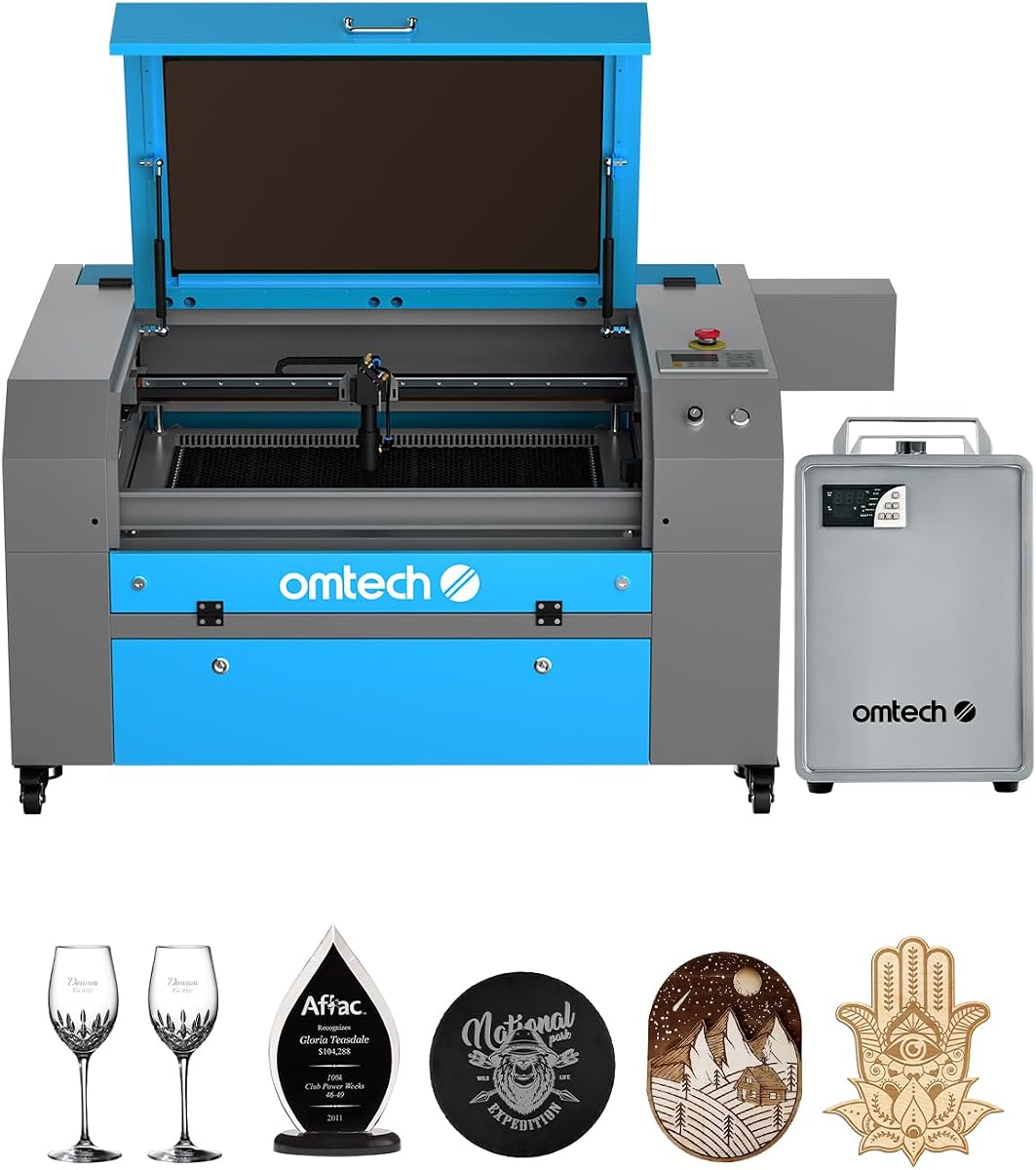
The OMTech K40+ 45W offers great value for beginners. It features a 45W laser capable of cutting acrylic and wood. Compatibility with LightBurn ensures a smooth software experience.
We may earn a commission when you buy through this link, at no additional cost to you.
Its compact design fits well in home workshops. The integrated air assist improves cut quality. Support includes 24/7 global help and demos. This unit is reliable for hobbyists.
The workspace is limited to 12×8 inches which restricts large projects. Manual setup is required but manageable. It is a solid choice for small tasks and learning.
Ideal for DIYers and small startups on a budget. It balances cost and performance well. We recommend this for entry-level cutting and engraving needs.
Full support for LightBurn and LaserGRBL ensures flexibility for all users.
Built-in air assist clears debris and reduces carbonization for cleaner cuts.
We may earn a commission when you buy through this link, at no additional cost to you.
The VEVOR 100W provides a spacious 24×35 inch workspace. It delivers 100W power for efficient cutting up to 0.59 inches thick. Pass-through doors enhance flexibility for long materials.
We may earn a commission when you buy through this link, at no additional cost to you.
The digital control panel supports popular software like LightBurn. It includes air assist and safety features like emergency stop. The bed design ensures stability during operation.
Setup requires careful alignment but yields precise results. The interface may lack advanced automation compared to premium models. It remains a strong option for varied project sizes.
Great for creators needing space without breaking the bank. It offers professional power at a competitive price. We recommend it for versatile cutting and engraving work.
The 24×35 inch bed accommodates large sheets and long items with ease.
Front and back doors allow processing of materials longer than the machine itself.
We may earn a commission when you buy through this link, at no additional cost to you.
The OMTech Maker 90W includes a water chiller for extended use. It delivers 90W power and speeds up to 23.6 inches per second. The four-way pass-through doors handle large items.
We may earn a commission when you buy through this link, at no additional cost to you.
Yongli H2 tube provides longevity and reliability. Safety features include interlocks and flame-retardant windows. Air assist protects lenses and improves cut quality significantly.
Manual setup is required which may slow workflow for beginners. The chiller adds bulk but prevents overheating. It is a balanced unit for small production runs.
Recommended for makers needing consistent output without premium automation. The bundled chiller adds value. We suggest this for stable engraving and cutting tasks.
Bundled chiller keeps the laser tube cool during long production sessions.
Four-way pass-through doors allow easy feeding of oversized materials.
We may earn a commission when you buy through this link, at no additional cost to you.
The OMTech Maker 60W comes with LightBurn software and a chiller. It features autofocus for quick bed height adjustment. This simplifies setup and improves consistency across jobs.
We may earn a commission when you buy through this link, at no additional cost to you.
The 20×28 workspace fits most common project sizes. Air assist and safety locks ensure safe operation. The honeycomb and blade beds offer versatility for flat and thick items.
It lacks the power of higher wattage models. Manual controls are still present alongside autofocus. It is ideal for users prioritizing ease over raw speed.
Best for beginners or small shops needing reliable performance. The software bundle saves money. We recommend this for streamlined engraving workflows.
Preinstalled autofocus finds focal distance instantly for accurate results.
Includes LightBurn for intuitive control and advanced design features.
We may earn a commission when you buy through this link, at no additional cost to you.
This OMTech K40+ 45W offers a compact solution for home makers. It supports LightBurn and LaserGRBL for flexible control. Speeds up to 300mm/s suit engraving and small cuts.
We may earn a commission when you buy through this link, at no additional cost to you.
Integrated air assist improves cut quality. The honeycomb bed and optional rotary axis add versatility. Safety features like emergency stop ensure secure operation at all times.
The small workspace limits project sizes but maximizes desk fit. Support includes local demos and global care. It is a versatile choice for beginners.
Perfect for hobbyists with limited space. It delivers reliable performance at a low cost. We recommend this for personal projects and learning.
Honeycomb and detachable base support various material thicknesses and shapes.
Full compatibility with LightBurn and LaserGRBL simplifies workflow.
We may earn a commission when you buy through this link, at no additional cost to you.
The OMTech Pronto 100W delivers speeds up to 39.4 inches per second. It uses a high-performance tube for consistent power. Autofocus simplifies setup for intricate designs.
We may earn a commission when you buy through this link, at no additional cost to you.
The 40×24 workspace handles large items easily. Air pumps and fans ensure clean cuts. Safety features like temperature alarms provide peace of mind during operation.
It balances speed and precision effectively. Setup is streamlined via autofocus. This machine is suitable for small business production needs.
Recommended for makers needing faster turnaround times. It offers industrial capabilities in a desktop unit. We suggest this for efficiency-focused users.
Engraving speeds up to 39.4 ips save time on complex projects.
Auto focus removes guesswork for accurate focal distance adjustments.
We may earn a commission when you buy through this link, at no additional cost to you.
The OMTech Pronto 130W features powerful 130W output and speeds up to 39.8 ips. It handles thick materials with ease. The 51×35 workspace accommodates large production batches.
We may earn a commission when you buy through this link, at no additional cost to you.
Autofocus ensures precise settings without manual adjustment. Comprehensive safety features include water protection and emergency stops. This unit is built for intensive engraving tasks.
The high power comes with thermal management needs. It fits commercial environments well. Setup is intuitive but requires space.
Ideal for businesses needing top-tier performance. It offers speed and power for heavy use. We recommend this for professional production.
130W laser tube delivers deep engraving and fast cutting speeds.
51×35 inch area supports large sheets and high-volume jobs.
We may earn a commission when you buy through this link, at no additional cost to you.
This OMTech K40+ 45W is a reliable entry-level option. It offers 45W power for basic cutting tasks. Its compact design fits most desks and small workshops easily.
We may earn a commission when you buy through this link, at no additional cost to you.
Safety features prioritize user protection with interlocks. It supports standard engraving workflows. The price point makes it accessible for new users.
Advanced features are minimal but functional. It is a practical choice for simple personal projects.
Best for beginners exploring laser cutting. It provides a solid foundation for skills. We recommend this for starter use.
Affordable price point for beginners starting laser engraving.
Small footprint suits home workstations effectively.
We may earn a commission when you buy through this link, at no additional cost to you.
The OMTech Pro 130W is a professional grade machine with 130W power. It features a Ruida controller with touchscreen for advanced control. WiFi enables remote management of jobs.
We may earn a commission when you buy through this link, at no additional cost to you.
Servo motors and guide rails ensure high precision at 1200mm/s. The 35×55 workspace handles industrial needs. Built-in chiller maintains stable temperatures during long runs.
Setup requires technical knowledge for optimal calibration. The price reflects industrial capabilities. It suits commercial studios with high demands.
Best for businesses needing precision and throughput. It offers top-tier control and cooling. We recommend this for serious industrial use.
Touchscreen interface with WiFi offers precise control and remote access.
Servo motors and ball bearings ensure high accuracy and smooth movement.
We may earn a commission when you buy through this link, at no additional cost to you.
Selecting the right CO2 laser cutter requires evaluating power, workspace, and safety. Consider your material needs and project scale to find a fit.
Laser power determines cutting depth and speed. 45W models suit thin materials while 100W to 130W handle thicker stocks. Higher wattage ensures faster jobs.
Choose power based on your most common material thickness to avoid limitations.
Work area defines the maximum material size. Compact 12×8 inch beds fit small shops but larger 36×18 inch spaces enable full sheets. Match the size to your projects.
Ensure the workspace fits your available room and production needs.
Cutting speed impacts throughput. Machines like 1200mm/s significantly outpace 300mm/s models. High speeds help production volumes but need precise control.
Look for speed ratings that balance quality with efficiency.
Safety includes interlocks, emergency stops, and class ratings. Class 1 fully encloses the beam while Class 2 allows viewing windows. Proper exhaust is critical.
Always prioritize safety features to protect eyes and lungs.
Software dictates ease of use. LightBurn is a top choice for versatility. Check compatibility with design tools like CorelDRAW for seamless workflows.
Confirm the machine supports your preferred software before buying.
Air assist clears debris and protects lenses. Integrated systems vary in power. Effective airflow reduces carbonization and improves cut quality significantly.
Select models with robust air assist for better results.
Prices range from hundreds to thousands. Entry models offer basics while premium units include automation. Consider total cost including accessories like chillers.
Set a realistic budget that covers necessary upgrades.
Good support ensures uptime. Look for warranties and accessible help. Local demos and online resources aid learning and troubleshooting.
Verify support availability to resolve issues quickly.
Always check material safety before cutting. Ensure the workspace is clean and ventilated to prevent fire hazards and fume exposure during operation.
Regularly clean the lens and mirrors to maintain power. Use recommended solutions to avoid scratching optical components which can affect performance.
Monitor exhaust systems to remove smoke and debris. Replace filters as needed and check for wear on guides to ensure consistent accuracy.
The OMTech K40+ 45W is ideal for beginners due to its affordable price and LightBurn compatibility. It offers essential features without overwhelming complexity.
They are safe when used with Class 1 or 2 safety features and proper ventilation. Always follow guidelines for operation and maintenance to minimize risks.
They cut wood, acrylic, leather, and cardboard but not metals. Some glass can be engraved but cutting requires specialized setups.
Yes, water chillers help maintain stable temperatures during long sessions. Built-in units prevent overheating and extend tube life effectively.
The higher wattage cuts faster and handles thicker materials. It offers better efficiency for production but costs more upfront.
Most modern models support LightBurn but verify compatibility before purchase. It provides advanced control and design options for users.
Clean lenses and mirrors regularly with proper solutions. Avoid touching them with bare hands to prevent damage and maintain clarity.
Autofocus automatically adjusts the bed height for accurate focus. This reduces manual setup time and improves consistency across jobs.
We found the xTool P3 80W offers the best automation for professionals. The OMTech K40+ 45W serves beginners with excellent value and support.
Prioritize power and workspace for your specific projects. Automation features save time but may add cost depending on needs.
Always check current pricing and availability. Prices change often so verify details before purchasing to get the best deal.