
Cooler Master Q300L V1
4.5Editor score
Modular I/O panel positioning
Transparent edge-to-edge side panel
Perforated open thermal design
Magnetic dust filters included
Explore our comprehensive guide comparing the top Compact E ATX Case options for 2026. We analyze airflow, compatibility, build quality, and portability to
Selecting the right enclosure for your desktop computer is a critical decision that impacts both performance and aesthetics. A Compact E ATX Case offers the perfect balance between space efficiency and component compatibility, allowing enthusiasts to house powerful hardware without the bulk of a full tower. These cases are designed to support standard ATX motherboards while maintaining a footprint that fits comfortably on smaller desks or in living room setups.
To compile this list, we evaluated ten distinct models based on their thermal performance, build quality, and feature sets. We considered factors such as motherboard support, GPU clearance, cooling options, and portability features like integrated handles. Each product was reviewed against the standards set by industry leaders to ensure they meet the demands of modern gaming and productivity builds.
Each pick in this guide showcases a unique approach to compact design, whether through modular layouts, optimized airflow, or premium materials. While we highlight key specifications and user ratings, please note that prices and availability change frequently. We recommend checking the current listings for the most up-to-date information before making your final purchasing decision.
4.5Editor score

4.4Editor score

3.9Editor score
This side-by-side comparison highlights the key differences between the ten selected compact cases, focusing on dimensions, supported motherboard sizes, cooling capabilities, and unique features to help you make an informed choice.



The Cooler Master QUBE 540 stands out as the Editor's Choice for its unparalleled flexibility in orientation and component support. With a 4.4 rating, it balances a compact footprint with the ability to house E-ATX motherboards and massive graphics cards. The reversible I/O panel and movable handles allow users to customize the layout for optimal accessibility.
We may earn a commission when you buy through this link, at no additional cost to you.
Its standout quality is the flexible orientation design, which lets you position the case horizontally or vertically without compromising airflow. The full front mesh panel ensures that high-performance components receive adequate cooling under load. Additionally, the support for 415mm GPUs means you can install even the largest modern graphics cards without issue.
While the case offers excellent features, it is heavier than typical ATX cases due to its robust construction. The price point is also higher than entry-level options, but the build quality and versatility justify the investment for serious enthusiasts. These trade-offs are acceptable given the level of customization and performance it offers.
This case is ideal for users who need a compact solution that does not sacrifice expansion capability. Whether you are building a high-end workstation or a powerful gaming rig, the QUBE 540 provides the necessary room and airflow to keep temperatures in check.
The reversible I/O panel and movable handles let you adapt the case to your specific desk setup or living room entertainment center seamlessly.
With clearance for GPUs up to 415mm without removing the front fan, you can utilize full-size cards like the RTX 5090 without thermal bottlenecks.
We may earn a commission when you buy through this link, at no additional cost to you.
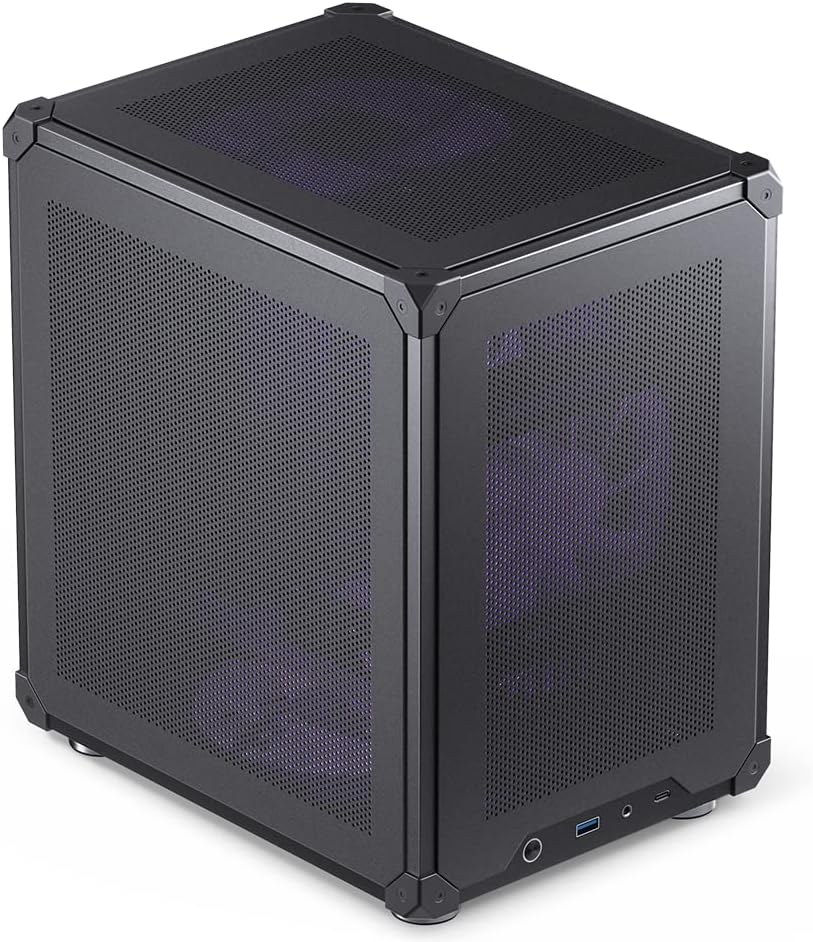
The Cooler Master Q300L V1 is our Best Budget pick, offering exceptional value for those seeking a compact chassis without overspending. It supports Micro-ATX and Mini-ITX boards while providing ample space for standard GPU sizes and high cooling performance. The transparent side panel allows you to showcase your components with pride.
We may earn a commission when you buy through this link, at no additional cost to you.
Its key strength lies in its versatile cooling design and modular I/O panel. You can adjust the panel position to the front, top, or bottom based on your desk setup, which is rare at this price. The perforated design on all sides ensures that heat is dissipated efficiently during intense gaming sessions.
The trade-off is that it only supports smaller motherboards, so you lose E-ATX flexibility found in larger cases. However, for most users, the Micro-ATX form factor is sufficient. The basic steel construction is robust enough for daily use despite lacking premium materials.
If you are building a budget gaming PC or a small office workstation, this case is highly recommended. It provides all the essential features needed for a stable build at a fraction of the cost of premium alternatives.
Adjust the modular I/O panel to the front, top, or bottom to match your desk layout and cable management needs perfectly.
Perforated panels on all sides promote optimal heat dissipation without the need for extensive aftermarket fan upgrades.
We may earn a commission when you buy through this link, at no additional cost to you.
The Mechanic Master C34Pro is our Best Premium pick, designed for users who value build quality and portability. With a sturdy 2mm aluminum shell, it offers a premium feel that stands out from standard steel cases. It supports large ATX and E-ATX motherboards alongside massive GPUs up to 420mm.
We may earn a commission when you buy through this link, at no additional cost to you.
Its standout feature is the integrated carry handle and robust build quality. The aluminum shell not only looks premium but also provides excellent structural integrity. The magnetic screwdriver kit included in the box makes assembly significantly easier compared to other brands that lack tool kits.
The main trade-off is the higher price point and the complexity of the modular design. Building a PC in a modular case requires careful planning for cable management and component placement. However, for LAN party enthusiasts or mobile workstations, this investment is worth the convenience and durability.
This case is perfect for professionals who need to transport their systems frequently or gamers who attend LAN events. The combination of premium materials and thoughtful features makes it a top choice for high-end portable builds.
The 2mm aluminum shell offers a durable and sleek aesthetic that protects your components while elevating the look of your desk.
An integrated carry handle allows you to move your desktop PC setup to different locations without straining your hands or risking damage.
We may earn a commission when you buy through this link, at no additional cost to you.
The Lian Li O11D Mini V2 is renowned for its aesthetic appeal and optimized cooling design. With a high rating of 4.7, it offers a pillar-less view of your build, which is a favorite among content creators and enthusiasts. The slanted bottom design improves cold air intake directly into the GPU area.
We may earn a commission when you buy through this link, at no additional cost to you.
Its key strengths include the robust GPU anti-sag brackets and support for ATX Back-Connect motherboards. The horizontal and vertical brackets protect your graphics card from bending, while the special cable brackets keep the 24-pin cable tidy. This ensures your build looks as good as it performs.
The primary downside is that fans are not included, so you must budget for additional cooling components. Additionally, the glass panels require careful handling during cleaning and installation. However, the visual impact and airflow optimization make these issues manageable.
This case is best for users who prioritize looks and modern motherboard features. If you want a clean look with maximum visibility and support for the latest connector standards, this case is an excellent choice for your next build.
Pillar-less tempered glass panels provide a clear view of your internal components, showcasing your build with unmatched style and clarity.
The slanted bottom design enhances direct cold air intake and significantly improves GPU cooling performance under heavy load conditions.
We may earn a commission when you buy through this link, at no additional cost to you.
The Mechanic Master C34 Ultra-Compact offers a powerful desktop experience in a tiny footprint. It supports standard ATX motherboards and GPUs up to 335mm, making it surprisingly versatile for its size. The integrated handle makes it easy to transport your system for LAN events or space reorganization.
We may earn a commission when you buy through this link, at no additional cost to you.
Its key strengths include the high compatibility with full-size ATX power supplies and the metal front I/O panel. The USB 3.0 and Type-C interface add modern functionality. The internal layout is optimized to simplify the installation process and clean cable management.
The trade-off is that liquid cooling is limited to 240mm, which might restrict extreme overclocking builds. Additionally, using an SFX power supply is recommended for a cleaner look, which adds cost. However, for most users, the convenience and performance are highly satisfying.
This case is ideal for gamers who need portability without sacrificing power. Whether you are moving between workstations or attending events, the integrated handle and compact design make it a practical choice for a powerful rig.
The integrated carry handle makes it easy to transport your desktop PC to LAN events or rearrange your workspace effortlessly.
The internal layout is designed to simplify installation and offer the cleanest cable management for an easier build process.
We may earn a commission when you buy through this link, at no additional cost to you.
The ASUS Prime AP201 is a Micro-ATX case designed for maximum airflow and spatial efficiency. With 57,000 precision-machined holes in its mesh panels, it provides excellent ventilation. It supports radiators up to 360mm and includes a large 32mm gap for hidden cable management.
We may earn a commission when you buy through this link, at no additional cost to you.
Its standout quality is the industry-leading spatial efficiency and tool-free design. Despite a compact 33L footprint, it accommodates ATX PSUs and long graphics cards easily. The tool-free clips allow for quick removal of side panels, making maintenance and upgrades straightforward.
The main trade-off is the micro-ATX limitation and potential dust accumulation on the mesh. Regular cleaning might be required to maintain airflow efficiency. However, for small form factor builds, the performance and convenience are unmatched.
This case is perfect for users who need high airflow in a small package. If you are looking to build a silent and cool system without sacrificing hardware support, the AP201 is a reliable and efficient choice.
Over 57000 precision-machined holes increase airflow and provide a compelling view of components within your build.
A simple yet secure clip mechanism allows chassis side panels to be easily removed without tools.
We may earn a commission when you buy through this link, at no additional cost to you.
The Cooler Master Q300L V3 is a versatile micro-ATX case that delivers premium performance without compromising quality. It supports GPUs up to 366mm and offers flexible cooling options for both air and liquid. The movable I/O panel allows you to customize the front of the case.
We may earn a commission when you buy through this link, at no additional cost to you.
Its key strengths are the builder-friendly design and robust cooling support. You can fit up to six fans and 240mm radiators, ensuring excellent thermal performance. The clean cable management features and tempered glass front help you create a professional-looking build.
The trade-off is that it is limited to Micro-ATX motherboards, which may restrict some users. Additionally, glass panels can show fingerprints and require regular cleaning. However, for most gaming builds, the performance and value are excellent.
This case is ideal for those who want a balance of style and function. If you need a reliable chassis for your gaming PC without breaking the bank, the Q300L V3 is a solid recommendation.
Supports graphics cards up to 366mm, making it easy to build with today's powerful gaming graphics cards.
Features a movable I/O panel to suit your desk layout and cable management preferences.
We may earn a commission when you buy through this link, at no additional cost to you.
The Zalman CUBIX is a tiny yet mighty case perfect for basic office or home builds. With a 17.1-liter volume, it saves significant desk space. The 0.8T steel construction provides durability, and the perforated front design ensures adequate airflow for standard components.
We may earn a commission when you buy through this link, at no additional cost to you.
Its key strengths include the compact size and pre-installed fan. It supports standard ATX power supplies and GPUs up to 260mm, covering most entry-level gaming needs. The magnetic dust filters help keep internal components clean over time.
The trade-off is that it is not suitable for high-end hardware requiring larger cooling solutions. GPU clearance is limited, and advanced features like Type-C are absent. However, for a simple desktop, this case offers exceptional value.
This case is ideal for budget builds or secondary PCs where space is a priority. If you need a reliable and tiny chassis for general computing tasks, the CUBIX is a practical choice.
Sturdy 0.8T steel construction ensures durability in a sleek design with a 17.1-liter total volume.
Perforated front panel and pre-installed 80mm fan provide optimal cooling for standard components.
We may earn a commission when you buy through this link, at no additional cost to you.
The JONSBO C6 Black is a minimalist case designed for efficiency and ease of use. With a mesh chassis and tool-free panels, it simplifies the build process. It supports standard ATX power supplies up to 185mm and GPUs up to 255mm.
We may earn a commission when you buy through this link, at no additional cost to you.
Its standout quality is the simple and quick disassembly design. You can open the upper cover and side panels without tools, which is convenient for maintenance. The heat-free mesh design on all sides ensures consistent thermal performance.
The trade-off is the limited compatibility with longer GPUs and power supplies. If you have flagship hardware, this might not fit well. However, for ITX and M-ATX builds, it is a cost-effective and reliable option.
This case is ideal for users who value simplicity and clean aesthetics. If you are building a quiet and compact home theater PC or office system, the C6 is a great choice.
Upper Cover and Side Panel Tool-free Open design makes building your PC easier and more convenient.
All sides in mesh including front, upper, and lower ensure efficient heat dissipation during operation.
We may earn a commission when you buy through this link, at no additional cost to you.
The NZXT H5 Flow is designed for exceptional GPU cooling and user convenience. With a perforated PSU shroud and pre-installed 120mm fans, it offers solid out-of-the-box performance. The ultra-fine mesh panels create maximum airflow for heat dissipation.
We may earn a commission when you buy through this link, at no additional cost to you.
Its key strengths include the seamless cable management features and large radiator support. You can fit up to 360mm radiators in the front, making it great for liquid cooling enthusiasts. The wide channels and hooks make routing cables effortless.
The trade-off is that it is a standard ATX size, which may not suit extremely tight spaces. Additionally, cable management requires some planning to look clean. However, for performance and ease of use, it is highly recommended.
This case is ideal for users who want a reliable and efficient system without complex mods. If you prioritize cooling performance and ease of use, the H5 Flow is a strong candidate for your build.
Equipped with two 120mm Quiet Airflow fans for solid performance right out of the box.
The PSU shroud is perforated on the side and bottom enabling optimal air intake for better cooling.
We may earn a commission when you buy through this link, at no additional cost to you.
Selecting the right compact E ATX case requires careful consideration of several technical factors to ensure your components fit and run efficiently.
Ensure the case supports your motherboard size. While many compact cases support ATX, some limit you to Micro-ATX or Mini-ITX. Check the internal dimensions specifically for E-ATX if you need the larger board.
Always verify the motherboard support list before purchasing to avoid incompatibility issues.
Graphics cards are growing longer every year. Check the maximum GPU length supported by the case. If you plan to use high-end cards like the RTX 5090 or RX 9070 XT, ensure you have ample clearance without removing fans.
Consider removing front fans if necessary to gain extra space but balance this with cooling needs.
Compact cases can trap heat if airflow is poor. Look for mesh panels on the front and top to allow air to flow freely. Ensure there are enough fan mounts or radiator slots to cool your CPU and GPU effectively.
Prioritize cases with full mesh fronts or high-quality intake options for better thermal management.
Check the supported power supply length and orientation. Some cases support standard ATX PSUs up to 180mm or longer, while others may require SFX or SFX-L units. Ensure the case can hold your power supply securely.
A standard ATX PSU is preferred for cost but verify the length fits before buying.
If you plan to transport your PC to LAN events or move it between rooms, look for a case with an integrated handle. This makes carrying the unit significantly easier and reduces the risk of dropping it.
Handles are a key feature for mobile setups and should be a priority for LAN enthusiasts.
Good cable management keeps your build clean and improves airflow. Look for cases with extended motherboard trays and large gaps behind the tray. This allows you to tuck cables away neatly and maintain a professional look.
Aim for at least 30mm of space behind the motherboard tray for effective cable routing.
Materials like aluminum offer better durability and aesthetics compared to steel. Aluminum is often lighter and more resistant to rust, making it ideal for premium builds. However, it usually costs more than steel options.
Evaluate your budget and determine if the extra durability of aluminum is necessary for your setup.
Modern devices often require USB Type-C or USB 3.2 ports. Ensure the case includes the necessary front I/O ports for your needs. This allows for faster data transfer and convenient connection of peripherals.
USB Type-C is highly recommended for future-proofing your connection options.
When installing components, start with the motherboard and CPU before placing it into the case. Use the provided standoffs to avoid short circuits and ensure the case supports your board size correctly.
Clean your case regularly by removing dust filters and wiping them down. Dust buildup can restrict airflow and cause overheating, so cleaning every three months is recommended for optimal performance.
If your case has removable panels, handle them gently to avoid scratches. For glass panels, use a microfiber cloth to clean fingerprints and smudges without damaging the surface.
A Compact E ATX case is designed to support larger E-ATX motherboards while maintaining a smaller footprint than traditional towers. It balances component compatibility with space efficiency for compact builds.
Some compact cases have limited airflow, but many modern designs use mesh panels and strategic fan mounts to mitigate this. Look for cases with full mesh fronts and ample radiator support for best results.
Many compact cases support standard ATX power supplies up to 180mm or 200mm. Always check the maximum PSU length before purchasing to ensure compatibility with your power unit.
Aluminum cases offer better durability, aesthetics, and lightweight properties compared to steel. They are worth the premium if you value build quality and want a portable PC for events.
A movable I/O panel allows you to adjust the position of USB ports and audio jacks based on your desk layout. This adds flexibility and improves cable management significantly.
Remove the dust filters from the front or bottom of the case regularly. Use a vacuum cleaner or compressed air to remove dust and maintain optimal airflow for your components.
Choosing a Compact E ATX case involves balancing size, performance, and budget. The Cooler Master QUBE 540 offers top-tier flexibility, while the Q300L V1 provides excellent value for budget builders.
Prioritize airflow and GPU clearance to ensure your hardware performs well. A case that supports cooling and expansion will provide a better long-term experience than one that looks good but lacks utility.
Remember that prices and availability change frequently. Check current listings to confirm you are getting the best deal before finalizing your purchase.