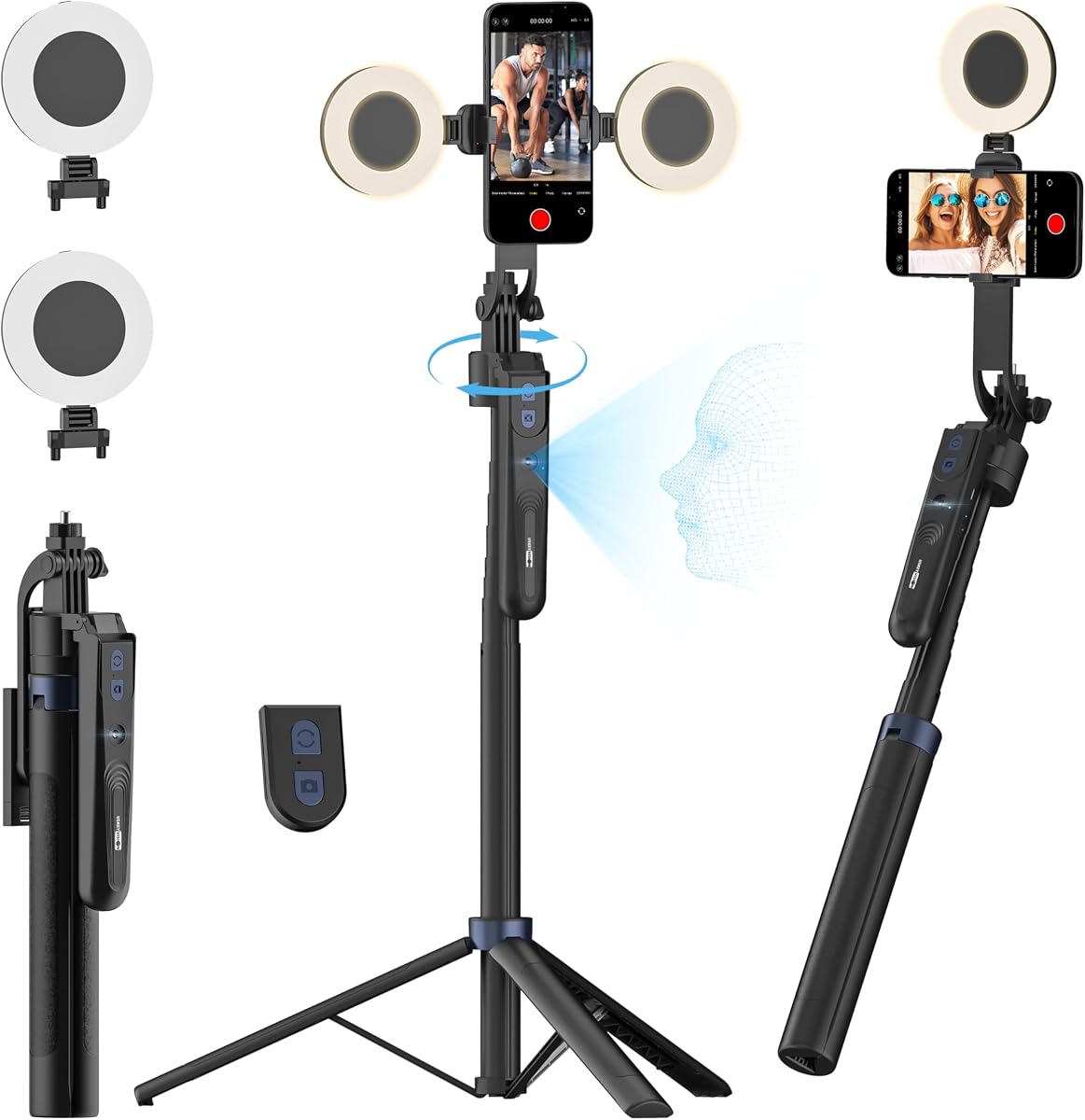
USKEYVISION 70.9 Auto Face Tracking Tripod
4.4Editor score
360 Rotation
Dual Ring Lights
Remote Control
Finding the right AI gimbal with tripod can transform your mobile filmmaking experience. These devices combine stabilization, smart tracking, and mounting flexibility into one compact tool. Whether you shoot vlogs, live streams, or family memories, the right gear ensures smooth, professional-looking footage without needing a crew.
We evaluated ten top-rated models based on tracking accuracy, stabilization quality, build durability, and ease of use. Our analysis covers native app support, battery life, and creative features like fill lights and gesture controls. Each product was assessed for real-world performance in dynamic shooting environments.
Each pick highlights key strengths, ideal use cases, and specific trade-offs to help you decide. Prices and availability change frequently, so verify current details before purchasing. Use this guide to find the AI gimbal with tripod that best fits your content creation needs and budget.
4.4Editor score

4.4Editor score

4.6Editor score
As an Amazon Associate we earn from qualifying purchases.
Here is a side-by-side comparison of all ten models featured in this guide. Each entry lists core specifications to help you quickly identify the right fit for your shooting style and device compatibility.


The Insta360 Flow 2 Pro AI Tracker Bundle White stands out as the industry-first AI phone gimbal with Apple DockKit support. Rated 4.4 stars, it delivers precise tracking across 200+ iOS apps. This makes it an ideal tool for professional vloggers who need seamless integration with their existing workflow.
We may earn a commission when you buy through this link, at no additional cost to you.
Its Active Zoom Tracking capability is unmatched, allowing precise following of fast movements even at 15x zoom. Multi-person tracking ensures entire groups stay framed perfectly. The built-in spotlight guarantees cinematic quality in low light. These features make it versatile for sports, travel, and daily recording.
The price is high compared to budget options, which might deter casual users. However, the premium build and advanced AI capabilities justify the cost for serious creators. You sacrifice some Android functionality for superior iOS performance, but the results are worth the trade-off for most.
If you prioritize app compatibility and tracking accuracy, this is the top pick. It simplifies complex shots into effortless routines. We recommend it for iPhone users seeking the best mobile filming experience available today without compromising on quality or ease of use.
This unique feature allows the gimbal to communicate directly with iOS apps without needing extra configurations for seamless operation.
Track fast subjects smoothly even when zooming in up to fifteen times, a feature rarely seen in competing products.
We may earn a commission when you buy through this link, at no additional cost to you.
The USKEYVISION 70.9 Auto Face Tracking Tripod offers exceptional value for creators on a tight budget. With a rating of 4.4, it provides 360-degree rotation and AI tracking without needing a dedicated app. It is perfect for stationary vlogging, live streaming, or family gatherings where mobility is secondary to stability.
We may earn a commission when you buy through this link, at no additional cost to you.
Its 70.9-inch maximum height allows for diverse angles, and the dual ring lights offer adjustable brightness and color temperatures. The remote control extends your range to 32.8 feet. These features make it a versatile all-in-one solution for static shooting scenarios.
It lacks the smooth motion of a true gimbal and is heavier to transport. Tracking is reliable but not as precise as premium models. For users who primarily need a stable stand with some automation, these limitations are acceptable given the low cost.
Choose this if you want a reliable setup for home studios or outdoor posts where you won't move much. It bridges the gap between simple tripods and advanced stabilizers. It is a smart buy for beginners needing features without breaking the bank.
Reach heights up to 70.9 inches allowing you to shoot from standing height or overhead angles easily.
Three brightness levels and color temperatures ensure your face is well-lit in any lighting condition.
We may earn a commission when you buy through this link, at no additional cost to you.
The DJI Osmo Mobile 8 bundle includes a Mic Mini Transmitter, making it a powerhouse for creators who need high-quality audio. With a 4.6-star rating, it excels in tracking and stabilization. This model is designed for professionals who demand reliability and advanced features like lighting and audio in one unit.
We may earn a commission when you buy through this link, at no additional cost to you.
Its native tracking combines audio and lighting capabilities, keeping you in focus and well-lit. The built-in extension rod supports hands-free filming. With ten hours of battery, you can shoot all day. These features ensure consistent performance during long sessions or travel.
The requirement for the DJI Mimo app can be a hurdle if you prefer other tools. The price is premium, reflecting its build quality and features. However, for serious vloggers, the integration of mic and stabilization offers a streamlined workflow that saves time.
This is the top choice for creators who need a comprehensive tool for high-quality video and audio. It balances portability with professional performance. If you can afford the investment, it provides the best all-around experience in the market.
Capture crystal-clear audio wirelessly, ensuring your voice is recorded perfectly without background noise interference.
Shooting for hours is possible without recharging, perfect for events or full-day travel vlogging sessions.
We may earn a commission when you buy through this link, at no additional cost to you.
The Insta360 Flow 2 Plus excels at tracking groups and pets. Rated 4.2, it keeps whole groups in frame using Multi-Person Tracking. Animal tracking allows you to capture pets seamlessly. These features make it unique for family vloggers or pet owners looking to automate their shots without assistance.
We may earn a commission when you buy through this link, at no additional cost to you.
Active Zoom Tracking works up to 15x on iPhone Pro models. The remote control turns any phone into a controller. This is useful for solo creators who need a second screen to monitor shots. It offers great flexibility for dynamic shooting environments.
While powerful, it may not be as durable as the Pro version. Some features are app-dependent. However, the ability to track animals and multiple people simultaneously is rare. It balances affordability with advanced tracking capabilities well.
If you often shoot with family or pets, this is an ideal choice. It simplifies capturing moving subjects automatically. The remote feature adds convenience. It is a strong mid-range option for creators needing smart tracking without the top-tier price.
Frames your whole group automatically, ensuring everyone stays in shot during gatherings or outdoor events.
Let the camera follow your pets with precision, capturing playful leaps and heartwarming gestures effortlessly.
We may earn a commission when you buy through this link, at no additional cost to you.
The Insta360 Flow 2 Grey offers a streamlined experience with gesture control. Rated 4.2, it allows you to start recording simply by raising your hand. Animal tracking ensures pets stay in focus. This makes it highly convenient for solo creators who need to manage shots without touching the phone.
We may earn a commission when you buy through this link, at no additional cost to you.
Active Zoom Tracking supports up to 15x on iPhone Pro models. The built-in tripod and selfie stick provide flexibility. It is lightweight and portable for travel. These features make it suitable for quick vlogging sessions on the go.
It lacks the spotlight found in Pro models, which affects low-light performance. Android features are limited compared to iOS. However, the gesture control is a standout feature that simplifies filming. It is a great balance of price and functionality.
If you value hands-free operation and portability, this is a strong choice. It is perfect for dynamic vlogging and pet tracking. The remote adds convenience. It offers essential smart features at an accessible price point.
Start recording and tracking effortlessly with simple hand raises, eliminating the need to press buttons.
Track fast movement smoothly even at high zoom levels on compatible iPhone models for dynamic shots.
We may earn a commission when you buy through this link, at no additional cost to you.
The AOCHUAN Smart V3 stands out for its exceptional height extension. Rated 4.5, it extends to 70.9 inches using a telescopic rod. App-free AI tracking ensures you can shoot without worrying about software compatibility. The detachable remote allows control from up to 32 feet away.
We may earn a commission when you buy through this link, at no additional cost to you.
The intelligent tracking maintains stability even during motion. Built-in fill lights improve visibility. Six creative modes like POV and DM add artistic options. These features make it versatile for travel and group shots where height is necessary.
It is heavier than standard gimbals, which may cause fatigue. The setup can be slightly complex. However, the height and app-free tracking provide unique advantages. It balances features and performance well for those needing flexibility.
If you need a tall stand with smart tracking capabilities, this is an excellent choice. It is ideal for family photos and wide-angle travel shots. The remote and lights add value. It is a robust option for diverse shooting needs.
Telescopic rod allows you to reach high angles for unique perspectives and group selfies easily.
Use intelligent tracking without needing a dedicated app, simplifying the workflow for quick recording.
We may earn a commission when you buy through this link, at no additional cost to you.
The DJI Osmo Mobile 7P offers advanced creative tools like ShotGuides. Rated 4.5, it ensures stability and precise tracking. The multifunctional module includes mic reception. Dual-lens tracking keeps subjects sharp. It is designed for creators wanting to craft cinematic content efficiently.
We may earn a commission when you buy through this link, at no additional cost to you.
The 3-axis stabilization eliminates shakes effectively. It folds easily for portability. While lighting is basic, the audio integration is a strong point. It balances performance with ease of use well. It suits vloggers who want polished results without extra gear.
App compatibility issues on Android can be frustrating. The design is not as advanced as newer models. However, the core features are reliable and robust. It is a strong choice for those prioritizing stability and creative guides.
If you need a reliable stabilizer with creative storytelling tools, this is a great option. It is perfect for travel vlogs and dynamic content. The mic feature adds professional audio. It delivers consistent performance for most users.
Film and edit like a pro with built-in tutorials and one-tap editing for instant storytelling.
Dual lenses team up for smarter tracking, keeping fast-moving subjects in sharp focus.
We may earn a commission when you buy through this link, at no additional cost to you.
The Insta360 Flow 2 Pro Grey offers robust Android support. Rated 4.2, it enables native tracking across apps. Active Zoom Tracking captures fast action. The fill light improves low-light shots. It is versatile for vloggers needing platform flexibility without compromising performance.
We may earn a commission when you buy through this link, at no additional cost to you.
Multi-person tracking ensures group shots are perfect. The 360 infinite pan adds immersion. It unfolds instantly for use. The design is portable yet sturdy. These features make it suitable for travel and family content creation.
Android zoom capabilities are limited compared to iOS. It is slightly heavier than lighter models. However, the cross-platform support is a key advantage. It balances features and price effectively for most users.
If you use Android but need premium features, this is the top choice. It simplifies shooting with AI tools. The lighting and tracking options are strong. It is a solid investment for versatile mobile content creation.
Experience native tracking across hundreds of third-party apps ensuring smooth workflows on Android devices.
Integrated professional lighting ensures your vlogs and streams are perfectly lit in low-light conditions.
We may earn a commission when you buy through this link, at no additional cost to you.
The DJI Osmo Mobile 8 is ideal for everyday recording. Rated 4.3, it offers smooth stabilization and native tracking. The built-in tripod adds flexibility for low angles. With ten hours of battery, it is reliable for long events. It is a perfect companion for daily vlogging.
We may earn a commission when you buy through this link, at no additional cost to you.
It connects instantly for tracking without complex setup. The grip is comfortable and ergonomic. Tutorials help beginners start fast. These features ensure a user-friendly experience. It balances performance with accessibility well.
Audio features are basic compared to the Mic bundle. The tracking is standard. However, for general use, it is highly efficient. It delivers professional results without overwhelming features. It is a reliable choice for casual users.
If you need a simple and reliable gimbal for daily use, this is a great option. It is perfect for travel and events. The battery life ensures uninterrupted shooting. It simplifies mobile filming for everyone.
Capture group selfies and wide shots without extra gear thanks to the integrated selfie stick.
Connect your phone instantly to the foldable gimbal for quick setup and intelligent tracking.
We may earn a commission when you buy through this link, at no additional cost to you.
The Acer Gadget Auto Face Tracking Tripod excels at desktop use. Rated 4.6, it features a quadfoot base for stability. It tracks faces automatically without an app. A detachable ring light improves lighting. It is ideal for tutorials and streaming on a desk.
We may earn a commission when you buy through this link, at no additional cost to you.
It folds compactly for storage. The aluminum build ensures durability. It supports cameras and GoPros. These features make it versatile for fixed setups. It bridges the gap between a tripod and a smart camera stand.
Mobility is limited compared to gimbals. It is heavier to carry. However, the stability is unmatched. It suits users needing a reliable desktop setup. It is a practical investment for consistent shooting quality.
If you shoot from a desk often, this is an essential tool. It simplifies streaming with auto-tracking. The light ensures you look great. It offers high reliability for a low price.
Unique quad-foot design ensures superior stability on desks preventing slips and ensuring rock-solid shots.
Instantly recognizes and follows your face without needing any software or app to function.
We may earn a commission when you buy through this link, at no additional cost to you.
Selecting the right AI gimbal with tripod requires understanding your specific needs. Here are key factors to consider before making your decision.
Ensure the gimbal supports your phone's operating system and size. Some models excel on iOS while others offer broader Android support. Check for app requirements and native tracking features.
Look for universal clamps and DockKit support if you switch between devices frequently.
Advanced tracking includes face, multi-person, and animal tracking. Active zoom tracking is valuable for sports and performances. Verify the range and responsiveness of the tracking system.
Choose models that match your content type to avoid missing key moments during shoots.
True 3-axis stabilization is essential for smooth footage. Check for gyroscopic precision and weight limits. Higher-end models offer better noise reduction.
Test the stabilizer with your heaviest setup to ensure it balances properly without drifting.
Look for at least 10 hours of use. Power delivery to your phone during filming is a plus. Fast charging capabilities can save time.
Prioritize long life if you plan full-day shoots without access to outlets.
Built-in tripods save carrying extra gear. Check for stability on uneven surfaces. Extension rods add height for versatile angles.
Ensure the tripod locks securely to prevent wobbling during live streams.
Integrated fill lights improve video quality. Adjustable color temperature and brightness offer flexibility. Detachable lights are easier to replace.
Choose a model with adequate brightness to reduce reliance on external lighting.
Intuitive apps and gesture controls reduce friction. Fast setup is crucial for spontaneous shots. Tutorials and editing tools add value.
Prefer setups that require minimal configuration to start filming quickly.
Foldable designs and lightweight materials aid travel. Compact cases protect gear on the go. Weight matters for long handheld use.
Check the folded dimensions to ensure it fits in your bag comfortably.
Start by balancing your phone securely in the clamp. Ensure the weight is evenly distributed across the gimbals. Test the stabilization by moving gently.
Charge the battery fully before first use. Keep the firmware updated via the app to access new features. Store in a cool place.
Clean sensors with a soft cloth. Avoid harsh chemicals. Check screws and joints regularly. Tighten any loose parts to maintain stability.
It is helpful but not strictly necessary. It simplifies stabilization and framing. Many beginners start with basic tripods. As skills grow, an AI gimbal unlocks more professional shots.
Not all models offer full Android support. Some focus on iOS compatibility. Check product details for Android features like active zoom. Universal models like Insta360 Pro support both.
Many models have built-in lights to help. However, stabilization does not increase sensor performance. You may need to adjust app settings for better results in dark environments.
Most top models offer 10 hours. This covers a full day of shooting. Some have power delivery to phones. Check capacity before long trips to avoid running out.
Most are not waterproof. Avoid exposing them to rain or water. Use protective cases if shooting near water. Check the IP rating if planning wet conditions.
Many models have ports for mics. DJI Osmo bundles include mic receivers. Others use adapters. Check audio inputs to ensure compatibility with your microphone.
Choosing the right model depends on your content needs and budget. The Insta360 Flow 2 Pro leads in iOS integration. DJI Osmo offers reliability. Budget options like USKEYVISION provide value.
Prioritize features like tracking, battery life, and tripod stability. Consider portability for travel. A model that grows with your skills ensures long-term satisfaction.
Verify current pricing and availability before buying. Technology evolves quickly. This guide helps you make an informed choice today. Select the tool that best fits your creative vision.