
TP-Link TL-SG3452P
4.7Editor score
384W PoE Budget
L2+ Static Routing
Omada SDN Integrated
This guide compares the top 48 Port Gigabit Managed Switch models for enterprise and SMB networks focusing on performance, security, and ease of management.
Choosing the right network infrastructure is critical for modern businesses requiring reliable connectivity. A 48 Port Gigabit Managed Switch offers the scalability and control needed to support growing device counts without compromising speed. These devices allow administrators to optimize traffic flow and secure data transmission effectively across large office environments.
We evaluated leading models based on port density, management features, security protocols, and overall reliability. Our analysis covers fully managed, smart managed, and L2 L options from trusted brands like TP-Link and NETGEAR. Each selection balances advanced functionality with user-friendly interfaces to suit different technical expertise levels.
Each pick highlights specific strengths such as PoE capabilities, fanless designs, or cloud management integration. We also consider warranty support and vendor reputation to ensure long-term value. Please note that availability and pricing can fluctuate, so verify current details before making your final purchasing decision.
4.7Editor score

4.7Editor score

4.8Editor score
The following table provides a side-by-side comparison of key specifications for all ten selected models to help you quickly identify the best fit for your network requirements.




The TP-Link SG2452LP stands out as a top choice for businesses needing a fully managed 48 port gigabit switch. With a strong rating of 4.7, it offers reliable performance and advanced network management through the Omada Cloud Platform. Its design prioritizes quiet operation, making it ideal for office environments where noise matters.
We may earn a commission when you buy through this link, at no additional cost to you.
This switch excels in security and management capabilities. It supports 802.1X authentication, IP-MAC-Port binding, and ACLs to protect your network from threats. The fanless design ensures silent operation even under full load, which is perfect for conference rooms or healthcare facilities. Additionally, the Omada platform allows for centralized remote management across multiple sites.
While it lacks PoE support, this model focuses on pure data switching with high reliability. The 5-year warranty provides peace of mind for long-term deployments. The web GUI and CLI options offer flexibility for different administrative preferences. Overall, it balances enterprise features with user-friendly management effectively.
Network administrators seeking a secure, scalable, and quiet managed switch will find this model excellent. It is particularly well-suited for offices that do not require power-over-ethernet but need robust traffic control. Investing in this device ensures a stable foundation for your business network infrastructure.
The Omada Cloud Platform enables you to monitor and configure your network remotely from a single interface. This simplifies maintenance and reduces downtime for multi-site deployments.
Built-in security protocols like DoS protection and VLAN segmentation help safeguard your data against internal and external threats efficiently.
We may earn a commission when you buy through this link, at no additional cost to you.
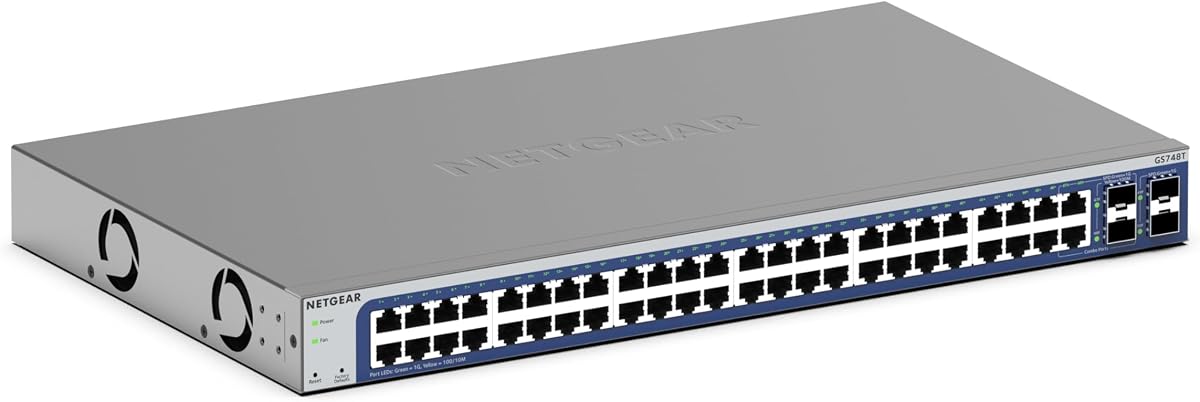
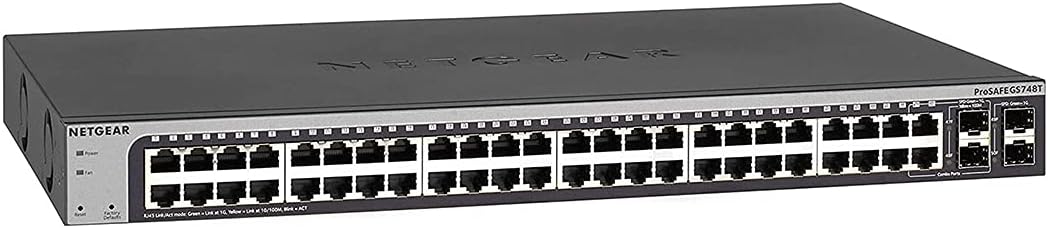
The NETGEAR GS748T is a solid choice for organizations requiring fiber optic connectivity alongside standard copper ports. Featuring 48 gigabit ports plus 4 SFP slots, it supports high-speed uplinks and network expansion. Its smart management software provides an easy-to-use interface for configuring access and security settings.
We may earn a commission when you buy through this link, at no additional cost to you.
This model supports both desktop and rack-mount installation, offering flexibility in various physical environments. The IEEE 802.3az Energy Efficient Ethernet compliance helps reduce power consumption without sacrificing performance. NETGEAR Insight inclusion allows remote management, enhancing operational convenience for IT teams managing distant locations.
While the rating is slightly lower than some fully managed alternatives, it remains a reliable option for smart managed needs. The compact metal design ensures durability and heat dissipation. The included lifetime hardware warranty adds significant value for long-term business use cases.
Businesses needing fiber uplinks and basic managed features without complex overhead will appreciate this switch. It bridges the gap between unmanaged simplicity and enterprise complexity. Ideal for small to mid-sized offices looking to upgrade their network backbone affordably.
The 4 SFP ports allow you to connect fiber optic cables for longer distances and higher bandwidth needs on your network backbone.
NETGEAR Insight provides a cloud-based dashboard to manage your switch remotely, simplifying IT tasks and improving response times to issues.
We may earn a commission when you buy through this link, at no additional cost to you.
The Omada SG3452 offers robust L2+ features including static routing, which helps route internal traffic more efficiently. It integrates seamlessly with the Omada SDN platform, allowing centralized control of switches, APs, and gateways. This makes it a powerful choice for growing businesses expanding their network infrastructure.
We may earn a commission when you buy through this link, at no additional cost to you.
Security is enhanced through features like IP-MAC-Port binding and DoS defense. The switch supports both standalone management and cloud access via the Omada app. This flexibility allows administrators to choose their preferred control method based on their technical requirements and operational preferences effectively.
While it requires SDN firmware for full integration, the standalone mode remains functional. The 5-year protection plan offers long-term reliability and technical support. Web and CLI interfaces provide comprehensive control for advanced users needing detailed configuration options for their network setup.
Organizations needing routing capabilities without a full router are well served by this switch. It is ideal for networks using TP-Link Omada ecosystems. The static routing feature optimizes internal traffic flow, reducing latency and improving overall network performance significantly.
Static routing allows you to define specific paths for data packets, improving efficiency and reducing congestion within your internal network segments.
Integrating with other Omada devices creates a unified network management experience, simplifying administration across multiple device types and locations.
We may earn a commission when you buy through this link, at no additional cost to you.
This version of the NETGEAR GS748T is distinguished by its limited lifetime hardware warranty and next business day replacement policy. It provides 48 gigabit ports plus 4 SFP ports for fiber connectivity. The smart software interface ensures secure setup and easy access management for network administrators.
We may earn a commission when you buy through this link, at no additional cost to you.
The 24/7 chat support with NETGEAR experts adds significant value for troubleshooting. Its energy efficient design complies with IEEE 802.3az, reducing power consumption. The desktop or rackmount options offer physical flexibility for various installation scenarios in offices or server rooms effectively.
While it is an older model, the warranty coverage makes it a compelling option for long-term planning. The quiet operation ensures it fits well in noise-sensitive environments. It balances reliability with modern connectivity standards for small business network needs.
Businesses prioritizing long-term support and warranty security will find this model appealing. The combination of smart management and physical durability makes it a staple for IT departments. It remains a robust choice for expanding network ports without sacrificing support services.
The lifetime limited warranty ensures you are covered for as long as you own the device, providing long-term peace of mind.
24/7 chat access to NETGEAR experts means you can resolve issues quickly, minimizing downtime for your business operations.
We may earn a commission when you buy through this link, at no additional cost to you.
The TP-Link TL-SG3452P is a premium option designed for networks requiring both data and power over Ethernet. With a 384W power budget, it supports up to 30W per port for devices like cameras and APs. It also includes L2+ features like static routing for better traffic management.
We may earn a commission when you buy through this link, at no additional cost to you.
Its integration with Omada SDN allows for seamless management across different device types. The PoE auto recovery feature ensures connected devices reboot automatically if they crash, reducing manual intervention. This switch is ideal for security systems and wireless networking deployments needing centralized power control.
While the price is higher, the comprehensive features justify the investment for demanding environments. The fanless design maintains quiet operation even under heavy load. Advanced security features like DHCP Snooping and 802.1X ensure network integrity against unauthorized access attempts.
Networks needing robust PoE power and management in one unit will find this switch unmatched. It is perfect for enterprises deploying extensive IP camera or AP systems. The combination of power, routing, and security makes it a future-proof solution.
A 384W power budget ensures you can power multiple high-wattage devices simultaneously without overloading the switch capacity.
PoE auto recovery automatically reboots connected devices that become unresponsive, minimizing downtime without physical intervention.
We may earn a commission when you buy through this link, at no additional cost to you.
The NETGEAR GS348 is perfect for users who need simple connectivity without configuration complexity. As an unmanaged switch, it requires zero software installation and works out of the box. With 48 gigabit ports, it provides ample connection points for workstations or devices needing reliable internet access.
We may earn a commission when you buy through this link, at no additional cost to you.
Its fanless design ensures silent performance, making it suitable for noise-sensitive areas. The energy efficient design reduces power consumption, aligning with green initiatives. It is made for U.S. and Canada compatibility, ensuring regional electrical standards are met for safe operation.
While it lacks management features, its reliability and ease of use are unmatched for basic needs. The high rating reflects its durability and consistent performance over time. It eliminates the learning curve associated with managed switches for non-technical users.
Small offices or home networks needing a simple expansion of ports will love this model. It is the ultimate plug-and-play solution for high-speed connectivity. You get reliable gigabit speeds without any administrative overhead or technical expertise required.
Simply plug in the cables and power it on. There are no settings to adjust, making it the easiest switch to install.
IEEE 802.3az support reduces power use when connected devices are idle, saving money on electricity bills over time.
We may earn a commission when you buy through this link, at no additional cost to you.
This renewed NETGEAR GS748T offers the same features as the new model but at a more accessible price point. It includes 48 gigabit ports and 4 SFP ports for flexible connectivity. The ProSAFE Lifetime Protection ensures you are covered for hardware issues, adding value to the purchase.
We may earn a commission when you buy through this link, at no additional cost to you.
Buying renewed allows businesses to access enterprise-grade features without the premium cost. The switch supports desktop or rackmount placement, fitting various physical setups. While condition may vary, Amazon's return policy offers some protection for your investment in this refurbished unit.
It is ideal for budget-conscious buyers who need smart management capabilities. The SFP ports allow for future network expansion using fiber optics. Careful inspection upon arrival ensures the device meets your expectations for physical and functional quality and standards.
If your budget is tight but you need managed features, this is a strong contender. It provides the core functionality of a managed switch without new pricing. Just ensure you verify the item's condition immediately upon delivery for peace of mind.
Renewed models offer significant savings while providing the same technical capabilities as brand-new units.
NETGEAR's ProSAFE protection covers you for the lifetime of the product, ensuring support even for refurbished items.
We may earn a commission when you buy through this link, at no additional cost to you.
The UBIQUITI EdgeSwitch Lite delivers exceptional performance with a 140 Gbps switching capacity and non-blocking throughput. It features 48 gigabit ports plus 2 SFP+ ports, making it suitable for high-density environments. The high forwarding rate ensures packets are processed quickly to minimize latency effectively.
We may earn a commission when you buy through this link, at no additional cost to you.
This switch supports DC input, offering redundancy options for power reliability. It is rack- or wall-mountable, providing physical installation flexibility. The management interface integrates with Ubiquiti's ecosystem, which is popular among network enthusiasts and SMBs. It balances performance with usability effectively.
While it lacks PoE, its speed and capacity are standout features. The 2 SFP+ ports support higher bandwidth uplinks for modern networks. This model is robust for environments where data throughput is critical. It is perfect for video production or high-performance computing setups.
Networks prioritizing raw speed and capacity will appreciate this model. The combination of SFP+ ports and high switching capacity future-proofs your infrastructure. It is a solid choice for users already in the Ubiquiti ecosystem needing reliable throughput.
Non-blocking throughput ensures that all ports can operate at full speed simultaneously without data loss or bottlenecks.
SFP+ ports allow for faster 10Gbps connections for uplinks, supporting modern high-speed backbone requirements.
We may earn a commission when you buy through this link, at no additional cost to you.
The YuanLey switch offers advanced L3 management features, allowing for routing and VLAN partitioning. With 48 PoE+ ports and a 460W budget, it handles heavy power loads for devices like APs and cameras. The 6 SFP+ slots provide extensive flexibility for high-speed network expansion.
We may earn a commission when you buy through this link, at no additional cost to you.
Security is comprehensive with ARP protection, IP source protection, and 802.1X authentication. The web interface is designed to be easy to use, suitable for both general and professional management. This makes it a versatile option for growing businesses needing enterprise-level tools.
As a lesser-known brand, it offers cost-effective solutions with high specifications. The fanless design ensures energy efficiency and low noise. It is ideal for environments requiring both high power delivery and advanced routing without paying a premium brand name price.
Businesses needing high power and L3 features on a budget will find this appealing. The extensive SFP+ slots support complex network topologies. It bridges the gap between standard managed switches and high-end enterprise gear effectively.
L3 features allow for routing decisions based on IP addresses, improving traffic management across different subnets.
With 460W of PoE power, this switch can support a large number of high-power devices without additional infrastructure.
We may earn a commission when you buy through this link, at no additional cost to you.
The NETGEAR GS348TPv2 boasts a perfect 5.0 rating for reliability and performance. It provides 48 PoE+ ports with a 380W budget, ideal for powering network devices. The smart managed interface offers control over secure setup and access, making it manageable for IT teams.
We may earn a commission when you buy through this link, at no additional cost to you.
Its compact metal design supports versatile installation options. The 4 SFP ports allow for fiber connections to extend network reach. The high rating reflects user satisfaction with its stability and ease of use. It is a strong choice for businesses prioritizing quality and support.
While pricier than basic models, the combination of PoE and smart features adds significant value. The energy efficient design reduces operational costs. It simplifies network management for those needing both data and power delivery in one box efficiently.
Organizations needing reliable PoE delivery and management features should consider this model. The 5.0 rating ensures you are buying a trusted product. It is perfect for offices needing to power and manage devices securely.
380W power budget ensures consistent power delivery to connected devices, reducing the risk of power-related interruptions.
Easy-to-use software simplifies network configuration and monitoring, saving time for IT administrators.
We may earn a commission when you buy through this link, at no additional cost to you.
Selecting the right switch requires understanding your specific network needs and growth plans.
Decide if you need VLANs and traffic control. Managed switches offer security and segmentation while unmanaged ones are plug-and-play.
Choose managed for growth and security; unmanaged for simple expansion.
Check if you need to power devices like cameras or APs over Ethernet. Calculate the total wattage required across all devices.
Ensure the switch budget covers your total PoE load plus a safety margin.
Look for SFP or SFP+ ports for fiber uplinks. These are crucial for high-speed connections to servers or other switches.
Select a switch with enough fiber ports for your backbone needs.
L2 switches handle traffic based on MAC addresses while L3 can route between subnets using IPs. L3 is better for complex networks.
Pick L3 if you need internal routing without a separate router.
Consider fanless vs. cooled designs. Fanless is quieter for offices but may have lower heat tolerance. Rack mount is standard for server rooms.
Choose silent for offices and rack mount for professional setups.
Web GUI is easier for beginners while CLI allows advanced control. Ensure the interface supports your team's skill level.
Verify remote access options for easier maintenance.
Choose established brands for better support and firmware updates. Look for warranties that cover your deployment period.
A longer warranty protects your investment against failures.
Install the switch in a well-ventilated area to ensure proper cooling. Connect your uplink fiber or Ethernet cable to an SFP or copper port first for internet access.
Log into the management interface using the default IP address. Change the admin password immediately and configure VLANs to separate your network traffic for better security.
Regularly update the firmware to patch security vulnerabilities. Monitor traffic stats to identify any anomalies or bottlenecks in your network performance.
Managed switches allow you to configure settings like VLANs, security, and traffic monitoring. Unmanaged switches simply pass data without configuration options.
Only if you are connecting devices that require power over Ethernet like security cameras or wireless APs. If not, a standard switch is sufficient.
Yes, you can use it in a default mode like an unmanaged switch. However, you lose the benefits of segmentation and security settings.
Ensure the switch supports cloud management or has a static IP. Use web interfaces or dedicated apps like Omada or Insight for remote access.
L2 switching uses MAC addresses for forwarding traffic. L3 switching uses IP addresses to route packets between different network subnets.
They are quieter and have fewer moving parts to fail. However, active cooling may handle heat better in high-load environments.
We reviewed ten excellent models ranging from basic unmanaged units to advanced L3 PoE switches. The TP-Link SG2452LP leads as our top pick for overall balance of features and ease of use.
Prioritize your specific needs such as PoE budget or fiber uplinks before buying. A switch that fits your current topology prevents future infrastructure upgrades.
Remember to check current availability and pricing on Amazon before finalizing your order. These switches represent a significant investment in your network reliability.