
CENMATE Aluminum 8 Bay Hard Drive RAID Enclosure
3.8Editor score
Supports up to 160TB total capacity
USB 3.0 with 5Gbps transfer speeds
Aluminum construction with dual cooling fans
Finding the right storage solution is critical for modern professionals and enthusiasts alike. An 8 Bay Hardware RAID Enclosure offers massive capacity and data protection through hardware-based redundancy. These devices allow you to connect multiple drives to a single computer interface while managing complex data configurations efficiently.
We evaluated ten leading models based on connection speeds, cooling efficiency, and build quality. Our analysis includes options ranging from affordable DAS units to high-performance Thunderbolt arrays. Each product was reviewed for its ability to handle large file transfers and maintain drive health under continuous operation loads.
Every selection in this list highlights specific strengths for different use cases and budgets. Prices and availability fluctuate frequently so always verify current details before purchasing. We aim to provide clear insights into features that matter most for your specific workflow requirements today.
3.8Editor score

5.0Editor score

3.7Editor score
As an Amazon Associate we earn from qualifying purchases.
This comparison table details the key specifications of each enclosure to help you find the best fit for your storage needs and budget constraints.

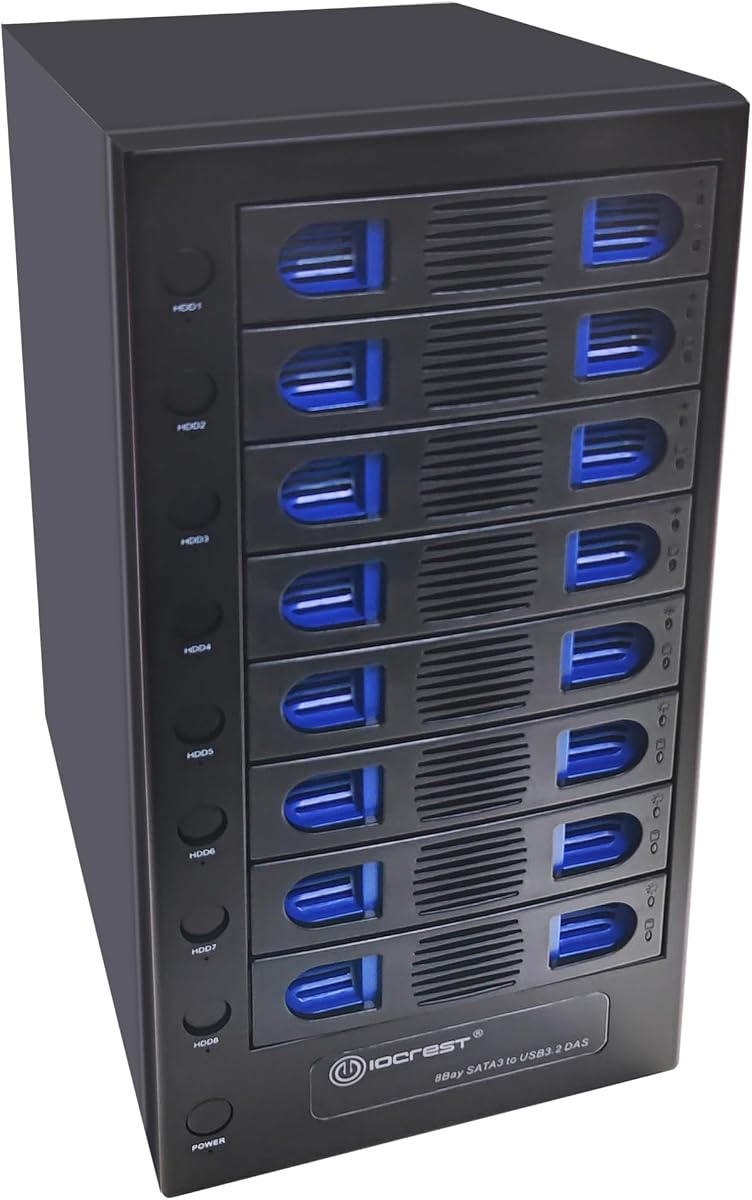


This CENMATE enclosure offers one of the most accessible entry points into hardware RAID storage solutions. It supports up to 160TB of total capacity across eight bays with a mix of 2.5 and 3.5 inch drives. The device uses USB 3.0 connectivity to deliver reliable transfer speeds for general workstation needs.
We may earn a commission when you buy through this link, at no additional cost to you.
Its standout feature is the inclusion of eight distinct RAID modes including RAID 0 1 5 and various striped configurations. Users can switch modes using a physical toggle and reset button sequence after powering down the unit. The aluminum chassis helps dissipate heat while two internal fans maintain safe operating temperatures during heavy loads.
The RAID switching process requires careful adherence to instructions and may be challenging for non technical users. Fans generate noticeable noise which might disturb quiet office environments. It requires inserting drives one by one to verify health before full setup to avoid detection issues.
This enclosure is ideal for individuals seeking affordable hardware redundancy without investing in enterprise NAS systems. It suits home users who need significant storage expansion and basic data protection features on a budget.
Hardware RAID provides data protection without requiring software overhead on your host computer.
Supports both 2.5 and 3.5 inch SATA drives up to 20TB per unit for versatile setup.
We may earn a commission when you buy through this link, at no additional cost to you.
The SanDisk Professional G-RAID Shuttle delivers top tier performance for creative professionals managing massive media assets. It ships with eight removable Ultrastar hard drives totaling 160TB of pre-configured RAID 5 storage. Thunderbolt 3 connectivity ensures transfer speeds up to 2000MB/s for smooth 8K video editing workflows.
We may earn a commission when you buy through this link, at no additional cost to you.
Its removable drive design allows for easy maintenance and physical security when transporting data between locations. Dual Thunderbolt ports enable daisy chaining up to five additional devices for expanded workflow flexibility. The enclosure also delivers 85W power through USB-C to charge compatible laptops while in use.
The price reflects enterprise grade reliability but may be excessive for casual users without heavy media demands. Its weight makes it less portable despite the removable drive design. Users must ensure their host system supports Thunderbolt 3 for optimal performance.
Choose this unit if you require premium speed and data integrity for professional video production. It represents the gold standard for external storage arrays needing minimal setup and maximum reliability.
Optimized for multi stream 8K editing with sustained high throughput without buffering.
Charges your laptop while connecting drives reducing cable clutter on your desk.
We may earn a commission when you buy through this link, at no additional cost to you.
This DAS model from CENMATE removes RAID complexity while offering eight drive bays for straightforward storage expansion. It connects via USB 3.0 for speeds up to 5Gbps and supports hot swapping for drive changes without power down. The aluminum chassis includes dual fans to prevent overheating during sustained file transfers.
We may earn a commission when you buy through this link, at no additional cost to you.
Users can expand capacity further using the USB HOST port to daisy chain up to three devices totaling 480TB. Setup requires testing drives individually before bulk loading to ensure system recognition. It works across Windows Mac and Linux without requiring additional drivers or software installation.
Without RAID features this unit lacks data redundancy protections found in hardware RAID enclosures. The cooling fans generate noise that may be disruptive in quiet spaces. Drive detection issues can occur if multiple drives are inserted simultaneously.
Ideal for users needing massive storage without redundancy concerns. This model suits media libraries or backup targets where simple access matters most.
True plug and play functionality ensures immediate recognition on any modern operating system.
Daisy chain capability allows adding more bays to create a massive storage network.
We may earn a commission when you buy through this link, at no additional cost to you.
The OWC ThunderBay 8 provides eight bays for universal SATA SSDs or HDDs via dual Thunderbolt 3 ports. It allows users to daisy chain six units for massive capacity expansion up to 1152TB across the network. Thumb screw trays make drive replacement easy without needing tools or specialized equipment.
We may earn a commission when you buy through this link, at no additional cost to you.
It is certified for both Mac and Windows systems with plug and play drivers included. The enclosure ships with a Thunderbolt cable for immediate use upon setup. It supports daisy chaining additional Thunderbolt devices through its second port for peripheral expansion.
Some users report fan noise during high load operation which may disturb quiet environments. While fast it lacks built-in RAID functionality which may require additional software management. The price point reflects brand premium over generic alternatives.
Select this enclosure if you need certified Thunderbolt reliability for creative workstations. It balances ease of use with professional grade connectivity standards effectively.
Works seamlessly with any standard SATA 2.5 or 3.5 inch SSD or HDD drives.
Secondary port allows connecting up to five additional devices in a chain.
We may earn a commission when you buy through this link, at no additional cost to you.
This DAS unit upgrades connectivity with USB 3.2 Gen 2 for 10Gbps transfer speeds ideal for large media files. It supports hot swappable drives allowing replacement without powering down the system. The aluminum chassis houses two cooling fans to maintain stable operating temperatures during sustained operations.
We may earn a commission when you buy through this link, at no additional cost to you.
Like other CENMATE models it allows daisy chaining multiple units via a USB HOST port for expanded storage needs. It supports drives up to 20TB each for a total of 160TB capacity. Plug and play compatibility works across Windows Mac and Linux without extra drivers.
It lacks hardware RAID which means users must manage data redundancy via software. The cooling fans can produce noise that may disturb quiet office environments. Proper drive insertion order is required to ensure system recognition of all drives.
Best suited for users needing fast USB connectivity without RAID complexity. This model fits high speed backup tasks or direct media editing workflows.
USB 3.2 Gen 2 interface doubles USB 3.0 speeds for faster data movement.
Add or remove drives while running system for minimal downtime during maintenance.
We may earn a commission when you buy through this link, at no additional cost to you.
This enclosure stands out with independent power switches for each drive bay allowing granular control over storage devices. It uses USB-C 3.2 for 10Gbps speeds and supports drives up to 22TB each for massive capacity potential. A smart fan with thermal sensor adjusts speed based on internal temperatures automatically.
We may earn a commission when you buy through this link, at no additional cost to you.
Users can manually adjust fan speed through three levels or rely on the automatic thermal sensor mode. The steel housing provides durability and heat dissipation during continuous operation. It supports all major operating systems including Windows Linux and macOS without requiring special drivers.
The lack of RAID support means data redundancy must be managed via software. Understanding the independent switches requires initial setup learning. Fans may still produce audible noise even in lower settings.
Select this unit if granular drive control is essential for your workflow. It fits well in environments where selective drive power cycling is needed.
Turn off individual drives when not in use to save power and reduce heat.
Auto mode adjusts fan speed based on internal drive temperature automatically.
We may earn a commission when you buy through this link, at no additional cost to you.
This versatile enclosure combines storage with PCIe expansion for audio capture networking or additional hardware RAID cards. The top four bays support U.2 NVMe drives for real world speeds up to 2750MB/s. Front ports include USB-C and card readers for quick access to external media sources.
We may earn a commission when you buy through this link, at no additional cost to you.
SoftRAID management software is included for creating and monitoring advanced RAID sets on compatible systems. The design allows users to upgrade host peripherals without internal case opening. It provides up to 144TB total capacity with mixed drive types.
The complexity of PCIe setup may overwhelm users who just want simple storage. U.2 NVMe drives are not included and must be purchased separately. The price reflects the premium features which may not suit all buyers.
Ideal for power users needing both massive storage and expansion capabilities. This enclosure fits pro audio video and network workstations perfectly.
Insert audio capture cards network cards or RAID controllers into PCIe slot.
Top bays accept U.2 NVMe drives for near internal SSD performance.
We may earn a commission when you buy through this link, at no additional cost to you.
This QNAP expansion unit provides eight bays for 3.5 or 2.5 inch SATA drives via USB 3.2 Gen 2 Type-C. It offers JBOD configuration allowing full control over each drive without RAID restrictions. The included utility allows monitoring drive health and system information easily through software.
We may earn a commission when you buy through this link, at no additional cost to you.
It works seamlessly as an expansion to existing QNAP NAS systems using the QTS or QuTS hero app. Standalone it functions as a plug and play direct attached storage device for workstations. The tower design fits neatly on desks with a professional appearance.
Maximum performance and features depend on QNAP ecosystem integration which may limit standalone utility. It lacks hardware RAID options so data protection must be handled externally. The price reflects brand quality and software support.
Best for QNAP users needing immediate storage expansion. Standalone users should verify feature expectations before purchase.
Use included software to monitor drive health and configuration status easily.
Extends existing QNAP storage capacity directly through native software integration.
We may earn a commission when you buy through this link, at no additional cost to you.
This case is designed for building custom NAS servers using Mini ITX or Micro ATX motherboards. It features eight hot swap drive bays with dedicated cooling channels to isolate drive heat from motherboard components. Each bay includes power and activity lights for monitoring drive status easily.
We may earn a commission when you buy through this link, at no additional cost to you.
It includes a full accessory kit with silent fans SATA cables and mounting stands for installation. The front panel provides USB 3.0 connectivity for peripheral devices alongside the power button. Steel chassis construction ensures durability and protection for stored data during use.
Users must source motherboard and power supply separately which adds complexity to setup. It lacks external connection ports requiring internal motherboard connections for network or USB. Assembly time is required compared to plug and play enclosures.
Perfect for DIY enthusiasts building custom media servers or backup repositories. It offers maximum flexibility for specific hardware configuration requirements.
Build a dedicated server tailored to specific performance and capacity needs.
Separate air channels prevent drive heat from overheating the motherboard.
We may earn a commission when you buy through this link, at no additional cost to you.
This internal cage fits into standard 5.25 inch drive bays for compact 2.5 inch SATA drive density. It uses full metal construction for durability and includes locking trays to secure drives during transport. The design supports both SATA and SAS drives for versatile connectivity options.
We may earn a commission when you buy through this link, at no additional cost to you.
It requires two 15 pin SATA power connectors for operation making it suitable for systems with sufficient power capacity. Users can swap drives without tools using the tray design which simplifies maintenance. Its internal nature means external ports must be provided by the motherboard.
Because it installs internally it requires opening the PC case for installation which may not suit all users. It supports only 2.5 inch drives which may limit capacity per drive. The locking mechanism adds security but may slow down drive changes.
Best for users needing high density storage inside a desktop workstation. This cage fits well in compact builds requiring internal drive management.
Pack eight 2.5 inch drives inside a standard 5.25 inch bay easily.
Locking trays prevent accidental drive removal during system movement or transport.
We may earn a commission when you buy through this link, at no additional cost to you.
Selecting the right enclosure depends on your speed needs capacity requirements and budget constraints.
USB 3.0 offers 5Gbps speeds sufficient for general file storage. USB 3.2 Gen 2 doubles this to 10Gbps ideal for media workflows. Thunderbolt 3 and 4 provide 40Gbps speeds for professional video editing and data intensive tasks.
Always match the interface to your host computer ports to avoid bottlenecks in data transfer.
Hardware RAID enclosures manage redundancy without host software overhead. Look for models supporting RAID 0 1 5 and 10 configurations based on your data protection needs. Some models like the CENMATE offer 8 modes while others like OWC rely on external software tools.
Choose hardware RAID for critical data or DAS if you prefer software redundancy management.
Check maximum supported drive size per bay to ensure future compatibility. Some models support 20TB drives while others support 22TB. Total capacity is calculated by multiplying drive size by bay count.
Plan for future storage growth by selecting enclosures that support larger drive sizes.
Eight drives generate significant heat requiring active cooling fans. Aluminum chassis designs help dissipate heat but fans are essential. Look for thermal sensors and adjustable fan speeds to manage noise levels effectively.
Prioritize silent cooling if the unit will operate in quiet office environments.
Hot swap capability allows replacing drives without shutting down the system. This reduces downtime during maintenance or failed drive replacement. Verify that your host OS supports hot swapping for full benefits.
Select hot swap models for high availability environments where uptime is critical.
Full metal chassis offer better durability and heat dissipation than plastic. Look for locking tray mechanisms if the unit will be transported frequently. Quality connectors and power adapters ensure stable operation under heavy loads.
Choose robust build materials for professional environments demanding long term reliability.
Verify operating system compatibility with your existing workstation. Some units work best with Mac while others are Windows optimized. Ensure your motherboard supports required protocols like UASP for optimal speeds.
Check official compatibility lists before purchasing to avoid driver or software issues.
Daisy chain support allows connecting multiple units to expand total storage capacity. Thunderbolt units often support multiple device chains while USB models may support fewer. Consider future scalability when selecting units with expansion ports.
Choose daisy chain capable units if you expect storage needs to grow over time.
Always initialize drives before use by following manufacturer setup instructions. This involves connecting drives sequentially to verify health before bulk loading to prevent detection issues.
Keep firmware updated for best performance and compatibility with newer operating systems. Check manufacturer websites regularly for firmware releases addressing bugs or adding features.
Monitor drive temperatures using built-in utilities to ensure fans operate correctly. Replace fans immediately if they stop working to prevent drive overheating and data loss.
Most modern enclosures support both Mac and Windows operating systems via USB or Thunderbolt. You will need to format drives in exFAT or NTFS for cross platform compatibility. Always check specific OS support in product documentation before purchasing.
Hardware RAID levels like 5 or 10 provide redundancy allowing data recovery if a single drive fails. However RAID does not replace regular backups for protection against accidental deletion or corruption. Always maintain offsite copies of critical data.
DAS units provide direct storage access without data redundancy or RAID management features. RAID enclosures offer hardware managed data protection allowing better performance and fault tolerance. DAS is simpler and cheaper while RAID adds security and speed.
RAID mode switching usually requires powering down the unit using a physical switch and holding a reset button. Always follow manufacturer instructions carefully as changing modes may format drives and delete data. Always backup data before attempting any mode changes.
Some models ship with pre-installed drives while others are sold as empty enclosures. Check product details to see if storage capacity is included or if drives must be purchased separately. Pre-installed models offer convenience while empty models provide flexibility.
You can replace existing drives with larger ones but RAID configuration must be rebuilt carefully. Some enclosures support daisy chaining to add more bays without replacing existing hardware. Always backup data before adding or replacing drives to avoid data loss.
We reviewed ten models offering varied solutions for professional and home storage needs. Top picks include the CENMATE for budget RAID and the SanDisk G-RAID for premium Thunderbolt performance.
Prioritize interface speed and cooling efficiency when selecting enclosures to ensure stable long term operation. Match your choice to your specific workflow whether it is video editing simple backup or server hosting.
Always verify current pricing and stock availability before purchasing as details change frequently. Check warranty terms and manufacturer support policies to ensure long term reliability for your investment.