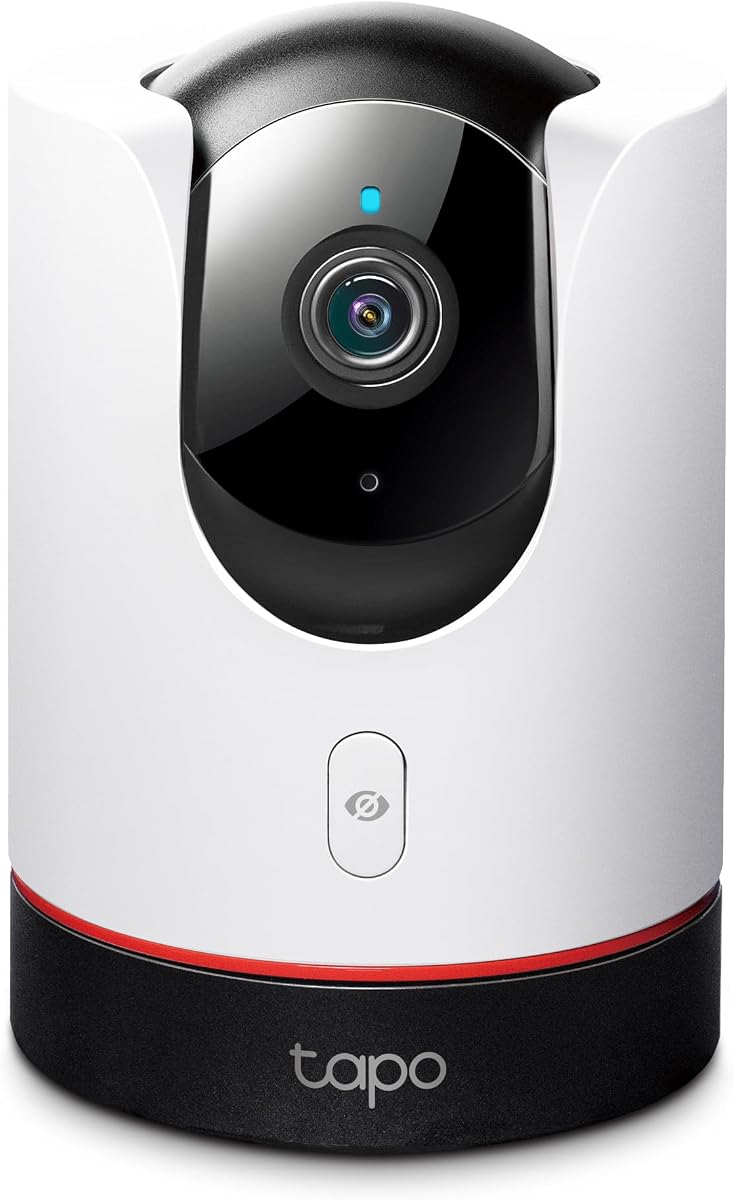
TP-Link Tapo C225
4.5Editor score
2K QHD Live View
Physical Privacy Mode
Starlight Night Sensor
This guide compares the top Apple Homekit Security Cameras for 2026, evaluating privacy, resolution, smart detection, and ecosystem integration to help you
Protecting your home with smart cameras requires seamless integration and strong privacy. Apple Homekit Security Cameras offer end-to-end encryption and local processing to keep your footage safe while providing instant alerts on your Apple devices.
We compared ten top models based on video quality, night vision, AI detection, and Homekit compatibility. Each camera was evaluated for ease of setup, storage options, and how well it fits into the broader smart home ecosystem.
Each pick highlights key strengths, potential trade-offs, and ideal use cases. While prices fluctuate over time, these selections represent the most reliable options available today for homeowners seeking secure and private surveillance solutions.
4.5Editor score
4.3Editor score
4.3Editor score
The following table provides a side-by-side comparison of all ten models. It highlights resolution, field of view, night vision capabilities, and storage options to help you quickly identify which camera fits your specific needs.



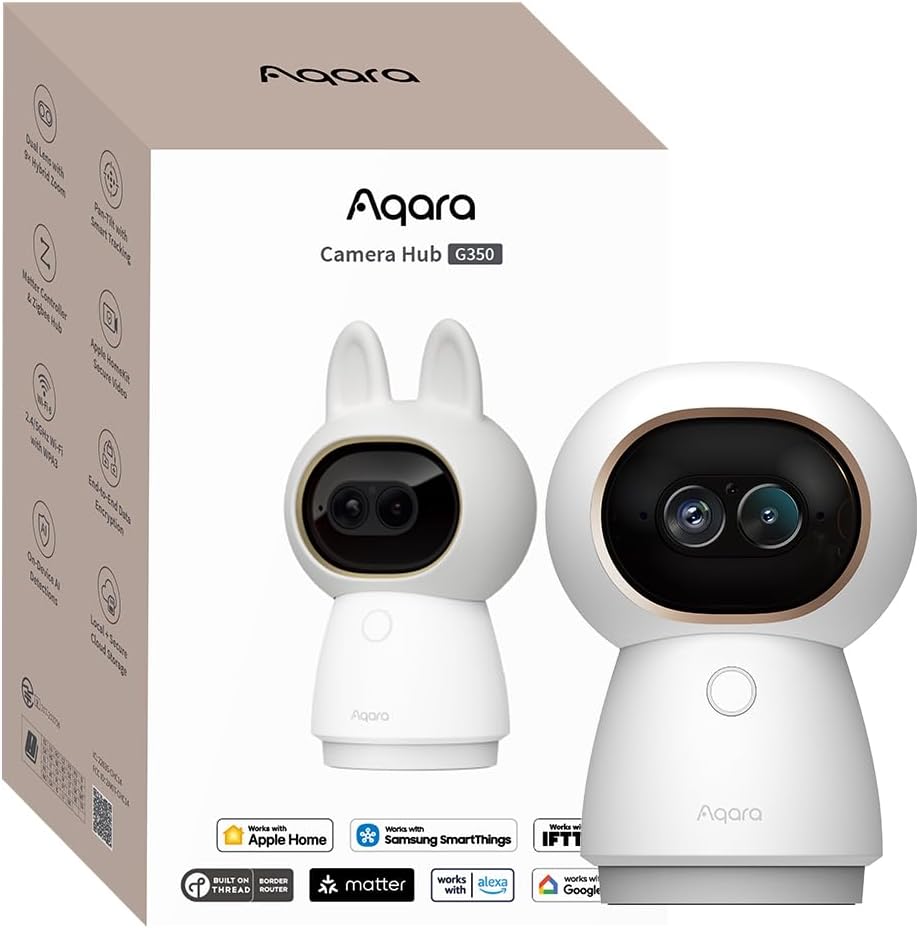
The Aqara Indoor Security Camera G350 stands out as a top-tier option for Homekit users seeking maximum detail and privacy. Its dual-lens system captures panoramic 4K views while using a telephoto lens for zoomed details. The camera ranks highly for its local AI processing which ensures data stays private.
We may earn a commission when you buy through this link, at no additional cost to you.
Key strengths include the 9X hybrid zoom and gesture recognition features. You can wave a hand to trigger scenes or zoom in on specific areas without losing clarity. The Matter bridge functionality also makes it a central hub for other smart devices, reducing the need for extra hardware.
While powerful, the camera requires initial setup through the Aqara Home app. Some features like gesture control are not accessible directly through Apple Home. This trade-off is acceptable given the superior image quality and the versatility of having a hub integrated into the camera.
This model is ideal for homeowners who want a comprehensive smart home solution. If you need high-resolution monitoring with local privacy and hub capabilities, the G350 offers a complete package that balances performance and security effectively.
Unlike digital privacy modes, the lens physically retracts to provide 100% visual assurance that you are not being watched when the camera is disabled.
As a hub, it connects up to 80 Aqara Zigbee devices and bridges them to Matter-compatible platforms like Apple Home, Alexa, and Google Home.
We may earn a commission when you buy through this link, at no additional cost to you.
The TP-Link Tapo C225 delivers impressive performance at an entry-level price. Despite being budget-friendly, it features a Red Dot Design Award winning build and 2K resolution. This makes it an excellent choice for users wanting quality without overspending on premium features.
We may earn a commission when you buy through this link, at no additional cost to you.
Its main strengths lie in its wide field of view and privacy features. The camera pans 360 degrees horizontally and includes a physical privacy mode that blocks the lens completely. The Starlight sensor ensures clear visuals in dim rooms without needing bright lights.
Limitations include reliance on 2.4 GHz Wi-Fi which may affect range in congested areas. Cloud storage requires a subscription for advanced features like motion tracking. These trade-offs are minor considering the low cost and strong core functionality.
Buyers looking for a reliable indoor monitor should consider this model. It is perfect for nurseries or living rooms where a balance of affordability and privacy is essential. The simple setup ensures anyone can start monitoring quickly.
The camera’s sleek design was recognized by international experts with a Red Dot Design Award in 2022 for combining aesthetics with function.
A single click in the app blocks the lens physically, giving you total control over when the camera can see your home interior.
We may earn a commission when you buy through this link, at no additional cost to you.
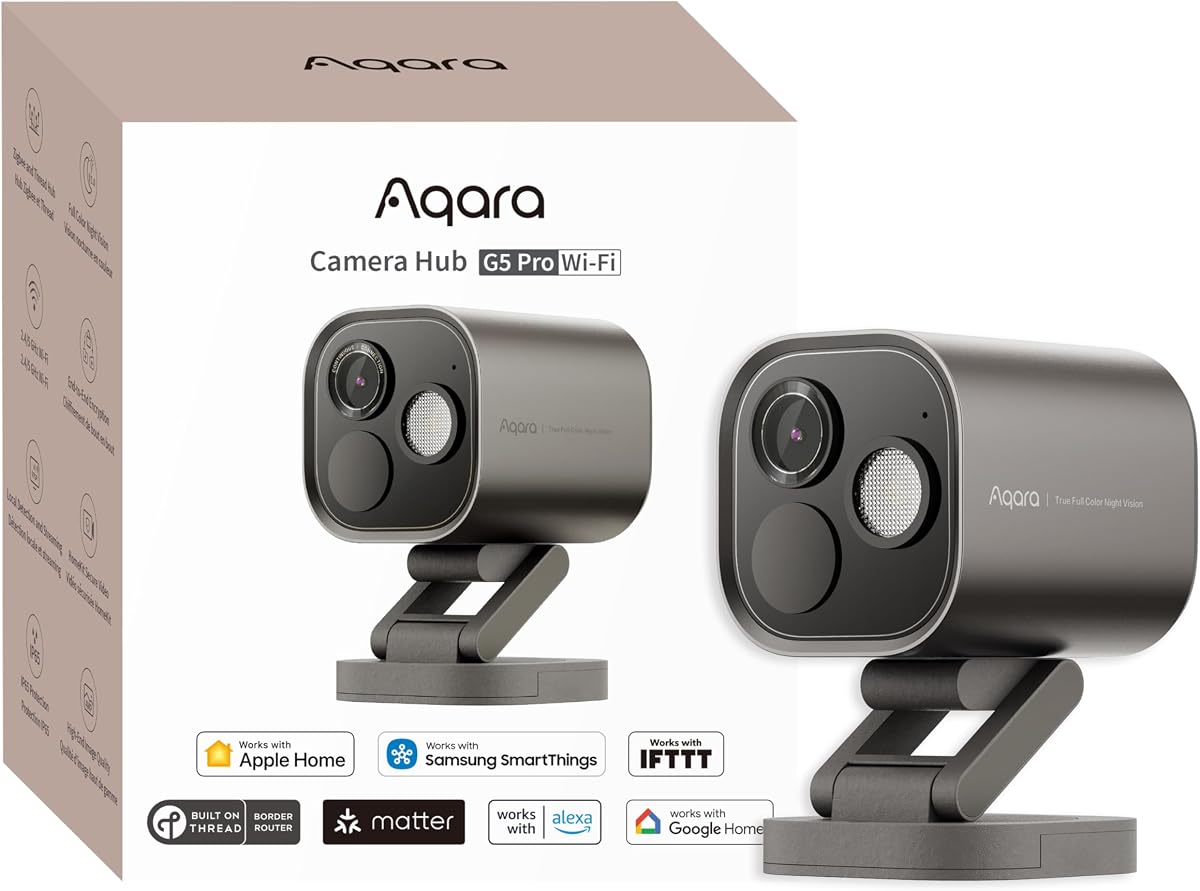
The Aqara 4MP Camera Hub G5 Pro WiFi is a high-end option designed for those who demand clarity and advanced features. It offers True Color Night Vision which allows you to see details even in low light without relying solely on IR. This is ideal for outdoor or semi-outdoor coverage.
We may earn a commission when you buy through this link, at no additional cost to you.
Performance is driven by a powerful NPU that handles seven types of visual detection. You can distinguish faces, vehicles, and animals locally. Dual-band Wi-Fi 6 ensures smooth streaming and lower latency compared to older standards. Built-in storage adds another layer of redundancy.
Installation requires a neutral wire and the camera lacks a battery backup. These constraints make it less flexible for some outdoor spots but acceptable for hardwired setups. The trade-off ensures consistent power and connectivity for critical security zones.
This model is best for users building a serious security system. If you need robust night vision and local AI without constant cloud uploads, the G5 Pro WiFi is a premium solution. It balances performance with privacy effectively.
With a large aperture and sensitive sensor, the camera captures color images in low light, helping identify details like clothing color at night.
The camera can detect abnormal sounds like alarm triggers, coughing, or barking, alerting you to issues even if no motion occurs.
We may earn a commission when you buy through this link, at no additional cost to you.
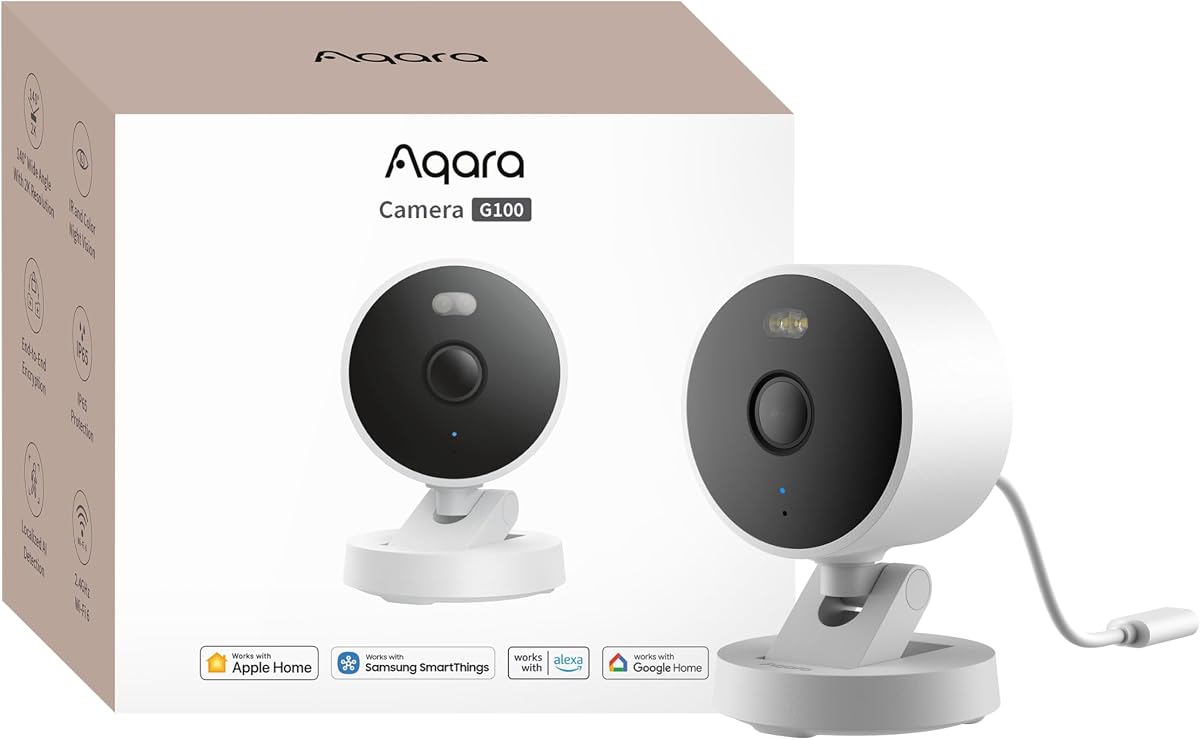
The Aqara G100 is designed for homeowners needing a versatile camera that works inside and outside. Its 2K resolution delivers sharp images during the day while the spotlight allows for color recording at night. This flexibility makes it a strong contender for various placement needs.
We may earn a commission when you buy through this link, at no additional cost to you.
Key strengths include its weather resistance and AI capabilities. The camera can detect persons and pets locally or via cloud subscription. Wi-Fi 6 ensures stable connection even in crowded networks. You can also use RTSP to stream to other platforms like Home Assistant.
Users should note that night vision modes must be enabled manually rather than automatically. Also, Homekit limits resolution to 1080p even if the camera supports higher. These points are minor trade-offs for the dual-use design and robust build quality.
This camera suits those who want one device for multiple rooms. Whether mounting it in a hallway or on a porch, it provides reliable monitoring. The balance of features and compatibility makes it a practical choice for diverse setups.
The integrated spotlight illuminates the scene allowing the camera to record in color at night which helps identify intruders or visitors clearly.
Advanced users can stream video to third-party platforms like Home Assistant using the RTSP protocol for greater control over the feed.
We may earn a commission when you buy through this link, at no additional cost to you.
The Eve Cam is built exclusively for Apple Homekit with a strong emphasis on privacy. It processes video locally and encrypts everything end-to-end. This means no data is stored in the cloud without your control. It is a top pick for privacy-conscious users.
We may earn a commission when you buy through this link, at no additional cost to you.
Strengths include instant notifications and seamless integration with Apple devices. You can receive alerts on your iPhone or Apple Watch instantly. The camera distinguishes between people and pets to reduce false alarms. All without relying on third-party servers.
However, the camera only works with Apple Homekit and requires a hub. It does not support other ecosystems like Alexa or Google. While this limits flexibility, it ensures a tightly integrated and secure experience within the Apple ecosystem.
Buyers who prioritize privacy above all else will appreciate this camera. It is best for homes already invested in Apple products. The simplicity and security focus make it a reliable option for indoor monitoring without external data risks.
The camera supports only Homekit Secure Video ensuring that video analysis happens locally in your home keeping personal data under your control.
Built from the ground up for Homekit it ensures seamless integration with your Apple ecosystem to maintain the highest privacy standards.
We may earn a commission when you buy through this link, at no additional cost to you.
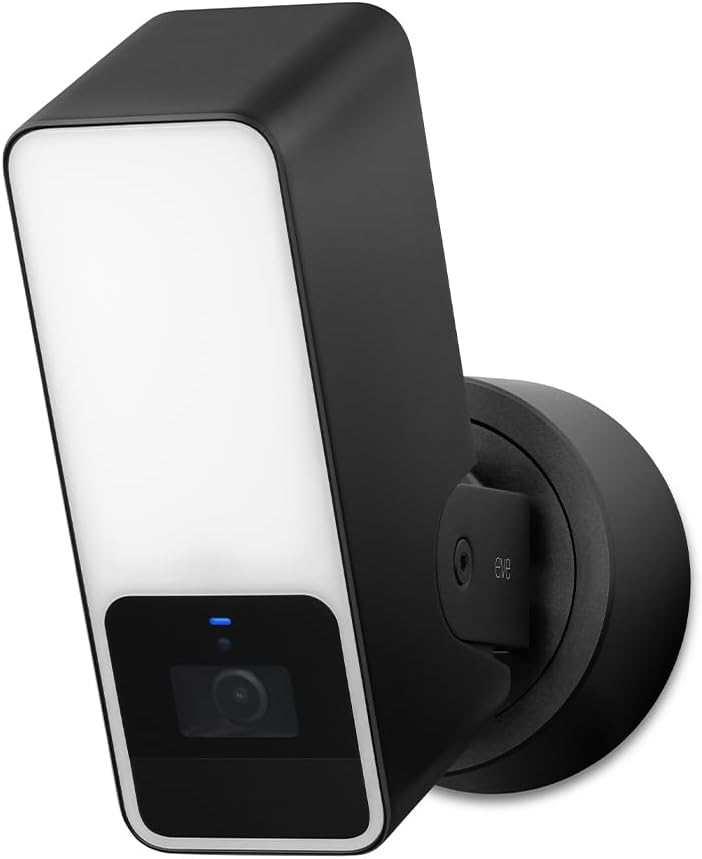
The Eve Outdoor Cam combines security with illumination through its floodlight design. It captures 1080p video and uses an infrared motion sensor to activate light when needed. This deters intruders and ensures clear visuals at night. The camera is designed for secure outdoor monitoring.
We may earn a commission when you buy through this link, at no additional cost to you.
Strengths include its privacy focus and lack of cloud dependency. It uses local intelligence and direct communication with your home hub. This means no tracking and no data exposure. Two-way audio allows you to speak to visitors directly from your device.
Installation requires both neutral and ground wires which may be complex. The price is higher than some competitors but reflects the premium build. These constraints are acceptable for users wanting a robust outdoor solution without cloud risks.
This camera is ideal for entryways or driveways. It provides bright lighting and secure video. If you need a powerful deterrent that respects privacy, this model offers the necessary tools for effective outdoor security.
The floodlight can be dimmed and uses light boost to enhance visibility during nighttime ensuring you can see details clearly when motion occurs.
Video analysis happens locally with no Eve cloud or registration meaning your data stays secure and is not tracked by external services.
We may earn a commission when you buy through this link, at no additional cost to you.
The Logitech Circle View is designed for outdoor durability and wide coverage. It features a 180-degree field of view to capture more area with one camera. The TrueView video quality ensures clear images even in sunlight or shadows. This makes it reliable for outdoor monitoring.
We may earn a commission when you buy through this link, at no additional cost to you.
Strengths include its weatherproof build and physical privacy feature. You can tilt the camera down or press a button to block the lens instantly. The metal base and matte finish provide a sturdy and aesthetically pleasing look. It fits well in modern homes.
The camera detects motion rather than recording continuously which saves storage. It also requires a wired power source limiting placement options. These trade-offs ensure reliability but reduce flexibility compared to battery models.
This model is great for doorways or porches. If you need a wide-angle view that withstands weather, it is a solid choice. The integration with Apple Homekit simplifies setup and ensures secure video analysis.
TrueView optics with 180-degree FOV capture everything in sharp detail while wide dynamic range ensures clarity in bright sunlight or shadows.
You can tilt the camera down or press a rear button for instant privacy giving you control over when the lens is active.
We may earn a commission when you buy through this link, at no additional cost to you.
The Aqara E1 focuses on detailed indoor monitoring with person tracking capabilities. It uses a motor to pan and tilt 360 degrees to follow detected subjects. This ensures you never miss movement in a room. The camera is excellent for keeping an eye on active spaces.
We may earn a commission when you buy through this link, at no additional cost to you.
Strengths include local AI sound detection and NPU support. It can recognize baby crying or coughing sounds without cloud uploads. This allows for instant automations like triggering lights when a sound is detected. Wi-Fi 6 ensures low latency streaming.
Limitations include the need for an external USB power adapter. Also, Homekit restricts resolution to 1080p even though the camera captures higher. These are minor issues for a camera that offers such strong tracking features.
This camera is perfect for nurseries or living rooms. If you need a reliable tracker that integrates with Homekit, it is a great pick. The privacy mode ensures you can disable the camera when needed for peace of mind.
The motorized pan tilt system allows for person tracking which enhances surveillance by keeping detected subjects centered in the view.
Built-in NPU supports advanced filtering of motion events and sound detection ensuring privacy and faster response times locally.
We may earn a commission when you buy through this link, at no additional cost to you.
The eufy E30 is a top choice for pet owners who want high resolution without subscriptions. It records in 4K and tracks pets automatically. This allows you to follow your pet’s movement throughout the day. The camera offers excellent detail and interaction features.
We may earn a commission when you buy through this link, at no additional cost to you.
Strengths include the integrated spotlight and panoramic view. You can switch between color night vision and infrared easily. The app allows Quick Focus Tap to switch views instantly. Local storage ensures you do not pay monthly fees for basic recording.
Homekit limits resolution to 1080p but this does not affect local storage. Cloud features require a subscription but are optional. These trade-offs are acceptable for a camera that offers such strong performance at no ongoing cost.
This model is ideal for pet monitoring. If you want a dedicated camera for your pets or kids, it is a strong choice. The balance of resolution and privacy makes it a practical option for daily indoor use.
The camera offers a 360-degree view and automatically tracks movement when a person or pet is detected for a complete view of activity.
An integrated spotlight allows seamless switching between color night vision and infrared night vision for clear nighttime surveillance.
We may earn a commission when you buy through this link, at no additional cost to you.
The Aqara G5 Pro PoE is designed for users who want stable network connections via Ethernet. It supports Power over Ethernet to transmit video and power through one cable. This ensures reliable performance without relying on Wi-Fi. It is a robust option for hardwired security.
We may earn a commission when you buy through this link, at no additional cost to you.
Strengths include True Color Night Vision and dual detection capabilities. You can recognize faces and vehicles locally while detecting sound anomalies. The USB-C port provides backup power which adds stability. This ensures the camera stays online during outages.
Installation requires a PoE switch which is sold separately. This adds to the cost and setup effort. However, the stability and speed of wired connections outweigh these hurdles for professional setups. It is ideal for offices or large homes.
This camera suits network enthusiasts and businesses. If you need a reliable camera with advanced AI, this model delivers. The wired connection ensures consistent performance while local processing keeps your data secure and private.
PoE technology allows transmission of video and power via a single network cable ensuring stable performance even in congested wireless environments.
The camera includes a USB-C port for non-PoE setups providing flexibility and backup power options for uninterrupted operation during power issues.
We may earn a commission when you buy through this link, at no additional cost to you.
Choosing the right camera involves balancing resolution, privacy, and smart features. This guide explains the key factors to consider when selecting a Homekit camera for your home.
Video resolution is critical for identifying faces or details. Look for 2K or 4K cameras for indoor use. Outdoor cameras should have wide dynamic range to handle sunlight and shadows effectively.
Prioritize cameras with at least 2K resolution to ensure sharp images. Higher resolution helps in zooming in without losing clarity.
Apple Homekit cameras offer end-to-end encryption to protect your footage. Local processing ensures video analysis happens on the device rather than the cloud. Check for physical privacy modes that block the lens.
Choose models that process data locally and offer physical lens blocking. This ensures your private data remains secure from external access.
Night vision is essential for 24/7 monitoring. Color night vision uses spotlights to capture details in low light. Infrared sensors provide black and white clarity in total darkness.
Consider cameras with True Color Night Vision or adjustable IR sensors. This ensures you can see details clearly regardless of lighting conditions.
Smart AI detects people pets and vehicles accurately. On-device AI reduces false alerts and ensures privacy. Check if the camera supports sound detection like crying or alarms.
Look for local AI processing to reduce cloud dependency. Sound detection adds another layer of security for monitoring specific events.
Storage can be local via microSD or cloud via Homekit Secure Video. Local storage avoids monthly fees while cloud offers accessibility from anywhere. Some cameras have built-in encrypted storage.
Evaluate whether you prefer local storage freedom or cloud convenience. Built-in storage offers a balance of speed and security.
Wi-Fi 6 offers faster speeds and better range. Dual-band support helps avoid congestion. PoE cameras are best for stable wired connections in offices.
Choose cameras supporting Wi-Fi 6 for smoother streaming. Wired connections provide maximum reliability for critical security zones.
Some cameras need neutral wires or hardwired power. Battery models offer flexibility but need recharging. PoE requires a switch. Consider where you can place the power source.
Check power requirements before buying. Easy installation ensures you can set up the camera quickly without professional help.
Homekit cameras work with Apple devices. Matter support allows compatibility with other platforms. Ensure the camera supports your existing smart home hubs like Alexa.
Look for Matter and Thread bridge features to unify your smart home. This simplifies control across different ecosystems.
Setup begins by plugging the camera into power and downloading the manufacturer app. Follow the on-screen instructions to connect to Wi-Fi. Pair the camera with Homekit using the Home app. Ensure your iPhone is updated to the latest iOS version for best compatibility.
Position the camera at a height that covers the desired area without glare. Adjust the field of view using the app controls. Test night vision settings to ensure visibility in low light. Place cameras near power outlets to avoid battery issues.
Maintenance involves cleaning the lens regularly with a soft cloth. Update firmware to keep features secure. Check storage space to ensure recordings are saved. Review privacy settings periodically to match your comfort level.
Not all cameras support 4K as Homekit limits resolution for video analysis. Some models like Aqara G350 offer 4K locally. However, Homekit streams may be capped at 1080p for compatibility.
Yes, you can use local storage via microSD cards. Homekit Secure Video requires iCloud+ for cloud storage but local features remain accessible. Some cameras have built-in storage options.
IR uses invisible light to record in black and white. Color night vision uses spotlights to capture visible details. Color vision helps identify clothing or vehicle colors at night.
Some models support third-party platforms via bridges. Check the specific model details. Most are designed primarily for Apple Homekit but some allow streaming via RTSP.
It depends on resolution and frame rate. A 512GB card can store weeks of footage. Higher quality needs more space. Use continuous recording to save hours of video.
Yes, a HomePod or Apple TV with tvOS 15 acts as the hub. This allows remote access and automations. Without it, cameras may only work locally on your network.
We reviewed ten models ranging from budget indoor units to premium outdoor hubs. The Aqara G350 and Tapo C225 stood out for their balance of features and price. Whether you need 4K clarity or basic monitoring, there is a model for every setup.
Prioritize privacy features like local processing and encryption. Night vision and AI detection are essential for effective monitoring. Ensure your chosen camera supports your existing smart home ecosystem before purchasing.
Prices and models change frequently so check current details. Verify availability and compatibility before buying. This guide aims to simplify your decision making with honest insights.