
Nektar SE49
4.5Editor score
DAW integration included
Full size velocity keys
Great value for money
Compare the top 49 key MIDI keyboards for 2026. We review features, integration, and software to help you choose the right controller for your studio.
Finding the right 49 key MIDI keyboard can transform your music production workflow. These controllers offer a balanced range of notes suitable for melodies and chords while remaining compact enough for smaller desks.
We evaluated each model based on key feel, software integration, and included tools. Our list covers options ranging from budget-friendly entry points to premium units with advanced control features.
Each pick highlights specific strengths and target users. Prices and availability change frequently so verify current details before purchasing to ensure you get the best value for your setup.
4.5Editor score

4.6Editor score

4.4Editor score
This side-by-side comparison highlights the key specifications and unique attributes of each controller to help you find the best match for your workflow.




The M-AUDIO Keystation 49 MK3 stands out as a reliable choice for producers needing a straightforward MIDI interface. With a strong rating it delivers consistent performance for daily tracking and writing sessions.
We may earn a commission when you buy through this link, at no additional cost to you.
Its 49 full-size velocity-sensitive keys provide a natural touch that responds well to dynamic playing. The simple layout ensures you spend less time mapping controls and more time creating music.
While it lacks advanced control elements like faders or knobs this trade-off keeps the design clean and cost-effective. This simplicity is acceptable for users who rely primarily on software for automation.
Anyone seeking a no-fuss entry point into MIDI production will find this keyboard highly rewarding. It balances quality and affordability making it a top recommendation for home studios.
This model requires no drivers or external power so you can connect it to your Mac or PC immediately.
Comes with essential production tools like MPC Beats and Ableton Live Lite to help you start creating right away.
We may earn a commission when you buy through this link, at no additional cost to you.
The Novation Launchkey 49 MK4 is a powerhouse for users deeply invested in specific software environments. Its high rating reflects the seamless integration it offers with major digital audio workstations.
We may earn a commission when you buy through this link, at no additional cost to you.
Features like FSR drum pads with polyphonic aftertouch allow for expressive percussion and trigger mapping. The Scale Mode ensures you stay in key which is perfect for beginners or fast sketching.
The premium price reflects the advanced capabilities and build quality included in this controller. However those who value workflow efficiency will find the investment well worth the extra cost.
Producers using Ableton Live or Logic Pro will appreciate the hands-on control this keyboard provides. It transforms your computer screen into a tactile surface for dynamic music production.
Custom scripts allow you to control transport parameters and plugin values without ever touching your mouse.
Built-in tools like arpeggiators and chord triggers help you generate complex patterns with minimal effort.
We may earn a commission when you buy through this link, at no additional cost to you.
For those on a tight budget the Nektar SE49 offers incredible value without sacrificing core functionality. It maintains a solid rating by focusing on the essentials that every beginner needs.
We may earn a commission when you buy through this link, at no additional cost to you.
Its DAW integration is straightforward allowing you to control your music software with ease. The keybed is responsive enough for most recording tasks and fits well on smaller desks.
You will not find advanced pads or complex routing options here but this keeps the device simple and easy to use. These trade-offs are acceptable given the competitive price point of this unit.
This controller is perfect for students or hobbyists starting their first home studio setup. It proves that you do not need to spend a fortune to access professional MIDI capabilities.
Compatible with Mac and PC systems ensuring flexibility for users regardless of their preferred operating system.
Includes Bigwig Studio and sound content to help you get started making tracks immediately after unboxing.
We may earn a commission when you buy through this link, at no additional cost to you.
The M-AUDIO Oxygen 49 MKV bridges the gap between entry and advanced controllers with its NKS compatibility. It is highly rated for users who utilize Native Instruments libraries in their production chain.
We may earn a commission when you buy through this link, at no additional cost to you.
Assignable knobs and faders give you direct control over virtual parameters enhancing your creative flow. The Smart Chord feature helps you experiment with harmonies even if theory knowledge is limited.
While the auto-mapping tools are powerful they can occasionally require manual tweaking for perfect function. This learning curve is minor compared to the control advantages you gain during sessions.
Producers who want hardware control over software parameters should consider this model seriously. It provides a robust toolkit for crafting beats and melodies without leaving your keyboard.
Seamlessly control Native Instruments presets and libraries with preset mappings that save setup time.
Use Smart Chord and Arpeggiator to quickly build musical ideas and expand your sonic palette.
We may earn a commission when you buy through this link, at no additional cost to you.
The Arturia KeyLab Essential mk3 offers a compelling package for producers who want deep software integration. It is rated highly for its extensive preset library and modern control interface.
We may earn a commission when you buy through this link, at no additional cost to you.
Access to Analog Lab V with its 2000 presets means you have a vast sound library immediately available. The RGB backlit pads and bright screen provide clear visual feedback during performance.
Some users might find the reliance on Arturia software a slight limitation when working with third party plugins. However the customization scripts available help mitigate this issue for most workflows.
If sound variety and visual feedback are priorities this keyboard is an excellent choice. It combines classic design with modern features to create an intuitive production experience.
Explore a wide range of sounds from vintage synths to modern orchestral textures without extra cost.
The bright LCD screen shows real-time parameter changes so you can adjust settings on the fly.
We may earn a commission when you buy through this link, at no additional cost to you.
This simple MIDI keyboard controller focuses on providing a basic input method for desktop setups. It serves well as a secondary controller or travel option due to its small footprint.
We may earn a commission when you buy through this link, at no additional cost to you.
The compact design ensures it fits easily on crowded desks without taking up excessive space. ABS construction keeps the unit lightweight making it easy to move between rooms or locations.
However you should not expect advanced controls like aftertouch or high end keybeds with this model. It is a functional tool rather than a high performance instrument for serious recording.
Users needing a small and cheap MIDI source for sketching ideas will find this useful. It strips away unnecessary features to deliver a straightforward connection for your software.
Designed to fit into tight workspace environments where space is at a premium for musicians.
Plug it in via USB and start using it immediately without complex configuration requirements.
We may earn a commission when you buy through this link, at no additional cost to you.
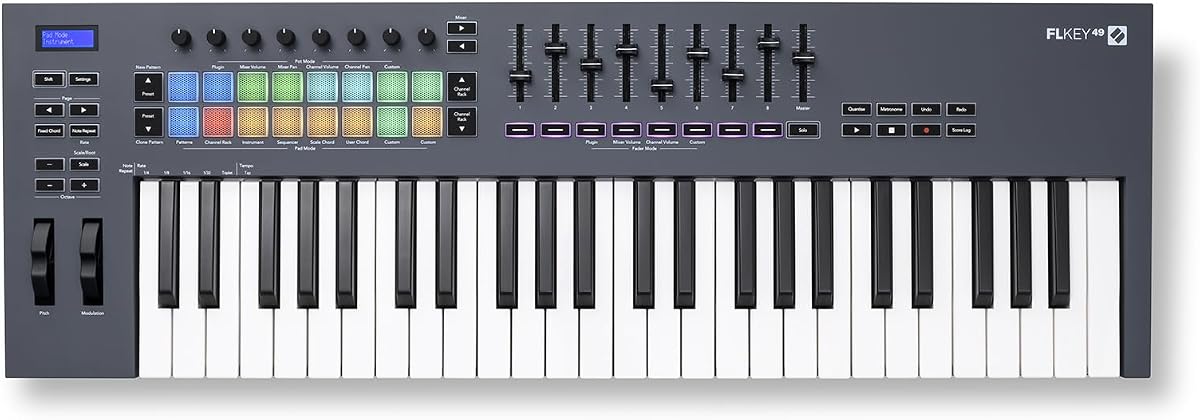
The Novation FLkey 49 is designed specifically for users who work primarily within FL Studio. It offers a dedicated workflow that mirrors the software interface for faster production.
We may earn a commission when you buy through this link, at no additional cost to you.
Controls like pots and faders map directly to FL Studio mixer and channel rack parameters for quick adjustments. This hardware integration reduces the need to mouse click through menus during mixing sessions.
If you use different DAWs this controller might not offer the same level of integration. The specialized nature limits its versatility but maximizes utility for FL Studio producers.
Beats producers and FL Studio users will find this keyboard significantly streamlines their workflow. It turns the software interface into physical controls for better hands on control.
Adjust volumes and pans directly from hardware giving you a more tactile mixing experience.
Use the step sequencer mode to program beats and change patterns without touching the mouse.
We may earn a commission when you buy through this link, at no additional cost to you.
The M-AUDIO Oxygen Pro 49 adds professional features like semi weighted keys and a 5-pin MIDI output. It is designed for performers who need to connect to a wider range of hardware gear.
We may earn a commission when you buy through this link, at no additional cost to you.
Aftertouch on the keys allows for expressive modulation during live performance which is a rare feature at this price point. The 16 pads offer ample room for complex drum programming and clip launching.
The larger footprint may be an issue for smaller desks compared to lighter models. However the added functionality justifies the space for users who need a comprehensive control surface.
Performers and producers who need hardware MIDI out should consider this robust option. It bridges the gap between computer production and live performance needs effectively.
Semi weighted keys and aftertouch provide a more authentic playing feel for live shows.
Use the 5-pin MIDI output to control synthesizers and other hardware instruments directly.
We may earn a commission when you buy through this link, at no additional cost to you.
The midiplus AK490 is a straightforward controller focusing on core functions like key input and basic modulation. It offers a reliable entry point for those needing simple MIDI capabilities.
We may earn a commission when you buy through this link, at no additional cost to you.
Standard features like pitch and modulation wheels plus octave buttons ensure you can access a wide range of notes. It is a no-frills solution that works well for basic recording tasks.
You will not find advanced pads or faders with this unit. This simplicity keeps costs low but may limit expression for users wanting detailed control over software.
Beginners or users with minimal requirements will appreciate its simplicity. It handles the basics effectively without confusing extra features that clutter the interface.
Includes a DIN MIDI out jack for connecting to older hardware synthesizers or interfaces.
Focuses on essential controls to keep the device affordable and easy to use.
We may earn a commission when you buy through this link, at no additional cost to you.
The Arturia KeyLab mk3 represents a premium tier of MIDI controller with exceptional build quality and tactile feedback. Its inclusion of aftertouch sets it apart for expressive performance needs.
We may earn a commission when you buy through this link, at no additional cost to you.
With 12 pressure sensitive pads and 9 encoders you gain a wide array of options for mapping and control. The USB-C power connection simplifies your cabling setup for modern desks.
The high cost is a barrier for many but the durability and features justify it for professional setups. This model is built to last and withstand rigorous daily use.
Studio professionals looking for top tier tactile control should consider this flagship model. It offers the highest quality playing experience among all 49 key options available.
Pressure sensitive pads and aftertouch keys allow for nuanced control over dynamics.
USB-C power support reduces cable clutter and aligns with modern hardware standards.
We may earn a commission when you buy through this link, at no additional cost to you.
Selecting the right MIDI keyboard depends on your workflow needs and budget constraints.
Decide between synth-style, semi-weighted, or fully weighted keys based on whether you prioritize speed or piano realism. Synth action is great for fast arpeggios while weighted keys suit classical piano players.
Consider the keybed material and tension to ensure it feels comfortable during long sessions.
Check if the controller offers pre-mapped integration with your specific DAW like Ableton Live or FL Studio. Seamless integration saves time by allowing direct access to transport controls and mixer faders.
Controllers with custom scripts can significantly enhance your production workflow efficiency.
Many bundles come with DAWs or virtual instruments that can save you significant money upfront. Review the included titles to ensure they are relevant to your production style.
Value often depends more on software value than just hardware specs.
Look for assignable knobs, faders, and drum pads if you need hands-on parameter tweaking during mixing. Basic models might lack these elements forcing you to use a mouse for adjustments.
Ensure the number of controls matches your typical workflow needs.
USB is standard but some units include 5-pin DIN MIDI outputs for connecting external hardware gear. Also verify if the keyboard supports bus power or requires an external adapter.
Choosing the right connection type ensures compatibility with your existing setup.
A sturdy chassis and durable keybed will withstand heavy daily use and transport. Plastic housings are common but premium units often feature metal components for stability.
Invest in a durable unit if you plan to move your gear frequently.
Prices vary widely from budget models to premium units with advanced features. Determine your maximum budget early to narrow down options effectively.
Often the best value lies in mid-range options rather than the cheapest choices.
Measure your desk space to ensure the keyboard fits without overwhelming your work area. Compact designs are useful for travel or limited workspace environments.
Consider weight if you plan to transport the controller regularly.
Connect the USB cable to your computer and wait for the drivers to install if necessary. Most modern systems recognize the device immediately allowing you to open your DAW.
Open your audio software and go to preferences to select the keyboard as your MIDI input. Ensure the output is routed correctly so you hear the sounds you produce.
Avoid exposing the keys to direct sunlight and use a soft cloth to clean dust from the keys regularly to maintain performance and hygiene.
Most 49 key MIDI keyboards draw power directly from the USB port so no external power adapter is needed. However models with many lights or audio outs might require a dedicated supply. Always check the product specs before connecting.
Yes most 49 key controllers work seamlessly with iOS devices when paired with an appropriate adapter. You can connect directly via USB using a lightning or USB-C adapter depending on your phone model. This allows for mobile music creation on the go.
Velocity responds to how hard you press a key while aftertouch responds to pressure applied after the key is down. Velocity helps with dynamics while aftertouch adds extra modulation like vibrato. Aftertouch is less common on budget models.
The majority of models are compatible with both Mac and PC operating systems without extra drivers. Some software integration features may require specific drivers on older systems. Always verify system requirements before purchase to avoid issues.
Most modern controllers are plug-and-play and do not require driver installation on newer systems. However installing official software can unlock advanced features and mapping capabilities. Check the manufacturer website for the latest updates.
You must map the keyboard controls to your DAW parameters manually or use pre-made scripts. This involves assigning knobs and faders to volume or effect settings within your software settings menu. Integration varies by manufacturer and software.
We reviewed ten diverse 49 key MIDI keyboards ranging from entry level to premium options for musicians. The top picks highlighted excellent value and specialized features to suit various production needs.
Prioritize software integration and key feel to ensure the unit supports your creative workflow effectively. The right controller can significantly speed up your music creation process.
Verify current availability and pricing before buying since these factors change frequently. Taking the time to compare specs ensures you find the perfect match for your studio.