
Snapmaker U1
4.5Editor score
Five second tool changer
True multi-material printing
CoreXY high-speed motion
This guide compares the top 3D printers for figurines and models, evaluating speed, precision, multi-color capabilities, and ease of use for hobbyists.
Finding the right 3D printer for figurines and models requires balancing precision with speed. Whether you are creating miniatures or large statues, accuracy is key for intricate details that define high-quality prints. We examine machines that deliver smooth surfaces and fine features essential for collectibles and artistic projects.
We compared ten leading printers based on resolution, build volume, material compatibility, and user experience. Our analysis highlights systems that minimize waste while maximizing color options and print reliability. Each entry includes detailed specifications and performance insights to help you choose the right tool for your creative needs today.
Each pick showcases unique strengths tailored to different skill levels and project types. Prices fluctuate regularly so verify current offers before purchasing. Our goal is to provide clear guidance so you can invest confidently in a machine that brings your detailed designs to life without frustrating failures.
4.5Editor score

4.7Editor score

4.4Editor score
This side-by-side comparison highlights key specifications across all ten selected printers. We focus on speed, build volume, nozzle temperature, and automation features to help you identify the machine that best fits your specific modeling needs.






The Bambu Lab A1 stands out as a top contender for figurines and models due to its incredible speed and precision. With a 4.7 rating it delivers high-quality prints with minimal user intervention thanks to automatic calibration. This makes it ideal for creators who want professional results without constant tweaking.
We may earn a commission when you buy through this link, at no additional cost to you.
Its high acceleration of 10000 mm/s2 ensures rapid printing while maintaining fine details crucial for intricate models. The active flow rate compensation algorithm guarantees smooth surfaces and consistent extrusion. Additionally the quiet operation with active motor noise canceling allows you to work in a peaceful environment.
While the A1 offers open frame design which limits high-temperature materials it excels with standard filaments like PLA and PETG. The AMS lite support adds multi-color capabilities though it requires separate purchase. These trade-offs are acceptable for most hobbyists seeking speed and ease of use.
Buyers should choose the A1 if they value speed and automation for detailed models. It fits beginners and pros who need reliable prints with minimal setup. Overall this printer balances performance and user experience better than many competitors in its class.
Full-auto calibration handles Z-offset and bed-leveling ensuring every print starts perfectly without manual adjustments.
Active flow rate compensation ensures consistent extrusion allowing for fast prints that still capture intricate model details.
We may earn a commission when you buy through this link, at no additional cost to you.
The Bambu Lab P2S Combo is a premium choice for complex figurines needing multi-color details. It combines high speed with a heated chamber and advanced AMS 2 Pro for reliable multi-material prints. This printer is designed for serious creators who need versatility and professional-grade output.
We may earn a commission when you buy through this link, at no additional cost to you.
Its ability to print up to 600 mm/s with active flow compensation means you get sharp layers and precise corners quickly. The 50 C chamber allows for engineering materials like ABS while maintaining a safe air environment with carbon filters. AI failure detection further protects your projects from wasting time.
The AMS 2 Pro enables vibrant multi-color prints with built-in filament drying to prevent clogging. While the cost is higher the convenience and quality justify it for advanced users. The only downside is that the base printer does not support multi-color without the combo.
Invest in this combo if you need top-tier speed and multi-color capability for detailed models. It suits professionals who prioritize reliability and speed. This system offers a unified workflow from design to print that few competitors can match.
AMS 2 Pro provides seamless multi-color printing with filament drying ensuring every spool is ready for flawless layers.
Adaptive airflow and 50 C chamber retention enable printing of engineering materials while keeping overhangs crisp.
We may earn a commission when you buy through this link, at no additional cost to you.
The FLASHFORGE Creator 5 Pro delivers industrial-grade multi-material printing for complex models. Its four independent toolheads switch instantly without flushing filament saving massive material. This makes it perfect for prototypes requiring support materials or multi-color details in a single build.
We may earn a commission when you buy through this link, at no additional cost to you.
With a 65 C active heated chamber it handles advanced filaments like ABS and PC without warping. The CoreXY motion system ensures stability at 600 mm/s while dual HEPA filtration keeps the air safe. Real-time monitoring and remote control add convenience for long jobs.
This printer excels at zero-waste multi-color prints using a 7-second FlashSwap changer. However the industrial features and enclosed frame might feel overkill for hobbyists. It is best for labs or professionals who need robust multi-material capabilities daily.
Choose this model if you need advanced multi-material prints with minimal waste. It fits engineering environments where versatility matters. The speed and material range offer unmatched productivity for complex functional parts.
Independent toolheads with FlashSwap changer eliminate flushing waste slashing operational overhead and material costs significantly.
Dual HEPA 13 filtration and rigid CoreXY rails ensure safe clean air and vibration-free printing at high speeds.
We may earn a commission when you buy through this link, at no additional cost to you.
The Bambu Lab P1S offers a balance of speed and reliability for general modeling tasks. With a fully enclosed body it supports a wider range of filaments than open frames. Its 500 mm/s speed and automatic leveling make it a solid choice for consistent daily use.
We may earn a commission when you buy through this link, at no additional cost to you.
The P1S reaches 20000 mm/s2 acceleration for fast prints that maintain quality. Auto bed leveling ensures a perfect first layer every time reducing failed attempts. It also supports up to 16 colors when connected to the AMS system.
While it lacks active heating it handles standard and some engineering filaments well. The quick 15-minute setup means you spend less time assembling and more time printing. This model is great for users wanting reliability without the cost of premium systems.
Buy this if you need a fast enclosed printer for varied projects. It suits those moving from open frames to better stability. The combination of speed and automation makes it a dependable workhorse.
High-speed printing with auto leveling means fast reliable prints without waiting or manual calibration steps.
Enclosed design improves performance for materials like ABS and ASA while ensuring safer consistent prints.
We may earn a commission when you buy through this link, at no additional cost to you.
The FLASHFORGE AD5X provides excellent value for multi-color modeling on a budget. It features Independent Filament System technology for up to four colors simultaneously without complex setups. This makes it ideal for creative projects needing vibrant finishes without a high cost.
We may earn a commission when you buy through this link, at no additional cost to you.
With a 300 C nozzle it handles a wide range of filaments including ABS and PETG. The auto leveling ensures consistent results and the 600 mm/s speed reduces wait times. A 220x220x220mm build volume accommodates medium-sized models comfortably.
While it is affordable it does not offer the premium features of higher-end units. High speeds might generate some noise but the performance justifies it. This printer is a smart entry point for those wanting multi-color and speed.
Choose this for its multi-color capability and high-temperature performance at a lower price. It suits hobbyists wanting to experiment with complex prints. The balance of features makes it a top budget contender.
IFS technology allows printing with four colors simultaneously creating vibrant models without manual filament swaps.
300 C nozzle temperature enables engineering materials and durable prints for various project needs.
We may earn a commission when you buy through this link, at no additional cost to you.
The Snapmaker U1 offers true multi-material printing with a tool changer that switches in five seconds. It enables functional parts with mixed materials like rigid and flexible filaments in one print. This is perfect for prototypes requiring different hardness levels or soluble supports.
We may earn a commission when you buy through this link, at no additional cost to you.
It reduces waste by 5X compared to traditional systems by swapping heads instead of purging. The CoreXY system supports 500 mm/s speeds while maintaining accuracy across the 270x270x270 build volume. AI monitoring and automatic calibration simplify the workflow significantly.
While expensive the Snapmaker U1 offers unique capabilities that few printers match. It is best for advanced users needing true multi-material prints without manual swaps. The robust locking mechanism ensures reliability over millions of swaps.
Invest in this if you need functional multi-material prints with high productivity. It fits workshops or creators needing versatility. The speed and waste reduction make it a powerful tool.
Four independent toolheads with SnapSwap change in five seconds enabling multi-material prints without manual intervention.
5X faster multi-color printing and 5X less waste than traditional filament changing systems.
We may earn a commission when you buy through this link, at no additional cost to you.
The Creality SPARKX i7 introduces AI features that turn portraits into 3D models instantly. It is pre-assembled to 95 percent so you can start printing in five minutes. This makes it ideal for beginners who want quick results and smart monitoring.
We may earn a commission when you buy through this link, at no additional cost to you.
It supports four-color printing with CFS Lite to reduce waste by 50 percent. The AI camera detects failures like spaghetti in real time and alerts you immediately. Night mode ensures quiet operation so you can print overnight without noise.
While the AI modeling feature is innovative it may need refinement. The build volume is sufficient for most figurines and the quiet mode is a nice touch. It balances smart features with ease of use well.
Buy this for its quick setup and AI-driven convenience for modeling. It suits beginners or casual creators needing simplicity. The monitoring features help ensure successful prints even for novices.
CubeMe AI turns uploaded portraits into 3D models in seconds eliminating complex software.
AI camera detects failures like spaghetti and alerts you to maximize success rates.
We may earn a commission when you buy through this link, at no additional cost to you.
The FLASHFORGE Adventurer 5M Pro focuses on speed and ease with a 1-click auto printing system. Its CoreXY structure reaches 600 mm/s while vibration compensation ensures smooth surfaces. Tool-free nozzle swaps in three seconds allow quick size changes for different model details.
We may earn a commission when you buy through this link, at no additional cost to you.
The 280 C extruder supports engineering materials like ABS and ASA. Dual filtration and a quiet enclosure make it suitable for home or office use. Real-time camera monitoring keeps you updated on progress and status alerts.
While the build volume is not massive the speed and quality make up for it. The auto leveling ensures perfect first layers consistently. It is a solid option for those needing a fast reliable printer without complexity.
Choose this for speed and simplicity with high-temperature capability. It suits creators needing a quiet enclosed printer for varied filaments. The quick-swap nozzle adds practical versatility.
Tool-free nozzle mechanism allows replacements in three seconds across multiple sizes for versatility.
All-metal CoreXY frame reaches 600 mm/s with vibration compensation eliminating ghosting.
We may earn a commission when you buy through this link, at no additional cost to you.
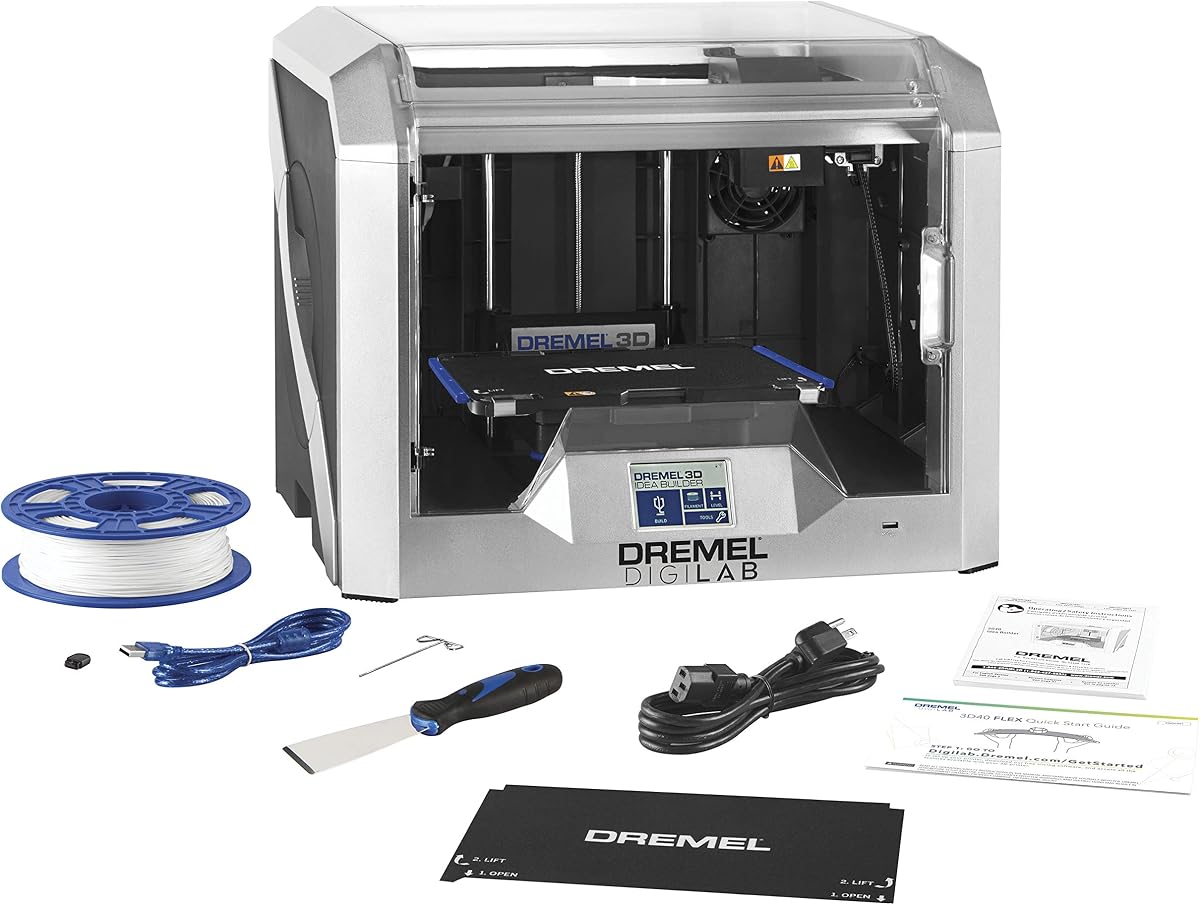
The Dremel 3D40 Flex is designed for reliability and ease of use. With a flexible build plate removing models is simple. The automated 9-point leveling sensor ensures perfect bed calibration every time. Its 50 micron resolution provides smooth surfaces ideal for fine details.
We may earn a commission when you buy through this link, at no additional cost to you.
The fully enclosed housing keeps prints safe and consistent. Dremel offers lifetime customer service and a one-year warranty which adds confidence. It supports network printing and works with various devices including iPads.
While it is slower than high-speed printers the focus on reliability suits classrooms and homes. The guided setup helps beginners start within minutes. It is a trusted choice for those prioritizing safety and ease.
Buy this for a stress-free printing experience with strong support. It fits beginners needing a reliable enclosed printer. The brand reputation adds peace of mind.
Lifetime access to customer service and one-year warranty ensure long-term confidence in your purchase.
Flexible build plate with ergonomic handles makes removing printed models simple and fast.
We may earn a commission when you buy through this link, at no additional cost to you.
The Bambu Lab A1 Combo delivers speed and precision with included multi-color capability via AMS Lite. It uses active flow compensation for accurate extrusion on every print job. Fully automatic calibration handles Z-offset and resonance matching for consistency without manual input.
We may earn a commission when you buy through this link, at no additional cost to you.
The quick-change nozzle swaps in seconds with a single clip. Active motor noise cancellation keeps the environment quiet. Its futuristic design appeals to enthusiasts seeking versatility and performance at a reasonable price.
While it lacks a heated chamber it handles most filaments efficiently. The combo package saves time and cost compared to buying separately. This makes it a great option for those wanting multi-color from day one.
Choose this combo for a complete solution with strong speed. It fits hobbyists needing reliability and color versatility. The automation features make it easy to use.
High-resolution eddy current sensor measures nozzle pressure to actively compensate flow rate for accuracy.
New hotend design allows quick nozzle changes with only one clip for easy maintenance.
We may earn a commission when you buy through this link, at no additional cost to you.
Selecting the right 3D printer depends on balancing speed precision and material needs. We break down key factors to help you choose a machine that fits your workflow.
For detailed figurines you need a printer that can handle fine layer heights often below 100 microns. High resolution ensures smooth curves and intricate details without visible layer lines. Look for machines with tight tolerances and stable motion systems to maintain accuracy.
Choose a printer with adjustable layer heights to balance speed and detail for your specific models.
Consider the size of your models when selecting a build volume. Larger volumes allow printing full-size statues without assembly but may cost more. Ensure the printer can handle your typical project dimensions comfortably.
Select a build volume that matches your most common model sizes to maximize efficiency.
Multi-color printing adds life to figurines but requires additional hardware like an AMS or multiple toolheads. These systems enable vibrant prints without manual filament changes. Evaluate if your projects need multiple colors before investing in these features.
Prioritize printers with multi-color systems if your designs rely on color segmentation.
Automatic calibration simplifies setup and reduces failed prints. Features like auto bed leveling and flow compensation ensure consistent results. These tools save time especially for beginners learning the ropes of modeling.
Choose a printer with full auto calibration to streamline your workflow.
High speed and acceleration allow you to print models faster without losing quality. Look for CoreXY or similar motion systems that provide stability at high velocities. Faster printing means more prototypes and quicker iteration.
Opt for machines with higher acceleration to reduce production time per model.
Different materials require different nozzle temperatures and chamber heating. If you plan to use ABS or engineering filaments ensure the printer supports high temps and enclosure. PLA works with most but versatility matters for advanced projects.
Check material support lists to ensure the printer matches your filament needs.
Enclosed printers offer better safety with HEPA filters and carbon filters to trap fumes. Quiet motors allow printing in shared spaces without disturbance. Consider your environment when choosing between open or enclosed designs.
Prioritize enclosed and quiet models for home use to ensure safety.
User-friendly slicing software and remote monitoring apps simplify management. Ecosystems like Bambu Studio or Snapmaker Orca integrate hardware and software for smoother workflows. Evaluate the available tools to see if they match your preferences.
Choose printers with supportive ecosystems to enhance your overall experience.
Start by loading filament correctly and ensuring the bed is leveled. Use a test print to verify calibration before starting larger models.
Keep the printer in a well-ventilated area and clean the nozzle regularly to prevent clogs. Monitor prints remotely when possible to catch errors early.
Store filament in a dry environment to prevent moisture issues. Perform periodic maintenance like lubricating rails and checking belt tension for best performance.
For high-detail figurines FDM printers with fine layer settings are popular for affordability while SLA printers offer superior detail. Choose based on your detail requirements and budget constraints.
Yes multi-color printers with AMS or multi-toolheads allow printing multiple colors without manual swaps. These systems reduce waste and increase speed for complex designs.
Use an enclosed chamber or heated bed to maintain stable temperatures during printing. Proper bed adhesion and cooling settings also help minimize warping issues.
PLA is ideal for beginners due to ease of use while PETG or resin offer more durability. Select based on the level of detail and finish needed.
Auto calibration reduces setup time and print failures making it valuable for consistent results. It is highly recommended for frequent printing and busy workflows.
Many modern printers operate under 50dB with quiet motors and active noise canceling. Check specs if you plan to use the printer in shared spaces.
The Bambu Lab A1 leads as an all-rounder with speed and precision. The Snapmaker U1 excels in multi-material versatility for advanced users. Budget-friendly options like the FLASHFORGE AD5X offer strong multi-color value.
Prioritize automation multi-color capabilities and build volume based on your project needs. Automation saves time while multi-color features bring your models to life with detail.
Always check current pricing and availability before purchasing. Prices change often so verify deals to get the best value for your setup today.