
Canon PIXMA TR4720
3.9Editor score
Affordable upfront cost
Compact home design
Basic fax functions
This guide compares the top all in one printer with fax models for home and office use, evaluating speed, ink costs, connectivity, and fax capabilities.
Finding a reliable all in one printer with fax can streamline your workflow by combining printing scanning copying and faxing into one device. Whether you run a small business or manage home office tasks, having these functions together saves space and reduces clutter on your desk.
We evaluated ten highly rated models based on performance features connectivity and overall value. Our analysis considers print quality speed fax reliability and ease of use to help you find the right fit for your specific needs without overwhelming you with technical jargon.
Each pick below highlights key strengths and potential trade-offs to guide your decision. Keep in mind that product availability and pricing can change frequently so verify current details before making your final purchase decision for your workspace setup.
3.9Editor score

3.9Editor score

3.9Editor score
This table provides a side-by-side overview of the top ten models to help you compare key specifications at a glance.






The HP OfficeJet Pro 9125 stands out as a top performer for users needing a robust all in one printer with fax. With a solid rating and professional features it handles high volume tasks efficiently while maintaining sharp color output for business documents and presentations.
We may earn a commission when you buy through this link, at no additional cost to you.
Its standout qualities include fast printing speeds up to 22 ppm black and 18 ppm color alongside a versatile auto document feeder. The 2.7 inch touchscreen provides intuitive navigation and the built-in fax function ensures you can send and receive traditional documents without extra hardware.
While it requires original HP cartridges which can limit third-party ink options the Instant Ink trial helps manage costs initially. The printer is designed to block non-HP chips so users should factor in ongoing supply costs when budgeting for long-term use.
This model is ideal for small offices or home businesses that prioritize speed and reliability. If you need a dependable all in one printer with fax that integrates well with modern workflows the 9125 offers a strong balance of performance and convenience.
The dual-band Wi-Fi ensures stable connections allowing seamless printing from multiple devices without interruptions during busy workdays.
HP Wolf Pro Security helps protect your network and data from cyber threats ensuring your sensitive documents remain secure.
We may earn a commission when you buy through this link, at no additional cost to you.
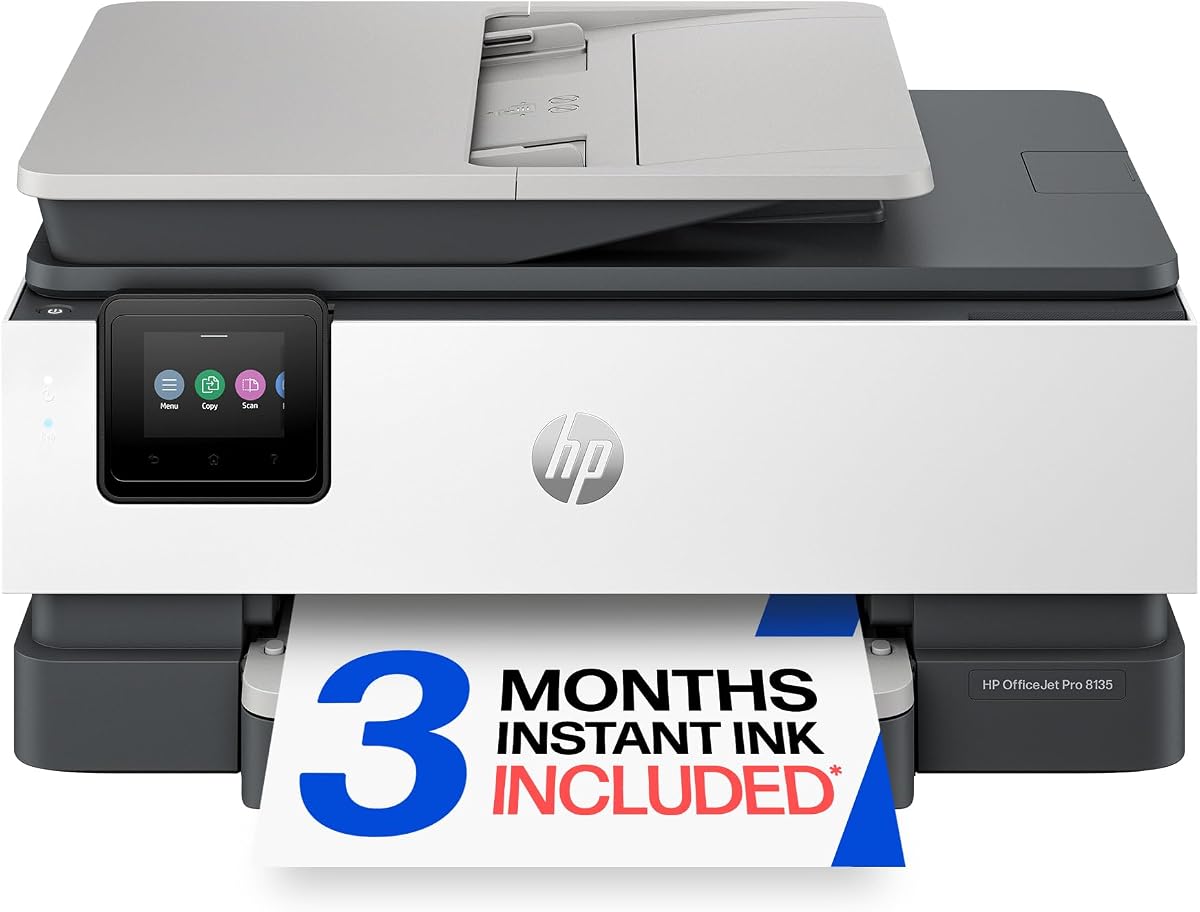
The HP OfficeJet Pro 8135 is tailored for home offices needing an efficient all in one printer with fax. It delivers professional quality prints for business documents and offers essential features like faxing and auto duplex printing in a space saving design.
We may earn a commission when you buy through this link, at no additional cost to you.
Key strengths include a 2.7 inch touchscreen for easy navigation and the ability to print scan copy and fax from a smartphone using the HP app. The 3 month Instant Ink trial helps manage costs while the eco friendly design uses recycled plastic materials.
Users should note that color print speeds are slower at 10 ppm compared to black printing and it relies on original HP cartridges. Firmware updates may enforce these restrictions so expect limitations if you try to use alternative ink supplies.
This printer is best suited for home users who need occasional faxing and solid color output without a large footprint. Its combination of wireless connectivity and essential office functions makes it a practical choice for everyday document tasks.
The HP app allows you to manage printing scanning and faxing directly from your phone for added flexibility.
Made with over 45 percent recycled plastic this model aligns with environmentally conscious purchasing decisions.
We may earn a commission when you buy through this link, at no additional cost to you.
The Epson EcoTank ET-4800 offers a unique approach as an all in one printer with fax by eliminating traditional ink cartridges. It uses high capacity ink tanks that reduce waste and lower long-term costs for users who print frequently.
We may earn a commission when you buy through this link, at no additional cost to you.
Its innovative design features EcoFit ink bottles that make refilling easy and worry-free while the Micro Piezo Heat-Free Technology ensures sharp text and vibrant color photos. The built-in fax function adds essential utility for home offices needing to send documents.
Although the upfront cost is higher than cartridge models the savings on ink over time can be significant. However users should be aware that print speeds are generally slower compared to laser or fast inkjet alternatives which may impact high-volume workflows.
This printer is ideal for those who want to minimize waste and avoid frequent cartridge replacements. If you prioritize cost efficiency and environmental impact the ET-4800 provides a reliable all in one printer with fax solution.
Using refillable tanks instead of cartridges significantly reduces the cost per page over the lifespan of the printer.
Zero cartridge waste helps reduce the amount of plastic ending up in landfills making it a greener choice.
We may earn a commission when you buy through this link, at no additional cost to you.
The HP OfficeJet Pro 8125 delivers strong performance in a compact form factor suitable for smaller spaces. It functions as a capable all in one printer with fax ensuring you can handle business documents without needing a bulky machine.
We may earn a commission when you buy through this link, at no additional cost to you.
Key strengths include fast printing up to 20 ppm black and a 2.7 inch touchscreen that simplifies daily tasks. The dual-band Wi-Fi ensures reliable connections and the HP app allows convenient remote printing scanning and faxing from smartphones.
Users should note that the printer requires original HP chips and may block third-party cartridges through firmware updates. The Instant Ink trial helps initially but a monthly fee applies after the trial period which adds to ongoing operational costs.
This model is best for home offices with limited desk space who need reliable connectivity and decent speed. It offers a balanced mix of features making it a practical all in one printer with fax for everyday use.
Dual-band Wi-Fi automatically detects and resolves connection issues to keep your printing tasks running smoothly.
HP AI removes unwanted content from web pages and emails to ensure prints are formatted correctly every time.
We may earn a commission when you buy through this link, at no additional cost to you.
The HP Smart Tank 7603 is designed for those seeking long-term value as an all in one printer with fax. It comes with up to three years of ink included which drastically reduces the hassle of frequent cartridge replacements.
We may earn a commission when you buy through this link, at no additional cost to you.
Its key feature is the mess-free refill system where ink bottles plug directly into the tank allowing easy replenishment without spills. The printer supports faxing scanning and copying alongside printing making it a complete office solution for home users.
While the upfront cost is higher the included ink saves money over time compared to cartridge models. However the physical size is larger which may require dedicated desk space and users should consider their workspace layout before purchasing.
This model is ideal for busy home offices that print frequently and want to avoid supply interruptions. With its reliable fax function and cost effective design it stands out as a premium choice for an all in one printer with fax.
Including up to three years of ink saves users from tracking supply levels and running out unexpectedly.
The cartridge-free design allows for easy refill without squeezing or spilling ensuring a clean workspace.
We may earn a commission when you buy through this link, at no additional cost to you.
The HP OfficeJet Pro 9135 is built for offices that demand speed and capacity as an all in one printer with fax. It delivers print speeds up to 25 ppm black and features two large input trays to handle high volume jobs efficiently.
We may earn a commission when you buy through this link, at no additional cost to you.
Key strengths include a large 4.3 inch touchscreen for intuitive control and single-pass duplex scanning which saves time on document processing. The built-in fax ensures you can manage traditional communication alongside digital tasks without extra hardware.
While it offers top-tier performance the price is higher than entry-level models and it requires original HP cartridges. The Instant Ink trial helps initially but ongoing costs should be factored in for long-term budget planning.
This printer is best for businesses needing fast reliable output and robust security features. If you prioritize speed and capacity the 9135 is a powerful all in one printer with fax option for professional environments.
Two large input trays mean you can load more paper and reduce downtime during busy work periods.
HP Wolf Pro Security helps protect your network from cyber threats keeping your data safe while printing.
We may earn a commission when you buy through this link, at no additional cost to you.
The Canon PIXMA TR4720 is an affordable option for home users needing a simple all in one printer with fax. It provides basic printing scanning copying and faxing capabilities in a compact design that fits easily on smaller desks.
We may earn a commission when you buy through this link, at no additional cost to you.
Key strengths include an auto document feeder for multi-page tasks and Alexa integration that notifies you when ink is low. The ability to place smart reorders via Alexa ensures you never run out of supplies unexpectedly which adds convenience.
While it is budget friendly print speeds are slower compared to premium models and it has a smaller paper capacity. Users needing high volume or fast output might find it limiting but it suits occasional home office tasks well.
This model is best for those on a tight budget who need essential functions without complex features. It offers a reliable all in one printer with fax solution for light home use and basic document management.
Alexa integration keeps you updated on ink levels so you can reorder supplies before running out.
Designed for easy ink cartridge installation and replacement making maintenance straightforward for users.
We may earn a commission when you buy through this link, at no additional cost to you.
The Canon PIXMA TR8620a offers a versatile mix of features for home offices looking for an all in one printer with fax. It supports voice commands and smart reorders ensuring you stay connected and supplied without manual intervention.
We may earn a commission when you buy through this link, at no additional cost to you.
Key strengths include a 200 sheet capacity with dual feed options and a Micro SD slot for direct photo printing. The built-in fax function allows you to manage traditional documents alongside digital ones efficiently from one device.
While it offers good connectivity and convenience the cost may be higher than basic models and subscription features have limits. Users should review the terms of smart reorders to ensure they fit their workflow and budget preferences.
This model is best for those who want modern connectivity and reliable fax capabilities in one package. It serves as a solid all in one printer with fax for home users needing flexibility and ease of use.
Voice commands like discover my printer make setup and basic operations faster without navigating menus.
A rear feed and cassette allow you to load different paper types without reloading the main tray.
We may earn a commission when you buy through this link, at no additional cost to you.
The HP OfficeJet Pro 8139 stands out with a 1 year Instant Ink trial making it an attractive all in one printer with fax for new users. It balances speed and convenience for home offices needing professional quality documents and fax capabilities.
We may earn a commission when you buy through this link, at no additional cost to you.
Key strengths include HP AI tools that optimize print formatting to reduce waste and a 2.7 inch touchscreen for easy navigation. The dual-band Wi-Fi ensures reliable connections and the eco friendly design uses recycled materials for sustainability.
Users should note that original HP chips are required and firmware updates may enforce this restriction. The long trial helps with initial costs but you must manage subscriptions carefully to avoid unexpected fees after the year ends.
This model is best for home users who want a long trial period and reliable fax support. It offers a practical all in one printer with fax solution for those seeking cost savings and smart features.
HP AI removes unwanted content from emails and web pages to ensure prints are just as you want.
Dual-band Wi-Fi automatically resolves connection issues so your printer stays online when you need it.
We may earn a commission when you buy through this link, at no additional cost to you.
The Brother MFC-L2820DW is a compact monochrome laser printer serving as a fast all in one printer with fax for offices. It delivers crisp black and white documents quickly and includes essential features like copying scanning and faxing.
We may earn a commission when you buy through this link, at no additional cost to you.
Key strengths include fast print speeds up to 36 ppm and a 50 page auto document feeder for efficient multi-page tasks. It connects securely via dual-band wireless or Ethernet and supports cloud apps for flexible workflow integration.
While it is fast and efficient it only prints in black and white which may not suit color document needs. The Refresh EZ Print Subscription helps manage toner costs but users should review terms to understand savings and limits.
This model is best for offices needing fast reliable black and white output without color requirements. It offers a robust all in one printer with fax solution for productivity-focused environments.
Laser technology ensures quick print speeds which helps keep up with busy office document demands.
Dual-band wireless and Ethernet options allow secure connections to multiple devices on your network.
We may earn a commission when you buy through this link, at no additional cost to you.
Selecting the right all in one printer with fax involves evaluating speed print quality connectivity and fax reliability to ensure it fits your workflow.
Look for models with pages per minute rates that match your daily workload to avoid bottlenecks.
Higher speeds help maintain efficiency during busy periods.
Consider long-term ink or toner expenses alongside the initial purchase price for accurate budgeting.
Tank systems often offer lower costs over time than cartridges.
Ensure the fax function supports resolution and transmission speeds you need for professional documents.
Reliable faxing avoids delays in sending and receiving important files.
Choose printers with dual-band Wi-Fi or Ethernet for stable connections across multiple devices.
Strong connectivity ensures smooth remote printing and scanning.
An ADF allows scanning faxing and copying multi-page documents without manual page turning.
This feature saves time on recurring tasks.
Look for companion apps that allow printing scanning and faxing from smartphones for added flexibility.
Mobile tools enhance convenience when away from your desk.
Opt for models with built-in security to protect your data and network from cyber threats.
Security features prevent unauthorized access to sensitive documents.
Measure your workspace to ensure the printer fits comfortably without crowding your desk.
Compact designs are ideal for smaller home offices.
Connect your all in one printer with fax to your Wi-Fi network following the on-screen setup instructions for seamless integration.
Regularly clean the glass scanner and auto document feeder to prevent smudges and ensure clear fax or scan quality.
Update firmware through the printer settings to maintain security features and optimize performance over time.
HP printers often include chips that detect non-original cartridges and may block them through firmware updates. Using non-original supplies can void warranties or cause printing issues so it is safer to use genuine HP products.
Look for models that support VoIP faxing or use cloud fax services to avoid traditional phone line fees. Many modern printers allow scanning documents and sending them via email which is more economical than traditional fax lines.
An ADF is useful if you frequently scan or fax multi-page documents since it automates page feeding. For single-page tasks it is less critical but highly recommended for improving efficiency in busy offices.
Download the manufacturer's app and connect the printer and phone to the same Wi-Fi network. The app typically walks you through pairing steps to enable mobile printing scanning and faxing capabilities.
Fax failures can result from poor phone line connections or incorrect settings. Check that the phone line is securely connected and the fax settings like resolution are configured correctly in the printer menu.
Yes ink tank models often have lower costs per page because they use high-capacity refillable tanks instead of small cartridges. While the upfront price is higher the savings on ink over time make them cost effective.
Some printers support direct Wi-Fi Direct connections allowing you to connect your phone directly to the printer without a router. This feature is useful when a network is unavailable or you want a temporary connection.
Look for models with built-in firewall protection and secure printing options to prevent unauthorized access. Security features help ensure your documents remain private and protected from potential cyber threats.
The HP OfficeJet Pro 9125 and Canon PIXMA TR4720 stand out for offering strong all in one printer with fax capabilities at different price points.
Prioritize features like fax reliability and long-term ink costs to ensure the printer meets your workflow needs without unexpected expenses.
Remember to verify current availability and details before purchasing since product offerings may change over time.