
LG UltraFine evo 32U990A
4.5Editor score
Nano IPS Black Panel
Thunderbolt 5 Support
VESA HDR 600
Finding the right display is crucial for modern creative workflows. A 6K monitor offers exceptional resolution and pixel density, enabling sharp text and detailed imagery without constant zooming. These screens are ideal for video editing, graphic design, and multitasking environments.
We evaluated ten leading 6K monitors based on panel quality, color gamut coverage, connectivity options, and ergonomic design. Our analysis focuses on real-world performance for professionals who need accurate colors and reliable hardware for daily use across various operating systems.
Each pick highlights specific strengths like touch capability, curved immersion, or Thunderbolt hub functionality. Please note that product availability and pricing can change frequently, so verify current details before making your final purchasing decision for your workspace setup.
4.5Editor score

3.9Editor score

3.7Editor score
As an Amazon Associate we earn from qualifying purchases.
The following table provides a side-by-side comparison of the ten selected 6K monitors, highlighting their key specifications, ratings, and primary use cases to help you identify the best fit for your specific needs.




The ASUS ProArt PA32QCV stands out as a top choice for professionals requiring precise color reproduction and high resolution. With its 6K display and factory calibration, it ensures that what you see on screen matches the final output. The integration with Mac systems is particularly strong, offering seamless workflows for creatives.
We may earn a commission when you buy through this link, at no additional cost to you.
This monitor delivers exceptional color accuracy with a verified Delta E < 2, making it suitable for photography and video editing tasks. The Thunderbolt 4 connectivity supports high-speed data transfer and daisy-chaining, allowing you to connect multiple peripherals with a single cable. The built-in KVM switch simplifies switching between different computers efficiently.
While the refresh rate is not designed for gaming, the focus on productivity and color fidelity is evident in every aspect of the design. The ergonomic stand allows for significant adjustments to suit various working positions and preferences. The inclusion of a three-month Adobe Creative Cloud subscription adds significant value to the purchase.
If you need a reliable monitor for creative work on Mac or Windows, this model offers the necessary tools for professional output. The extensive warranty and calibration features provide peace of mind for long-term use. It is highly recommended for designers who prioritize visual accuracy above all else.
The factory calibration ensures consistent color performance right out of the box, reducing the need for external calibrators immediately.
Thunderbolt 4 ports support high power delivery and fast data transfer, making it easy to connect laptops and storage drives simultaneously.
We may earn a commission when you buy through this link, at no additional cost to you.
The Dell 52-inch monitor offers an expansive viewing experience with its curved design and 6K resolution. The 120Hz refresh rate provides smooth motion which is beneficial for scrolling and video content. Its IPS black panel technology delivers deep blacks and vibrant colors for a cinematic feel.
We may earn a commission when you buy through this link, at no additional cost to you.
Productivity is enhanced by the Thunderbolt hub capabilities which allow for power delivery up to 140W. This means you can connect a laptop and charge it with a single cable. The Picture-by-Picture feature enables users to work on tasks from two different computers simultaneously without distraction.
The eye comfort certifications ensure that long hours of work do not lead to excessive strain. The ambient light sensor adjusts brightness automatically to match the room conditions. While the size is a consideration, it provides unmatched clarity for detailed tasks like coding or data analysis.
This monitor is ideal for users who need a large, unified workspace without relying on multiple screens. The build quality and connectivity options justify the investment for professional environments. It is a strong contender for those who value immersion and efficiency in their workflow.
The 52-inch curved screen creates a wrap-around effect that enhances focus and reduces the need to move your head constantly.
With multiple ports including USB-C and Ethernet, this hub reduces cable clutter and keeps your desk organized while connecting many devices.
We may earn a commission when you buy through this link, at no additional cost to you.
The G32P monitor delivers stunning clarity with its high pixel density and 6K resolution. This makes it perfect for reading text and viewing fine details in design work. The glossy finish enhances color vibrancy, making images look vivid and engaging to the viewer.
We may earn a commission when you buy through this link, at no additional cost to you.
Color accuracy is a key focus with 99% coverage of major color spaces. This ensures that your work appears consistent across different devices. The stand design is unique with honeycomb elements that help with heat dissipation and add to the premium aesthetic of the desk setup.
While the refresh rate is standard, the focus on detail and build quality shines through. The ergonomic stand allows for comfortable viewing angles throughout the day. High-speed connectivity means you can charge your devices while streaming high-quality video content without issues.
If you prioritize sharpness and color quality over fast motion, this is an excellent choice. The sturdy construction and versatile mounting options provide flexibility for different setups. It is well-suited for professionals who need to see every detail clearly.
With 223 PPI, this screen offers incredibly sharp text and imagery that rivals print quality for design work.
The aluminum body with honeycomb cooling ensures durability and helps maintain performance over long periods of use.
We may earn a commission when you buy through this link, at no additional cost to you.
The Samsung Odyssey G8 is a strong contender for those seeking 6K resolution at a more accessible price point. Its focus on gaming performance with a 165Hz refresh rate makes it versatile for entertainment and daily tasks. The Fast IPS panel ensures good response times and viewing angles.
We may earn a commission when you buy through this link, at no additional cost to you.
The dual mode feature allows switching between high resolution and high refresh rates depending on the task. This flexibility is valuable for users who balance gaming with professional work. G-Sync compatibility helps eliminate screen tearing for a smoother visual experience during fast-paced scenes.
While it may lack some advanced calibration features found in professional monitors, it offers significant value for the price. The ergonomic stand provides adequate adjustments to reduce neck strain. Input options like DP 2.1 and HDMI 2.1 ensure future-ready connectivity for various systems.
If you want 6K clarity without breaking the bank, this monitor is a great starting point. It bridges the gap between high-end gaming and productivity needs effectively. Consider this if performance and affordability are your primary priorities.
The 165Hz refresh rate and low response time make this monitor ideal for smooth and responsive gaming experiences.
Modern ports ensure compatibility with the latest graphics cards and consoles, providing a future-proof investment.
We may earn a commission when you buy through this link, at no additional cost to you.
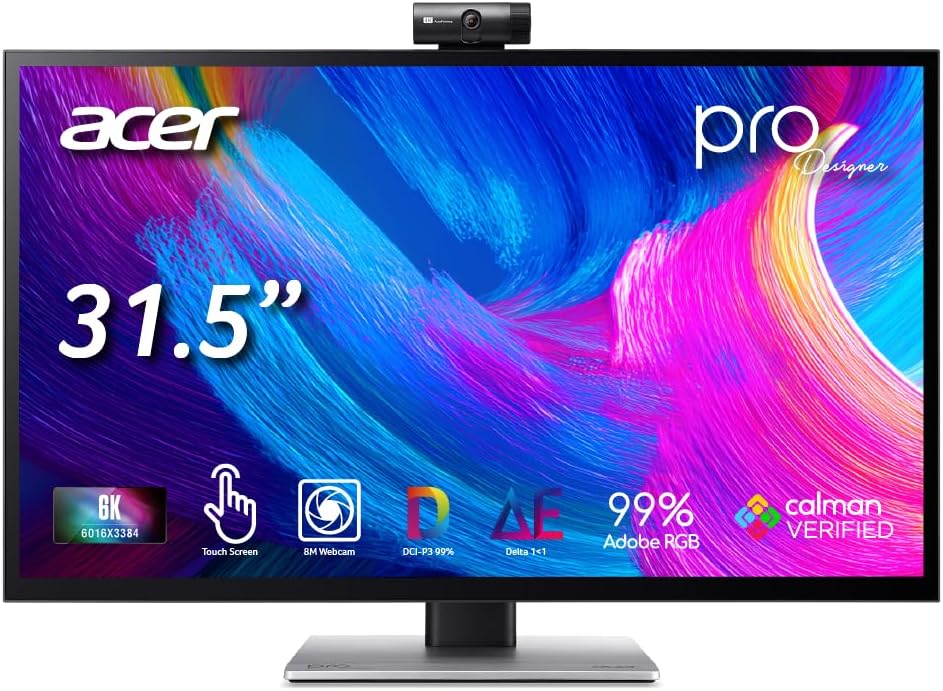
The Acer ProDesigner is unique in its ability to support direct touch and stylus input on a 6K screen. This eliminates the need for a separate drawing tablet which simplifies your desk setup. The factory calibration ensures that color accuracy is maintained for professional creative work.
We may earn a commission when you buy through this link, at no additional cost to you.
Features like the built-in 8MP webcam and microphone array reduce the need for extra peripherals during meetings. This integration streamlines workflows for remote creators who need to review content and communicate simultaneously. The DisplayHDR 600 certification provides better brightness and contrast for HDR content viewing.
While the touch interface is helpful, it requires careful maintenance to keep the screen clean. The USB-C connectivity supports high power delivery which is convenient for laptops. The color coverage including Adobe RGB makes it suitable for print-focused projects and design approvals.
For artists and designers who want a unified tool for both drawing and viewing, this monitor is unmatched. It brings the tablet experience to a larger screen size. It is highly recommended for professionals who want to streamline their creative process.
The 10-point touch and stylus support allow for natural sketching and annotation directly on the workspace.
Built-in camera and audio reduce clutter, making it easier to focus on creative tasks without extra hardware.
We may earn a commission when you buy through this link, at no additional cost to you.
The G32X stands out for its clean design and high user satisfaction ratings. The high pixel density ensures text and images appear crisp and clear. It delivers strong color performance that is suitable for both work and entertainment tasks.
We may earn a commission when you buy through this link, at no additional cost to you.
Anti-glare coatings help reduce eye strain during long working hours in bright environments. The stand supports universal mounting which allows for flexible positioning on various desk types. Its aluminum body ensures the monitor is durable and looks premium on any setup.
While it focuses on essentials rather than extra features, it performs reliably for core tasks. The high-speed port supports efficient charging and video transmission through a single cable. This simplicity is often preferred by users who want a straightforward display experience.
If you value design and performance without unnecessary extra features, this is a solid choice. The high rating suggests it meets user expectations consistently. It is a great option for a clean and efficient workspace.
The anti-glare screen protects against glare and provides clearer images even in well-lit offices or rooms.
Precision machining and aluminum construction ensure the monitor is built to last and maintain its look over time.
We may earn a commission when you buy through this link, at no additional cost to you.
The Dell U5226KW is designed as a central hub for complex workstation setups. It offers extensive connectivity options including dual Thunderbolt 4 ports and high power delivery. This allows it to power multiple devices and charge laptops efficiently.
We may earn a commission when you buy through this link, at no additional cost to you.
The inclusion of software like Dell Color Management helps maintain accurate visuals across different color profiles. A remote control is included which simplifies adjusting settings without reaching for physical buttons. This can be useful in presentation or viewing scenarios.
While the rating is lower than others, the feature set is extensive for IT professionals. The KVM functionality allows for controlling multiple computers with one mouse and keyboard. This makes it ideal for environments where switching between systems is frequent.
If you need a powerful hub that integrates seamlessly into a larger IT ecosystem, this monitor is beneficial. The advanced features justify the complexity for those who need them. It is a specialized tool for high-productivity professional spaces.
The software suite ensures color consistency and easy management of all connected peripherals from a central interface.
Up to 140W power delivery means this can charge almost any modern laptop while driving the display and peripherals.
We may earn a commission when you buy through this link, at no additional cost to you.
The LG UltraFine evo offers the latest Thunderbolt 5 technology for faster data transfer speeds. This is a significant upgrade for those working with large files and needing high bandwidth. The Nano IPS Black panel provides better contrast and deeper blacks than standard IPS.
We may earn a commission when you buy through this link, at no additional cost to you.
Color accuracy is excellent with broad coverage across Adobe RGB and DCI-P3. This makes it suitable for professional video editing and color grading tasks. The bundle includes accessories that add value to the overall purchase and ease of use.
While expensive, the future-proof connectivity and high performance justify the cost for top-tier users. The KVM functionality enhances productivity by allowing control of multiple computers easily. It is a top choice for those who want the absolute best specs available.
If budget is not a constraint and you need cutting-edge features, this monitor delivers. It combines speed, accuracy, and reliability in one premium package. It is highly recommended for serious professionals.
Thunderbolt 5 supports up to 80 Gbps, allowing for rapid file transfers and multiple device connections seamlessly.
Nano IPS Black technology provides superior contrast and color precision for demanding professional creative work.
We may earn a commission when you buy through this link, at no additional cost to you.
The Dell UltraSharp bundle offers reliable performance with added protection for long-term use. Its high brightness ensures visibility in bright office environments without glare issues. The included protection pack provides peace of mind against accidental damage or technical issues.
We may earn a commission when you buy through this link, at no additional cost to you.
With a fast response time, it handles motion well for general productivity tasks. The USB Type-C port simplifies connection and charging for laptops. It is a balanced option for corporate settings where durability and ease of use are key.
While it does not have the highest color specs, it is robust for daily office work. The bundle adds significant value by including service coverage. This reduces the risk for businesses investing in multiple units.
If you want a reliable monitor with service support included, this is a practical choice. It fits well in standard workspaces and provides consistent performance. It is a solid option for general office deployment.
USB Type-C makes connecting laptops simple and allows for quick data transmission and charging with one cable.
The included protection plan ensures you are covered against hardware failures for the first two years of use.
We may earn a commission when you buy through this link, at no additional cost to you.
This renewed model offers a cost-effective way to access high-end features without the stand. The Thunderbolt hub is included, making it a powerful addition to any desk. It supports high refresh rates which are smooth for viewing content and multitasking.
We may earn a commission when you buy through this link, at no additional cost to you.
Because it is VESA mount only, you have the freedom to choose a compatible arm. This allows for flexible positioning that suits ergonomic needs. The renewed status provides a budget-friendly entry point for premium specifications.
While it lacks a stand, the mounting compatibility ensures it can be used on existing setups. The performance capabilities match the full version. This is a great option for tech enthusiasts who already have mounting solutions.
If you want to save money while keeping high performance, this is a viable choice. Just ensure you have the necessary mounting gear for installation. It is a smart buy for flexible setups.
VESA mounting allows you to use your preferred monitor arm for ergonomic positioning and clean desk management.
Getting premium features like Thunderbolt at a lower price makes this accessible for budget-conscious professionals.
We may earn a commission when you buy through this link, at no additional cost to you.
Selecting the right 6K monitor involves balancing resolution, color accuracy, connectivity, and ergonomics to fit your specific workflow and budget.
Panel technology determines the color gamut coverage and contrast ratios. IPS panels generally offer better color accuracy and viewing angles which are essential for creative work. Look for Delta E values under 2 to ensure precise color reproduction that matches industry standards.
Prioritize monitors with factory calibration and verified color profiles like Adobe RGB or DCI-P3 to ensure consistent results across devices.
A true 6K resolution typically offers over 6,000 pixels horizontally. Higher pixel density ensures text remains sharp even at close distances reducing the need to zoom frequently. This is crucial for detailed editing and coding where clarity improves productivity.
Choose a screen size that provides a comfortable viewing angle without requiring excessive head movement for detailed tasks.
Modern monitors should support high bandwidth connections like Thunderbolt 4 or USB-C with DisplayPort Alt Mode. These allow for video, data, and power delivery over a single cable. Durable connectors and support for daisy chaining help manage complex setups efficiently.
Ensure the monitor includes necessary ports for your peripherals such as USB-A, HDMI, and Ethernet to minimize the need for external hubs.
While 6K often prioritizes resolution over speed, refresh rates matter for smooth scrolling and video editing. Look for models with at least 120Hz if you plan on using the screen for dynamic content or light gaming. Response times impact motion blur during fast transitions.
Balance refresh rate needs with resolution requirements based on whether your primary work involves static content or dynamic visual media.
Adjustable stands with tilt, height, and pivot options protect your posture during long sessions. A sturdy build with durable materials ensures longevity and reliability over time. VESA mounting compatibility provides flexibility for custom setups using arms or wall mounts.
Select a monitor that aligns with your physical workspace constraints to ensure it fits comfortably on your desk.
Professional displays often come with extended warranty options or accidental damage protection. Reliable customer support is vital if issues arise during critical projects. Check for included services or accessories like cleaning kits that add value to the purchase.
A comprehensive warranty plan gives peace of mind and protects your investment against unforeseen hardware failures or defects.
Ensure the monitor integrates well with your operating system, Mac, or Windows. Features like macOS color matching or Windows-specific software hubs can streamline workflows. Drivers and settings should be accessible without requiring third-party software for basic functions.
Verify that the monitor supports the operating features of your devices to avoid connectivity or display issues in daily use.
Evaluate the total cost including necessary cables and accessories. Sometimes buying a bundle with extended warranty offers better long-term value than separate purchases. Determine if premium features justify the extra cost compared to standard models.
Compare specifications across brands to find the best balance of performance and affordability for your specific needs.
Connect your device using a certified Thunderbolt or USB-C cable to ensure full bandwidth and power delivery. Avoid using older or low-quality cables that may limit resolution or cause flickering. Adjust the brightness settings to match your room lighting to reduce eye strain during long sessions.
Regularly clean the screen using a microfiber cloth and approved liquid cleaner to maintain visibility. Avoid applying too much pressure on the screen which can damage sensitive pixels. Use built-in eye comfort features like low blue light modes during night time work.
Update the firmware of your monitor regularly to ensure compatibility with new operating systems. Use software tools provided by the manufacturer to calibrate colors and manage settings efficiently. Position the monitor at arm's length to maintain healthy posture while working.
Yes, a 6K monitor requires a computer with a powerful graphics card and sufficient video output ports to handle the resolution and refresh rates. Ensure your device supports Thunderbolt 4 or DisplayPort 1.4 to drive the full resolution without performance drops.
6K provides significantly more screen real estate and sharper details allowing you to work without constant zooming. This higher pixel density improves text readability and image clarity which is essential for professional creative work and multitasking workflows.
Yes, some models support high refresh rates and adaptive sync technologies ideal for gaming. However, not all 6K monitors are designed for gaming so check for features like high refresh rates and low response times if gaming is a priority.
Use a soft microfiber cloth and a mild screen-safe cleaner applied to the cloth, not the screen. Avoid harsh chemicals or abrasive materials which can damage the screen coating. Turn off the monitor before cleaning to avoid electrical issues.
Factory calibration is common, but professional color accuracy may require regular recalibration. Using built-in tools or external hardware ensures colors remain accurate over time which is vital for print and video work where consistency is key.
Many Thunderbolt supported monitors allow daisy chaining. This enables connecting multiple displays through a single cable to your computer which simplifies cable management and supports extended workspaces for productivity.
The ASUS ProArt PA32QCV stands out for its balance of color accuracy and connectivity making it a top choice for creators. The Dell 52-inch and LG UltraFine models offer premium features for those needing immersive or high-speed workflows.
Prioritize the features that matter most to your specific workflow whether that is pixel density or color fidelity. Ensure the monitor integrates well with your existing setup to maximize productivity and comfort during long work hours.
Always check current pricing and availability as these can vary by retailer and region. A 6K monitor is a significant investment that can enhance your productivity if chosen carefully based on your professional needs.