
EMEET C960 1080P Webcam
4.4Editor score
1080p resolution with privacy cover
Built-in dual omnidirectional microphones
Plug-and-play with USB-C adapter
This comprehensive guide compares the top 1080p webcams for streaming and meetings, evaluating video quality, audio performance, and privacy features to help
In today's digital landscape, having a reliable webcam is essential for work, education, and entertainment. A good 1080p webcam ensures you look professional and clear during video calls. With so many options available, finding the right one can be challenging without expert guidance.
We evaluated the top models based on video clarity, microphone quality, ease of setup, and privacy features. Our comparison covers a range of options from budget-friendly picks to premium business cameras. Each product was assessed for its performance in typical home and office environments.
Every pick in this guide highlights specific strengths such as autofocus, low-light correction, or wide field of view. Remember that prices and availability can change frequently. Always check the latest listings before making your final purchase decision to ensure you get the best value.
4.4Editor score

4.6Editor score

4.4Editor score
Here is a side-by-side comparison of all ten models to help you quickly identify the right fit for your needs based on key specifications and features.




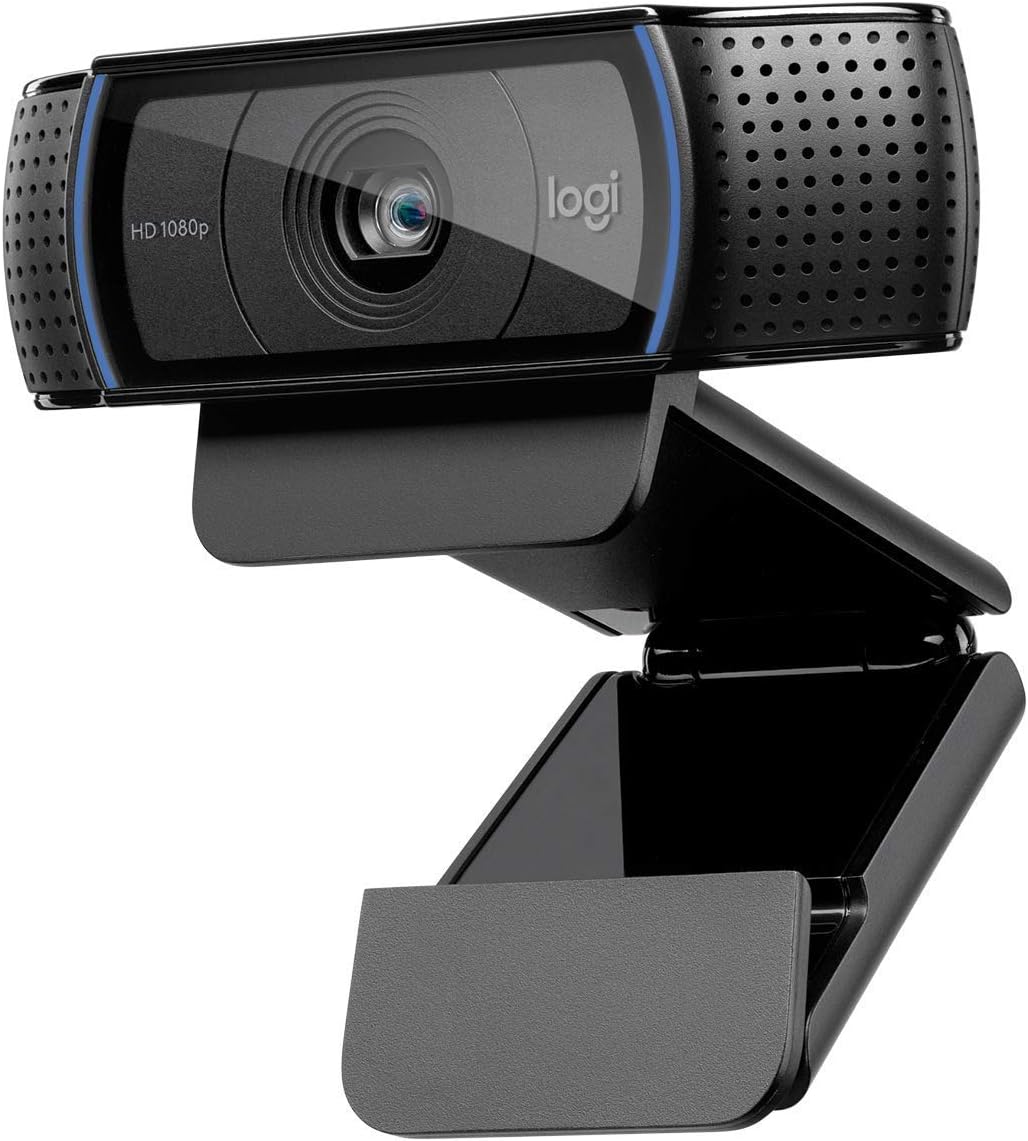


The Logitech C920x HD Pro is a standout choice for users seeking reliable video performance without breaking the bank. With a high rating of 4.6 stars, it has earned its place as a top contender in the 1080p webcam market. Its crisp video and natural sound make it ideal for professional meetings and casual chats alike.
We may earn a commission when you buy through this link, at no additional cost to you.
This webcam excels in lighting adjustment and autofocus, ensuring you look sharp even in less than ideal conditions. The dual microphones capture stereo audio, reducing the need for external gear. Additionally, the included XSplit VCam license allows for virtual background effects without a green screen.
While the lack of a built-in privacy shutter is a trade-off, the video quality often outweighs this concern for many users. The fixed cable is long enough for most setups but limits positioning flexibility slightly. Overall, it remains a robust option for daily use.
If you need a dependable camera for streaming or conferencing, this model delivers consistent results. It works seamlessly with Windows 11 and major platforms like Zoom and Teams. We recommend it for anyone prioritizing video clarity and ease of use.
The autofocus system ensures your face remains sharp throughout calls, while HD lighting correction adapts to your environment.
Dual microphones pick up sound from various angles, ensuring your voice is clear and free from distortion.
We may earn a commission when you buy through this link, at no additional cost to you.
The EMEET C960 offers impressive features for its price point, making it a strong choice for budget-conscious buyers. It delivers realistic 1080p video with a privacy cover that slides open when needed. This model is designed to provide value without sacrificing essential functionality for video calls.
We may earn a commission when you buy through this link, at no additional cost to you.
Its 90-degree field of view allows more people to fit in the frame, which is great for small group meetings. The automatic light adjustment helps maintain image stability even when room conditions change. Plus, the inclusion of both USB-A and USB-C adapters ensures compatibility with modern devices.
However, the fixed focus means you need to sit at an optimal distance for the best image. It also performs best in well-lit environments, so dim rooms may reduce clarity. These limitations are acceptable given the cost savings it provides to users.
We suggest this webcam for students or remote workers who need a reliable tool without a large investment. It works well with Zoom, Teams, and Google Meet. For basic conferencing needs, it provides solid performance at a fraction of the cost.
The integrated privacy cover gives you peace of mind and can be removed automatically to meet your privacy needs.
The 90-degree lens captures more participants without requiring frequent camera adjustments during group calls.
We may earn a commission when you buy through this link, at no additional cost to you.
The Logitech Brio 101 brings premium features to a standard HD webcam, focusing on user experience and environmental responsibility. It features RightLight technology that boosts brightness to reduce shadows, ensuring you look your best. This model is ideal for those who value design and functionality equally.
We may earn a commission when you buy through this link, at no additional cost to you.
Its integrated privacy slide offers reliable protection when not in use, addressing security concerns common with modern devices. The webcam is also made with at least 77% post-consumer plastic, aligning with sustainability goals. Additionally, it supports Nintendo Switch 2 GameChat mode for gaming enthusiasts.
While it does not offer 4K resolution, the optimized 1080p output is highly detailed. The price point is higher than basic models, but the added features justify the cost for professional users. It works effortlessly with major video calling platforms without extra configuration.
We recommend this webcam for professionals who want a polished look during meetings. It is also great for gamers looking to stream with a clean interface. The combination of privacy, eco-design, and image quality makes it a top-tier choice.
RightLight boosts brightness by up to 50%, reducing shadows so you look your best in any lighting condition.
Constructed with recycled plastic, this webcam supports environmental goals without compromising on performance.
We may earn a commission when you buy through this link, at no additional cost to you.
The Logitech C920S is a refined version of a classic model, adding a crucial privacy shutter to the mix. It delivers full HD video calls that make you look professional on screen. This webcam is built for those who prioritize privacy alongside high-quality video output.
We may earn a commission when you buy through this link, at no additional cost to you.
The glass lens ensures that recorded videos are crisp and vibrant, maintaining detail even during long sessions. Stereo audio with dual mics captures natural sound, reducing background noise effectively. The autofocus works reliably to keep you sharp throughout your calls.
One trade-off is the lack of an XSplit VCam license, which limits virtual background options without additional software. However, the physical privacy shutter provides a more secure solution for sensitive environments. The build quality remains sturdy and reliable over time.
We recommend this for office workers or content creators who need privacy controls. It fits well in both home and business setups. If security is a priority, the shutter makes this a compelling choice for daily use.
The privacy shutter puts you in control of what you show and protects the lens with a snugly fitting cover.
A glass lens and full HD mean your recorded videos are crisp and vibrantly colored for better content creation.
We may earn a commission when you buy through this link, at no additional cost to you.
The Logitech C920e is designed specifically for business environments, offering certification for popular platforms like Zoom and Microsoft Teams. It features a 78-degree field of view that balances individual users with room for sharing projects. This model is ideal for workplaces needing reliable and compliant equipment.
We may earn a commission when you buy through this link, at no additional cost to you.
Its integrated omnidirectional microphones capture your voice clearly from up to one meter away, ensuring natural sound during meetings. The attachable privacy screen flips up and down to cover the lens, adding a layer of security. It also includes tripod threads for versatile mounting options.
While the field of view is fixed, it is optimized for single-person framing which works well for most corporate calls. The privacy screen is attachable rather than built-in, which offers flexibility but requires a separate step. Still, it is a robust tool for professional collaboration.
We suggest this webcam for companies deploying multiple units across offices. The management software helps keep devices updated and connected. If you need a dependable camera for daily business use, this model meets those needs effectively.
Certified for Zoom and Microsoft Teams, ensuring compatibility and seamless integration in the workplace.
The adjustable clip makes it easy to mount on laptops or monitors, plus it supports tripod attachment.
We may earn a commission when you buy through this link, at no additional cost to you.
The NexiGo N60 is a versatile webcam known for its plug-and-play simplicity and wide compatibility. It produces sharp videos at 1080p with a fixed focus lens optimized for indoor use. This model is suitable for users who want a straightforward setup without complicated drivers.
We may earn a commission when you buy through this link, at no additional cost to you.
Its noise-cancelling microphone reduces ambient noise, enhancing the sound quality of your video. The privacy cover blocks the lens when not in use, providing security and peace of mind. It works with Windows, Mac, Linux, and Chrome OS, making it accessible to almost anyone.
However, it is not compatible with gaming consoles like Xbox or PlayStation, limiting its use for streamers on those platforms. The audio range is decent for close-up calls but may lack depth for larger rooms. These are minor limitations for a general-purpose webcam.
We recommend this for students and remote workers using laptops or desktops. It supports major calling apps and is easy to install. If you need a hassle-free camera that just works, this is a solid option.
Ready to use in approximately one minute with no additional drivers required on any compatible device.
The built-in noise-canceling microphone reduces ambient noise to enhance the sound quality of your video.
We may earn a commission when you buy through this link, at no additional cost to you.
The EMEET S600 is a premium option that supports 4K streaming but also excels at 1080p6 60fps for smooth motion. It uses a Phase Detection Autofocus system for faster and more precise focusing. This camera is ideal for streamers who demand top-tier visual quality.
We may earn a commission when you buy through this link, at no additional cost to you.
Its auto light adjustment balances shadows and highlights, keeping details sharp even in low light. The customizable field of view lets you focus on yourself or include surroundings. The privacy cover is integrated into the lens, ensuring it stays secure when not in use.
While it offers advanced features, fine-tuning image parameters requires the EMEETLINK software. This adds a step for users who prefer raw simplicity. The price is higher than standard webcams, but the performance justifies it for professional content.
We suggest this for aspiring streamers and creators needing versatile resolution options. The rugged design ensures stability during long sessions. If you want high-quality video with advanced control, this model delivers excellent results.
PDAF autofocus offers significant advantages with faster speed and higher precision compared to common autofocus.
At 1080p the FOV adjusts from 40 to 73 degrees, allowing you to focus on you and your surroundings.
We may earn a commission when you buy through this link, at no additional cost to you.
The Logitech HD Pro C920 is a classic model that has stood the test of time. It offers Full HD 1080p video calling and recording in widescreen format. This webcam remains a reliable choice for users who want straightforward performance without extra bells and whistles.
We may earn a commission when you buy through this link, at no additional cost to you.
Its video quality is crisp and vibrantly colored, suitable for both meetings and recorded content. The plug-and-play design means you can start using it immediately after connecting to your computer. It works well with most video conferencing applications out of the box.
The fixed cable can be a limitation if you need flexibility in camera positioning, but it ensures a stable connection. As an older model, it lacks some modern privacy features like a shutter. However, its consistent performance keeps it popular among users.
We recommend this for anyone needing a no-fuss solution for daily video calls. It is a great value for its price point. If you prioritize reliability and simplicity, this is a trustworthy option.
A widescreen video calling camera that works well for desktop or laptop setups without extra software.
Full HD 1080p delivers clear and smooth video streaming for professional and casual use.
We may earn a commission when you buy through this link, at no additional cost to you.
The Logitech Brio 105 offers great value for businesses needing reliable video performance. It delivers Full HD 1080p resolution with RightLight 2 technology that improves image quality in suboptimal conditions. This webcam is designed to make meetings feel natural and employees look confident.
We may earn a commission when you buy through this link, at no additional cost to you.
Its integrated webcam cover provides extra privacy confidence, especially for remote workers. Being certified for Google Meet and compatible with Chromebooks makes it a versatile choice for education and enterprise. The plug-and-play setup ensures minimal IT overhead.
The camera relies on basic features without advanced autofocus, which works well in controlled environments. While not the most feature-rich, it provides solid utility for daily tasks. The price point makes it accessible for bulk deployments.
We suggest this for organizations looking for a dependable and affordable option. It supports Logitech Sync for remote deployment and updates. If you need a simple camera that works well for business calls, this fits the bill.
RightLight 2 light-balancing technology automatically improves image quality in suboptimal conditions.
An integrated webcam cover gives employees extra confidence that their privacy is protected while working.
We may earn a commission when you buy through this link, at no additional cost to you.
The Logitech Brio 100 Renewed provides an affordable entry point for Full HD video streaming. It captures up to 1080p resolution at 30fps for clear and smooth video. This model is ideal for users seeking a high-quality option without paying full price.
We may earn a commission when you buy through this link, at no additional cost to you.
Its 58-degree field of view captures more of your surroundings during calls, which is useful for showing products or notes. The built-in microphone offers convenient audio capture without needing extra equipment. It works seamlessly with popular conferencing apps via USB.
As a renewed unit, it may show minor cosmetic signs of use but is tested for functionality. The price is significantly lower than new models, making it attractive for tight budgets. It performs reliably for standard conferencing needs.
We recommend this for home users or students needing a budget-friendly camera. If you prioritize value over new condition, this is a smart choice. It delivers clear video and easy setup for everyday use.
A 58-degree diagonal field of view captures more of your surroundings during video calls and recordings.
Integrated audio capture provides a convenient solution without needing additional equipment.
We may earn a commission when you buy through this link, at no additional cost to you.
Selecting the right webcam involves considering several key factors that impact your video and audio experience. This guide breaks down what to look for to ensure you choose a model that fits your needs.
While 1080p is the standard for most users, the frame rate matters for smoothness. Look for at least 30fps to avoid choppy video during fast movements. Some models offer 60fps for more fluid motion which is beneficial for streaming.
Prioritize models that maintain clarity at 1080p without excessive noise in low light.
Good audio is just as important as video. Dual microphones or noise-cancelling tech help reduce background sounds and improve voice clarity. Check if the mic captures sound from a reasonable distance without cutting off.
If you plan to use external headphones, ensure the webcam mic does not interfere with system audio settings.
Privacy is a major concern for many users. Look for webcams with built-in shutters or covers that physically block the lens when not in use. These provide peace of mind against accidental recording or hacking.
Always verify that the privacy mechanism is easy to operate and secure.
The field of view determines how much of your environment the camera captures. A wider angle is useful for group meetings or showing your surroundings, while a narrower one focuses on you. Choose based on your typical setting.
Adjustable FOV is a bonus if you need flexibility for different call scenarios.
Automatic light correction helps maintain image quality in varying lighting conditions. Models with HDR or auto-exposure adjust brightness and contrast automatically. This ensures you look good even if you are backlit or in a dim room.
Opt for cameras that adapt quickly to changes in your environment.
Ensure the webcam works with your operating system and video conferencing software. Most modern cameras support Windows and Mac, but some may have limited Linux support. Check for certified apps like Zoom or Teams if you need guaranteed integration.
Verify USB connection types such as Type-A or Type-C to match your ports.
A flexible mount allows you to position the camera correctly on monitors or laptops. Look for sturdy clips or tripod threads for stability. Some models offer tilt and rotation to help find the best angle.
A secure mount prevents the camera from slipping during use.
Dedicated software can enhance your experience with filters, virtual backgrounds, or color correction. However, ensure the software is user-friendly and does not require high system resources. Basic plug-and-play functionality is preferred for ease of use.
Check if the software is updated regularly to support new OS versions.
To get the best image, place the webcam at eye level and ensure you face a light source. This reduces shadows on your face and ensures a clear picture. Adjust the angle so that your head is centered in the frame.
Keep the lens clean by wiping it gently with a microfiber cloth. Dust and smudges can significantly reduce video quality. Avoid using harsh chemicals that might damage the coating on the glass.
Update your drivers and software regularly to maintain performance and security. Restart your computer after installing new webcam software to ensure it recognizes the device. If audio issues arise, check your system settings to confirm the webcam mic is selected.
Most modern 1080p webcams are compatible with Mac computers running recent operating systems. However, it is best to check the product specifications for specific macOS version requirements. Some may require additional drivers for full functionality on older systems.
To improve quality in low light, use a desk lamp or ring light facing you. Enable automatic light correction settings in your software. Also ensure the room lighting is not too dim or your video may appear grainy.
A built-in microphone is convenient for quick calls, but external mics offer better audio. If you take meetings often, consider a dedicated headset. Otherwise, the integrated mic works well for casual use.
Webcams are designed for real-time video conferencing and streaming with high frame rates. Security cameras focus on recording footage and motion detection. Webcams are not typically used for surveillance due to their design and software requirements.
Many tablets support webcams via USB adapters if they have the correct port. Check your tablet's specifications for video input support. Android and iOS devices often work with specific plug-and-play models.
Most USB webcams are plug-and-play and do not require manual driver installation. Windows and macOS usually recognize them automatically. However, dedicated software may be needed for advanced features.
We have explored ten top models that offer reliable 1080p video for various needs. The Logitech C920x stands out for overall performance while the EMEET C960 offers great budget value. The Brio 101 provides premium features for those seeking advanced tools.
When making your decision, consider your specific use case such as streaming or business calls. Prioritize features like privacy shutters and lighting correction that matter most to you. Balance cost with the performance you need to ensure satisfaction.
Prices and availability can change so check current listings before purchasing. We hope this guide helps you find the right webcam for clear and professional video calls. Investing in a good camera will enhance your communication experience significantly.