
ASRock PG 1600G
4.4Editor score
1600W continuous power
Japanese capacitors
12V-2×6 connectors
This guide compares the top 1500W PSUs for high-performance builds, evaluating efficiency, noise, modularity, and ATX 3.1 compliance for gamers and professional
Choosing a power supply is critical for system stability. A 1500W unit ensures headroom for flagship GPUs and CPUs. Look for ATX 3.1 compliance and high efficiency ratings to minimize heat and power waste.
We evaluated ten top models based on build quality, efficiency certifications, and features like digital control and noise. Our criteria include reliability, cable management, and protection features to help you decide.
Each pick highlights unique strengths and trade-offs. Prices vary by retailer and availability, so check current listings before buying. Read on to find the perfect match for your high-performance rig.
4.4Editor score

4.5Editor score

4.7Editor score
Compare all ten units side by side to see key specs like efficiency, fan type, and connectivity options at a glance.


The CORSAIR HX1500i stands out with its digital control and ATX 3.1 compliance. Its 4.5 rating reflects reliable performance and quiet operation under varied loads.
We may earn a commission when you buy through this link, at no additional cost to you.
Key strengths include the iCUE software for custom fan curves and power monitoring. The Zero RPM mode ensures silence during idle, while the 140mm FDB fan handles heat efficiently when needed.
The trade-off is the higher cost compared to standard units. However, the digital control and modern compliance justify the investment for enthusiasts needing precise power management.
Ideal for users with high-end GPUs requiring stable power. Choose this if you value software integration and future-proofing for next-gen hardware.
The iCUE software allows real-time monitoring and customization of fan behavior and protection settings for tailored performance.
Certification ensures compatibility with PCIe 5.1 GPUs and resilience against transient power spikes for stable operation.
We may earn a commission when you buy through this link, at no additional cost to you.
The ASRock PG 1600G offers immense power at a competitive price. Its 4.4 rating highlights solid efficiency and robust component quality for demanding setups.
We may earn a commission when you buy through this link, at no additional cost to you.
It features 100% Japanese capacitors and native 12V-2×6 connectors for modern GPUs. The TempGuard technology adds safety by monitoring terminal temperatures for extra protection.
Its depth of 180mm may not fit smaller cases. Ensure chassis clearance before purchase to avoid compatibility issues with compact builds.
Best for builders needing max wattage without premium costs. Select this if case space allows and you prioritize raw power and longevity.
Dual 12V-2×6 connectors ensure secure GPU connections with dual-color design for easy visual confirmation.
TempGuard monitors heat at terminals while 5V BOOST maintains stability during transient spikes.
We may earn a commission when you buy through this link, at no additional cost to you.
The NZXT C1500 Platinum delivers high efficiency with a sleek design. Its 4.1 rating reflects excellent noise levels and reliable power for gaming rigs.
We may earn a commission when you buy through this link, at no additional cost to you.
The 140mm magnetic levitation fan provides quiet airflow and long lifespan. Dual 12V-2×6 connectors support next-gen GPUs with clean cable routing.
Digital power ensures precise regulation but lacks advanced software like competitors. The price is steep compared to standard models.
Ideal for users prioritizing silence and aesthetics. Choose this for clean builds where visual appeal and quiet operation are top priorities.
Magnetic levitation reduces friction and noise while maintaining high airflow for efficient heat dissipation.
Exceeds 80 Plus Platinum with Cybenetics Titanium rating for minimal power waste and lower operating temps.
We may earn a commission when you buy through this link, at no additional cost to you.
The Seasonic Prime TX-1600 Noctua Edition is the quietest option available. Its 4.7 rating is earned through exceptional noise control and ultra-tight voltage regulation.
We may earn a commission when you buy through this link, at no additional cost to you.
It uses the renowned Noctua fan for near-silent operation. Semi-passive mode keeps the fan off until 50% load for maximum quietness.
The high cost is significant but justified by the top-tier components and performance. It is a luxury choice for enthusiasts.
Perfect for silent workstations or living room PCs. Choose this if noise is your primary concern and budget is not a constraint.
Noctua fan and semi-passive design deliver 8-10dB quieter performance than standard PRIME TX models.
Titanium efficiency minimizes heat and power waste for cleaner power delivery and lower energy costs.
We may earn a commission when you buy through this link, at no additional cost to you.
The be quiet! Dark Power Pro 13 features digital control and bridge LLC technology. Its 4.3 rating indicates stable performance and high efficiency for overclocking.
We may earn a commission when you buy through this link, at no additional cost to you.
Sixteen overclocking key switches offer flexible 12V rail configurations. The full mesh front and funnel inlet optimize airflow for consistent cooling.
Digital control adds complexity and cost compared to analog models. However, it provides unmatched signal stability for high-end rigs.
Ideal for overclockers and pro workstations. Select this if you need flexible rail management and top-tier efficiency.
Switch between single massive 12V rail and six smaller rails to optimize for multi-GPU or overclocking needs.
Full digital control and bridge LLC ensure precise voltage regulation for stable system operation under load.
We may earn a commission when you buy through this link, at no additional cost to you.
The Corsair HX1500i excels in modular design and quiet performance. Its 4.7 rating is driven by excellent build quality and consistent fan operation.
We may earn a commission when you buy through this link, at no additional cost to you.
It features full modularity for easy management. The 140mm FDB fan ensures low noise and long lifespan, ideal for quiet builds.
It lacks advanced digital monitoring software like newer versions. The price is high compared to simpler units.
Best for traditional builders valuing simplicity. Choose this if you want reliability and clean airflow without extra software features.
Fully modular connectors reduce clutter and improve airflow inside the PC case for better thermal performance.
Fluid Dynamic Bearing fan provides quiet and durable cooling with Zero RPM mode for silent idle.
We may earn a commission when you buy through this link, at no additional cost to you.
The Corsair HX1500i variant includes triple EPS12V connectors for modern motherboards. Its 4.6 rating reflects robust power delivery and silent operation.
We may earn a commission when you buy through this link, at no additional cost to you.
The triple EPS12V ensures compatibility with high-end CPUs needing multiple power inputs. Zero RPM fan mode enhances quietness for idle systems.
Triple EPS12V may be unnecessary for single-CPU builds. The cost reflects its high-end design.
Ideal for workstation builds. Choose this if your motherboard requires extra EPS12V connectors or you want future-proofing.
Triple EPS12V connectors guarantee full compatibility with modern multi-core CPUs and motherboards.
Full modularity and FDB fan ensure clean builds and long-lasting quiet performance.
We may earn a commission when you buy through this link, at no additional cost to you.
The Seasonic Prime TX-1600 is built for high-power loads like AI workstations. Its 4.5 rating shows reliable performance and top efficiency ratings.
We may earn a commission when you buy through this link, at no additional cost to you.
It uses 100% Japanese capacitors and a 135mm FDB fan for long-term stability. Hybrid fan control balances noise and cooling effectively.
The cost is steep for general use but worth it for professional reliability. It is a robust choice for demanding tasks.
Best for AI and rendering farms. Choose this if you need consistent power under continuous heavy workloads.
100% Japanese capacitors ensure longevity and stability for continuous high-load operation.
Hybrid control keeps the 135mm FDB fan silent under low loads while ramping up when needed.
We may earn a commission when you buy through this link, at no additional cost to you.
The EVGA SuperNOVA 1600 T2 offers high efficiency and robust support. Its 4.6 rating reflects excellent protection features and a long 10-year warranty.
We may earn a commission when you buy through this link, at no additional cost to you.
It is SLI/Crossfire ready for multi-GPU setups. The 140mm double ball bearing fan ensures durable cooling over time.
It lacks ATX 3.1 compliance for modern GPUs. The price is high for older tech.
Ideal for legacy or specific multi-GPU builds. Choose this if you need legacy support and high durability.
SLI and Crossfire support allow for multiple GPU configurations with stable power delivery.
100,000-hour MTBF and 10-year warranty ensure long-term reliability for demanding systems.
We may earn a commission when you buy through this link, at no additional cost to you.
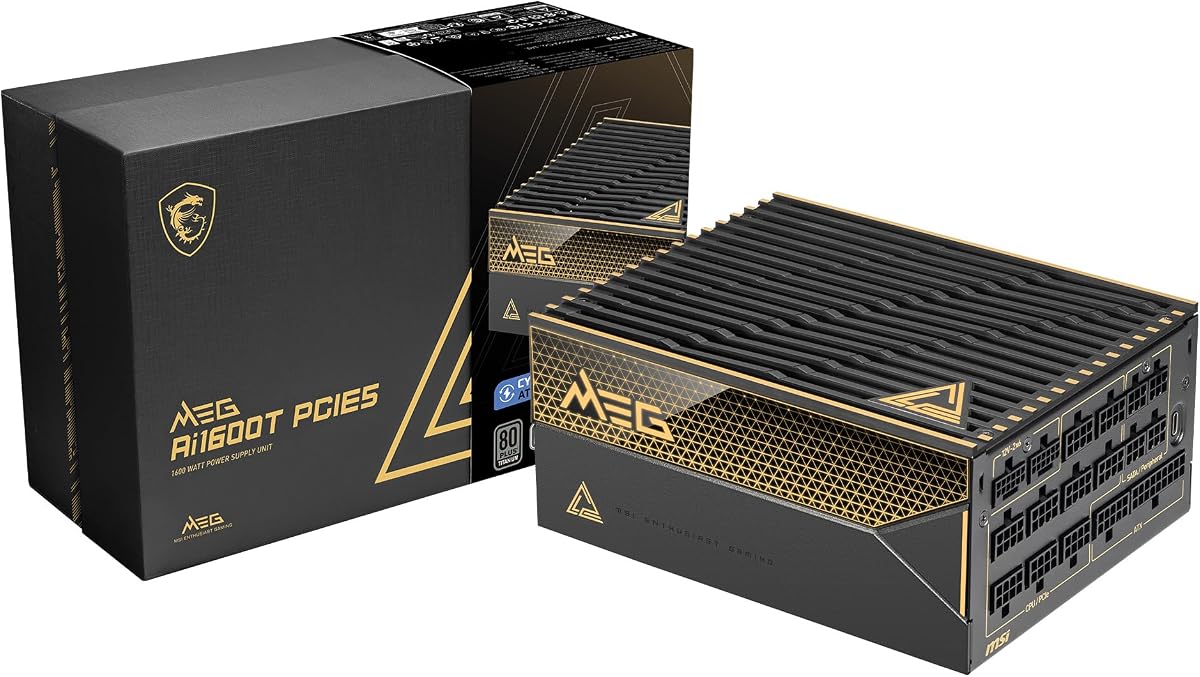
The MSI MEG Ai1600T delivers gaming-focused power with top specs. Its 4.5 rating highlights strong efficiency and dual 12V-2×6 support.
We may earn a commission when you buy through this link, at no additional cost to you.
It includes server-grade capacitors for stability and a 12-year warranty for peace of mind. Braided cables ensure clean builds.
Noise can be higher under heavy load than competitors. The cost reflects the long warranty.
Ideal for gamers seeking longevity. Choose this if you want modern features and top-tier coverage.
A 12-year warranty provides long-term security against defects and failures for expensive setups.
Dual 12V-2×6 cables ensure stable power for next-gen GPUs like NVIDIA RTX 4090.
We may earn a commission when you buy through this link, at no additional cost to you.
Selecting a 1500W PSU requires attention to efficiency, compliance, and build quality. Use this guide to understand key factors before buying.
Efficiency ratings like 80 Plus Titanium reduce power waste and heat. Higher ratings mean lower electricity bills and better cooling.
Prioritize units with Titanium or Platinum ratings for minimal energy loss.
ATX 3.1 ensures support for PCIe 5.1 GPUs and transient spikes. This is essential for modern high-end graphics cards.
Verify ATX 3.1 certification to future-proof your system.
Fan type such as FDB or magnetic levitation impacts noise levels. Silent units use semi-passive modes to turn off fans under low loads.
Look for low-decibel ratings or semi-passive operation for quiet builds.
Native 12V-2×6 connectors prevent cable damage and simplify setup. Fully modular designs improve cable management and airflow.
Choose units with native PCIe 5.1 connectors for safer GPU connections.
Comprehensive protections like OVP, OCP, and SCP safeguard components from voltage issues. These are critical for system longevity.
Ensure all essential protections are included for safe operation.
Japanese capacitors and high-quality components ensure reliability and stability. They withstand heat and voltage stress better.
Opt for 100% Japanese capacitors for premium longevity and performance.
Digital control and software allow real-time power monitoring and fan customization. This helps optimize performance for your setup.
Consider digital PSUs if you want detailed power management.
Long warranties like 10 or 12 years reflect manufacturer confidence. They protect your investment against failures.
Prioritize models with extended warranties for peace of mind.
Install the PSU in a well-ventilated case area. Connect native 12V-2×6 cables directly to GPUs to avoid using adapters.
Use a surge protector to shield the PSU from power spikes. Regularly check connectors for loose fits or damage.
Keep the PSU intake free from dust. Clean filters every few months to maintain cooling and silent operation.
Usually not. A single flagship GPU needs around 1000W. 1500W is better for multi-GPU or heavy CPU workloads. Consider your total power needs before buying.
ATX 3.1 is a standard ensuring GPUs handle transient spikes safely. It supports PCIe 5.1 connectors. This ensures stability for high-end cards.
Japanese capacitors offer better reliability and thermal stability. They last longer than standard ones. They are standard in high-end PSUs.
Yes. Native connectors reduce risk of cable bending and melting. They ensure secure GPU connections. They are safer than adapters.
Higher efficiency reduces wasted energy and heat. It lowers bills. A Titanium PSU saves more than Bronze. It benefits cooling too.
Digital PSUs offer monitoring and customization. This helps tune performance. For most users, analog is fine. Digital is for enthusiasts.
The CORSAIR HX1500i, ASRock PG 1600G, and Seasonic Prime TX-1600 Noctua lead this list. Each offers distinct strengths for different needs.
Prioritize ATX 3.1 compliance and efficiency. Ensure you have proper case clearance for larger units.
Prices change often. Verify current pricing and availability before purchasing to secure the best value for your build.