
Synology 16 bay RackStation RS4021xs+
4.8Editor score
8 Core Intel Processor
Up to 234k IOPS
Two Redundant Power Supplies
PCIe Expansion Slots
Finding the right storage solution is crucial for data heavy workflows. A 16 Bay NAS Enclosure offers massive capacity while maintaining efficient cooling and robust connectivity for modern computing needs.
We evaluated leading models based on drive compatibility processor power expandability and network speeds. Our analysis covers both rackmount options and desktop units suitable for various professional environments.
Each pick highlights key strengths and potential trade offs to help you decide. Remember that pricing and availability can fluctuate so verify current details before purchasing your ideal system.
4.8Editor score
4.5Editor score

4.5Editor score
As an Amazon Associate we earn from qualifying purchases.
The following table provides a side by side overview of all ten selected products. It highlights essential specifications and capabilities to help you quickly identify the model that fits your specific storage requirements.


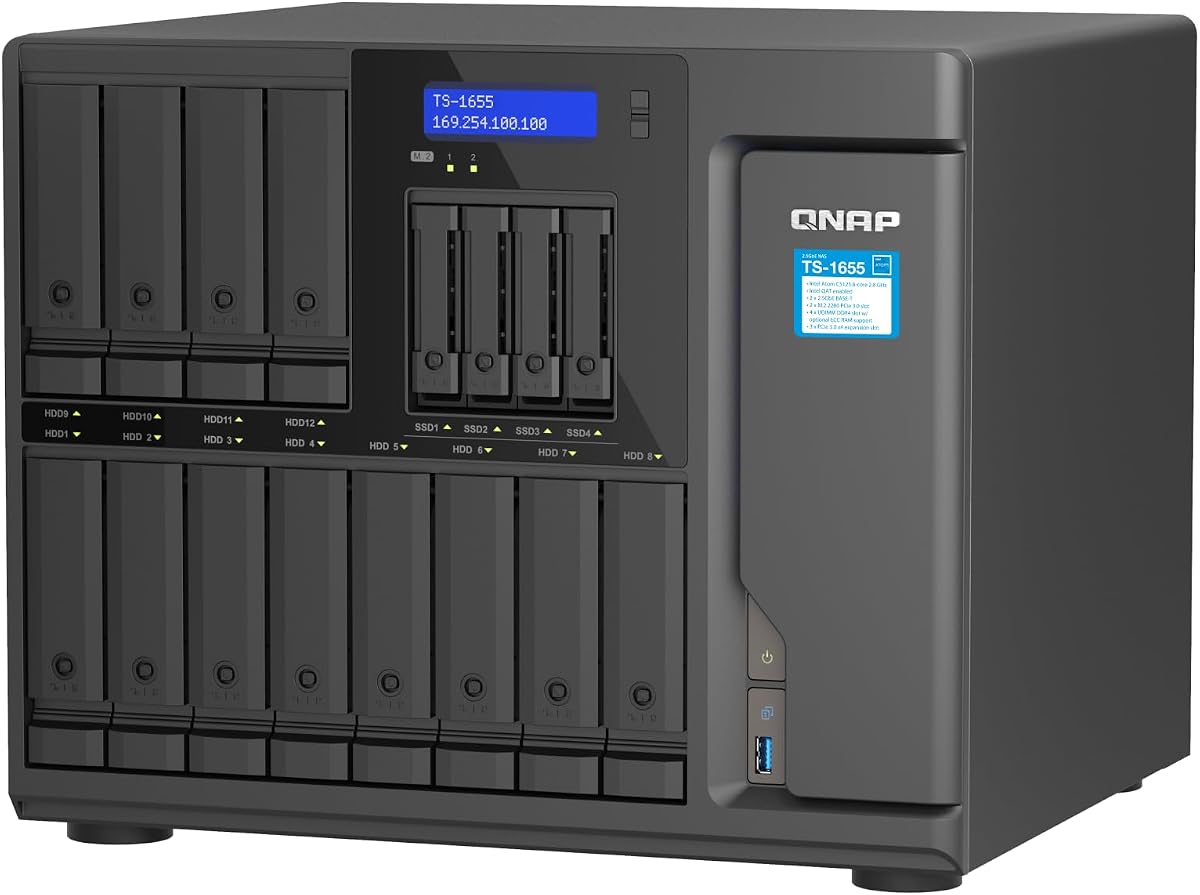
The QNAP TS-1655-8G-US stands out as a powerful hybrid NAS designed for demanding users. With its strong rating and versatile features it delivers exceptional value for professionals needing robust storage solutions.
We may earn a commission when you buy through this link, at no additional cost to you.
Its Intel Atom C-5125 processor ensures smooth multitasking while the ability to upgrade RAM up to 128GB with ECC support provides stability for virtualization tasks. Dual 2.5GbE ports accelerate file transfers significantly.
While the price is higher than basic units the performance gains justify the investment. The hybrid design allows mixing SSD and HDD storage which optimizes both speed and capacity efficiently.
This unit is ideal for small businesses or power users running virtual machines. If you need reliable high capacity storage with enterprise grade features this model is highly recommended.
The high RAM capacity and ECC support make this NAS excellent for running multiple virtual machines reliably without data corruption risks.
Supporting both 3.5 and 2.5 inch drives plus M.2 NVMe slots allows you to tailor storage speed and volume to your exact needs.
We may earn a commission when you buy through this link, at no additional cost to you.
This Synology RS4021xs+ is a top-tier enterprise solution offering unmatched performance and reliability. Its high rating reflects consistent quality in handling intensive compute tasks and large data volumes effectively.
We may earn a commission when you buy through this link, at no additional cost to you.
The eight-core Intel processor supports multiple compute-intensive services simultaneously. Two redundant power supplies ensure business continuity while PCIe slots allow adding NVMe cache or network cards as needed.
Despite the premium price tag the reliability and scalability make it worth it for critical environments. The 5-year warranty further reinforces confidence in its long-term operational stability.
Businesses needing high-speed access and guaranteed uptime should consider this model. It is an excellent choice for data centers or large offices requiring robust shared storage.
Redundant power supplies and high IOPS ensure that your data remains accessible and protected even during hardware failures or power interruptions.
With expansion slots and support for up to 40 drive bays using RX units you can grow your infrastructure without replacing the core system.
We may earn a commission when you buy through this link, at no additional cost to you.
The QNAP TL-D1600S is an excellent budget option for expanding storage without buying a full NAS unit. It offers reliable connectivity and simplicity for users who already have a powerful host computer.
We may earn a commission when you buy through this link, at no additional cost to you.
Its SATA 6Gbps interface ensures fast data transfer while the included PCIe card guarantees compatibility with desktop and server systems. The JBOD design provides maximum flexibility for managing drives individually.
While it lacks an onboard operating system this limitation helps keep costs low. Users needing simple storage expansion rather than complex services will find this device highly effective and affordable.
Ideal for home labs or small offices needing extra space quickly. If you have a compatible host and want a straightforward expansion solution this enclosure delivers great value.
As a JBOD enclosure it bypasses complex NAS software allowing you to manage storage directly through your existing operating system for maximum control.
The included PCIe card saves extra purchases and ensures high-speed data transfer between your host and the 16 connected drives without bottlenecks.
We may earn a commission when you buy through this link, at no additional cost to you.
The CENMATE Aluminum 12 Bay offers a versatile and portable solution for connecting multiple drives via USB. Its design prioritizes cooling and ease of use making it suitable for personal or enterprise use.
We may earn a commission when you buy through this link, at no additional cost to you.
Built with aluminum alloy and three cooling fans it maintains safe operating temperatures. The USB 3.0 interface ensures fast data transfers which is essential for large media files and backups.
Note that the fan noise might be noticeable in quiet environments. While not silent it effectively prevents overheating which is crucial for protecting your valuable data over time.
This enclosure is great for users needing temporary high capacity storage. If you require a simple tool-free setup with reliable cooling this model is a solid choice for external needs.
Three built-in cooling fans and aluminum construction ensure that drives stay cool during heavy usage preventing overheating and extending hardware lifespan.
USB A and C 3.0 ports plus daisy chaining allow you to connect this unit to various devices and expand storage capacity easily.
We may earn a commission when you buy through this link, at no additional cost to you.
This QNAP model delivers high performance with its eight core processor and extensive connectivity options. It supports massive capacity and hybrid storage setups which benefit users with diverse workload requirements.
We may earn a commission when you buy through this link, at no additional cost to you.
The dual 2.5GbE ports provide faster networking than standard Gigabit connections. Combined with M.2 NVMe slots you can implement SSD cache to significantly improve read and write speeds.
While the system offers powerful features the setup and management may require some technical knowledge. This complexity ensures robust control over your storage environment and security settings.
Ideal for power users needing speed and flexibility. If you need a reliable system for virtualization or heavy file access this NAS offers the performance to handle demanding tasks.
Dual 2.5GbE ports reduce network bottlenecks ensuring that large file transfers and multiple user access remain smooth and efficient.
Support for up to 128GB RAM with ECC allows you to upgrade memory as your workload grows without replacing the entire NAS unit.
We may earn a commission when you buy through this link, at no additional cost to you.
This Asustor NAS targets enterprise workloads with powerful networking and computing capabilities. Its AMD Ryzen processor and high speed RAM ensure stability for virtualization and heavy data traffic environments.
We may earn a commission when you buy through this link, at no additional cost to you.
With dual 10GbE ports it offers ultra high bandwidth for multi-user access. The USB4 40Gbps support allows professional external storage expansion for workflows requiring rapid data transfers.
Although it has fewer bays than some competitors the performance and networking speeds make it suitable for environments where throughput matters more than capacity. ECC memory protects data integrity.
Creative studios and IT departments will appreciate its robust design. If you need a workstation class NAS for editing or virtualization this unit provides enterprise reliability in a compact form.
Dual 10GbE ports combined with link aggregation ensure that network speeds keep up with high demand even when multiple users access data simultaneously.
USB4 40Gbps offers lightning fast external storage connections ideal for video editors moving large projects quickly between systems.
We may earn a commission when you buy through this link, at no additional cost to you.
The Synology DS3622xs+ is built for businesses consolidating heavy workloads into one secure system. Its strong performance metrics make it suitable for managing backups, video systems, and virtual machines.
We may earn a commission when you buy through this link, at no additional cost to you.
With a 6 core Xeon processor it handles multiple services smoothly. NVMe cache accelerates read and write speeds ensuring responsive performance even under heavy load conditions.
While the price is steep the ability to scale up to 36 bays with DX units provides long term growth potential. This scalability prevents the need for frequent system replacements.
Organizations needing a central server for diverse tasks should consider this model. It delivers professional reliability and speed essential for maintaining efficient business operations and data security.
By adding DX1222 expansion units you can grow your storage to support up to 36 drive bays without replacing the main system.
Over 260k IOPS means applications and data loads quickly even when many small files are accessed simultaneously by multiple users.
We may earn a commission when you buy through this link, at no additional cost to you.
This Generic NAS case is designed for custom PC builders needing massive drive capacity and flexibility. It supports hot swap bays and multiple motherboard types allowing tailored hardware configurations.
We may earn a commission when you buy through this link, at no additional cost to you.
The 15 bay hot swap design makes maintenance easy without powering down. With eight PCI slots you can add specialized cards like GPUs or RAID controllers for specific workstation needs.
Shipping takes about 40 days by sea which may delay your setup. However the durable SGCC construction and versatile support ensure your build is stable and scalable long term.
Builders needing a robust chassis for a home server are ideal. If you want complete control over hardware and cooling this case offers excellent physical capabilities and durability.
Eight full height PCI slots allow adding multiple add-on cards for specialized needs like GPUs or high bandwidth network controllers.
Made with 1.0mm SGCC steel this case provides strong protection for drives and components in demanding home or office environments.
We may earn a commission when you buy through this link, at no additional cost to you.
This QNAP enclosure is designed for tight server cabinets offering 16 bays in a short depth form. It ensures continuous service with redundant power supplies which is critical for professional environments.
We may earn a commission when you buy through this link, at no additional cost to you.
The Mini-SAS HD interface provides robust connectivity for large data transfers. Its space-efficient design allows installation in media cabinets where depth is limited but storage capacity is high.
Although the rail kit is sold separately the unit itself is sturdy and reliable. It fits well with QNAP NAS systems and is ready for immediate integration into existing setups.
Businesses needing extra petabyte capacity in a small footprint should choose this. It delivers reliable continuity and flexible expansion for offices with space constraints.
The short depth allows easy installation in small cabinets or rooms with limited depth preventing clutter while providing massive storage capacity.
Redundant power supplies ensure that if one fails the other takes over instantly keeping your storage available without interruption.
We may earn a commission when you buy through this link, at no additional cost to you.
This Synology DX1222 expands your existing storage system seamlessly. It is designed for selected diskstation units allowing you to increase capacity without changing your entire NAS setup.
We may earn a commission when you buy through this link, at no additional cost to you.
Configure new storage in minutes using Synology DSM's unified tools which simplify management. The 5 year warranty ensures peace of mind regarding reliability and long term performance.
While it is an extra cost it saves you from buying a new NAS entirely. This makes it a cost effective solution for growing storage needs over time.
Existing Synology users should consider this unit for scaling up. It provides simple and reliable storage expansion ensuring your system grows with your data demands.
By adding this unit you can expand your storage without replacing your main NAS keeping data intact and management simple.
DSM tools allow you to manage the new bays alongside your existing drives providing a single interface for all storage needs.
We may earn a commission when you buy through this link, at no additional cost to you.
Choosing the right enclosure depends on your workload and environment. This section explores essential factors to help you pick a model that fits your specific needs and budget.
Ensure the enclosure supports your intended drive types and sizes. Most 16 Bay units accept 3.5 and 2.5 inch SATA drives but verify max capacity per drive to plan total storage.
Look for units that support up to 20TB or more per drive for future proofing. This ensures you can maximize capacity without needing to upgrade soon.
The internal processor determines multitasking ability. Models with 8 core CPUs handle virtualization and heavy file access better than basic processors.
Select a processor based on whether you need raw speed for editing or basic storage for backups. Higher core counts provide better overall performance.
RAM affects system stability especially when running virtual machines. Models supporting ECC memory offer higher reliability for critical business workloads.
Choose a unit with RAM expandability to adapt as your needs grow. This flexibility avoids replacing hardware when demand increases.
Network ports determine how fast users access data. Look for dual Gigabit or faster 2.5GbE and 10GbE options for multi-user environments.
High-speed ports reduce bottlenecks during large file transfers. Investing in better networking improves overall system efficiency significantly.
Consider PCIe slots or daisy chain ports if you plan to add cache cards or expand later. Some models allow scaling to dozens of drives.
Expandability saves money by letting you grow storage gradually. This avoids the need to replace the entire system immediately.
Redundant power supplies prevent downtime during hardware failures. These are crucial for business continuity and protecting your data availability.
Prioritize units with dual PSUs if uptime is critical. This feature ensures your data remains accessible even if one power supply fails.
JBOD enclosures work with Windows or Linux hosts offering flexibility but requiring external setup. NAS units include built-in OS for simpler management.
Decide if you prefer a complete package or a raw enclosure. NAS systems offer more features while JBOD offers more control.
Check the warranty length and technical support options. Longer warranties indicate manufacturer confidence and protect your investment.
Choose brands with reliable customer service for troubleshooting. Good support ensures quick resolution when issues arise.
Start by installing drives carefully in the slots without forcing them. Many models offer tool-free trays allowing you to slide drives in until they click securely.
Configure your RAID or storage pool immediately after connecting the unit. Follow the manufacturer's interface steps to set up file sharing and backup settings correctly.
Keep the unit in a well-ventilated area to prevent overheating. Clean dust from fans regularly to ensure cooling fans work efficiently and extend drive life.
Yes most models support both sizes. Ensure the drive caddies fit your specific drives so they align properly with the backplane connectors. Always check the manual for compatibility details.
No JBOD exposes each drive individually without built-in redundancy. You must rely on software RAID on your host system to protect data. NAS units often include RAID features by default.
NAS is a networked device with its own OS while DAS connects directly via USB or PCIe. NAS allows multiple users access over a network whereas DAS is for single host storage expansion.
ECC RAM detects and fixes memory errors automatically. This protects data integrity especially important for virtualization and critical storage systems. Non-ECC memory might corrupt data without detection.
Use expansion units connected via SAS or Ethernet. Most major brands offer matching enclosures that add 12 more bays. Verify compatibility before purchasing to ensure proper function.
Diskless units are cheaper and let you choose drives. Pre-configured ones save setup time but cost more. Choose diskless if you have existing drives or specific capacity needs.
We reviewed ten top models offering diverse features from basic expansion to enterprise grade performance. The QNAP TS-1655-8G-US offers the best balance for power users needing high speed and flexibility.
Your choice should depend on whether you prioritize raw capacity or advanced networking. Business users may prefer Synology for stability while home labs might prefer QNAP for customization.
Always check current prices and availability before purchasing. Deals may change so compare multiple vendors to ensure you get the best value for your required model.