
Heavy Duty 3D Printer Stand with Filament Storage
4.8Editor score
Thick steel tubing base
Thirty-two spool storage
Adjustable leveling feet
Finding the right 3D printer table stand with filament storage is crucial for maintaining a clean and efficient workshop. These specialized units combine stable printing surfaces with organized spool racks to keep your materials within easy reach while you work on your latest projects without clutter.
We have carefully evaluated ten leading models based on their build quality, vibration dampening capabilities, storage capacity, and overall usability. Our comparison focuses on heavy-duty construction, ease of assembly, and how well each stand supports various printer sizes and filament types for optimal performance.
Each pick in this list highlights specific strengths like built-in power outlets, mobile casters, or unique dual-zone designs for multiple printers. Keep in mind that prices and availability can change frequently so verify current details before making your final purchase decision for your specific needs.
4.8Editor score
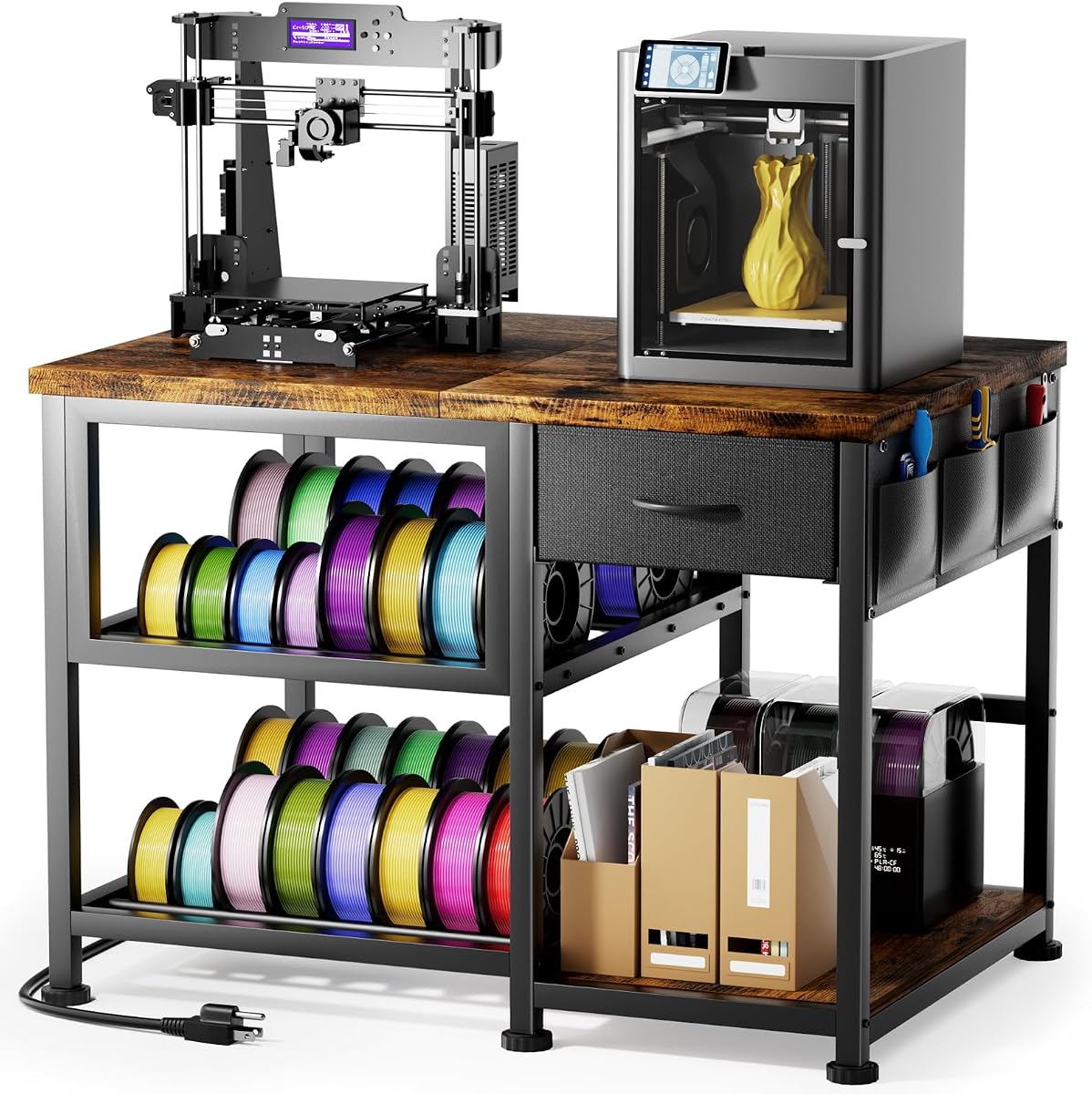
4.7Editor score

4.2Editor score
As an Amazon Associate we earn from qualifying purchases.
This side-by-side comparison reviews all ten selected models to highlight their unique features and specifications for easy decision-making.


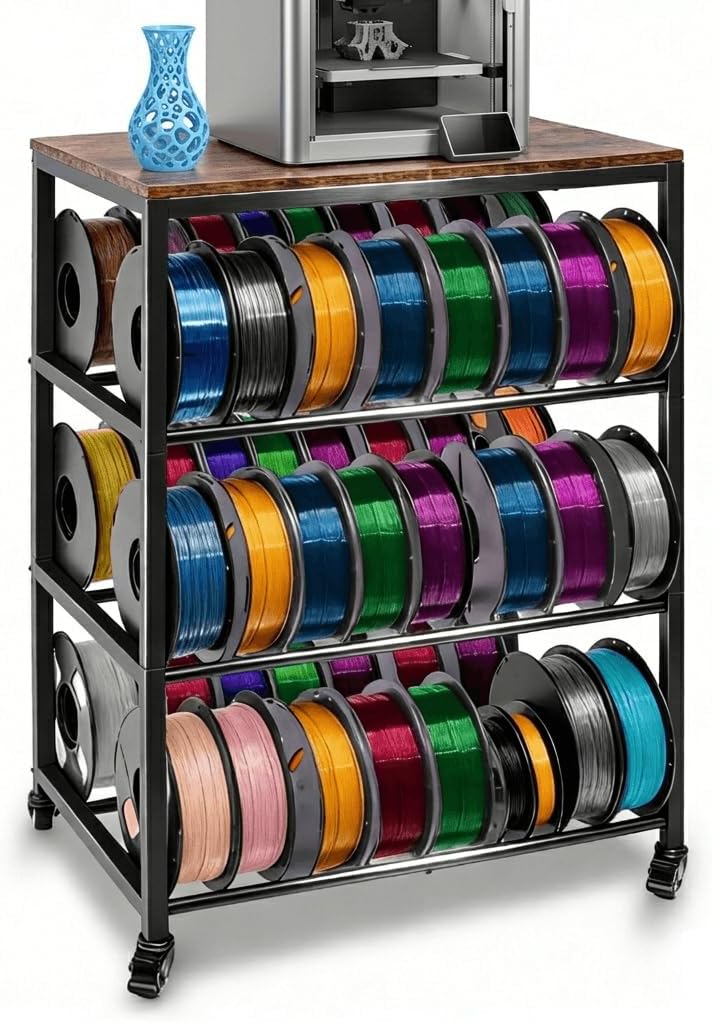
This heavy-duty 3D printer table stands out for its ability to absorb mechanical vibrations which is essential for smooth surfaces on complex prints. With a rating of 4.3 stars it offers robust stability that supports over two hundred thirty pounds of equipment weight.
We may earn a commission when you buy through this link, at no additional cost to you.
The open-shelf station acts as a centralized material hub neatly packing up to fifty-six spools without devouring your floor space. The included metal drawer keeps essential 3D printing hardware and maintenance tools perfectly organized and right at your fingertips for quick access.
While the assembly might take two people to ensure the frame is square it remains relatively quick at twenty-five minutes. The trade-off is minimal compared to the industrial stability provided by the thick metal construction and leveling feet.
Makers who prioritize print quality and need a dedicated home for large filament collections will find this the ideal solution. It is perfect for tucking into a garage or makerspace while keeping your heavy setups perfectly stable.
The heavy duty construction minimizes ghosting on tall prints ensuring higher quality output.
Keep your workshop efficient by organizing all your spools in one compact vertical space.
We may earn a commission when you buy through this link, at no additional cost to you.
Affordable pricing does not mean compromised quality with this unit which holds a high 4.8 rating. It features a thick steel tubing and solid MDF top that hold heavy 3D printers stably eliminating vibrations for smooth precise printing.
We may earn a commission when you buy through this link, at no additional cost to you.
The dual-tier storage securely holds up to thirty-two filament rolls preventing rolling and keeping materials tidy. The adjustable spacing on the shelves accommodates supplies of any size ensuring you can store various spool types efficiently.
Some users might find the smaller top surface less ideal for very large printers but it fits standard desktop models perfectly. The lack of power outlets is a minor drawback that can be solved with an external power strip.
This stand is perfect for beginners or those with limited space who need a reliable and sturdy base for their printer. The quick assembly and adjustable feet make it accessible for almost any user setup.
Save money without sacrificing stability thanks to the robust steel tube construction.
Set up your new workstation in under twenty minutes with the straightforward modular design.
We may earn a commission when you buy through this link, at no additional cost to you.
This unique workstation is designed specifically for users running two 3D printers side by side with dedicated zones. The dual independent closed-loop metal frames maintain consistent stability ensuring that loads are fully supported by the matching frame unit.
We may earn a commission when you buy through this link, at no additional cost to you.
Beyond the printer zones it features unique dual-side hanging mesh racks that can sort and store filaments by each printer station. This maximizes your available storage and frees up valuable desktop area for active projects or tools.
The size is substantial which might be too much for small home offices but is perfect for dedicated studios. The higher price point is justified by the specialized design that allows for simultaneous printing without interference.
Hobbyists and professionals who need to run multiple prints simultaneously will find this the ultimate solution. It accommodates every type of 3D printing enthusiast from casual creators to small workshop operators.
Service one printer without disrupting the active print job on the other unit.
The side mesh racks add significant capacity for filaments and tools unique to this model.
We may earn a commission when you buy through this link, at no additional cost to you.
Integrated power solutions are a game changer for organizing your workspace and this stand delivers with a built-in power strip. It features two AC outlets and two USB ports allowing you to power your printer and laptop at once.
We may earn a commission when you buy through this link, at no additional cost to you.
Constructed from a heavy-duty steel frame with X-shaped bracket reinforcement this workstation provides superior stability and reduces vibration. This ensures cleaner and more precise print layers even for large-format printers trusted by studio professionals.
The power strip reduces messy cables but the cord length might be short for some setups. The height is greater than standard desks which might make it harder to access the top shelf for taller users.
Creators who need a single station to power and organize their workflow will love this all-in-one setup. It transforms your workshop into a space of order and creative efficiency.
Eliminate multiple power strips and keep your devices connected from one central spot.
X-brackets reinforce the frame to support heavy loads and reduce wobble effectively.
We may earn a commission when you buy through this link, at no additional cost to you.
This stand offers a unique combination of heavy-duty stability and accessible fabric drawers for your essential tools. It holds your premium 3D printers with zero flex while giving you plenty of room to run your machines.
We may earn a commission when you buy through this link, at no additional cost to you.
The side and bottom shelves are engineered exclusively for standard filament spools securely organizing your PLA and ABS reels. The dual accessory tool drawers perfectly partition your scrapers and hex wrenches to keep them safe.
While the particleboard is high-density it is less moisture-resistant than solid wood or metal. The drawers are functional but lack heavy-duty metal slides which might limit load weight inside.
Makers who value quick access to tools and finished prints will appreciate this versatile design. It is a sturdy workhorse that handles over one hundred fifty pounds with ease.
Keep your most used tools right at your fingertips without searching through boxes.
Use the spacious shelf area to show off your finished models and parts.
We may earn a commission when you buy through this link, at no additional cost to you.
This workstation combines durability with a clean modern look making it suitable for home offices and workshops. It features a sturdy metal frame and a wood-style tabletop that blends seamlessly into professional environments.
We may earn a commission when you buy through this link, at no additional cost to you.
The massive filament storage keeps spools organized visible and within easy reach while printing. The built-in power management includes AC outlets and USB ports to reduce loose extension cords around your printing area.
The wood finish can show smudges more than a powder-coated metal surface. It also requires careful assembly to align the shelves correctly during the initial setup process.
Users who want a professional aesthetic that does not look like industrial shelving will love this option. It provides an efficient printing setup without taking up extra workspace.
The wood style desktop adds a touch of elegance to your maker space.
Keep your devices connected from one central workstation while reducing cable clutter.
We may earn a commission when you buy through this link, at no additional cost to you.
This model is designed to fit seamlessly into any home office or classroom without taking up too much space. It features a multi-functional stand with a spacious tabletop to securely hold your 3D printer.
We may earn a commission when you buy through this link, at no additional cost to you.
The built-in power strip stays charged with convenience featuring AC outlets and USB ports for multiple devices. The metal tube racks ensure your filaments stay organized and easily accessible on both middle and bottom shelves.
The top surface is more compact which might limit placement of larger printers or laptops. The fabric drawers are convenient but may not be as rigid as solid plastic or metal options.
Those with limited room who still need organized storage and power access will find this perfect. It balances functionality and size for smaller environments effectively.
With dimensions under forty inches long it fits well in tight corners.
The power cord length ensures flexibility in placement near outlets.
We may earn a commission when you buy through this link, at no additional cost to you.
This printer cabinet offers a large work surface with an enclosed lower compartment to protect sensitive spools from dust and moisture. It features a solid metal frame that effectively absorbs vibrations and shocks during operation.
We may earn a commission when you buy through this link, at no additional cost to you.
The secure mobility with locking wheels allows you to move the entire setup effortlessly. Two of the wheels feature locking brakes to securely stabilize the unit during printing runs providing portability and stability.
The height is significant at nearly sixty inches which might make the top shelf hard to reach. The enclosed cabinet adds protection but makes accessing stored items slower than open shelves.
Users in dusty environments or those wanting a tidy look will prefer the enclosed design. It is perfect for workshop or studio setups where protection is key.
The enclosed compartment keeps sensitive spools safe from dust and humidity damage.
Move your entire setup when needed with the three hundred sixty degree swivel casters.
We may earn a commission when you buy through this link, at no additional cost to you.
This sturdy 3D printer table is equipped with lockable heavy-duty rotating industrial casters for smooth movement. It features a wooden top that measures twenty-four by sixteen inches perfect for setting up different types of printers.
We may earn a commission when you buy through this link, at no additional cost to you.
The filament spool holder bottom three layers provide ample storage space for forty-eight rolls of standard filament spools. With adjustable pipe spacing it is compatible with consumables of various sizes to keep filaments tidy.
The wooden top might stain if water sits on it so care is needed. The casters add some height which might be an issue on very low ceilings.
This is the ideal solution for workshops where the printer needs to be moved frequently or repositioned. It ensures accessories remain neat and stable preventing them from toppling over.
The unit can handle up to four hundred pounds ensuring heavy printers are safe.
The casters are silent so moving the cart is quiet in any environment.
We may earn a commission when you buy through this link, at no additional cost to you.
This heavy duty model is built for creators who need a permanent and robust solution for their printer. It features a sleek matte black powder coating that is scratch-resistant and provides an industrial aesthetic.
We may earn a commission when you buy through this link, at no additional cost to you.
The heavy-duty metal drawer is specifically designed to keep your essential 3D printing hardware and spare parts perfectly organized. It holds a massive weight of two hundred thirty pounds without breaking a sweat.
The metal drawer might develop surface scratches over time but does not affect utility. Installation is easier with two people to align the heavy metal frame correctly.
Makers who want a professional look and heavy storage capacity will find this reliable. It is perfect for tucking into a garage or home office.
The powder coating helps resist scratches and wear in busy workshop environments.
The drawer offers a secure place for heavy tools and spare parts.
We may earn a commission when you buy through this link, at no additional cost to you.
Selecting the right stand involves evaluating stability, storage capacity, and features to match your specific workflow needs.
Look for stands with heavy-duty frames and leveling feet to minimize vibrations that can ruin prints. X-brackets and thick steel tubing are preferred for reducing ghosting on tall prints.
Prioritize stability to ensure your printer remains level and steady during long print jobs.
Check the number of spools the stand can hold to ensure it meets your collection size. Vertical shelves and open racks are efficient for keeping materials tidy and accessible.
Choose a capacity that accommodates your current spools plus room for growth.
Some models include drawers for storing nozzles scrapers and tools to keep the workspace organized. Fabric drawers offer soft storage while metal drawers provide rigid protection.
Consider your tool organization needs to decide between open shelves or closed storage.
Stands with integrated power strips simplify cable management by allowing you to plug in your printer and laptop directly. This reduces the need for external extension cords and keeps the area neat.
Power integration is a great convenience feature for a clean and efficient setup.
If you need to move your printer frequently look for models with lockable heavy-duty casters. Some models offer adjustable feet to fix the stand if you want to lock mobility.
Mobility is ideal for workshops where space changes or for easy cleaning.
Metal frames are generally more durable than wood but wood finishes offer better aesthetic appeal. Scratch-resistant coatings protect the surface from wear and tear over time.
Choose a material that fits your workspace style and durability requirements.
Check the estimated assembly time and whether you need two people for installation. Clear instructions and included tools make setup faster and less frustrating.
Opt for simple modular designs if you prefer quick and easy setup.
Measure your available floor space to ensure the stand fits without overcrowding your room. Vertical designs save floor space while wide tops accommodate larger printers.
Verify width and height to ensure compatibility with your printer and room.
Start by assembling the frame on a flat surface using all included hardware to ensure stability. Check that all leveling feet are adjusted to keep the stand balanced on your floor.
Place your printer on the top surface and secure it if needed. Organize your spools on the lower shelves so they are easy to reach while you work on your projects.
Regularly wipe down the metal and wood surfaces to remove dust and prevent buildup. Keep the area dry to protect the materials and ensure longevity of the stand.
Most stands are designed with universal dimensions that fit popular models like Creality and Anycubic. Always check the specific top surface dimensions and weight limits to ensure compatibility.
Typical stands hold between thirty and fifty-six standard spools depending on the model. Some models offer additional side racks to increase total storage capacity.
Most models require around twenty to thirty minutes to assemble with clear instructions provided. Some larger units may require two people for optimal stability and alignment.
These stands are designed for indoor use and may rust if exposed to rain. If you need outdoor storage look for models with specific weather-resistant coatings.
Several models include built-in AC and USB outlets for convenient power management. Verify the specific model features to ensure it has the outlets you need.
Wipe the shelves with a dry cloth to remove dust and filament residue. Avoid harsh chemicals that might damage the finish of the shelves.
Most drawers are attached securely to the frame and are not removable. They are designed to be sturdy and accessible during operation.
We have reviewed ten top models including the Editor's Choice with wood and metal construction and the Budget pick with thick steel tubing. Each offers unique strengths for stability and filament organization.
Prioritize your specific needs such as power outlets for efficiency or wheels for mobility when selecting a stand. Ensure the dimensions fit your workspace to avoid overcrowding.
Remember that prices and stock levels can change so always verify current details before making your purchase.