
MOUNT PRO 4 Monitor Mount
4.5Editor score
Fits 13 to 32 inch screens
Adjusts up to 31.7 inches tall
Includes cable clips for organization
Finding the right quad monitor setup can transform your workspace into a productivity powerhouse. A good mount elevates screens to eye level, reducing strain while freeing up valuable desk real estate for your keyboard and notes.
We analyzed ten leading models based on build quality, arm articulation, and compatibility with modern displays. Each option offers unique strengths for different budgets and screen configurations ranging from standard panels to ultrawide monitors.
Every selection includes verified specifications and user feedback to help you decide quickly. Note that pricing fluctuates daily, so check current offers before purchasing to ensure you get the best deal available right now.
4.5Editor score

4.5Editor score

4.5Editor score
As an Amazon Associate we earn from qualifying purchases.
The following table provides a quick side-by-side overview of all ten models reviewed in this guide. Compare key specifications like weight capacity, screen size limits, and adjustment ranges to find the perfect fit for your desk.

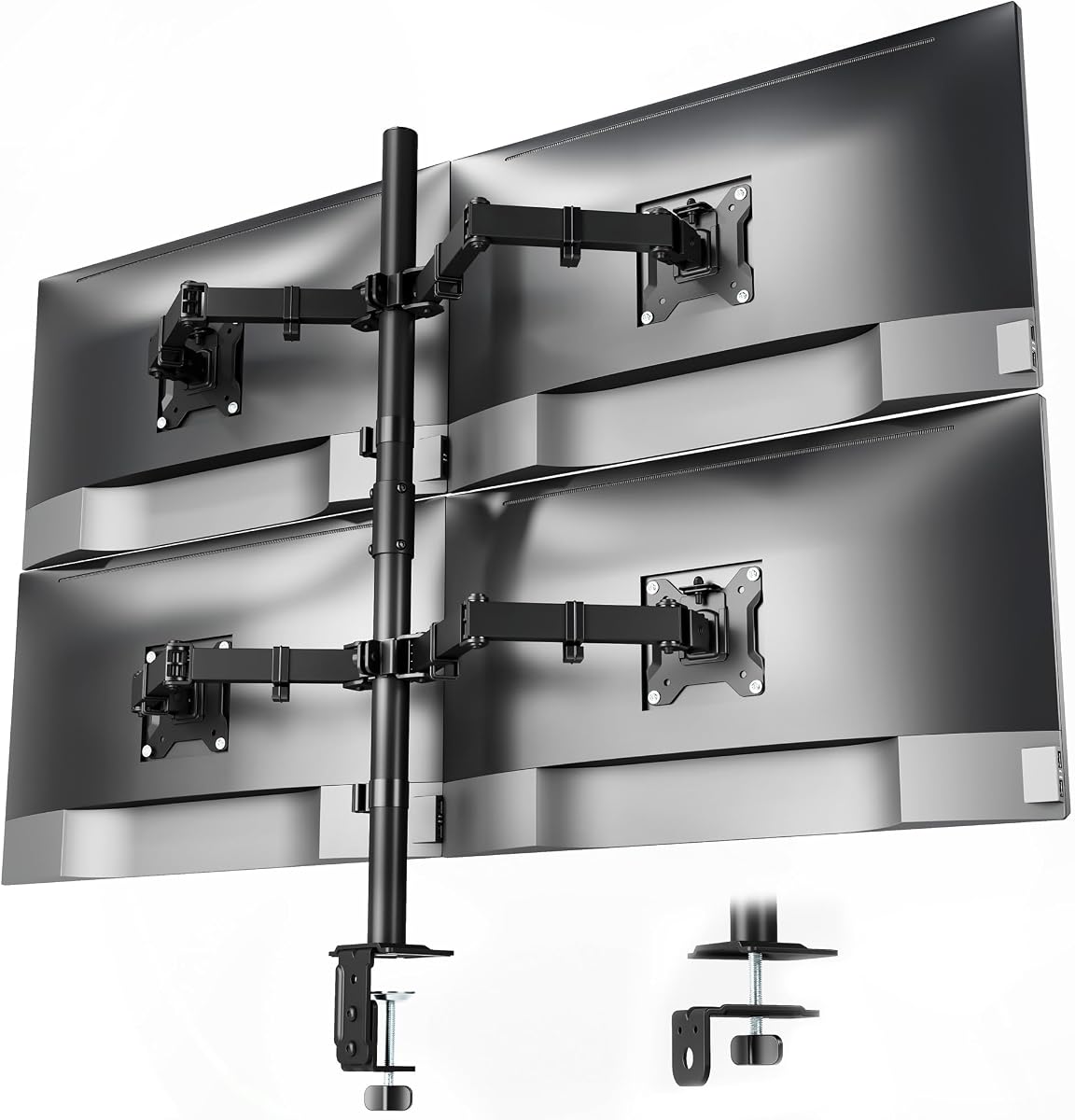


This quad monitor mount delivers outstanding value for users needing a robust solution for multiple displays. With a 4.5 star rating from thousands of verified buyers, it proves reliable for both office and home setups.
We may earn a commission when you buy through this link, at no additional cost to you.
The steel frame construction ensures your screens stay steady even when adjusted frequently. You get full articulation with tilt, swivel, and rotation options to tailor viewing angles for every task you perform daily.
While assembly takes some time, the included hardware simplifies the process significantly. The only minor trade-off is ensuring your desk thickness falls within the supported range for the clamping mechanism.
It is the ideal choice for professionals seeking a balance of durability and affordability. Upgrade your desk today to enjoy better ergonomics and a cleaner workspace immediately.
Integrated clips keep wires tucked neatly along the arms preventing clutter on your desk surface.
Raising screens to eye level reduces neck strain and improves posture throughout your entire workday.
We may earn a commission when you buy through this link, at no additional cost to you.
Designed for serious users with large screens this model handles up to 49 inch ultrawide monitors with ease. Its pneumatic system allows effortless height changes without struggling against stiff mechanical tension.
We may earn a commission when you buy through this link, at no additional cost to you.
The cast aluminum build provides exceptional strength to support heavier monitors without drooping. You can tilt and swivel screens to eliminate glare while maintaining perfect stability during intense work sessions.
The premium nature means a higher cost but the build quality justifies the investment. Ensuring your desk is thick enough for the clamp base is crucial for a secure installation.
If you need room for large screens or trade heavily this mount is unmatched. It delivers professional-grade performance that transforms any workstation into a command center efficiently.
Gas springs counterbalance monitor weight allowing one hand adjustments for perfect positioning every time.
Fits massive screens up to 49 inches making it perfect for immersive trading or creative work.
We may earn a commission when you buy through this link, at no additional cost to you.
This budget-friendly model proves you do not need to spend a fortune to get a reliable quad monitor setup. It supports standard screens up to 32 inches with a simple but effective design.
We may earn a commission when you buy through this link, at no additional cost to you.
The tall center pole makes it suitable for standing desks where extra height is often needed. You can tilt and swivel screens easily to find comfortable angles for long periods of focused work.
While it lacks some premium features like pneumatic arms, it performs well for lighter monitors. Ensure your screens do not exceed the weight limit to maintain safety and stability over time.
For students or startups needing multiple screens without breaking the bank this is ideal. You get a clean workspace and better ergonomics at a very accessible entry price point.
The extra tall pole ensures monitors remain at eye level even when standing for extended periods.
Affordable pricing lets you upgrade to a multi-monitor setup without sacrificing too much of your budget.
We may earn a commission when you buy through this link, at no additional cost to you.
This mount offers a unique vertical configuration perfect for users with massive top screens and smaller lower monitors. It combines a robust steel frame with gas springs to handle heavy loads safely.
We may earn a commission when you buy through this link, at no additional cost to you.
The 3-section arm design allows you to adjust extension length by removing segments. This flexibility helps you position screens exactly where you need them without cluttering your desk surface.
While the vertical layout is space-saving, it might not suit traditional work habits. Reading instructions carefully is vital to ensure assembly is done correctly for maximum stability.
Ideal for traders or video editors needing a wide panoramic view on top this model works well. It frees up desk space effectively while keeping all screens accessible and ergonomic.
Stacking screens vertically opens up huge desk real estate for keyboard or reference materials below.
Springs support heavy monitors easily reducing strain on joints and making adjustments smoother daily.
We may earn a commission when you buy through this link, at no additional cost to you.
This quad mount focuses on providing a stable platform for four screens without sacrificing functionality. It supports up to 22 lbs per arm which covers most standard LED or LCD monitors effectively.
We may earn a commission when you buy through this link, at no additional cost to you.
Engineered with high-grade materials, it resists sagging even when screens are moved frequently. The integrated cable organizers help maintain a tidy look so your desk remains professional throughout the day.
Installation is straightforward with clear steps provided to guide you through setup. While slightly larger than minimalist options, the trade-off ensures your monitors stay securely in place during adjustments.
For users needing reliable support without advanced pneumatic features this is a strong choice. It balances cost and performance well for daily office or home entertainment usage.
Integrated organizers hide wires neatly along the arms for a polished clean desk appearance.
With 22 lbs capacity you can mount heavier monitors confidently without worrying about bending arms.
We may earn a commission when you buy through this link, at no additional cost to you.
MOUNTUP offers a user-friendly experience with quick-release plates that make attaching monitors simple. It is designed for standard screens up to 32 inches with a clear setup process for all users.
We may earn a commission when you buy through this link, at no additional cost to you.
You can rotate screens fully for portrait orientation without removing hardware manually. The sturdy base keeps all arms anchored securely ensuring your display stays level during daily use.
The design prioritizes efficiency which is great for quick upgrades to existing workstations. While weight limits are moderate, it handles most consumer monitors perfectly for professional or personal use.
For those valuing speed and simplicity in setup this model delivers well. It reduces assembly time and lets you start working sooner with a clean organized setup.
Rotate monitors fully to portrait mode for reading long documents or code easily on screens.
Simple instructions and hardware get you up and running within minutes of opening the box.
We may earn a commission when you buy through this link, at no additional cost to you.
This model combines pneumatic convenience with robust support to make screen positioning effortless. You can adjust height smoothly without struggling against mechanical resistance thanks to counterbalancing springs.
We may earn a commission when you buy through this link, at no additional cost to you.
The dual side pneumatic arms let you reposition screens quickly whenever your needs change. A solid steel and aluminum structure ensures stability so monitors remain steady during active sessions.
Drill-free mounting saves time and prevents damage to your desk surface permanently. You get enough range of motion to find perfect angles for typing or watching media comfortably.
Ideal for users who frequently adjust screen height this model excels in adaptability. It offers a premium feel without the higher price tag of larger ultrawide specialized mounts.
Springs reduce physical effort needed to move screens allowing precise height tuning instantly.
Secure C-clamp avoids drilling holes in your desk while maintaining strong and reliable hold.
We may earn a commission when you buy through this link, at no additional cost to you.
This mount uses advanced gas spring technology to ensure smooth and effortless screen positioning. It lifts monitors completely off the desktop surface so you gain valuable workspace for other items.
We may earn a commission when you buy through this link, at no additional cost to you.
You can adjust height and forward or backward positioning to suit your posture perfectly. The design adheres to standard VESA compatibility making it easy to fit most major monitor brands.
Clear instructions guide you through assembly ensuring a secure attachment to your desk edge. While not designed for heavy loads, it handles standard screens without sagging or wobbling during use.
Perfect for users prioritizing desk cleanliness this option keeps wires and screens organized neatly. It balances performance and simplicity for daily tasks efficiently without unnecessary complexity.
Advanced springs provide smooth movement allowing you to reposition screens with minimal physical force.
Lifting screens off the desk surface frees up room for keyboard notebooks or tools below.
We may earn a commission when you buy through this link, at no additional cost to you.
A classic choice in the category this model boasts a 4.6 star rating from many satisfied customers. It supports screens up to 32 inches with strong arms that resist bending under normal loads.
We may earn a commission when you buy through this link, at no additional cost to you.
Detachable plates make screen changes easy while keeping the mount intact. You get both clamp and grommet options so you can pick the installation style that suits your desk.
The design may look simple but it delivers reliability for daily use efficiently. Integrated management keeps wires tidy and out of sight for a professional appearance throughout work.
For users seeking a proven reliable solution without fancy features this is great. It combines durability with straightforward design to deliver consistent performance over long periods.
High customer ratings show consistent performance and durability over time for daily use.
Detachable plates let you swap screens quickly without disassembling the entire mounting system.
We may earn a commission when you buy through this link, at no additional cost to you.
This clamp-on mount offers a straightforward way to add four screens without permanent desk modification. It supports screens up to 32 inches and includes padding to protect your surface from scratches.
We may earn a commission when you buy through this link, at no additional cost to you.
Installation is quick using the heavy-duty C-clamp for secure attachment to desk edges. You can adjust tilt and swivel to avoid glare while maintaining a clean workspace for daily work.
The tilt range is narrower than some competitors so check angles before buying. However, the drill-free nature makes it ideal for renters or offices where changes must remain non-permanent.
For those wanting a simple non-invasive upgrade this model fits well. It delivers solid performance with easy removal if you need to change your setup later.
Secure C-clamp attaches without drilling holes preserving your desk surface and finish completely.
Included padding prevents scratches or marks on your desk from the mounting hardware base.
We may earn a commission when you buy through this link, at no additional cost to you.
Choosing the right quad mount requires understanding your screen sizes, desk constraints, and ergonomic needs. This section breaks down the critical factors to consider before making a purchase.
Always check the maximum screen size and weight per arm. Most mounts support up to 32 inches and 17.6 to 22 lbs per arm. Ensure your monitors fall within these limits to avoid sagging.
Select a mount with a capacity exceeding your monitor weight by at least 20 percent for safety and stability.
Most monitors use standard VESA mounting patterns of 75x75mm or 100x100mm. Confirm your monitors have these hole patterns before buying to ensure the plates fit securely.
If you have proprietary monitors check if adapters are available to convert them to standard VESA spacing easily.
Clamp mounts work best on desks with thickness between 0.4 and 3.5 inches. Grommet mounts require a hole diameter usually around 0.4 to 2.5 inches depending on the model.
Measure your desk thickness and hole size to ensure the chosen mount fits securely without wobbling.
Look for mounts with full tilt, swivel, and rotation capabilities. Being able to rotate screens to portrait mode helps when reading documents or code for long periods daily.
Prioritize mounts that allow independent adjustment per arm to avoid interference between screens during use.
Steel and aluminum builds offer better longevity compared to plastic-heavy models. Metal frames resist wear and maintain tension longer under heavy loads or frequent adjustments.
Choose heavy-duty materials if you plan to move screens often or work in a dynamic office environment.
Pneumatic arms use gas springs for effortless height changes without manual tightening. Mechanical models require knob adjustments which may be slower but are often more affordable for budget users.
Opt for pneumatic if you frequently change height; mechanical suits fixed setups with occasional adjustments only.
Integrated clips or channels along arms keep wires tidy and prevent tangling. This reduces visual clutter and helps maintain a professional look on your desk surface.
Ensure cables route easily along the arms so you do not struggle with messy wires after installation.
Look for products offering at least a one-year warranty covering structural defects. Reliable support teams help troubleshoot assembly issues or missing parts quickly after purchase.
Choose brands with strong reputations and positive reviews regarding customer service responsiveness and reliability.
Start by attaching the base firmly to your desk using the provided clamp or grommet kit. Ensure the base is level so screens do not sag to one side immediately after installation.
Connect each monitor to the VESA plates using included screws before hanging them on arms. Tighten plates securely to prevent sliding during adjustments or accidental bumps to the setup.
Adjust tension knobs if available to match monitor weight and minimize drooping. Regularly check screws and tension after heavy use to maintain alignment and prevent long-term sagging.
Most standard monitors use 75x75mm or 100x100mm VESA hole spacing. Check your monitor manual or back panel before buying to ensure compatibility with the mount plates.
Generally no, clamp mounts require solid wood or metal edges to grip safely. Glass desks usually lack a sturdy edge for clamping and may crack under pressure from the mount.
Most mounts come with necessary Allen wrenches so no extra tools are required. Follow the included manual carefully to attach base, arms, and monitors step by step.
Lifting monitors off the desk surface frees up about 15 to 20 inches of depth. This creates significant space for keyboard and notes so your workspace feels less crowded.
Yes, many mounts support mixed screen sizes if they share compatible VESA patterns. Check weight limits per arm to ensure heavier screens are placed on stronger sections.
Use an extension kit or consider a grommet mount instead if your desk exceeds thickness limits. Alternatively, look for premium models with wider clamp capacity for thick desks.
Many models allow height adjustment along a central pole to suit standing desks. Verify max pole height ensures screens remain at eye level when standing upright comfortably.
The top picks for 2026 include the VIVO Pneumatic Arm Quad for premium needs and the WALI Stacked 4 Monitor Mount for balanced performance. Both offer strong support and reliability for professional setups.
Prioritize weight capacity and adjustability to match your specific desk and monitor configurations. Investing in a durable mount ensures longevity and comfort during daily work and play tasks.
Prices change frequently so verify current offers before purchasing. Use this guide to compare features side by side and make the best choice for your workstation today.