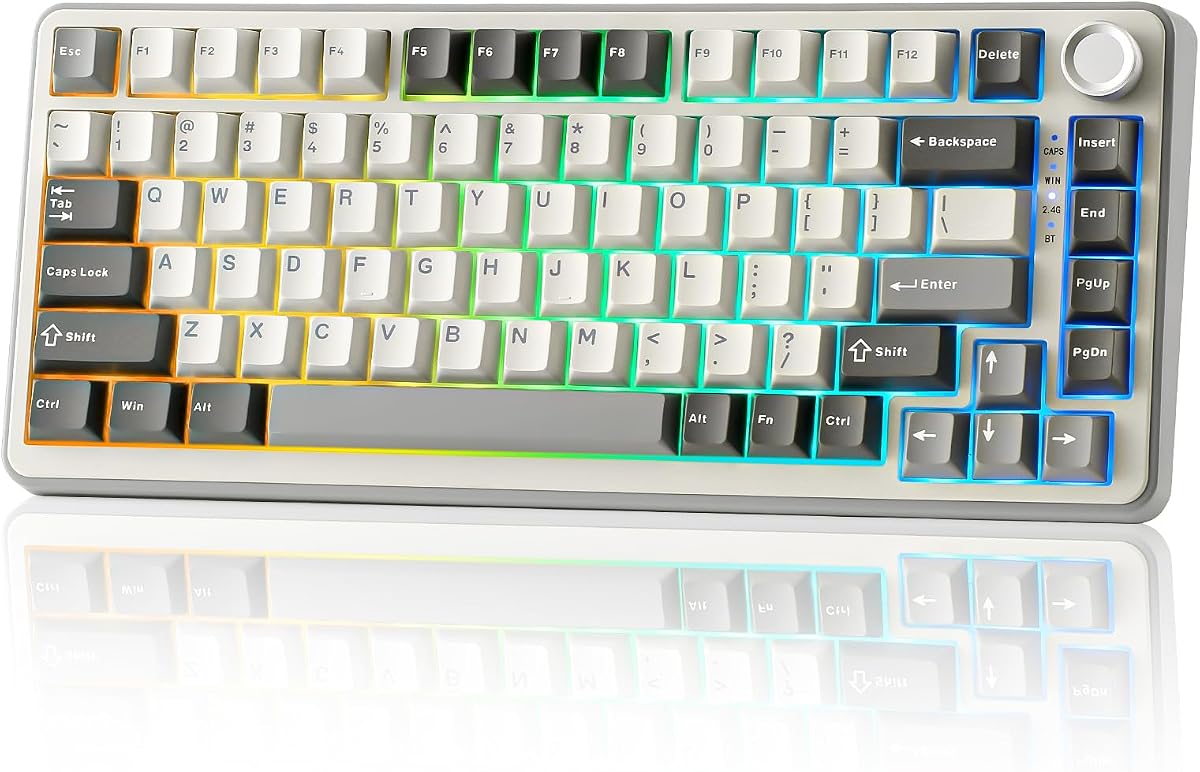
YUNZII B75 PRO 75% Wireless Mechanical Keyboard
4.6Editor score
Gasket mount design
Tri-mode connection support
Premium PBT keycaps
Explore the top 75 percent mechanical keyboards for gaming and productivity, comparing features, switches, and build quality to find your perfect match.
The 75 percent mechanical keyboard layout strikes a perfect balance between compact design and full functionality. It retains essential keys like arrows and function rows while freeing up valuable desk space for better mouse movement and ergonomic positioning.
We evaluated ten top-rated models based on build quality, switch performance, connectivity options, and customization features. Our analysis covers wireless capabilities, hot-swappable designs, and premium materials to help you make an informed decision.
Each product highlight showcases key strengths, real-world performance insights, and honest trade-offs to consider before buying. Please note that prices and availability may change frequently, so verify current listings before finalizing your purchase.
4.6Editor score

4.6Editor score

4.6Editor score
This side-by-side comparison highlights the core specifications and unique selling points of each model to help you quickly identify the best fit for your setup.




The AULA F75 Pro stands out as a top contender in the 75 percent mechanical keyboard market. With a strong rating of 4.6 stars, it delivers a well-rounded experience for both gamers and professionals seeking a compact layout.
We may earn a commission when you buy through this link, at no additional cost to you.
Its tri-mode connectivity supports Bluetooth 5.0, 2.4GHz wireless, and USB-C wired connections, allowing seamless switching between five devices. The pre-lubed Reaper switches provide a smooth and creamy typing feel right out of the box without needing modifications.
While the keyboard performs exceptionally well, some users may find the driver software limited to Windows systems. Additionally, the vibrant RGB lighting can reduce battery life if left on continuously, though the 4000mAh cell still offers significant usage time.
This keyboard is ideal for users who want a premium wireless experience without breaking the bank. The combination of build quality, switch performance, and versatile connectivity makes it a highly recommended choice for most setups.
The side button or shortcut keys let you toggle between connected devices instantly, boosting productivity for multitaskers.
Five layers of filling silencer reduce cavity noise, ensuring every keystroke sounds solid and satisfying.
We may earn a commission when you buy through this link, at no additional cost to you.
The RK ROYAL KLUDGE R75 offers incredible value for those seeking a gasket-mounted keyboard without a high price tag. Rated 4.4 stars, it balances cost with essential features like hot-swap support and durable keycaps.
We may earn a commission when you buy through this link, at no additional cost to you.
Its pre-lubed cream switches deliver a quiet and smooth typing experience suitable for office environments. The gasket mount design with five layers of sound-absorbing material ensures minimal vibration and a consistent feel across all keys.
While the build quality is impressive, the RGB lighting offers fewer modes compared to competitors, and the battery life may not last as long under heavy wireless use. However, these trade-offs are acceptable given the budget-friendly pricing.
This model is perfect for budget-conscious buyers who do not want to compromise on typing quality. The inclusion of PBT keycaps and a metal knob elevates the perceived value significantly beyond its price point.
Gasket mounting and PBT keycaps are typically found on expensive boards, making this a rare find in the entry-level segment.
The hot-swappable knob can be replaced with switches, allowing for unique customization options for enthusiasts.
We may earn a commission when you buy through this link, at no additional cost to you.
The AULA S75 PRO is a feature-rich powerhouse designed for enthusiasts who want the latest tech. Its standout interactive LCD screen displays system status, GIFs, and other visual details, setting it apart from standard keyboards.
We may earn a commission when you buy through this link, at no additional cost to you.
With advanced acoustic structuring and five layers of silencers, the typing sound is deep and thocky. The side-printed PBT keycaps not only look stylish but also resist wear and ensure light shines through the fonts clearly.
While the premium features come at a higher cost, the customization possibilities are unmatched. Users should note that the driver software for screen customization only supports Windows in wired mode, which may limit flexibility for some.
This keyboard is the top choice for power users and streamers who want a standout aesthetic. The combination of visual customization and robust performance makes it a worthy investment for a high-end desk setup.
View battery status, time, and custom GIFs directly on the keyboard for a dynamic user interface.
PCB single key slotting and extended silicone pads provide a soft yet stable keystroke experience.
We may earn a commission when you buy through this link, at no additional cost to you.
The Newmen GM326 offers one of the most accessible entry points into the 75 percent mechanical keyboard world. With a 4.4 rating, it proves you can get hot-swap capability and essential features for a minimal investment.
We may earn a commission when you buy through this link, at no additional cost to you.
Its linear red switches provide smooth typing without tactile bumps, ideal for rapid gaming inputs. The volume knob adds utility, allowing quick adjustments without fumbling through software or menus during use.
However, this model is strictly wired, which limits portability for wireless setups. The ABS keycaps may also shine or wear faster than PBT alternatives, but they are replaceable thanks to the hot-swap socket.
This is an excellent choice for beginners or anyone on a tight budget who wants to try mechanical switches. The compact design and essential features make it a practical tool for work or light gaming.
Hot-swap sockets let you experiment with different switch types without needing a soldering iron.
Indicators for Caps lock and Win lock ensure you stay aware of system status during intense tasks.
We may earn a commission when you buy through this link, at no additional cost to you.
This retro-styled mechanical keyboard focuses on providing a clean and quiet typing experience. The 4.6 rating reflects its ability to deliver a premium feel through gasket mounting and five layers of internal padding.
We may earn a commission when you buy through this link, at no additional cost to you.
The pre-lubed linear white jade switches are exceptionally smooth and silent, making this a great option for shared workspaces. The full-key macro programmability allows for complex commands that can streamline workflows or gaming strategies.
Because it is wired-only, it may not suit users who need wireless freedom. Additionally, accessing full customization features requires a specific driver, which might complicate setup for less technical users.
Ideal for those who prioritize noise reduction and simplicity, this keyboard offers a solid foundation for customization. Its sturdy build and responsive keys ensure reliability during long sessions of work or play.
The five-layer padding and gasket mount significantly dampen sound, creating a peaceful environment.
Program complex key combinations to automate tasks or execute in-game commands efficiently.
We may earn a commission when you buy through this link, at no additional cost to you.
This model emphasizes sound quality and durability through its gasket-mounted design and PBT keycaps. A 4.6 rating highlights its ability to provide a consistent and comfortable typing experience for daily use.
We may earn a commission when you buy through this link, at no additional cost to you.
The included sound-absorbing pads effectively reduce the hollow sound often associated with compact keyboards. Full key anti-ghosting ensures that every input is registered accurately, even during fast-paced gaming scenarios.
As a wired-only device, it lacks wireless flexibility, but this often translates to stable latency. The software allows for macro programming, though it may not offer as many advanced features as high-end competitors.
This keyboard is recommended for users who value tactile quality and acoustic performance. It serves well as a dedicated workstation tool where reliability and comfort are primary concerns.
PBT material resists oil and wear, keeping the texture smooth and clean over extended use.
Full key anti-ghosting guarantees every press is recorded, preventing missed commands during action.
We may earn a commission when you buy through this link, at no additional cost to you.
The MageGee 75% offers a straightforward and affordable option for gamers and typists needing a compact layout. Its 4.1 rating reflects a no-frills approach that focuses on essential performance and durability.
We may earn a commission when you buy through this link, at no additional cost to you.
Red switches provide smooth linear keystrokes ideal for rapid gaming inputs. The metal panel adds rigidity to the chassis, ensuring the keyboard remains stable on the desk during intense typing or gaming sessions.
While it lacks premium features like gasket mounting or PBT keycaps, its plug-and-play nature makes it easy to set up immediately. The blue LED backlight provides sufficient visibility for dark environments.
This is an excellent starter keyboard for those on a strict budget. It delivers reliable performance for basic tasks and gaming without the complexity of additional software or connectivity options.
A sturdy metal panel ensures the keyboard stays flat and stable even during aggressive keystrokes.
Supports Windows, macOS, and Linux systems without requiring driver installation or configuration.
We may earn a commission when you buy through this link, at no additional cost to you.
The Keychron K2 is a trusted choice for Mac users needing a compact mechanical keyboard. With a 4.4 rating, it excels in providing a layout designed specifically for macOS while maintaining full Windows compatibility.
We may earn a commission when you buy through this link, at no additional cost to you.
Its Super Red switches deliver smooth linear performance, and the white LED backlight ensures clear visibility without excessive power draw. The Bluetooth 5.1 chipset offers a stable wireless connection to multiple devices simultaneously.
While this version does not support hot-swapping, the battery life is exceptional, lasting up to 72 hours of typing. The ergonomic design and durable build quality make it a reliable daily driver for professionals.
This keyboard is perfect for Apple ecosystem users who value design and connectivity. The inclusion of extra keycaps ensures you can switch between operating systems seamlessly without hassle.
Specialized function keys and layout ensure full functionality with macOS shortcuts right out of the box.
The 4000mAh battery supports weeks of usage, reducing the need for frequent recharging.
We may earn a commission when you buy through this link, at no additional cost to you.
The YUNZII B75 PRO stands out for offering premium features like gasket mounting and hot-swap sockets at a very competitive price. Its 4.6 rating highlights its balance of build quality and modern connectivity options.
We may earn a commission when you buy through this link, at no additional cost to you.
The gasket mount structure ensures a soft and consistent typing feel across all keys. South-facing LEDs allow for better keycap compatibility, and the hot-swap PCB supports both 3-pin and 5-pin switches for endless customization.
The large 4000mAh battery ensures long wireless usage, though the keyboard is slightly heavier due to its robust build. Users should note that full macro functionality requires installing the driver software on compatible systems.
This keyboard is ideal for enthusiasts looking for high-end specs without the high price. It provides a premium experience that rivals more expensive boards in both comfort and customization.
South-facing LEDs prevent interference with keycap legends, allowing for more flexible customization.
Tri-mode connectivity ensures stable wireless performance across various devices and environments.
We may earn a commission when you buy through this link, at no additional cost to you.
The Womier SK80 combines mechanical performance with visual flair through its integrated color multimedia display. With a 4.7 rating, it appeals to users who want unique visual customization alongside solid typing performance.
We may earn a commission when you buy through this link, at no additional cost to you.
The gasket mount design paired with an EVA positioning plate creates a soft and responsive typing feel. The south-facing transparent switches allow RGB light to shine through clearly, enhancing the overall aesthetic.
While the screen adds significant customization potential, full functionality requires downloading specific driver software. The music-syncing lighting mode offers a fun visual experience during media consumption or gaming sessions.
This is a perfect choice for streamers and tech enthusiasts who value visual flair. The blend of acoustic comfort and screen customization makes it a standout option for modern setups.
The multimedia screen can display custom GIFs, system status, and other dynamic visual elements.
Gasket mounting and EVA padding work together to reduce noise and vibration during use.
We may earn a commission when you buy through this link, at no additional cost to you.
Selecting the right 75 percent mechanical keyboard involves evaluating several key factors to ensure it meets your specific needs.
The 75 percent layout typically includes around 80 to 84 keys. It saves space by removing the numpad but keeps essential navigation keys. This layout is ideal for users who want a compact desk setup without sacrificing critical functionality like arrow keys.
Look for a keyboard that fits your workspace size while providing the necessary keys for your workflow.
Mechanical switches come in three main types: linear, tactile, and clicky. Linear switches offer smooth keystrokes without bumps, making them popular for gaming. Tactile switches have a noticeable bump, while clicky switches make a distinct sound when pressed.
Choose a switch type that matches your preference for feedback and noise level to ensure comfortable long-term use.
Modern keyboards often support tri-mode connectivity including Bluetooth, 2.4GHz wireless, and wired USB-C. This flexibility allows you to switch between devices seamlessly. Consider how many devices you need to connect simultaneously.
Ensure the keyboard supports your preferred wireless protocols to avoid connectivity issues during daily tasks.
A hot-swappable PCB allows you to change switches without soldering. This feature is perfect for enthusiasts who want to experiment with different switch types or replace faulty ones easily. It extends the lifespan and versatility of your keyboard.
Prioritize hot-swap support if you plan to customize your typing experience or repair the keyboard yourself.
Construction materials like PBT keycaps resist wear and shine better than ABS. Gasket-mounted designs offer a softer typing feel by isolating the PCB from the case. These features contribute to a premium tactile experience and durability.
Look for sturdy materials and mounting styles that promise long-term reliability and comfort.
For wireless models, battery life is critical. A larger capacity ensures longer usage between charges. Some keyboards offer up to weeks of use with lights off, while others may need frequent charging depending on RGB usage.
Check the rated battery capacity and estimated usage time to ensure it fits your daily routine.
Advanced keyboards come with software for programming macros, changing lighting effects, and remapping keys. Ensure the software is compatible with your operating system. Some drivers may be limited to Windows, which could be a drawback for Mac users.
Verify software support early to avoid limitations in customizing your keyboard to your needs.
RGB backlighting adds aesthetic value and helps with visibility in low-light environments. Some keyboards support music-syncing effects or per-key customization. Consider whether you need full RGB or if single-color backlighting is sufficient for your setup.
Balance the visual features with battery efficiency if you prefer extended wireless use.
To maintain optimal performance, clean your keyboard regularly by removing keycaps and wiping away dust or debris with a soft brush. This prevents dirt from accumulating around the switches which can cause sticky keys.
Store your keyboard in a dry and cool environment to prevent moisture damage or battery degradation. For wireless models, avoid exposing the unit to extreme temperatures which may affect the battery life.
Periodically update your keyboard's firmware and driver software to ensure compatibility and access new features. This helps maintain stability and ensures your keyboard remains functional with system updates.
The 75 percent layout saves desk space by removing the numpad while retaining essential keys like arrows and function rows. This compact design improves ergonomics by allowing the mouse to be closer to your hand, reducing arm strain during use.
Hot-swappable keyboards allow you to change switches without soldering, making repairs and customization much easier. This flexibility extends the lifespan of the board and lets you tailor the typing feel to your preferences over time.
Many advanced keyboards have drivers that support Windows but may have limited features on macOS. Always check product specifications to ensure software compatibility before purchasing if you plan to customize lighting or macros.
Gasket mounting isolates the keyboard PCB from the case using cushioning materials, reducing vibration and noise. This design results in a softer, more consistent keystroke feel that is highly favored by enthusiasts for comfort.
Modern 2.4GHz wireless connections offer latency comparable to wired connections, making them suitable for gaming. Bluetooth is better for general office work, while 2.4GHz is ideal for tasks requiring instant response.
Yes, most keyboards in this guide work with Mac computers but may require a mode switch or key remapping. Some models like the Keychron K2 come with extra keycaps specifically designed for macOS layouts.
The AULA F75 Pro, RK ROYAL KLUDGE R75, and AULA S75 PRO stand out as top choices for performance and features. Each offers unique benefits that cater to different needs ranging from budget-friendly options to premium customization.
When making your decision, prioritize the features that matter most to you such as battery life, switch type, or connectivity. A keyboard that fits your workflow will provide the best return on investment and satisfaction.
Remember that prices and availability can change frequently, so verify current listings and read recent user reviews before buying. Ensuring you have the latest information will help you secure the best deal for your new keyboard.