
ARCTIC P9 PWM PST
4.5Editor score
Wide RPM range
High static pressure
Cable splitter included
This guide compares the top 92mm case fans for quiet performance and cooling efficiency to help you choose the right fan for your build.
Choosing the right cooling solution is critical for maintaining system stability. Small form factor builds often rely on 92mm fans to manage heat effectively. These compact units deliver significant airflow while fitting into tight spaces where standard sizes cannot go.
We evaluated ten leading models based on noise levels, static pressure, and build quality. Our analysis focuses on real-world performance metrics and user feedback to ensure reliability. Each product was assessed for its ability to handle demanding thermal loads in constrained environments.
Every pick highlights specific strengths like PWM control or low-profile designs. Prices may vary over time so verify current offers before purchasing. Use this resource to find a fan that balances performance with your specific case requirements and budget constraints.
4.5Editor score

4.8Editor score

4.8Editor score
This table presents a side-by-side view of key specifications for all ten models. Review the details to identify which fan matches your specific cooling needs and installation constraints accurately.


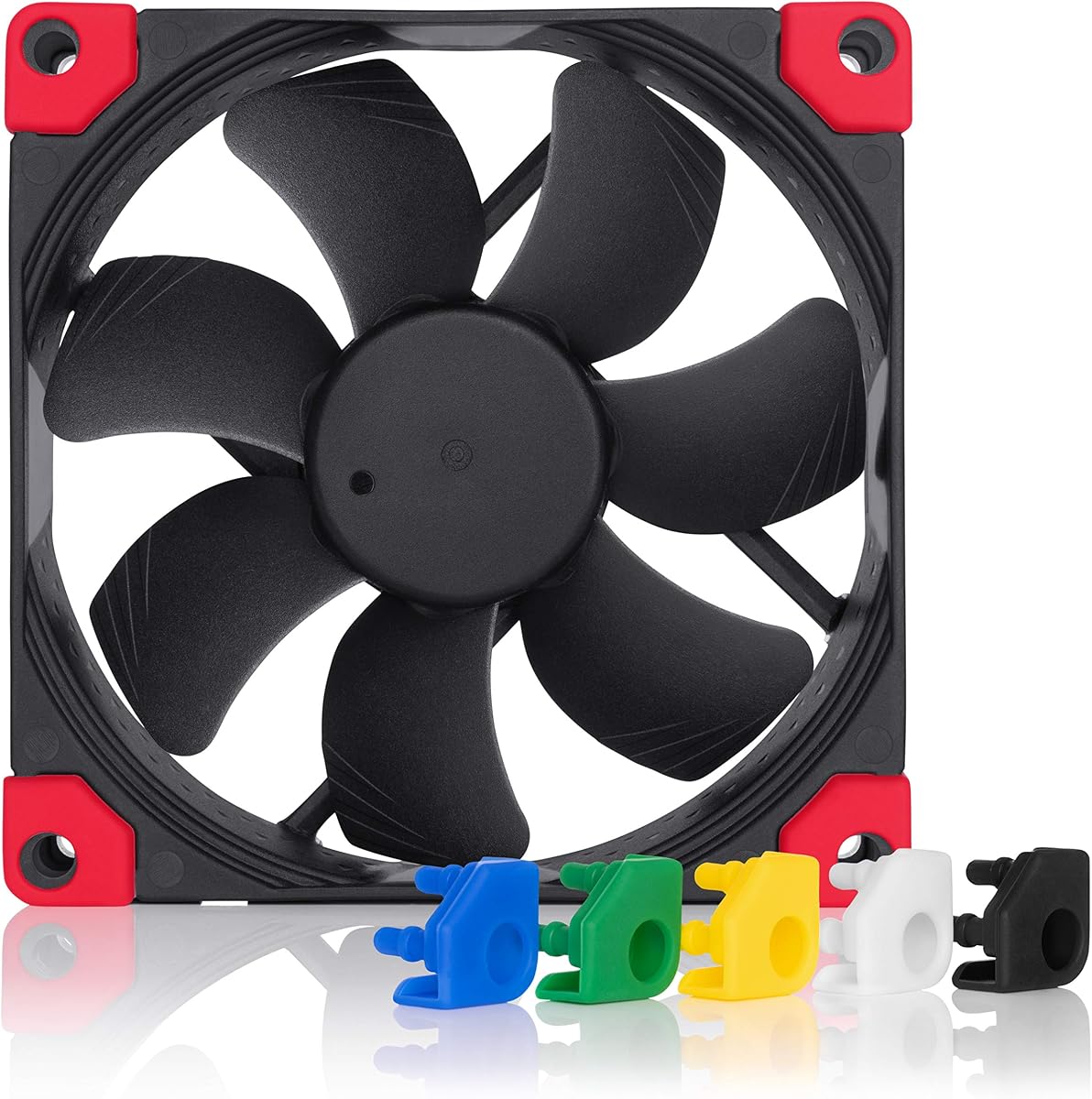


The Noctua NF-A9 PWM stands out as a premium solution for compact cooling needs. It delivers exceptional silence while maintaining strong airflow performance. The award-winning design ensures reliability across thousands of operating hours.
We may earn a commission when you buy through this link, at no additional cost to you.
Its Flow Acceleration Channels and AAO frame system optimize air movement efficiently. The 4-pin PWM interface allows precise speed control through your motherboard. Anti-vibration mounts reduce resonance noise significantly during high-load tasks.
While the price is higher than budget options the performance justifies the cost. The included low-noise adaptor offers flexibility for silent setups. Some users may prefer RGB lighting which this model lacks entirely.
This fan is ideal for HTPCs and ITX builds where silence matters most. If you prioritize quality and quietness over cost this is the top recommendation. It consistently outperforms competitors in noise-to-performance ratios.
Advanced acoustic optimization minimizes noise turbulence for a peaceful environment.
Over 150000 hours MTTF ensures years of continuous operation without failure.
We may earn a commission when you buy through this link, at no additional cost to you.
The ARCTIC P9 PWM PST offers incredible value for budget-conscious builders. It supports a wide RPM range allowing flexible cooling profiles. The 0dB mode lets the fan stop completely when temperatures are low.
We may earn a commission when you buy through this link, at no additional cost to you.
High static pressure makes it suitable for radiators and dense heat sinks. The alloy lubricant bearing reduces friction to prevent heat buildup over time. Including a cable splitter adds convenience for daisy-chaining fans.
The construction is less robust than premium brands which is expected at this price. Noise levels rise noticeably when pushed to maximum speed settings. However for typical use it remains quiet enough for most cases.
Choose this fan if you need efficient cooling without breaking the bank. It works well in budget builds where silence is secondary to affordability. The included accessories save extra purchases immediately.
Optimized blade shape ensures air penetrates dense radiators effectively.
Variable speed control adapts cooling to real-time thermal requirements.
We may earn a commission when you buy through this link, at no additional cost to you.
This model is designed specifically for low-profile CPU coolers and tight spaces. The 14mm thickness allows clearance in compact cases without sacrificing performance. The chromax.black.swap edition provides a sleek all-black aesthetic.
We may earn a commission when you buy through this link, at no additional cost to you.
It features HS-PWM control for automatic speed adjustments and standstill at zero percent. The swappable anti-vibration pads add a touch of customization. Despite its size it maintains high static pressure and airflow efficiency.
The high cost might deter some users looking for standard fans. Handling requires care as the thin frame is slightly more fragile than thicker units. However the performance in tight spaces is unmatched.
Ideal for SFF builds needing specific dimensions and top-tier silence. If you own an NH-L9 series cooler this fan is the perfect match. Prioritize it for aesthetics and minimal clearance requirements.
Fits where standard fans cannot ensuring better CPU clearance.
Interchangeable pads allow color matching to your system build.
We may earn a commission when you buy through this link, at no additional cost to you.
The Noctua NF-A9x14 PWM is the classic version of the slim profile fan. It shares the same technical benefits as the chromax version but retains the original look. A great choice for traditional builders.
We may earn a commission when you buy through this link, at no additional cost to you.
Its SSO2 bearing ensures smooth operation and long-term durability. The 4-pin PWM interface provides precise speed control via your motherboard headers. Noise levels remain impressively low even under load.
You miss out on the swappable pads found in the chromax edition. The standard brown and tan colors may clash with black cases. However performance remains consistent with top-tier expectations.
Select this if you prefer the original Noctua design over customization. It fits perfectly in ITX cases needing slim cooling solutions. Trust its reliability for long-term silent operation.
Engineered bearing reduces friction for silent and stable performance.
Designed to match standard cooler mounting holes exactly.
We may earn a commission when you buy through this link, at no additional cost to you.
Thermalright offers a compelling alternative with the TL-P9 model. It balances performance and cost effectively for many users. The S-FDB bearings provide a good noise floor for typical environments.
We may earn a commission when you buy through this link, at no additional cost to you.
Silicone feet at corners help dampen vibration transmitted to the chassis. The 7-blade design optimizes airflow without creating excessive turbulence. PWM control ensures speed matches system temperature requirements accurately.
Some variance in build quality has been noted among different batches. Mounting hardware is functional but not as refined as premium brands. Despite this it performs well in standard case scenarios.
This is a great pick for budget builds needing decent cooling. It works well as a supplementary case fan or CPU cooler replacement. Ensure your case mounting points align perfectly.
Soft feet isolate the fan to reduce case noise effectively.
Seven blades move air efficiently while maintaining quiet operation.
We may earn a commission when you buy through this link, at no additional cost to you.
The ARCTIC P9 Silent simplifies cooling with a fixed speed approach. It runs at 1900 RPM ensuring consistent airflow without complex wiring. Ideal for users who prefer plug-and-play simplicity.
We may earn a commission when you buy through this link, at no additional cost to you.
Its high static pressure capability makes it suitable for restricted airflow areas. The alloy lubricant bearing maintains low friction for long life. Silence is prioritized over variable performance control.
Lack of PWM means you cannot adjust speed via BIOS easily. Voltage control is possible but less precise than modern PWM headers. This limits its flexibility in dynamic thermal environments.
Choose this for silent cases where constant cooling is sufficient. It fits well in HTPC setups needing stable operation. Verify your power supply can handle the fixed voltage draw.
Fixed speed ensures consistent airflow without complex setup steps.
Optimized blades push air through dense heat sinks effectively.
We may earn a commission when you buy through this link, at no additional cost to you.
This edition brings the classic Noctua performance in an all-black finish. It eliminates the traditional brown color for a modern black aesthetic. Perfect for dark-themed PC builds seeking high reliability.
We may earn a commission when you buy through this link, at no additional cost to you.
Features the same Flow Acceleration Channels and AAO frame as the original. The swappable pads allow you to customize the frame color. It maintains silence and efficiency typical of the brand.
Premium pricing applies here reflecting the brand reputation and finish. RGB lighting is absent so do not expect lighting effects from the fan itself. Still it stands as a premium component.
Select this for stylish builds needing silent cooling without compromise. It fits into standard 92mm slots perfectly. The quality ensures years of stable performance.
All-black finish blends seamlessly with dark case internals.
Interchangeable pads let you match frame colors to your preference.
We may earn a commission when you buy through this link, at no additional cost to you.
The TL-9015B offers a slim 15mm profile suitable for compact CPU coolers. It reaches up to 2700 RPM for aggressive cooling when needed. Vibration pads help keep noise low during typical operation.
We may earn a commission when you buy through this link, at no additional cost to you.
High airflow capacity supports heat dissipation in small form factors. The design focuses on providing thin clearance without losing performance. Installation is straightforward with standard mounting methods.
Long-term reliability data is limited compared to established brands. High speed settings can introduce audible noise despite damping efforts. Check reviews for long-term durability before committing.
This is a budget-friendly choice for slim clearance needs. Use it in cases where space is extremely restricted. Ensure mounting points align before purchase.
Fits in tight spaces where standard fans cannot fit.
PWM support allows speed adjustment based on thermal load.
We may earn a commission when you buy through this link, at no additional cost to you.
The FLX version provides three fixed speeds via Low-Noise Adaptors. It uses a 3-pin connector compatible with older headers or power supplies. Ideal for users prioritizing simplicity over dynamic speed changes.
We may earn a commission when you buy through this link, at no additional cost to you.
Noise levels drop to 17.1 dB(A) at lower speeds for silent operation. The build quality matches the premium standards set by Noctua. Adaptors included allow easy speed adjustments.
Lack of PWM prevents automatic speed adjustment based on temperature. You must manually change adaptors to alter fan performance. Max RPM is lower than standard PWM models.
Choose this for systems needing fixed low noise operation. It works well for NAS devices or HTPCs with stable loads. Verify your motherboard has a 3-pin header.
Adaptors allow you to pick three specific operating speeds.
3-pin design ensures compatibility with older power setups.
We may earn a commission when you buy through this link, at no additional cost to you.
The P9 Max pushes performance boundaries with up to 4300 RPM. It offers massive static pressure for challenging cooling scenarios. Ideal for high-performance needs in compact enclosures.
We may earn a commission when you buy through this link, at no additional cost to you.
Fluid Dynamic Bearings support long service life and smooth operation. The wide RPM range provides flexibility for different cooling demands. 0dB mode stops the fan when heat is low.
Max speed is quite loud and may disturb quiet environments. Ensure your case has enough clearance for high air pressure. Build quality is decent but lacks premium refinement.
Opt for this when maximum airflow is the top priority. It works well in radiators requiring high pressure. Check noise tolerance before installing at max settings.
High RPM ensures maximum cooling power when required.
Wide speed range allows tuning for different thermal loads.
We may earn a commission when you buy through this link, at no additional cost to you.
Selecting a 92mm fan involves balancing size constraints with thermal performance. Understanding key factors helps you pick a unit that fits your case and cools your components effectively.
Thickness dictates clearance in small cases. Standard 25mm fans offer better airflow but 14mm options save space.
Choose thinner fans for low-profile coolers and standard for general use.
Bearings influence lifespan and noise. Fluid Dynamic and SSO2 bearings are durable and quiet.
Prioritize high-quality bearings for silent long-term operation.
3-pin fans allow voltage control but lack PWM automation. 4-pin PWM supports precise speed adjustments via BIOS.
Use 4-pin connectors for smarter thermal management.
Static pressure measures air pushing ability. High pressure fans work best with radiators or dense heatsinks.
Check static pressure ratings for restricted airflow cases.
Decibel ratings indicate loudness. Lower dB values mean quieter fans for home offices or quiet rooms.
Look for noise ratings under 25 dB for silent builds.
Premium fans cost more but last longer. Budget models save cash but may lack durability.
Set a budget range before choosing a specific model.
Vibration dampening mounts reduce noise transmission. Check if screws and rubber pads are included.
Ensure hardware matches your case mounting points.
Install the fan securely using included screws or mounts to prevent wobbling. Ensure airflow direction aligns with case vents for optimal cooling efficiency.
Clean dust buildup from the blades periodically to maintain performance. Use compressed air to clear debris without damaging the bearing.
Monitor fan speeds via BIOS to ensure PWM control functions correctly. Adjust curves if noise becomes too high during idle usage.
Standard 92mm fans are usually 25mm thick. However low-profile models exist in 15mm or 14mm thicknesses for tighter spaces.
Yes PWM fans allow dynamic speed control which improves efficiency. 3-pin fans are simpler but lack automated temperature adjustments.
Good 92mm fans typically operate under 25 dB. Premium models may drop below 20 dB for silent environments.
If you have more fans than headers a splitter or hub is necessary. Some fans like the ARCTIC P9 include built-in splitters.
Yes many CPU coolers support 92mm fans. Check the cooler's clearance before purchasing a specific model.
High-quality fans last over 150000 hours. Budget models may have shorter lifespans depending on bearing quality.
MTTF means Mean Time To Failure. It predicts the average operational lifespan of the fan in hours.
The Noctua NF-A9 PWM leads as the top choice for balanced quality and silence. Budget builders should consider the ARCTIC P9 PWM PST for great value.
Prioritize bearing quality and PWM support to ensure longevity. Proper airflow direction also matters more than speed alone for cooling.
Check current offers before buying as prices change frequently. Verify dimensions to ensure the fan fits your specific case.