
ARCTIC P12 Pro A-RGB
4.7Editor score
Affordable price point
High static pressure design
Fluid dynamic bearing
This guide compares the top 10 addressable RGB fans for PC cooling and lighting, evaluating airflow, noise, and sync features.
Addressable RGB fans transform your PC build with vibrant lighting and efficient cooling. They synchronize with your motherboard for stunning effects while maintaining airflow. Selecting the right fan balances performance with aesthetics to create a visually appealing system.
We evaluated ten top models based on airflow, noise levels, bearing types, and lighting control. Our comparison highlights daisy-chaining capabilities and compatibility with motherboard sync software. This list covers budget options and premium choices for any build.
Each pick showcases specific strengths like quiet operation or high static pressure. Prices and availability change frequently, so check current listings before buying. We focus on real-world performance to help you choose the best fan for your case.
4.7Editor score

4.7Editor score
4.8Editor score
This side-by-side comparison highlights key specifications and features for each fan model. It helps you quickly identify the best option for your cooling and lighting needs.




This pack of five fans delivers exceptional cooling and lighting for the price. It holds a strong 4.7 rating from users who appreciate its balance of performance and noise. The S-FDB bearing ensures smooth operation while the ARGB lights sync easily.
We may earn a commission when you buy through this link, at no additional cost to you.
The high-brightness LED atomizing blades reflect light softly for a refined look. It manages up to 17 modes of light effects with motherboard control. Airflow reaches 66.17 CFM which is ideal for standard cases and radiators.
While the fans are quiet you need to route cables carefully to avoid clutter. The software support relies on your motherboard brand which might limit control. These trade-offs are acceptable given the high quality and affordability.
Anyone building a budget or mid-range gaming PC should consider this pack. It provides enough fans to outfit a full case while saving money. It is a reliable choice for those wanting good lighting and cooling.
The S-FDB bearing minimizes friction to extend fan life and reduce noise during operation.
Connect to your motherboard to control color modes through built-in ARGB software.
We may earn a commission when you buy through this link, at no additional cost to you.
The ARCTIC P12 Pro stands out as an affordable powerhouse for cooling. It earns a 4.7 rating for its ability to push air through dense radiators. The fluid dynamic bearing ensures it runs smoothly without excessive vibration.
We may earn a commission when you buy through this link, at no additional cost to you.
Its high static pressure helps it move air through restrictive cases or radiators. You can adjust speeds up to 3000 rpm for maximum cooling power. The design balances performance with low noise levels effectively.
It has basic lighting compared to others with fewer control options. You might need to buy extra cables for daisy chaining. These limits are minor when the price is so low.
Buy this if you want maximum cooling per dollar spent. It works well for system integrators who need reliable fans without extra cost. It is great for simple builds needing strong airflow.
The fan pushes air through dense obstacles better than standard airflow fans.
Automatic balancing reduces gaps for a smooth quiet running experience.
We may earn a commission when you buy through this link, at no additional cost to you.
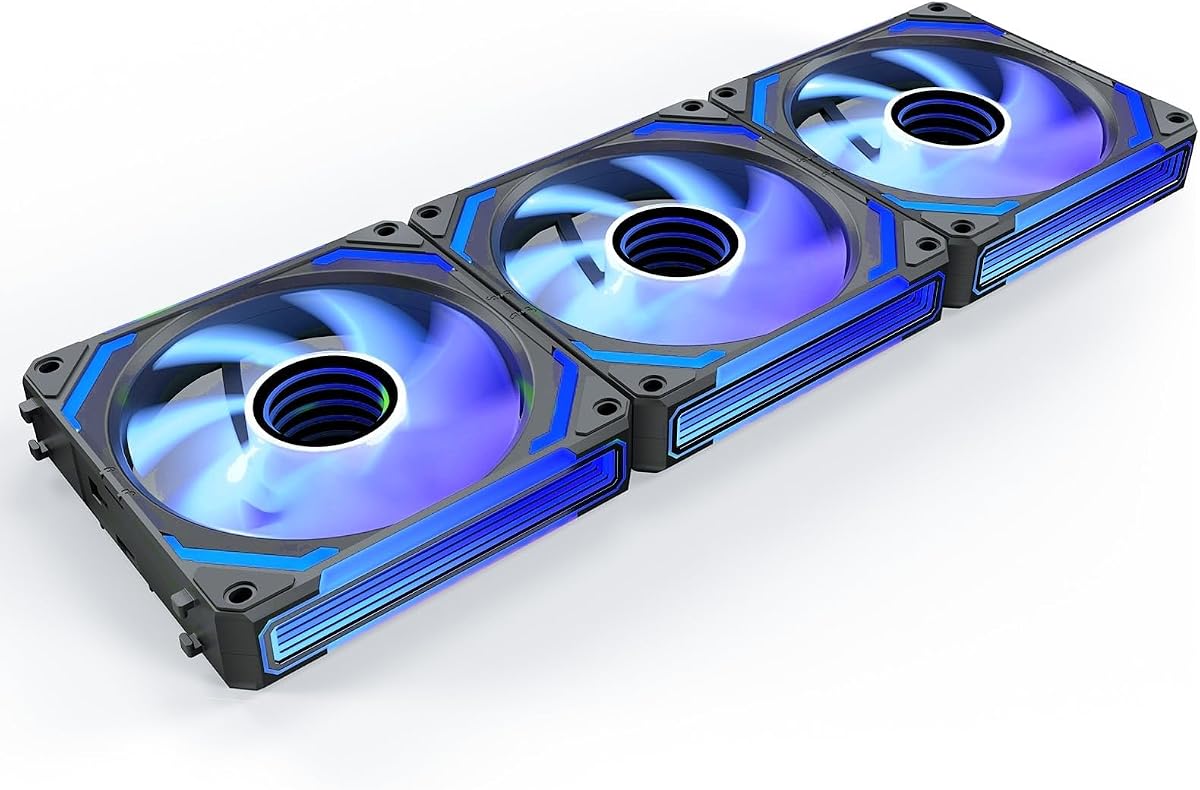
This pack offers a premium look with its infinity mirror design and music sync. It has a 4.8 rating for combining high-end visuals with effective cooling. The FDB bearing keeps noise low even at high speeds.
We may earn a commission when you buy through this link, at no additional cost to you.
The lighting automatically changes with ambient sound or game audio. It includes a dedicated controller for independent control without extra cost. Daisy chain connections reduce cable clutter significantly inside your case.
The price is higher than basic fans which might not suit everyone. Ensure your motherboard supports 5V 3-PIN sync for the full effect. These issues are worth it for visual impact.
PC modders and gamers seeking unique lighting should choose this fan. It turns a standard case into a landscape with layered lighting. It is a top choice for those prioritizing aesthetics.
Supports eight music rhythm modes for dynamic visual reactions to sound.
Daisy chain design allows multiple fans to connect with less wiring.
We may earn a commission when you buy through this link, at no additional cost to you.
This pack features magnetic connections that simplify daisy chaining three fans. It holds a 4.6 rating for reliability and ease of installation. The 9 addressable LEDs offer millions of colors via motherboard sync.
We may earn a commission when you buy through this link, at no additional cost to you.
Optimized hydraulic bearings provide silent operation and long service life. The anti-vibration mounting system prevents rattling during use. It is a great option for cleaner cable management and setup.
You rely on the motherboard for control which may vary by model. It is less suited for high-pressure radiator use. These points are minor for general case cooling.
Use this fan for a tidy build with standard cooling needs. It simplifies connections and offers a smooth visual experience. It fits well for users wanting easy installation.
Magnetic connections allow you to chain fans without extra cables.
Anti-vibration mounting reduces noise from vibrations in the case.
We may earn a commission when you buy through this link, at no additional cost to you.
This kit includes reverse fans for better visibility on side panels. It has a 4.4 rating for its comprehensive set of lighting and cooling tools. The hub manages both speed and lights to reduce clutter.
We may earn a commission when you buy through this link, at no additional cost to you.
With 28 LEDs each fan offers more brightness than standard models. The design ensures visuals from multiple angles. PWM control adjusts speed automatically based on temperature.
The hub needs power which adds to your wiring needs. Connecting reverse fans requires careful planning for airflow direction. These issues are manageable for experienced builders.
Buy this if you need reverse fans and centralized control. It helps unify case airflow and lighting style easily. It suits builds wanting balanced intake and exhaust options.
Reverse blades keep lighting visible even when installed as intake.
The hub allows you to manage all fans from one controller.
We may earn a commission when you buy through this link, at no additional cost to you.
This three pack offers great value with strong cooling and lighting. It has a 4.6 rating from users who want reliable fans cheaply. The long cables help with easier cable management inside your case.
We may earn a commission when you buy through this link, at no additional cost to you.
S-FDB bearings keep the fans quiet while maximizing cooling performance. The ARGB sync matches motherboard colors perfectly. It is ideal for standard case and CPU cooler use.
It lacks reverse options or advanced light controls. This fits basic builds well but might lack features for advanced setups. It is a solid choice for simple needs.
Use this for filling a case with consistent cooling and looks. It saves money without sacrificing performance or noise levels. It fits well for budget conscious users.
Long cables allow you to route wires further for a cleaner build.
Fans adjust speed automatically using PWM to match heat levels.
We may earn a commission when you buy through this link, at no additional cost to you.
This five pack combines durability with consistent cooling and lighting. It earns a 4.7 rating for its steady performance over time. The intelligent temperature control adjusts speed automatically for efficiency.
We may earn a commission when you buy through this link, at no additional cost to you.
The LED blade design creates a soft lighting effect that matches cases well. It offers 17 modes of light effects for visual variety. Airflow remains high at 66.17 CFM for effective cooling.
It has standard features without advanced software customization. This might limit those seeking complex light patterns. It is a practical choice for reliable operation.
Choose this for a full case upgrade with minimal fuss. It provides enough fans to cover all slots with low noise. It fits well for steady daily performance.
PWM control lets fans slow down to reduce noise at idle.
Blade design reflects light evenly for a softer ARGB effect.
We may earn a commission when you buy through this link, at no additional cost to you.
This pack features a seven blade design for improved airflow and pressure. It has a 4.6 rating for reliable cooling and easy connections. Daisy chain cables reduce the need for multiple ports.
We may earn a commission when you buy through this link, at no additional cost to you.
It allows fan speeds up to 2000 RPM for stronger cooling. The anti-vibration mounting keeps the frame stable during use. It suits users needing efficient case or radiator fans.
You only get two fans per pack which might limit coverage. Noise increases slightly at max speed. This fits small builds needing targeted cooling.
Buy this for compact cases needing better airflow. It simplifies wiring while keeping a clean look. It is a good fit for simple cooling needs.
Seven blades improve air pressure for better component cooling.
Daisy chain design uses fewer ports for multiple fans.
We may earn a commission when you buy through this link, at no additional cost to you.
This pack includes a splitter to make installation quick and easy. It has a 4.8 rating for simplicity and effective airflow. The hydraulic bearing keeps noise low during normal operation.
We may earn a commission when you buy through this link, at no additional cost to you.
With 66.1 CFM airflow it moves air efficiently through cases. Each fan has 9 LEDs for bright colors via sync. It suits general case cooling and standard cooling.
Max speed is lower than some competitors. This may limit high performance scenarios. It works well for standard daily usage.
Use this for a quick upgrade with minimal hassle. The splitter removes guesswork from wiring. It is a great fit for simple builds.
Includes a 3-way splitter for instant connection of multiple fans.
Daisy chain cables leave room for other internal devices.
We may earn a commission when you buy through this link, at no additional cost to you.
This pack offers high airflow with AirGuide vanes for targeted cooling. It has a 4.6 rating for performance and reliable build quality. Magnetic dome bearings reduce noise while handling high speeds.
We may earn a commission when you buy through this link, at no additional cost to you.
It can push up to 72.8 CFM which is strong for case fans. Static pressure helps it work well as radiator fans. It is a great choice for thermal performance.
You need compatible motherboard headers for full control. The price is higher than basic options. It fits performance seekers wanting strong cooling.
Choose this if cooling power is a top priority. It balances airflow and silence for demanding builds. It suits users wanting reliable high-end fans.
AirGuide vanes direct airflow where it is needed most.
Fans reach 72.8 CFM to cool system components fast.
We may earn a commission when you buy through this link, at no additional cost to you.
Choosing the right addressable RGB fan requires evaluating key specs like airflow, noise, and lighting sync. Understanding these factors ensures you pick fans that fit your build goals.
Airflow measures how much air the fan moves which is vital for general case ventilation. Static pressure helps push air through restrictive obstacles like radiators or filters. If you plan to mount fans on radiators choose high static pressure fans. For general exhaust and intake prioritize high airflow models.
Select airflow for open cases and static pressure for radiators.
Bearings affect the noise and lifespan of your fans. S-FDB and FDB bearings are hydrodynamic and offer quiet long operation. Ball bearings last longer but tend to be louder. Sleeve bearings are cheaper but wear out faster in high heat.
Choose hydrodynamic bearings for quiet and reliable long-term performance.
Check your motherboard for compatible ARGB headers. Most modern boards support 5V 3-pin connectors for addressable lighting. Older boards might use 12V 4-pin which requires adapters. Ensure your fan supports the same protocol to avoid hardware damage.
Verify your motherboard supports 5V 3-pin sync before buying.
Daisy-chaining lets you connect multiple fans with one cable to reduce clutter. Look for magnetic or interlocking connections that make wiring easier. This feature is especially useful for packs of three or more fans. It saves ports and keeps your case tidy.
Choose daisy-chain capable fans to simplify cable management.
Noise is measured in decibels and should ideally stay below 30 dBA for quiet builds. High RPM usually means more noise. Look for models optimized for low decibel output. If you are sensitive to sound check reviews on operational noise.
Prioritize fans rated under 30 dBA for a quiet workspace.
Fans often come in packs of two three or five. Larger packs offer better value and coverage. Some kits include reverse fans to improve visibility from the side. Assess how many spots you need to fill before buying.
Choose packs that match your case slot requirements for value.
Addressable fans allow individual control of each LED for effects. Check if the fan supports many modes like music sync or wave patterns. Some need specific software while others work with any motherboard. Decide how much visual control you want.
Select fans with software that matches your motherboard ecosystem.
Install fans with consistent airflow direction to maximize cooling. Ensure arrows on the frame point toward the desired exhaust side. This prevents hot spots and improves system performance.
Route cables to minimize tangling. Use daisy-chain connectors or bundled headers to keep wires organized. This ensures air can move freely and improves aesthetics.
Update your motherboard lighting software to ensure all RGB effects work. Check fan curves in BIOS to balance noise and cooling. Dust fans every few months to maintain airflow and bearing health.
RGB fans have all LEDs change color together while ARGB fans allow individual LED control. ARGB creates more complex effects like waves or music sync. Make sure your motherboard supports ARGB to use these features.
If your motherboard has 5V 3-pin headers you do not need a controller. Some packs include hubs that let you manage fans without extra software. Hubs are useful if you lack enough motherboard headers.
Yes but syncing them may require universal software or a shared hub. Different brands might use different control protocols. Use a generic controller to unify colors across brands.
Use daisy-chain cables that link fans in a series. Only one cable connects to the motherboard while others link to each other. This reduces clutter and saves ports on your board.
Static pressure measures a fan's ability to push air through obstacles. High static pressure is best for radiators or filters. High airflow is better for open case mounting.
Reverse fans show the same side when mounted as intake. This helps keep lighting visible and consistent. They are ideal for front and side panels.
Quality fans stay under 30 dBA which is very quiet. Noise increases at higher RPM. Look for fans with hydrodynamic bearings for lower noise levels.
We covered ten top addressable RGB fans offering strong cooling and stunning visuals. Our picks range from budget-friendly packs to premium lighting options. Each model delivers reliable performance for different user needs.
Prioritize airflow and bearing quality to ensure long-term reliability. Choose fans with daisy-chaining for cleaner builds. Match your lighting to your motherboard sync options.
Check current prices and stock availability before purchasing. Prices fluctuate and deals often appear on Amazon. We update this guide regularly to reflect the best choices available.