
HP 24 Touchscreen All-in-One Desktop Computer for Home and School
4.3Editor score
Intel Processor N100
16GB DDR4 RAM
1TB PCIe SSD Storage
Finding the right All in One Desktop PC with Touchscreen can transform your workspace into a sleek, efficient hub. These devices combine powerful computing with interactive displays, making them ideal for professionals and families alike.
We analyzed ten leading models based on processor speed, memory capacity, display quality, and user feedback. Each entry offers a unique blend of performance and design tailored to different needs and budgets.
Every pick highlights key specs, pros, and cons to guide your decision. Prices and availability change frequently, so verify current details before purchasing to ensure you get the best value today.
4.3Editor score

4.7Editor score

5.0Editor score
As an Amazon Associate we earn from qualifying purchases.
This side-by-side comparison evaluates all ten selected All in One Desktop PC with Touchscreen models across critical performance metrics and design features to highlight their unique strengths.




This HP All in One Desktop PC ranks first due to its exceptional balance of speed and display quality. With a 4.7 rating, it stands out for delivering smooth multitasking and crisp visuals perfect for modern workloads.
We may earn a commission when you buy through this link, at no additional cost to you.
The AMD Ryzen AI 7 processor handles complex tasks effortlessly while the 27-inch touchscreen provides intuitive interaction. You get 16GB of DDR5 RAM ensuring apps run smoothly even when multiple browser tabs are open.
While the price is higher than some competitors, the included accessories like the touchscreen pen add significant value. The anti-glare panel reduces eye strain during long hours making it comfortable for extended use.
This model is ideal for professionals needing reliable AI tools and a large interactive workspace. It offers everything you need right out of the box for seamless daily productivity without additional setup.
The dedicated Microsoft Copilot key and 50-TOPS NPU accelerate AI assisted workflows making routine tasks faster and easier.
With 178-degree viewing angles and DC Dimming technology the display reduces flicker to ensure comfortable viewing throughout the day.
We may earn a commission when you buy through this link, at no additional cost to you.
This model earns the Best Budget badge by offering essential performance at an accessible price point. It delivers a clean experience for students and home users needing reliable daily computing.
We may earn a commission when you buy through this link, at no additional cost to you.
The Intel N100 processor handles web browsing and document editing smoothly while the 16GB RAM supports light multitasking. You get a crisp 23.8-inch touchscreen that makes navigation intuitive and responsive.
While it may not handle heavy video editing or gaming well the 1TB SSD ensures ample space for files. The compact footprint saves desk space making it a great choice for smaller rooms.
Buyers seeking a no-frills machine for standard tasks will find this HP All in One Desktop PC an excellent value. It simplifies setup and provides a clutter-free workspace for everyday school or work needs.
Pre-installed Windows 11 Home ensures you can start using your computer immediately after unboxing without complex configurations.
WiFi 6 and Bluetooth 5.3 support keep your peripherals connected reliably without tangled cables cluttering your workspace.
We may earn a commission when you buy through this link, at no additional cost to you.
With a perfect 5.0 rating this Dell All in One Desktop PC offers top-tier performance for demanding professionals. It features the latest Intel Ultra 7 processor ensuring rapid processing and future-ready capabilities.
We may earn a commission when you buy through this link, at no additional cost to you.
The 32GB DDR5 RAM handles massive spreadsheets and creative apps without slowing down. You benefit from Wi-Fi 7 for ultra-fast internet speeds and a 23.8-inch touchscreen with excellent color accuracy.
Advanced security features like the 8MP IR camera and Windows Hello ensure your business data stays safe. The sleek design and VESA mount compatibility let you integrate it seamlessly into any office environment.
This model is best for those needing powerful computing and maximum security. It provides a polished workspace experience with premium specs that justify its higher cost for business users.
Windows 11 Pro delivers enhanced management tools and security features tailored specifically for professional environments and remote work.
Support for Wi-Fi 7 ensures you stay ahead of the curve with incredibly fast wireless speeds for large file transfers.
We may earn a commission when you buy through this link, at no additional cost to you.
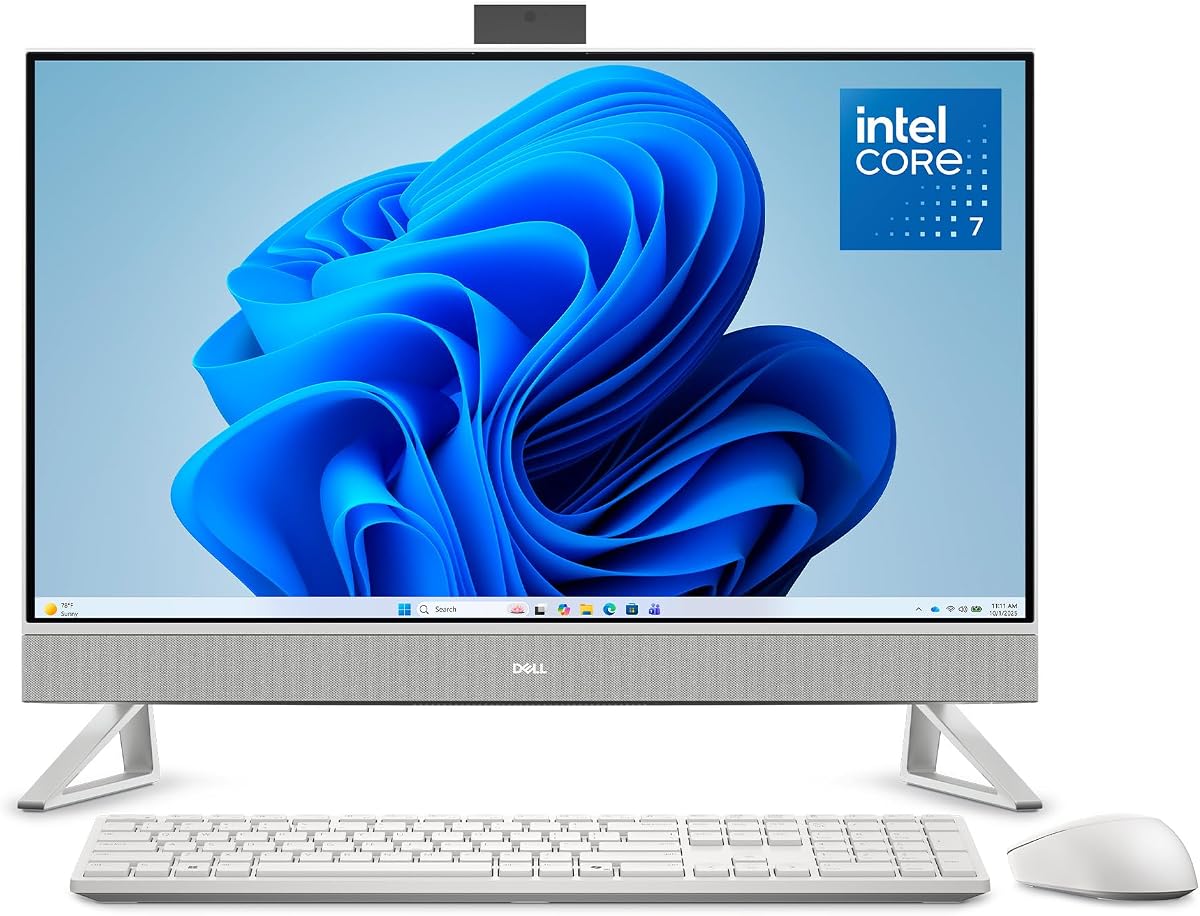
This Dell model achieves a perfect 5.0 rating by combining strong performance with practical privacy features. The 10-core Intel Core 7 processor handles daily tasks with impressive speed and efficiency.
We may earn a commission when you buy through this link, at no additional cost to you.
The 24-inch touchscreen offers sharp visuals while the pop-up camera shutter provides privacy when not in use. You get 16GB RAM which ensures smooth multitasking across multiple applications without lag.
Windows 11 Pro is pre-installed giving you access to advanced business tools right away. The slim profile fits well in home offices while reducing cable clutter with wireless peripherals included.
Users wanting a reliable machine for professional use will appreciate its balance of power and privacy. The easy-access ports and clean design make it a practical choice for modern workspaces.
The physical camera shutter allows you to instantly hide the lens ensuring privacy during breaks from video calls.
The Intel Core 7 150U offers 10 cores that balance power consumption with high performance for everyday workloads.
We may earn a commission when you buy through this link, at no additional cost to you.
This Dell All in One Desktop PC is a solid reliable option for general home use. It features an immersive display with 99 percent sRGB coverage ensuring accurate colors for viewing and work.
We may earn a commission when you buy through this link, at no additional cost to you.
ComfortView Plus technology reduces blue light to protect your eyes during long sessions. The 5MP camera ensures you look good on video calls while dual speakers provide clear immersive audio.
One standout feature is the 1-year onsite service that brings support directly to your home or office. This peace of mind makes it a great choice for those who value convenience over raw speed.
Ideal for students or casual users it handles media and browsing comfortably. The sleek design and reliable support make it a trustworthy addition to any household workspace.
The narrow border and vibrant contrast make the screen feel larger and more engaging for both work and entertainment.
Dolby Atmos spatial sound fills the room with clear audio making movies and calls sound professional and dynamic.
We may earn a commission when you buy through this link, at no additional cost to you.
This ASUS model stands out with 32GB of high-speed DDR5 RAM making it perfect for heavy multitasking. It handles multiple large browser windows and creative apps without breaking a sweat.
We may earn a commission when you buy through this link, at no additional cost to you.
The AMD Ryzen AI 7 processor with a dedicated NPU ensures AI tools run locally without lag. You get a large 27-inch touchscreen with 100 percent sRGB for accurate color representation.
Connectivity is robust with HDMI-in and HDMI-out allowing you to use this as a secondary display. Security features like BIOS protection and Microsoft Pluton keep your data safe from threats.
For power users needing massive memory and fast storage this device is excellent. It offers the versatility to connect external monitors while maintaining a sleek unified design.
The 50-TOPS NPU accelerates local AI tasks ensuring faster processing and better privacy for sensitive data.
HDMI-in allows this unit to function as a standalone monitor for gaming consoles or other media devices.
We may earn a commission when you buy through this link, at no additional cost to you.
This ASUS All in One Desktop PC shines with its 32GB of RAM and dedicated graphics capabilities. It handles creative tasks and video meetings effortlessly while maintaining smooth touch interaction.
We may earn a commission when you buy through this link, at no additional cost to you.
The 75Hz refresh rate makes scrolling and animations appear incredibly fluid. Anti-glare technology reduces reflections which is perfect for bright office environments or windows nearby.
AI ExpertMeet technology filters background noise ensuring your voice is clear during calls. The sandstone-white finish adds a premium look that blends well into modern home or office spaces.
Ideal for creators or businesses this model offers performance that exceeds standard productivity needs. It provides a complete workspace setup with essential ports and wireless accessories included.
AI noise reduction helps eliminate distractions so your voice sounds professional even in busy environments.
100 percent sRGB coverage ensures what you see on screen matches your final output for design work.
We may earn a commission when you buy through this link, at no additional cost to you.
This Dell model is designed for users who prioritize a large display and high memory. The 27-inch screen offers ample space for multitasking without needing external monitors or clutter.
We may earn a commission when you buy through this link, at no additional cost to you.
With 32GB of RAM it handles complex spreadsheets and data analysis smoothly. The stand cleverly stores the keyboard underneath keeping the desk tidy and organized.
ComfortView Plus ensures eye comfort during long workdays while the HDR camera captures clear video. The innovative design helps reduce clutter while maintaining a professional look.
For analysts or traders needing wide views this machine is ideal. It balances large screen real estate with powerful internals to handle demanding productivity tasks.
The unique stand design tucks the keyboard away reducing clutter for a cleaner and more professional desk.
Onsite service ensures that if hardware issues arise a technician comes to you rather than shipping the device.
We may earn a commission when you buy through this link, at no additional cost to you.
This HP All in One Desktop PC offers a balanced mix of speed and usability for general work. It features a 27-inch touchscreen that is responsive and easy to navigate for daily tasks.
We may earn a commission when you buy through this link, at no additional cost to you.
The AMD Ryzen 5 processor provides reliable performance for web apps and documents. The 16GB DDR5 RAM keeps the system snappy while the 1TB SSD offers plenty of storage space.
A privacy shutter on the camera ensures security when you are not on a call. Windows 11 Pro delivers advanced management tools useful for small business users needing more control.
It is a solid choice for those needing a touch interface without paying premium prices. The compact footprint ensures it fits comfortably in standard office setups.
The physical tilt privacy camera shutter allows you to cover the lens when not using it for calls.
NVMe SSD technology ensures rapid boot times and quick file access improving overall workflow efficiency.
We may earn a commission when you buy through this link, at no additional cost to you.
This MSI model is an entry-level option that still offers powerful processing power. It is designed for business users needing basic touchscreen capability and connectivity without high costs.
We may earn a commission when you buy through this link, at no additional cost to you.
The Intel Core 7 processor ensures responsiveness for common apps while the 1.2TB storage provides plenty of space for documents. You can connect two external monitors for expanded workspace needs.
Windows 11 brings enterprise grade features ensuring security and reliability for professional tasks. The wireless keyboard and mouse reduce clutter making it ready for use right out of the box.
It is best for light office work and general business applications. The affordable price point makes it accessible for small teams needing multiple reliable touch devices.
Dual external monitor support allows you to expand your desktop space beyond the built-in screen.
Enterprise features and security protocols ensure safe and compliant computing environments for professional teams.
We may earn a commission when you buy through this link, at no additional cost to you.
Selecting the right All in One Desktop PC with Touchscreen requires evaluating several key factors to ensure it meets your specific performance needs and design preferences.
The display determines how you interact with your computer so prioritize models with high resolution and wide viewing angles. Look for IPS panels that offer accurate colors and brightness suitable for your lighting conditions. Larger screens improve productivity but consume more desk space.
Choose at least a 24-inch display for comfortable multitasking and ensure it has an anti-glare coating for eye comfort.
The processor is the engine of your All in One Desktop PC with Touchscreen and dictates how fast applications run. For standard tasks Intel Core 5 or AMD Ryzen 5 processors are sufficient but consider higher tiers for intensive workloads. AI specific features can also boost productivity.
Select a processor that matches your primary workload to avoid bottlenecks during peak usage times.
Memory capacity influences how many programs you can run simultaneously without slowdowns. Aim for at least 16GB of RAM for modern multitasking to ensure smooth performance across tabs and apps. Storage speed also matters for system responsiveness and boot times.
Prioritize SSD storage over HDD and ensure you have enough space for your files and essential software installations.
A responsive touchscreen enhances usability but quality varies between models. Look for displays with high sensitivity and durability to withstand daily finger inputs. Some models also support stylus pens for drawing and note-taking.
Verify if the touchscreen technology supports multi-touch gestures which are essential for modern navigation experiences.
Ports and wireless standards determine how easily you can connect peripherals and external devices. Ensure the machine includes USB-C or HDMI ports and modern WiFi 6 support for reliable internet. Bluetooth versions should be up to date for peripheral pairing.
Check the available ports to ensure compatibility with your existing monitors printers and storage devices.
The operating system affects security and software compatibility so choose a version that fits your needs. Windows 11 Home suits most users but Pro versions offer advanced management tools for businesses. Ensure the system receives regular updates for safety.
Select the OS version that aligns with your security and management requirements for long term stability.
Integrated webcams and speakers are crucial for remote work so prioritize models with good resolution and clarity. Look for cameras with privacy shutters and speakers that support high-definition audio. AI noise reduction features also improve call quality.
Invest in systems with decent built-in hardware to avoid needing external accessories for meetings and calls.
A well designed All in One Desktop PC with Touchscreen should fit your workspace without clutter. Check for adjustable stands that allow height and tilt adjustments for comfortable viewing. Compact footprints save space and look modern.
Ensure the design supports proper posture and allows for easy access to ports and buttons.
Position your All in One Desktop PC with Touchscreen on a stable surface to prevent accidental tipping or screen damage. Ensure adequate ventilation around the device to avoid overheating during long use.
Clean the touchscreen regularly with a soft microfiber cloth to remove fingerprints and smudges. Avoid harsh chemicals or abrasive materials that might scratch the screen surface.
Keep the system updated to the latest software to benefit from security patches and performance improvements. Regularly remove unused applications to maintain speed and free up storage space.
Most models are designed for productivity rather than gaming and lack dedicated graphics cards. While casual games run fine heavy gaming will struggle on these integrated systems. Consider a desktop with a separate GPU for better gaming performance.
Most All in One Desktop PCs are not designed for easy user upgrades. The RAM and storage are often soldered to the motherboard making modifications difficult. Check specific model details before purchase if future upgrades are a priority.
With proper maintenance an All in One Desktop PC with Touchscreen lasts between five to seven years. Regular software updates and careful handling extend its usable life. Physical damage to the screen is the most common failure point.
Most modern All in One Desktop PCs come with wireless keyboard and mouse bundles. Always check the specific product details to confirm what accessories are included. Some models may require separate purchases for input devices.
Many models include HDMI-in or USB-C ports to connect external displays. Check the available ports on your specific model before buying cables. Some support dual monitor setups but this depends on the GPU capabilities.
Windows 11 Home is usually sufficient for personal and educational tasks. Pro offers extra management tools useful for business environments but adds cost. Choose Home if you do not need advanced security or remote desktop features.
These touchscreens use capacitive technology similar to smartphones but larger and more durable. They respond to multi-touch gestures for smooth navigation. Some models support pen input for more precise drawing and note-taking.
These units require minimal depth but width varies by screen size from 23 to 27 inches. Measure your desk area to ensure the base fits comfortably without crowding. VESA mount options exist for wall mounting to save space.
The HP 27-inch model stands out for its AI performance and display quality making it the top pick for most users. Budget buyers will appreciate the HP 24 model offering essential features at an affordable cost. Professionals should consider the Dell 24-inch premium version for its advanced specs.
Prioritize memory and screen size based on your daily tasks to ensure smooth performance. A larger display and sufficient RAM significantly improve multitasking capabilities across all models.
Prices change frequently so always check current listings before buying. Verify warranty details and accessories included to get the best value for your specific requirements today.