
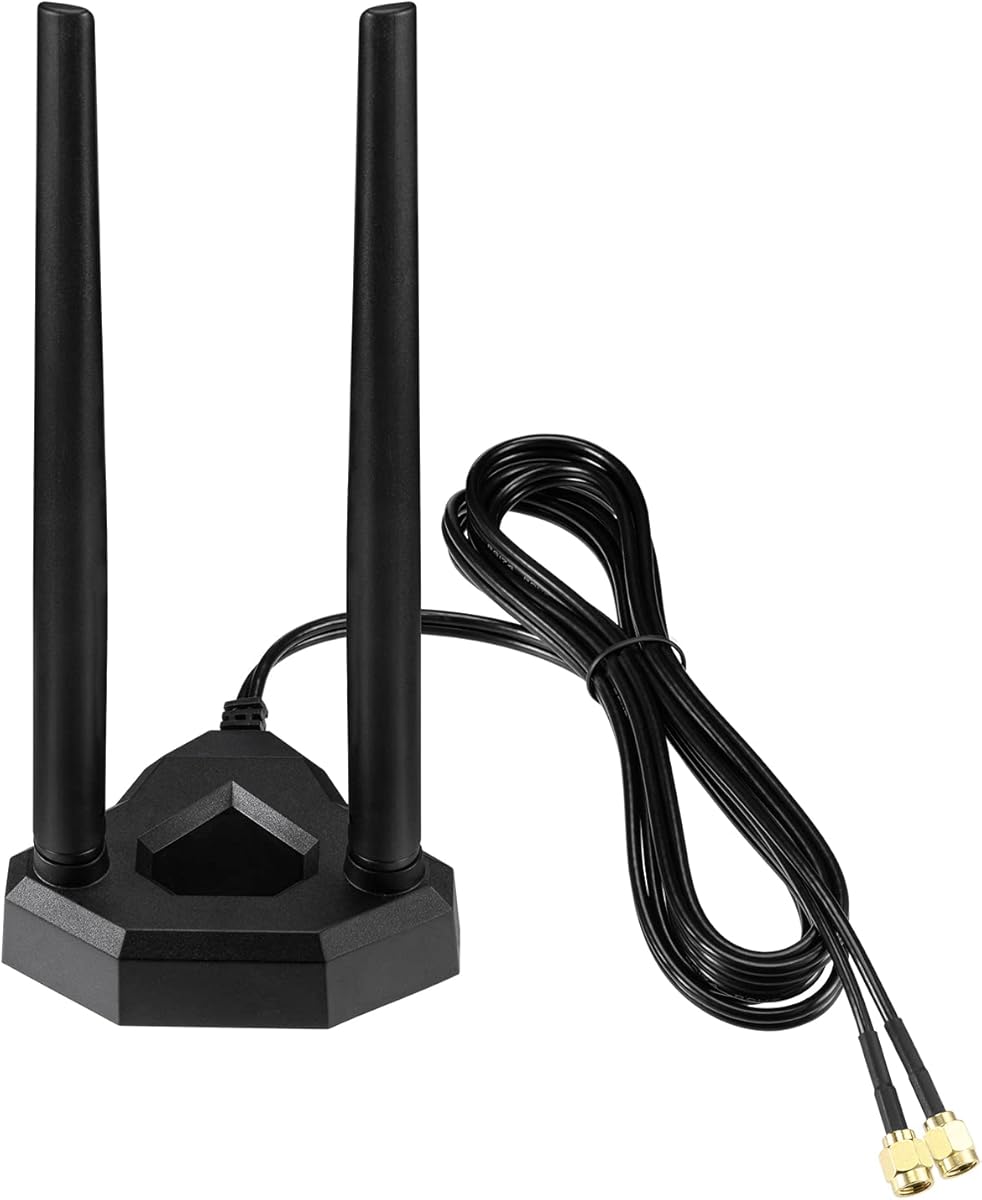
Bingfu Dual Band WiFi Antenna
4.6Editor score
Dual band 2.4GHz 5GHz support
RP-SMA Male connector included
Compact design for easy setup
This guide compares the top antenna for router options to help you choose the best model for enhanced signal strength, speed, and coverage in any home or
Finding the right antenna for router upgrades can transform your wireless network performance. High-quality antennas extend coverage, reduce dead zones, and stabilize connections for gaming or streaming. Choosing wisely ensures your devices communicate efficiently without signal drops.
We compared ten top-rated models based on gain, frequency bands, connector types, and build quality. Each product offers unique features like magnetic bases or weather resistance. Our analysis highlights real-world performance across diverse setups from offices to industrial sites.
Each pick showcases specific strengths for different needs such as budget-friendly or high-performance options. Prices fluctuate frequently so verify current deals before purchasing. Use this guide to match your router model with the ideal antenna for reliable connectivity.
4.6Editor score
4.5Editor score

4.4Editor score
This table provides a side-by-side comparison of all ten antenna for router models. Review key specifications like frequency bands, gain, connector types, and special features to identify the best fit for your network setup.


The Bingfu Dual Band Antenna offers an affordable entry point for upgrading wireless connectivity. It supports 2.4GHz and 5GHz bands with RP-SMA male connectors suitable for many routers and adapters. Users praise its versatility across PC network cards, routers, and even FPV drones. This kit ensures you have backup antennas ready for any scenario.
We may earn a commission when you buy through this link, at no additional cost to you.
Its dual-band capability allows seamless switching between frequency ranges to optimize performance. The omni-directional design ensures signal transmission in all directions which is ideal for general home use. Compatibility extends to security cameras and industrial routers making it a multipurpose tool. The RP-SMA connector design prevents accidental loosening during movement.
While cost-effective, the 3dBi gain limits reach compared to high-gain models. Cables are short so placement flexibility might require extension wires. However, for indoor setups or short-range links, this limitation is negligible. The value proposition remains strong for budget-conscious buyers needing reliable connectivity.
This antenna is perfect for home users upgrading routers without spending much. It suits technicians installing multiple cameras due to the two-pack design. Avoid if you need extreme range or 6GHz support. Overall it delivers solid performance for common WiFi needs effectively.
Supports routers, cameras, drones, and industrial IoT terminals effectively.
Ideal for budgets requiring multiple antennas without breaking the bank.
We may earn a commission when you buy through this link, at no additional cost to you.
Eightwood provides a standout option with flexible positioning features for optimal signal gain. The 6.5ft extension cable allows moving antennas to windows or high points for better reception. A magnetic base securely attaches to metal surfaces enabling vertical alignment. Users report improved speed and stability during multi-device streaming sessions.
We may earn a commission when you buy through this link, at no additional cost to you.
This antenna supports modern WiFi 6 standards ensuring future-proof connectivity for latest devices. Beyond WiFi it enhances Bluetooth range for headphones and controllers which adds value. The omnidirectional pattern covers entire rooms efficiently without dead spots. Installation is straightforward requiring no technical expertise or software.
The magnetic base is convenient but restricts placement to metal surfaces only. Non-metal shelves require alternate mounting or adhesive solutions which might reduce stability. Cable slack might need securing to avoid tripping hazards. Despite these minor issues, the performance gains justify the setup adjustments.
Recommended for users needing flexible antenna positioning without drilling holes. Ideal for home offices with metal furniture or racks. Avoid if magnetic mounting isn't feasible. This model balances performance and convenience exceptionally well for general WiFi upgrades.
Long cable and magnetic base allow placing antennas in optimal signal spots.
Also extends Bluetooth range for wireless headphones and controllers nearby.
We may earn a commission when you buy through this link, at no additional cost to you.
This antenna unlocks the full potential of WiFi 6E networks by supporting the new 6GHz band. Users gain access to wider bandwidth and significantly lower latency which is critical for competitive gaming. The magnetic base ensures stable placement similar to the dual-band version. Streaming 4K video sees no buffering even with multiple concurrent connections.
We may earn a commission when you buy through this link, at no additional cost to you.
Tri-band support separates traffic across 2.4GHz, 5GHz, and 6GHz frequencies to reduce congestion. The 6GHz channel is less saturated leading to faster and more reliable data transfer. It pairs best with routers explicitly supporting WiFi 6E standards. The build quality feels robust enough for long-term daily usage.
Investment is higher than standard antennas and only works with compatible routers. Older WiFi 6 or WiFi 5 devices cannot utilize the 6GHz band features. Cable management remains a consideration as the extension cord requires careful routing. These trade-offs are acceptable for performance seekers.
Buyers upgrading to WiFi 6E should prioritize this model for maximum speed. Gamers and power users needing ultra-low latency benefit most. Avoid if you lack a WiFi 6E router. This antenna represents the cutting edge of home wireless performance.
Provides faster speeds and lower latency by utilizing the new 6GHz spectrum.
Handles heavy traffic loads by distributing devices across three distinct bands.
We may earn a commission when you buy through this link, at no additional cost to you.
Eifagur offers a robust solution for extending WiFi range outdoors with its 7dBi gain. The antenna comes with a wall mount bracket and screws for easy installation on exteriors. It covers 2.4GHz and 5GHz bands making it versatile for different devices. Users report improved connectivity for backyard structures or security camera feeds.
We may earn a commission when you buy through this link, at no additional cost to you.
Designed specifically for outdoor environments, it withstands weather conditions better than indoor models. The higher gain focuses signal transmission more directly extending range significantly. This helps bridge connections to remote sheds or RV setups. Hardware included simplifies the mounting process for DIY projects.
Some users report mixed experiences regarding signal stability and cable durability. The 3 meter cable might be short for certain outdoor routing needs. Ensure connectors are tightly sealed against moisture to prevent degradation. While cost-effective, quality control varies compared to top-tier brands.
Ideal for budget outdoor projects needing simple range extension. Suitable for attaching to sheds or monitoring areas outside. Ensure you check mounting conditions before installing. It serves well for specific outdoor needs with proper setup.
Built to withstand external weather for reliable outdoor network coverage.
7dBi gain extends signal distance significantly compared to standard antennas.
We may earn a commission when you buy through this link, at no additional cost to you.
Superbat delivers high-performance WiFi 6E capabilities with tri-band support for future-proof networking. The 6GHz band allows faster data transfer crucial for 4K streaming and large file transfers. A magnetic base ensures secure mounting on metal surfaces without extra hardware. Users appreciate the seamless installation and improved network stability.
We may earn a commission when you buy through this link, at no additional cost to you.
This antenna maintains strong connectivity even in congested areas thanks to wider channel availability. The 6ft cable provides flexibility to position the antenna away from interference sources. It suits gamers needing reduced latency and households streaming high-resolution content simultaneously. The RP-SMA connector ensures secure connection compatibility.
Placement is limited to steel surfaces due to the magnetic base design. Non-metallic furniture requires alternative solutions or adhesive modifications. The antenna works best with compatible routers to utilize 6GHz features. These constraints are minor compared to performance benefits for advanced setups.
Buyers needing reliable WiFi 6E performance should consider this model. It fits modern routers and high-bandwidth applications well. Verify your router compatibility before purchase. Overall it offers robust features for demanding network environments.
Distributes traffic across three bands for consistent speed during heavy use.
Strong magnet attaches firmly to metal surfaces for stable signal reception.
We may earn a commission when you buy through this link, at no additional cost to you.
This model balances performance with versatility through its 6dBi gain and magnetic base. It supports WiFi 6 for modern router compatibility and dual-band operation for flexibility. Users highlight improved stability across devices connected simultaneously. The RP-SMA male connector fits many common routers and network cards easily.
We may earn a commission when you buy through this link, at no additional cost to you.
Omnidirectional pattern ensures coverage across rooms without needing precise aiming. The 6.5ft cable allows positioning the antenna higher or away from obstacles. This feature helps bypass thick walls or furniture causing interference. Users report fewer dropped connections and smoother streaming experiences after installation.
Magnetic mounting works well on steel but not other surfaces. Optimal performance requires adjusting two antenna stubs to different angles for polarization. Non-metal desks need adhesive tape or clips for stability. These adjustments take minimal effort but deliver noticeable signal improvements.
Ideal for home users upgrading standard routers easily. Fits desks with metal frames or near metal racks. Avoid non-metal setups without extra mounting tools. A reliable choice for general connectivity improvements with solid ratings.
Moderate gain balances range and omnidirectional coverage effectively.
Stub angles allow tuning polarization for better signal alignment with routers.
We may earn a commission when you buy through this link, at no additional cost to you.
Eifagur delivers exceptional range with 9dBi gain making it ideal for long-distance links. The outdoor-rated construction withstands rain and sun for permanent exterior mounting. Users connect security cameras across driveways easily using this model. It supports both 2.4GHz and 5GHz bands for broad device compatibility.
We may earn a commission when you buy through this link, at no additional cost to you.
High gain focuses signal in specific directions requiring precise pointing. This makes it perfect for outdoor bridges where targets are known. The sturdy build resists corrosion and elements ensuring long service life. Setup typically includes wall mounting options for vertical orientation and stability.
Directionality limits use in homes needing 360 coverage. Indoor applications may suffer from restricted signal spread. Mounting hardware varies so verify included screws before purchase. For dedicated outdoor links though, it performs exceptionally well.
Buyers needing outdoor range extensions should prioritize this antenna. It suits security setups and point-to-point links effectively. Indoor users may prefer omnidirectional models. Highly recommended for specific outdoor connectivity challenges.
9dBi gain enables reliable connections over significant distances outdoors.
Weather-resistant materials ensure stability in harsh external environments.
We may earn a commission when you buy through this link, at no additional cost to you.
TRENDnet offers a premium outdoor kit supporting tri-band WiFi including the 6GHz band for future tech. The kit includes two high-performance antennas with N-Type female connectors for professional installations. Users report stability in extreme temperatures ranging from -40°C to 70°C. This makes it suitable for industrial or remote outdoor deployments.
We may earn a commission when you buy through this link, at no additional cost to you.
N-Type connectors provide a secure lock preventing accidental disconnection in windy conditions. The antennas are NDAA and TAA compliant which meets strict US government security standards. This appeals to organizations requiring verified sourcing for their networks. The omni-directional design ensures 360-degree coverage around towers or buildings.
Standard routers often require adapters to connect N-Type connectors. Compatibility checks are essential before purchase to avoid extra costs. Price is higher than consumer models reflecting professional-grade quality and compliance. Installation is straightforward but may require professional cabling skills.
Ideal for professional networks or government facilities needing compliance. Outdoor industrial sites benefit from extreme temperature tolerance. Avoid if you lack N-Type adapter access. A top choice for secure, reliable, outdoor tri-band setups.
Meets strict US government security standards for verified sourcing and trust.
Supports 6GHz band preparing networks for upcoming WiFi 7 standards.
We may earn a commission when you buy through this link, at no additional cost to you.
NETGEAR provides specialized antennas for M5 and M6 hotspot routers boosting cellular data signals. Users in buildings or vehicles with weak 4G/5G coverage see performance improvements. The kit includes TS-9 to SMA converters making it versatile for different ports. Suction cups allow easy temporary mounting on laptops or vehicle windows.
We may earn a commission when you buy through this link, at no additional cost to you.
This antenna works with various cellular bands including GSM, LTE, and 5G up to 6GHz. It improves upload and download speeds where internal antennas struggle. Installation is simple requiring no software or complex configuration. Suitable for remote workers needing reliable internet on the go.
Compatible only with specific NETGEAR hotspot models limiting broader router use. Higher price point compared to general WiFi antennas. Performance depends on local cellular tower strength. Despite niche compatibility, it delivers significant gains for mobile users.
Buyers with M5 or M6 routers should consider this upgrade. Perfect for remote offices in cars or buildings. Avoid for standard home WiFi routers. A specialized tool for enhancing mobile broadband connectivity.
Enhances cellular signal strength for 4G/5G mobile hotspots effectively.
Includes suction cups for flexible mounting on smooth surfaces like windows.
We may earn a commission when you buy through this link, at no additional cost to you.
This kit allows adding external high-gain antennas to routers without removable ports. It includes two 6dBi omnidirectional antennas and IPEX to RP-SMA pigtail cables. Users report better signal strength in dead zones after internal modification. Ideal for routers stuck with fixed internal antennas.
We may earn a commission when you buy through this link, at no additional cost to you.
The 6dBi gain focuses signals effectively for standard 2.4GHz networks. Installing pigtail cables requires opening the router case which might void warranties. Once installed, the external antenna placement drastically improves range. This makes it a budget DIY upgrade for specific hardware.
Not all routers accept this modification internally. Verify your motherboard connector type before opening the device. 2.4GHz only limits speed compared to dual-band options. However, coverage improvement is substantial for older devices needing help.
DIY enthusiasts owning older routers benefit most from this kit. It breathes new life into legacy hardware. Avoid if warranty is critical. A clever solution for extending range without buying new routers.
Adds external antennas to routers lacking removable ports for better range.
Pigtail cables connect internal boards to external antenna connectors easily.
We may earn a commission when you buy through this link, at no additional cost to you.
Selecting the right antenna depends on your router type, environment, and performance needs. Consider these factors to ensure compatibility and optimal results.
Check if your router uses RP-SMA male, RP-SMA female, or N-Type connectors. Mismatched connectors prevent physical installation. Verify your device manual before purchasing any antenna to ensure a perfect fit.
Always match connector gender and thread type to your router's ports.
Choose dual-band or tri-band antennas matching your router's capabilities. If using WiFi 6E, ensure 6GHz support. Standard routers might only need 2.4GHz or 5GHz compatibility. Mismatching reduces performance potential.
Confirm the antenna supports all frequency bands your router broadcasts.
Gain measured in dBi indicates signal focus strength. Higher gain like 9dBi extends range but narrows coverage. Lower gain like 3dBi offers wider room coverage. Select based on whether you need distance or general area coverage.
Match gain levels to your specific distance and coverage goals.
Outdoor antennas feature weather-resistant materials and wider temperature ranges. Indoor models lack this protection. If placing antennas outside, choose outdoor-rated units. Indoor placement allows standard plastic build.
Ensure the build environment matches the antenna's durability rating.
Longer cables allow placing antennas near windows or metal surfaces. Most include 6.5ft extension cables. Shorter cables restrict placement options. Ensure the cable is flexible enough to route around furniture.
Look for cables long enough to reach optimal signal pickup spots.
Magnetic bases simplify setup on metal surfaces. Wall brackets offer permanent solutions. Consider where you will install the antenna. Magnetic options are easy but limited to steel furniture.
Choose mounting that fits your furniture material and desired placement.
Modern routers use WiFi 6 or 6E standards. Older antennas might not leverage these speeds. Check if the antenna supports 802.11ax for best performance. Compatibility ensures you utilize modern hardware fully.
Ensure the antenna supports your router's latest WiFi standard.
Security cameras need steady links. Gaming requires low latency. General browsing needs broad coverage. Identify your primary task to prioritize gain versus coverage. Some models specialize in industrial IoT or mobile hotspots.
Pick models that align with your specific usage scenarios.
Begin by disconnecting power from your router before swapping antennas. Unscrew the existing antenna carefully to avoid stripping threads. Screw in the new antenna firmly but do not overtighten. Ensure the RP-SMA connector aligns perfectly to prevent bending the center pin.
Position the antenna vertically for best omni-directional signal transmission. If possible, place it high and away from metal obstructions or thick walls. Use extension cables to move the antenna to windows or metal shelves for better reception. Adjust the angle slightly to find the strongest signal zone.
Regularly check connectors for dust or corrosion especially if used outdoors. Wipe the antenna with a dry cloth monthly. If the base is magnetic, ensure it stays secure on the surface. Revisit placement if you notice new dead zones after moving devices.
Yes, upgrading to high-gain antennas can significantly improve signal strength and stability. While max speed depends on your internet plan, better reception reduces packet loss and increases usable throughput. Users report fewer dropped connections and faster streaming after installation.
Check the back of your router for removable connectors. If the antenna is fixed, internal replacement requires opening the case. Consult your router manual for compatibility. Many gaming routers and older models have removable RP-SMA ports.
2.4GHz antennas have longer range but lower speeds. 5GHz antennas offer faster data rates but shorter range. Dual-band antennas support both frequencies providing versatility. Choose based on whether you prioritize distance or speed.
Only specific cellular antennas work with hotspots. Standard WiFi antennas generally do not support cellular bands. Check if the product mentions 4G/5G compatibility. NETGEAR models are designed for specific mobile hotspot routers.
Most require no tools beyond your hands for screwing in the connector. Magnetic bases snap onto surfaces. Wall mounts may need a screwdriver. If using pigtail cables, opening the router case might require small screwdrivers.
Strong magnets are safe for painted metal surfaces. They do not scratch or rust modern furniture. Place a cloth between base and surface for extra protection. Ensure the antenna remains stable during movement.
Outdoor antennas are built with weather-resistant materials for exterior durability. They are not strictly better indoors but more durable. Use outdoor models only if exposed to elements. Indoor models are lighter and cheaper for inside use.
The top picks include the Bingfu Dual Band for budget, the Eightwood Dual Band for value, and the Eightwood WiFi 6E for premium performance. Each model serves distinct needs from general home use to professional outdoor deployments. Matching features to your router ensures the best result.
Prioritize connector compatibility and gain requirements before considering price. If you plan to use newer WiFi 6E standards, ensure tri-band support. For simple range extension, high-gain outdoor antennas work best. Consider cable length for flexible placement options.
Prices fluctuate frequently so verify current deals before purchasing. Check if your router warranty is affected by internal modifications. Use the guides above to identify the perfect match for your specific network setup. Enjoy enhanced connectivity with the right choice.