
Qanba N3 Drone 2
4.5Editor score
Officially licensed Sony peripheral
Authentic Qanba buttons
Full control panel layout
Discover the top arcade sticks for PS5 including tournament grade sticks and budget friendly options tailored for Street Fighter and Tekken players in October
Finding the right arcade stick for PS5 can transform your fighting game experience significantly. A quality stick offers precision inputs and durability that standard controllers simply cannot match for competitive play.
We compared ten top rated fight sticks based on build quality, button response, and compatibility with the PlayStation 5 ecosystem to help you find the perfect match for your setup.
Each pick below highlights unique features and performance traits to guide your decision. Keep in mind that product availability and pricing can change frequently so always check current listings before buying.
4.5Editor score

4.6Editor score

4.2Editor score
This side-by-side comparison breaks down the ten best arcade sticks available for PlayStation 5 users. We highlight key specifications and unique selling points for each model.




The HORI PlayStation 5 Fighting Stick Alpha stands out as the premier choice for serious fighters seeking a tournament ready arcade stick. With a strong 4.6 rating and official Sony licensing, this model delivers exceptional build quality and reliability that rivals home arcade cabinets.
We may earn a commission when you buy through this link, at no additional cost to you.
Its standout feature is the proprietary Hayabusa joystick and button set which offers crisp input response and durability for intense sessions. The unit opens easily for maintenance allowing users to swap out parts or change the top panel artwork without special tools.
While the price reflects its premium nature the longevity and performance justify the investment for those committed to improving their gameplay. The official license ensures perfect compatibility with PS5 games eliminating potential driver issues seen with third party peripherals.
If you want the best all round experience on PS5 this stick is the definitive recommendation. It balances professional grade performance with user friendly features making it ideal for both competitive play and casual fun.
Built to withstand hours of intense gameplay this stick maintains consistent performance without wear over time.
The ability to open the casing and swap components lets you tailor the stick to your exact preferences easily.
We may earn a commission when you buy through this link, at no additional cost to you.
The Nacon Daija Arcade Fight Stick brings professional grade features to the PlayStation ecosystem with a focus on customization and comfort. It holds a 4.2 rating and is designed in collaboration with pro gamers to meet high competitive standards.
We may earn a commission when you buy through this link, at no additional cost to you.
It features a high quality Sanwa joystick and action buttons which are industry standards for reliability and feel. The included software allows full button mapping on PC and Mac giving you total control over how inputs are registered for different games.
A textured palm rest ensures comfort during long sessions while the ability to swap joystick heads lets you switch between flowy and tight styles. The audio jack allows direct headset connection for chat which is convenient for online tournaments.
This stick is perfect for players who want to tweak every aspect of their setup. While it requires some initial setup the flexibility and premium build quality make it a top choice for dedicated fighting game enthusiasts.
Using Sanwa components ensures your inputs are recorded accurately and consistently every single time you play.
With full button mapping software you can configure complex macros and shortcuts to suit your play style perfectly.
We may earn a commission when you buy through this link, at no additional cost to you.
The MAYFLASH Arcade Stick F700 offers incredible versatility by supporting wireless Bluetooth and wired connections across many platforms. With a 4.5 rating it is a favorite among users looking for cross platform functionality without breaking the bank.
We may earn a commission when you buy through this link, at no additional cost to you.
It works with PS5 for fighting games and offers a 2.4G receiver with a hidden compartment for safe storage. The stick supports turbo functions and is compatible with Sanwa parts making it easy to upgrade the buttons or joystick later.
While it requires specific firmware updates for newer consoles like Switch 2 it remains a robust choice for multi console gamers. The ability to use wired headsets on PS5 is a practical feature for streaming or chatting during matches.
For gamers who need one stick for multiple systems this is the best value pick. It provides solid performance and broad compatibility ensuring you can play anywhere without needing multiple controllers.
Connect to PS5 Switch and PC effortlessly making this the ideal solution for players with multiple gaming systems.
With Bluetooth and wired options you are never stuck with just one connection method regardless of where you play.
We may earn a commission when you buy through this link, at no additional cost to you.
The Qanba N3 Drone 2 is a straightforward and reliable arcade stick that prioritizes authenticity and essential features for PlayStation users. Boasting a 4.5 rating it is officially licensed by Sony which guarantees seamless integration with the console's ecosystem.
We may earn a commission when you buy through this link, at no additional cost to you.
It uses authentic Qanba buttons and an Omron switch joystick which provide a solid tactile feel and reliable inputs. The full control panel layout ensures all standard fighting game inputs are easily accessible for both newcomers and veterans.
A 3.5mm microphone input with a mute button allows for easy voice communication during online matches. While it lacks some of the flashier features of premium models it delivers consistent performance for a very competitive price.
If you want a no fuss licensed stick that just works this is a strong choice. It offers all the core features you need for serious play without unnecessary extras that drive up the cost.
Qanba buttons are known for their durability and precise actuation which helps you execute combos more reliably.
The built-in mic input lets you stay connected with teammates without needing extra adapters or controllers.
We may earn a commission when you buy through this link, at no additional cost to you.
The MAYFLASH F700 Elite takes the popular F700 design and upgrades it with genuine Sanwa components for a more premium feel. It has a 4.6 rating and is perfect for those who want high end quality without paying top dollar.
We may earn a commission when you buy through this link, at no additional cost to you.
The inclusion of Sanwa buttons and a 4-way joystick ensures that your inputs are crisp and accurate. It supports Bluetooth 2.4G and wired connections making it versatile for desktop or living room setups.
The included anti-slip rubber mat keeps the stick firmly in place during intense matches which is a thoughtful touch often missing on budget models. It also supports turbo functions which can be useful for specific game mechanics.
This model bridges the gap between budget and premium sticks effectively. You get the reliability of top tier components with the convenience of wireless connectivity at a price point that offers great value.
The anti-slip mat ensures your stick stays put even during aggressive combos and rapid button pressing.
Bluetooth support frees you from cable clutter while maintaining responsive input for competitive gaming.
We may earn a commission when you buy through this link, at no additional cost to you.
The MAYFLASH F500 Bundle is designed for players who want a single stick that works across almost every console platform including Xbox. It comes with Magic Boots which simplify the setup process on PS5 and PS4 significantly.
We may earn a commission when you buy through this link, at no additional cost to you.
You can plug it in directly without needing the original controller plugged in for PS5 which is a major convenience factor. It supports Xinput and Dinput on PC and also works on Xbox Series X/S making it truly universal.
While the build is not as premium as the HORI or Nacon sticks it gets the job done reliably for most users. The turbo functions add extra utility for games that benefit from repeated button presses or rapid inputs.
For households with multiple consoles this bundle is a practical and budget friendly solution. It eliminates the need for multiple controllers and simplifies your gaming setup effectively.
Work seamlessly across PS5 Xbox and PC with one device reducing clutter and simplifying your setup.
The Magic Boots allow for instant plug and play on PlayStation consoles without extra steps or controllers.
We may earn a commission when you buy through this link, at no additional cost to you.
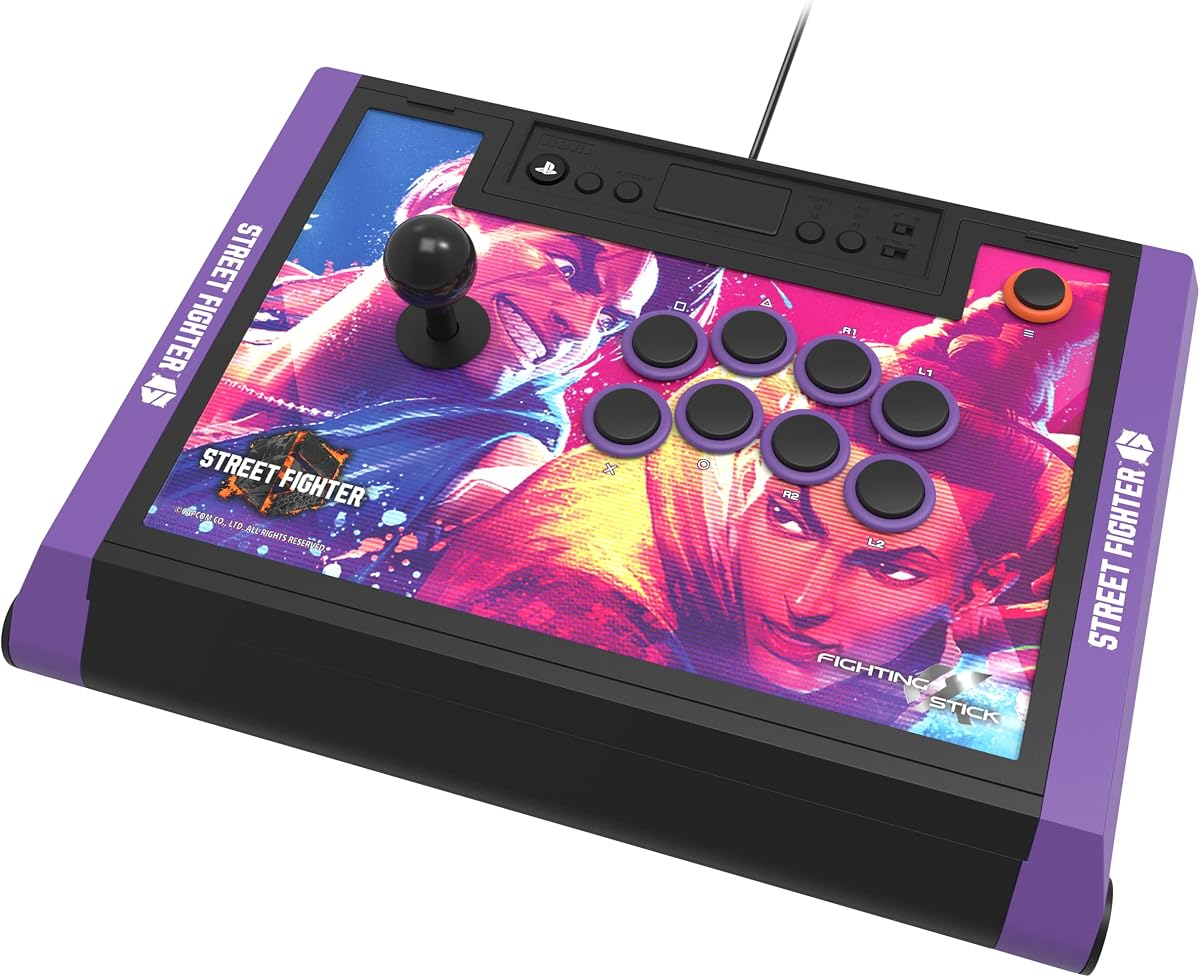
The HORI Street Fighter 6 Edition brings a thematic aesthetic to the highly regarded Alpha model making it a dream for fans of the franchise. It maintains the same 4.5 rating as the standard model ensuring top tier performance in tournaments.
We may earn a commission when you buy through this link, at no additional cost to you.
Featuring the same Hayabusa joystick and buttons this stick provides the tactile feedback necessary for precise execution in competitive play. The special top panel artwork adds a unique look to your setup that reflects your favorite game.
You can download high resolution images to print new panels which keeps the unit fresh and personalized over time. The official license with Capcom ensures that the design is authentic and meets the standards of the game creators.
If you love Street Fighter 6 this edition adds a special touch to your gaming experience. It combines the best performance features of the Alpha with a visual flair that stands out among other sticks.
Show your love for Street Fighter with an officially licensed design that looks great on your desk or table.
Designed with pro input in mind it delivers the reliability needed for high stakes competitive matches.
We may earn a commission when you buy through this link, at no additional cost to you.
The Qanba Q7 Obsidian 2 is built for players who frequently switch between PC and console gaming. It holds a 4.3 rating and features a dedicated switch to change modes between PS5 PS4 and PC for seamless transitions.
We may earn a commission when you buy through this link, at no additional cost to you.
It uses OBSF buttons and allows you to swap the Sanwa JLF joystick top which gives you flexibility in feel and durability. The licensed status ensures full compatibility with PlayStation features while the mic input supports online chat.
The full control panel design is ergonomic and supports rapid inputs with minimal fatigue. While it is a wired device the consistent connection it provides is often preferred in competitive settings for stability.
If you game on both PC and PlayStation this model is a practical choice. It handles the hardware switches well and provides reliable inputs across both environments without requiring extra adapters.
Switch between PC and console modes instantly with a physical switch designed for frequent cross platform players.
Swap out the joystick top to match your preferred stick tension and travel distance for better accuracy.
We may earn a commission when you buy through this link, at no additional cost to you.
The HORI Tekken 8 Edition is a premium tournament stick tailored for fans of the iconic fighting game series. It shares the same 4.6 rating as the standard Alpha model ensuring it meets the highest standards for performance and reliability.
We may earn a commission when you buy through this link, at no additional cost to you.
Equipped with Hayabusa buttons and a joystick it delivers the responsiveness needed for complex Tekken moves and combos. The unique artwork on the top panel adds a distinctive look that celebrates the game's heritage.
Downloadable alternate artwork lets you refresh the look of your stick whenever you want. The officially licensed status guarantees full compatibility with PS5 features and smooth integration with the console's firmware.
For dedicated Tekken players this stick is a fantastic investment. It combines the proven performance of the Alpha with a design that honors the game you love.
Designed to honor the Tekken series this stick is perfect for players who prioritize this specific franchise.
The underlying hardware matches tournament standards ensuring you get consistent results during high stress matches.
We may earn a commission when you buy through this link, at no additional cost to you.
The GuileKeys GK-18 offers a unique leverless approach that uses eighteen keys for direct input without a traditional joystick. With a 4.3 rating it appeals to players looking to reduce input errors and gain an edge in competitive games.
We may earn a commission when you buy through this link, at no additional cost to you.
It features customizable RGB lighting and an integrated OLED screen that shows your current input mode and button layout. The hot-swappable switches allow you to change the feel and sound of the keys without soldering.
While it requires an additional adapter for PS5 compatibility the ultra-low latency and precision make it worth the extra step for serious competitors. The web configurator allows deep customization of your setup to match your preferences.
If you want to try a different style of controller this leverless stick is a great way to start. It provides a modern take on arcade fighting with features that enhance both performance and immersion.
Eliminate stick wear and reduce input lag with a direct button layout that many competitive players prefer.
Change your switches RGB lights and macros to create a controller that is unique to you.
We may earn a commission when you buy through this link, at no additional cost to you.
Selecting the right arcade stick involves evaluating several key factors to ensure compatibility and performance for your gaming needs.
Ensure the stick explicitly supports PS5 for fighting games. Some models require specific modes or firmware updates to work correctly on the latest console.
Check for official licensing to guarantee seamless integration with PlayStation system features and games.
Look for sticks that use Sanwa or Hayabusa components as these are industry standards for reliability and tactile feel.
High quality buttons and joysticks reduce latency and prevent wear during extended gaming sessions.
Decide between wired and wireless options based on your preference for stability versus convenience.
Wired sticks often offer lower latency while wireless provides flexibility for couch gaming.
Metal boards are generally more durable and stable during intense gameplay compared to plastic alternatives.
A heavy base prevents the stick from sliding around on your table or desk.
Consider if the stick allows for easy maintenance and part swapping such as buttons or joystick tops.
Customization options let you tailor the feel and look to your specific preferences over time.
Some sticks include a 3.5mm audio jack for direct headset connection which is useful for online matches.
This feature simplifies setup by allowing you to chat without plugging into a controller.
Prices vary significantly from budget friendly bundles to premium tournament grade sticks.
Determine how much you are willing to spend based on how frequently you play and the level of durability you need.
Look for designs that match your gaming setup or feature artwork from your favorite games.
Aesthetics matter for personal enjoyment and some editions offer special panels that enhance the visual appeal.
To get started simply connect the stick to your PS5 via USB or Bluetooth depending on the model. Ensure your console firmware is up to date to support the peripheral properly.
Place the stick on a flat stable surface and adjust the tension if your model allows it to suit your play style. This improves comfort and accuracy during gameplay.
Regularly clean the buttons and joystick with a dry cloth to prevent dust buildup. If your stick opens for maintenance check connections periodically to ensure they are tight.
Not all arcade sticks support every PS5 game. Most are designed specifically for fighting games like Tekken and Street Fighter. Check the product details for compatibility with specific titles.
Wired sticks generally offer lower latency and more stable connections which is preferred for competitive play. Wireless sticks provide convenience and less cable clutter for casual gaming at home.
Use a soft dry cloth to wipe down buttons and the joystick. Avoid liquids to prevent damage to the internal electronics. For deeper cleaning refer to the manufacturer's guide for your specific model.
Many modern sticks allow you to replace buttons and joystick tops easily. Look for models with screw less designs or easy access panels for quick maintenance and customization.
Most sticks work independently on PS5 without needing a controller plugged in. Some models require a controller for initial setup but you can play using the stick alone after configuration.
Sanwa parts are known for being lighter and having longer travel which is preferred by many pros. OEM parts like Qanba tend to be heavier and offer more tactile resistance.
The HORI Fighting Stick Alpha remains the top choice for those seeking a reliable and tournament grade experience. It offers the perfect balance of official licensing and premium components.
If you are looking for affordability the Qanba N3 Drone 2 delivers solid performance with essential features. It is ideal for players who do not need advanced customization.
Prices and availability can change quickly so always review the current details on Amazon before finalizing your purchase. Investing in the right stick will greatly enhance your fighting game performance and enjoyment.