
ASUS Pro WS W890E-SAGE SE
5.0Editor score
Intel Xeon 600 series ready
Advanced AI PC optimized design
NitroPath DRAM technology support
This guide compares ten top ASUS server motherboards for workstations and enterprise systems, highlighting performance, connectivity, and remote management
Choosing the right server motherboard is critical for building reliable and high-performance computing systems. ASUS offers a wide range of options designed for workstations, servers, and professional applications requiring stability and speed.
We have evaluated ten current models based on their specifications, connectivity options, and management features. This list covers various form factors and chipset options to help you find the perfect match for your needs.
Each pick highlights key strengths and ideal use cases to guide your decision. Please note that specifications and availability can change, so always verify details before purchasing your components.
5.0Editor score

3.7Editor score
4.3Editor score
The following table provides a side-by-side overview of key specifications across all ten models to help you compare features at a glance.


The ASUS Pro WS WRX90E-SAGE SE is a high-performance workstation motherboard built for AMD Ryzen Threadripper PRO 7000 WX-Series processors. It holds a rating that reflects its specialized enterprise positioning. This board stands out for its massive expansion capabilities and server-grade reliability.
We may earn a commission when you buy through this link, at no additional cost to you.
It offers seven PCIe 5.0 x16 slots allowing for extensive multi-GPU or accelerator setups. The dual 10Gb LAN ports provide ultrafast connectivity essential for data intensive tasks. Support for up to 2TB of ECC R-DIMM DDR5 memory ensures data integrity for critical workloads.
The board requires a large case due to its EEB form factor which limits deployment options. However for enterprise environments this size is standard and the benefits of thermal headroom outweigh the space requirements. The 32 power stages ensure stable power delivery even under heavy loads.
This motherboard is ideal for professionals needing maximum CPU and GPU density in a single system. It is perfect for rendering farms AI training or virtualization servers. For anyone building a top-tier workstation this model delivers unmatched expansion and reliability.
With seven PCIe 5.0 slots users can install multiple GPUs or accelerators without bandwidth bottlenecks.
IPMI remote management allows administrators to monitor and control the system remotely even when powered off.
We may earn a commission when you buy through this link, at no additional cost to you.
The ASUS Pro WS W890E-SAGE SE is engineered for the future of AI computing with Intel Xeon 600 processors. It boasts a strong user rating highlighting its reliability. This board excels in providing the connectivity and power needed for demanding AI workloads.
We may earn a commission when you buy through this link, at no additional cost to you.
Its NitroPath DRAM technology enhances memory performance which is crucial for large datasets. The board supports up to 7 PCIe 5.0 x16 slots for maximum GPU density. Dual 10Gb LAN ports ensure that data transfer speeds keep up with processing power.
The board is expensive and targets high-end enterprise workstations which may not suit all budgets. Its EEB size also demands careful planning for chassis selection and airflow. Despite these considerations the performance gains justify the investment for professional users.
Choose this motherboard if you need a future-proof platform for AI research or heavy computational tasks. It offers a blend of speed and stability that few competitors match. It is a top choice for those prioritizing performance above all else.
The design specifically targets AI applications ensuring compatibility with latest acceleration technologies.
NitroPath DRAM technology optimizes signal quality for improved memory stability and speed.
We may earn a commission when you buy through this link, at no additional cost to you.
The ASUS Pro WS W890-SAGE offers a slightly different form factor with Intel Xeon 600 support. It is a reliable choice for workstations needing robust performance without the largest footprint. This board provides excellent connectivity for its class.
We may earn a commission when you buy through this link, at no additional cost to you.
It features CEB form factor which is more flexible than EEB for many chassis options. The mix of 10Gb and 2.5Gb LAN ports offers versatile networking choices. USB4 support allows for high-speed peripheral connections directly to the system.
IPMI management requires an expansion card which adds cost and complexity compared to onboard solutions. The 2.5Gb secondary port might be limiting for some high-bandwidth network needs. However for general workloads these trade-offs are acceptable.
This motherboard suits users needing a balance between performance and case flexibility. It works well for small business servers or professional workstations. Select this model if you need Xeon power but have space constraints.
CEB size allows for broader case compatibility compared to larger workstation boards.
Includes both high-speed and standard Ethernet ports for diverse networking needs.
We may earn a commission when you buy through this link, at no additional cost to you.
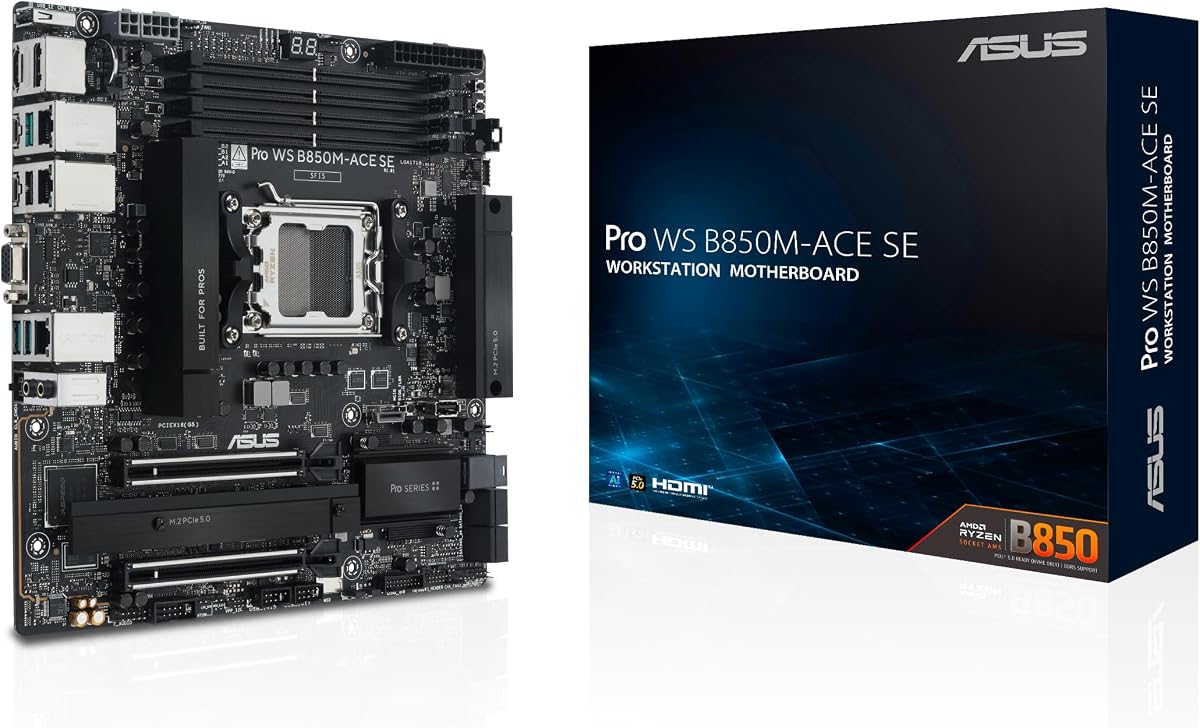
The ASUS Pro WS B850M-ACE SE brings enterprise features to a smaller MicroATX package. It has a solid rating reflecting its strong value proposition. This board is an excellent entry point for server builds on a budget.
We may earn a commission when you buy through this link, at no additional cost to you.
It includes onboard BMC for IPMI remote management which saves the cost of an expansion card. The combination of 10G and 2.5G LAN ports provides flexible networking options. PCIe 5.0 support ensures future compatibility with next-gen GPUs.
The smaller form factor limits the number of expansion slots available for add-in cards. Users needing many GPUs might find this board too restrictive. However for most single-GPU workloads this is not a significant drawback.
This motherboard is perfect for small business servers or home labs needing reliable management. It delivers impressive performance for its size and price point. Choose this if you want server features in a compact chassis.
Delivers full IPMI and 10G networking in a MicroATX size.
AMD AM5 socket ensures long term upgrade paths for Ryzen processors.
We may earn a commission when you buy through this link, at no additional cost to you.
The ASUS Pro WS TRX50-SAGE WIFI combines server-grade power with cutting-edge wireless connectivity. It is designed for Threadripper PRO processors and features a 36 power stage design. This model offers flexibility for workstations needing wireless access.
We may earn a commission when you buy through this link, at no additional cost to you.
WiFi 7 support ensures the fastest possible wireless speeds for modern networks. The board supports up to three PCIe 5.0 slots and robust cooling for thermal stability. Dual LAN ports offer both 10Gb and 2.5Gb options for varied needs.
Users report fewer positive ratings compared to other models in this lineup. The limited storage slots might require additional storage controllers for heavy I/O needs. These issues are manageable for general workstation use cases.
Ideal for creative professionals needing high CPU power and reliable wireless. It serves well for content creation studios or rendering workstations. Select this board for its balanced feature set and connectivity options.
WiFi 7 integration provides ultra-fast wireless connectivity for modern workflows.
36 power stages ensure stable power for maximum CPU boost clocks.
We may earn a commission when you buy through this link, at no additional cost to you.
The ASUS Pro WS TRX50-SAGE WiFi A offers a balance of performance and connectivity. It holds a strong rating for stability during heavy workloads. This board is built for users needing reliable CPU performance and fast storage.
We may earn a commission when you buy through this link, at no additional cost to you.
Four M.2 slots provide ample NVMe storage options without needing add-in cards. Dual USB4 ports deliver high-speed data transfer for external drives. The 20 power stage design ensures efficient power delivery for high core count processors.
IPMI management requires an expansion card which adds cost and setup time. Some users might need PCIe 4.0 slots for legacy cards which are limited here. Despite this the board performs well for modern compute tasks.
This motherboard suits professional workstations needing high speed storage and I/O. It is great for video editing or data processing tasks. Choose this model for its robust connectivity and proven reliability.
Four M.2 slots allow for extensive local SSD storage arrays.
USB4 support enables rapid data transfers for external storage devices.
We may earn a commission when you buy through this link, at no additional cost to you.
The ASUS Pro WS W680-ACE IPMI brings workstation power to the standard ATX form factor. It receives excellent ratings from users valuing reliability. This board is well suited for enterprise workstations needing remote management.
We may earn a commission when you buy through this link, at no additional cost to you.
An IPMI expansion card is bundled which simplifies setup and saves cost. Thunderbolt 4 header support enables high-speed external connectivity. ECC memory support ensures data integrity for critical business applications.
The platform uses an older CPU socket which might limit future upgrades. PCIe 5.0 slots are limited to two which may not fit all GPU configs. However for many business needs this is sufficient and stable.
This motherboard is ideal for office workstations or small business servers. It provides enterprise features in a familiar ATX chassis. Select this board if you need IPMI without buying extra cards.
IPMI card included ensures remote management ready out of the box.
Thunderbolt 4 header allows for high-speed peripheral integration.
We may earn a commission when you buy through this link, at no additional cost to you.
The Asus P12R-M/10G-2T is a dedicated server motherboard designed for enterprise use. It supports Intel Xeon E-2300 processors on a LGA 1200 socket. This board is a budget friendly solution for small server deployments.
We may earn a commission when you buy through this link, at no additional cost to you.
The Micro ATX form factor fits into many compact chassis. The C252 chipset provides stability for 24/7 operation. It is designed specifically for server environments requiring reliability and uptime.
The platform is older which means it lacks modern PCIe 5.0 or USB4 speeds. This board will not support the latest high-performance workloads. However for basic file or print serving it is sufficient.
Use this motherboard for small business file servers or network appliances. It offers stability without the cost of newer platforms. Choose this for basic server needs where speed is secondary.
Designed specifically for 24/7 server operation with stable chipset support.
We may earn a commission when you buy through this link, at no additional cost to you.
The ASUS Z13PE-D16 is a powerful server motherboard for dual socket Intel Xeon CPUs. It supports up to 4TB of RAM which is critical for heavy workloads. This board is built for virtualization and database servers.
We may earn a commission when you buy through this link, at no additional cost to you.
Dual 10Gbps Ethernet ports provide high bandwidth network connectivity. The E-ATX form factor accommodates large cooling solutions and dual CPUs. Up to 350W TDP support ensures high power CPUs can run effectively.
Managing power and cooling for dual CPUs requires careful planning and chassis selection. The board is complex to configure and needs specialized knowledge. These requirements are standard for dual socket server builds.
Ideal for enterprise virtualization servers or large databases. It delivers massive memory capacity for data intensive tasks. Select this board for heavy server infrastructure needs.
Up to 4TB RAM capacity handles the largest data sets easily.
Dual 10Gbps LAN ports ensure network speeds match processing power.
We may earn a commission when you buy through this link, at no additional cost to you.
The ASUS Pro WS W680-ACE IPMI is a versatile ATX board for workstation use. It features integrated video outputs which simplify setup for graphics tasks. This board offers a solid foundation for standard workstations.
We may earn a commission when you buy through this link, at no additional cost to you.
Support for ECC memory ensures data integrity for business applications. Three M.2 PCIe 4.0 slots allow for multiple NVMe drives. The W680 chipset is well suited for Intel Core workstation CPUs.
User ratings are lower potentially due to management requirements. The IPMI expansion card must be bought separately which adds cost. For general users this may not be a major concern.
Choose this board for standard office workstations needing ECC memory. It works well for CAD or general professional use. Select this if video outputs are important for your setup.
Built-in video outputs allow connection to multiple monitors without add-in cards.
We may earn a commission when you buy through this link, at no additional cost to you.
Selecting the right motherboard involves weighing several key factors to match your specific workload and budget.
Ensure the motherboard socket matches your intended processor. Threadripper PRO uses sTR5 while Xeon uses LGA sockets. Mismatched sockets will prevent CPU installation and operation.
Check the processor generation to confirm support on the specific motherboard model.
Server motherboards support ECC memory which is critical for data integrity. Check the maximum RAM capacity to handle future growth requirements.
Verify whether the board supports DDR5 or DDR4 based on your chosen CPU.
Motherboards come in ATX EEB and MicroATX sizes. Ensure your chassis supports the board dimensions to allow proper installation and airflow.
Larger boards like EEB offer more expansion slots but require specialized cases.
Built-in Ethernet speed matters for server workloads. Look for 10Gb or 2.5Gb ports depending on your bandwidth needs.
Multiple ports allow for link aggregation or separate management networks.
PCIe slots determine how many GPUs or add-in cards you can install. Count the total slots and lanes required for your hardware.
Ensure the board supports PCIe 5.0 if using the latest graphics cards.
IPMI allows you to manage servers remotely which is vital for uptime. Some boards include this onboard while others need an expansion card.
Check if the IPMI solution supports dedicated LAN ports for best results.
M.2 slots provide fast boot and storage options. NVMe speed depends on PCIe generation which should match your storage needs.
SlimSAS or U.2 ports may be needed for enterprise storage arrays.
High TDP processors need robust VRM designs. Look for multiple 8-pin CPU power connectors for stability.
Proper VRM cooling prevents throttling under sustained loads.
Install the motherboard in a compatible chassis ensuring all standoffs align. Use anti-static precautions to protect sensitive components during assembly.
Update the BIOS to the latest version immediately after installation. Newer firmware improves hardware compatibility and system stability for all CPUs.
Monitor system temperature regularly using the provided software tools. Ensure fans are spinning properly to maintain optimal thermal performance.
IPMI stands for Intelligent Platform Management Interface. It allows administrators to control servers remotely even when powered down. This feature is essential for monitoring hardware health and rebooting systems without physical access.
ECC memory corrects data errors which is crucial for data integrity. For servers handling critical data it is highly recommended. Workstation boards often support ECC even if it is not strictly required for all tasks.
Some models support both workstation and desktop CPUs depending on the socket. Always check the specific CPU compatibility list. Server boards are optimized for 24/7 reliability rather than gaming.
High speed networking ensures fast data transfer between systems. For file servers or virtualization this speed prevents bottlenecks. Standard 1Gb Ethernet is often too slow for heavy enterprise traffic.
ATX is a standard size fitting most consumer cases. EEB is larger designed specifically for high-end workstations. You must ensure your chassis supports the board dimensions before purchasing.
Most models support 2 to 7 GPUs depending on the PCIe slots available. Check the PCIe lane count to ensure proper bandwidth. Multi-GPU setups require careful attention to power and thermal design.
Updating BIOS ensures compatibility with newer CPUs and fixes bugs. It is strongly recommended to install the latest firmware. Always follow the manufacturer instructions carefully during the update process.
Use ASUS Control Center Express software to monitor hardware sensors. This tool provides real-time temperature data for CPU and VRMs. Keeping temperatures low extends hardware lifespan.
We have reviewed ten top ASUS models covering different form factors and needs. Each offers unique strengths for workstations and enterprise servers alike.
Prioritize features like remote management and CPU compatibility to match your specific workload. Ensure your case supports the chosen form factor for a smooth build.
Always check current availability and specifications before purchasing to avoid compatibility issues.