
4K AI-Powered Conference Webcam with Microphones Speakers
4.1Editor score
120 degree wide angle lens
AI auto framing for groups
Built-in physical lens cover
This guide compares the top auto tracking conference camera models for video calls, highlighting key features like resolution, zoom, and AI tracking performance
Choosing the right auto tracking conference camera can transform how teams collaborate remotely. These devices use advanced AI to follow speakers automatically, ensuring everyone stays in focus without manual adjustments during meetings.
We evaluated ten leading models based on video quality, tracking accuracy, audio performance, and ease of integration. Our analysis covers options for small offices to large conference halls, helping you find the perfect fit for your needs.
Each pick highlights specific strengths and ideal use cases for different environments. Please note that pricing and availability may change over time, so verify current details before making your final purchase decision for your workspace.
4.1Editor score

4.8Editor score

4.6Editor score
This comparison table provides a side-by-side overview of the top ten auto tracking conference cameras available today, detailing their core specifications to help you make an informed decision quickly.




This TONGVEO system stands out as the top choice for professional meeting rooms. It combines a 4K PTZ camera with a wireless speakerphone to deliver a complete conferencing experience. The high rating reflects consistent performance in real-world scenarios.
We may earn a commission when you buy through this link, at no additional cost to you.
The AI tracking technology precisely follows speakers using facial recognition, ensuring no one is left out of the frame. Video output is sharp at 4K 30fps via HDMI, while USB provides 1080P. The included speakerphone picks up voices clearly across a 16-foot range.
While it costs more than basic webcams, the all-in-one design saves money on separate audio equipment. The setup is straightforward with USB or HDMI connections. Compatibility covers major platforms like Zoom and Teams without extra drivers.
Ideal for offices needing a reliable turnkey solution for daily meetings. The three-year warranty adds peace of mind for business purchases. This model balances performance and ease of use better than most competitors.
Advanced algorithms ensure smooth tracking even when multiple people move around the room.
The Bluetooth speakerphone eliminates the need for external microphones or speakers.
We may earn a commission when you buy through this link, at no additional cost to you.
This webcam offers a cost-effective entry into AI tracking for small conference rooms. Its 120-degree lens captures the entire table without distortion. The privacy cover is a valuable feature for shared office spaces.
We may earn a commission when you buy through this link, at no additional cost to you.
AI auto framing detects and frames all attendees automatically. Dual microphones with noise cancellation ensure clear audio even in noisy environments. The plug-and-play setup means you can start meetings immediately without IT intervention.
While it lacks advanced zoom features, it is sufficient for standard meetings. The lower price makes it accessible for smaller teams or startups. Privacy protection is often overlooked but essential for security-conscious users.
Best suited for small teams needing simple tracking without complex hardware. It delivers reliable performance for basic video calls. The certification ensures smooth integration with popular collaboration tools.
The 120-degree field of view ensures everyone at the table is visible.
A physical lens cover provides peace of mind when the camera is not in use.
We may earn a commission when you buy through this link, at no additional cost to you.
This model prioritizes smooth motion with a 60fps refresh rate. It is ideal for presentations where movement is frequent. The all-in-one kit includes both camera and speakerphone for convenience.
We may earn a commission when you buy through this link, at no additional cost to you.
The AI tracking detects speakers and follows them with high precision. Video is crisp at 1080p with a wide field of view. The speakerphone connects via USB or Bluetooth for flexible setup options.
While it uses HD rather than 4K, the 60fps rate makes movement look natural. The camera is wired but supports various mounting options. This trade-off is acceptable for many business needs.
Great for training sessions or workshops where smooth tracking matters most. The combination of camera and speaker reduces clutter. It is a solid choice for mid-sized meeting rooms.
Higher frame rates ensure smooth video even when presenters move quickly.
The speakerphone works via USB or Bluetooth to fit different room layouts.
We may earn a commission when you buy through this link, at no additional cost to you.
This camera offers a unique advantage with gesture controls for tracking. Users can toggle modes with simple hand signals like OK or V. It adds an interactive element to meetings.
We may earn a commission when you buy through this link, at no additional cost to you.
It supports 4K video and includes a full speakerphone set. The camera can store multiple presets for quick scene changes. A remote allows easy operation without accessing menus manually.
Learning the gestures might take time initially, but they speed up control. Digital zoom is limited compared to optical options. However, the overall package remains competitive for the price.
Perfect for training or interactive sessions requiring frequent camera changes. The hands-free options reduce the need for IT support. It brings a touch of innovation to standard conference setups.
Simple hand signals allow quick switching between tracking modes without touching controls.
Includes camera, remote, and speakerphone for a complete meeting solution.
We may earn a commission when you buy through this link, at no additional cost to you.
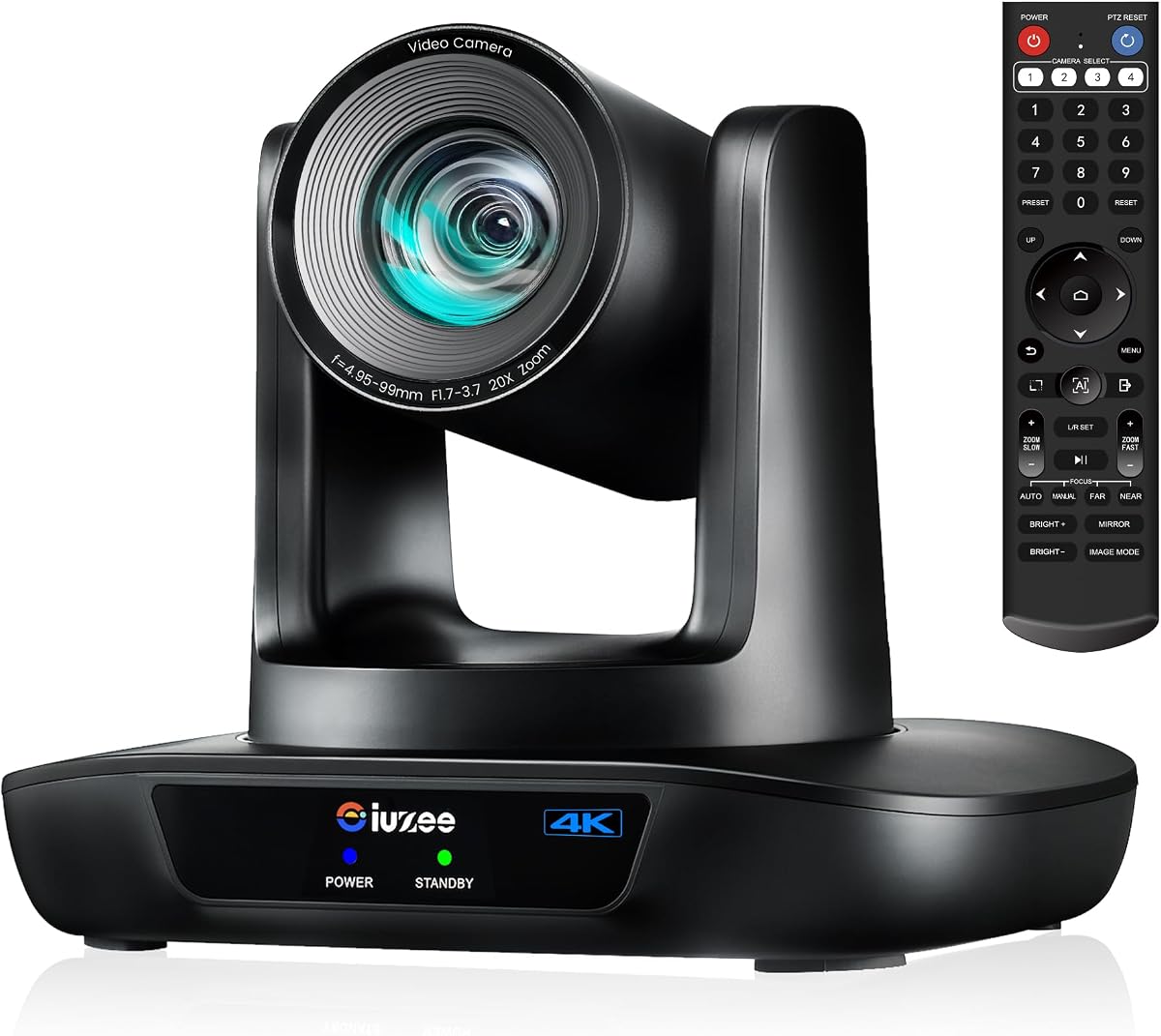
This camera excels with a massive 20x optical zoom for large venues. It is perfect for church services or auditoriums where distance matters. The tracking follows speakers smoothly even when zoomed in.
We may earn a commission when you buy through this link, at no additional cost to you.
Support for PoE simplifies installation with a single network cable. Video quality remains sharp at 4K resolution. The included speakerphone ensures audio clarity across the room.
While the cost is higher, the zoom capability justifies it for large rooms. PoE reduces clutter significantly. This model bridges the gap between conference and broadcast needs.
Ideal for houses of worship or large educational halls. It delivers broadcast quality in a user-friendly package. The zoom ensures no detail is lost from the back of the room.
20x optical zoom captures clear details from far away without losing quality.
PoE support allows power and data over one cable to reduce installation effort.
We may earn a commission when you buy through this link, at no additional cost to you.
This camera is built for professional live streaming with multiple outputs. It supports RTMP and RTSP protocols for direct streaming. The 20x zoom is excellent for covering large events.
We may earn a commission when you buy through this link, at no additional cost to you.
Advanced AI tracking ensures the main subject stays in frame. The web browser interface allows control without additional software. PoE support simplifies power and data transmission.
Note that it lacks a built-in microphone, so external audio is needed. This makes it more suitable for broadcast setups than simple office calls. The 3-year warranty adds security for the investment.
Best for church production teams or event streamers needing reliability. The streaming features provide flexibility for platforms like YouTube. It delivers broadcast quality video at a reasonable price.
Protocols like RTMP allow direct streaming to platforms without intermediate hardware.
Access camera settings easily through any web browser on your network.
We may earn a commission when you buy through this link, at no additional cost to you.
This is the top choice for production professionals requiring advanced workflows. It includes official NDI support for seamless integration with software like OBS. The SDI output is perfect for long cable runs.
We may earn a commission when you buy through this link, at no additional cost to you.
The 20x zoom ensures detailed shots even in large venues. Tracking combines facial and body recognition for robust performance. 4K resolution via HDMI provides unmatched clarity for broadcasts.
It is expensive and requires some technical setup, but the quality justifies it. Ideal for studios, churches, and high-end events. The inclusion of NDI license saves additional costs.
Perfect for teams needing studio-grade camera control and flexibility. It simplifies complex setups without sacrificing quality. This model sets a new standard for affordable broadcast cameras.
Official NDI support allows easy integration with popular broadcast software.
SDI output enables long-distance signal transmission without signal degradation.
We may earn a commission when you buy through this link, at no additional cost to you.
This camera provides reliable performance for both meetings and streaming. Its 20x optical zoom brings distant subjects close without loss of quality. PoE support offers a clean setup option for IT teams.
We may earn a commission when you buy through this link, at no additional cost to you.
AI tracking follows presenters with smooth movements. The camera supports multiple protocols for broad compatibility. Built to withstand daily use in high-traffic environments like schools.
It does not include audio, requiring external mics. This adds to the cost but gives flexibility in audio choices. Resolution defaults to 4K but can be adjusted if needed.
Great for educational or hybrid event setups needing flexibility. The zoom capabilities make it stand out. With the right audio, it becomes a powerful all-round solution.
20x optical zoom ensures clear images from any distance in the room.
HDMI, USB, and LAN options provide flexibility for various system designs.
We may earn a commission when you buy through this link, at no additional cost to you.
This system is designed specifically for medium to large conference rooms. It combines camera, mics, and speakers into one unit. Auto framing adjusts the view dynamically to keep everyone visible.
We may earn a commission when you buy through this link, at no additional cost to you.
The 4-mic array captures sound clearly across the room. Built-in speakers mean no extra audio hardware is required. Plug-and-play setup works with Teams and Zoom immediately.
It lacks a zoom or PTZ function, relying on wide angle coverage. This limits flexibility but simplifies operation. It is ideal for rooms where everyone stays seated at a large table.
Best for corporate boardrooms needing a single device solution. The audio quality is particularly impressive for an all-in-one unit. It reduces clutter and simplifies daily conference calls.
Integrated audio and video hardware reduces cable clutter and setup time.
Large angle lens ensures all participants in big rooms stay visible.
We may earn a commission when you buy through this link, at no additional cost to you.
This webcam is perfect for personal offices or small huddle spaces. It integrates video, microphone, and speaker into a single plug-and-play unit. Adjustable FOV settings allow customization for solo or group calls.
We may earn a commission when you buy through this link, at no additional cost to you.
Voice tracking follows speakers quickly to keep focus on active talkers. The remote control enables easy volume and mute adjustments. A privacy cover adds security for sensitive work environments.
While zoom is digital rather than optical, it suffices for desktop use. Tracking works best for single users or close groups. The price makes it highly accessible for individuals.
Ideal for remote workers or small teams on a budget. It brings 4K quality to laptops without external hardware. Easy setup and compact design make it user-friendly.
All audio and video functions combined in one small unit for simplicity.
Multiple FOV modes let you switch between wide group views and focused shots.
We may earn a commission when you buy through this link, at no additional cost to you.
Selecting the right camera requires balancing video quality, audio, and smart features to match your space and workflow.
Resolution impacts clarity. Look for 4K if you want detailed images, but 1080p is often sufficient for standard meetings. Higher resolution requires more bandwidth.
Optical zoom maintains quality when magnifying distant subjects. Digital zoom crops the image and may lose detail. For large rooms, optical zoom is recommended.
Effective AI tracking follows speakers smoothly without jitter. Check if the camera supports both face and body recognition. Some models handle multi-person rooms better than others.
Clear audio is as vital as video. Ensure the system includes mics with noise cancellation or plan for external gear. Speaker volume matters for remote attendees to hear everyone.
USB offers plug-and-play simplicity. HDMI provides uncompressed video for external monitors. PoE simplifies cabling for professional setups requiring network power.
Wide angles cover more space but can distort edges. Narrower angles focus on specific areas. Adjustable FOV models offer flexibility to match room sizes.
Ensure the camera works with your conferencing platforms like Zoom or Teams. Drivers may be needed for advanced features. Most modern cameras support standard UVC protocols.
Consider if you need desk, wall, or ceiling mounting. Adjustable mounts help position the camera correctly. Look for included accessories like brackets and cables.
Connect the camera to your computer via USB or HDMI. Install any required drivers or software from the manufacturer. Adjust the angle to ensure the entire room is within the frame.
Test the microphone and speaker settings before meetings. Use the privacy cover when not in use to protect the lens. Keep the lens clean with a soft microfiber cloth to maintain clarity.
Update firmware regularly to improve AI tracking performance. Use presets if available to save favorite camera positions. Ensure your network bandwidth supports the video resolution you selected.
Most models listed support Zoom and Microsoft Teams. They use standard protocols like UVC to ensure compatibility. Always check the product description to confirm support for your specific platform.
Optical zoom uses the lens to magnify the image without losing quality. Digital zoom crops the image and loses detail. Optical is preferred for large rooms where close-ups are needed.
Many models include built-in microphones or speakerphones. However, for large rooms, external mics may improve audio. Check the specs to see if audio components are included in the kit.
Place the camera at eye level and avoid blocking the view. Ensure lighting is even to help facial recognition. Some models allow manual preset adjustments for better tracking.
Yes, many support HDMI and IP outputs for live streaming. They work well with platforms like YouTube and OBS. Check for specific protocols like RTSP if you need streaming features.
Most cameras support desk, wall, and tripod mounting. Some include brackets in the box. Ceiling mounts may require separate adapters. Ensure the mounting method fits your room layout.
We have reviewed the top ten auto tracking conference cameras to help you choose the right fit. The TONGVEO 4K system leads for overall value, while the NDI model suits professionals.
Prioritize optical zoom if your room is large. For audio needs, check if mics are included. Ensure your chosen model integrates seamlessly with your existing meeting platforms.
Remember that prices and stock change frequently. Verify current availability before purchase. With the right camera, your virtual meetings will be clear, smooth, and professional.