
TECKNET Wired Keyboard
4.5Editor score
Silent typing technology
7-color RGB lighting
Spill-resistant design
Discover the top 10 backlit illuminated keyboard models for 2026. This guide compares features, lighting options, and usability to help you find the perfect
Finding a reliable backlit illuminated keyboard can transform your computing experience. Whether you work late at night or need clear visibility, these devices offer essential lighting features for comfort and efficiency.
We have carefully evaluated the top options available on the market. Our comparison focuses on build quality, lighting customization, and ergonomic design to ensure you get the most value for your investment.
Each pick highlights unique strengths and ideal use cases for different users. Please note that product availability and pricing may change over time, so verify details before making your final purchase decision.
4.5Editor score

4.9Editor score

4.1Editor score
The following table provides a side-by-side overview of the top ten models. It highlights key specifications to help you quickly identify the model that best fits your specific typing and lighting needs.



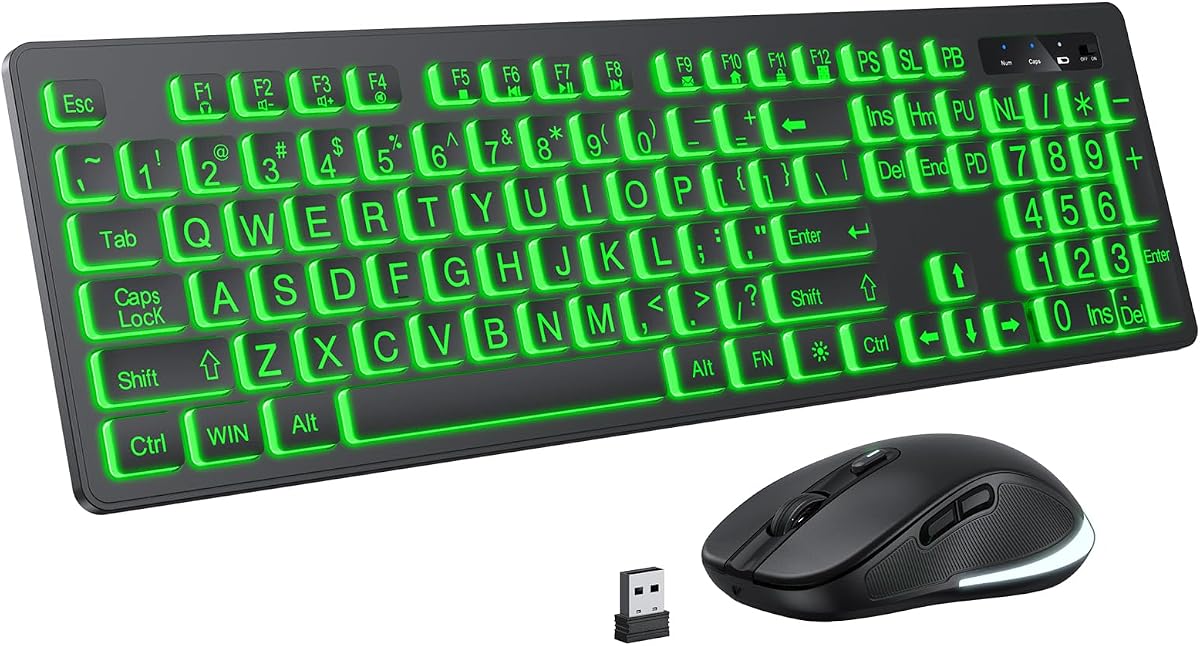


The TECURS Large Print Backlit Keyboard stands out with its impressive 4.9 rating. It offers oversized keys that are four times larger than standard fonts, making it ideal for those with vision challenges or who prefer high visibility.
We may earn a commission when you buy through this link, at no additional cost to you.
This model features both USB and Type-C connectors for broad device compatibility. The soft membrane structure ensures quiet typing, which is perfect for shared spaces. Dedicated multimedia keys add convenience for media control.
While the lighting is not RGB, the 7 adjustable brightness levels provide excellent visibility. The spill-resistant design adds durability for daily office use. It balances functionality and comfort effectively for many users.
This keyboard is recommended for seniors, students, and office workers seeking clarity. Its ergonomic design reduces hand fatigue during long sessions. It remains a top choice for reliability and readability.
The large print keys ensure you never miss a keystroke. This is essential for reducing errors and maintaining typing speed in any lighting condition.
Soft membrane keys provide a low-profile typing experience. This reduces noise levels significantly, making it suitable for libraries or quiet offices.
We may earn a commission when you buy through this link, at no additional cost to you.
The TECKNET Wired Keyboard offers exceptional value with a 4.5 rating. It combines a full-size layout with vibrant RGB lighting. This makes it a great choice for users seeking style and function without a high cost.
We may earn a commission when you buy through this link, at no additional cost to you.
Designed with low-profile membrane keys, it delivers soft keystrokes that reduce noise. The spill-resistant conductive film protects against accidental liquid damage. It supports up to 80 million keystrokes for long-term reliability.
While the RGB lighting is attractive, some users may miss wireless connectivity. However, the plug-and-play setup is easy and requires no drivers. It is compatible with various Windows and Mac OS versions.
This keyboard is best for students or budget-conscious buyers. It provides a quiet workspace and customizable lighting. The lifetime warranty adds significant peace of mind for daily users.
Choose from seven vibrant colors and multiple brightness modes. This allows you to personalize your desk setup and typing atmosphere to match your preferences.
Built with a sturdy frame and conductive film protection. The keys are tested to withstand millions of presses, ensuring consistent performance over years.
We may earn a commission when you buy through this link, at no additional cost to you.
The HP 400 Backlit Wired Keyboard brings premium features to the table. Its warm white LED keys help reduce eye fatigue. The slim design makes it easy to carry or pack away when not in use.
We may earn a commission when you buy through this link, at no additional cost to you.
It includes 12 programmable shortcuts for faster workflow. The keys are quiet and suitable for hybrid work environments. The sanitizable surface is a plus for shared workspaces requiring hygiene.
While it offers fewer brightness levels than RGB models, the warm white is gentle on eyes. The included USB-C cable with adapter ensures modern connectivity. It is built for professionals needing efficiency.
This model is ideal for business users or travelers. The programmable keys save time on complex tasks. It combines style, utility, and a polished finish for a professional office setting.
The warm white LED illumination is less harsh than bright white light. This helps maintain focus during late-night work sessions without causing discomfort.
The keyboard surface can be sanitized easily. It is also spill-resistant, protecting internal components from accidental liquids and keeping it clean.
We may earn a commission when you buy through this link, at no additional cost to you.
The X9 Large Print Backlit Computer Keyboard is designed for easy visibility. Its large bold print keys make every character clear. It is excellent for seniors or visually impaired users needing clear access.
We may earn a commission when you buy through this link, at no additional cost to you.
This model features 7 colors and 4 brightness levels for customization. The full-size 107-key layout includes a number pad for efficient workflow. It requires no software installation and works instantly.
The keyboard is built for daily use in homes or offices. While it may be slightly bulky, the durability compensates for the size. The LED lighting ensures keys are visible in dim conditions.
This product is perfect for shared workspaces or libraries. It simplifies typing for those who struggle with small letters. The reliable USB connection makes setup effortless for any user.
The oversized keys provide maximum readability. You can type confidently without straining your eyes, even in low-light environments.
With 7 colors and adjustable brightness, you can choose a setting that suits your mood. This adds a touch of style to your workstation.
We may earn a commission when you buy through this link, at no additional cost to you.
The KOPJIPPOM Large Print Backlit Keyboard offers great value for the price. It features fonts that are four times larger than standard. This helps those with visual difficulties type with confidence.
We may earn a commission when you buy through this link, at no additional cost to you.
Its white LED backlight is evenly distributed and adjustable. The spill-proof design means you can work without worrying about coffee spills. The ergonomic feet reduce hand fatigue during long typing sessions.
While it does not offer RGB colors, the white light is effective. It supports Windows 2000 to 11 and Mac OS with limitations. The durable build ensures it lasts for years.
This keyboard is ideal for home offices and schools. It provides a reliable connection without needing batteries. The simple design focuses on function and ease of use for everyone.
Large fonts help users find keys quickly. This reduces typing errors and speeds up work, especially for those with limited vision.
Spill-proof technology protects internal components. This adds an extra layer of security for accidental water splashes on the desk.
We may earn a commission when you buy through this link, at no additional cost to you.
The Arteck Backlit USB Wired Full Size Keyboard combines style and comfort. It is ultra-thin and light, making it easy to move. The scissors X structure offers a low-profile typing experience.
We may earn a commission when you buy through this link, at no additional cost to you.
It features 7 unique LED backlight colors for personalization. The media hotkeys allow for quick volume and playback adjustments. Despite being thin, it includes a full number pad and arrow keys.
While it lacks a battery, the wired connection ensures constant power. The ergonomic design provides comfort without bulk. It is ideal for users who prefer a clean and modern desk aesthetic.
This keyboard suits users needing a compact yet full layout. The quiet typing action is great for shared spaces. It balances design with practical typing performance effectively.
The slim profile looks professional on any desk. The 7 colors add a subtle touch of style to your workspace setup.
Scissors X keys offer stability and quiet feedback. This reduces finger strain and makes typing smooth for long periods.
We may earn a commission when you buy through this link, at no additional cost to you.
The Large Print Wireless Keyboard and Mouse offers freedom from cables. The 2.4GHz wireless provides a stable connection up to 33 feet. This makes it perfect for comfortable typing away from your desk.
We may earn a commission when you buy through this link, at no additional cost to you.
Both devices are rechargeable via Type-C with long standby times. The keyboard has oversized letters for visibility. The shared USB receiver simplifies connectivity by using one dongle for both devices.
The silent keystrokes are friendly for shared offices. While the battery life is good, users may need to recharge periodically. It supports many OS systems but note Mac limitations.
This combo is great for home users or students. The backlight aids typing in dark rooms. The included mouse makes it a complete solution for daily computing tasks.
Wireless technology allows flexible positioning. You can place the keyboard further from your computer for better comfort and posture.
A keyboard and mouse combo saves time and cost. Both devices feature matching backlighting for a cohesive look on your desk.
We may earn a commission when you buy through this link, at no additional cost to you.
The Perixx PERIBOARD-317 delivers a slim profile without sacrificing full keys. It has 4X larger fonts for easy visibility. The low-profile keys offer responsive and quiet typing for users.
We may earn a commission when you buy through this link, at no additional cost to you.
The white LED backlight supports low-light conditions. It includes a long 5.25-ft USB cable for flexibility. The ABS key printing resists wear for years of use.
Note that the Scroll Lock function is disabled when light is on. This is a minor trade-off for brightness. The design ensures comfort and reduces hand fatigue during long sessions.
This keyboard is ideal for libraries or schools. It supports Windows systems well. The durable build makes it a practical choice for daily office environments.
The thin design saves desk space and looks sleek. It maintains all full-size keys while reducing overall bulk on your work surface.
Large fonts help with quick key identification. This ensures smooth workflow even if your eyesight is not perfect in low light.
We may earn a commission when you buy through this link, at no additional cost to you.
This keyboard is designed specifically for seniors and low vision users. The large font reduces typing errors. The white LED backlight aids typing in darker environments effectively.
We may earn a commission when you buy through this link, at no additional cost to you.
It includes an ergonomic foldable tripod and wrist rest. A keyboard cover helps prevent dust and liquids from damaging keys. This extends the service life significantly.
The backlight remains on in standby mode which may drain power slightly. However, this ensures immediate visibility. The plug-and-play setup requires no software or drivers to install.
This model is perfect for home use or offices. The wrist support reduces fatigue. It offers a reliable and supportive typing experience for all users.
The ergonomic design includes foldable support. This promotes a natural hand position to prevent strain during extended typing sessions.
The included cover shields keys from debris. It is especially useful for environments where dust or crumbs are common.
We may earn a commission when you buy through this link, at no additional cost to you.
This keyboard offers vibrant 7-color backlighting. It includes an ergonomic wrist rest for comfort. The oversize letters ensure easy identification for all users.
We may earn a commission when you buy through this link, at no additional cost to you.
Soft-touch keys provide a silent feel for late-night use. The kickstand allows an ergonomic typing angle of 7 degrees. It works fast within seconds without needing drivers.
While it is wired, the setup is very simple. The wrist rest is comfortable but not detachable. The colors let you customize your desk to match your mood.
It is ideal for gaming or home office use. The silent keys do not disturb others. The combination of comfort and light makes it a versatile choice for daily typing.
Seven colors provide variety for your desk. You can change the tone of the keyboard to match your work environment.
The wrist rest provides soft support. This helps maintain a natural hand position and reduces fatigue during long tasks.
We may earn a commission when you buy through this link, at no additional cost to you.
Selecting the right backlit illuminated keyboard depends on your specific needs. This guide outlines key factors to consider before making a purchase.
For users with vision challenges, large print keys are essential. Look for keyboards with oversized fonts that are at least four times larger than standard keys.
This ensures clear visibility and reduces typing errors in any environment.
Backlighting can be white or RGB with multiple colors. White light is often better for reducing eye strain while RGB offers style.
Choose adjustable brightness levels to suit different lighting conditions.
Wired keyboards ensure constant power and reliability. Wireless options provide flexibility and reduce desk clutter with Bluetooth or USB receivers.
Consider battery life if you choose a wireless model for your setup.
Full-size layouts include a number pad and arrow keys for efficiency. Compact models save space but may lack dedicated navigation keys.
Select a size that fits your desk and your workflow needs.
Look for features like wrist rests, adjustable feet, or low-profile keys. These reduce hand fatigue and improve posture during long typing sessions.
Comfort is key for preventing strain and improving daily productivity.
Spill-resistant designs protect against accidental liquid damage. Check the key life rating to ensure the keyboard lasts for years of daily use.
Durable materials and good build quality ensure long-term reliability.
Ensure the keyboard works with your specific OS. Most support Windows well but Mac users should check multimedia key limitations.
Plug-and-play models make setup easy across different devices.
Determine your price range before comparing options. Higher prices may offer more features but basic models often meet all needs effectively.
Balance features with cost to get the best value for your budget.
To activate the backlight, use the function key combination provided. Adjust brightness levels to suit your environment and reduce eye strain.
Clean the keys regularly with a soft cloth or compressed air. Avoid excessive liquid exposure even with spill-resistant models to maintain longevity.
Store the keyboard in a dry place when not in use. For wireless models, recharge batteries regularly to avoid unexpected power loss during work.
Most backlit keyboards work with Mac OS for basic typing. However, multimedia keys may have limited functionality. Check the product specifications for full compatibility.
The backlight LEDs typically last for thousands of hours. Wired models do not drain battery as they draw power from the computer directly.
Large print keyboards are similar to standard ones in cleaning. Use a soft brush or cloth to remove dust from the key gaps regularly.
Wireless models require batteries or rechargeable packs. Look for USB-C rechargeable options to avoid frequent battery replacements.
RGB models allow color changes via function keys. White models only have brightness adjustments. Choose based on your style preference.
Spill-resistant means they can handle minor splashes. They are not fully waterproof for submersion. Clean spills immediately for best results.
We hope this guide helped you narrow down your choices. The TECURS, TECKNET, and HP 400 models stand out for their unique benefits.
Prioritize visibility and comfort based on your daily needs. Large print keys or adjustable lighting can make a huge difference in your workflow.
Always check current availability and specifications before purchasing. These products offer great value for anyone seeking a reliable illuminated keyboard.