
NetumScan USB 1D Barcode Scanner
4.4Editor score
Plug and play USB connectivity
Durable anti shock design
Affordable entry level option
This guide compares the top barcode scanners for library use, focusing on connectivity, battery life, durability, and compatibility with library management
Libraries require reliable tools to manage collections efficiently. A quality barcode scanner ensures quick checkouts and accurate inventory tracking for patrons and staff alike.
We evaluated ten top models based on connectivity options, scan speed, battery endurance, and ruggedness. Each device was assessed for its suitability in high traffic library environments.
Every pick highlights key strengths and potential limitations to help you decide. Prices fluctuate frequently so verify current offers before purchasing your next library scanner today.
4.4Editor score

4.4Editor score

4.3Editor score
The following table provides a side by side overview of each model including key specifications and core strengths to help you find the right fit for your collection.




The NETUM Bluetooth Barcode Scanner stands out as a versatile choice for modern library environments. With a strong rating of 4.4 stars this device offers flexible connectivity through Bluetooth 2.4G wireless and wired modes.
We may earn a commission when you buy through this link, at no additional cost to you.
Its 2600mAh battery ensures long operation without frequent recharging making it ideal for high volume circulation desks. The internal storage holds up to 100000 barcodes which is perfect for offline inventory tasks.
While it excels at 1D scanning it does not handle QR codes which might limit some uses. Additionally initial configuration requires scanning specific barcodes from the manual which adds a setup step.
Librarians needing a reliable wireless scanner for ISBN tracking will find this model excellent. Its balance of battery life connectivity and storage makes it our top recommendation for most libraries.
Seamlessly switches between Bluetooth and wireless modes to match your network setup without interrupting workflow.
A single charge supports months of use in typical library conditions reducing downtime and maintenance needs.
We may earn a commission when you buy through this link, at no additional cost to you.
The NetumScan USB 1D Barcode Scanner provides a cost effective solution for libraries on a tight budget. It scores 4.4 stars and delivers dependable performance for reading standard 1D barcodes reliably and quickly.
We may earn a commission when you buy through this link, at no additional cost to you.
Its CCD sensor technology handles damaged or smudged codes better than many laser scanners. The durable ABS housing can withstand drops from significant heights ensuring longevity in busy circulation areas.
The main limitation is the lack of wireless capability since it relies on a USB cable. This restricts movement but ensures a stable connection without battery concerns or signal interference.
For fixed workstations like front desks this scanner is an excellent value. Its simplicity and robustness make it a smart choice for libraries prioritizing cost efficiency over mobility.
Designed to endure repeated drops and heavy use ensuring the device lasts for years in demanding settings.
Connect directly to a USB port and start scanning immediately without needing drivers or complex configuration.
We may earn a commission when you buy through this link, at no additional cost to you.
The Tera Barcode Scanner with Screen offers premium features for libraries needing advanced capabilities. It supports both 1D and 2D QR codes and includes a display for easy setting adjustments on the device.
We may earn a commission when you buy through this link, at no additional cost to you.
Its CMOS imaging technology reads high density barcodes and reflective materials with ease. The included charging cradle simplifies battery management and ensures the scanner is always ready for daily operations.
The added weight and cost may not suit all users but the versatility is unmatched. Customizable settings allow precise integration with various library systems enhancing overall workflow efficiency.
Libraries requiring QR code scanning or complex configuration options should consider this top tier model. Its robust feature set justifies the investment for forward thinking institutions.
Adjust settings directly on the scanner screen for quick customization without connecting to a computer.
The dedicated cradle keeps the unit charged and organized ensuring uninterrupted scanning throughout shifts.
We may earn a commission when you buy through this link, at no additional cost to you.
The Eyoyo Mini is designed for portability without sacrificing core scanning functions. At just 35 grams it is one of the lightest options available making it easy for staff to carry during inventory checks.
We may earn a commission when you buy through this link, at no additional cost to you.
Its vibration mode allows silent operation which is beneficial in quiet library zones. The battery lasts up to ten days with auto off features ensuring it is ready whenever needed.
However it does not scan QR codes or screen barcodes which limits versatility. The small form factor also means it may be more prone to damage if dropped frequently.
For mobile circulation staff or small collection audits this scanner is ideal. Its convenience and silent mode make it a great secondary tool for specific tasks.
Use vibration instead of audio alerts to maintain a peaceful reading environment while scanning.
The tiny design fits comfortably in hand or pocket allowing easy transport around the library.
We may earn a commission when you buy through this link, at no additional cost to you.
The Tera 5100 Purple features a useful battery indicator light that prevents unexpected power loss during critical tasks. With a 4.5 star rating it delivers reliable wireless performance and durability.
We may earn a commission when you buy through this link, at no additional cost to you.
Its IP54 rating provides protection against dust which is valuable in older buildings. The extended wireless range allows freedom of movement across large stacks without signal drops.
While it lacks QR scanning capabilities it excels at standard barcode tasks. The silicone cover adds extra protection against drops ensuring the unit remains functional over time.
Libraries needing a rugged wireless scanner with clear power management will appreciate this model. The visual battery status helps maintain continuous workflow without interruptions.
The built-in light shows remaining power so you never run out mid-task unexpectedly.
IP54 rating shields internal components from dust and debris ensuring long-term reliability.
We may earn a commission when you buy through this link, at no additional cost to you.
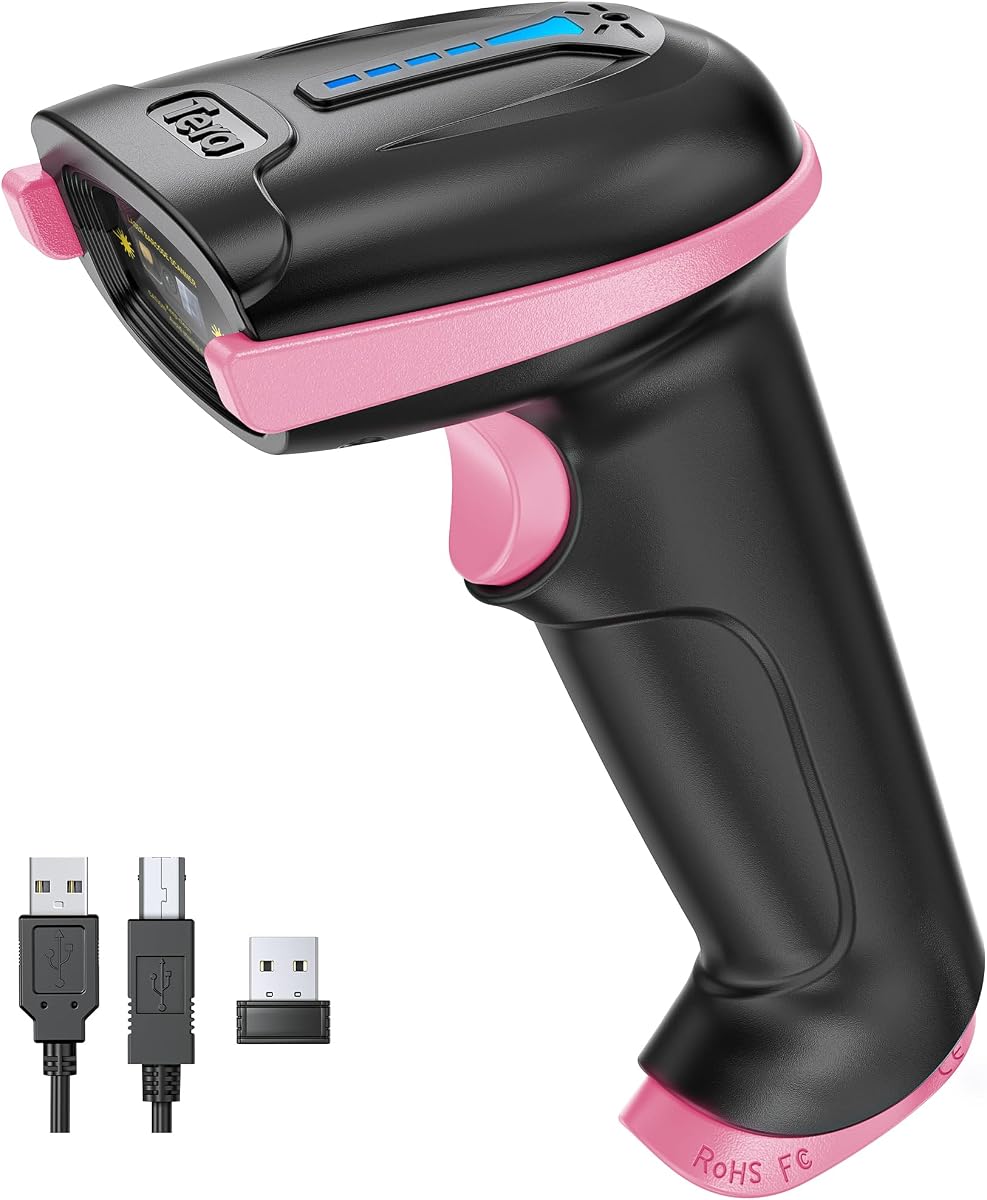
This pink variant of the Tera 5100 combines functionality with a distinct visual appeal. It offers the same robust features as the purple model including battery indicators and durable construction.
We may earn a commission when you buy through this link, at no additional cost to you.
The vibrant color makes it easy to spot in a busy work environment. Staff can quickly identify this unit among other equipment reducing confusion during shift changes.
Like its counterpart it does not support QR codes but handles standard library codes flawlessly. The battery indicator helps prevent unexpected downtime during busy circulation periods.
Ideal for libraries wanting a tool that stands out visually while maintaining high performance. The pink design adds a touch of personality to technical equipment.
The pink finish helps differentiate this unit from other tools on the desk.
Enjoy the same strong signal range and battery indicators as the standard model.
We may earn a commission when you buy through this link, at no additional cost to you.
The WoneNice USB Laser Scanner offers a classic laser solution for libraries prioritizing speed. With 200 scans per second it handles high volume checkout lines with ease.
We may earn a commission when you buy through this link, at no additional cost to you.
Its plug and play nature simplifies setup for any IT team. The ergonomic shape reduces hand fatigue during extended periods of scanning at the circulation desk.
Because it relies on a wired connection mobility is limited to the cable length. However this ensures stable performance without battery or wireless signal concerns.
For traditional front desk operations this model provides efficient and affordable performance. Its speed and reliability make it suitable for busy public libraries.
Rapid scanning rates keep lines moving quickly even during peak library hours.
Designed to fit naturally in hand for reduced strain during long shifts.
We may earn a commission when you buy through this link, at no additional cost to you.
The Symcode Wireless Barcode Scanner boasts an impressive 100m indoor range ideal for large libraries. It supports multiple devices transmitting to one receiver allowing simultaneous work by several staff members.
We may earn a commission when you buy through this link, at no additional cost to you.
Its 2000mAh battery ensures long shifts without recharging. Offline storage allows scanning far from the receiver with data syncing once within range.
The laser technology handles standard codes well but does not read QR or screen barcodes. This limitation means it is best suited for traditional barcode labels on books.
Libraries requiring wide coverage and multi-user capability will benefit from this model. The combination of range and battery life supports large floor plans effectively.
Connect multiple scanners to one receiver for parallel inventory tasks across different sections.
The 100m range allows staff to move freely through large areas without losing connection.
We may earn a commission when you buy through this link, at no additional cost to you.
This pink portable model from Eyoyo offers style combined with practical functionality. It appeals to users who want a tool that stands out while remaining highly functional.
We may earn a commission when you buy through this link, at no additional cost to you.
The pocket size makes it easy to carry during shelf checks. Bluetooth connectivity ensures flexibility without the need for constant cable use.
However it is not as rugged as larger units and might be more prone to damage if dropped. The lack of QR scanning limits its use to standard library barcodes.
For staff wanting a lightweight personal tool or a gift this scanner is a thoughtful choice. Its balance of style and utility makes it a unique option.
The pink finish adds a fun touch to technical gear for those who appreciate design.
Carry it effortlessly during round trips through the stacks without added bulk.
We may earn a commission when you buy through this link, at no additional cost to you.
The Barcode Scanner with Stand offers a dedicated hands-free solution perfect for fixed stations. The adjustable stand allows positioning for optimal scanning angles without holding the device.
We may earn a commission when you buy through this link, at no additional cost to you.
It supports both 1D and 2D QR codes providing versatility beyond standard books. The auto-sensing feature automatically scans when a code is placed near the sensor.
Being wired limits mobility but ensures stable operation. The included stand adds value by providing an all-in-one setup without buying extra accessories.
Libraries needing a quick station for self-checkout or reference work will find this useful. Its simplicity and included stand make it a convenient choice.
The auto-sensing mode lets you scan by simply passing items over the sensor.
The included stand allows you to set the perfect angle for scanning different sizes.
We may earn a commission when you buy through this link, at no additional cost to you.
Selecting the right scanner requires considering key factors that impact daily workflow and staff efficiency.
Libraries often need scanners that connect wirelessly to move around the stacks freely. Bluetooth and 2.4G wireless options reduce cable clutter and increase flexibility for mobile tasks.
Choose a model with the connection types your library system supports to ensure smooth integration.
Long shifts demand batteries that last without constant recharging. Models with 2000mAh capacity or higher can operate for hours on a single charge reducing downtime.
Prioritize scanners with clear battery indicators so you can manage charging proactively.
Ensure the scanner reads the formats you use daily. Most libraries need 1D ISBN codes but some may require 2D QR for digital resources.
Check the product specs to confirm compatibility with all barcode types in your collection.
Equipment in libraries faces frequent handling and potential drops. Look for models with anti-shock design or rubberized covers to withstand accidental impacts.
Rugged construction extends the life of the scanner and reduces replacement costs over time.
Network issues can interrupt real-time syncing. Scanners with internal storage allow staff to record data offline and upload it later when connected.
This feature ensures no data is lost during temporary outages or in remote sections.
Staff should not spend excessive time troubleshooting devices. Plug and play functionality with minimal setup steps improves productivity and reduces IT support needs.
Models with simple interfaces and clear instructions are easier for all users to adopt.
Cost varies widely between basic wired models and advanced wireless units. Determine how many units you need and prioritize features that directly impact your operations.
Investing in quality devices can save money long term by reducing maintenance and replacement costs.
Verify that the scanner works with your library management system and operating system. Some scanners have specific software requirements that may not match your existing setup.
Checking compatibility before purchase prevents integration issues and workflow interruptions.
Start by connecting the scanner to your system via the recommended method. Follow the pairing instructions carefully if using wireless to ensure a stable link before scanning.
Keep the scanning window clean and free from dust or scratches. Wipe it gently with a soft cloth to maintain optimal reading accuracy over time.
Store the device in a protective case when not in use. This prevents accidental drops and keeps the unit ready for the next shift without damage.
Most models listed support iOS devices through Bluetooth or USB connections. Always verify that the specific scanner supports the operating system you are using before purchasing.
Only certain models support 2D QR scanning. Check the product specifications for 2D capabilities if your library uses QR codes for digital resources.
Battery life varies by model but many offer all-day use on a single charge. Some units can last up to ten days with intermittent usage due to auto-off features.
Yes wireless scanners are reliable for libraries when paired correctly. They provide flexibility for mobile tasks and reduce cable clutter at circulation desks.
Most scanners work as plug and play devices without extra software. However some advanced configurations may require specific settings barcodes to be scanned.
Some models support multiple scanners connecting to a single receiver. This is useful for large warehouses but standard library setups usually need one unit per desk.
The NETUM Bluetooth Scanner leads as the overall best choice due to its versatile connectivity and strong battery life.
Consider your specific needs like budget and mobility before making a final decision on which unit fits your space best.
Verify current pricing and availability before purchasing to ensure you get the best value for your library.