
ASRock DeskMeet X300 Mini PC Barebone Kit
4.8Editor score
Supports Ryzen 5000 CPUs
Dual M.2 expansion slots
500W power supply included
This expert guide compares the top 10 Barebone Pcs with Amd for performance, features, and value to help you find the perfect mini PC.
Barebone PCs with AMD processors offer incredible flexibility for builders who want custom specifications without paying for pre-installed components. These compact systems provide powerful processing cores from AMD alongside versatile connectivity options that suit modern computing needs across various environments.
We evaluated ten leading barebone mini PCs based on processor performance, expansion capabilities, cooling efficiency, and port selection to create this comprehensive ranking. Each model was analyzed for its ability to handle demanding workloads while maintaining stable operation under sustained usage conditions throughout the day.
Each pick details specific strengths like OCuLink support, quad display output, or massive storage capacity to help you match hardware to your unique workload requirements. Note that prices and availability change frequently so verify current listings before finalizing your purchase decision today.
4.8Editor score

4.0Editor score

3.1Editor score
Compare these ten top-rated barebone systems side by side to see how they differ in processor generation, memory capacity, storage options, and specialized features like OCuLink or NAS bays.





The AOOSTAR MACO delivers exceptional performance for a compact mini PC using the Ryzen 7 PRO 8845HS processor paired with Radeon 780M graphics. This unit stands out in our rankings due to its innovative OCuLink port which provides near lossless external GPU connectivity unlike standard USB4 ports.
We may earn a commission when you buy through this link, at no additional cost to you.
Performance-wise this system handles everything from 4K video editing to AAA gaming with ease thanks to its 8 cores and 16 threads reaching boost clocks of 5.1GHz. The advanced cooling system utilizing a VC heat spreader ensures stable operation even during prolonged high load sessions without thermal throttling.
While the lack of included RAM and SSD means you must purchase these separately it offers the freedom to choose exactly what you need for your specific workload. The enterprise-grade encryption and fingerprint unlock provide strong security features ideal for business users handling sensitive data.
If you need a powerful mini PC that can grow with your needs and support external graphics cards this is the top recommendation in our lineup. Its combination of speed connectivity and durability makes it the ideal choice for professionals gamers and creative enthusiasts alike.
The OCuLink port delivers high bandwidth with minimal latency enabling you to connect high performance external GPUs like RTX 4080 without sacrificing frames.
Crafted with 100% recycled aluminum this chassis cuts carbon emissions by 75% while maintaining durability and a sleek modern aesthetic for any workspace.
We may earn a commission when you buy through this link, at no additional cost to you.
The AOOSTAR GEM12+ brings high-end features like OCuLink support and quad display output to a more accessible price point making it the best budget option for power users. It shares the same potent Ryzen 7 PRO 8845HS processor as our top pick but focuses on maximizing connectivity options for multi-monitor setups.
We may earn a commission when you buy through this link, at no additional cost to you.
Its dual cooling system pairs a dedicated CPU fan with a vapor chamber that distributes heat evenly across the sink to prevent thermal hotspots under sustained loads. The BIOS allows you to choose between Silent Balanced and Performance modes to tailor power consumption and acoustic levels to your environment needs.
The OCuLink port operates on an independent channel without occupying M.2 slots which means you can expand storage and graphics simultaneously without sacrificing internal NVMe capacity. This makes it particularly useful for users who need massive local storage alongside external GPU processing power.
Buy this model if you want top-tier specs without paying for a premium brand name or extra accessories you might not need. It offers excellent performance and flexibility for home offices gaming rigs and professional workstations that demand reliability and speed.
Supporting four 4K displays simultaneously allows you to run multiple windows and applications side by side for unmatched multitasking efficiency during work or creative tasks.
Adopting VAT architecture saves up to 20% of energy compared to standard architectures reducing electricity costs and environmental impact over the device lifetime.
We may earn a commission when you buy through this link, at no additional cost to you.
The AOOSTAR GEM12+ PRO adds unique premium features like a fully customizable built-in display and fingerprint recognition to the already impressive GEM12+ platform. This makes it ideal for users who want both aesthetic customization and enhanced security without compromising on raw processing power or connectivity options.
We may earn a commission when you buy through this link, at no additional cost to you.
Like other top models it features the Ryzen 7 PRO 8845HS processor and OCuLink support but distinguishes itself with software that lets you monitor system stats or set personal backgrounds on a dedicated panel. The built-in fingerprint recognition simplifies login processes making access faster and safer against unauthorized entry.
Storage and memory expansion remain flexible with dual DDR5 slots and dual M.2 slots allowing you to configure the system exactly to your budget and performance needs. The vapor chamber cooling ensures that even with high performance settings the device remains stable and quiet during long work sessions.
Choose this model if you value unique features that improve daily workflow and security while maintaining high-end gaming and editing capabilities. It represents the best blend of premium features and robust performance available in the current barebone PC market today.
Use dedicated software to customize the display panel to show real-time CPU GPU and RAM data or display your favorite background images for a unique look.
Built-in fingerprint recognition lets you log in instantly with a simple touch eliminating the need for complex passwords while keeping sensitive data protected.
We may earn a commission when you buy through this link, at no additional cost to you.
The ASRock DeskMeet X300 stands out as the most affordable classic barebone option leveraging the mature AM4 socket to support a wide range of Ryzen processors. It is perfect for users who want to upgrade existing AM4 CPUs or build a budget system without needing the latest DDR5 memory and processor standards.
We may earn a commission when you buy through this link, at no additional cost to you.
It features a PCIe 3.0 x16 slot which is rare for mini PCs allowing for additional expansion cards beyond just storage or wireless modules. The inclusion of a 500W power supply inside the kit ensures you have reliable power for your components without needing to source a separate unit externally.
While it uses DDR4 memory instead of DDR5 this model saves significant cost without sacrificing real-world performance for most daily tasks and standard office applications. The compact 8 liter size makes it easy to fit into tight spaces while still offering full desktop capabilities through its various ports.
Buy this if you are looking for an economical entry point into barebone mini PCs or if you already own AM4 components you want to repurpose. It offers excellent value and flexibility for budget-conscious builders who prioritize function over cutting-edge specifications.
Supporting Ryzen 2000 through 5000 G-Series CPUs lets you reuse existing hardware or choose from a vast market of compatible processors for your build.
The PCIe 3.0 x16 slot gives you room to add specialized expansion cards like capture cards or additional network adapters for advanced workstation needs.
We may earn a commission when you buy through this link, at no additional cost to you.
The MINISFORUM X1 Lite-255 brings modern Ryzen 7 255 performance to a budget-friendly barebone chassis with support for dual DDR5 memory and fast PCIe 4.0 storage. It competes well in the value segment by offering triple display outputs and a full-blood USB4 port that supports high speed data transfer and external devices easily.
We may earn a commission when you buy through this link, at no additional cost to you.
Cooling is handled efficiently using a large ventilation channel design and PCM phase-change material in the CPU fan to keep temperatures low even under load. This design ensures memory and SSD speeds remain consistent without throttling which helps maintain smooth performance during gaming or video editing sessions.
The OCuLink support comes with an adapter plate included making it easier to set up external GPU docks compared to systems where accessories must be purchased separately. Combined with a generous 3-year limited warranty this system provides peace of mind for users concerned about long-term reliability and support.
Select this model if you want modern features like DDR5 and USB4 without spending premium prices. It is an excellent choice for students remote workers and home users who need a compact reliable and fast mini PC for everyday computing tasks.
Connect three independent displays via HDMI USB4 and DP to create a panoramic workspace that boosts productivity for multitasking and data analysis.
PCM phase-change material in the fan absorbs heat effectively allowing the system to maintain full speeds during long gaming or rendering workloads.
We may earn a commission when you buy through this link, at no additional cost to you.
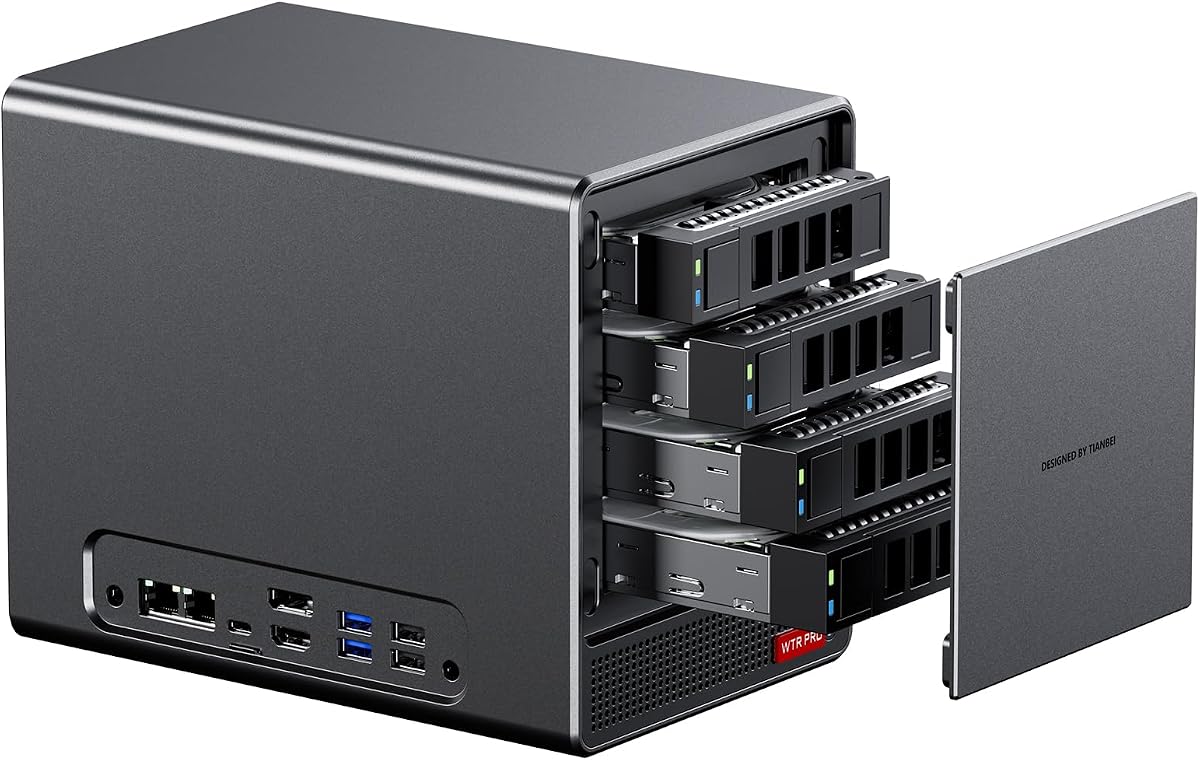
The AOOSTAR WTR PRO is specifically designed for NAS and soft routing tasks with four 3.5 SATA drive bays and two M.2 NVMe slots for fast caching or system drives. This hardware configuration makes it ideal for users building a home server who need massive storage capacity without resorting to large tower case solutions.
We may earn a commission when you buy through this link, at no additional cost to you.
Its through-the-wall construction paired with a large 12CM fan ensures efficient heat dissipation and silent operation even when drives spin up simultaneously during heavy data transfers. Intelligent fan control adjusts speeds based on load to maintain quiet performance while keeping internal temperatures within safe limits for long-term drive health.
With support for up to 88TB of total storage using four 22TB drives this model offers exceptional expandability for media libraries backups and virtual machine images. The low power consumption of 15 to 25 watts makes it cost-effective to run 24/7 without worrying about high electricity bills impacting your monthly budget.
Choose this if you need a dedicated compact NAS or router that can handle significant storage loads without noise. It is perfect for home labs media centers and small offices that need reliable always-on storage and network management capabilities.
With four 3.5 drive bays and two NVMe slots you can store massive amounts of data including 4K movies backups and large project files.
The through-the-wall cooling and intelligent fan controls keep noise levels low so the device remains unobtrusive in living rooms or offices.
We may earn a commission when you buy through this link, at no additional cost to you.
The ASRock DeskMini X300 defines ultra-compact computing with a 1.92L form factor that fits on a desk or shelf without taking up valuable space. It supports the reliable AM4 platform allowing you to use Ryzen processors from the 2000 to 5000 series for a balanced mix of performance and power efficiency.
We may earn a commission when you buy through this link, at no additional cost to you.
Despite its tiny size it offers triple display output via HDMI DisplayPort and D-Sub which is impressive for a system this small. This makes it suitable for digital signage kiosks or compact workstations where multiple monitors are needed without the bulk of a traditional PC.
It includes two M.2 slots for high-speed storage alongside support for 2.5-inch drives via its internal bays giving you flexible options for storage configuration. The inclusion of a 2.5G LAN port ensures fast network connectivity for large file transfers and smooth streaming without needing external adapters.
Buy this if you need the smallest possible AMD based mini PC that still offers decent expansion and multi-monitor support. It is perfect for digital signage office desks and living room setups where space conservation is the top priority.
At just 1.92 liters this chassis fits almost anywhere saving valuable desk space while still delivering reliable desktop computing performance.
Connect three monitors simultaneously using HDMI DisplayPort and VGA to maximize productivity or create immersive viewing experiences.
We may earn a commission when you buy through this link, at no additional cost to you.
The ASUS ExpertCenter PN54 brings next-level AI performance with the Ryzen AI 300 Series and XDNA2 NPU delivering up to 50 TOPS for faster responsive computing. This model stands out as the premium choice for those who need advanced AI workloads and future-proof connectivity like Wi-Fi 7 in a remarkably thin form factor.
We may earn a commission when you buy through this link, at no additional cost to you.
Its ultra-thin 0.6L chassis is built for 24/7 reliable operation with an eco-conscious design that does not compromise on durability or functionality. The inclusion of Wi-Fi 7 and Bluetooth 5.4 ensures that wireless connections are fast stable and ready for the latest network standards without requiring upgrades soon.
Radeon 800M graphics support up to four 4K displays making it suitable for professional creative work that requires high color accuracy and multiple screens. The toolless design allows quick access for customization so you can upgrade components quickly without specialized tools or complex disassembly steps.
Invest in this if you need the latest AI capabilities and wireless standards in a sleek portable package. It is ideal for business agents creative professionals and power users who prioritize cutting-edge features and long-term reliability over basic budget options.
With 50 TOPS of AI performance the XDNA2 NPU accelerates responsive computing tasks and dynamic processing without taxing the main CPU cores.
Wi-Fi 7 ensures ultrafast wireless speeds and stability for high bandwidth applications like video calls and cloud gaming without lag.
We may earn a commission when you buy through this link, at no additional cost to you.
The AOOSTAR WTR PRO 4+2 offers a flexible storage layout with four 3.5 drive bays plus two M.2 NVMe slots providing massive expandability up to 96TB total capacity. This model is tailored for home servers and soft routers that need to handle significant storage and network traffic simultaneously without overheating or noise issues.
We may earn a commission when you buy through this link, at no additional cost to you.
It supports triple 4K display output via DP HDMI and Type-C enabling efficient multitasking and better workflow environments for office or creative work. The intelligent fan control system adjusts speed based on load to keep noise levels low while ensuring stable operation during long running 24/7 cycles.
Dual 2.5G LAN ports allow for redundant connections or network aggregation which is critical for high performance file transfers and robust network setups. Compatibility with various systems like Windows Ubuntu and OpenWrt makes it versatile for different technical environments and user preferences.
Choose this if you need a versatile storage and networking solution that can scale easily with your needs. It is excellent for tech enthusiasts and small offices that require a reliable high capacity home server or router without compromising on connectivity options.
Support up to 96TB across four SATA and two NVMe slots to store massive libraries files and backups without external drive enclosures.
Connect three 4K monitors to split workspace efficiently for monitoring and editing tasks or managing complex server operations.
We may earn a commission when you buy through this link, at no additional cost to you.
The ASUS ExpertCenter PN54-S1 is designed with sleek aesthetics in mind featuring a 34mm chassis that fits effortlessly into modern workspaces while maintaining reliability for 24/7 operation. It brings next-level Wi-Fi 7 connectivity and quad display support to ensure you stay connected and productive without physical space constraints or visual limits.
We may earn a commission when you buy through this link, at no additional cost to you.
Its tool-free design allows quick access for upgrades making it simple to swap memory or storage without needing screwdrivers or technical expertise. This ease of use appeals to users who want a clean professional look with the flexibility to adapt hardware to changing needs over time without service visits.
Radeon 740M graphics deliver sufficient performance for multimedia and light creative tasks while keeping power consumption reasonable for daily office environments. The inclusion of a 3-year warranty provides strong support backing for businesses that depend on continuous uptime and minimal downtime for productivity.
Buy this if you value professional design and effortless maintenance alongside modern connectivity options. It is perfect for business agents and creative professionals who need a stylish reliable and adaptable mini PC for daily office use and presentations.
At just 34mm thick this chassis looks elegant on any desk and minimizes desk clutter while maximizing usable workspace area.
Tool-free access means you can swap memory or storage quickly without tools saving time and avoiding hassle during routine maintenance.
We may earn a commission when you buy through this link, at no additional cost to you.
Selecting the right AMD barebone PC requires understanding core hardware specs and how they match your specific workload demands. We break down the key factors to help you make an informed choice.
Modern Ryzen 7 PRO 8845HS CPUs offer higher boost clocks up to 5.1GHz and better integrated graphics like Radeon 780M for gaming and editing tasks. Older AM4 processors like the 5825U provide solid performance for office use at lower prices if you do not need top-tier speeds.
Choose newer chips if you need maximum multitasking power and fast graphics without a dedicated card or pick older generations if budget and basic office needs are priorities.
Most models support dual DDR5 slots allowing up to 128GB or 256GB total which is crucial for heavy multitasking large datasets and virtual machines. DDR5 speeds like 5600MHz offer noticeable bandwidth improvements over older DDR4 systems for smoother data handling.
Ensure the model supports enough capacity to match your future needs since memory upgrades after purchase can be tricky in compact mini PC designs.
Look for dual M.2 slots supporting PCIe 4.0 NVMe SSDs for fast system performance and additional SATA bays if you need massive storage capacity for media or backups. Some NAS specific models offer 4 to 6 bays allowing terabytes of storage in a small chassis.
Prioritize models with at least two M.2 slots to balance operating system speed and personal storage without needing external drives later on.
OCuLink ports provide higher bandwidth and lower latency than USB4 for connecting external graphics cards which is ideal for high-end gaming or professional rendering. Ensure the system supports hot-swapping if you need to change GPUs frequently without powering down the unit.
This feature is critical if you need desktop-level graphics power but want the portability and small footprint of a mini PC form factor.
Dual 2.5G LAN ports offer faster wired connections for file transfers and streaming while Wi-Fi 6e or Wi-Fi 7 ensures stable wireless connectivity for modern home networks. USB4 ports allow high-speed data transfer and support for multiple 4K displays or Thunderbolt peripherals.
Choose systems with dual LAN if you need network redundancy or aggregation and ensure USB4 support if you need multiple high-resolution monitors.
Cooling is vital in compact chassis so look for vapor chambers VC heat spreaders and intelligent fan controls that maintain performance under load without excessive noise. Dustproof designs help prevent debris buildup which can throttle performance over long periods of use.
Better thermal solutions mean longer hardware lifespan and consistent speeds during long gaming or rendering sessions without slowdowns due to heat.
Some models like the DeskMeet X300 include PCIe 3.0 x16 slots for specialized cards or extra wireless modules. Check if you need these for specific industrial or professional applications beyond standard storage and network options.
Standard models often rely on M.2 and USB ports for expansion so verify specific slot availability before purchase if you have unique hardware needs.
Barebone systems typically do not include an OS so you must install your preferred system separately. Some models include fingerprint sensors and enterprise encryption for secure access without complex passwords.
Consider the security features available and the ease of OS installation when selecting a model for business or personal use.
Install compatible RAM and SSDs before powering on the unit to avoid BIOS errors and ensure proper system detection during initial boot sequences. Follow the included manual for component installation to prevent accidental damage to connectors or motherboard pins.
Keep the unit in a well-ventilated area away from direct sunlight or dust prone locations to maintain optimal cooling performance. Dust accumulation can block airflow and cause overheating so clean vents regularly with compressed air for consistent operation.
Update firmware and BIOS through the vendor website to improve stability and enable new features like higher clock speeds or compatibility with newer drives. Regular updates ensure your system runs safely and efficiently over time.
Barebone PCs do not come with an OS pre-installed so you will need to purchase a license and install Windows Linux or another OS separately. This approach saves costs and lets you choose the exact system version you need.
Most newer models use DDR5 SO-DIMM memory which offers higher speeds up to 5600MHz and better efficiency than older DDR4 types. Older AM4 models may support DDR4 which is cheaper but slightly slower for demanding workloads.
Yes many models support OCuLink for external GPUs which lets you connect high performance desktop graphics cards for AAA gaming. Integrated Radeon 780M graphics also handle lighter games well without needing extra hardware.
Create a bootable USB drive with your desired OS image boot into BIOS to set USB as first boot device then follow the installation prompts. Once installed you must activate your license and install drivers for full functionality.
OCuLink ports offer lower latency and more direct PCIe bandwidth making them better for external GPUs compared to USB4 which uses tunneling. This difference can impact performance in demanding gaming or creative workloads.
Modern systems with dual M.2 slots can support up to 16TB total using four TB drives while NAS models add SATA bays for up to 96TB capacity depending on drive sizes and RAID configuration.
Our top pick the AOOSTAR MACO offers the best balance of speed connectivity and expandability for most users needing high performance in a small case. It combines powerful AMD Ryzen 7 PRO 8845HS performance with OCuLink support and dual USB4 ports for unmatched versatility.
Prioritize OCuLink and high clock speeds if you need desktop level gaming or editing power or opt for AM4 models if budget is your primary concern. Consider NAS models if you need massive storage for media or backups in a compact footprint.
Always verify current listings and prices before buying since availability and costs fluctuate frequently based on supply and demand. Select the model that best fits your specific use case to get the most value from your investment.