
Canon MegaTank G3270
4.1Editor score
Affordable initial purchase price
Large ink capacity included
Simple wireless connectivity
Finding the right printing solution can be challenging when you want to avoid constant cartridge replacements. Cartridge free printers offer a sustainable and cost-effective alternative for modern households and small offices.
We have analyzed the most reliable models available in the market today to bring you this comprehensive list. Each product was evaluated based on ink capacity, connectivity options, and overall print performance.
Our picks highlight key strengths and potential trade-offs to help you make an informed decision. Remember that prices and availability can change frequently so check the latest details before purchasing.
4.1Editor score

4.3Editor score

3.9Editor score
As an Amazon Associate we earn from qualifying purchases.
The following table provides a side-by-side comparison of all ten models to help you quickly identify the best fit for your specific printing needs and budget constraints.





The HP Smart Tank 5003 stands out as a top choice for home users who need reliable printing without frequent maintenance. It comes with enough ink to last up to three years which reduces the worry of running out unexpectedly. The design focuses on ease of use with a mess-free refill system that makes adding ink simple and clean.
We may earn a commission when you buy through this link, at no additional cost to you.
Its standout qualities include the ability to print up to six thousand color pages from the initial ink set. The AI-capable features help optimize print jobs automatically ensuring sharp text and rich colors. Wireless connectivity allows you to print from smartphones or laptops easily making it convenient for busy households.
While the print quality is excellent for documents and photos the lack of automatic double-sided printing might be a downside for high volume users. The AI features are present but may not be fully utilized by everyone depending on their workflow. Overall the trade-offs are acceptable given the low cost of ownership.
This printer is ideal for families or home offices that prioritize convenience and low running costs. We recommend it for anyone looking to switch from traditional cartridge printers to a more sustainable option.
The included ink provides enough capacity for several years of average home printing reducing long term expenses significantly.
The mess-free refill system ensures that users can replenish ink without spills or stains on their desks.
We may earn a commission when you buy through this link, at no additional cost to you.
The Epson EcoTank ET-2803 offers a robust solution for those seeking to eliminate traditional ink cartridges. It provides dramatic savings on replacement ink bottles compared to standard cartridges which is a major benefit over time. The built-in scanner and copier make it a versatile all-in-one device for home use.
We may earn a commission when you buy through this link, at no additional cost to you.
Key strengths include the Micro Piezo Heat Free technology which ensures sharp text and impressive color photos. Voice-activated printing adds a layer of convenience allowing hands-free operation. The EcoFit ink bottles are designed to make filling easy and worry-free for all users.
One trade-off is the absence of automatic double-sided printing which might increase paper usage for large documents. The initial setup can take longer than standard printers due to the ink filling process. However these issues are minor compared to the long-term savings.
We recommend this model for households that print frequently and want an eco-friendly option. It balances performance and cost effectively making it a solid choice for general office tasks.
By reducing cartridge waste this printer helps lower the environmental impact of your printing habits.
Heat Free technology ensures consistent quality without the energy consumption of traditional thermal printers.
We may earn a commission when you buy through this link, at no additional cost to you.
The Epson EcoTank ET-2903 is a powerful choice for users who prioritize photo quality alongside document printing. It comes with enough ink to last up to three years which minimizes interruptions to your workflow. The 1.44 inch color screen provides easy navigation for settings and tasks.
We may earn a commission when you buy through this link, at no additional cost to you.
Its standout feature is the high resolution printing capability that delivers exceptional images and text. The 11 pages per minute speed ensures jobs are completed quickly without sacrificing quality. Wireless connectivity allows seamless printing from mobile devices using the Epson Smart Panel app.
While the performance is excellent the price point is slightly higher than some competitors. The paper tray capacity is modest at 100 sheets which may require frequent refills during large print jobs. These trade-offs are acceptable for those needing high fidelity output.
We recommend this printer for photographers or home users who need vibrant color prints. It combines speed quality and sustainability into one reliable package.
The high DPI resolution ensures that photos look sharp and vibrant on various media types.
The color display simplifies navigation making it easy to adjust settings and monitor ink levels.
We may earn a commission when you buy through this link, at no additional cost to you.
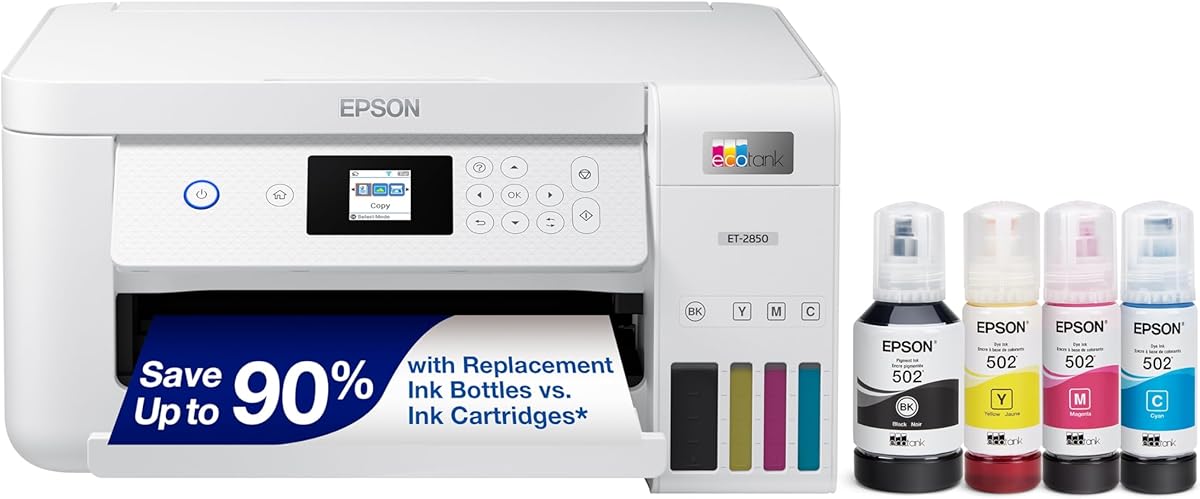
The Epson EcoTank ET-2850 is ideal for users who want to reduce paper usage with automatic double-sided printing. It saves up to ninety percent on ink costs compared to cartridge printers which makes it a smart financial investment. The pigment black ink ensures extremely sharp text for documents.
We may earn a commission when you buy through this link, at no additional cost to you.
Key strengths include the high capacity ink tanks that provide up to seven thousand five hundred black pages. The EcoFit bottles make refilling easy and prevent mistakes. Wireless features allow you to print from smart devices effortlessly.
One trade-off is the lack of a color display which makes navigation less intuitive than models with screens. The initial cost is higher but the long-term savings on ink offset this expense. Overall it is a practical choice for document heavy environments.
We recommend this model for small offices or students who print many documents. It balances functionality and sustainability effectively.
Auto duplex printing reduces paper waste by half while maintaining professional print quality.
Pigment black ink produces crisp lines and professional looking reports and letters.
We may earn a commission when you buy through this link, at no additional cost to you.
The Epson EcoTank ET-4800 offers a balanced mix of features for general home use. It includes a built-in scanner and copier making it a complete solution for document management. The high capacity ink tanks ensure you spend less time refilling and more time printing.
We may earn a commission when you buy through this link, at no additional cost to you.
Standout qualities include the sharp text quality and vibrant color photos produced by the Micro Piezo technology. Wireless connectivity supports seamless integration with your home network. The EcoFit bottles simplify the maintenance process significantly.
A trade-off is the average print speed which may slow down large jobs. The lack of automatic duplex printing means you must flip pages manually. Despite these minor issues it remains a reliable workhorse for everyday tasks.
We recommend this printer for families needing a versatile device. It provides consistent performance without complex requirements.
With scan copy and print capabilities this unit handles most document tasks efficiently.
The refillable tank system drastically lowers the cost per page compared to traditional printers.
We may earn a commission when you buy through this link, at no additional cost to you.
The Canon MegaTank G3270 is an excellent entry point for those new to cartridge-free printing. It offers up to two years of ink included which helps offset the initial purchase price. The wireless print copy and scan features make it a functional all-in-one device.
We may earn a commission when you buy through this link, at no additional cost to you.
Key strengths include the massive page yield of up to six thousand black pages from one set of inks. This makes it incredibly cost-effective over time. The LCD display allows easy navigation for basic tasks.
Trade-offs include the lack of automatic double-sided printing and a smaller screen size. These factors might inconvenience heavy users but do not hinder general performance. For the price the value is hard to beat.
We recommend this model for budget-conscious households. It provides essential features without unnecessary complexity.
The low upfront cost combined with high yield ink makes this the most economical option available.
Simple controls and wireless connectivity ensure anyone can start printing immediately.
We may earn a commission when you buy through this link, at no additional cost to you.
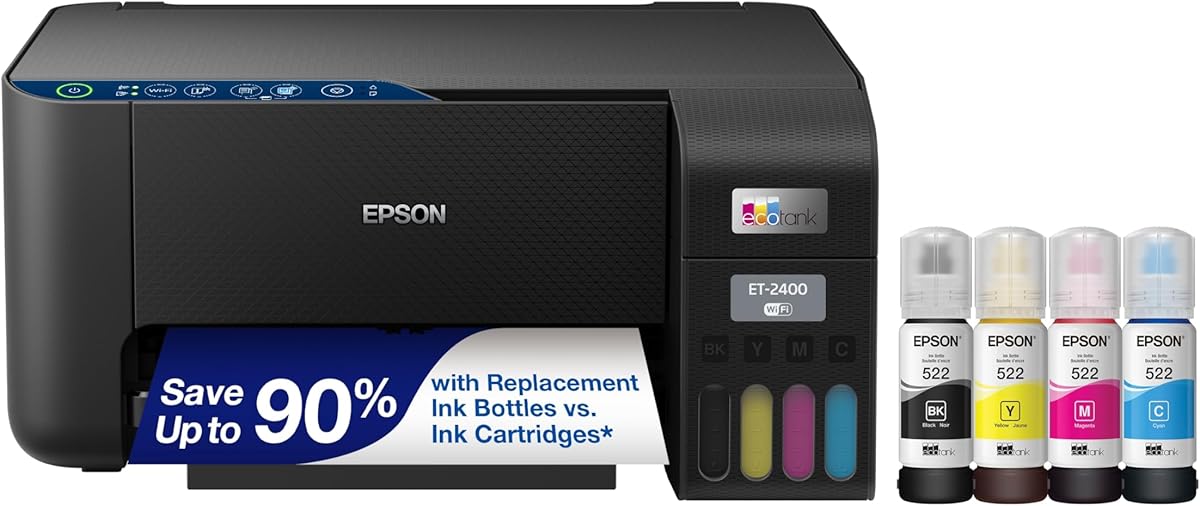
The Epson EcoTank ET-2400 is designed to provide reliable printing for home environments. It allows you to print up to four thousand five hundred black pages without needing new ink. The EcoFit bottles ensure the refill process is easy and worry-free.
We may earn a commission when you buy through this link, at no additional cost to you.
Standout features include the Micro Piezo Heat Free technology which produces sharp text and vibrant photos. It helps reduce cartridge waste which aligns with environmental goals. The all-in-one design covers scanning and copying needs as well.
A trade-off is the slower print speed compared to higher-end models. The absence of duplex printing might be a drawback for frequent document users. However these issues are outweighed by the reliability and cost savings.
We recommend this model for standard home use. It delivers consistent results without demanding frequent maintenance.
Using refillable tanks significantly reduces plastic waste compared to disposable cartridges.
The ink bottles are designed to maximize yield ensuring you get the most value from each purchase.
We may earn a commission when you buy through this link, at no additional cost to you.
The Epson EcoTank ET-2800 brings reliability to your home office with fast and vivid prints. It allows you to fire off ten ISO pages per minute making it efficient for everyday tasks. The ink capacity ensures up to two years of printing without interruption.
We may earn a commission when you buy through this link, at no additional cost to you.
Key strengths include the Micro Piezo Heat-Free technology which ensures durable prints and low maintenance. The all-in-one functionality allows you to scan and copy documents with ease. Wireless features let you print directly from mobile devices.
Trade-offs include the lack of automatic double-sided printing and a small display. These limitations make it less suitable for high-volume office work. For home users it remains a strong and reliable choice.
We recommend this model for households needing speed and dependability. It offers a good balance of features for the price.
The fast print speed ensures that documents are ready quickly without long wait times.
Built to handle frequent use the printer maintains quality over time with minimal issues.
We may earn a commission when you buy through this link, at no additional cost to you.
The Epson EcoTank ET-2980 is built for users who need a massive ink supply for heavy usage. It comes with enough ink to last up to three years which minimizes maintenance efforts significantly. The simple refilling system ensures you never run out of ink unexpectedly.
We may earn a commission when you buy through this link, at no additional cost to you.
Key strengths include the high page count and the ability to print from smart devices easily. It is part of the world's best selling supertank family which speaks to its popularity and reliability. Wireless connectivity is seamless across all platforms.
A trade-off is the absence of duplex printing which may increase paper usage for large batches. The higher price is justified by the volume of ink included. For high volume needs it is a top contender.
We recommend this model for small businesses or large families. It provides consistent output with minimal downtime.
With thousands of pages available per refill this unit is ideal for busy environments.
As a top selling model it has proven reliability and user satisfaction over time.
We may earn a commission when you buy through this link, at no additional cost to you.
The Epson EcoTank ET-2988 offers premium productivity features for demanding home offices. It provides fast 15 pages per minute speeds and auto duplex printing to maximize efficiency. The 1.44 inch color screen simplifies navigation and control significantly.
We may earn a commission when you buy through this link, at no additional cost to you.
Key strengths include the high page yield and the convenient auto duplex option which saves paper. The included ink lasts up to three years ensuring long-term stability. Wireless connectivity is robust supporting all modern devices.
A trade-off is that this model is sold as renewed which might concern some buyers. However it offers advanced features at a competitive price. The speed and duplexing make it superior for productivity.
We recommend this model for users needing speed and automation. It delivers professional features for home use effectively.
Auto duplex and fast speeds reduce the time spent on manual tasks significantly.
The color display provides intuitive control over complex settings and tasks.
We may earn a commission when you buy through this link, at no additional cost to you.
Selecting the right printer involves weighing several critical factors that affect your long term experience.
Consider how many pages the included ink can produce before you need to buy more. High yield models allow you to print thousands of pages without interruption which is crucial for busy households.
Look for printers that advertise years of ink included to ensure you are covered for a long period.
Print speed determines how quickly your documents are ready. For large batches or school projects faster speeds save significant time.
Choose a model with higher pages per minute if you frequently print multiple documents at once.
Modern printers should offer wireless and mobile printing capabilities to work with your devices seamlessly.
Ensure the printer supports apps like AirPrint or the manufacturer's specific app for easy setup.
Check the paper tray capacity to see how many sheets it can hold before needing a refill.
Larger trays reduce interruptions and are beneficial if you print frequently in bulk.
Automatic double-sided printing saves paper and money by printing on both sides of the sheet.
If you print many documents regularly prioritize a model with this feature to reduce waste.
Look for printers that promise high resolution for sharp text and vibrant color photos.
Technology like Micro Piezo Heat Free often delivers better quality and longevity for your prints.
A good cartridge-free printer should make it easy to add ink without spills or mess.
Features like unique bottles or key systems simplify the process for all users.
Evaluate the long-term cost including the initial price and the cost of replacement ink bottles.
Savings on ink usually outweigh the initial higher price of tank-based printers over time.
Set up your printer in a clean dry area away from direct sunlight to maintain optimal performance and longevity.
Keep the ink tanks sealed when not in use to prevent the ink from drying out and clogging the print heads.
Regularly run a nozzle check and cleaning cycle from the printer software to ensure sharp print quality.
Yes they are significantly cheaper in the long run because the cost per page is much lower. You save a lot on replacement ink bottles compared to buying tiny cartridges constantly.
Most models come with enough ink to last years for average home use. You will rarely need to refill unless you print thousands of pages every month.
It is generally recommended to use genuine ink from the manufacturer to avoid damage or voided warranties. Using non-genuine ink might cause issues not covered by support.
Yes almost all models support wireless printing from smartphones and tablets. You can use official apps or AirPrint to send jobs easily without a computer.
Yes many models offer high resolution printing that rivals traditional inkjets. You get vibrant colors and sharp details suitable for home photo printing.
If you do not print for long periods the ink might dry. Running a cleaning cycle usually fixes clogs and restores print quality quickly.
We have explored ten top models that offer exceptional value and performance for your home or office printing needs.
Prioritize features like ink capacity and duplex printing based on your specific usage patterns to get the best value.
Always check current prices and availability before buying to ensure you get the best deal possible.