
ARESGAME AGV Series 500W
4.4Editor score
500W Continuous Output
80 Plus Bronze Certified
5 Year Warranty Coverage
This guide compares ten affordable power supplies for gaming PCs, evaluating efficiency, wattage, and reliability to help you choose the best cheap option for
Building a gaming PC requires careful attention to every component, especially the power supply. A reliable unit ensures stability and protects your hardware from costly damage during intense gaming sessions or system updates.
We have analyzed ten top-rated affordable power supplies currently available on the market. Our selection process focused on efficiency ratings, build quality, safety features, and customer feedback to identify the most dependable options.
Each pick highlights specific strengths suitable for different budget levels and system requirements. Please note that pricing fluctuates frequently, so verify current deals before making your final purchasing decision for your setup.
4.4Editor score

4.6Editor score

4.6Editor score
The following table provides a side-by-side overview of all ten models featured in this guide. Compare their key specifications to find the right match for your gaming PC requirements and budget constraints.



The Thermaltake SMART 600W is a solid choice for budget-conscious gamers needing reliable power. With an 80 Plus certification and active PFC, it offers efficient energy usage for entry-level gaming builds without breaking the bank.
We may earn a commission when you buy through this link, at no additional cost to you.
Its robust 12V rail ensures stable power delivery to your CPU and GPU, which is critical during intense gaming sessions. The unit includes industry-grade protections like OVP and SCP to safeguard your components against electrical surges.
While it lacks the flexibility of modular cables, the fixed design keeps costs down and simplifies installation for standard cases. The fan is adequate for normal loads though it may become audible under maximum stress conditions.
This power supply is ideal for builders prioritizing value and safety features over premium aesthetics. It delivers consistent performance for mid-range systems making it a trustworthy foundation for your gaming PC setup today.
This unit meets 80 Plus standards ensuring reduced energy waste while active PFC optimizes power usage for better stability under varying system loads.
Built with high-quality components and a 100k hour MTBF rating this supply promises long-term durability for daily use in gaming environments.
We may earn a commission when you buy through this link, at no additional cost to you.
This high-wattage unit is designed for enthusiasts planning to use top-tier GPUs requiring significant power headroom. Its 80 Plus Gold efficiency ensures minimal energy loss while the fully modular design improves cable management and airflow inside your case.
We may earn a commission when you buy through this link, at no additional cost to you.
Compliance with ATX 3.1 and PCIe 5.1 standards means it is ready for the latest graphics cards without needing adapters. The dual-color 12V-2×6 cable makes safe connections easier reducing the risk of accidental mismatches during assembly.
Features like the 105°C rated capacitors provide exceptional durability and stability under heavy loads. The low-noise fan operates quietly even when the system is under stress ensuring your gaming experience remains immersive without distracting noise.
For builders seeking a long-term solution that can handle high-end components this supply offers unmatched versatility and reliability. It is the perfect choice for those investing in a powerful system intended to last several years.
Support for ATX 3.1 and PCIe 5.1 ensures this supply can handle high power transients from modern GPUs without stability issues.
Japanese 105C capacitors and advanced cooling technology ensure sustained performance and longevity even during extended gaming sessions.
We may earn a commission when you buy through this link, at no additional cost to you.
The ARESGAME AGV Series offers incredible value for those building entry-level gaming PCs on a tight budget. It delivers 500W of continuous output which is sufficient for most mid-range graphics cards and standard CPUs found in affordable setups.
We may earn a commission when you buy through this link, at no additional cost to you.
With 80 Plus Bronze certification it ensures a baseline of energy efficiency reducing electricity costs over time. The unit features a 120mm fan designed for quiet operation helping to keep noise levels low during gameplay.
The non-modular design simplifies the build process and keeps the unit cost-effective for price-sensitive consumers. All cables are black which prevents the mismatched look often found in budget units contributing to a cleaner aesthetic.
This power supply is best suited for budget builds where every dollar counts without compromising on essential safety features. It provides reliable power for standard gaming systems making it a smart choice for economical PC builders.
Bronze certification guarantees at least 85 percent efficiency under typical loads helping you save money on energy bills over the long term.
Industrial protection against over-voltage and short circuits ensures your sensitive components remain safe from unexpected electrical surges or failures.
We may earn a commission when you buy through this link, at no additional cost to you.
CORSAIR has built a reputation for quality and the RM750e continues that legacy with reliable performance for mid-range gaming PCs. Its modular design allows you to connect only the cables you need reducing clutter inside your chassis for better airflow.
We may earn a commission when you buy through this link, at no additional cost to you.
The unit supports ATX 3.1 and PCIe 5.1 standards ensuring it can handle the power demands of modern GPUs without requiring additional adapters. This future-proofing adds significant value to your system longevity and upgrade potential.
A specially calculated fan curve keeps noise levels exceptionally low even under full load conditions. The rifle bearing fan is durable and designed to run quietly providing a peaceful gaming environment without distracting operational sounds.
This power supply is excellent for users prioritizing quiet operation and brand reliability in a mid-wattage package. It offers a balanced blend of modern features and proven design making it a solid investment for any serious gamer.
The rifle bearing fan and optimized curve ensure minimal noise disturbance allowing you to focus entirely on your gaming experience.
Fully modular cables give you complete control over wiring enabling cleaner builds and improved internal airflow management.
We may earn a commission when you buy through this link, at no additional cost to you.
The Segotep 650W delivers impressive efficiency with its 80 Plus Gold certification at a competitive price point. This ensures that your system runs cooler and uses less electricity compared to lower-rated units which is beneficial for long-term ownership costs.
We may earn a commission when you buy through this link, at no additional cost to you.
It features a single 12V rail that provides stable power distribution to your CPU and GPU even during high-demand gaming scenarios. The inclusion of four PCI-E connectors supports multiple graphics cards or demanding single cards without power issues.
Global voltage adaptation makes this unit versatile for international users or those who travel frequently. It automatically adjusts to different power inputs ensuring consistent performance regardless of where you plug in your gaming setup.
For budget builders wanting top-tier efficiency without breaking the bank this supply is a strong contender. It balances cost and performance effectively making it a smart choice for energy-conscious gamers.
80 Plus Gold certification ensures over 90 percent efficiency under typical loads reducing energy waste and operational heat generation significantly.
A single 12V output rail delivers consistent power to high-draw components preventing instability during intense gaming sessions.
We may earn a commission when you buy through this link, at no additional cost to you.
GAMEMAX offers an attractive option for those who want both high performance and aesthetic flair in their gaming PC. With 850W of power and Gold efficiency this supply can handle high-end GPUs while providing a customizable RGB lighting experience.
We may earn a commission when you buy through this link, at no additional cost to you.
The fully modular design makes cable management easier helping to maintain clear airflow inside your case. Japanese capacitors ensure stable power delivery and longevity reducing the risk of component failure during extended gaming periods.
RGB lighting sync allows you to match the PSU lights with your motherboard ecosystem creating a cohesive look throughout your build. The 140mm ultra-quiet fan ensures that cooling is effective without adding distracting noise to your setup.
This unit is perfect for builders who value both function and form in their power supply choice. It delivers reliable performance for demanding systems while adding a touch of visual customization to your rig.
RGB sync capabilities allow seamless integration with your motherboard lighting system for a unified and visually appealing build design.
A large 140mm fan provides excellent cooling efficiency while operating quietly to maintain a peaceful gaming environment.
We may earn a commission when you buy through this link, at no additional cost to you.
MSI brings reliability to the budget segment with this compact power supply designed for efficient operation. Its non-modular design keeps costs low while still delivering 650W of power for a wide range of gaming builds.
We may earn a commission when you buy through this link, at no additional cost to you.
Active PFC technology ensures better power efficiency and stability compared to units lacking this feature. The DC-DC circuit design improves voltage regulation ensuring your components receive clean and consistent power during demanding tasks.
Built to be quiet this unit features a low-noise fan that maintains silence even when the system is working hard. Industrial level protections guard against over-voltage and short circuits safeguarding your hardware from electrical damage.
This power supply is an excellent choice for users seeking a reliable and quiet unit without unnecessary frills. It fits well in standard cases and offers solid performance for budget-friendly gaming setups.
Active PFC improves energy efficiency and ensures stable operation across varying input power conditions.
DC-DC topology enhances voltage stability and reduces ripple for cleaner power delivery to sensitive PC components.
We may earn a commission when you buy through this link, at no additional cost to you.
The A650BE offers a step up in flexibility with its semi-modular design allowing you to detach non-essential cables. This improves airflow and reduces clutter inside your case while keeping the price accessible for budget builders.
We may earn a commission when you buy through this link, at no additional cost to you.
Like its counterpart this unit features Active PFC for better power efficiency and a DC-DC design for stable voltage output. The low-noise fan ensures that your system remains quiet during gaming sessions without compromising cooling performance.
Industrial level protections are included to safeguard your components against common electrical issues like short circuits and over-voltage. This reliability makes it a trustworthy choice for standard gaming builds where safety and quiet operation are priorities.
For those wanting some cable flexibility without paying full modular prices this supply is an ideal solution. It provides balanced performance and value suitable for a wide range of gaming PC configurations.
Semi modular design allows you to detach unnecessary cables reducing clutter and improving internal airflow in your case.
Industrial protections shield your hardware from power anomalies ensuring stable operation during daily use.
We may earn a commission when you buy through this link, at no additional cost to you.
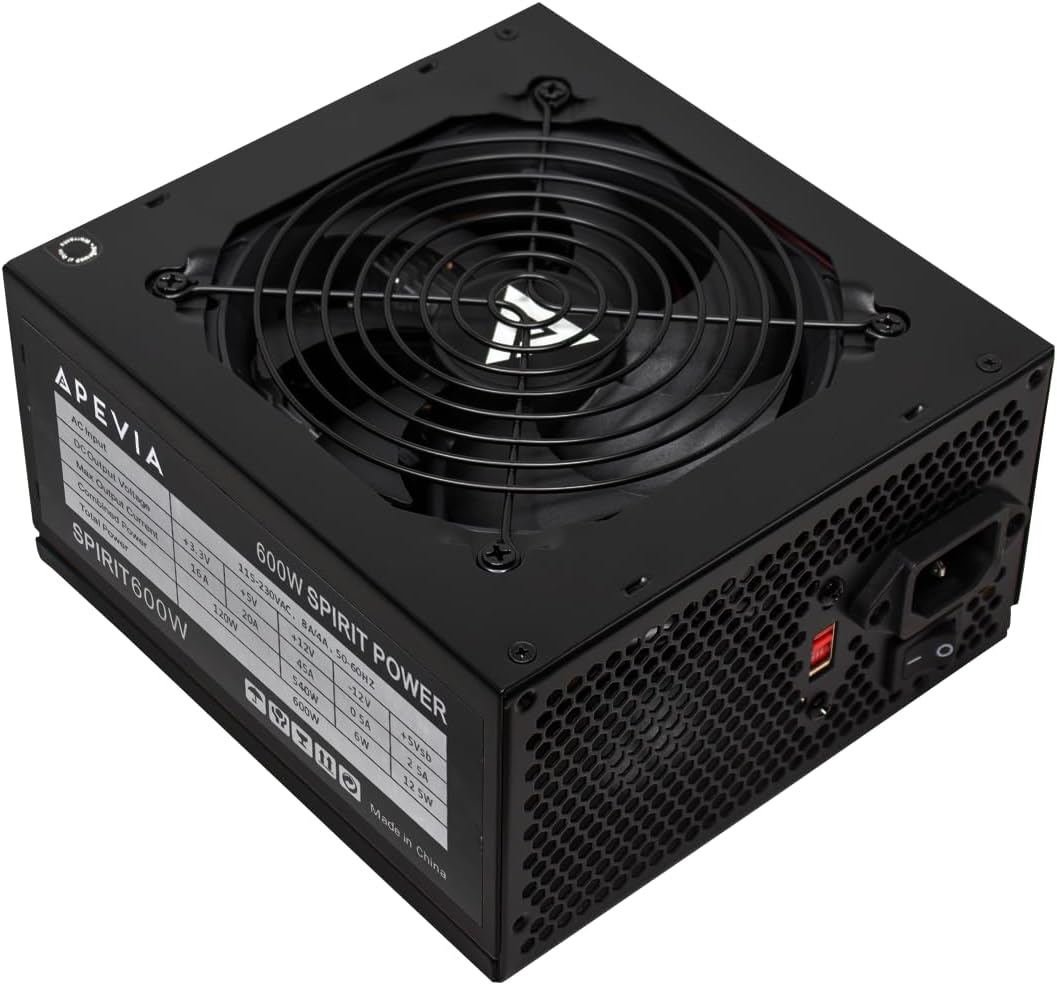
Apevia offers a straightforward power solution with this unit featuring split connectors for versatile compatibility. The ability to adjust connectors like the 24-pin or CPU power ensures it works with various motherboard designs.
We may earn a commission when you buy through this link, at no additional cost to you.
Safety is a priority with this supply as it includes heavy-duty protections against short circuits and over-voltage. These features protect your hardware from electrical failures providing peace of mind during regular use.
The auto-thermally controlled fan adjusts speed based on internal temperatures maintaining a balance between cooling and noise. This ensures the unit runs efficiently without generating excessive heat or sound during typical gaming loads.
This power supply is best for users needing a flexible and affordable unit for older or custom builds. It offers essential features at a low price making it suitable for budget projects with specific connector needs.
Split cable design allows compatibility with motherboards requiring 4-pin or 20-pin power inputs offering greater installation flexibility.
Auto-thermal fan control adjusts speed based on heat ensuring optimal cooling while minimizing noise output.
We may earn a commission when you buy through this link, at no additional cost to you.
Segotep delivers high performance with this GM850 unit supporting the latest power standards for modern gaming PCs. With 850W output and ATX 3.1 compliance it is ready to handle high-end graphics cards and future hardware upgrades effortlessly.
We may earn a commission when you buy through this link, at no additional cost to you.
The fully modular design with flat white cables improves airflow and makes cable management easier. A native 12VHPWR cable ensures proper support for next-generation GPUs without needing adapters that could compromise safety.
Gold efficiency guarantees energy savings and reduced heat output helping your system run cooler under load. Stable DC-DC circuits and synchronous rectification ensure consistent voltage delivery to your components preventing performance dips.
This power supply is excellent for builders seeking a powerful modern unit at a reasonable price. It offers great value for high-end systems requiring reliable and efficient power delivery for demanding applications.
ATX 3.1 and PCIe 5.1 compliance ensures compatibility with the latest high-power graphics cards and hardware technologies.
80 Plus Gold certification combined with modular cabling maximizes efficiency and improves internal airflow management.
We may earn a commission when you buy through this link, at no additional cost to you.
Selecting the right power supply involves evaluating several critical factors beyond just wattage. Use this guide to understand key features and ensure you pick a unit that matches your system needs.
Determine your total power needs by adding the CPU and GPU wattage plus overhead for other components. A common rule is to choose a PSU that exceeds your peak draw by at least 20 percent to prevent strain.
Always calculate your estimated power consumption before buying to ensure the unit can handle your system without overload.
Look for 80 Plus Bronze Gold or Platinum certification to ensure the supply converts electricity efficiently. Higher ratings mean less wasted energy as heat which keeps your system cooler and lowers electricity bills over time.
Prioritize higher efficiency tiers to save on energy costs and reduce thermal load inside your PC case.
Check that the PSU has enough PCIe connectors for your graphics card especially for modern cards needing 12VHPWR connections. Verify CPU and motherboard connector types match your specific hardware to avoid compatibility issues during assembly.
Ensure all required cables are present and compatible with your current hardware components before purchase.
Decide between non-modular semi-modular or fully modular designs based on your preference for cable management. Fully modular units offer the most flexibility for airflow but cost more while non-modular options are cheaper and simpler.
Choose modularity level based on your budget and how important cable management is for your build aesthetics.
Ensure the unit includes protections like OVP UVP OCP and SCP to protect against electrical faults. These features are critical to prevent damage to your expensive components in case of power surges or internal failures.
Never compromise on basic safety features even when buying on a budget to protect your investment.
Check for quality capacitors like Japanese ones which offer better reliability and lifespan over time. A sturdy casing and reliable fan bearing type also contribute to the overall durability and noise performance of the unit.
Look for high-quality components to ensure long-term stability and durability for your gaming setup.
If you value a quiet environment look for PSUs with larger fans and smart fan curves. Units with PWM fans adjust speed based on load keeping them silent during low activity while cooling effectively under heavy use.
Prioritize larger fan sizes for quieter operation especially if your PC is in a bedroom or living area.
A longer warranty often reflects confidence in the product quality and durability. Aim for at least three to five years of coverage to ensure protection if the unit fails prematurely during your ownership period.
Check the warranty terms to ensure you have adequate support if the power supply develops issues later.
Always connect the power supply to a surge protector to shield it from voltage spikes during storms or grid fluctuations. This simple step extends the lifespan of the internal components and protects your entire system.
Keep the area around the PSU clean and free from dust to maintain proper airflow and cooling. Use compressed air periodically to blow dust out of the intake vents and fan blades.
Do not cover the vents or place the PC in a confined space as this can cause overheating and reduced efficiency. Ensure there is enough clearance around the unit for air to circulate freely.
Not necessarily. Many budget units offer solid protections and efficiency for standard builds. Just ensure it has at least 80 Plus certification and essential safety features like OVP and SCP to avoid risks.
Modular PSUs are great for cable management and airflow but are not essential for functionality. If you are on a strict budget a non-modular unit works well as long as you can route the cables cleanly.
Use an online PSU calculator to estimate your system needs based on your CPU and GPU models. Aim for a supply that is about 20 percent higher than your total system draw to ensure headroom.
Only if the wattage is sufficient and it has the correct connectors. New GPUs often require specific 12VHPWR cables so check compatibility carefully before connecting to avoid damage.
It refers to the efficiency rating of the power supply. Bronze units convert 85 percent of power while Gold units convert 90 percent meaning less wasted energy and heat output.
With normal usage a good budget unit should last around five to seven years. Quality components like Japanese capacitors can extend this lifespan significantly even in cheaper models.
We have highlighted ten affordable power supplies that offer reliability and performance for various gaming needs. Whether you need entry-level protection or high-wattage future-proofing there is a match here for every budget.
Prioritize efficiency and safety features when selecting your unit to protect your investment long term. A small upgrade in quality can save you from costly repairs or replacements down the line.
Always verify current prices and availability before purchasing as deals change frequently. Check the specific connector needs of your components to ensure compatibility before finalizing your order today.