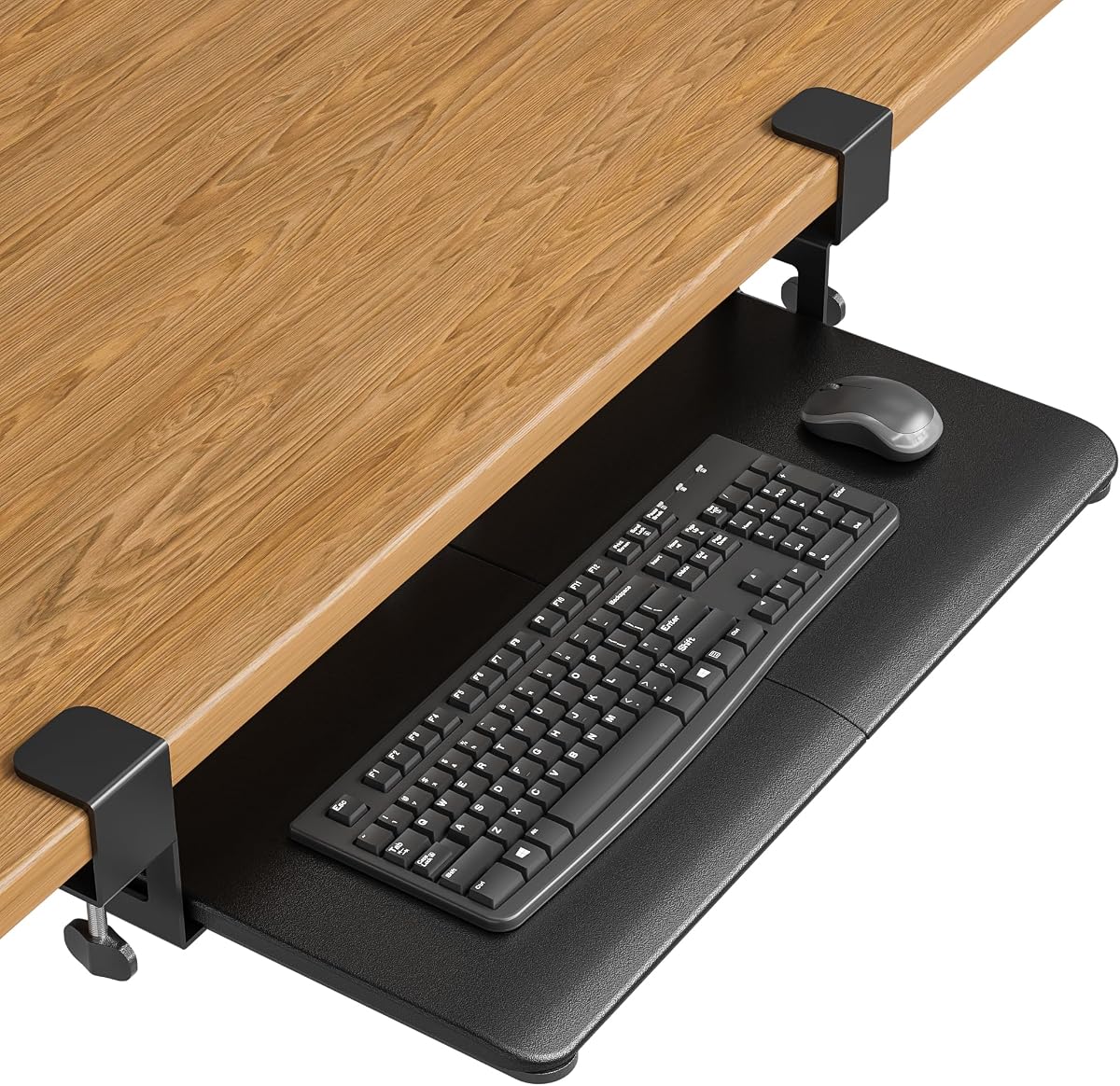
BONTEC Under Desk Keyboard Tray
4.4Editor score
Compatible with desks up to 1.97 inches
No drill installation with C clamps
25.6 by 11.8 inch platform
Creating a comfortable workspace is essential for productivity and health. A clamp on keyboard tray offers an excellent solution to free up desk space while promoting better posture. These devices mount securely under your desk surface without drilling, making them ideal for renters and shared offices. By choosing the right model, you can significantly reduce wrist strain during long typing sessions. The market offers various designs including rotating trays, corner setups, and standard pull-out platforms to suit different needs.
We have carefully selected ten top-rated products to help you find the perfect fit for your workstation. Our comparison focuses on key factors like desk compatibility, load capacity, and ergonomic adjustability. Each entry includes detailed specifications and real user feedback to ensure transparency. We evaluated installation ease and build quality to filter out unreliable options. This list covers a range of price points and configurations to accommodate diverse office environments.
Each product review highlights specific strengths and potential limitations based on available data. You will find information about dimensions, weight limits, and special features like tilt adjustments or storage drawers. Prices and availability change frequently so always verify current details before purchasing. We recommend measuring your desk thickness and available width before finalizing your decision. This guide aims to simplify your search and help you invest in a reliable ergonomic solution.
4.4Editor score

4.4Editor score

4.3Editor score
As an Amazon Associate we earn from qualifying purchases.
This comparison table outlines the key specifications and features of the ten selected clamp on keyboard trays to help you make an informed decision.


This VIVO model stands out as a top contender in the clamp on keyboard tray category. It holds a solid 4.4 rating from numerous users who appreciate its straightforward design. The tray provides ample space for standard keyboards and mice while keeping them neatly tucked under the desk.
We may earn a commission when you buy through this link, at no additional cost to you.
The sturdy C clamps attach securely to desks up to 1.25 inches thick without causing damage. Users report that the tray slides in and out smoothly, allowing for ergonomic typing angles. The 8.5 inch extension ensures your hands stay at a comfortable distance from the desk edge.
One trade-off is the lack of tilt adjustment which may matter for users needing specific wrist support. Additionally it does not fit desks with beveled edges so compatibility checks are essential. These limitations are acceptable given the price and overall reliability of the unit.
Best suited for standard home office setups needing a simple space saving solution. If you have a flat desk surface and want to reduce clutter this model delivers consistent value. We recommend it for those prioritizing ease of installation and budget friendliness.
The under desk placement frees up valuable surface area for monitors and documents.
Sliding the tray out allows for a neutral wrist position during extended typing sessions.
We may earn a commission when you buy through this link, at no additional cost to you.
The VIVO Mount-KBST1 offers unique adjustability that sets it apart from standard fixed trays. With a 4.3 rating users praise its ability to adapt to various desk sizes. The split design allows for width adjustments between 23 and 30 inches making it versatile for different setups.
We may earn a commission when you buy through this link, at no additional cost to you.
Key strengths include the ability to accommodate desks up to 3.4 inches thick which is rare in this category. It also includes a keyboard wrist pad and mouse accessories adding value out of the box. The height adjustment feature provides five set points for customized comfort.
However the increased complexity means assembly might take longer than simpler models. The price is also higher compared to basic trays which might not fit tight budgets. These factors are acceptable if you need specific fit for a non standard desk.
Ideal for users with thicker desks or those needing precise ergonomic customization. The included accessories make it a comprehensive package for office workers. We suggest this model when standard trays do not meet your thickness or width requirements.
The adjustable width allows it to fit desks ranging from small to large sizes comfortably.
Wrist pads and mouse rests are included to enhance comfort immediately upon setup.
We may earn a commission when you buy through this link, at no additional cost to you.
This VIVO tray introduces a 360 degree rotating clamp for unmatched flexibility in placement. It holds a 4.0 rating from users who value its unique pivot feature. The design allows you to rotate the tray under the desk when not in use to free up space.
We may earn a commission when you buy through this link, at no additional cost to you.
The single clamp system simplifies installation and works on desks up to 2 inches thick. Its compact 23 by 10 inch footprint fits easily into tight spots without overwhelming the workspace. The rotation mechanism is smooth and locks securely into place when needed.
One limitation is the smaller surface area which may not accommodate oversized keyboards or dual mouse setups. It is best suited for lighter use cases rather than heavy industrial work. These constraints are minor considering the unique mobility it provides.
Recommended for creative studios or shared workspaces where desk space is at a premium. The ability to hide the tray completely makes it great for multi purpose tables. Choose this if you need flexible positioning over a large work surface.
The 360 degree pivot allows you to position the tray exactly where you need it.
When not typing you can rotate the tray completely under the desk for a clean look.
We may earn a commission when you buy through this link, at no additional cost to you.
The BONTEC tray is a strong entry for budget conscious buyers seeking ergonomic improvements. It maintains a 4.4 rating thanks to its reliable performance and low cost. The tray offers a spacious surface for standard keyboards while remaining affordable for most buyers.
We may earn a commission when you buy through this link, at no additional cost to you.
Key strengths include its ability to fit desks up to 1.97 inches thick without drilling. Protective pads help prevent scratches and improve grip during operation. The 11 pound load capacity ensures stability during typical office use.
Limitations involve the lack of tilt adjustment and incompatibility with beveled edges. Users must ensure their desk has a flat underside for proper clamp installation. These factors are acceptable for the price point and ease of use.
Perfect for renters or students needing a temporary ergonomic upgrade without permanent changes. The no drill feature makes it safe for shared or rented spaces. We suggest this for those prioritizing cost and simplicity over advanced features.
C clamps secure the tray without requiring any screws or modifications to your desk.
This model offers essential ergonomic benefits at a very accessible price point.
We may earn a commission when you buy through this link, at no additional cost to you.
This premium VIVO model delivers advanced ergonomic adjustments not found in standard trays. It holds a 4.3 rating among users who value detailed customization. The tray includes nine tilt settings ranging from positive to negative to suit personal typing preferences.
We may earn a commission when you buy through this link, at no additional cost to you.
Key strengths include compatibility with desks up to 3.4 inches thick and rotating clamps for corners. This flexibility allows it to adapt to various workstation configurations easily. The build quality is robust ensuring long term durability under daily use.
The higher price tag reflects these premium features which may not be necessary for everyone. It also requires significant desk space due to the clamp to clamp length. These trade-offs are acceptable if ergonomics and fit are top priorities.
Best for professionals who spend long hours typing and need precise wrist support. The ability to adjust tilt and fit thick desks makes it versatile for offices. We recommend this for those investing in long term comfort.
Nine distinct tilt settings let you find the perfect angle to reduce strain on your wrists.
Swivel clamps allow the tray to fit securely on L-shaped workstations without issues.
We may earn a commission when you buy through this link, at no additional cost to you.
This VIVO tray is specifically engineered for corner desks which often pose mounting challenges. It has a 4.2 rating from users who appreciate its specialized clamp design. The swiveling clamps rotate 90 degrees independently to secure to L-shaped workstations.
We may earn a commission when you buy through this link, at no additional cost to you.
Key strengths include its ability to fit standard 27 by 11 inch setups on corner desks. The clamps secure tightly without damaging the desktop. It is straightforward to install with all hardware included for assembly.
Limitations involve the 1.25 inch thickness constraint and lack of tilt options. Corner desks often have irregular edges so verify compatibility before buying. These restrictions are acceptable given the niche focus on corner desks.
Perfect for users with L-shaped desks who need a dedicated solution. The swivel clamps make it much easier to mount than standard trays. We suggest this for anyone struggling to fit a keyboard tray on a corner desk.
The unique clamp system allows secure mounting on L-shaped desks without slipping.
Despite the special clamps it offers a full sized surface for standard keyboards and mice.
We may earn a commission when you buy through this link, at no additional cost to you.
This VIVO model adds a 17 inch pencil drawer to the standard tray design. It has a 4.4 rating from users who value extra storage under the desk. The tray holds your keyboard while the drawer keeps pens and small accessories organized.
We may earn a commission when you buy through this link, at no additional cost to you.
Key strengths include the extra storage which helps reduce desktop clutter significantly. The slide mechanism is smooth and the clamps hold securely to standard desks. It fits standard keyboards perfectly while offering added utility for office supplies.
One trade-off is the extended length when both tray and drawer are pulled out. This requires sufficient space under the desk for full extension. These limitations are minor considering the added convenience of the storage drawer.
Ideal for students or professionals needing to keep frequently used items handy. The drawer ensures you have supplies within reach without leaving the seat. We recommend this for those wanting organization alongside ergonomic typing support.
The 17 inch drawer provides dedicated space for pens and small office accessories.
By storing supplies under the desk you can keep your surface clear for work.
We may earn a commission when you buy through this link, at no additional cost to you.
This ergo tray offers a solid alternative for desks requiring thicker clamp support. It holds a 4.4 rating from users who praise its stability and back baffle feature. The tray measures 20 by 11.8 inches which is sufficient for most standard setups.
We may earn a commission when you buy through this link, at no additional cost to you.
Key strengths include the upgraded slide mechanism and the back baffle that prevents the keyboard from sliding. It fits desks up to 2.76 inches thick which is quite generous compared to others. The clamps are reinforced to provide stability during heavy use.
The smaller width might not suit those using oversized keyboards or large mouse pads. It is also from a lesser known brand so long term durability varies slightly. These factors are acceptable for the price and functional features provided.
Suitable for home offices needing a reliable tray without advanced features. The back baffle is a notable benefit for maintaining keyboard position. We suggest this for users prioritizing stability and desk thickness compatibility.
A built-in baffle keeps your keyboard from sliding forward during intense typing sessions.
The adjustable clamps secure to desks up to 2.76 inches thick without issues.
We may earn a commission when you buy through this link, at no additional cost to you.
The VIVO DESK-EXT24 acts as a versatile platform that can serve as a keyboard tray or storage. It has a 4.2 rating from users who like its foldable design. The 23.7 by 11.7 inch surface is large enough for printers or extra storage too.
We may earn a commission when you buy through this link, at no additional cost to you.
Key strengths include the foldable design which saves space when you do not need the extra surface. The K-shaped brackets provide rigid support and hold up to 44 lbs on the large platform. It also comes with a 3 year warranty for added peace of mind.
The cost is higher than standard trays and it lacks specific ergonomic tilt adjustments. It is better suited as a multi-purpose solution than a dedicated typing platform. These trade-offs are worth it for those needing a versatile desk extension.
Perfect for users who need flexible desk reallocation or extra space for monitors. The foldable feature makes it ideal for small home offices. We suggest this for those needing a surface for more than just a keyboard.
Fold the platform 90 degrees to hide it when you need the full desk surface.
Use it as a tray or a support for monitors printers and other office equipment.
We may earn a commission when you buy through this link, at no additional cost to you.
This Mount-It! tray stands out with a lifetime warranty and responsive US based support. It holds a 4.4 rating from users who appreciate the long term backing. The 27 by 11 inch tray provides ample space for full size keyboards and mouse movement.
We may earn a commission when you buy through this link, at no additional cost to you.
Key strengths include the lifetime warranty which ensures long term security for your purchase. The clamps fit desks up to 2.2 inches thick making it versatile for standard setups. The push-pull design is smooth and stays stable during use.
The higher price point reflects the warranty and support which may not be necessary for all. It is not compatible with glass desks which limits some users. These factors are acceptable given the security and peace of mind provided.
Ideal for users seeking a reliable long term solution for their workspace. The warranty and support make it a safe investment for offices. We recommend this for those prioritizing durability and customer service.
A lifetime warranty protects your investment and ensures support if any issues arise.
US based specialists are available to help with setup and any installation questions.
We may earn a commission when you buy through this link, at no additional cost to you.
Selecting the right clamp on keyboard tray requires attention to several key factors to ensure compatibility and ergonomic benefit.
Check your desk surface thickness before purchasing. Most clamps have a max limit usually between 1.25 and 3.5 inches. Measure carefully to avoid fitment issues.
Always verify the max thickness rating against your own desk measurements.
Ensure the tray width accommodates your keyboard and mouse comfortably. Standard sizes range from 20 to 27 inches wide. Measure your desk underside to ensure enough space for extension.
Confirm that your keyboard and mouse fit within the tray dimensions.
Look for tilt or height adjustments to maintain a neutral wrist position. Some models offer multiple tilt angles while others are fixed. Adjustable trays reduce strain during long work sessions.
Prioritize trays with tilt settings if you type frequently.
Metal frames and durable plastic surfaces tend to last longer than cheap composites. Check load capacity ratings to ensure stability. Heavier trays usually feel more secure during use.
Choose models with sturdy construction for long term reliability.
Most trays use C clamps that tighten by hand without tools. Verify that your desk has a flat edge for clamps to grip. Avoid models if you have beveled or rounded edges.
Ensure your desk edge is flat for proper clamp attachment.
Standard trays support up to 11 pounds which is enough for most setups. If you use heavy mechanical keyboards check for higher load ratings. A stable tray prevents wobble while typing.
Confirm the load capacity matches your equipment weight.
Look for brands offering at least a one year warranty on mechanical parts. Lifetime warranties offer extra security for long term investments. Check if the seller offers US based support for questions.
Choose brands with strong warranty policies for peace of mind.
Some trays include drawers or mouse pads that add value. Corner specific clamps help with L-shaped workstations. Evaluate what extras matter most for your workflow needs.
Identify features like drawers or corner clamps that fit your needs.
Begin by measuring your desk thickness and width to ensure compatibility. Install the clamps on the underside of the desk edge ensuring they are tight. Adjust the height or tilt settings if your model allows them for best ergonomics.
Place your keyboard and mouse on the tray and test the slide mechanism regularly. Keep the slides clean and free of dust to maintain smooth movement. Use a soft cloth to wipe down the surface if spills occur.
Periodically check the clamps to ensure they have not loosened over time. Tighten them slightly if you notice any movement or instability. Avoid hanging heavy items on the tray beyond the specified weight limit to preserve durability.
Most clamp on trays include protective pads to prevent scratching. As long as you tighten them properly and do not over tighten they will not damage standard surfaces. Avoid using them on glass or beveled edges to prevent accidental slips.
Yes all models listed use no drill C clamps that secure to the desk edge. They are designed specifically to attach without screws or permanent modifications. This makes them ideal for renters or shared office environments.
Most trays fit desks up to 1.25 inches thick but some models go up to 3.5 inches. Always check the product specifications before purchasing to ensure a proper fit. Measure your desk edge carefully to avoid compatibility issues.
Some models like the VIVO MOUNT-KB10C feature swiveling clamps for corner desks. Standard trays may not fit L-shaped setups without specific corner designs. Check the product details for corner compatibility before buying.
You need enough depth for the tray to extend fully when in use. Measure the distance from the desk edge to any obstacles underneath. Ensure the slide mechanism has enough clearance for comfortable use.
Most trays require minimal assembly with all hardware included. Installation usually takes under fifteen minutes with basic tools. Follow the included instructions to secure the clamps and tray properly.
We reviewed ten top options offering various features like tilt adjustments and corner compatibility. The VIVO MOUNT-KB05E remains a strong overall choice for standard desks due to its balance of price and performance. The VIVO MOUNT-KB05HT offers premium adjustability for those needing specific ergonomic support.
Consider your desk thickness and edge type before making a final purchase decision. Ensure the tray supports your keyboard size and includes features like drawers if needed. Prioritize clamps that protect your desk surface from scratches during use.
Prices and availability change frequently so verify current details before you order. We hope this guide helps you find a comfortable and reliable solution for your workspace. Check current pricing to ensure you get the best value for your needs.